2010 AUDI S6 park assist
[x] Cancel search: park assistPage 4 of 368

Table of contents
Table of contents
Vehicle literature ..... .
About this Owner's Manual .......... ....... .. .
Controls and
equipment .............. .
Instruments and controls ... .
General illustration ........... .
Instruments and
warning/indicator Lights ..... . Instruments ... ... .......... .
Warning/indicator ligh ts ..... . .
Driver information display ... .
Introduction ...... ......... . .
On-Board Diagno stic sy ste m
(OBD) . ..... ....... .......... .
Auto Ch eck Control ........... .
Speed warning system ........ .
Tr ip computer ............ ... .
Opening and closing ......... . Keys ............ ............ .
Power locking system ........ .
Rear lid .... ..... ............ .
Child safety Lock ............. .
Convenience key ............. .
Anti-theft alarm sys tem ...... .
Power windows .............. .
Sliding/tilting power sunroof .. .
Clear vision .. .... ............ .
L ights ... .. ........ ......... .
Interior ligh ts ... ... .. ....... .
4
5
6
7
7
8
8
12
19
19
23
24
32
34
37
3 7
41
46
47
47
49
so
53
58
58
63 Vi
sion .................... .. .
Wiper and washer system Mirrors ... ............... ... .
Digital compass ............. .
Seats and storage ........ ... .
General recommendations .... .
Power seat . ................. .
S eat m emory ............... . .
Rear sea ts ... ... .. .......... .
Head res train ts ........... ... .
Armrest .. .. ................ .
Luggage compar tm en t ..... .. .
Roof ra ck . .... .... .......... .
Cupholder .................. .
Ashtray .. ................... .
Cigarette Lighter/socket ...... .
S torag e ................ .. .. .
Warm and cold .... .......... .
Cl imate control ....... ... .... .
Ba sic se tt ings ............... .
On the road ... .... .......... .
S tee ring .................... .
Igni tion lock and ignition swi tch
Start ing and stopp ing the engine
Start ing and stopping the engine
with Convenience key ......... .
E lectromechanical parking brake
Cru ise control ............... .
Adaptive Cruise Control ..... . Speed and distance con trol
sys tem .............. ....... .
Dr iver information ........... .
Syst em Limitations ........... .
Audi Lane assist ........... .. .
Lane ass ist .... .. ............ . 64
66
69
73
75
75
76
79
80
81
82
83
87
89
91
92
93
96
96
104
106
106
108
109
110
113
116
119
119
12 7
131
134
134 Audi side assist ...............
137
Lane Change Assistant ......... 137
No tes ....... .... ............. 144
Automatic transmission 146
tiptronic ® (6-sp eed au toma tic
tr ansmission) . . . . . . . . . . . . . . . . . 146
multitronic ® ............ ...... 152
Park assist . . . . . . . . . . . . . . . . . . . . 160
Park ing system (rear, with rear
view camera) . . . . . . . . . . . . . . . . . 160
Adaptive Air Suspension .. ... . 166
Adaptive Air Su spens ion and
Damping . . . . . . . . . . . . . . . . . . . . . 166
Homelink ® ............. ... ... 169
Univ ersal r emot e control 169
Safety first ............ ... 174
Driving Safely .. ............... 174
G eneral n otes ......... ........ 174
Proper occupant seating
po sition s . . . . . . . . . . . . . . . . . . . . . 176
Pedal area . . . . . . . . . . . . . . . . . . . . 180
S towing Luggage .............. 181
Report ing Safety Defects . . . . . . . 183
Safety belts . . . . . . . . . . . . . . . . . . . 185
General no tes . . . . . . . . . . . . . . . . . 185
Why safety belts? ............ . 186
Safe ty b elts . . . . . . . . . . . . . . . . . . . 189
Safety bel t pre ten sioner s . . . . . . . 193
Airbag system ................ 195
Im portan t thing s to kn ow ...... 195
F ront airbags .............. ... 199
Page 9 of 368

Instruments and controls
General illustration
(D Power window switches . . . . . . . . . . . . . . . . . . . . . . . . . 50
@ Door handle
@ Memory buttons (driver's seat) . . . . . . . . . . . . . . . . . . . 79
© Power locking switch . . . . . . . . . . . . . . . . . . . . . . . . . . . . 44
® Adjuster control for outside mirrors . . . . . . . . . . . . . . . 71
© Air outlets . . . . . . . . . . . . . . . . . . . . . . . . . . . . . . . . . . . . 101
0 Light switch . . . . . . . . . . . . . . . . . . . . . . . . . . . . . . . . . . . 58
@ Control lever for:
- Turn signal and high beam . . . . . . . . . . . . . . . . . . . . . 62
- Lane assist . . . . . . . . . . . . . . . . . . . . . . . . . . . . . . . . . . 134
® Control lever for:
- Cruise control . . . . . . . . . . . . . . . . . . . . . . . . . . . . . . . 116
- Adaptive Cruise Control . . . . . . . . . . . . . . . . . . . . . . . 119
@ Multifunction steering wheel with:
- Horn
- Driver 's airbag . . . . . . . . . . . . . . . . . . . . . . . . . . . . . . . 199
- Shift buttons ...... .. .. .... ........ .......... 151, 158
- Button for steering wheel heating . . . . . . . . . . . . . . . 104
@ Instrument cluster . . . . . . . . . . . . . . . . . . . . . . . . . . . . . 8
@ Switches for
- Windshield wiper/washer . . . . . . . . . . . . . . . . . . . . . . 66
- Trip computer ............... .. .. .. .. ....... .
@ Steering lock/ignition/starter switch ... .. ......... .
@ Buttons for
- resetting the trip odometer .......... .. .. .. ... .
- !CHECK] .... .... .. .... .. .... ............... .
-Instrument lighting . ....... .... .. .. .... .. .. . .
Controls and equip
ment Safety first
34
108
10
11
11
Instruments and controls
@ MMI Display, see separate manua l
@ Depending on equipment, switches for:
- Electronic Stabili zation Program (ESP)
- Side assist .. ... . .... .. .. .. .. .. .... .. .. .. ... .
- Emergency flashers .. .... .. .. .. ............. .
- Power sunshade . ... ... .. .. .. .. .... .. .. ... .. .
- Valet key function .. .. .. .. .... ....... ...... .. .
@ Buttons for
- Switching MMI display on/off
- Unlocking glove compartment
@ Glove compartment ...... .. .. .. .... .. ......... .
@ Front passenger 's airbag ............... ... .. .. . .
@ Climate controls ... .. .. .. .. .. .... .......... ... .
@ Ashtray .............. .. .... .. .. .. .. .... ..... .
@ Shift lever for automatic transmission
- 6-speed automatic transmission ....... .. ... ... .
- multitronic ® ....................... .. .... .. .
@ MMI contro l console, see separate manua l
@ Storage with cupholder ... .. ... .............. .. .
@) Electromechanical parking brake .............. .. . .
@ ISTAR T]-/ISTOP] button ........ .. ... .......... .
@ Adjustable steering wheel, depending on equipment :
- mechanical ............. .. .. .. ............. .
- electrical . ... ... .. .. .. .. .. .. .. .. .. ....... .. .
@ Data Link Connector for On Board Diagnostics (OBD II)
@ Hood release .......... .. .... .. .. .. .. ......... .
@ Switch for
unlocking the fuel fi ller door .............. .... .
- unlocking the trunk lid . .. ........ .. ... .. .. .. . .
Vehicle care
240
137
61
65
40
94
94
199
98
91
146
154
89
113
110
106
106 23
276
273
46 •
Technical data
Page 15 of 368
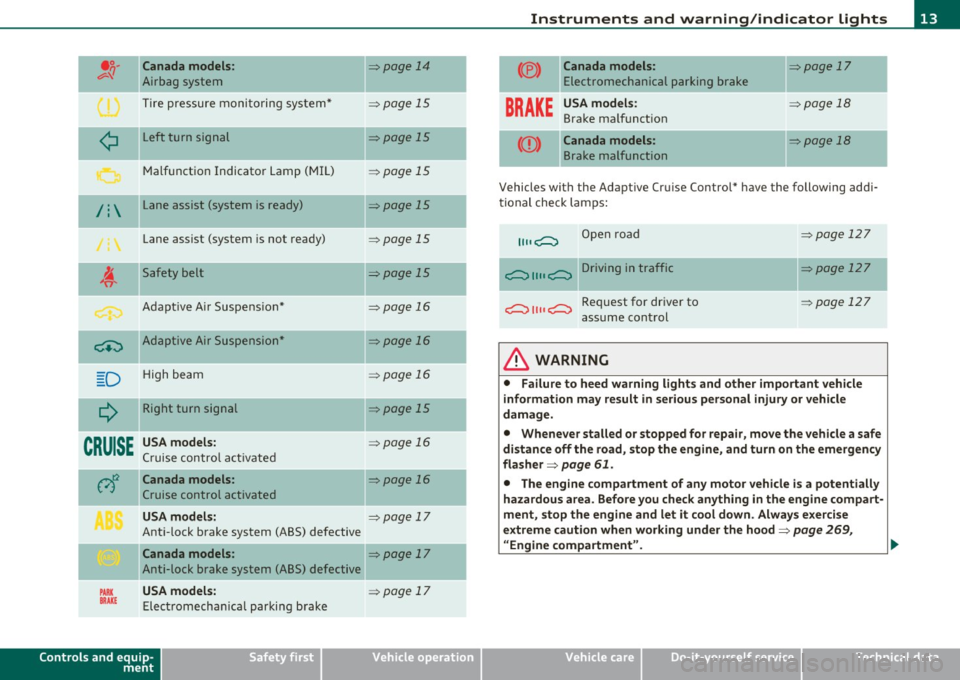
.o. Canada model s: ,;:;..{/
Airbag system
Tire pressure monitoring system*
-
¢ L eft turn signal
Malfunct ion Indicator Lamp (MIL)
/: L ane assist (system is ready)
Lane assist (system is not ready)
~
Safety belt
Adapt ive A ir Suspe nsio n*
-
~ Adaptive Air Suspension"
D H igh beam
--
Q Right turn signal
CRUISE USA models:
Cruise contro l a ct ivated
At:i Canada models:
Cruise control activated
USA models:
Ant i-lock brake system (ABS) defective
Canada models :
Anti-lock brake system (ABS) defective
PARK USA models: BRAKE Elect romechan ica l parking b rake
Controls and equip
ment Safety first
=>page
14
=> page 15
=>page 15
=> page 15
=> page 15
=> page 15
=>page 15
-
=> page 16
-
=> page 16
=> page 16
-
=> page 15
=> page 16
=> page 16
=> page 17
=>page 17
=> page 17
Instruments and warning /indicator lights
(® ) Canada models: => page 17
E lectromechanical parking bra ke
BRAKE
USA model s: => page 18
Brake ma lf u nct ion
-- -
Canada models: => page 18
B rake malfunction
Vehicles with the Adaptive Cru ise Control* have the following addi
ti onal check lamps:
Open road
i;:;::::::, 1111 i;:;::::::, D ri vi n g i n traffic
i;:;::::::, 1111 i;:;::::::, Request for driver to
assume con trol
& WARNING
=> page 12 7
=> page 127
=> page 127
• Failure to heed warning light s and other important vehicle
information may result in serious personal injury or vehicle
damage.
• Whenever stalled or stopped for repair, move the vehicle a safe
distan ce off the road, st op the engine, and turn on the emergency
flasher =>
page 61.
• The engine compartment of any motor vehicle i s a potentially
hazardous area . Befo re you check anyth ing in the engine compart
ment, stop the engine and let it cool down. Always exercise
extreme caution when working under the hood=>
page 269,
"Engine compartment". .,.
Vehicle care Technical data
Page 29 of 368

& WARNING
• Always observe the warnings in~ page 269 , "Engine compart
ment ", before opening the hood and che cking the brake fluid.
• Driving w ith low brake fluid is a safety haza rd. Stop the car and
get profe ssional a ssistan ce.
• USA models : If the BRAKE warning light and the warning
light come on tog ether, the rear wheel s could lock up fir st under
hard b raking. Rear wheel lock -up can cause loss of vehicle cont rol
and an a ccident . Have your vehicle repaired immediately by your
authorized Audi dealer or a qualified workshop. Drive slowly and
avoid sudden, hard brake application s.
• Canada models : If the brake warning light((])) and the ABS
warning light come on together , the rear wheel s could lock up
first under hard braking. Rear wheel lock-up can cause loss of
vehicle control and an accident. Have your vehicle repaired imme diately by your authorized Audi dealer or a qualified workshop.
Drive slowly and avoid sudden , hard brake applications. •
Engine cooling system malfunction _t_
A malfunction in the engin e cooling system must be
repaired as soon as possible.
When t he J_ symbol in the disp lay blinks , th en e ither the
engine coola nt
temperature is too high, or t he coolan t level
is too low. A n add itiona l dr iver messa ge ca n also be d isp layed
by pressing t he
[CHECK) bu tton :
Switch off engine and check coolant level
-Pull off the road.
- Sto p the v ehicl e.
- Turn off the eng ine.
Controls and equip
ment Safety first Driver information display
-
Check coolant level => page 284 .
- Add coola nt if necessa ry=> page 285.
- Continue driv ing on ly after the eng ine coolant
war ning/i ndica tor light goes ou t.
- Contact your authorized Audi dea ler for assistance if
necessary.
If the eng ine coolan t leve l is correct, then the radiator fan may be the
cause of the malfu nction.
If the
D wa rning symbol (alternator ma lfunction) also lights up on
t he ins trumen t pa ne l~
page 2 6, the n th e fan b elt may be d amaged.
& WARNING
• If your vehicle should break down for mechanical or other
reasons, park at a safe distance from moving t raffic , turn off the
engine and turn on the hazard warning lights~
page 61, "Emer
gency fl asher
A ".
• Never open the hood if you see or hear steam or coolant
escaping from the engine compartment -you risk being scalded.
Wait until you can no longer see or hear steam or coolant escaping .
• The engine compartment of any vehicle is a dangerous area. Before you perform any wo rk in the engine compartment, turn of
the engine and allow it to cool. Follow the warning stickers
~ page 269, "Engine compartment" .
0 Note
Do not continue driving if the -F-symbol illum inates. There is a
m alfu nct ion in the engine cooling system -yo u co uld da mage yo ur
engine. •
Vehicle care Technical data
Page 162 of 368
ffl..__P_ a_r_ k_ a_ s_ s_ is_t ____________________________________________________ _
Park assist
Parking system (rear, with rear
view camera)
Ap plies t o vehicles: wit h pa rk ing syste m (rear, with rear view ca mera )
Introduction
D
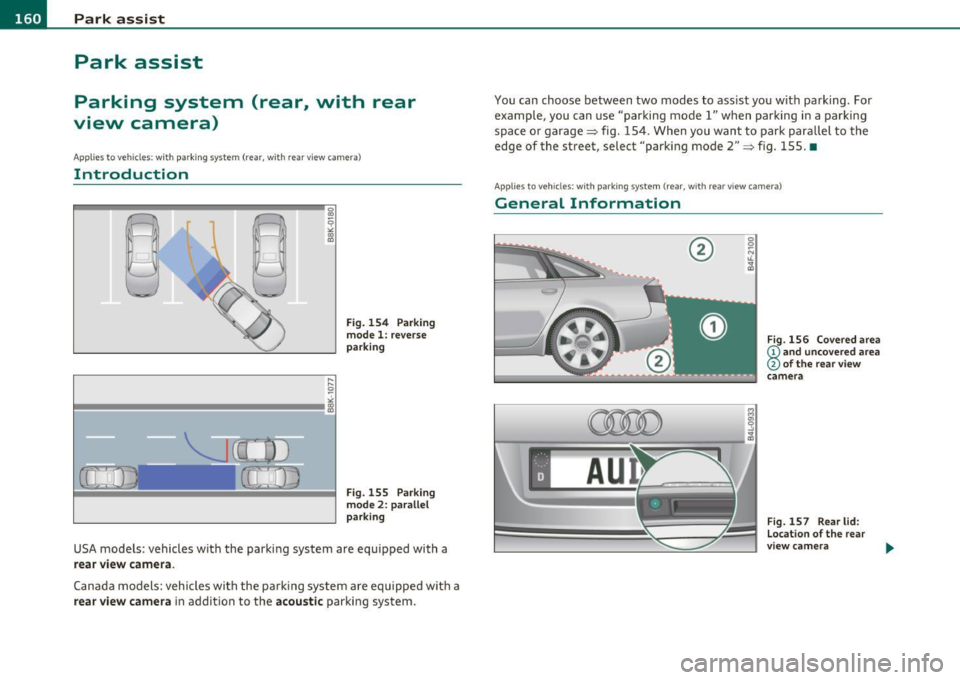
Fig. 154 Parking
mode 1: reverse
parking
Fig . 155 Parking
mode 2: parallel
parking
USA models : vehicles with the parking system are equipped with a
rear view camera .
Canada models: vehicles with the parking system are equipped with a
rear view camera in addition to the acoustic parking system. You can choose between
two modes to assist you with parking . For
example, you can use "parking model" when parking in a parking
space or garage~ fig. 154. When you want to park parallel to the
edge of the street, select "parking mode 2"
~ fig. 155. •
App lies to vehicles: with par kin g system (rear, w ith rea r vie w camera)
General Information
®
~
s:
r--. iiii=.:.=:... == ~~~~~- .. 1.~
l~:::!:: f--==~)
Fig. 156 Covered area
(!) and uncovered area
@ of the rear view
camera
Fig.
157 Rear lid:
Location of the rear
view camera
Page 164 of 368

1111...._ __ P_a _ r_ k_ a_ s_ s_is _ t ____________________________________________________ _
continue to be signaled. Objects such as barrier chains, trailer draw
bars, thin painted vertical poles or fences may not be detected by the
system, posing risk of damage .
• Never use warm or hot water to remove snow or ice from the rear
view camera lens - danger of crack formation on the lens!
• When cleaning the lens, never use products that are abrasive. •
Applies to veh icles: with park ing syste m (rear, with rear view camera)
Switching on/off
The rear view camera switches on automatically together
with the acoustic park assist* when you put the vehicle in
reverse .
Switching on
-Before parking with the rear view camera, the Adaptive Air
Suspension* comfort or automatic mode must be
switched on=>
page 16.
-Put the vehicle in reverse gear, the acoustic parking
system* with rear view camera is activated automatically.
Activation of the acoustic parking system is confirmed by a brief acknowledgement sound.*
Switching off
- Drive faster than 6 mph (10 km/h), or
- take the vehicle out of reverse gear. The acoustic parking
system* is immediately deactivated, and the rear view
camera picture is deactivated automatically after a period
of about 15 seconds, or
- switch off the ignition.
The delay in deactivating the camera prov ides an uninterrupted view
behind the vehicle especially when maneuvering in tight parking spaces and prevents the picture
from turning off the every time you
shift out of reverse.
If the warning message appears in the display but not the rear view
camera picture, read and confirm the warning message. The acoustic
distance signal is always active.*
If you press a function but ton on the MMI control console, the rear
view camera picture disappears. The rear view camera picture reap
pears the next time you park.
Further information on the warning message and the MMI control
console can be found in the MMI instruction booklet.
[I) Tips
• The rear view camera picture is available as soon as the MMI
Display or the MMI is switched on, or the start-up phase is completed.
• Keep the sensors in the rear bumper and the rear view came ra lens
clean and free of snow and ice, so that the parking system can work
properly . Please follow the additional notes on~
page 165. •
Applies to veh icles: with park ing syste m (rear, w ith rear vie w came ra)
Reverse Parking
Parking mode 1 can be used when parking in a garage or
parking space.
Fig. 158 MMI Display:
aiming at a parking
spot
~
Page 167 of 368

Park assist IIJII _________________________________ _____;.....:;_;_.:..:,____;;_ ____ _
0 Note
In the MMI display, the d irect ion of t ravel of the vehicle rear is rep re
sented depend ing on the steering wheel angle. The vehicle front
swi ngs ou t mo re t han t he ve hicle re ar. M ain tain ple nty of dist ance
from an obstacle so t hat your outs ide mirror or a corner of your
vehicle d oes no t collide with any o bstacles - dange r of accide nt!
[ i ) Tips
Th e left or right or ientat ion lines and s urfaces will be displ aye d,
depending on the tu rn signal being used. •
App lies to veh icles : with park ing syst em (rear, wit h rea r view cam era)
Adjusting the display and warning tones
Th e display and warning tones can be adjusted in the
MM I.
-Select: Funct ion button !CA R]> Systems *> Parking
system .
Display
• Off -when the parking system is switche d off, only audible sig na ls
are given.
• On -when t he pa rking system is swi tched on, the pic ture from the
rear view camera is displayed.
Warning tones (Canada models)
• Rear volume -rear sensor vo lume
• Rear frequency -rear sensor frequency
• In-car entertainment fader -w hen the p ark in g sys tem is switche d
on, t he volume of the active audio source is lowered.
Th e newly adj uste d value is briefly hear d from the signal generator .
Th e set tings are automat ically stored and assigned to the master key
with remote control.
Controls and equip
ment Safety first
& WARNING
•
Canada models: always make sure that the volume and
frequency of the chimes is adjusted so that you can easily hear the
acoustic distance signal even if the radio is playing, the air-condi
tioner blower is on High or there is a high level of outside noise.
• Check the settings whenever someone else has driven the
vehicle before you.
[I] Tips
• Cana da mo dels: the warning tones can a lso be adjusted directly
from t he rear -view came ra image* . Simply press the
!Settings)
control button.
• Cha nged settings are activated w hen parking assist is switched on
again. •
Appli es to ve hicle s: wit h pa rk ing system (rea r, wi th r ear vie w c amer a)
Error messages
If a wa rni ng tone* is aud ible for abo ut five seconds w he n you t urn on
the ignition , the re is a ma lfunction in the system. Have the prob lem
co rrected by yo ur aut ho rized Audi dea ler.
Keep the sensors in the rear b umper clean and free from ice so that
t he a cousti c p ark assis t* sys tem c an fun ction pro perly .•
Vehicle care Technical data
Page 330 of 368
.,.,___F_ u_ s_e _ s_ a_n_ d_ b_u _ l_ b_ s _______________________________________________ _
No. Equipment Amps
9 Heated seats, front 30
10 MMI
7,5
11 Seat adjustment (passenger) 10
12 Communication 5
Fuse holder (brown)
1 Electric fuel pump 20/30
2 Adaptive Air Suspension
15
3 Lane assist 10
4 Audi side assist
5
5 Adaptive Air Suspension 5
6 Shift gate automatic transmission/clutch switch 5
7 Parking System 5
8 Control module Gateway 5
9
Automatic headlight range control (auxiliary 5
driving lights), headlight electronics, right-side
10 Airbag 5
11 Heated rear seats 5
12 Telephone
5 •
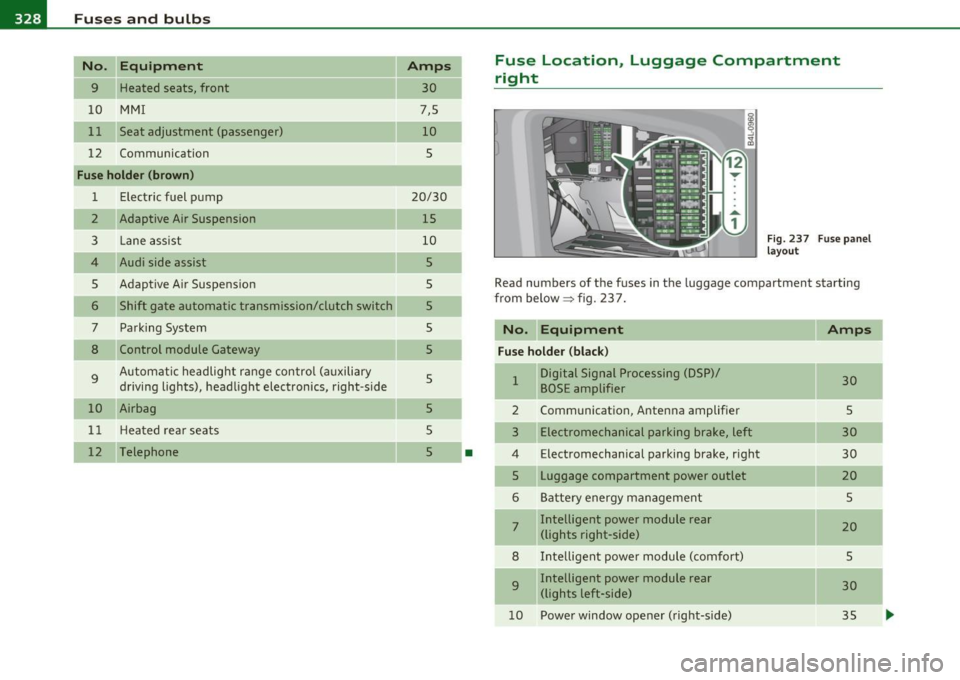
Fuse Location, Luggage Compartment
right
Fig. 237 Fuse panel
layout
Read numbers of the fuses in the luggage compartment starting
from below :::::> fig. 23 7.
No. Equipment
Amps
Fuse holder (black)
1 Digital Signal Processing (DSP)/ 30 BOSE amplifier
2 Communication, Antenna amplifier 5
3 Electromechanical parking brake, left 30
4 Electromechanical parking brake, right
30
5 Luggage compartment power outlet
20
6 Battery energy management 5
7 Intelligent power module rear
20 (lights right-side)
8 Intelligent power module (comfort)
5
9 Intelligent power module rear
30
(lights left-side)
10 Power window opener (right-side)
35
-
-
-
...