2010 AUDI S6 airbag
[x] Cancel search: airbagPage 64 of 368
Clear vision
-Press the switch /4. => page 61, fig. SO to turn the emer-
gency flashers on or off.
When the emergency flasher is on, all four turn signals blink at the
same time. The turn signal indicator lights¢¢ in the instrument
cluster, as well as the light in the emergency flasher switch~ blink
likewise.
The emergency flashers will turn on automatically if you are in an accident where the airbag has deployed.
(I) Tips
You should turn on the emergency flashers when:
• you are the last vehicle standing in a traffic jam so that any other
vehicles coming can see you, or when
• your vehicle has broken down or you are in an emergency situa
tion, or when
• your vehicle is being towed by a tow truck or if you are towing
another vehicle behind you .•
Turn signal ¢ c> and high beam ~D lever
The lever on the left side of the steering column is used to
operate the turn signals and the high beam as well as the
headlight flasher .
i
'
-to
"' -w
"' cc
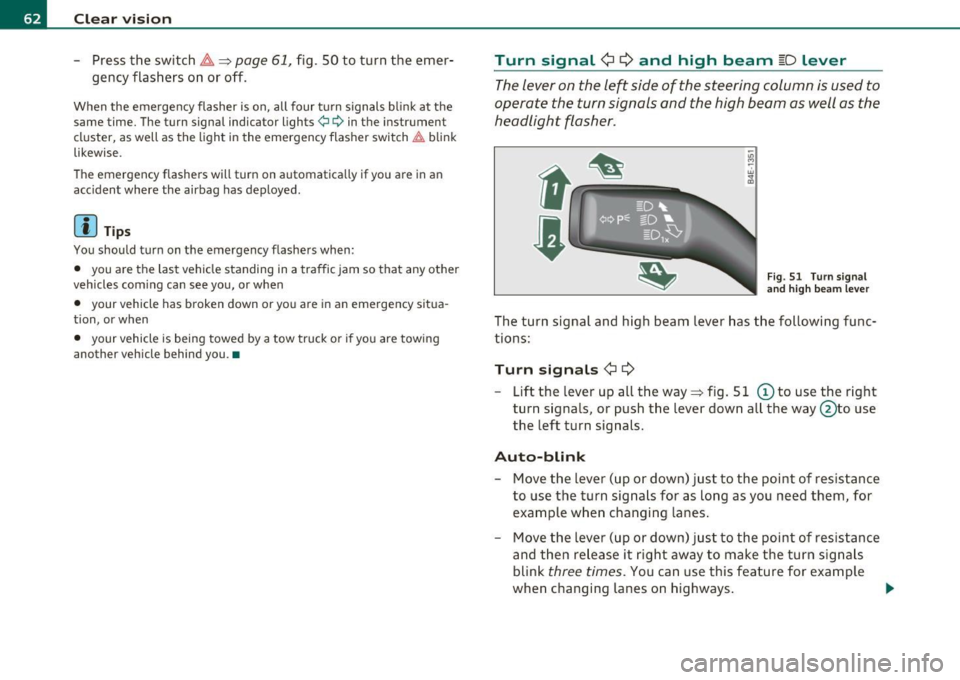
Fig. 51 Turn signal
and high beam lever
The turn signal and high beam lever has the following func
tions:
Turn signals ¢ Q
- Lift the lever up all the way=> fig. S 1 © to use the right
turn signals, or push the lever down all the way@to use
the left turn signals.
Auto-blink
-Move the lever (up or down) just to the point of resistance
to use the turn signals for as long as you need them, for
example when changing lanes.
- Move the lever (up or down) just to the point of resistance
and then release it right away to make the turn signals
blink
three times . You can use this feature for example
when changing lanes on highways.
~
Page 77 of 368

Seats and storage
General recommendations
Why is your seat adjustment so important?
The safety belts and the airbag system can only provide
maximum protection if the front seats are correctly
adju sted.
Th ere a re various ways of adjusting t he front seats to provide safe and
comfortable support for the driver and the front passenger . Ad just
your seat properly so that :
• you can easily and quickly reach a ll the switc hes and contro ls in the
ins trumen t pa nel
• your body is properly supported thus reducing phys ica l stress and
fatigue
• the safety be lts and airbag system can offer maximum protection
=>
page 195 .
In the following sections, you w ill see exact ly how you can best ad just
your sea ts .
Th ere are special regulations a nd instr uctions for install ing a child
safety seat on the front passenger's sea t. Always follow the informa
tion regarding child safety p rovided in=>
page 217, "Child Safety ".
& WARNING
Incorrect seating posit ion of the dri ver and all other passengers
can result in seriou s personal injury.
• Always keep your feet on the floor when the vehicle is in
motion -never put your feet on top of the instrument panel, out
of the window o r on top of the seat cush ion. This applies especially
to the passengers.
If your seating po sition is incorrect, you
increase the ri sk of injury in the case of sudden braking or an acci-
Controls and equip
ment Safety first
Seats and storage
& WARNING
(con tinu ed)
dent . If the airbag inflates and the seating position is incorrect ,
this could result in per sonal injury or even death .
• It is important for both the dri ver and front passenger to keep
a distan ce of at least 10 inche s (25 cm) between themselves and
the steering wheel and /or instrument panel. If you 're sitting any
closer than this , the airbag system cannot protect you properly. In
addition, the front seats and head restraints must be adjusted to
your body height so that they can give you maximum protection .
• Always try to keep as much distance as possible between your
self and the steering wheel or instrument panel.
• Do not adjust the driver's or front passenger 's seat while the
vehicle is moving. You r seat may move unexpectedly , causing
sudden loss of vehicle control and personal injury . If you adjust
your seat while the vehicle is moving , you are out of position. •
Driver's seat
The correct seat position is important for saf e and
re lax ed driving.
W e recomme nd that you a djust the drive r's sea t in the
f ollowing man ner :
- Ad just the seat in fore and aft direction so that you can
easily pus h the pedals to the floor w hile keeping your
knees slightly bent=>
& in "Why is yo ur seat a djus tme nt
so importa nt?" .
- Adjust the seatback so that when yo u sit with yo ur back
agai nst t he seatback , you can st ill grasp t he top of the
steering w heel. ..,
Vehicle care Technical data
Page 78 of 368
Seats and storage
-Position the head restraint according to the occupant's
height=>
page 81. For maximum protection, the top of
the head restraint should be at least at eye level, prefer
ably higher and ideally level with the top of the head
=>
page 179, fig. 168.
& WARNING
Never place any objects in the driver's footwell. An object could
get into the pedal area and interfere with pedal function. In case
of sudden braking or an accident, you would not be able to brake
or accelerate. •
Front passenger's seat
Always move the front passenger seat into the rearmost
position.
To avoid contact with the airbag while it is deploying, do not
sit any closer to the instrument panel than necessary and
always wear the three-point safety belt provided adjusted
correctly. We recommend that you adjust the passenger's
seat in the following manner:
- Move the front passenger seat into the rearmost position
of the fore and aft adjustment range=>
& in "Why is your
seat adjustment so important?" on
page 75.
- Bring the backrest up to an (almost) upright position.
Do
not ride with the seat reclined.
- The ideal position for the head restraint is with the upper
edge of the restraint level with the top of your head
=>
page 81. You should not lower the top of the restraint
below the level of your eyes . -
Place your feet on the floor in front of the passenger's
seat. •
Power seat
Controls
The operating logic for the switches corresponds to the
construction and function of the seat.
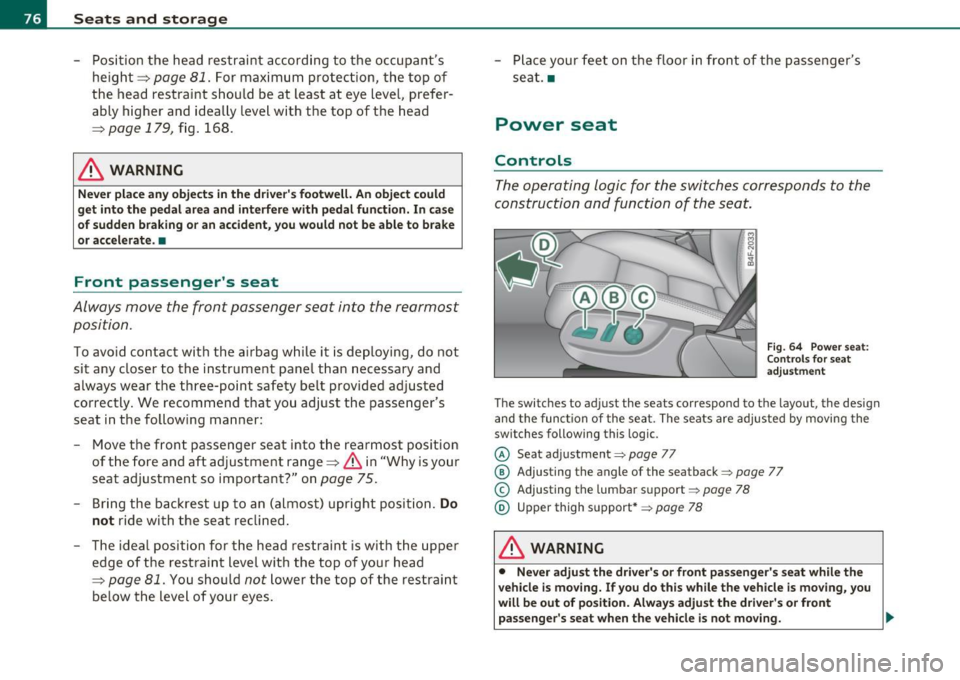
Fig. 64 Power seat:
Controls for seat
adjustment
The switches to adjust the seats correspond to the layout, the design
and the function of the seat. The seats are adjusted
by moving the
switches following this logic.
© Seat adjustment=> page 77
@ Adjusting the angle of the seatback ::::> page 77
© Adjusting the lumbar support => page 78
® Upper thigh support*=> page 78
& WARNING
• Never adjust the driver's or front passenger's seat while the
vehicle is moving. If you do this while the vehicle is moving, you
will be out of position. Always adjust the driver's or front
passenger's seat when the vehicle is not moving. _,,,
Page 80 of 368
Seats and storage
in. WARNING
• Never adjust the seatback while the vehicle is moving. If you
adjust your seat while the vehicle is moving, you are out of posi
tion. Never adjust the seatback when the vehicle is moving.
• To reduce the risk of injury in the case of sudden braking or
accident, front passengers must never ride in a moving vehicle
with the seatback reclined. Safety belts and the airbag system
only offer maximum protection when the seatback is upright and
the safety belts are properly positioned on the body. The more the
seatback is reclined, the greater the risk of personal injury from an
incorrect seating position and improperly positioned safety
belts. •
Lumbar support
The lumbar support can be adjusted to fit the natural
curvature of the occupant's spine.
Adjusting the contour
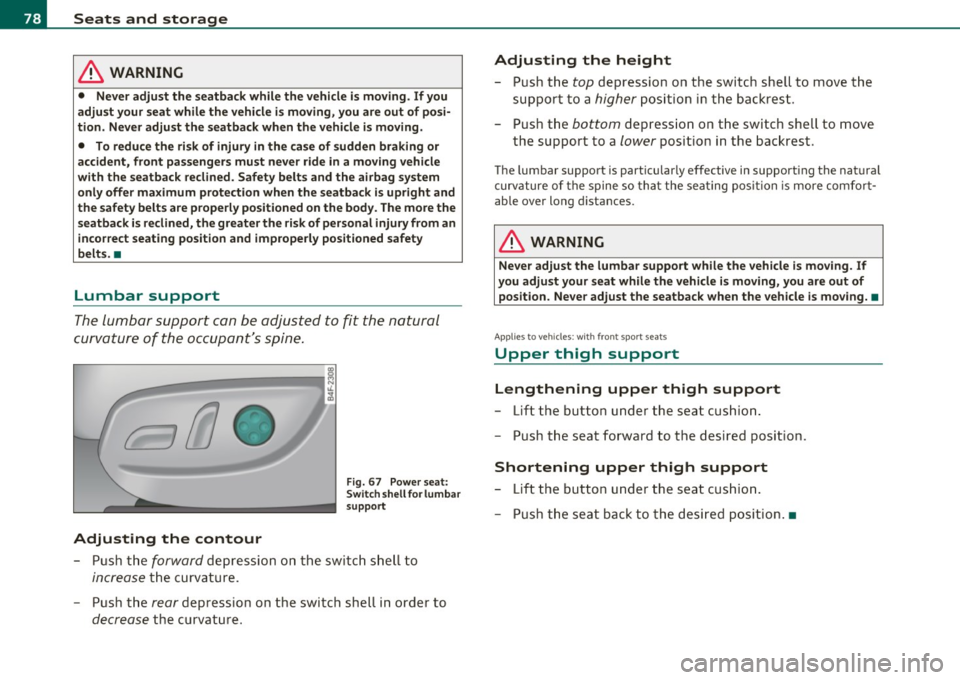
Fig. 67 Power seat:
Switch shell for lumbar
support
- Push the forward depression on the switch shell to
increase the curvature.
- Push the
rear depression on the switch shell in order to
decrease the curvature.
Adjusting the height
- Push the top depression on the switch shell to move the
support to a
higher position in the backrest.
- Push the
bottom depression on the switch shell to move
the support to a
lower position in the backrest .
The lumbar support is particular ly effective in supporting the natural
curvature of the spine so that the seating position is more comfort
able over long distances.
in. WARNING
Never adjust the lumbar support while the vehicle is moving. If
you adjust your seat while the vehicle is moving, you are out of
position. Never adjust the seatback when the vehicle is moving. •
Applies to vehicles: wi th fron t spo rt seats
Upper thigh support
Lengthening upper thigh support
- Lift the button under the seat cushion.
- Push the seat forward to the desired position .
Shortening upper thigh support
-Lift the button under the seat cushion.
- Push the seat back to the desired position. •
Page 96 of 368
Seats and storage
& WARNING (continued )
braking or in an accident· especially if the airbag is deployed -
the se object s could injure any passengers inside the vehicle. •
Glove compartment
The media p layer is in the glove compartment.
To open glove compartment
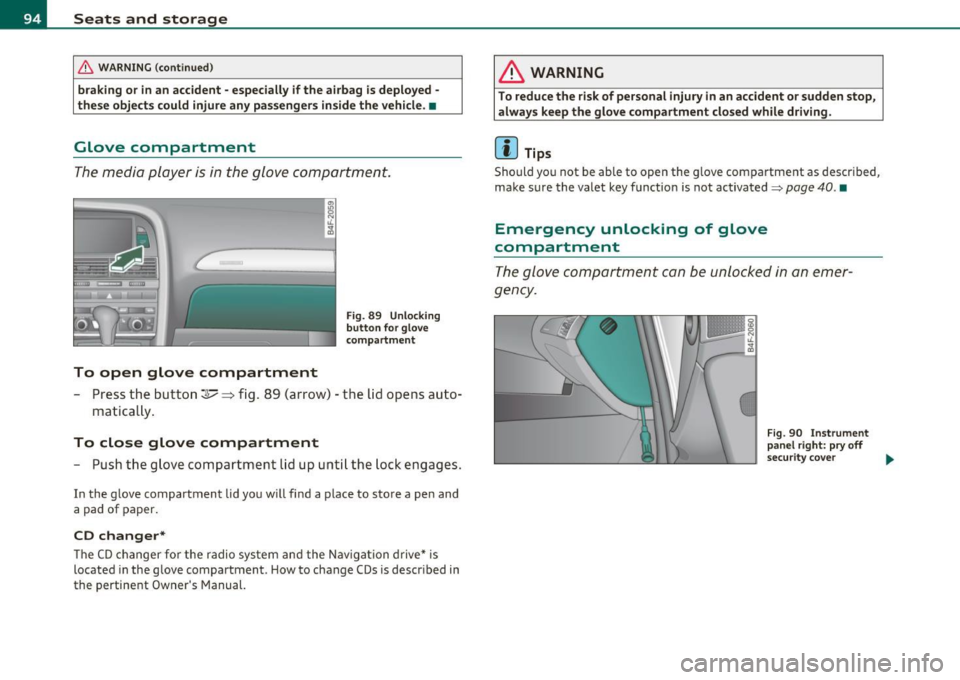
Fig. 89 Un lo cking
button fo r g love
c om partm ent
- Press the button~~ fig. 89 ( arrow) - the lid opens auto-
matica lly .
To close glove compartment
- Push the glove comp art ment lid up unt il th e lo ck en gag es.
In the g love compartment lid yo u w ill find a plac e to sto re a pen and
a pad of paper.
CD changer*
Th e C D ch an ger f or the radio sy stem and t he Nav igation drive* is
located in the g love compartment . How to change CDs is descr ibed in
the pertinent Owner's Manual.
& WARNING
To reduce the risk of personal injury in an accident or sudden stop,
always keep the glove compartment clo sed while driving.
[I) Tips
Sho uld you not be ab le to open the g love compa rtme nt as descr ibed,
make s ure the valet key f unction is not activated~
page 40. •
Emergency unlocking of glove
compartment
T h e glov e co mp artm ent can be unl ocke d in a n em er
g ency.
Fig . 90 In strument
panel right: pry off
s ecu rit y cove r
~
Page 97 of 368
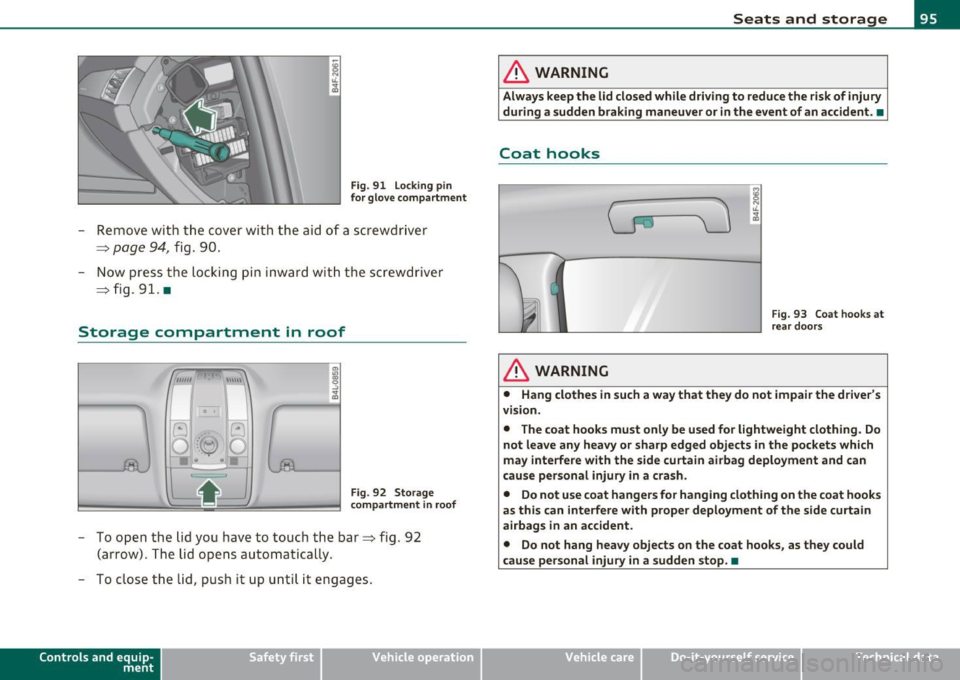
Fig. 91 Lock ing pin
for glove compartment
-Remove with the cover with the aid of a screwdriver
==>
page 94, fig . 90.
- Now press the locking pin inward with the screwdriver
==> fig . 91. •
Storage compartment in roof
111111 \\\H
. '
Fig. 92 Storage
compartment in roof
-To open the lid you have to touch the bar==> fig . 92
(arrow) . The lid opens automatically.
- To close the lid, push it up until it engages.
Con tro ls a nd e quip
m en t Vehicle
OP-eration
Seats and storage
& WARNING
Always keep the lid closed while driving to reduce the risk of injury
during a sudden braking maneuver or in the event of an accident. •
Coat hooks
& WARNING
Fig. 93 Coat hooks at
rear doors
• Hang clothes in such a way that they do not impair the driver's
vision .
• The coat hooks must only be used for lightweight clothing. Do
not leave any heavy or sharp edged objects in the pockets which
may interfere with the side curtain airbag deployment and can
cause personal injury in a crash.
• Do not use coat hangers for hanging clothing on the coat hooks
as this can interfere with proper deployment of the side curtain
airbags in an accident.
• Do not hang heavy objects on the coat hooks, as they could
cause personal injury in a sudden stop. •
Vehicle care Do-it-yourselt service iTechnical data
Page 108 of 368
1111....__0_ n_ t_h_ e_ r_ o_ a _ d _________________________________________________ _
On the road
Steering
Applies to vehicles : w ith manua lly ad justab le stee ring whee l
Manually adjustable steering wheel
The height and reach o f the steering wheel can be
adjusted.
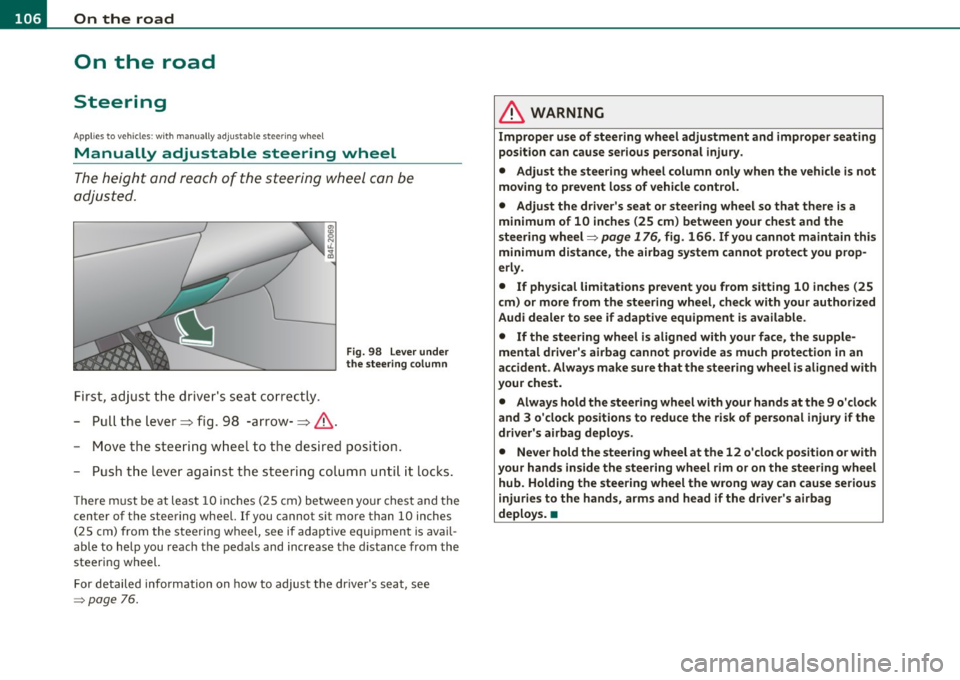
First, adjust t he driv er's seat correctly.
- Pull the lever~ fig. 98 -arrow-~ &.
Fig. 98 L ever under
the stee ring colum n
-Move the steering w heel to t he desired position.
- Push t he leve r against the s teering colum n unti l it locks .
The re m ust be at leas t 10 inc hes (25 cm) be tween yo ur chest and the
center of the steering wheel. If you cannot sit more than 10 inches
(25 cm) from the steering wheel, see if adaptive equ ipment is avail
able to help you reach the pedals and increase the d istance from the
steering wheel.
For detailed info rmation on how to adjust the dr ive r's seat, see
=> page 76.
& WARNING
Improp er use of steering wh eel adjustment and improper seating
position can cause serious personal injury .
• Adjust th e steering wheel column only when the v ehicle i s not
moving to p revent loss of vehicle control.
• Adjust the driver's seat or steering wheel so that th ere is a
minimum of 10 inches (25 cm ) between your chest and the
steering wheel=>
page 176 , fig. 166 . If you cannot maintain this
minimum distance , the airbag sy stem cannot protect you prop
erl y.
• If physical limitat ions p revent you from sitting 10 in ches (25
cm ) or more from the steering wheel, check with your authorized
Audi dealer to see if adaptive equipment is available.
• If the steering wheel is aligned with your face , the supple
mental driver' s airbag cannot provide a s much p rote ction in an
accident . Always make sure that the steer ing wheel i s aligned with
your che st.
• Always hold the ste ering wheel with your hands at th e 9 o'clock
and 3 o 'clock positions to reduce the risk of per sonal injury if the
driver' s airbag deploy s.
• Never hold the steering wheel at the 12 o 'clock position o r w ith
your hands inside the steering wh eel rim or on the steering wh eel
hub. Holding the stee ring wheel the wrong way can cause seriou s
injuries to the hands, arms and head if the driver' s airbag
deploy s. •
Page 109 of 368
_________________________________________________ O_ n_ t_ h_ e_ r _o_ a_d _ __.fflll
App lies to veh icles : w ith electrically adju stab le steer ing wheel
Electrically adjustable steering wheel
The height and reach of the stee ring wheel ca n be ele ctri
c ally adj usted to sui t th e d river.
Firs t, a djust t he dr iver's se at correct ly.
Height adjustment
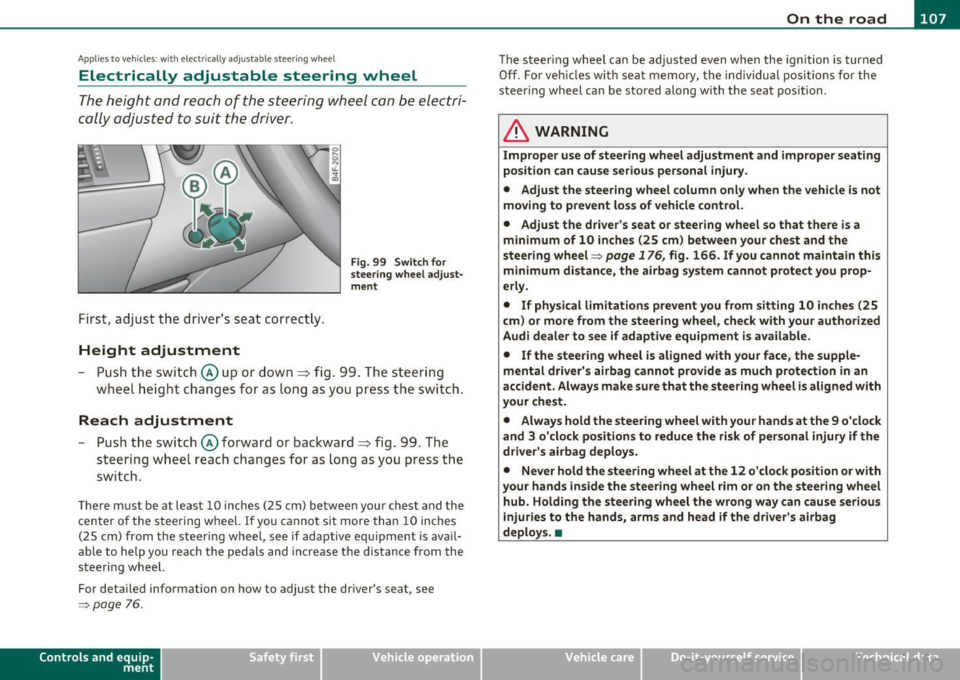
Fig . 99 Switch for
s teering whee l ad ju st
ment
- Push t he s witch © up or down=> fig. 99 . T he st ee rin g
w he el heig ht chang es f or as long as you press t he swi tch .
Reach adjustment
- Push t he switc h© forward or backward=> fig. 99 . T he
ste ering w hee l reac h changes for as long as yo u press the
swi tch .
The re m ust be at leas t 10 inches (25 cm) between you r chest and the
cen ter of the steering whee l. If you cannot sit more than 10 inches
(25 cm) from the steer ing wheel, see if adapt ive equ ipment is ava il
able to h elp you reach the pedals and increase the distance from the
steeri ng wheel.
For detailed information on how to adjust the dr iver 's seat , see
~ page 76.
Cont rols a nd e quip
m en t Vehicle
OP-eration
The steering wheel ca n be adjusted even when the ign ition is turned
O ff. For veh icles with sea t memory, the individu al pos it io ns for the
steer ing wheel can be sto red along with t he seat pos it ion.
& WARNING
Improper use of steering wheel adjustment and imprope r seating
position can cau se seriou s per sonal injury.
• Adjust the steering wheel column only when the vehicle i s not
moving to prevent loss of vehicle control.
• Adjust the driver 's seat or steering wheel so that there is a
minimum of 10 in ches (25 cm) between your chest and the
steering wheel~
page 176, fig. 166. If you cannot maintain this
minimum distance , the airbag system cannot prote ct you prop
erly.
• If phy sical limitations prevent you from sitting 10 inches (25
cm ) or more from the steering wheel, check with you r authorized
Audi dealer to see if adaptive equipment is available .
• If the steering wheel is aligned with your face , the supple·
mental driver 's airbag cannot provide as much protection in an
accident. Always make sure that the steering wheel is aligned with
your che st.
• Always hold the steering wheel with your hands at the 9 o'clock
and 3 o'clock po sition s to reduce the risk of personal injury if the
drive r's airbag deploys.
• Never hold the steering wheel at the 12 o'clock po sition or with
your hands inside the steering wheel rim or on the steering wheel
hub. Holding the steering wheel the wrong way can cause serious
injuries to the hands, arms and head if the driver's airbag
deploy s.•
Vehicle care Do-it-yourselt service iTechnical data