2010 AUDI A5 COUPE ignition
[x] Cancel search: ignitionPage 118 of 360

• .___O_ n_ t_h _e _ r_o _a_ d __________________________________________________ _
may vary, depending on the type of display in your vehicle. The indi
cator light
CRUISE (US model)/ (7)0 (Canadian model) will also light up
in the instrument cluster .
The speed is kept constant by modifying engine power or through
an active brake intervention.
& WARNING
• Always pay attention to the traffic around you when the cruise
control is in operation. You are always responsible for your speed
and the distance between your vehicle and other vehicles.
• For reasons of safety, cruise control should not be used in the
city, in stop-and-go traffic, on twisting roads and when road condi
tions are poor (such as ice, fog, gravel, heavy rain and hydro
planing) -you could have an accident.
• Switch the cruise control off temporarily when driving in
turning lanes, highway exits or in construction zones.
• Please note that unconsciously "resting" your foot on the
accelerator pedal causes cruise control not to brake. This is due to
the control system being overridden by the driver's acceleration.
[ i] Tips
• Vehicles with manual transmission: You can attain the set speed
only if the gear that is currently engaged will allow it, or if it does not tax the engine and allows it to run smoothly. Therefore shift into
a higher or lower gear in a timely manner.
• The brake lights illuminate as soon as the brakes apply
automatically .•
Changing speed
- Press the lever in the direction of the 0 ~ page 115,
fig. 120 or in the direction of the Q to increase or
decrease your speed. -
Let go of the lever to save that speed.
Change speed in increments of 1 mph (1 km/hi by lightly pressing
the lever . If you keep the lever pressed down, you will alter your
speed in 5 mph (10 km/hi increments.
You can also press the accelerator pedal down to increase your speed, e.g. if you want to pass someone. The speed you saved
earlier will resume as soon as you let off of the accelerator pedal.
If, however, you exceed your saved speed by 5 mph (10 km/h) for
longer than 5 minutes, the cruise control will be turned off tempo
rarily. The green symbol in the display turns white, the saved speed
is retained .•
Pre -selecting speed
You can pre-select your desired speed while the vehicle is
not moving.
Turn on the ignition.
- Pull lever into position 1
~ page 115, fig. 120.
Press the lever in the
0 or Q direction to increase or
decrease your speed.
- Let go of the lever to save that speed.
This function makes it possible, for example, to save the speed you
want before driving on the highway. Once on the highway, activate
the cruise control by pulling the lever toward
(D. •
Switching off
Temporary deactivation
- Step on the brake pedal, or
Page 119 of 360

_________________________________________________ O _n_ t_h _e _ r_o _a _d __ ftllll
- Manual transmission : K eep the clu tch pedal p ressed
d own longer, or
- Press the lever i nto position
0 (not clicked into place)
=> page 115, fig. 120, or
- Drive for longer t han 5 minutes at more than 5 mph
(10 km/h) above the stored speed.
Switching off completely
- Pre ss lever into posit ion 0 (clicked into place), or
- Switch t he igniti on o ff.
The speed you saved wil l be retained if the cruise control has been
switched off temporarily . To resume the saved speed, let up on the
brake or clutch peda l and pu ll the lever to position
G) .
The saved speed wil l be erased after turning the ignition off .
& WARNING
You should only resume the saved speed if it is not too high for
exi sting traffi c condition s. Otherwi se you ri sk an accident . •
Controls and equip
ment
I • •
Page 121 of 360

_______________________________________________ A_ d_ a ---=- p_t_ i_v _e_ c_ r_ u_ i_ s _e_ c_ o_ n_t_ r _o _ l __ llll
& WARNING (continued)
• Always turn off adaptive cruise control when entering turn
lanes, highway exit lanes and construction zones or similar situa
tions because the vehicle will automatically accelerate to the
stored speed.
• Never rest your foot on the accelerator pedal, especially when
the adaptive cruise control is being used because doing so will override the braking function and prevent the brakes from being
applied by the system when it detects a situation when the brakes
must be applied.
• Always remember that the adaptive cruise control has limits -
it does not react when you drive towards an obstacle or some
thing else on or near the road that is not moving, such as vehicles stopped in a traffic jam, a stalled or disabled vehicle.
• Always remember that the adaptive cruise control cannot
detect a vehicle that is driving towards you in your traffic lane and
that it cannot detect narrow vehicles such as motorcycles and
bicycles .
[ i] Tips
• For safety reasons, the stored speed is deleted when the ignition
is turned off.
• The Electronic Stabilization Program (ESP) and the Anti -Slip
Regulation (ASR) cannot be deactivated when the adaptive cruise
control is switched on. If the ESP and the Anti -Slip Regulation (ASR)
has been deactivated and you then switch on the adaptive cruise
control, the ESP function will also be activated automatically.
• Damage caused by accidents (e.g. if the vehicle is damaged
when parking) can affect the radar sensor settings. This can cause
the system to malfunction or switch off completely.
• The radar sensor cover is heated. In winter conditions, you
should still check before driving to make sure it is free of ice and
snow. If necessary, clean the area near the radar sensor carefully
=>
page 118, fig. 122.
Controls and equip
ment
• To ensure that the radar sensor is not blocked, foreign objects
(e.g. stickers, add -on parts) must not cover the area near the radar
sensor=>
page 118, fig. 122. The area near the radar sensor must
not be painted, either.
• For Declaration of Compliance to United States FCC and Industry
Canada regulations =>
page 342. •
Applies to vehic les : with adaptive crui se cont rol
How does adaptive cruise control work?
Vehicles traveling ahead are detected with the aid of a
radar sensor.
I==;.===============-. ~
~
ll!
Fig. 123 Radar sensor
measurement range
A radar sensor is built into the front of the vehicle=> fig. 123, which
is subject to certain system limits=>
page 130. Stationary objects
are not taken into consideration. The system is intended to measure
the distance to reflective surfaces. The system responds after the
distance measurement has taken place. If a measurement is not
possible, the system does not respond.
Open road
When the road is clear, the adaptive cruise control works like cruise
control. It maintains a constant target speed specified by the driver .~
I • •
Page 123 of 360

Adaptive cruise control -____________ ____,_ __ ___.
Applies to vehic les : w ith ada ptive cru ise cont rol
How is the speed stored ?
Fig. 125 Control lever:
Storing speed
With the system switched on the speed is stored as follows:
- Drive at the speed you want. The speed must be between
20 and 95 mph (30 and 150 km/hl.
- Press the
I SET I button ~ fig. 125 to store the desired
speed.
After the I SET j button is released , the current speed is stored and
maintained .
The saved speed is now shown in the LED display in the speedom
eter by one or two illuminated red light diodes=>
page 125. At the
same time, the saved spe ed is also shown for a short time in the
Information line::::>
page 127.
[ i J Tips
For safety reasons, the stored speed is deleted when the ignition is
turned o ff . •
Con tro ls and eq uip
ment
A pp lies to veh ic les: with ada ptive cru ise cont rol
Changing stored speed
The speed can be changed without touching the acceler
ator or brake pedal.
Increasing speed
,... 0
~
ill
Fig . 126 Control lever:
Changing speed
- Press the lever briefly upwards G) ~ fig. 126. USA
models: the speed increases by about 2.5 mph . Canada
models : speed will increase by one mark o n the speed
ometer scale.
- Press the leve r upwards
0 and hold it. As long as you
hold the control switch down , the light diode display in
the speedometer LED display in the speedometer moves
forward and the speed is increased .
Reducing speed
- Press the lever downwards briefly Q. USA models: the
speed decreases by 2.5 mph. Canada models: speed will
decrease by one mark on the speedometer scale. _,.
Vehicle care I I irechnical data
Page 126 of 360
• ..__A_ d_ a-'- p_t _iv _ e_ c_r _u _ i_s _e _ c_o_ n_t _r _o _l _____________________________________________ _
Driving pro
gram
Di sta nce 1
Distance 2
D ist an ce 3
& WARNING
dynamic
1
2
2
3
standard
2
3
3
4
comfort
3
4
4
5
-
When setting the distance , the driver is responsible for adhering
to the respective national and country -specific regulations.
• Following other vehicles too closely increases the risk of colli
sions and serious personal injury .
• Setting short distances to the traffic ahead reduces the time
and distance available to bring your vehicle to a safe stop and
makes it even more necessary to pay close attention to traffic .
• Always use good judgment and select a safe following distance
for the traffic , road and weather conditions.
[ i J Tips
T he di stance se tting is re set to the factory defa ult DISTANCE 3 the
next time the ignition is turned on. •
Driver information
Applies to vehic les: with adapt ive cruise contro l
Displays in the instrument cluster
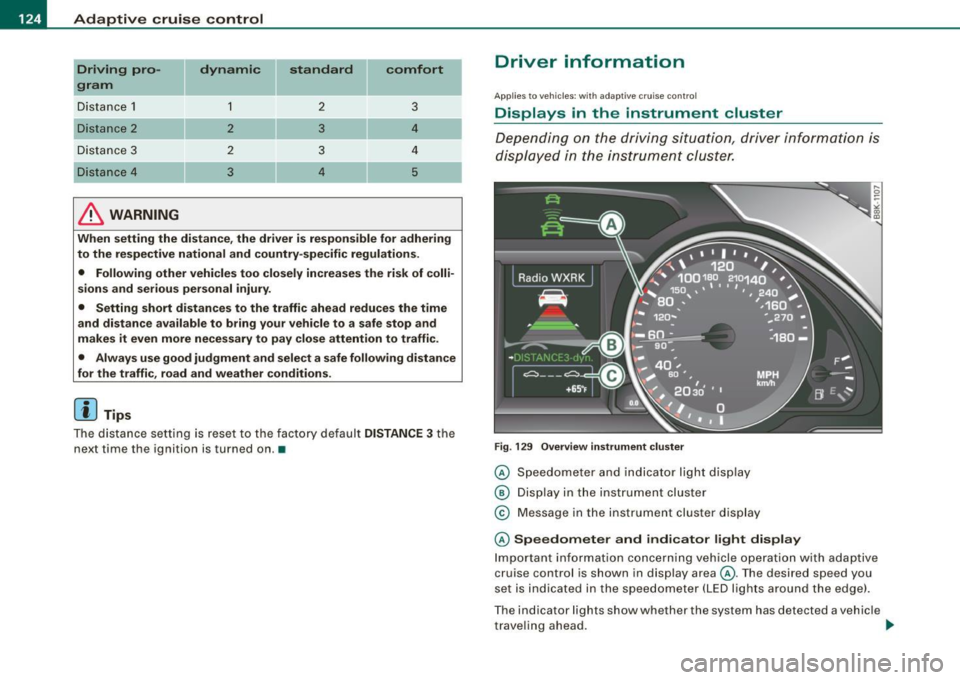
Dependin g o n the driving si tuati on, driver inform ation is
dis pla yed in the i nstr umen t clus ter.
F ig . 129 Overview instrument clu ste r
© Speedome ter and indicator lig ht dis play
® Displ ay in the instru ment clus ter
© M essage in the instr ument clus ter disp lay
© Speedometer and indicator light display
Im port ant inf orm ati on c once rning v ehicle opera tion with a daptiv e
cruise control is shown in display area@. T he desired speed you
s et is in dica ted in the sp eedometer ( LED l igh ts a rou nd th e e dge).
T he indicator lig hts show whether the system has detected a v ehic le
t rave ling ahead . ..,
Page 148 of 360

• ..__A_ u_ d_ i _d _ r_ i_v _e_ s_ e_ le_c_ t _________________________________________________ _
& WARNING
Pay attention to t raffi c when operating Audi dri ve se lect to prevent
potenti al risk of an accid ent.
[ i J Tips
If you remove the igniti on key, AUTO mode is se t the next time you
start the ignition .•
App lies to vehicles: w ith MM I and dr ive select
Setting the INDIVIDUAL mode
Y ou can pe rsonally specify the vehicle setup in the M M/.
Fi g. 15 7 MMI di spl ay:
S etting individu al
sy stem s
Sele ct: [CAR]> Audi drive select individual.
Yo u n eed to se le ct this con trol to dr ive in the recently set I NDI
V IDUAL mode=:>
page 145.
[ i J Tips
Your INDIVI DUAL mode settings are automatically stored and
assigned to the remote con trol key being used .•
Page 149 of 360

____________________________________________________ T_ r_ a _n _s_ m_ i_ s _ s_ i_ o _ n _ ___._
Transmission
Manual transmission
Applies to vehicles: with manual transmission
Gearshift lever
The clutch pedal must be depressed all the way before
you can start the engine.
The manual transmission in your Audi is equipped with an
interlock-feature.
- Depress the clutch pedal all the way.
- Start the engine with the gearshift
lever in Neutral and
the clutch pedal depressed .
0 Note
Always depress the clutch pedal fully when changing gears. Do not
hold the vehicle on a hill with the clutch pedal partially depressed .
This may cause premature clutch wear or damage .
[ i J Tips
• Resting your hand on the gearshift lever knob while driving will
cause premature wear in the transmission.
• The back-up lights go on when you shift into Reverse with the
ignition on .•
Con tro ls and eq uip
ment
App lies to vehicles: with manual transm ission
Gearshift pattern (6-speed manual
transmission )
Engaging reverse gear (R)
Fig. 158 Gearshift
pattern: 6-s peed
manual transmission
- Move the shift lever all the way to the left, press it down,
then push it forward.
Especially after driving forward, stop the vehicle completely, shift
into
Neutral and rest the shift lever briefly in Neutral before shifting
into
Reverse. •
Automatic transmission
Applies to vehicles: wi th au tomat ic transmission
Introduction
Your vehicle is equipped with an electronically controlled 6 -speed
automatic transmission. Upshifting and downshifting takes place
automatically. ~
Vehicle care I I irechnical data
Page 152 of 360

• ..__T_ r_a _n_ s_ m_ is_ s_i o _ n ______________________________________________________ _
Before you move the selector lever to R, press both the button in the
handle of the selector lever
and the brake pedal at the same time .
When the ignition is on , the backup lights illumina te when the
selector lever is moved into R.
N -N eutr al
The transmission is in neutral in this position. Shift to this position
for standing with the brakes applied=:>
page 150.
When the vehicle is stationary or at speeds below 3 mph (5 km/h) ,
you must always apply the footbrake before and while moving the lever out of
N .
D -N or mal pos itio n fo r d rivi ng forward
Posi tion Dis for normal city and highway driving . It ranges from zero
to top speed and all gears shift automatically, depending on engine load , driv ing spe ed and automa tically selected shift programs .
When the vehicle is s tationary or at speeds below 3 mph (5 km/h).
you must always apply the foot brake befo re and while moving the
lever to
D ou t of N.
In certain circumstances it may be advantageous to temporarily
switch to the manual shift program to manually select gear ratios to
match specific driving conditions=:>
page 152.
S -Sp o rt posit io n*
Select this pos ition for sportier performance. In this position, the
transmission will not upshift as soon , allowing the vehicle to use the
increased power available at higher engine speeds to achieve live
lier acceleration.
When the vehicle is stationary or at speeds below 3 mph (5 km/h) ,
you must always apply the foot brake befo re and while moving the
lever to
S out of N.
& WARNING
R ea d and foll ow all WARNIN GS =:> & in "Dri vin g th e a utom atic
tr an smi ssion " on
pag e 148.
0 Note
Coasting downhill with the transmission in N and the engine not
running will result in damage to the automa tic transmission and
possibly the catalytic converter. •
Applies t o ve hicl es: wit h automa tic trans mis si on
Automatic Shift Lock (ASL )
The Automatic Shift Lock safeguards you against acciden
tally shifting into a forward or the reverse gear and
causing the vehicle to move unintentionally.
F ig . 16 1 Shift gate:
se lector le ver loc k
posit ions a nd int erl ock
butt on hi gh ligh ted
The selector lever l ock is released as follows :
Turn the ignit ion on .
Step on the brake peda l.
At the same time press and hold
the interlock button on the s ide of the gear selector knob
=> fig. 161 w ith your thumb until you have moved the
selector lever to t he desired position.
~