2010 AUDI A5 COUPE instrument cluster
[x] Cancel search: instrument clusterPage 114 of 360

-On th
e ro ad
..___ ______________ _
& WARN ING (c ontinued )
• For safety rea son s, you sh ould alway s park y our v ehicle with
t he sele ctor le ver in P . Othe rwis e , the vehi cle cou ld in adve rtent ly
roll aw ay .
• Afte r the e ngine h as been s witched off , the radiator f an ca n
c ontinue to run for up to 10 minutes -even w ith the ignition
s wit ched off . It can also swit ch on again after some t im e i f the
c oolant temperatur e rises a s the re sult of a he at buildup or if th e
engin e is hot and the engine compartm ent i s addition ally heated
by the sun's rays .
0 Note
If the engine has been under heavy load for an extended period ,
heat bui lds up in the engine compartment after the engine is
switched off - there is a risk of damaging the engine. Allow the
engine to run a t idle for about 2 minutes before switching it off .•
Electromechanical parking brake
Operation
The electromechanical parking brake replaces the hand
brake .
Fig . 119 Cen ter
c onsol e: Park in g br ake
P ull on the sw it c h @ ~fig. 119 to app ly the parking
brake . The indi ca to r light in th e sw itch illum inates.
- Step on t he b rake peda l or the accele rator pedal and
press the switch at the same time to release t he pa rking
brake . The indicato r light in the sw itch goes out .
Your vehicle is equipped with an electromechanical parking brake.
The parking brake is designed to prevent the vehicle from roll ing
unintentionally and replaces the hand brake.
In addition to the normal functions of a traditional hand brake, the
elec tromechanica l pa rk ing brake provides various convenie nce and
safety functions.
When starting from rest
• T he integral starting assist he lps you when driving by automati
cally re leasing the parking brake~ page 113, "Starting from rest" .
• When starting on inclin es, the star ting assist prevents the
vehic le fro m unintentionally rolling back . The braking force of the
parking brake is not released until sufficient driving force has been
built up at the whee ls .
Em erg en cy b rake f uncti on
An emergency brake ensures that the vehic le can be slowed down
even if the normal brakes fail~ page 114, "Emergency braking".
Indicator light s
• If the parking brake is closed with the ignition switched on the
indicator lights come on:!, (USA models)/ ®) (Canada models) in
the instrument cluster and the switch.
• If the parking brake is closed w ith the ignition
s witched off the
indicator lights com e on =:, (USA models) /® ) (Canada models) in
the instrument clus ter and the switch for about 20 seconds. ._
Page 115 of 360

On the road -
----------------
& WARNING
If a gear or a drive range (automatic transmission) is engaged with
the vehicle stationary and the engine running, you must in no
instance accelerate or release the clutch carelessly . Otherwise the
vehicle will start to move immediately -risk of an accident.
0 Note
If the symbol (CD) in the display or the indicator light BRAKE (USA
models)/ {(i)) (Canada models) in the instrument cluster flashes, there
is a malfunction in the brake system. By pressing the
[SET] button,
you can bring up a driver message which explains the malfunction in more detail. If the driver message
Parking brake! appears, there
is an operating malfunction in the parking brake which you should
have repaired immediately by an authorized Audi dealer or other
qualified workshop ~
page 29.
[ i] Tips
• You can apply the parking brake at any time -even with the igni
tion turned off. The ignition must be turned on in order to release
the parking brake.
• Occasional noises when the parking brake is applied and
released are normal and are not a cause for concern.
• When the vehicle is parked, the parking brake goes through a
self -test cycle at regular intervals. Any associated noises are
normal. •
Parking
Various rules apply to prevent the parked vehicle from
rolling away accidentally.
Parking
- Stop the vehicle with the foot brake.
Controls and equip
ment
- Pull the switch to apply the parking brake.
- Automatic transmission*: Move the selector lever to
P.
- Turn the engine off=:,& .
- Manual transmission: Shift into 1st gear.
In addition on inclines and grades
-Turn the steering wheel so that your vehicle will roll
against the curb in case it should start to move.
& WARNING
• When you leave your vehicle -even if only briefly -always
remove the ignition key. This applies particularly when children
remain in the vehicle. Otherwise the children could start the
engine, release the parking brake or operate electrical equipment
(e.g. power windows). There is the risk of an accident.
• When the vehicle is locked, no one -particularly not children
should remain in the vehicle. Locked doors make it more difficult
for emergency workers to get into the vehicle -putting lives at
risk. •
Starting from rest
The starting assist function ensures that the parking
brake is released automatically upon starting.
Stopping and applying parking brake
-Pull the switch to apply the parking brake.
Starting and automatically releasing the parking
brake
-When you start to drive as usual, the parking brake is
automat ically released and your vehicle begins to move . .,..
I • •
Page 117 of 360

On th e road 1111
-------------------'
Driver messages in the instrument cluster
Warning Vehicl e in cline is e xce ssive
This message appears when the parking brake is applied on an
incline that exceeds about 30%.
In this case the braking power of the park ing brake may
n ot be
adequ ate
to prevent the vehicle from rol ling unintentionally.
Pl ease release parking brake
Please note that for safety reasons the parking brake is re leased
automatically only if the driver's seat belt is fully engaged in the
buckle.
To relea se the parking brake pre ss the br ake pedal
This driver message appears when the switch to release the parking
brake was pressed. The parking brake can only be released if you
step on the brake pedal and at the same time press the switch or
you automatically release the parking brake wi th the starting assist
=> page 113.
Parking brake!
This driver message appears together with the yellow symbol
when there is a parking b rake ma lfunction.
M alfun ction sta rt ing a ssist
This driver message appears if the re is a starting assist ma lfunction .
The automatic release of the parking brake when starting is
malfunctioning. You have to release the parking brake manua lly by
pressing the switch. Have the problem corrected by an authorized
Audi dea ler .•
Con tro ls and eq uip
ment
Cruise control
Switching on
The cruise control system m akes it possible to drive at a
constan t speed starting at 20 mph (30 km/h) .
A--
Fig. 120 Con tro l l ever
w ith pu sh -butt on
Fig . 12 1 D ispla y:
Se lec te d sp ee d
Pull the lever to pos ition (D => fig. 120 to switc h the
system on.
Drive a t th e speed to be controlled .
Press button
© to set that speed.
The stored speed and the green symbol ( CRU ISE (US mode l)/ c,f'
(Canadian model) are shown in the display=> fig. 121. The display _.,
Vehicle care I I irechnical data
Page 118 of 360

• .___O_ n_ t_h _e _ r_o _a_ d __________________________________________________ _
may vary, depending on the type of display in your vehicle. The indi
cator light
CRUISE (US model)/ (7)0 (Canadian model) will also light up
in the instrument cluster .
The speed is kept constant by modifying engine power or through
an active brake intervention.
& WARNING
• Always pay attention to the traffic around you when the cruise
control is in operation. You are always responsible for your speed
and the distance between your vehicle and other vehicles.
• For reasons of safety, cruise control should not be used in the
city, in stop-and-go traffic, on twisting roads and when road condi
tions are poor (such as ice, fog, gravel, heavy rain and hydro
planing) -you could have an accident.
• Switch the cruise control off temporarily when driving in
turning lanes, highway exits or in construction zones.
• Please note that unconsciously "resting" your foot on the
accelerator pedal causes cruise control not to brake. This is due to
the control system being overridden by the driver's acceleration.
[ i] Tips
• Vehicles with manual transmission: You can attain the set speed
only if the gear that is currently engaged will allow it, or if it does not tax the engine and allows it to run smoothly. Therefore shift into
a higher or lower gear in a timely manner.
• The brake lights illuminate as soon as the brakes apply
automatically .•
Changing speed
- Press the lever in the direction of the 0 ~ page 115,
fig. 120 or in the direction of the Q to increase or
decrease your speed. -
Let go of the lever to save that speed.
Change speed in increments of 1 mph (1 km/hi by lightly pressing
the lever . If you keep the lever pressed down, you will alter your
speed in 5 mph (10 km/hi increments.
You can also press the accelerator pedal down to increase your speed, e.g. if you want to pass someone. The speed you saved
earlier will resume as soon as you let off of the accelerator pedal.
If, however, you exceed your saved speed by 5 mph (10 km/h) for
longer than 5 minutes, the cruise control will be turned off tempo
rarily. The green symbol in the display turns white, the saved speed
is retained .•
Pre -selecting speed
You can pre-select your desired speed while the vehicle is
not moving.
Turn on the ignition.
- Pull lever into position 1
~ page 115, fig. 120.
Press the lever in the
0 or Q direction to increase or
decrease your speed.
- Let go of the lever to save that speed.
This function makes it possible, for example, to save the speed you
want before driving on the highway. Once on the highway, activate
the cruise control by pulling the lever toward
(D. •
Switching off
Temporary deactivation
- Step on the brake pedal, or
Page 120 of 360

-Adaptive cruise control .._ _ ______,:,.._ _______________________________________ _
Adaptive cruise control
Speed and distance control system
Applies to vehicles: with adaptive cruise contro l
Description
The adaptive cruise control driver assistance program is
a combined speed and distance control system.
Fig . 122 Front
bumper: Position of
radar sensor
Any speed between about 20 mph (30 km/h) and about 95 mph
(150 km/h) can be set and held with the adaptive cruise control. The
system also regulates a pre-set distance from the vehicle ahead
within the limits of the system described.
Driving can be more relaxed, particularly on long trips on interstates
or on other highways that are generally straight.
How does it work?
You can operate the adaptive cruise control using the lever on the
steering wheel column:::::,
page 121, "How is the speed stored?" and
~ page 123, "How is the distance (time interval) set?".
Driver information
Important information is brought up in the speedometer and in the
instrument cluster display as the vehicle is being driven
=:> page 124, "Driver information".
What is important for you to know
The adaptive cruise control is set with system -specified limits, that
is, as a driver, you will have to adjust the speed and distance to the
vehicle ahead in some instances~
page 128, "Driver intervention
prompt" and~
page 130, "System limitations".
& WARNING
Improper use of the adaptive cruise control can cause collisions,
other accidents and serious personal injury.
• Never drive at speeds that are too high for traffic, road and
weather conditions.
• Never follow the vehicle in front so closely that you cannot stop
your vehicle safely. The adaptive cruise control cannot brake the
vehicle safely when you follow another vehicle too closely. Always
remember that the adaptive cruise control has a braking power
that is only about 25% of the vehicle's maximum braking ability,
the automatic braking function cannot bring the vehicle to a stop.
• Never use adaptive cruise control on roads where you cannot
drive safely at a steady speed, including city, stop-and-go or heavy
traffic, on winding roads or when road conditions are poor (for
example, on ice, gravel , in fog, heavy rain or on wet roads that
increase the risk of hydroplaning).
• The radar sensor's
vision can be reduced by rain, snow and
heavy spray. This can result in vehicles driving ahead being inade
quately detected or, in some circumstances, not detected at all. If
necessary, take action yourself! ..,
Page 126 of 360
• ..__A_ d_ a-'- p_t _iv _ e_ c_r _u _ i_s _e _ c_o_ n_t _r _o _l _____________________________________________ _
Driving pro
gram
Di sta nce 1
Distance 2
D ist an ce 3
& WARNING
dynamic
1
2
2
3
standard
2
3
3
4
comfort
3
4
4
5
-
When setting the distance , the driver is responsible for adhering
to the respective national and country -specific regulations.
• Following other vehicles too closely increases the risk of colli
sions and serious personal injury .
• Setting short distances to the traffic ahead reduces the time
and distance available to bring your vehicle to a safe stop and
makes it even more necessary to pay close attention to traffic .
• Always use good judgment and select a safe following distance
for the traffic , road and weather conditions.
[ i J Tips
T he di stance se tting is re set to the factory defa ult DISTANCE 3 the
next time the ignition is turned on. •
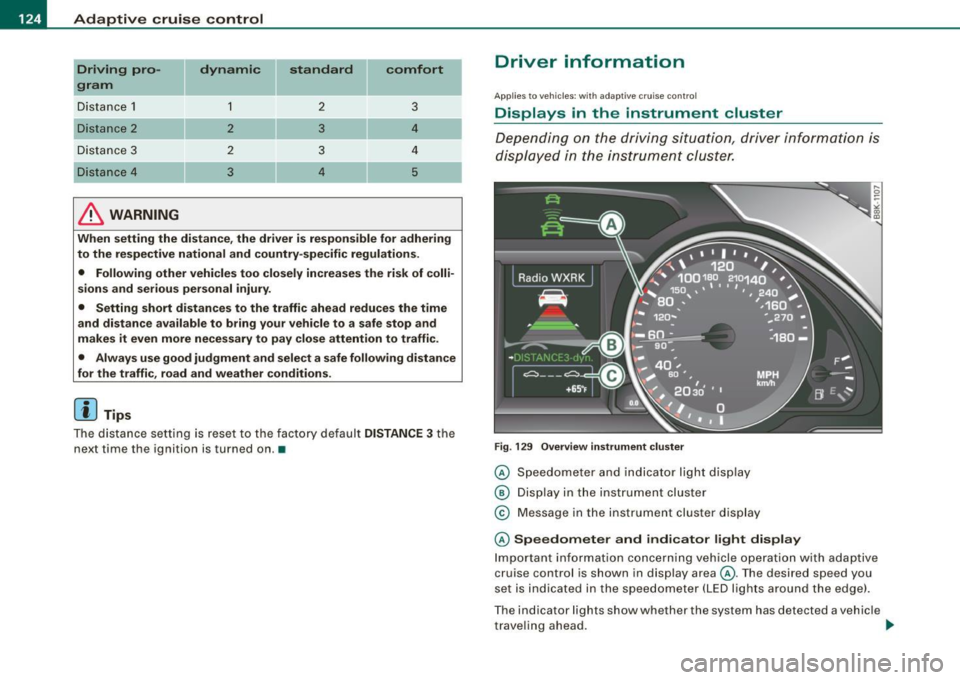
Driver information
Applies to vehic les: with adapt ive cruise contro l
Displays in the instrument cluster
Dependin g o n the driving si tuati on, driver inform ation is
dis pla yed in the i nstr umen t clus ter.
F ig . 129 Overview instrument clu ste r
© Speedome ter and indicator lig ht dis play
® Displ ay in the instru ment clus ter
© M essage in the instr ument clus ter disp lay
© Speedometer and indicator light display
Im port ant inf orm ati on c once rning v ehicle opera tion with a daptiv e
cruise control is shown in display area@. T he desired speed you
s et is in dica ted in the sp eedometer ( LED l igh ts a rou nd th e e dge).
T he indicator lig hts show whether the system has detected a v ehic le
t rave ling ahead . ..,
Page 128 of 360

• ..__A_ d_ a-'- p_t _iv _ e_ c_r _u _ i_s _e _ c_o_ n_t _r _o _l _____________________________________________ _
Applies to ve hicles : w it h ada ptive c ruise cont rol
Display in the instrument cluster
F ig . 13 1 Di spl ay in the
in strum en t c luster
Scroll through the avai lab le information displays by briefly tapping
the
I RESET] button at the end of the windshield wiper lever. You can
select information from the trip computer, navigation system* or
adaptive cruise control.
@ Vehicle symbol
@ Dis tance
© Status
@ Veh icle sy mbol
The vehicle symbol indicates whether the system has detected an
object traveling in front.
• Vehicle outl in e: Open road, no vehicle ahead .
• Whit e vehi cle : A vehicle is detected ahead .
• Red vehicle: Request for driver to assume cont ro l.
@ Distance
Using the arrows and scale, you can detect how far it is to the
vehic le in front of you .
• Open road: No arrow appears when the vehicle is on an open
road and there is no vehicle ahead .
• Driving in traff ic: If a vehicle is detected ahead, the arrow moves
on the scale . The green area represents the d istance set . When
approaching s lowly, the arrow moves from the
gray zone to the
green zone on the scale .
• Reque st for driver to as sume control : When approaching rapidly,
the arrow serves as an early warning signal. If the distance selected
is exceeded or possibly not reached, the arrow
moves into the red
z one on the scale. In certain driving si tuations, you as the driver will
have to take action ::::,
page 128, "Driver interventio n promp t" .
© Status
• The tex t ACC OFF appears in white letters when adaptive cru ise
contro l is turned off.
• T he text
ACC AVAILABL E appears in white letters when the
system is turned on but no desired speed has been set .
• The text
OVE RRIDE appears in white letters when you exceed the
desired speed by accelerating .
• The text
DISTANCE! appears in red letters when the interval to a
vehic le trave ling ahea d is too short and you have to slow y our
vehic le additionally with the foot brake .
• The text messages
DISTANCE 1 to DISTANCE 4 appear in green
letters to indicate the time interva l you have se t and adaptive cruise
co ntrol is in ma nagement mode .
• I f the driving program "standard" is replaced by "comfor t" or
" d ynamic" usi ng the MMI*, the a bove text message is supp le
mented by an appropriate prompt , e.g .
DI STANCE 1 DYN . •
Page 131 of 360

_______________________________________________ A_ d_ a ---=- p_t_ i_v _e_ c_ r_ u_ i_ s _e_ c_ o_ n_t_ r _o _ l __ llJIII
• A red vehicle is shown in the instrument cluster disp lay
~ page 128, fig. 133 .
• T he text DISTANCE! appears in the status line.
• The indicator light in the Instrument cluster blinks red.
• A warning tone sounds.
[ i] Tip s
• I f the adaptive cruise control initiates braking, the hydraulic
brake system is under pressure. Therefore, the brake peda l distance
is shorter and the pedal "feels" harder.
• Adaptive cruise control is switched off after pressing the foot
brake . The speed saved up this point can be resumed.
• To resume the saved speed, release the brake pedal and press
the control lever~
page 122, "Turning adaptive cruise control off
temporarily".
• I f you use the accelerator t o go faster than the speed of the
object ahead of you, the
dri ver inter vention prompt will not be
accompanied by a wa rning signal.
• I f the speed you previously set is exceeded, the indicator light in
the speed ometer will switch off .•
Controls and equip
ment
App lies to vehic les: with adaptive crui se cont rol
MMI settings
Individual settings for adaptive cruise control can be
selected in the
MM/*.
F ig . 134 MMI Di spl ay:
adapt ive cruise control
Sett ings fo r th e driving program can be adjusted individu
a lly t o th e part ic ul ar user and save d in the MM I* .
- Press the
I CAR] function button.
- Select
Adaptive Cruise Control . The Adaptive Cruise
Control
men u appears => fig. 134.
Selec t
driving program .
Select the desired driving program .
Setting the dri ving program
In the driv ing program menu you can adjust the characteristics of
adaptive cruise control to what you want using
dynamic , standard
or comfort .
Sav ing setting s
Your individual settings are automatically saved and assigned to the
re mote contro l key being used (remote key storage). If the key is
given to another person, the saved settings remain as they are .•
I • •