2010.5 PEUGEOT 5008 engine
[x] Cancel search: enginePage 105 of 345

96
COURTESY LAMPS
1. Front courtesy lamp
2. Map reading lamps
Front and rear courtesy lamps
In this position, the courtesy
lamp comes on gradually:
Map reading lamps
With the ignition on, press the cor-
responding switch.
With the permanent lighting
mode, the lighting time varies
according to the circumstances:
- with the ignition off, approximately ten minutes,
-
in energy economy mode, approxi-
mately thirty seconds,
- with the engine running, unlimited.
- when the vehicle is unlocked,
- when the key is removed from the
ignition,
- when a door is opened,
- when the remote control locking but- ton is activated, in order to locate
your vehicle.
Permanently off.
Permanent lighting. When the front courtesy lamp
is in the "permanent lighting"
position, the rear courtesy
lamp will also come on, unless it is in
the "permanently off" position.
To switch off the rear courtesy lamp,
place it in the "permanently off" posi-
tion.
Take care not to place anything
in contact with the courtesy
lamps.
It switches off gradually:
- when the vehicle is locked,
- when the ignition is switched on,
- 30 seconds after the last door is
closed.
3. Rear courtesy lamp
Page 107 of 345
98
Different lighting times are
available:
- when the ignition is off, approxi- mately ten minutes,
- in energy economy mode, approxi- mately thirty seconds,
- when the engine is running, no limit.
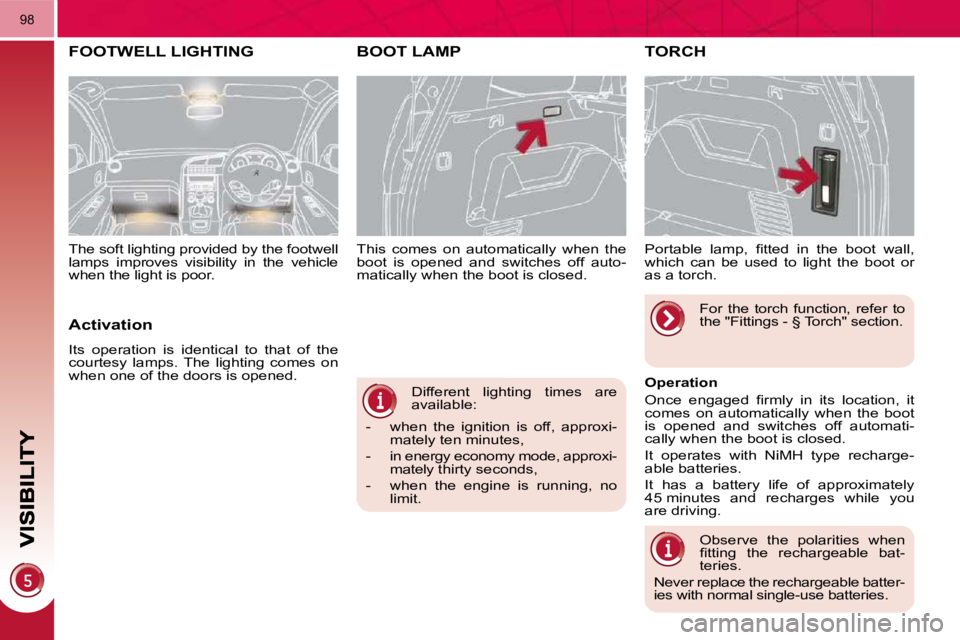
This comes on automatically when the
boot is opened and switches off auto-
matically when the boot is closed.
BOOT LAMP TORCH
Portable lamp, fi tted in the boot wall,
which can be used to light the boot or
as a torch.
Operation
Once engaged fi rmly in its location, it
comes on automatically when the boot
is opened and switches off automati-
cally when the boot is closed.
It operates with NiMH type recharge-
able batteries.
It has a battery life of approximately
45 minutes and recharges while you
are driving.
Observe the polarities when
fi tting the rechargeable bat-
teries.
Never replace the rechargeable batter-
ies with normal single-use batteries. For the torch function, refer to
the "Fittings - § Torch" section.
FOOTWELL LIGHTING
Activation
Its operation is identical to that of the
courtesy lamps. The lighting comes on
when one of the doors is opened.
The soft lighting provided by the footwell
lamps improves visibility in the vehicle
when the light is poor.
Page 108 of 345
98
Different lighting times are
available:
- when the ignition is off, approxi- mately ten minutes,
- in energy economy mode, approxi- mately thirty seconds,
- when the engine is running, no limit.
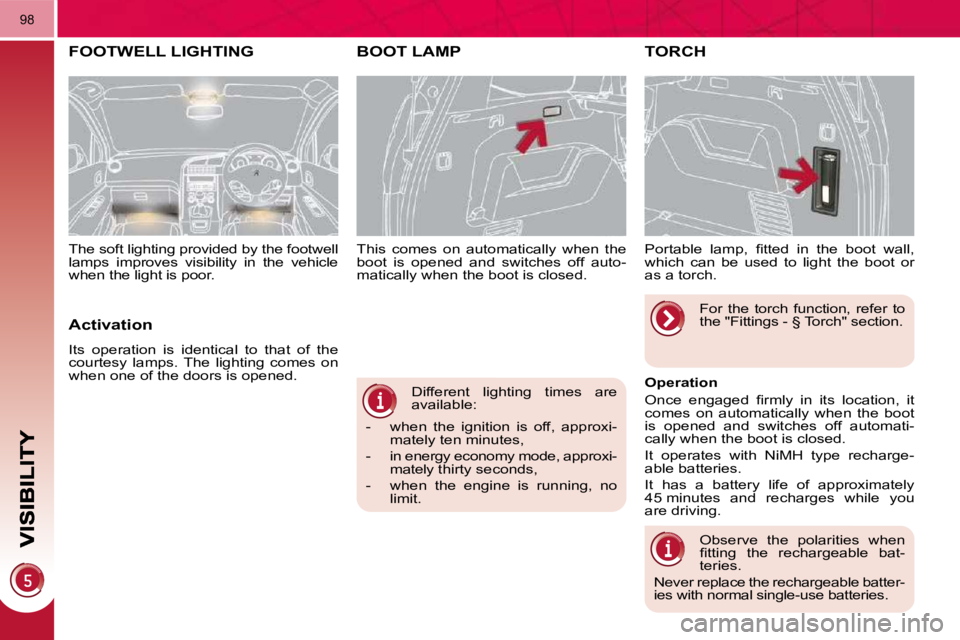
This comes on automatically when the
boot is opened and switches off auto-
matically when the boot is closed.
BOOT LAMP TORCH
Portable lamp, fi tted in the boot wall,
which can be used to light the boot or
as a torch.
Operation
Once engaged fi rmly in its location, it
comes on automatically when the boot
is opened and switches off automati-
cally when the boot is closed.
It operates with NiMH type recharge-
able batteries.
It has a battery life of approximately
45 minutes and recharges while you
are driving.
Observe the polarities when
fi tting the rechargeable bat-
teries.
Never replace the rechargeable batter-
ies with normal single-use batteries. For the torch function, refer to
the "Fittings - § Torch" section.
FOOTWELL LIGHTING
Activation
Its operation is identical to that of the
courtesy lamps. The lighting comes on
when one of the doors is opened.
The soft lighting provided by the footwell
lamps improves visibility in the vehicle
when the light is poor.
Page 115 of 345
FITTINGS
104
REAR MULTIMEDIA
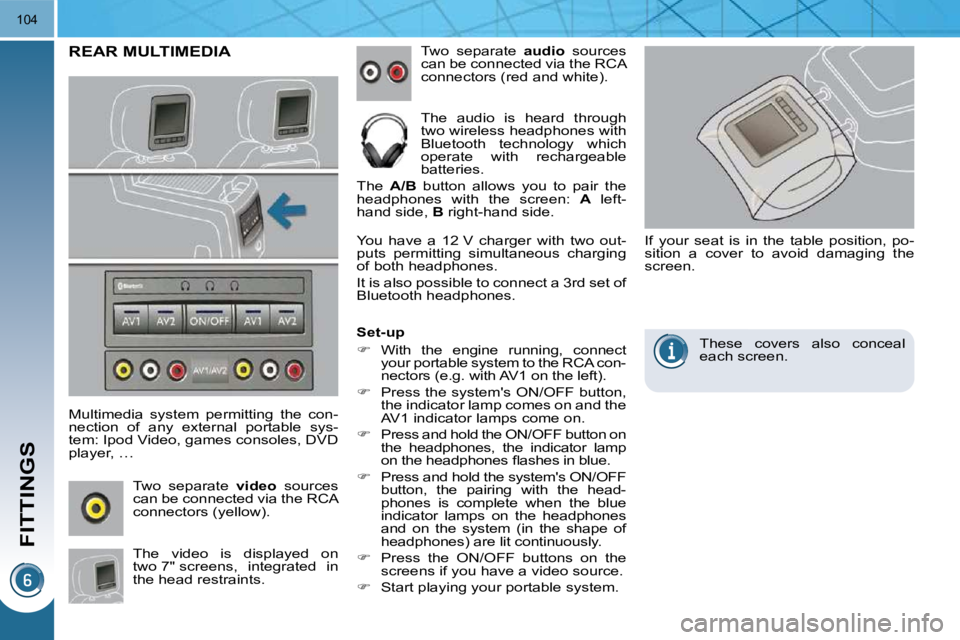
Multimedia system permitting the con-
nection of any external portable sys-
tem: Ipod Video, games consoles, DVD
player, … Two separate
audio sources
can be connected via the RCA
connectors (red and white).
The audio is heard through
two wireless headphones with
Bluetooth technology which
operate with rechargeable
batteries.
The A/B button allows you to pair the
headphones with the screen: A left-
hand side, B right-hand side.
The video is displayed on
two 7" screens, integrated in
the head restraints.
Two separate
video sources
can be connected via the RCA
connectors (yellow). You have a 12 V charger with two out-
puts permitting simultaneous charging
of both headphones.
It is also possible to connect a 3 rd set of
Bluetooth headphones.
Set-up
With the engine running, connect
your portable system to the RCA con-
nectors (e.g. with AV1 on the left).
Press the system's ON/OFF button,
the indicator lamp comes on and the
AV1 indicator lamps come on.
Press and hold the ON/OFF button on
the headphones, the indicator lamp
on the headphones fl ashes in blue.
Press and hold the system's ON/OFF
button, the pairing with the head-
phones is complete when the blue
indicator lamps on the headphones
and on the system (in the shape of
headphones) are lit continuously.
Press the ON/OFF buttons on the
screens if you have a video source.
Start playing your portable system. If your seat is in the table position, po-
sition a cover to avoid damaging the
screen.
These covers also conceal
each screen.
Page 121 of 345

FITTINGS
104
REAR MULTIMEDIA
Multimedia system permitting the con-
nection of any external portable sys-
tem: Ipod Video, games consoles, DVD
player, … Two separate
audio sources
can be connected via the RCA
connectors (red and white).
The audio is heard through
two wireless headphones with
Bluetooth technology which
operate with rechargeable
batteries.
The A/B button allows you to pair the
headphones with the screen: A left-
hand side, B right-hand side.
The video is displayed on
two 7" screens, integrated in
the head restraints.
Two separate
video sources
can be connected via the RCA
connectors (yellow). You have a 12 V charger with two out-
puts permitting simultaneous charging
of both headphones.
It is also possible to connect a 3 rd set of
Bluetooth headphones.
Set-up
With the engine running, connect
your portable system to the RCA con-
nectors (e.g. with AV1 on the left).
Press the system's ON/OFF button,
the indicator lamp comes on and the
AV1 indicator lamps come on.
Press and hold the ON/OFF button on
the headphones, the indicator lamp
on the headphones fl ashes in blue.
Press and hold the system's ON/OFF
button, the pairing with the head-
phones is complete when the blue
indicator lamps on the headphones
and on the system (in the shape of
headphones) are lit continuously.
Press the ON/OFF buttons on the
screens if you have a video source.
Start playing your portable system. If your seat is in the table position, po-
sition a cover to avoid damaging the
screen.
These covers also conceal
each screen.
Page 155 of 345

126
ELECTRONIC STABILITY PROGRAMME (ESP)
Electronic stability programme (ESP)
incorporating the following systems:
- the anti-lock braking system (ABS) and the electronic brake force distri-
bution system (EBFD),
- the emergency braking assistance,
- the traction control (ASR),
- the dynamic stability control (DSC).
Definitions
Anti-skid regulation (ASR)
The ASR system (also known as Trac-
tion Control) optimises traction in order
to avoid wheel slip by acting on the
brakes of the driving wheels and on the
engine. It also improves the directional
stability of the vehicle on acceleration.
Dynamic stability control (DSC)
If there is a difference between the path
followed by the vehicle and that re-
quired by the driver, the DSC monitors
each wheel and automatically acts on
the brake of one or more wheels and
on the engine to return the vehicle to
the required path, within the limits of the
laws of physics.
Emergency braking assistance
In an emergency, this system enables
you to reach the optimum braking pres-
sure more quickly and therefore reduce
the stopping distance.
It is triggered in relation to the speed at
which the brake pedal is pressed. This
is felt by a reduction in the resistance of
the pedal and an increase in the effec-
tiveness of the braking.
Anti-lock braking system (ABS) and
electronic brake force distribution
system (EBFD)
This system improves the stability and ma-
noeuvrability of your vehicle when braking
and offers improved control, in particular
on poor or slippery road surfaces.
The ABS prevents wheel lock in the event
of emergency braking.
The electronic brake force distribution sys-
tem manages the braking pressure wheel
by wheel. Operation
When this warning lamp
comes on, accompanied by an
audible signal and a message,
it indicates that there is a fault
with the ABS, which could cause loss of
control of the vehicle when braking.
When this warning lamp comes
on, coupled with the STOP
warning lamp, accompanied
by an audible signal and a
message, it indicates that there is a fault
with the electronic brake force distribu-
tion (EBFD), which could cause loss of
control of the vehicle when braking.
You must stop as soon as it is safe
to do so.
In both cases, contact a PEUGEOT
dealer or a qualifi ed workshop.
When changing wheels (tyres
and rims), make sure that
these are approved for your
vehicle.
Normal operation of the ABS may
make itself felt by slight vibrations of
the brake pedal.
In emergency braking, press
very fi rmly without releasing
the pressure.
Anti-lock braking system (ABS) and
electronic brake force distribution (EBFD)
Snow driving assistance (Intelligent Traction Control)
Your vehicle has a system to help driving
on snow: Intelligent Traction Control .
This automatic system continuously
checks for situations of diffi cult surface
adhesion that could make it diffi cult to
move off or make progress on deep
fresh snow or compacted snow.
In these situations, Intelligent Traction
Control takes over from the ASR sys-
tem, limiting the amount of wheel slip to
provide the best traction and trajectory
control, even without snow tyres and
with or without chains.
In extremely severe conditions (snow
on top of ice, sand, deep mud…), it can
be useful to deactivate the ESP/ASR
systems to allow a degree of wheel spin
and so recover grip.
Page 156 of 345
127
Dynamic stability control (DSC) The DSC system offers excep-
tional safety in normal driving,
but this should not encourage
the driver to take extra risks or drive
at high speed.
The correct functioning of the system
depends on observation of the man-
ufacturer's recommendations regard-
ing the wheels (tyres and rims), the
braking components, the electronic
components and the PEUGEOT as-
sembly and operation procedures.
After an impact, have the system
checked by a PEUGEOT dealer.
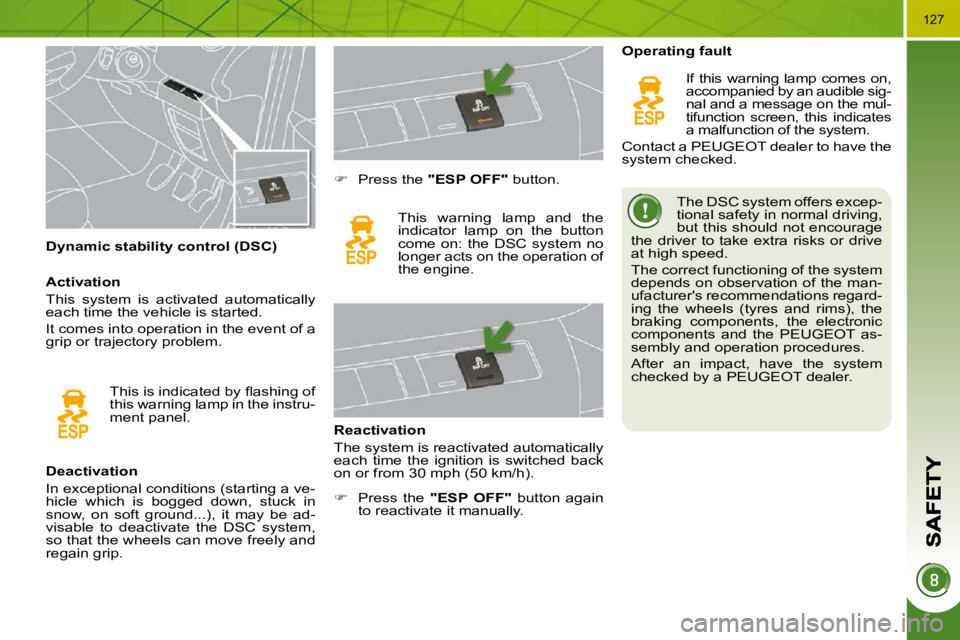
Deactivation
In exceptional conditions (starting a ve-
hicle which is bogged down, stuck in
snow, on soft ground...), it may be ad-
visable to deactivate the DSC system,
so that the wheels can move freely and
regain grip.
Press the "ESP OFF" button.
This warning lamp and the
indicator lamp on the button
come on: the DSC system no
longer acts on the operation of
the engine.
Reactivation
The system is reactivated automatically
each time the ignition is switched back
on or from 30 mph (50 km/h). Operating fault
If this warning lamp comes on,
accompanied by an audible sig-
nal and a message on the mul-
tifunction screen, this indicates
a malfunction of the system.
Contact a PEUGEOT dealer to have the
system checked.
This is indicated by fl ashing of
this warning lamp in the instru-
ment panel.
Activation
This system is activated automatically
each time the vehicle is started.
It comes into operation in the event of a
grip or trajectory problem.
Press the "ESP OFF" button again
to reactivate it manually.
Page 157 of 345

126
ELECTRONIC STABILITY PROGRAMME (ESP)
Electronic stability programme (ESP)
incorporating the following systems:
- the anti-lock braking system (ABS) and the electronic brake force distri-
bution system (EBFD),
- the emergency braking assistance,
- the traction control (ASR),
- the dynamic stability control (DSC).
Definitions
Anti-skid regulation (ASR)
The ASR system (also known as Trac-
tion Control) optimises traction in order
to avoid wheel slip by acting on the
brakes of the driving wheels and on the
engine. It also improves the directional
stability of the vehicle on acceleration.
Dynamic stability control (DSC)
If there is a difference between the path
followed by the vehicle and that re-
quired by the driver, the DSC monitors
each wheel and automatically acts on
the brake of one or more wheels and
on the engine to return the vehicle to
the required path, within the limits of the
laws of physics.
Emergency braking assistance
In an emergency, this system enables
you to reach the optimum braking pres-
sure more quickly and therefore reduce
the stopping distance.
It is triggered in relation to the speed at
which the brake pedal is pressed. This
is felt by a reduction in the resistance of
the pedal and an increase in the effec-
tiveness of the braking.
Anti-lock braking system (ABS) and
electronic brake force distribution
system (EBFD)
This system improves the stability and ma-
noeuvrability of your vehicle when braking
and offers improved control, in particular
on poor or slippery road surfaces.
The ABS prevents wheel lock in the event
of emergency braking.
The electronic brake force distribution sys-
tem manages the braking pressure wheel
by wheel. Operation
When this warning lamp
comes on, accompanied by an
audible signal and a message,
it indicates that there is a fault
with the ABS, which could cause loss of
control of the vehicle when braking.
When this warning lamp comes
on, coupled with the STOP
warning lamp, accompanied
by an audible signal and a
message, it indicates that there is a fault
with the electronic brake force distribu-
tion (EBFD), which could cause loss of
control of the vehicle when braking.
You must stop as soon as it is safe
to do so.
In both cases, contact a PEUGEOT
dealer or a qualifi ed workshop.
When changing wheels (tyres
and rims), make sure that
these are approved for your
vehicle.
Normal operation of the ABS may
make itself felt by slight vibrations of
the brake pedal.
In emergency braking, press
very fi rmly without releasing
the pressure.
Anti-lock braking system (ABS) and
electronic brake force distribution (EBFD)
Snow driving assistance (Intelligent Traction Control)
Your vehicle has a system to help driving
on snow: Intelligent Traction Control .
This automatic system continuously
checks for situations of diffi cult surface
adhesion that could make it diffi cult to
move off or make progress on deep
fresh snow or compacted snow.
In these situations, Intelligent Traction
Control takes over from the ASR sys-
tem, limiting the amount of wheel slip to
provide the best traction and trajectory
control, even without snow tyres and
with or without chains.
In extremely severe conditions (snow
on top of ice, sand, deep mud…), it can
be useful to deactivate the ESP/ASR
systems to allow a degree of wheel spin
and so recover grip.