2009 VOLVO XC60 ESP
[x] Cancel search: ESPPage 126 of 297

04 Comfort and driving pleasureMenus and messages 04
124
Menu overviewDriving distance on current fuel reserve
Average
Instantaneous:
Average speed
Current speed in mph (Canadian models
only)
DSTC
Message When a warning, information or indicator sym-
bol comes on, a corresponding message
appears on the information display. An error
message is stored in a memory list until the
fault is rectified. Press READ to acknowledge and scroll among
the messages.
NOTE If a warning message appears while you are
using the trip computer, the message must
be read and confirmed by pressing READ
before the previous activity can be
resumed.
Message Description
Stop safely Stop and switch off
the engine. Serious
risk of damage.
Contact an author-
ized Volvo work-
shop.
Stopping the
engine Stop and switch off
the engine. Serious
risk of damage.
Contact an author-
ized Volvo work-
shop.
Service urgent Have the vehicle
checked by an
authorized Volvo
workshop immedi-
ately. Message Description
Service required Have the vehicle
checked by an
authorized Volvo
workshop as soon
as possible.
See manual Read the owner\fs
manual.
Book time for
maintenance Time to book service
at an authorized
Volvo retailer.
Time for regular
maintenance Time for regular
service at an author-
ized Volvo work-
shop. The timing is
determined by the
number of miles
driven, number of
months since the
last service, engine
running time. G028940
Page 128 of 297

04 Comfort and driving pleasureClimate system 04
126
* Option/accessory, for more information, see Introduction.
Introduction
Air conditioningThe vehicle is equipped with Electronic Climate
Control (ECC). The climate control system
cools, heats or dehumidifies the air in the pas-
senger compartment.
NOTE
\b
The air conditioning can be switched
off, but to ensure the best possible cli-
mate comfort in the passenger com-
partment and to prevent the windows
from misting, it should always be on.
\b In warm weather, a small amount of
water may accumulate under the car
when it has been parked. This water is
condensation from the A/C system and
is normal.
Sensor location
\b
The sunlight sensor is located on the top
side of the dashboard.
NOTE The sunlight sensor monitors which side of
the car that is most exposed to sunlight.
This can mean that the temperature may
differ between the right and left-side air
vents, even if the temperatures set for both
sides of the passenger compartment are the
same.
\b
The temperature sensor for the passenger
compartment is located below the climate
control panel.
\b The outside temperature sensor is located
on the door mirror.
\b The humidity sensor
* is located in the inte-
rior rearview mirror.
NOTE Do not cover or block the sensors with
clothing or other objects.
Side windows and moonroofTo ensure that the air conditioning works opti-
mally, the side windows, and the optional
moonroof should be closed.
Fog on the inside of the windowsThe defroster function should be used to
remove fog or mist from the inside of the win-
dows. Keeping the windows clean with a com-mercially available window washing spray will
also help prevent fogging or misting.
Temporary shut-off of the air
conditioning
The air conditioning is momentarily disen-
gaged during full-throttle acceleration or when
driving uphill with a trailer. This may result in a
temporary increase in cabin temperature.
Ice and snowAlways keep the air intake grille at the base of
the windshield free of snow.
Climate system maintenanceSpecial tools and equipment are required to
maintain and carry out repairs on the climate
system. Work of this type should only be done
by a trained and qualified Volvo service tech-
nician.
RefrigerantVolvo cares about the environment. The air
conditioning system in your car contains a
CFC-free refrigerant – R134a. This substance
will not deplete the ozone layer. The air condi-
tioning system contains 1.8 lbs (800 g) of
R134a. The systems uses PAG oil.
Passenger compartment filterReplace the cabin air filter with a new one at
the recommended intervals. Please refer to
Page 131 of 297

04 Comfort and driving pleasure
Climate system04
}}
* Option/accessory, for more information, see Introduction. 129
Heated rear seats*Heat control for the outboard seating positions
takes place in the same way as for the front
seat.
Air distributionThe figure consists of three
buttons. When the buttons
are pressed, an indicator light
in front of the respective part
of the figure illuminates and
shows which air distribution is
selected.
AutoThe function automatically
regulates cooling, heating,
blower speed, recirculation,
and air distribution to main-
tain the chosen temperature.
If you select one or more man-
ual functions, the other func-
tions continue to be controlled automatically.
The air quality sensor is engaged and all man-
ual settings are switched off when AUTO is
pressed. The display shows AUTO
CLIMATE.
Blower speed in automatic mode can be set
under Climate settings Automatic blower
adjust. Choose between Low, Normal or
High.
NOTE Selecting the lowest blower speed may
increases the risk of fog forming on the win-
dows.
For a description of the menu system, see
page 122.
Temperature controlThe temperatures on the
driver and passenger sides
can be set independently.
When the vehicle is started,
the most recent setting is
resumed.
NOTE Heating or cooling cannot be speeded up by
selecting a higher/lower temperature than
the actual temperature required.
A/C – ON/OFFThe air conditioning is con-
trolled automatically by the
system when the ON light is
on. This cools/heats and
dehumidifies the incoming air.
When the OFF light is on, the
air conditioning is always dis-
engaged. Other functions are still controlled
automatically. When defroster is selected, the
air conditioning system is set for maximum
blower speed and dehumidification. G021376
Page 132 of 297

04 Comfort and driving pleasureClimate system 04
130
* Option/accessory, for more information, see Introduction.
DefrosterThis function defrosts/de-ices
the windshield and front side
windows. The indicator light
in the defroster button lights
when the function is active.\b
Blower speed increases automatically and
the air conditioning will switch on (if not
already on and if the passenger compart-
ment blower is not turned off) to dehumid-
ify the air in the passenger compartment.
Air conditioning can be switched off by
pressing the AC button.
\b Recirculation will not function while defrost
is engaged.
The climate system will return to its previous
settings when the defroster function is
switched off.Recirculation/air quality system
Recirculation
This function can be used to
shut out exhaust fumes,
smoke, etc from the passen-
ger compartment. The air in
the passenger compartment
is then recirculated, i.e., no air
from outside the car is taken
into the car when this function is activated. The
indicator light in the button will illuminate when
recirculation is selected.
If the air in the car recirculates for too long,
there is a risk of condensation forming on the
insides of the windows, especially in winter.
TimerThe timer function minimizes the risk of fog-
ging, or stale air when the recirculation function
is selected by automatically switching off the
function after a certain length of time, depend-
ing on the ambient temperature. Activate/
deactivate the function under Climate control
settings Recirculation timer. For a
description of the menu system, see
page 122.
NOTE When Defroster is selected, recirculation is
always deactivated.
Interior Air Quality System–IAQS*This system consists of a mul-
tifilter and an air quality sen-
sor. The filter helps remove
gases and particles from the
incoming air, thereby reduc-
ing the amounts of odors and
contaminants entering the
vehicle. The air quality sensor detects
increased levels of contaminants in the outside
air. When the air quality sensor detects conta-
minated outside air, the air intake closes and
the air inside the passenger compartment is
recirculated, i.e., no outside air enters the vehi-
cle. The filter also cleans recirculated passen-
ger compartment air. When the AUTO button
is depressed the air quality sensor is always
engaged.
Activating the air quality sensorSwitch between the three
functions by pressing the but-
ton repeatedly.
Page 139 of 297

04 Comfort and driving pleasure
Audio system04
}}
* Option/accessory, for more information, see Introduction. 137
Sound settingsPress the control (3) repeatedly to toggles
among the sound settings. Adjustments are
made by turning the control (3).
\b
Bass – Bass level.
\b Treble – Treble level.
\b Fader – Balance between the front and
rear speakers.
\b Balance – Balance between the right and
left speakers.
\b Subwoofer* – Level for the bass speaker.
The subwoofer can be switched off by
turning control (3) counterclockwise to
MIN. The location of the subwoofer is
shown in the illustration. \b
Surround* – Surround settings.
Under Surround, 3 channel stereo or Dolby
Surround Pro logic II can be activated by
selecting 3-ch or Dpl2 respectively. This ena-
bles the following options:
\b Center level 2
– Level for the center
speaker.
\b Surround level 2
– Level for surround
sound.
EqualizerSound levels for different frequency bands can
be adjusted separately using the equalizer 3
. 1.
Go to Audio settings and select
Equalizer Front or Equalizer Rear.
The sound level for the frequency band is
adjusted with / on the navigation but-
ton. Press / to select another fre-
quency band.
2. Use ENTER to save or EXIT to close.
Sound stage 4The sound experience can be optimized for the
driver\fs seat, both front seats or the rear seat.
Select one of the options under
Audio settings Soundstage.
Optimal sound reproductionThe audio system is calibrated for optimal
sound reproduction using digital signal pro-
cessing.
This calibration takes into account factors such
as the speakers, amplifier, cabin acoustics, the
listeners\f seating positions, etc., for each com-
bination of vehicle/audio system.
There is also a dynamic calibration that takes
into consideration the volume level, radio
reception, and the speed of the vehicle.
The settings that are described in this manual,
such as Bass,
Treble, and Equalizer are only2
Premium Sound
3 Certain audio systems
4Certain markets only. G031960
Page 140 of 297

04 Comfort and driving pleasureAudio system 04
138 intended to enable the user to adapt sound
reproduction to his/her personal tastes.
Radio functions
Center console, controls for radio functions
Navigation button for automatic tuning
Cancel a menu selection or a selected
function
Manual tuning
Scan the current wave band
Auto store the strongest radio stations in
the area
Station preset buttons
Select wave band AM and FM (FM1 and
FM2)
Automatic tuning1.
Select a wave band using FM or AM.
2. Press / on the navigation button.
3. The tuner will search for the next station.
Manual tuning1. Select a wave band using FM or AM.
2. Turn TUNING to select a frequency.
Preset stationsTen station presets can be stored for each
wave band. FM has two memories for presets:
FM1 and FM2. The stored presets are selected
using the preset buttons.
Preset storage can be carried out manually or
automatically.
Manually storing preset stations1. Tune in a station or frequency.
2. Hold in one of the preset buttons until the
message Channel stored appears on the
display.
Automatically storing preset stationsThe function is especially useful in areas where
the radio stations and their frequencies are
unfamiliar. The ten strongest radio stations are
stored automatically in a separate memory.
1.Select a wave band using FM or AM. 2.
Hold in AUTO until Autostoring…
appears on the display.
Once Autostoring… disappears from the dis-
play, the stations are stored. The radio contin-
ues in Auto mode and Auto appears on the
display. The automatically stored presets can
now be selected using the preset buttons.
Automatic preset storage can be cancelled
using EXIT.
Auto mode is cancelled by pressing AUTO or
FM.
Returning to Auto mode provides access to the
autostored presets:
1. Press AUTO.
>
Auto appears on the display.
2. Press a preset button.
ScanThe function automatically searches the cur-
rent wave band for strong stations. When a
station is found, it is played for approx. eight
seconds before scanning is resumed. While
the station is playing it can be stored as a pre-
set as usual.
NOTE Storing a station interrupts the SCAN func-
tion. G031441
Page 158 of 297
04 Comfort and driving pleasureStability system 04
156 If the symbol appears alone, it may
appear as follows:
\b If the symbol flashes, this indicates that the
stability system is actively functioning to
help counteract wheel spin and/or a skid.
\b If the symbol remains on for approximately
2 seconds after the engine has been
started, this indicates that the system is
performing a self-diagnostic test.
WARNING The stability system is intended to help
improve driving safety. It supplements, but
can never replace, the driver\fs judgment
and responsibility when operating the vehi-
cle. Speed and driving style should always
be adapted to traffic and road conditions.
Page 159 of 297
04 Comfort and driving pleasure
Active chassis system–Four C04
* Option/accessory, for more information, see Introduction. 157
Active chassis (Four C)*
Active chassis, Four-C (Continuously Con-
trolled Chassis Concept), regulates the cha-
racteristics of the shock absorbers so that the
car\fs driving characteristics can be adjusted.
There are three settings: Comfort, Sport and
Advanced.
ComfortComfort mode offers a somewhat softer ride
and the transmission shifts gears at lower rpm.
This mode is particularly suitable for long-dis-
tance highway driving. The indicator light in the
button will be on when this mode is selected.
SportIn this mode, the vehicle\fs body sway is
reduced during cornering and steering
response is more immediate. The transmission
shifts up at higher rpm for sportier driving. The
indicator light in the button will be on to indi-
cate that Sport mode has been selected.
AdvancedIn this mode, body sway in curves is minimal
and steering response is very direct. Gear shift-
ing is done at high rpm in each gear for
dynamic and active driving.
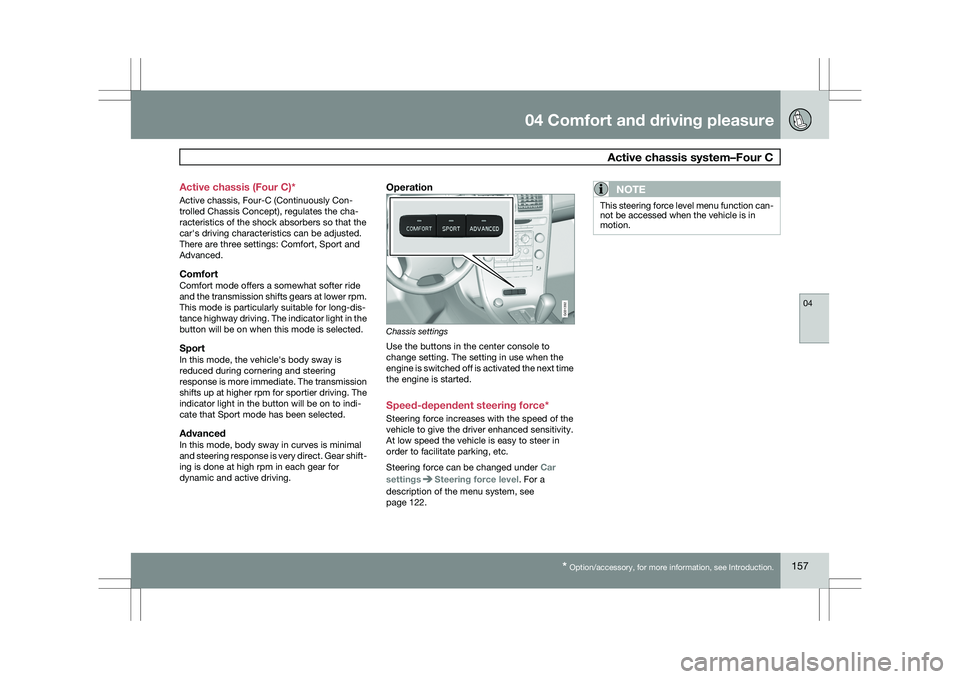
Operation
Chassis settings
Use the buttons in the center console to
change setting. The setting in use when the
engine is switched off is activated the next time
the engine is started.
Speed-dependent steering force*
Steering force increases with the speed of the
vehicle to give the driver enhanced sensitivity.
At low speed the vehicle is easy to steer in
order to facilitate parking, etc.
Steering force can be changed under
Car
settings Steering force level. For a
description of the menu system, see
page 122.NOTE This steering force level menu function can-
not be accessed when the vehicle is in
motion. G031392