2009 VOLVO XC60 headlights
[x] Cancel search: headlightsPage 177 of 297

04 Comfort and driving pleasure
Adaptive Cruise Control (ACC)*04
}}
* Option/accessory, for more information, see Introduction. 175
WARNING\b
Only use a time interval that is suitable
in current traffic conditions.
\b A short time interval gives the driver lim-
ited reaction time if an unexpected sit-
uation occurs in traffic. The number of bars indicating the selected
time interval are shown while the setting is
being made and for several seconds afterward.
A smaller version of the symbol is then shown
to the right in the display. The same symbol is
also displayed when Distance Alert is acti-
vated, see page 179 .
Deactivating and resuming settingsCruise control is deactivated, either with a
short press on
, or by action taken by the
driver, such as braking, etc. The set speed, for
example 55 mph, is then shown in parenthe-
ses. Speed and time interval are resumed by
pressing .
WARNING
There may be a significant increase in speed
after the
button has been pressed.
A short press on in standby mode or a long
press in active mode deactivates cruise con- trol. The set speed is then cleared and cannot
be resumed.
When ACC is activated, the vehicle’s speed
increases by approximately 1 mph (1 km/h)
each additional time is pressed.
Deactivation due to action by the driverACC is deactivated:
\b
when the brakes are applied
\b if the gear selector is moved to
N
\b if the accelerator pedal is depressed for an
extended period.
NOTE If the accelerator pedal is only depressed for
a short time, such as when passing another
vehicle, ACC is deactivated temporarily and
is reactivated when the pedal is released.
Automatic deactivationAdaptive cruise control is linked to other sys-
tems such as ABS, the stability and traction
control system (DSTC), and the Distance Alert
System. If any of these systems are not func-
tioning properly, adaptive cruise control is
automatically deactivated.
In the event of automatic deactivation a signal
will sound and the message
Cruise Control
Canceled is shown in the display. The driver must then intervene and adapt the vehicle\fs
speed to the surrounding traffic.
Automatic deactivation may be caused if:
\b
the vehicle\fs speed falls below 20 mph
(30 km/h)
\b the wheels lose traction or if the anti-lock
brake system (ABS) is activated
\b brake temperature is high
\b engine speed (rpm) is too low
\b the radar sensor is obstructed by, for
example, wet snow or rain.
The radar sensor and its limitations
The radar sensor is used by both Adaptive
Cruise Control and the Collision Warning Sys-
tem with Auto-brake. It is designed to detect
cars or larger vehicles driving in the same
direction as your vehicle.WARNING Accessories or other objects, such as extra
headlights, must not be installed in front of
the grille.
Modification of the radar sensor could make
its use illegal.
The radar sensor\fs capacity to detect vehicles
ahead is impeded:
Page 191 of 297

04 Comfort and driving pleasure
Park assist*04
* Option/accessory, for more information, see Introduction. 189
Front park assistThe distance monitored in front of the vehicle
is approximately 2.5 ft (0.8 m). The audible sig-
nal comes from the audio system\fs front
speakers.
It may not be possible to combine auxiliary
headlights and front park assist since these
lights could trigger the system\fs sensors.
Faults in the system
If the information symbol illuminates and
Park
Assist syst Service required is shown on the
information display, this indicates that the sys-
tem is not functioning properly and has been
disengaged. Consult a trained and qualified
Volvo service technician.CAUTION In certain circumstances, the park assist
system may give unexpected warning sig-
nals that can be caused by external sound
sources that use the same ultrasound fre-
quencies as the system. This may include
such things as the horns of other vehicles,
wet tires on asphalt, pneumatic brakes,
motorcycle exhaust pipes, etc. This does
not indicate a fault in the system.
Cleaning the sensors
Location of the front sensors Location of the rear sensors
The sensors must be cleaned regularly to
ensure that they work properly. Clean them
with water and a suitable car washing deter-
gent.
Ice and snow covering the sensors may cause
incorrect warning signals.
NOTE
If the sensors are obstructed by e.g., dirt,
snow, or ice, this could result in false warn-
ing signals from the park assist system. G031401 G031402 G031403
Page 196 of 297

04 Comfort and driving pleasureBlind Spot Information System* 04
194
* Option/accessory, for more information, see Introduction.
When does BLIS function
The system functions when your vehicle is
moving at speeds above 6 mph (10 km/h).
When you pass another vehicle:The system reacts when you pass another
vehicle at a speed of up to 6 mph (10 km/h)
faster than that vehicle.
When you are passed by another vehicle:The system reacts if your vehicle is passed by
another vehicle at a speed of up to 43 mph
(70 km/h) faster than your vehicle.
WARNING
\b
BLIS does not function in sharp curves.
\b BLIS does not function when your vehi-
cle is backing up.
\b If you are towing a wide trailer, this may
prevent the BLIS cameras from detect-
ing other vehicles in adjacent lanes.
How BLIS functions in daylight and
darkness
Daylight
BLIS reacts to the shape of surrounding vehi-
cles. The system is designed to help detect
motor vehicles such as cars, trucks, buses,
motorcycles, etc.
DarknessBLIS reacts to the headlights of surrounding
vehicles. In order to be detected by BLIS, a
vehicle in the blind area must have its head-
lights on. This means, for example, that the
system will not detect a trailer without head-
lights that is being towed behind a car or truck.WARNING \b
BLIS does not react to cyclists or
mopeds.
\b BLIS does not react to vehicles that are
standing still.
\b The function of the BLIS cameras may
be affected by intense light, or when
driving at night in areas where there are
no external sources of light (e.g., street
lights, other vehicles, etc.). In such
cases, the system may react as if the
cameras were obscured.
\b In both of the above mentioned condi-
tions, a message will appear in the infor-
mation display.
\b When driving in such conditions, the
system\fs function will be limited or it
may be temporarily switched off, see
page 195 for instructions.
\b When the message is no longer dis-
played, BLIS will return to normal func-
tion.
\b The BLIS cameras have the same limi-
tation as the human eye. In other words,
their "vision is impaired" by adverse
weather conditions such as heavy
snowfall, dense fog, etc.
Page 227 of 297

06 Maintenance and specifications
Maintaining your car06
}}
225
Owner maintenance
Periodic maintenance requirements and inter-
vals are described in your vehicle\fs Warranty
and Service Records Information booklet.
The following points can be carried out
between the normally scheduled maintenance
services.
Each time the car is refueled:
\b
Check the engine oil level.
\b Clean the windshield, windshield wipers,
headlights, and tail lights.
Monthly:
\bCheck cold tire pressure in all tires. Inspect
the tires for wear.
\b Check that engine coolant and other fluid
levels are between the indicated "min" and
"max" markings.
\b Clean interior glass surfaces with a glass
cleaner and soft paper towels.
\b Wipe driver information displays with a soft
cloth.
\b Visually inspect battery terminals for cor-
rosion. Corrosion may indicate a loose ter-
minal connector, or a battery near the end
of its useful service life. Consult your Volvo
retailer for additional information.
As needed:Wash the car, including the undercarriage, to
reduce wear that can be caused by a buildup
of dirt, and corrosion that can be caused by salt
residues.
Clean leaves and twigs from air intake vents at
the base of the windshield, and from other pla-
ces where they may collect.
NOTE Complete service information for qualified
technicians is available online for purchase
or subscription at www.volvotechinfo.com.
Hoisting the vehicle
If a garage jack is used to lift the vehicle, the
two jack attachments points should be used.They are specially reinforced to bear the weight
of the vehicle. A garage jack can also be placed
under the front of the engine support frame.
Take care not to damage the splash guard
under the engine. Ensure that the jack is posi-
tioned so that the vehicle cannot slide off it.
Always use axle stands or similar structures.
If a two-post hoist is used to lift the vehicle, the
front and rear lift arm pads should be centered
under the reinforced lift plates on the inboard
edge of the sill rail (see illustration).
Emission inspection readiness
What is an Onboard Diagnostic System
(OBD II)?
OBD II is part of your vehicle\fs computerized
engine management system. It stores diagnos-
tic information about your vehicle\fs emission
controls. It can light the Check Engine light
(MIL) if it detects an emission control "fault." A
"fault" is a component or system that is not
performing within an expected range. A fault
may be permanent or temporary. OBD II will
store a message about any fault.
How do states use OBD II for emission
inspections?
Many states connect a computer directly to a
vehicle\fs OBD II system. The inspector can
then read "faults." In some states, this type of
Page 234 of 297

06 Maintenance and specificationsReplacing bulbs 06
232
* Option/accessory, for more information, see Introduction.
Introduction
All bulb specifications are listed on page 238.
The following bulbs should only be replaced by
a trained and qualified Volvo service techni-
cian:
\b
Dome lighting
\b Reading lights
\b Glove compartment lighting
\b Turn signals in the door mirrors
\b Approach lighting in the door mirror
\b Parking lights
\b Rear side parking lights
\b Active Dual Xenon and LED bulbs
NOTE For information regarding any other bulbs
not mentioned in this section, please con-
tact your Volvo retailer or a trained and
authorized Volvo service technician.
WARNING \b
Active Dual Xenon headlights* – due to
the high voltage used by these head-
lights, these bulbs should only be
replaced by a trained and qualified
Volvo service technician.
\b Turn off the lights and remove the
remote key from the ignition before
changing any bulbs. Headlight housing
WARNING
\b
The engine should not be running when
changing bulbs.
\b When changing in the headlight hous-
ing, if the engine has been running just
prior to replacing bulbs, please be
aware that components in the engine
compartment will be hot. The entire headlight housing must be lifted out
when replacing all front bulbs (except for the
fog lights). G031935 G031936
Page 236 of 297
06 Maintenance and specificationsReplacing bulbs 06
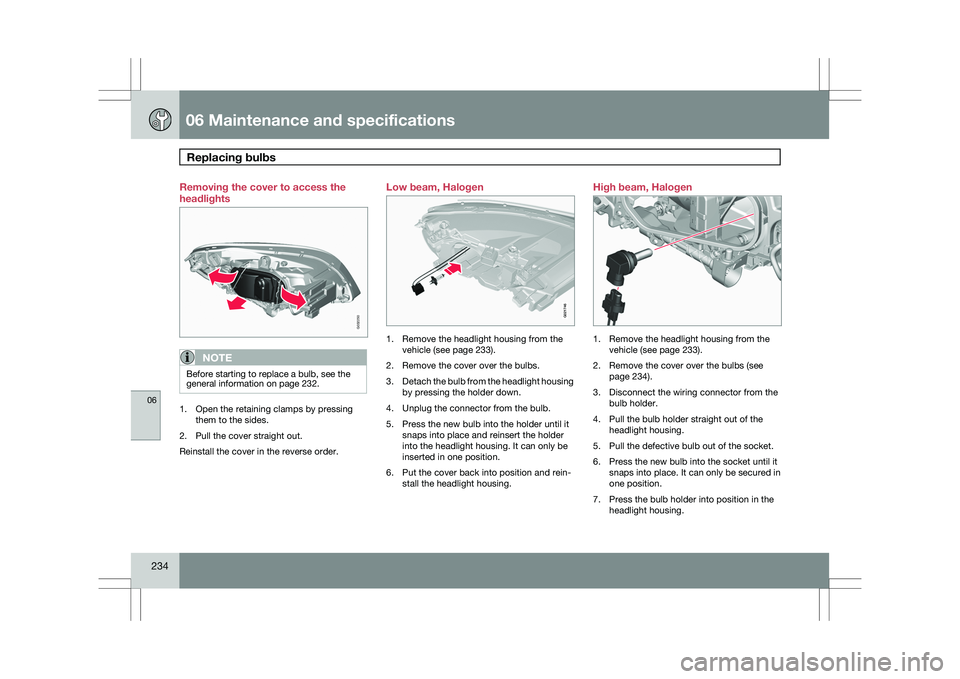
234 Removing the cover to access the
headlights
NOTE
Before starting to replace a bulb, see the
general information on page 232.
1. Open the retaining clamps by pressing
them to the sides.
2. Pull the cover straight out.
Reinstall the cover in the reverse order. Low beam, Halogen
1. Remove the headlight housing from the
vehicle (see page 233).
2. Remove the cover over the bulbs.
3. Detach the bulb from the headlight housing
by pressing the holder down.
4. Unplug the connector from the bulb.
5. Press the new bulb into the holder until it snaps into place and reinsert the holder
into the headlight housing. It can only be
inserted in one position.
6. Put the cover back into position and rein- stall the headlight housing. High beam, Halogen
1. Remove the headlight housing from the
vehicle (see page 233).
2. Remove the cover over the bulbs (see page 234).
3. Disconnect the wiring connector from the bulb holder.
4. Pull the bulb holder straight out of the headlight housing.
5. Pull the defective bulb out of the socket.
6. Press the new bulb into the socket until it snaps into place. It can only be secured in
one position.
7. Press the bulb holder into position in the headlight housing. G032250 G021746 G032252
Page 237 of 297
06 Maintenance and specifications
Replacing bulbs06
}}
235
8.
Reconnect the wiring connector to the bulb
holder.
9. Put the cover back into position and rein- stall the headlight housing.
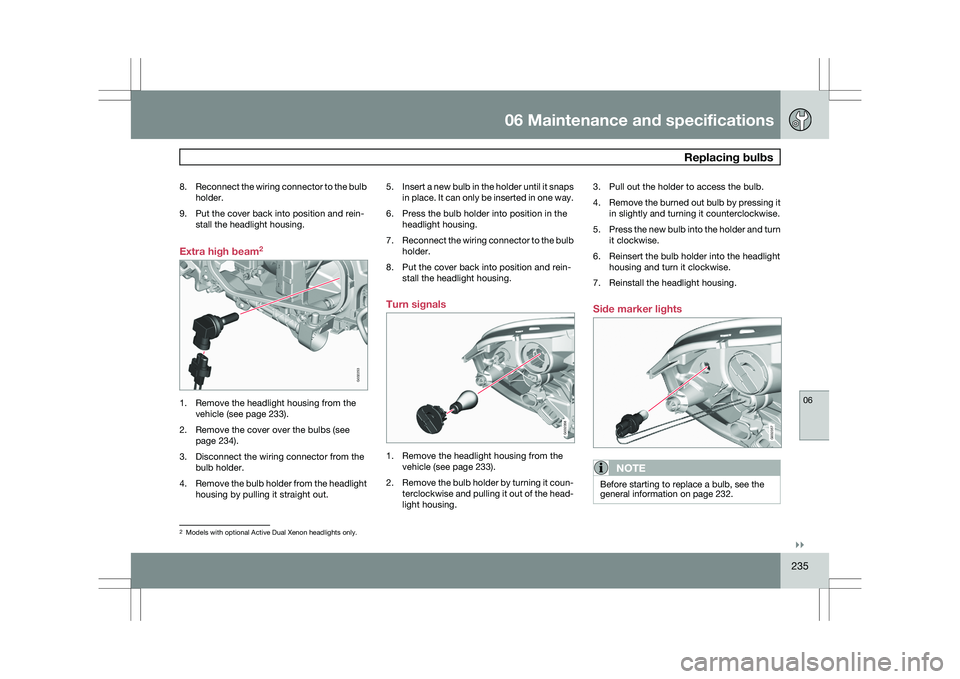
Extra high beam 21. Remove the headlight housing from the
vehicle (see page 233).
2. Remove the cover over the bulbs (see page 234).
3. Disconnect the wiring connector from the bulb holder.
4. Remove the bulb holder from the headlight
housing by pulling it straight out. 5.
Insert a new bulb in the holder until it snaps
in place. It can only be inserted in one way.
6. Press the bulb holder into position in the headlight housing.
7. Reconnect the wiring connector to the bulb
holder.
8. Put the cover back into position and rein- stall the headlight housing.
Turn signals 1. Remove the headlight housing from the
vehicle (see page 233).
2. Remove the bulb holder by turning it coun-
terclockwise and pulling it out of the head-
light housing. 3. Pull out the holder to access the bulb.
4.
Remove the burned out bulb by pressing it
in slightly and turning it counterclockwise.
5. Press the new bulb into the holder and turn
it clockwise.
6. Reinsert the bulb holder into the headlight housing and turn it clockwise.
7. Reinstall the headlight housing.
Side marker lights
NOTE Before starting to replace a bulb, see the
general information on page 232.
2
Models with optional Active Dual Xenon headlights only. G032253 G032358 G032357
Page 276 of 297
06 Maintenance and specificationsVehicle care 06
274 Washing the car
WARNING
Be sure that the compressor is not con-
nected to a 12-volt socket while replacing
the container.
The following points should be kept in mind
when washing and cleaning the car:
\b
The car should be washed at regular inter-
vals since dirt, dust, insects and tar spots
adhere to the paint and may cause dam-
age. To help prevent corrosion, it is partic-
ularly important to wash the car frequently
in the wintertime.
\b Avoid washing your car in direct sunlight.
Doing so may cause detergents and wax
to dry out and become abrasive. To avoid
scratching, use lukewarm water to soften
the dirt before you wash with a soft
sponge, and plenty of sudsy water.
\b Bird droppings: Remove from paintwork
as soon as possible. Otherwise the finish
may be permanently damaged.
\b A detergent can be used to facilitate the
softening of dirt and oil.
\b A water-soluble grease solvent may be
used in cases of sticky dirt. However, use
a wash place equipped with a drainage
separator. \b
Dry the car with a clean chamois and
remember to clean the drain holes in the
doors and rocker panels.
\b Tar spots can be removed with kerosene
or tar remover after the car has been
washed.
\b A stiff-bristle brush and lukewarm soapy
water can be used to clean the wiper
blades. Frequent cleaning of the wind-
shield and wiper blades improves visibility
considerably and also helps prolong the
service life of the wiper blades.
\b Wash off the dirt from the underside (wheel
housings, fenders, etc).
\b In areas of high industrial fallout, more fre-
quent washing is recommended.
\b After cleaning the engine, the spark plug
wells should be inspected for water and
blown dry if necessary.
NOTE When washing the car, remember to remove
dirt from the drain holes in the doors and
sills.
CAUTION \b
During high pressure washing, the
spray mouthpiece must never be closer
to the vehicle than 13" (30 cm). Do not
spray into the locks.
\b Dirt, snow, etc., on the headlights can
reduce lighting capacity considerably.
Clean the headlights regularly, for
example when refueling.
\b When washing or steam cleaning the
engine, avoid spraying water or steam
directly on the electrical components or
toward the rear side of the engine. Spe-
cial moonroof cautions:
\b Always close the moonroof and sun
shade before washing your vehicle.
\b Never use abrasive cleaning agents on
the moonroof.
\b Never use wax on the rubber seals
around the moonroof.
Exterior componentsVolvo recommends the use of special cleaning
products, available at your Volvo retailer, for
cleaning colored plastic, rubber, or ornamental
components such as chromed strips on the
exterior of your vehicle. The instructions for
using these products should be followed care-