2009 VOLKSWAGEN SCIROCCO Page 105
[x] Cancel search: Page 105Page 12 of 138
Downloaded from www.Manualslib.com manuals search engine front passenger side
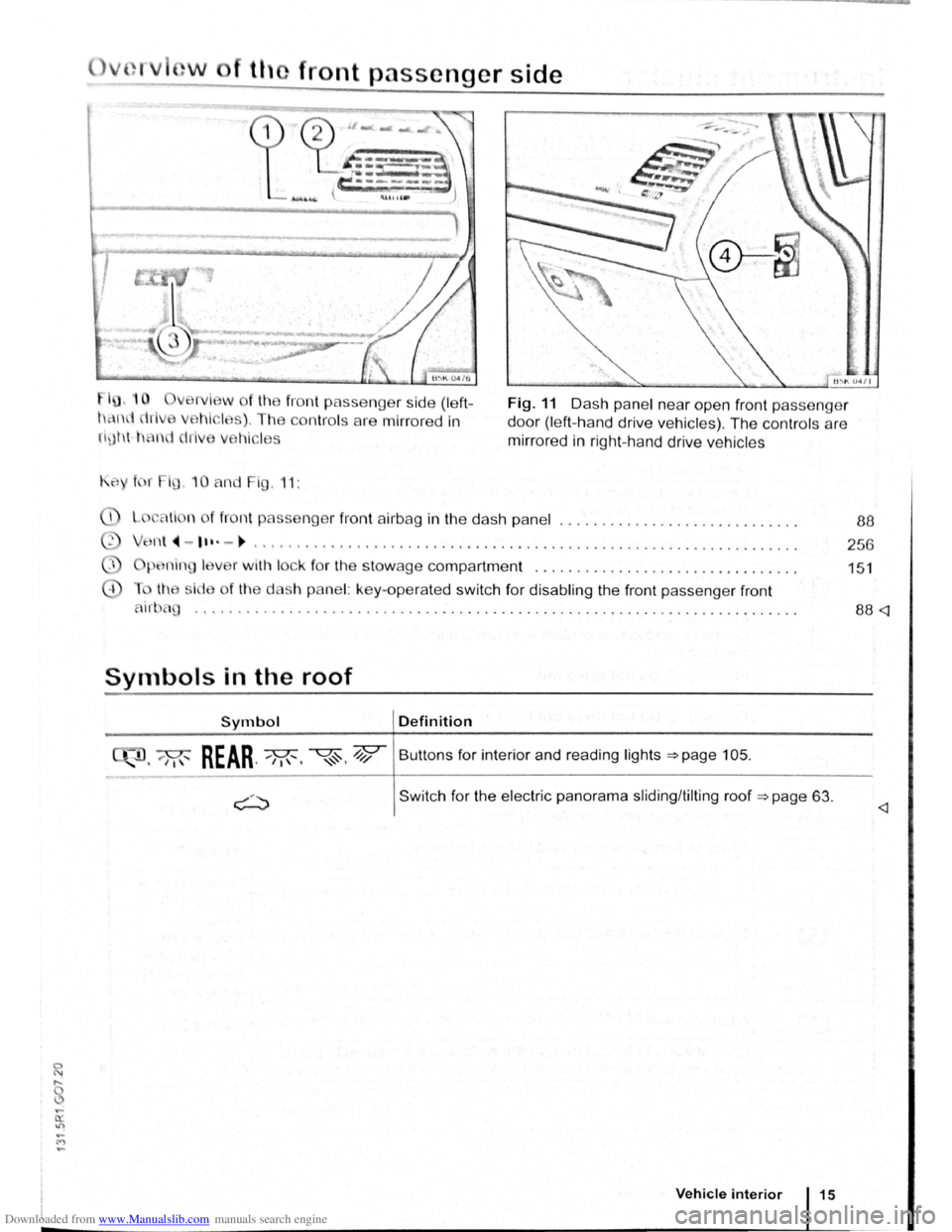
fro nt p asse nger side (left
con tro ls are mirro red in
Fig. 11 D as h pa ne l nea r ope n front passeng er
d o
or (le ft-h a nd driv e ve hi cles ). Th e co ntr ols a re
mirr ore d in rig ht -h a nd driv e ve hi cle s
K f r i , 1 0 nd F ig , 11:
li n f fro nt p sseng er f ront air b ag in the das h p ane l ................ ............ .
n t
~-1 ••·-~ , ......... ..... ............................ ................... .. .
p .n in I v r w ith lock for th e sto w age compartment ............................... .
th i
de of th e das h panel: ke y-ope ra te d swit ch for disabling the front pa sse nger front
88
256
1 5 1
'''.' •••••••••• •••••• 0 •• 0 ••••• •••••••• 0 •••••• 0 0 • • 0 •••• 0 • ••••••••• • 0. 0 • • 88
Symbols in the roof
Symbol Definition
, 'M"' REAR ..... M,, '<~. 4;? Butt ons fo r int erior and reading lights ~page 105.
Swit c h for the electric panorama sliding /tilt ing roof ~page 63.
Vehicle interior 15
Page 14 of 138
Downloaded from www.Manualslib.com manuals search engine Symbol Meaning~~ See
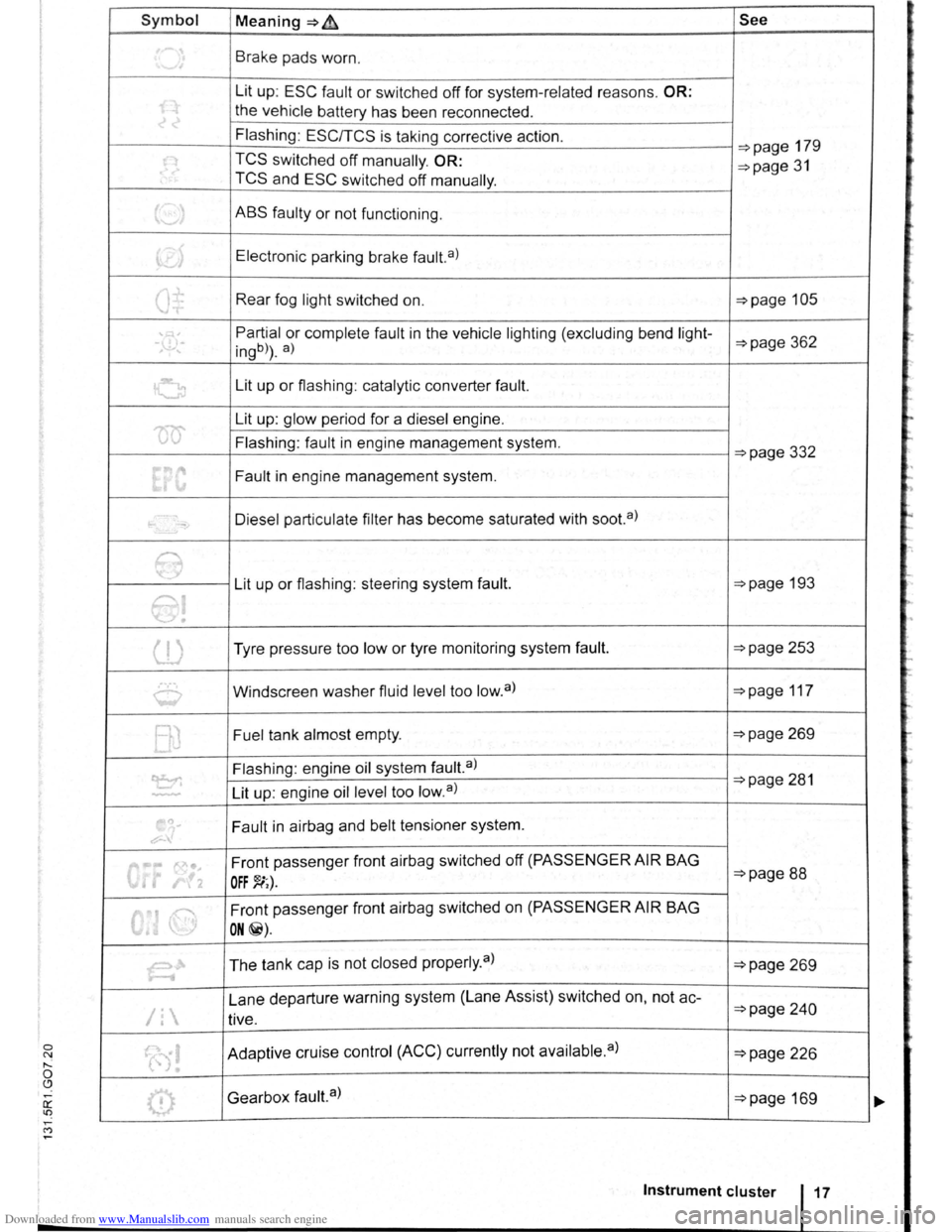
~ Brake pads worn.
Lit up:
ESC fault or switched off for system -related reasons. OR:
the ve hi cle battery has been reconnected .
Flashing :
EScrrcs is taking corrective action. ~page 179
~ TCS switched off manually. OR: ~page 31 TCS and ESC switch ed off manually .
t._.J ABS faulty or not functioning .
~> Electronic parking brake fault. a)
Q± Rear fog light switched on. ~page 105
' , Partial or complete fault in the vehicle lighting (excluding bend light--,\.!),-ingb)) . a) ~page 362
G Lit up or flashing : catalytic converter fault.
'00'
Lit up: glow period for a diesel engine .
Flashing : fault
in engine management system. ~page 332
Fault in engine management system.
-Diesel particulate filter has become saturated with soot. a)
e Lit up or flashing : steering system fault. ~page 193
e!
(l) Tyre pressure too low or tyre monitoring system fault. ~page 253
0 Windscreen washer fluid level too low. a) ~page 117
BJ Fuel tank almost empty. ~page 269
~
Flashing : engine oil system fault.a) ~page 281
Lit up: engine oil level too low. a ) ..............
.,
~
~ Fault in airbag and belt tensioner system.
0"' ... 1'0•. Front passenger front airbag switched off (PASSENGER AIR BAG ~page 88 • r!2 OFF~;).
6
Front passenger front airbag switched on (PASSENGER AIR BAG
I ON@).
~ The tank cap is not closed properly . a ) ~page 269
Lane departure warning system (Lane Assist) switched on, not
ac-~page 2 4 0 /1 tive.
(0! Adaptive cruise control (ACC) currently not available. a) ~page 226
0 Gearbox fault.a) ~page 169
Instrument cluster
=
Page 15 of 138
Downloaded from www.Manualslib.com manuals search engine Symbol Meaning=>~ See
~Q
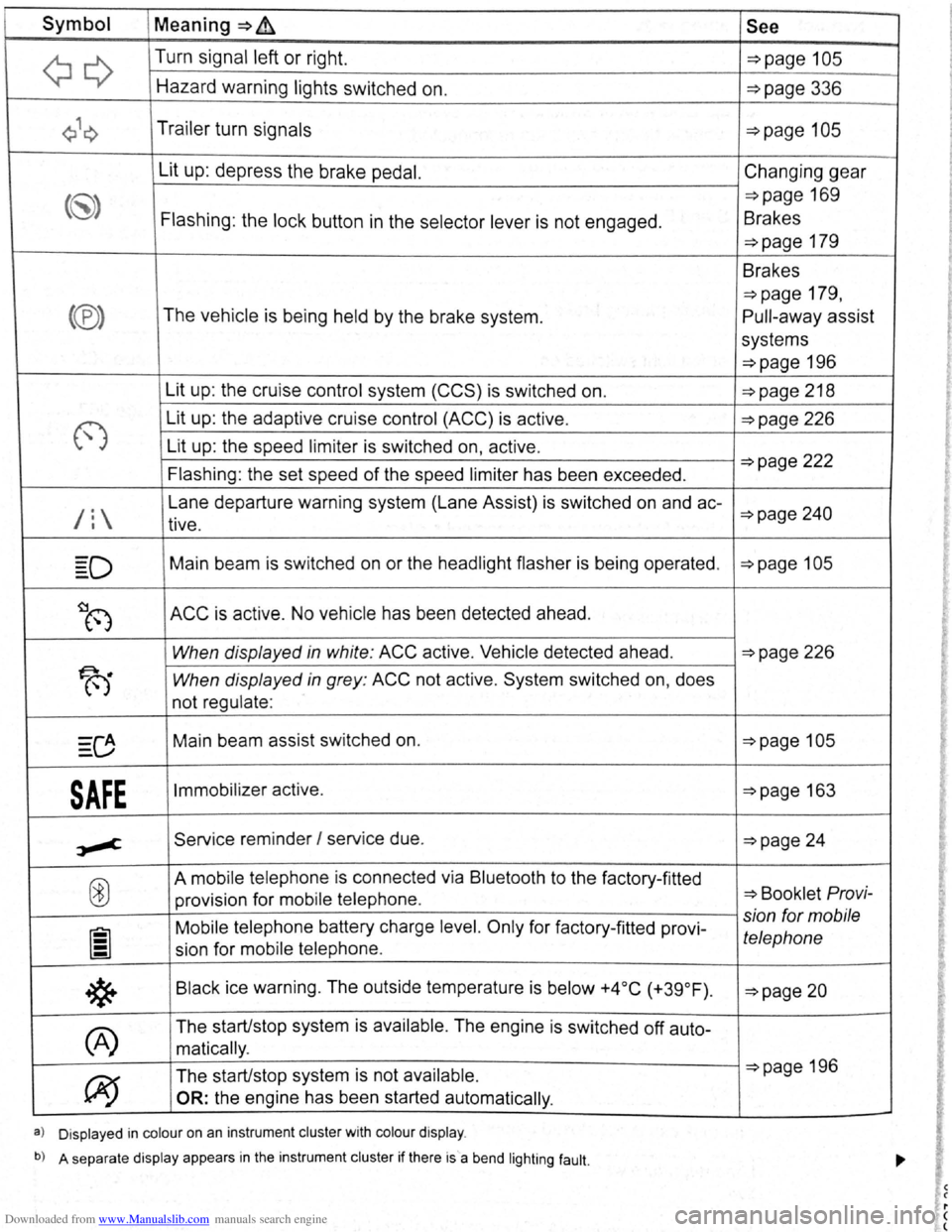
Turn signal left or right. ~page 105
Hazard warning lights switched on. ~page 336
Q\~ Trailer turn signals ~page 105
Lit up: depress the brake pedal. Changing gear
(~) =>page 169
Flashing : the lock button in the selector lever is not engaged . Brakes
~page 179
Brakes
~page 179 ,
(®) The vehicle is being held by the brake system. Pull-away assist
systems
~page 196
Lit up : the cruise control system
(CCS) is switched on. ~page 218
(')
Lit up: the adaptive cruise control (ACC) is act ive . ~page 226
Lit up: the speed limiter is switched on, active.
Flashing : the set speed
of the speed limiter has been exceeded . ~page 222
/l
Lane departure warning system (lane Assist) is switched on and ac-~page 240 tive.
=D Main beam is sw itched on or the headlight flasher is be ing operated . ~page 105
~~ ACC is active . No vehicle has been detected ahead.
When displayed in white : ACC active . Vehicle detected ahead. ~page 226
T-i When displayed in grey: ACC not active. System switched on, does
not regulate :
0 Main beam assist switched on. ~page 105
SAFE Immobilizer active . ~page 163
,.,-c Service reminder I serv ice due . ~page 24
@
A mobile telepho ne is connected via Bluetooth to the factory-fitted ~ Booklet Pro vi-provision for mobile telephone .
Mobile telephone battery charge level. Only for factory-fitted provi-
sion for mobile
lil telephone sion for mobile telephone .
*
Black ice warning . The outside temperature is below +4 °C (+39 °F) . ~page 20
(A)
The start/stop system is available . The engine is switched off auto-
matically .
~
The start/stop system is not available . ~page 196
OR: the engine has been started automatically .
a) Displayed in colour on an instrument cluster with colour display .
b) A separate display appears in the instrument cluster if there is a bend lighting fault.
Page 27 of 138

Downloaded from www.Manualslib.com manuals search engine lnfotainment system
Menu and system settings (SETUP)
o:n Introduction
This chapte r con ta in s info rm ation on th e fo llo w in g
su bjects :
V ehi cle se ttin
gs menu . . . . . . . . . . . . . . . . . . . . 31
Additional information and warnings:
• Instrum ents ~page 20
•
V olks wage n informa tion syst em ~page 26
• C entral locking system ~page 46
• Electric windows ~page 60
•
Lights ~page 105
• Windscreen wiper/ wa she r ~page 117
• Mirrors ~page 122
• Brake assist systems ~page 179
• Driver assist systems ~page 196
• Tyre monitoring system ~page 253
• Wheels and tyres ~page 308
•
~Booklet Radio or ~Booklet Navigation sys
tem
General information on operating the unit
The following section contains information on the
settings that can be adjusted in the
Vehicle set
tings menu . Basic information on operating the
i nfotainment system and on warning and safety in
structions are contained in a separate manual
~Booklet Radio or ~Booklet Navigation system.
Systems settings and display of vehicle
information
After pressing the (ill] infotainment button you can
t
ouch the corresponding function button to displ ay
information
or adjust settings , e .g . you can check
the current status
of the start/stop system
~page 196 in the Vehicle status menu .
Vehicle settings menu
r-f"'n First read and observe the i~troductory
L-1=J.1 information and safety warnmgs A on
page 31.
Opening the Vehicle settings menu
• Switch on the ignition .
• If necessary, switch on the infotainment system.
• Vehi cle se ttings (setup) ~page 31.
• Auxili ary hea te r sett ings ~page 256.
• Radio sta tio n selection .
• Vehicle status .
• Driving da ta .
• Conv enien ce consumers .
A WARNING
Accidents and injuries can occur if the driver
is distracted. Operating the lnfotainment sy s
tem can distract you from the road.
• Always drive carefully and responsibly.
r::l Aft er sta rt ing the engine with a disc harged
L!J ve hi cle battery , or after the battery has been
chang ed,
system settings (time, da te , personal
conveni ence settings and program ming)
may have
be en chang ed or de leted . Ch eck and correc t
the
s e ttin gs as necessa ry once the ve hi cle ba tte ry has
been sufficiently charged .
• Touch the 0 function button to open the Vehi
cl e settings menu.
• Touc h the corresponding function button to
open additional menus in the
Vehicle settings
menu, or to adjust settings in the menu points. ...,.
lnfotainment system 31
..
Page 29 of 138
Downloaded from www.Manualslib.com manuals search engine Menu Submenu Further in-Settings options formation
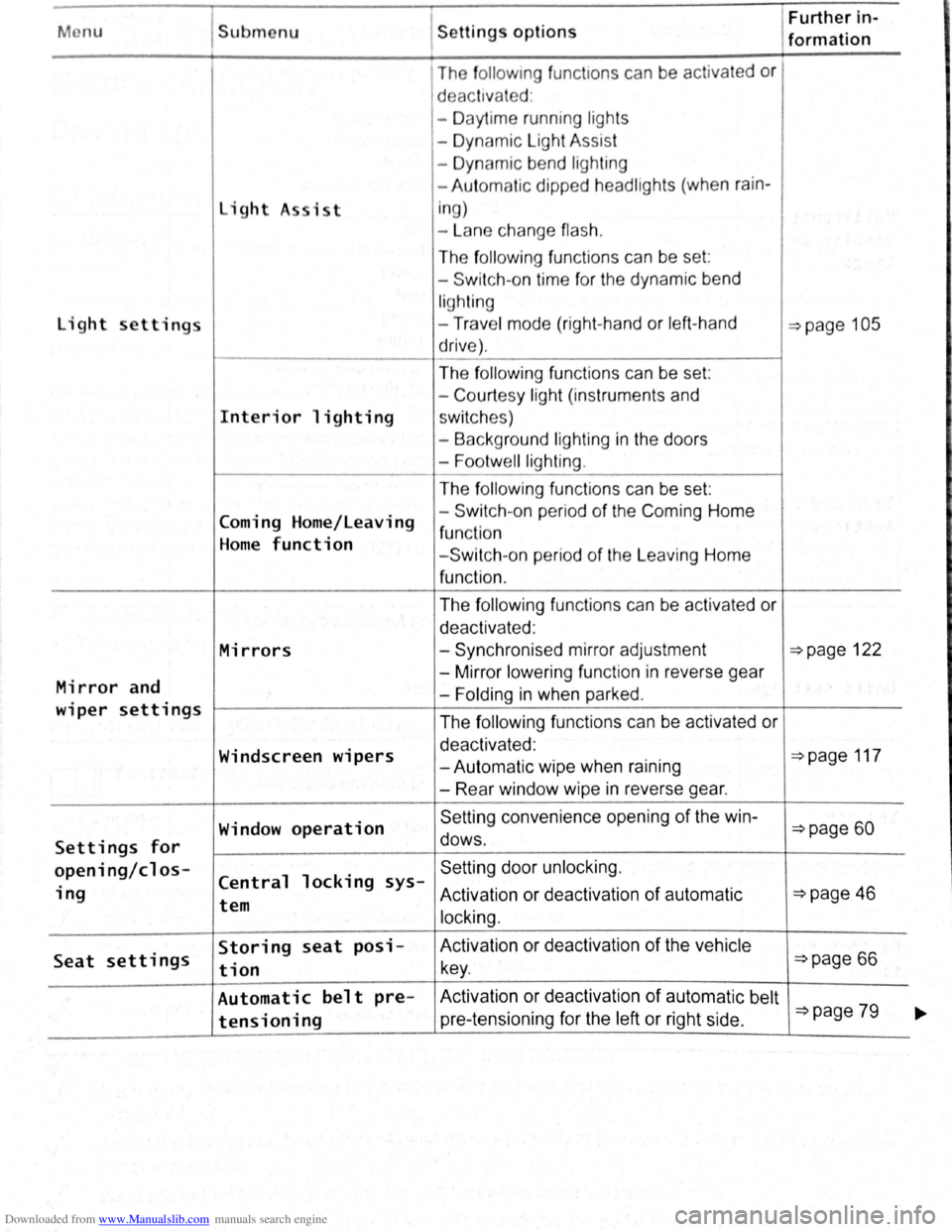
The fo llo w ing func t1ons can be activated or
d eac tivated :
- Daytime running ligh ts
- Dynamic Light Assist
- Dynamic bend lighting
- Aut omatic dipped headlights (when
rain-
light A sist i
n g)
- La n e change
flash.
The following func tio ns can be set :
- Switch -on time for the dynamic bend
lighting
light settings -Trav e l mode (right-hand or left -hand ~page 105
drive) .
The
f ollo win g functions can be set:
- Court
esy light (instruments and
Interior lighting sw itc hes)
- Background lighting
in the doors
-
Footwell lighting .
The following fun ctions can be set:
Coming Home/Leaving -
Switch -
on pe riod of the Com ing Home
function Home function - Switch -on period of the L eaving Home
function .
The
f ollowing fun ctions can be activated or
deactivated :
Mirrors -Synchronised mirror adjustment ~page 122
Mirror and -
Mirror lower ing function in reverse gear
-Folding in when parked .
wiper settings The following functions can be activated or
Windscreen wipers deactivated : ~page 117 -Autom atic wipe when raining
- Rear window wipe
in reverse gear.
Window
operation Se tting convenience opening of the win-~page 60
Settings for dows .
opening/cl os-Central locking sys-Setting door unlock ing.
ing Activation or deact ivat ion of automatic ~page 46 tem
locking.
Seat settings Storing seat posi- Activation
or deactivation of the vehicle
tion key . ~page 66
Automatic belt pre- Activ ation or deactivation of automatic belt ~page 79 tensioning pre-tensioning for the left or right side . ~
Page 57 of 138
Downloaded from www.Manualslib.com manuals search engine Lights and vision
Lights
Introduction
Th1s ·hapt r c nt 1n inf rm lion on th e f llowing
utject :
lnd1 ator lamps . . <>-~ • .. .. .. .. .. • .. .. ~ • .. • .. • • .. •
Turn s1gnal and main beam lever ..•.......
Svvitching lights on and off .............. .
Lights
and v1sion -functions ............ .
~1ain beam ass1st . . . . . . . . . . . . . . . . ... .
Ma king or sv itching over headlights for
dnving abroad (travel mode) . . . . ........ .
Commg Home and Leaving Home functions
(onentation
lighting) . . . . . . . ............ .
Headl i
ght range control, instrument and
s~ itch lighting . . . . . . . . . . . . . . . ....
Interior and reading hght s ...............•.
105
106
107
108
110
111
111
112
113
Observe any country-spec•fic regu lations when us
ing veh1c le lighting.
The driver 1s responsib le for the correct headlight
pos1t1on and the correct headlight settm g.
Addit ional information and warnings:
• Exterior views ~page 6
• lnfotamment system ~page 31
• Changing bulbs ~page 362
Indicator lamps
A WARNING
Accidents and serious injuries can occur if
roads are not sufficiently illuminated and oth
er r oad users have d ifficulty seeing the vehi
cle, or cannot see it at all.
• Always switch the dipped beam head
lights on if it is dark, raining or visibility is
poor.
A WARNING
Setting headlights too high, and the incorrect
use of the main beam, could d istract and daz
zle other road users. This can lead to acci
dents and serious injuries.
• Always ensure that the headlights are ad
justed correctly.
• Never use the main beam or the headlight
flasher if other road users could be dazzled.
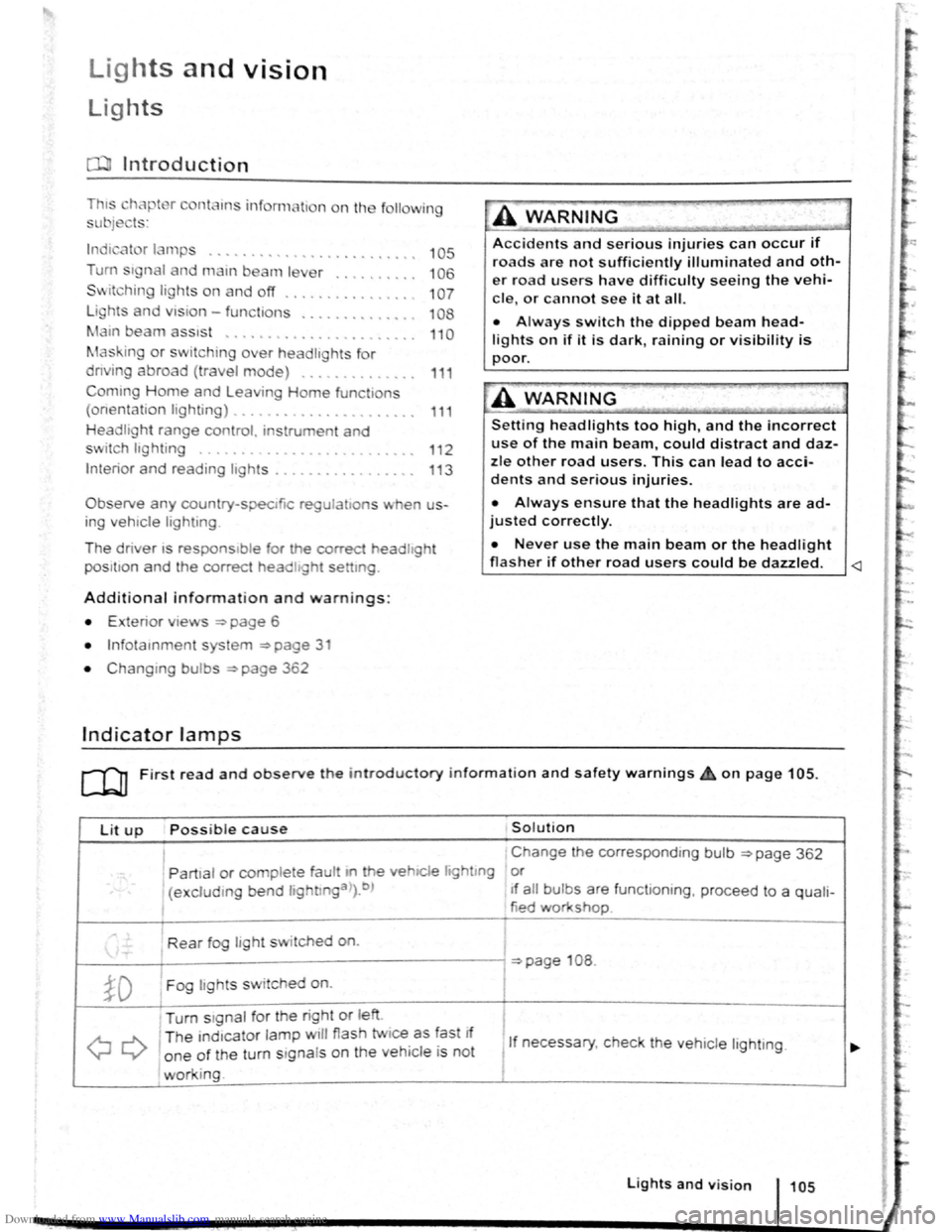
Lit up Possi ble cause Solution
I Change the corresponding bulb ~page 362
' Partial or complete fau tt m he vehiCle hghtmg or
(excluding bend lightlnga>).b ) If a ll bulbs are functioning , proceed to a quali-
tied workshop
Rear fog light switched on.
~page 108 .
~D Fog lights sw itched on. I
Turn stgnal for the right or left i
I
QQ
T he ind1cator lamp will flash twice as fast If
1 If necessary, c heck the vehicle lighting. o ne of the turn signals on the vehicl e is not
working. I
Lights and v is ion 105
Page 58 of 138

Downloaded from www.Manualslib.com manuals search engine Lit up Possible cause Solution
Tr ailer turn signal. -......
Q\~ The indica tor lamp goe s out if a tra iler turn Check the trailer l ighting as required.
signal
or all trailer lig ht s st op working .
Main beam is swi tc h e d on or the headlight
----D =>pa ge 106 .
flasher is being opera ted .
-
0 Main beam ass ist swi tc hed on. =>page 110 .
-1
) A separate display appears in the instrumen t cluster if there is a bend lighting fault.
>) Displayed in colour on an instru ment cluster with colour display .
Several warning and indicato r lamps will light up
briefly as a
functiona l check when the ign iti on i s
switched
on. T he y will swi tc h off after a few sec
onds.
--·--~-
Failure to observe illuminated warning lamps
and text messages can lead to your vehicle
breaking down in traffic, and can cause acci
dent and serious injury.
• Never ignore any illuminated warning
lamps or text messages.
• Stop the vehicle as soon as possible and
when safe to do so.
Turn signal and main beam lever
®
B5K ·0415
Fig. 81 T urn signa l and main beam lever
r-('n F irst read and observe the introductory
1.-J=JJ information and safety warnings~ on
page 105 .
1061 Before the journey
--
~>A WARNING (Continued) -
• Stop the vehicle at a safe distance away
from moving traffic and so that no part of the
exhaust system can come into contact with
any inflammable material underneath the ve
hicle, e .g . dry grass, fuel, oil etc.
• Broken-down vehicles increase the risk of
accidents both for you and for other road
users. If necessary, switch on the hazard
warning lights and set up the warning trian
gle to warn other road users.
Failure to observe illuminated indicator lamps
and text messages can lead to your vehicle be
ing damaged.
Move the lever into the required position:
® Right turn signa l ~ &. W it h ignit ion swi tched
off m ove from centr al posit io n for right parking
li g ht
~page 108.
® Left turn sig na l ~ ~. W ith ignition switched off
move from centra l posi tion for left parking light
~page 108 .
© Switch on the main beam ~ &. Whe n the
main beam is switc hed on, an indicator
lamp
ED in the instr ument cluster lights up.
@ Operate the headlight flasher or switch off the
main beam. The h eadligh t flasher comes on
for as long as the leve r is pulled . The indicator
lamp ED lights u p .
R etu
rn the le ver to the basic position to switch off
the c urrent fu nc tio n.
Lane change flash
) ~
)
)
To o pe rate the la ne c hange flash push the lever ' . nee I) u p or d own to the poin t where you incur reslsta eo
and th en release the le ver. The turn signal fiashBS ,
3 times .
Page 59 of 138
Downloaded from www.Manualslib.com manuals search engine ..,
of turn signals, a failure to use
r f rg tting to switch off a turn
nfuse other road users. This can
nt and serious Injuries.
• lw. y activate the turn signal In good
tim wh n ch anging lanes and performing
'lt king or turning manoeuvres.
• Alw ys switch off the turn signal once the
le ne change or overtaking or turning ma-
n euvre has been completed.
A W~RNING
In correct use of the main beam headlights
ca n lead to accidents and serious injuries as
the main beam headlights can distract and
dazzle other road users.
Switching lights on and off
m The turn signal will only work when the igni
W tion is switched on. The hazard warning lights
a ls o work
when the ignition is switched off
=>page 336.
m If one turn signal fails, the indicator lamp will
W start flashing twice as fast.
m The main beam headlights can only be
W switched on if the dipped beam headlights
are already on.
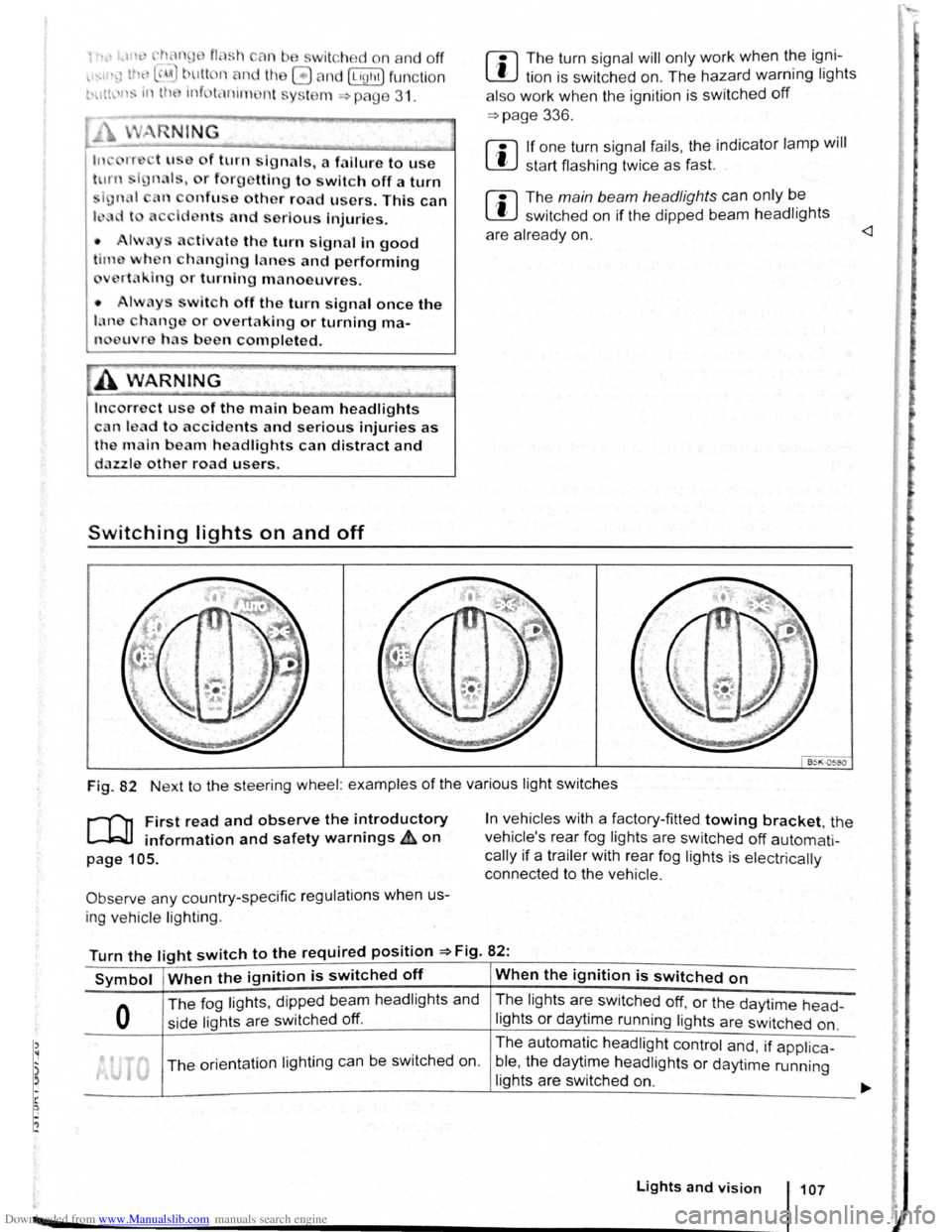
Fig. 82 Next to the steering wheel: examples of the various light switches
r-("n First read and observe the introductory
L-.W1 information and safety warnings ~on
page 105.
Observe any country-specific regulations when us
ing ve hic le lighting .
In vehicles with a factory-fitted towing bracket, the
vehicle's rear fog lights are switched
off automati
cally if a trailer with rear fog lights is electrically
connected to the vehicle .
Turn the light switch to the required position =>Fig. 82:
Symbol When the ignition is switched off When the ignition is switched on
0
The fog lights, dipped bea m headlights and
side lights are switched
off.
The lights are switched off, or the daytime head-
lights or daytime running lights are switched on.
The orientation lighting ca n be switched on. The
automatic
headlight control and, if applica -
ble ,
the daytime headlights or daytime running
lights are switched
on.
Lights and vision 107