2009 VOLKSWAGEN JETTA safe
[x] Cancel search: safePage 435 of 477
About this booklet
This booklet contains important informati on,
tip s, sugges tions and warning s o n using your ve
hicle . Th e other booklets in th e Owner's Litera
tur e contain more informati on that you should
be aware of for your own safety and for th e safe ty
of your passenger s.
Make sure that you alwa ys kee p the compl ete
Owner 's Literature in the vehicle. Thi s is espe
ciall y important when you lend or sell the ve
hicle.
This manual describes the vehicle equipment at
the time of publicat ion. The content s of this
booklet correspond to the equi pment options
on your vehicle.
Illustratio ns ma y vary from your vehicle. For
this r ea so n you sh ou ld regard illustration s as a
gene ral guide.
At the beginning of
bookle t, you will find a
tab le of con tents sho win g all the item s de
sc ribed in thi s manua l in the ord er th ey appear.
An alphabetical index is at the end of the
bookl et.
Directions and posit ions (for example ri ght , le ft,
front, rear) ar e always relative
10 the direction of
tra vel of the vehicle unl ess stated otherw ise .
So me section s of thi s book let do not appl y
to all
vehicles. If this is the case, a texl at the b eginnin g
of the section indicates which vehicle s it appli es
to , for examp le "Applies to
Models onl y".
Th e section is cont inued on th e nex t p age.
Indicat es the end of a sect ion .
® Reg is tered trad emar ks are mark ed or®.
H owever, t he ab senc e of thi s symbol does
1101 con stitute a waiver of the right s co n
cern ing any te rm.
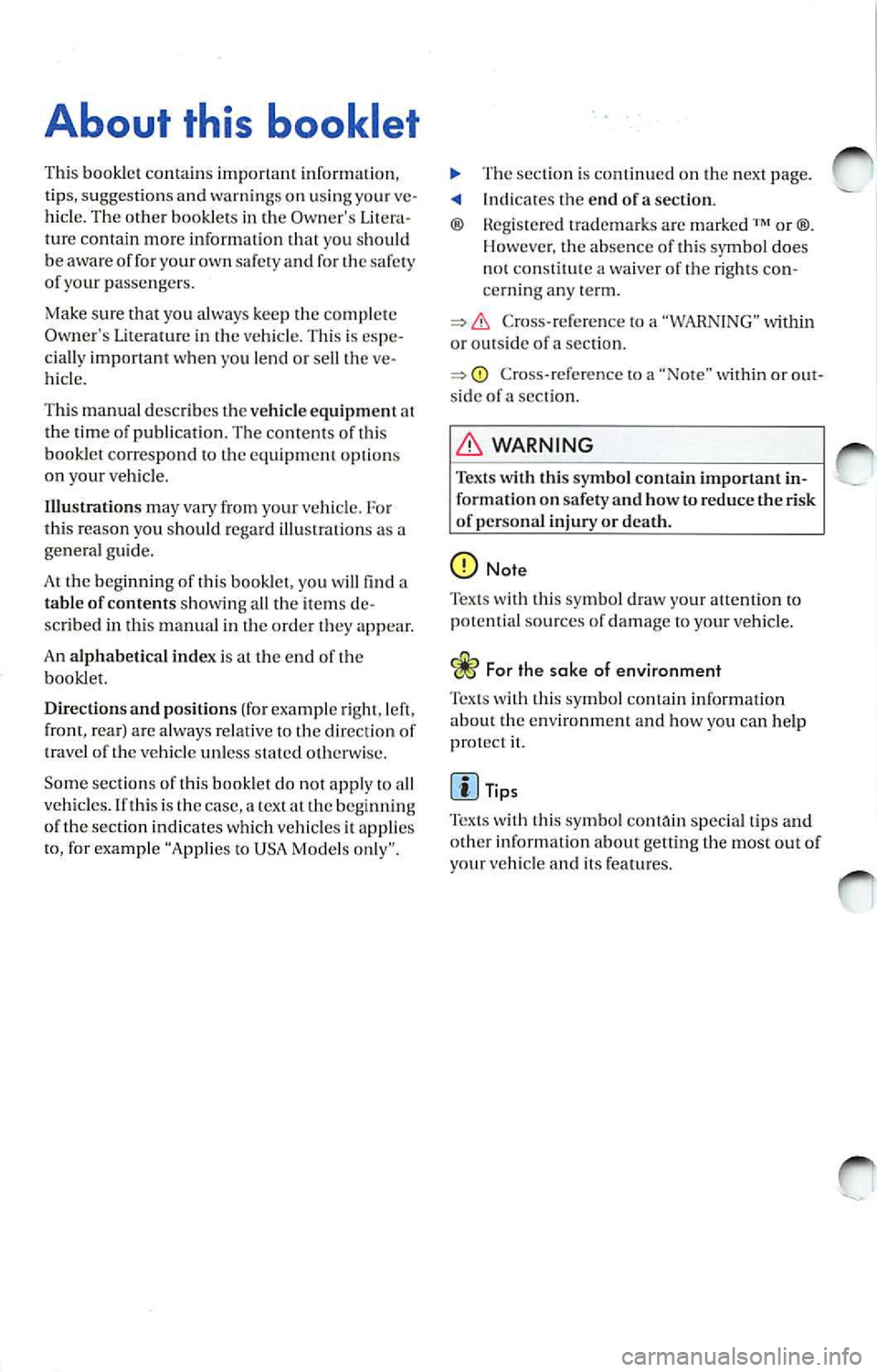
Cross- re fere nce to a "WARN IN G" within
or ou ts id e of a sec tion.
Cross-refe re nce to a within or side of a sec tion.
W AR NIN G
Tex ts with this symbo l contain impo rtant in
formation on safety and how to reduce t he risk
of persona l injury or death.
No te
Tex ts w ith this sy mbol draw yo ur attent ion to
po tent ial source s of dam age to your vehicl e.
Fo r th e sake of environ men t
with this symbol contain informa tion env ironm ent and how you can he lp
prot ect it.
Tip s
symbol special tips and
o th er inform ation abo ut getting the most out of
your veh icle and its fe ature s.
Page 438 of 477

Fig . 2 Sound System with SDRS
On/Off switch (pr ess) and volume Fader Control (FADER I: Tu rn the
c ontrol (turn ). The mode that was page 2, 1 to adjust
in use befor e the unit was last th
e des ired balan ce betwee n the
t urned off· ra dio or CD· will auto · front and
rear sp eake rs .
matica lly c om e back on aga in when
Band Sett ing Button s .... ..... ... 9
you tu rn on th e un it. If th e unit i s
FM Press thi s butto n
l e nt when turn ed on and the wo rd
to se lec t the FM band, to sw itch
SA FE appear s in the d is pla y, th en
to the second set of p rese ts or to
yo u must re-en ter the safety code. 34 FM AU TO set of prese ts . Press So und Setting Bultons ........... 1
2
and hold to sLOre automati cal ly
Bass Co ntro l I BASS I: Turn the knob t
h e 6 FM best quality station s in page 2, I to adjust the FM
AUT O.
b ass as des ired ..
AM Button(§ : Pr ess this bulton
Mi ddle Contr ol (MIDDLE I: Turn the to
select the AM band or to switch page 2, l to adju st t
o the AM AUTO set of presets.
t h e m id dle frequ enci es as Press and hold to store automati-
s ir ed . call
y the 6 AM bes t quality
Treble Control Turn the ti
ons in AUTO .
page 2, I to adj ust Stat ion Preset butt ons:
th e treble as des ired.
Mode : Press these buttons
Balance Contro l (BALANCE!: Turn t
o pre set on e radio statio ns on
th e to adjust the desired eac
h of th em in eac h of the five
balance th e left and bands AM
I.AM AUTO , FM I, FM2
ri ght sp eake rs. and
FM AUTO or whe n using the
sa tellit e mode ..
............. ..
Quick overview 3
Page 440 of 477

Booklet 3.4 P remi um Sound System
.0, WARNING (conti nued )
• Us e the Sound System only if road , traffic
an d weath er cond itions permit and you will
not be distracted from your driving.
Important information
Operating the Sound System while driving
D rivi ng on today 's road s demands th e full atten
ti o n of the driver.
The w ide range of sophisti cate d eq uipm ent de
tail s of modern car radio s offer not onl y a vas t
so urce of entertainmen t, but also import ant in
form ation reg arding t raffic updates, road condi
t ions, wea ther repo rts. etc.
Bu t re mem ber, you should onl y operate the
ra di o system wit h its num erous fe atures when
th e traffic situ atio n rea lly
in "Con
tro ls" on page 2.
For examp le, c hangin g CDs o r re ading song t i
tl es on a CD case or in th e rad io display when
drivi ng is o ften the ca use of aut o acc idents .
You s hould also set th e vo lume of your radio
sys tem so that yo u ca n h ear s ig n als from other
dr iv ers at a ny tim e.
Convenience radio coding For tec hn ical reason s. the conve nience radio
c oding is not ava ila bl e for all vehicle models.
In the past, it used to be tha t yo u had to manu
a lly recode t he radio wheneve r th e uni t was re
m oved from the ve hicle (for example, if th e unit
was removed to be repaired). or whenever the
veh icle battery was disco nnected (for examp le,
if yo u brou ght yo ur v ehicl e in to t he deale rship
for service a nd it was necessary to dis con nect
t he bauery). In eith er case , the power sup ply to
th e unit was cut off.
T hat has all ch anged w ith the new conven ie n ce
radio cod ing f un cti on: Once t he co de number
ha s bee n ent ered. it
will th en sy nchro nize itse lf
w ith "its" vehicl e!
.0, WARNING (co ntinu ed)
• Always set volume leve ls so that you can
clearly hear horns , si rens and oth er warning
sounds outside the vehicle .
If the power supp ly has been interrupted , the
radio will automa tically c hec k to see if it i s s till in
vehicle after the ignition has been switched
on . If this hap pen, th e radio will be ready for use
af ter just a few seconds.
It is th erefo re no longer necessary to d isengage
th e e lect ronic lock manuall y!
If t11e rad io ha s been in s ra ile d in anot her ve hicl e,
how ever, the electronic lock ha ve to be dis
engaged manually.
If
SAFE ap pea rs i n the disp lay a fter switchin g the
rad io on , it can then only be operated aga in afte r
entering tJ1e co rrect code
=> pa ge 34.
External CD changer1l
You also have the option of installin g a Ge nuine
Vo lkswagen CD Changer. Ask your authoriz ed
Vo lkswagen dealer about thi s optio n.
The CD change r is in stalle d in the front armres t
co mp artment. It is "re mote controlled" by th e
radio unit.
It allow s you ro load up to 6 CDs. See => page 32 for furt her information.
Vo lkswage n dea ler s have a ll the informa tion
conce rning in stallin g th e CD c hange r.
Tip s
• Please note tha t it em s marked with an as
t e ri sk(*) may be standard on ce rtain m odels , op
tional on otJ1 ers or no t ava ilabl e on yo ur model.
Always ch eck with your authorized Volkswage n
deale r to see if the feat ure or item ap plies to your
mod el.
• The radio code numb er and the radio seria l
numb er ca n be found on th e "Radio Card" at the
beg inning of the
Lit erature . ._
I) Availa ble as a fa cto ry install ed opt ion, or your author ized Volkswagen dealer can install the oplional C D
c h anger for you. A lways chec k with yo ur a utho rize d Vol kswage n deale r if th is op tio n i s ava ilab le fo r yo ur
model.
Quick overview 5
Page 441 of 477
Booklet 3.4 Premium Sound System
• It is very important that you keep this "Radio
Card" in safe place neve r keep it in the ve
hicle . On ly then the ra dio is use less to
6 Quick overview
Page 442 of 477
Booklet 3.4 Premium Sound System
Radio I CD
Radio
ON /OFF Button
88.3 89.1 94.1
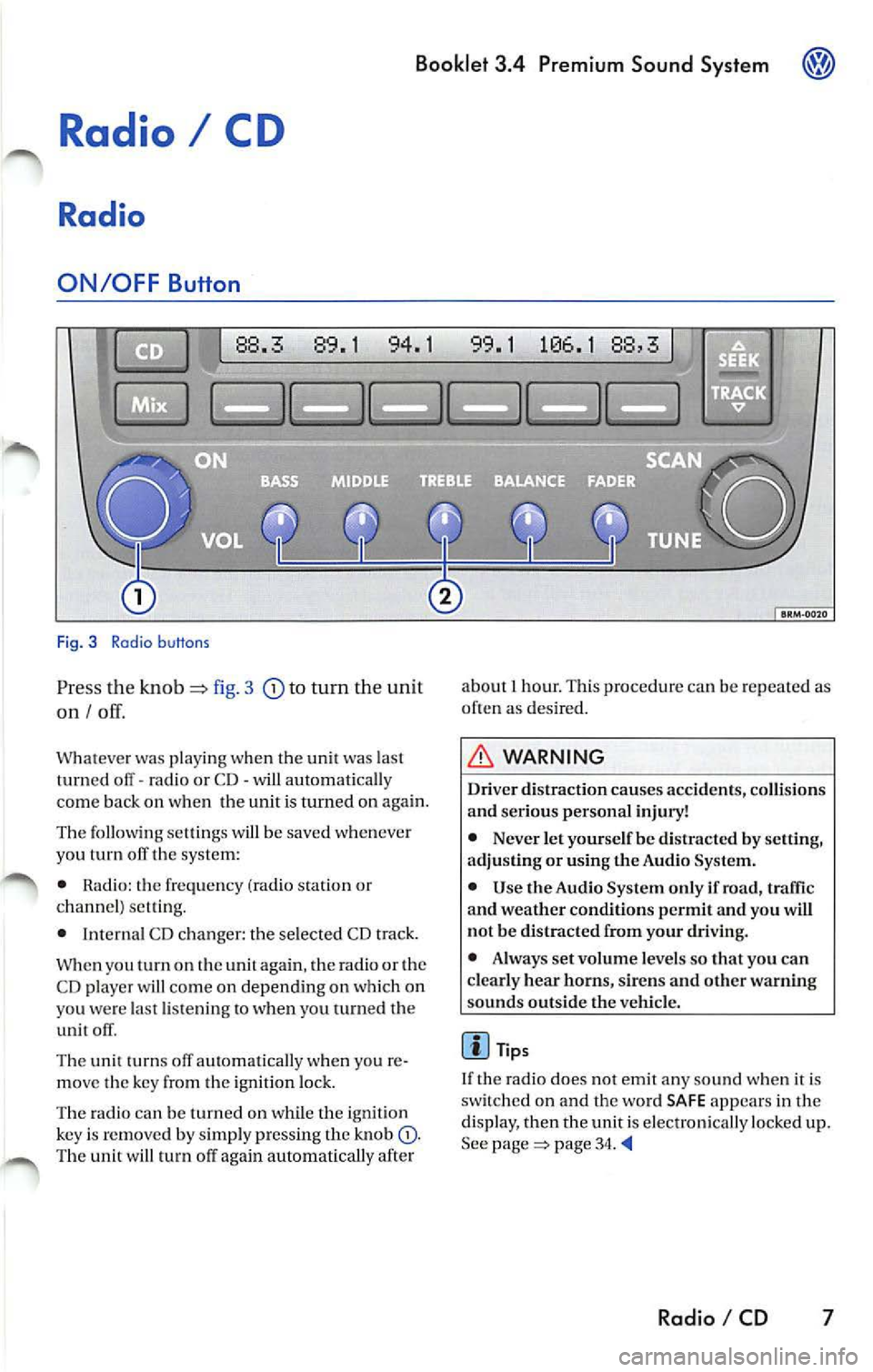
Fig. 3 Radio b uttons
Pr ess the knob fig. 3 to turn the unit
on I
Whatever was playing when the uni! was las!
turned off -radio or CD -will automaticall y
come back on when the unit is turned on again.
The foll owing se lling s will b e saved whenever
yo u tu m off the system:
• Rad io: the frequen cy (ra dio s tat ion or
c h an nel) se ttin g.
• Interna l CD c han ger : the se lected CD track.
W hen you
on the again , th e ra di o or the
CD player w ill co me on depend ing on which on
yo u wer e la st li ste nin g
when you turn ed the
unit off .
The uni! turn s off au!Omati ca lly w hen you re
m ove the key fro m the ign ition lock.
The radio can be turn ed on wh ile th e ignition
key is rem oved b y simpl y pressing the kn ob
88,3
about 1 hour. This procedure can be re p eate d as
o ften as des ired .
WARNING
Dri ver distraction causes accid ents, collision s
and ser ious personal injury!
• Never let yourse lf be distr acted by setting,
a djusting or using the Audio System.
• Use the Audio System only if road, traffic
and weather conditions p ermit and you will
not b e distracted from your driving .
• Alwa ys set vo lum e le vel s so that you can
clearly hear horns, sir ens and other warning
s ounds outside the vehicl e.
Tips
If th e radio does not emit any so un d w hen it is
sw itched on and the word SAFE appears in the
display, then the unit i s electronica lly lock ed u p.
See
page 34.
Radio I CD 7
Page 468 of 477
Booklet 3.4 Premium Sound System ®
Tips
• Whe n
external CD changer is selected
EXT will appear in the radio display.
• The LED s above the slot buttons I to 6 will
stay on
to indi cate that there is a CD inside the
s lo t.
• It is po ssible to reproduce Howeve r the reproduction depends on th e terial quality of the CD .
• Always inser t the CD with the prin ted s ide
fac ing up . •
Make sure the CDs are prop erly install ed in
the CD changer. Also, make su re the CDs are
moved from the slot before you close the rest, otherwise you cou ld damage th e CDs.
• Only use standard
12 cm (4.72 inch) CDs. T he
s h ap ed CDs or 8 cm (3.15 in ch) CDs can not be
played.
• If no CD slot is se lected after pressing the
LOAD button, the radio unit will automatically
select the next empty tray .
• I f the ejected CD is not removed from the slot
in t he next
15 secon ds, it will be pulled back tomat ically into the CD slot to prevent damage
and the eject mod e will be
Tips for operating your internal CD-Changer and external CD
Changer
To assu re a sound reproduction of the highest
quality, u se on ly CDs which are clean and free of
sc ratch es or any other type of damage.
Do not u se tran sparent
Wa re availabl e in the
market. Use of these CDs w ill cause th e changer
improp erl y load.
If yo u are going
to make your own CDs, do not
s tick an adhesive labe l on the CD itself. The heat
Preventive measures for laser units.
Laser devices are divided into safety classes I 4.
Your VOLKSWAGEN CD ch an ger conforms to
safety class I.
The laser used in cla ss l is so low a nd so we ll
s hield ed, that no danger exi sts wi th proper
usage . generated
by the CD play er ca n loosen t he
sive label, which then coud come off and and
jam up the unit. This could result in a costly
pair. Use a marker labe l your CDs in stead.
Always sto re CDs in tl1eir cases whe n you are not
li stening to th em.
Neve r leave CDs in direct
Note
Never remove the cover from the uni t. The unit
doc s not contain any parts that can b e serviced
b y the use r.
Radio I CD 33
Page 469 of 477

Booklet 3.4 Premium Sound System
Anti-Theft Coding
Convenience radio coding
For techni cal reason s, the convenience radio
coding is not a vailable for all vehicle models .
In the past , it u sed to be that you h ad to manu
ally reco de th e rad io whe neve r the unit was re
moved from the veh icle (fo r examp le, if the unit
wa s removed to be repa ired), or whenever the
vehicle battery was disconnected (for example ,
if you brought yo ur vehicle in to the dealership
for service and it was necessary to disconnect
the banery ). In either case , th e power supply to
t he unit was cut off.
That ha s all ch anged with th e new conve nien ce
radio coding function: Once the code number
has been inplll in the rad io, i t w ill then synchro
nise itself wi th "it s" veh icle!
I f th e curr ent supply has been interrupted the
radio will automaticall y ch eck to see if it is still in
Canceling the Electronic Lock
Fig. 28 Preset buttons
Pe rform th e steps in exact ly the fo llowing
order:
34 Radio I CD
vehicle af te r th e ig niti on has been switched
o n . If thi s happ ens, the radio will be read y for
u se after just a few seco nds.
It is therefore no longe r n ecess ary to disengag e
the e lectro nic lock manua lly!
If the radio has been
to another vehicle,
however , the electronic lock will have to be dis
engaged manua lly.
Tip s
• This code number, togeth er w ith the unit's
se rial numb er. ca n be found on the "Ra dio
Card".
• never keep it in the ve
hicle. Only then is th e radio use less to thieves!
-Turn on the radio. SAFE will appear in
the disp lay. After a few seconds, the
numb er 1000 will appear in the display. ._
Page 470 of 477

Booklet 3.4 Premium Sound System ®
-Use the radio stat io n pr ese t button s 1 to
4
page 34, fig. 28 to ent er the code
numb er fo un d on your R adio Card. Use
pre set button
l to ent er t he fir st digit in the
code numb er. U se button 2 to en te r the
seco nd digit , e tc. Th e valu e range for each
of the 4 di git s is O ... 9. T he digit will in
c rease by l eac h tim e you tap the pr ese t
bu tton. The number r etu rns to O afte r 9.
- After you finish ent ering th e code, press
the sta tion p reset button below
word
OK in th e di spl ay. It usual ly is th e las t sta
tion pre set button. You w ill hear a n au
dibl e signa l.
-If you have en te red t he co de number
c orr ect ly, a radio frequency will app ear in
th e d isp lay.
Wrong Code Number
lfyou have accide ntally ent ered a wrong code
number , SAFE will ap pear in th e di spl ay and
th en the number 1000 will app ear.
Yo u can re p ea t the procedu re agai n on e time .
T he num ber of attempt s will app ear in the dis
p lay. lf you acci dent all y ent er a wrong code
number a seco nd tim e
SAFE will appea r in the
d isp lay.
lfth e wrong cod e number i s enter ed aga in, th e
uni t w ill be di sab le d for about I hour. Lea ve th e
unit O N for this hour . After th e hour has
e la p se d, the numb er of att em pts will stop bei ng
displayed and you can cancel th e elec tronic lock
once again.
Remembe r, the cycle i s ...
• 2 attempt s
• one hour lo cked.
Tips
If y ou loose your Rad io Card, contact yo ur au
t ho riz ed VO LKSWAGEN
ered by a re pl ace ment pa rts warra nty. This re
pl acement serv ice w ill not b e availab le, how
eve r, it th e unit h ousing is damaged or if un au- th
oriz ed per sons have att empt ed to make re
pair s.
Antenna Care
Th e an tenna i s des ig n ed to achieve optim al per
fo rmance with the radio and is located at a pos i
tion where reception is good and su sce pti bili ty
to int erfer ence is low.
Ve hicle s equ ipped wi th antenna s emb edd ed in
t he winds hield o r backlights offer the furth er ad
vantages o f being completely pro tec te d f rom
damage and wear.
No antenna car e is r equir ed for vehicles
e quipped with roof moun te d
Radio I CD 35