Page 1 of 392
TABLE OF CONTENTS
1
1Before drivingAdjusting and operating features such as door locks,
mirrors, and steering column.
2When drivingDriving, stopping and safe-driving information.
3Interior
featuresAir conditioning and audio systems, as well as other in-
terior features for a comfortable driving experience.
4Maintenance
and careCleaning and protecting your vehicle, performing do-it-
yourself maintenance, and maintenance information.
5When trouble
arisesWhat to do if the vehicle needs to be towed, gets a flat
tire, or is involved in an accident.
6Vehicle
specificationsDetailed vehicle information.
7For ownersReporting safety defects for U.S. owners and seat belt
instructions for Canadian owners
IndexAlphabetical listing of information contained in this
manual.
Page 2 of 392
TABLE OF CONTENTSIndex
2
1-1. Key informationKeys ..................................... 26
1-2. Opening, closing and
locking the doors
Wireless remote control ....... 28
Side doors ............................ 31
Back door ............................. 36
1-3. Adjustable components
(seats, mirrors, steering
wheel)
Front seats ........................... 38
Rear seats ............................ 41
Head restraints ..................... 48
Seat belts ............................. 52
Steering wheel ..................... 62
Anti-glare inside rear view mirror .................................. 63
Outside rear view mirrors ..... 64
1-4. Opening a nd closing the
windo ws
Power windows .................... 67
1-5. Refueling Opening the fuel tank cap .... 70
1-6. Theft deterrent system Engine immobilizer system ................................ 74
Alarm (Puerto Rico).............. 76
Theft prevention labels (except Canada) ................ 78 1-7. Safety information
Correct driving posture ......... 79
SRS airbags ......................... 81
Front passenger occupant classification system ........... 93
Child restraint systems ......... 98
Installing child restraints ..... 102
2-1. Driving procedures Driving the vehicle .............. 116
Engine (ignition) switch....... 125
Automatic
Transmission...... 128
Manual Transmission ......... 130
Turn signal lever ................. 131
Parking brake ..................... 132
Horn .................................... 134
2-2. Instrument cluster Gauges and meters ............ 135
Indicators and warning lights ................................. 141
2-3. Operating the li ghts and
wipers
Headlight switch ................. 145
Fog light switch ................... 147
Windshield wipers and washer .............................. 148
Rear window wiper and washer .............................. 151
1Before driving
2When driving
Page 13 of 392
13
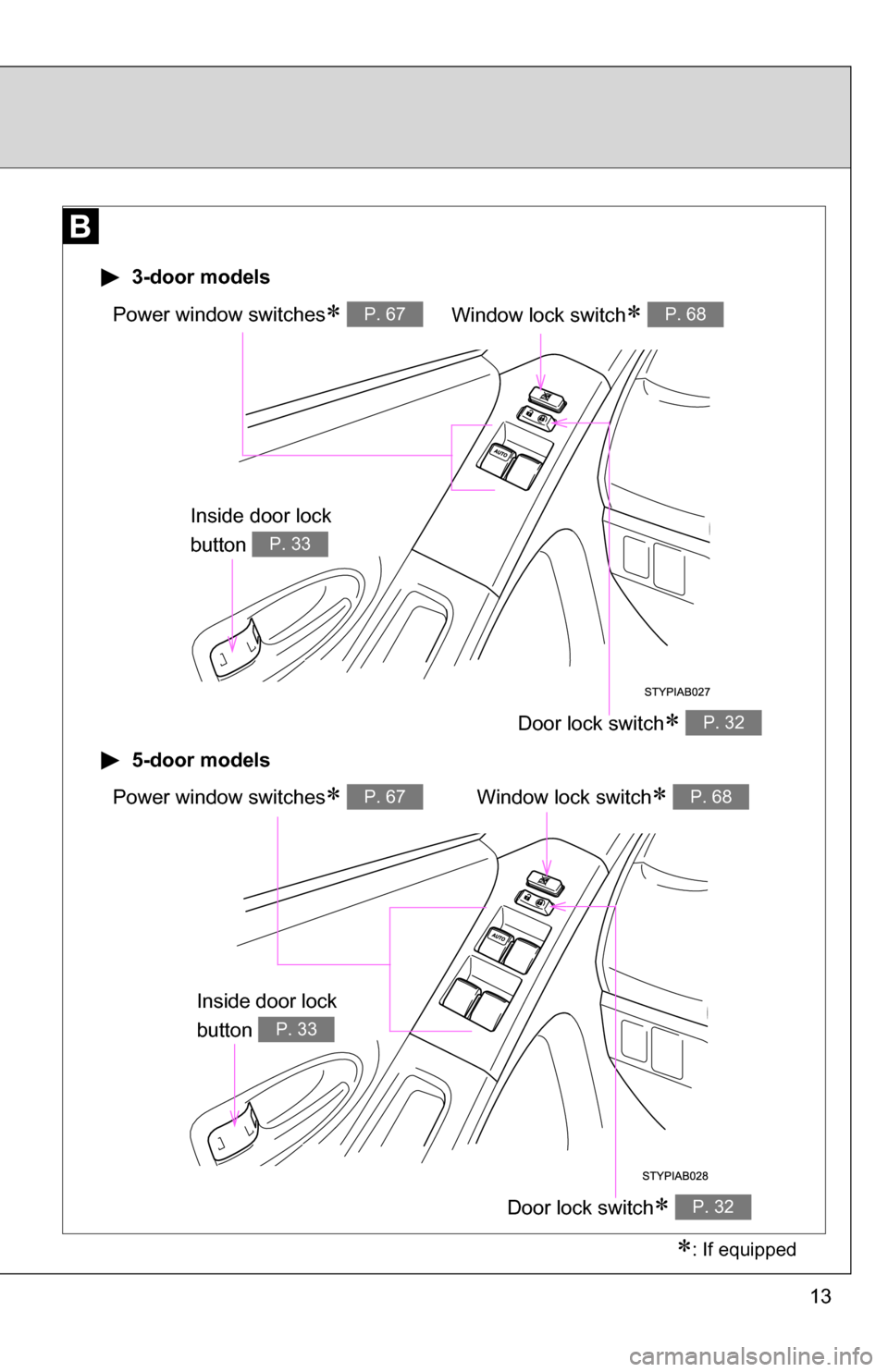
Window lock switch P. 68Power window switches P. 67
Door lock switch P. 32
3-door models
5-door models
Window lock switch P. 68Power window switches P. 67
Door lock switch P. 32
: If equipped
Inside door lock
button
P. 33
Inside door lock
button
P. 33
Page 14 of 392
14
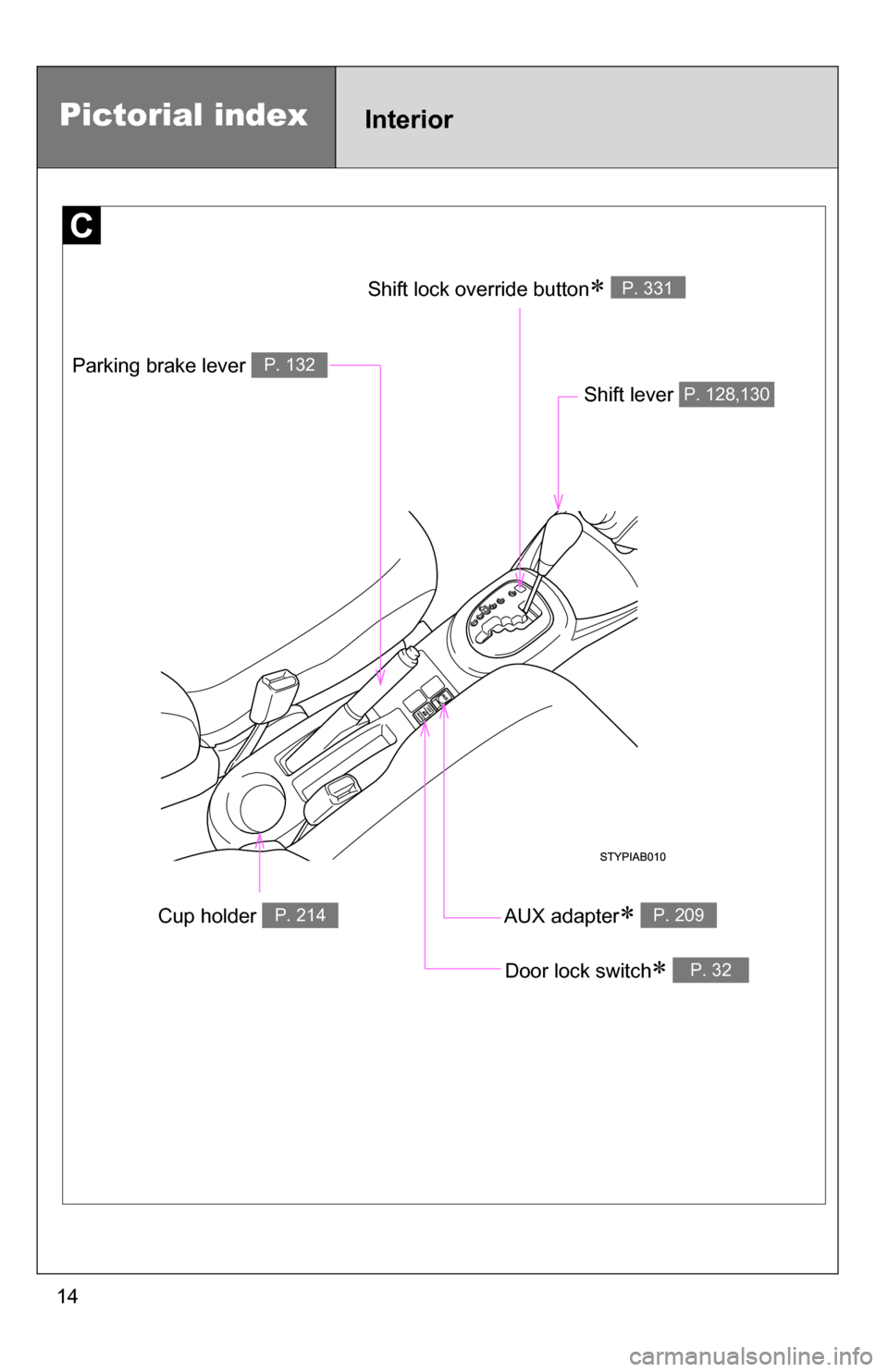
Cup holder P. 214
Parking brake lever P. 132
Shift lever P. 128,130
Door lock switch P. 32
AUX adapter P. 209
Shift lock override button P. 331
Pictorial indexInterior
Page 15 of 392
15
Pictorial indexInstrument panel
Fog light switch P. 147Rear window wiper
and washer switch
P. 151
Tilt steering lock release lever P. 62
Hood opener P. 242
Gauges and meters
P. 135
Audio system P. 187
Glove boxes P. 212
Fuel filler door
opener
P. 70
Auxiliary boxes
P. 217
Bottle holder
P. 215
Windshield wipers and
washer switch
P. 148Turn signal lever P. 131
Headlight switch P. 145
: If equipped
Page 25 of 392
Before driving1
25
1-1. Key informationKeys ................................... 26
1-2. Opening, closing and locking the doors
Wireless remote control ..... 28
Side doors .......................... 31
Back door ........................... 36
1-3. Adjustable components (seats, mirrors,
steering wheel)
Front seats ......................... 38
Rear seats.......................... 41
Head restraints................... 48
Seat belts ........................... 52
Steering wheel ................... 62
Anti-glare inside rear view mirror ....................... 63
Outside rear view mirrors ... 64
1-4. Opening and closing the windows
Power windows .................. 67
1-5. Refueling Opening the fuel tank cap ................................... 70 1-6. Theft deterrent system
Engine immobilizer system ............................. 74
Alarm (Puerto Rico) ........... 76
Theft prevention labels (except Canada) .............. 78
1-7. Safety information Correct driving posture....... 79
SRS airbags ....................... 81
Front passenger occupant classification system ........ 93
Child restraint systems....... 98
Installing child restraints... 102
Page 28 of 392
28
1-2. Opening, closing and locking the doors
Wireless remote control (if equipped)
■Operation signals
The emergency flashers flash to indicate that the doors have been locked/
unlocked. (Locked: Once; Unlocked: Twice)
■Panic mode
■Key battery depletion
The standard battery life is 1 to 2 years. (The battery becomes depleted
even if the key is not used.) If the wireless remote control function does not
operate, the battery may be depleted. Replace the battery when necessary.
(P. 273)
■ Security feature
If a door is not opened within approximately 30 seconds after the vehicle is
unlocked, the security feature automatically locks the vehicle again.
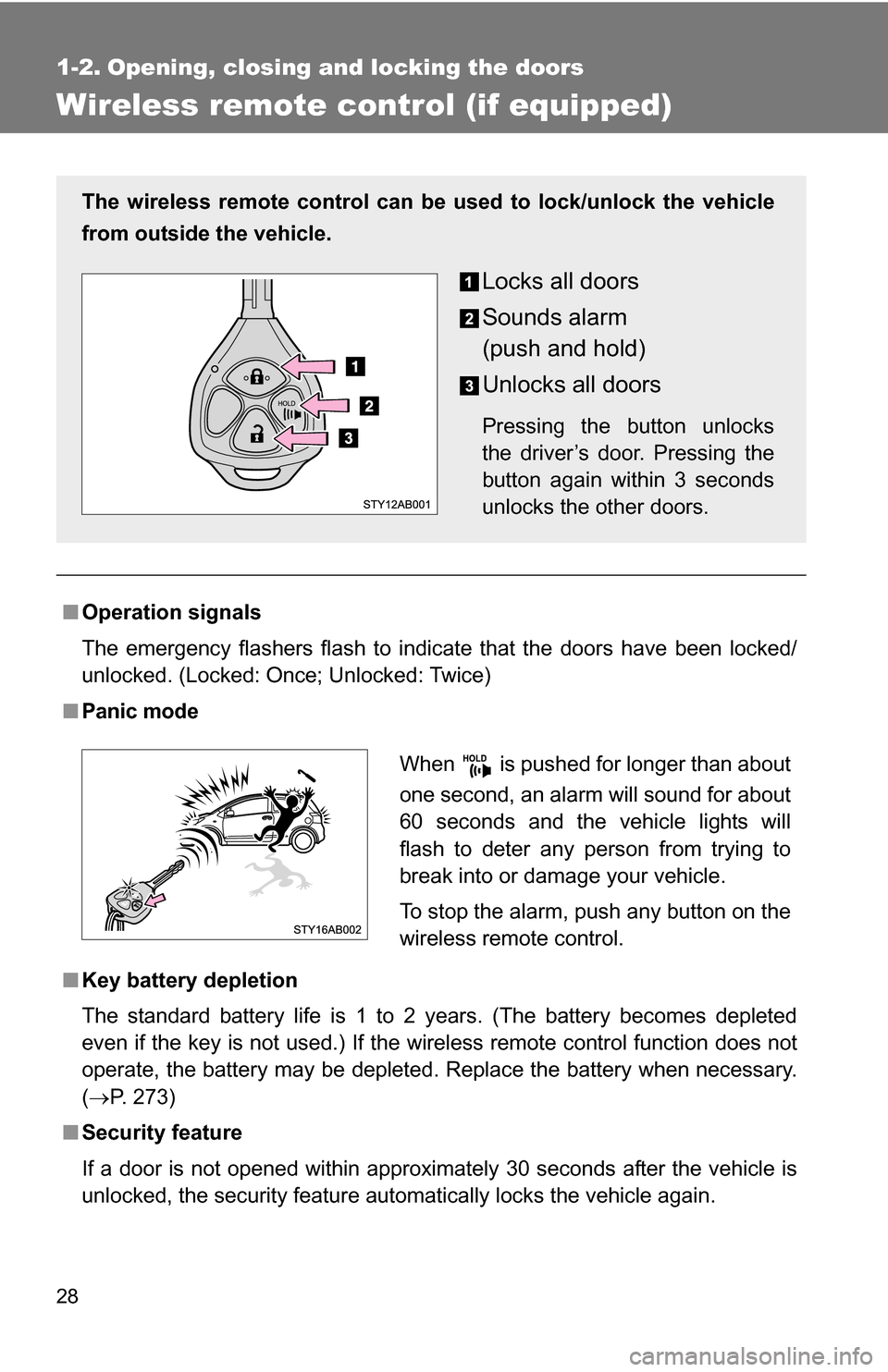
The wireless remote control can be used to lock/unlock the vehicle
from outside the vehicle.
Locks all doors
Sounds alarm
(push and hold)
Unlocks all doors
Pressing the button unlocks
the driver’s door. Pressing the
button again within 3 seconds
unlocks the other doors.
When is pushed for longer than about
one second, an alarm will sound for about
60 seconds and the vehicle lights will
flash to deter any person from trying to
break into or damage your vehicle.
To stop the alarm, push any button on the
wireless remote control.
Page 29 of 392
29
1-2. Opening, closing and locking the doors
1
Before driving
■
Conditions affecting operation
The wireless remote control function may not operate normally in the follow-
ing situations.
●Near a TV tower, radio station, elec tric power plant, airport, gas station or
other facility that generates strong radio waves
● When carrying a portable radio, cell ular phone or other wireless commu-
nication device
● When multiple wireless keys are in the vicinity
● When the wireless key has come into contact with, or is covered by a
metallic object
● When a wireless key (that emits radio waves) is being used nearby
● When the wireless key has been left near an electrical appliance such as
a personal computer
■ When riding in an aircraft
When bringing an wireless key onto an aircraft, make sure you do not press
any buttons on the wireless key while inside the aircraft cabin. If you are car-
rying an wireless key in your bag etc., ensure that the buttons are not likely
to be pressed accidentally. Pressing a button may cause the wireless key to
emit radio waves that could interfere with the operation of the aircraft.
■ Customization that can be co nfigured at Toyota dealer
Settings (e.g. wireless remote control system) can be changed.
(Customizable features P. 369)