Page 131 of 392
131
2-1. Driving procedures
2
When driving
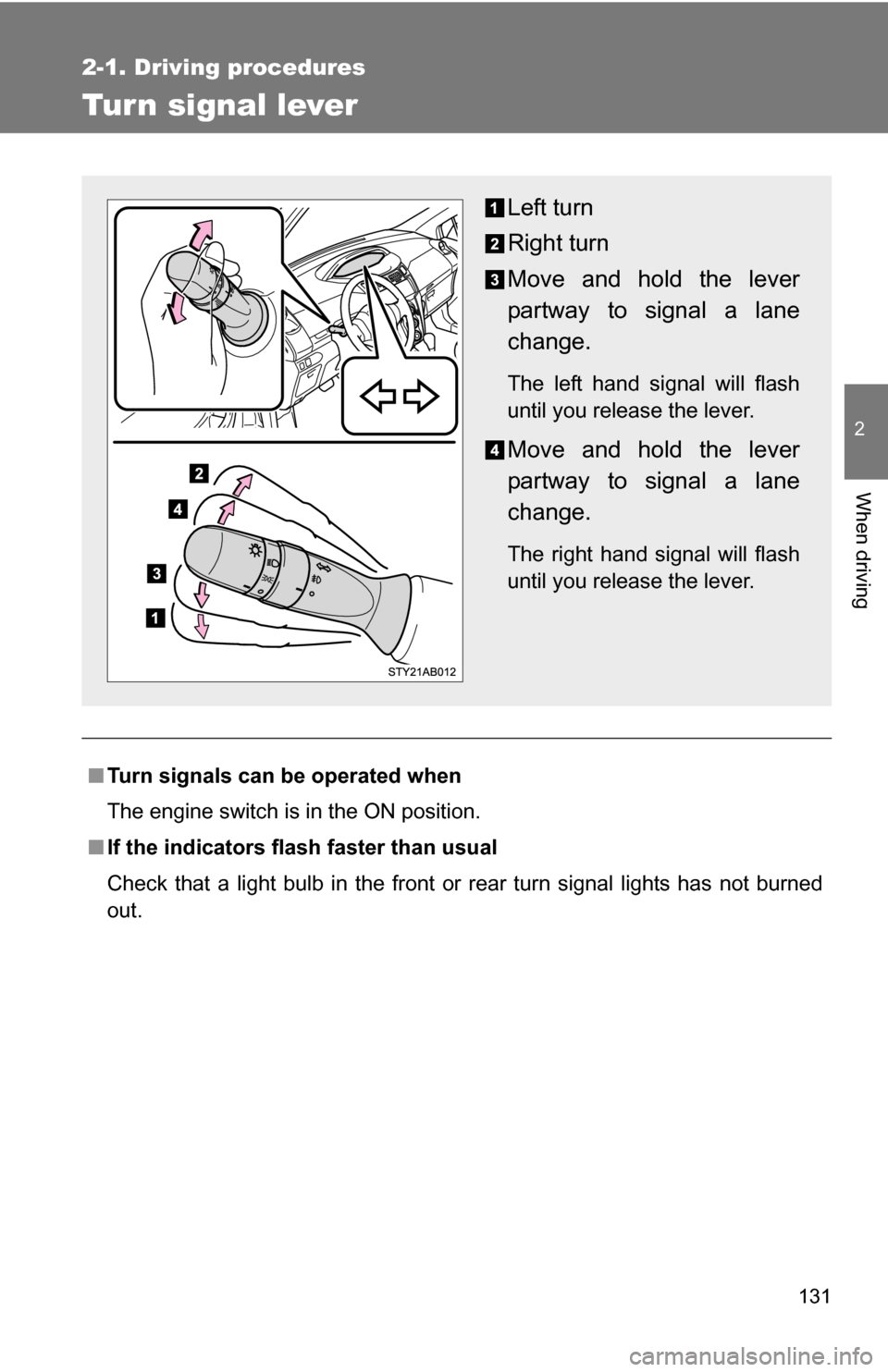
Tur n signal lever
■Turn signals can be operated when
The engine switch is in the ON position.
■ If the indicators flash faster than usual
Check that a light bulb in the front or rear turn signal lights has not burned
out.
Left turn
Right turn
Move and hold the lever
partway to signal a lane
change.
The left hand signal will flash
until you release the lever.
Move and hold the lever
partway to signal a lane
change.
The right hand signal will flash
until you release the lever.
Page 132 of 392
132
2-1. Driving procedures
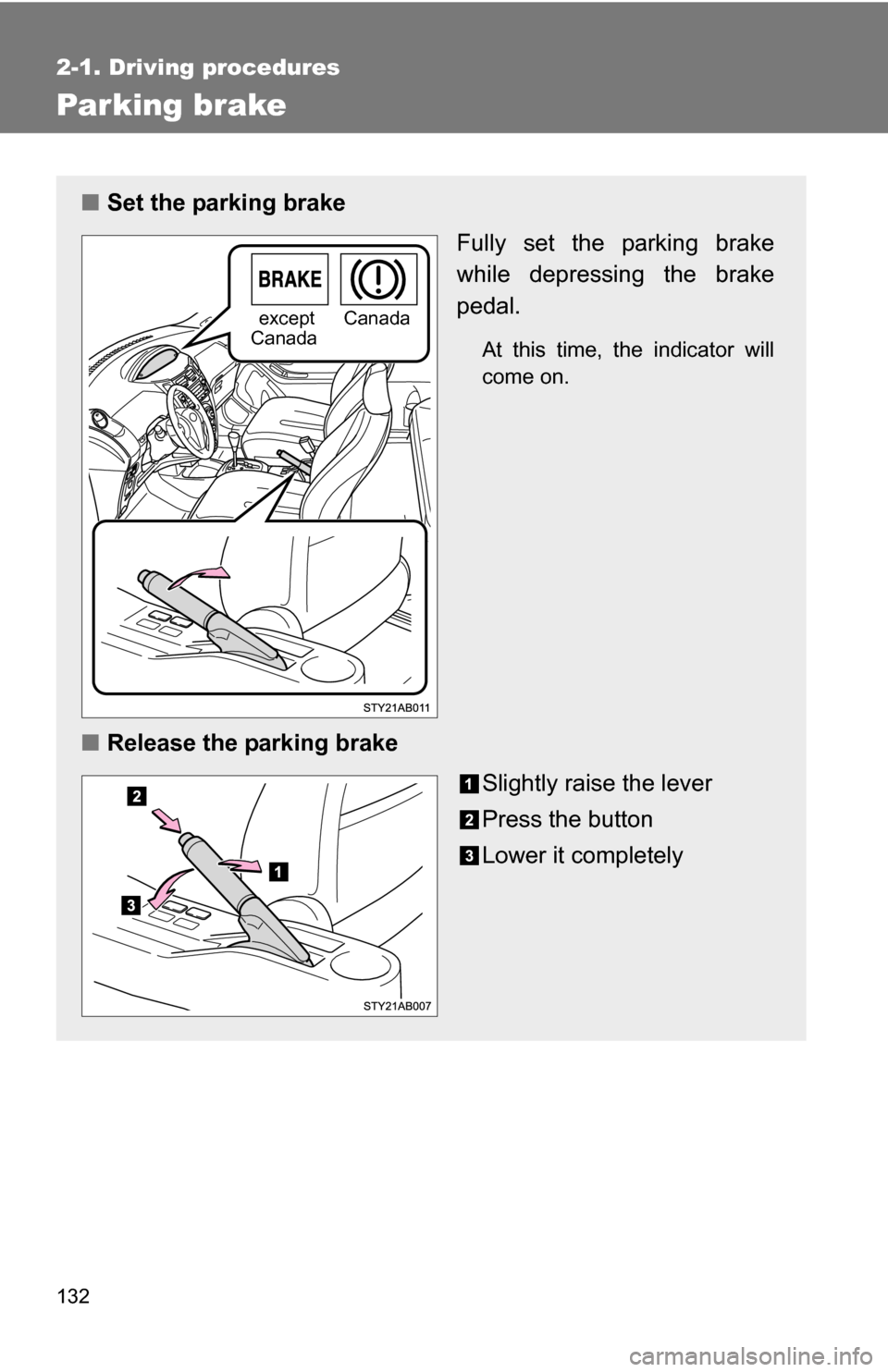
Parking brake
■Set the parking brake
Fully set the parking brake
while depressing the brake
pedal.
At this time, the indicator will
come on.
■Release the parking brake
Slightly raise the lever
Press the button
Lower it completely
except
CanadaCanada
Page 140 of 392
140 2-2. Instrument cluster
NOTICE
■To prevent damage to the engine and its components
●Do not let the indicator needle of the tachometer enter the red zone, which
indicates the maximum engine speed.
● The engine may be overheating if the high engine coolant temperature
warning light comes on. In this case, immediately stop the vehicle in a safe
place, and check the engine after it has cooled completely. (
P. 337)
Page 141 of 392
141
2-2. Instrument cluster
2
When driving
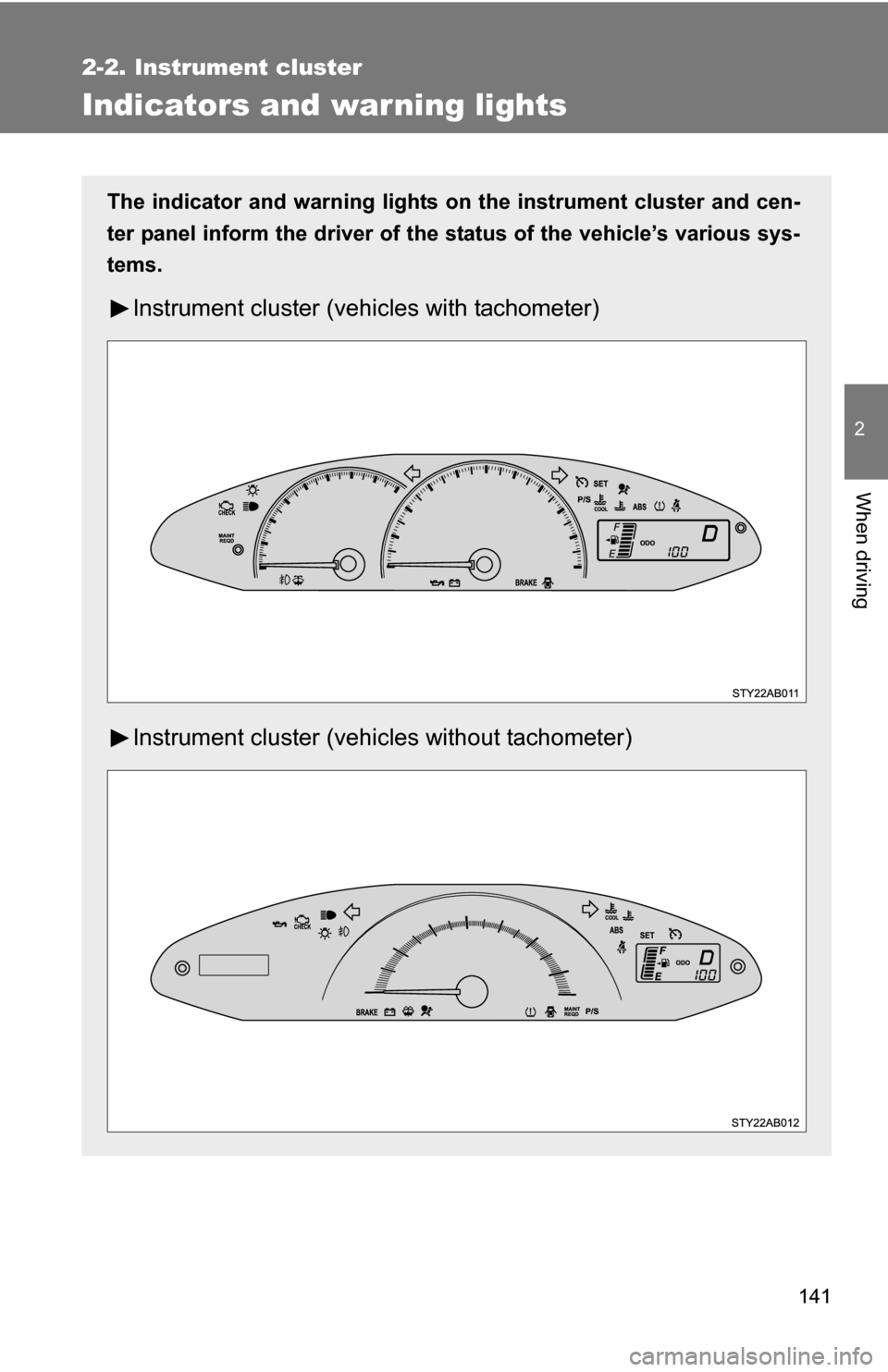
Indicators and warning lights
The indicator and warning lights on the instrument cluster and cen-
ter panel inform the driver of the status of the vehicle’s various sys-
tems.
Instrument cluster (vehicles with tachometer)
Instrument cluster (vehicl es without tachometer)
Page 143 of 392
143
2-2. Instrument cluster
2
When driving
■
Indicators
The indicators inform the driver of the operating state of the
vehicle’s various systems.
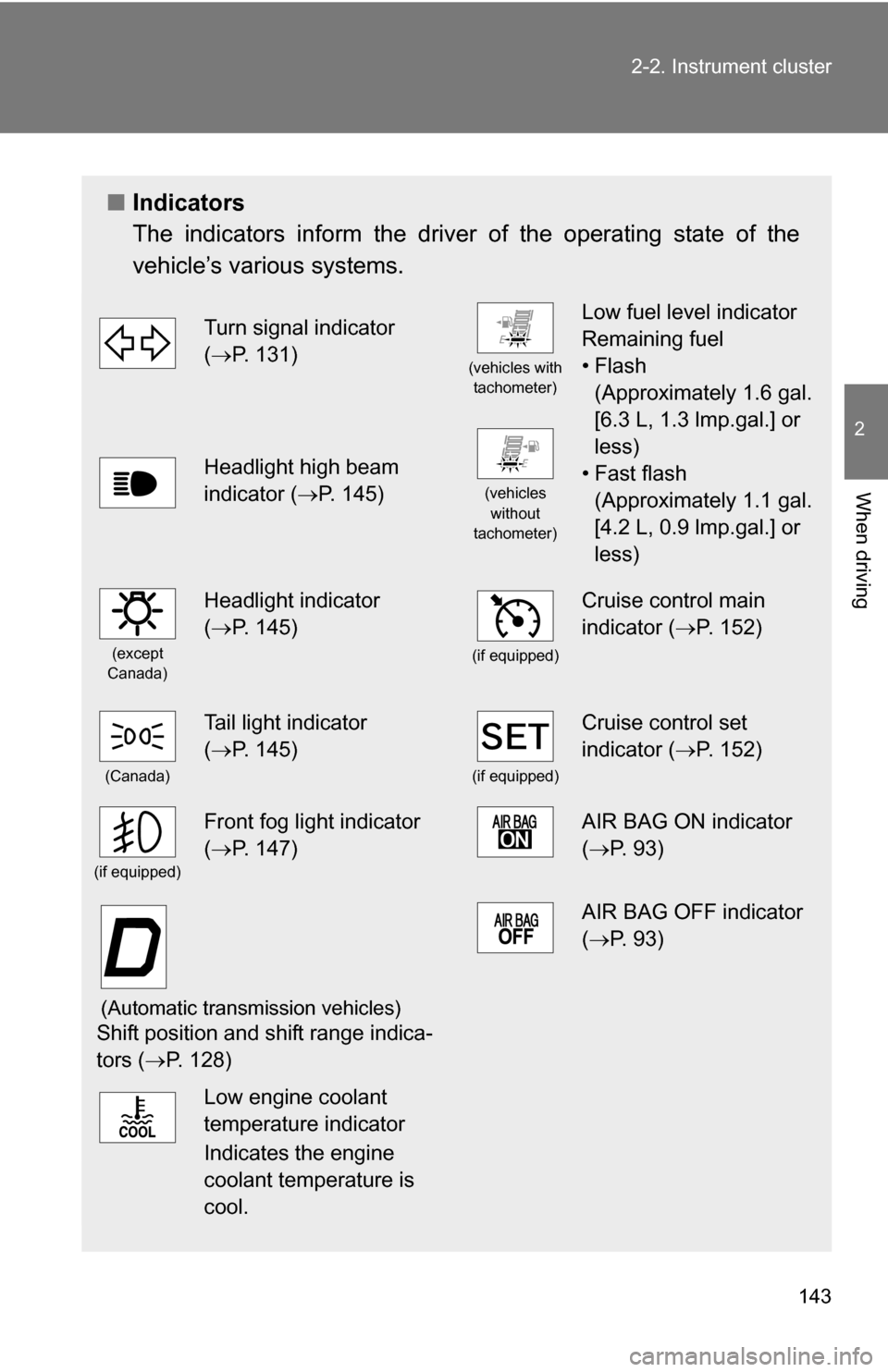
Turn signal indicator
(P. 131)
(vehicles with
tachometer)
Low fuel level indicator
Remaining fuel
•Flash (Approximately 1.6 gal.
[6.3 L, 1.3 lmp.gal.] or
less)
• Fast flash (Approximately 1.1 gal.
[4.2 L, 0.9 lmp.gal.] or
less)
Headlight high beam
indicator ( P. 145)
(vehicles
without
tachometer)
(except
Canada)
Headlight indicator
( P. 145)
(if equipped)
Cruise control main
indicator ( P. 152)
(Canada)
Tail light indicator
(P. 145)
(if equipped)
Cruise control set
indicator ( P. 152)
(if equipped)
Front fog light indicator
(P. 147)AIR BAG ON indicator
( P. 93)
(Automatic transmission vehicles)
Shift position and shift range indica-
tors ( P. 128)
AIR BAG OFF indicator
(P. 93)
Low engine coolant
temperature indicator
Indicates the engine
coolant temperature is
cool.
Page 152 of 392
152
2-4. Using other driving systems
Cruise control (if equipped)
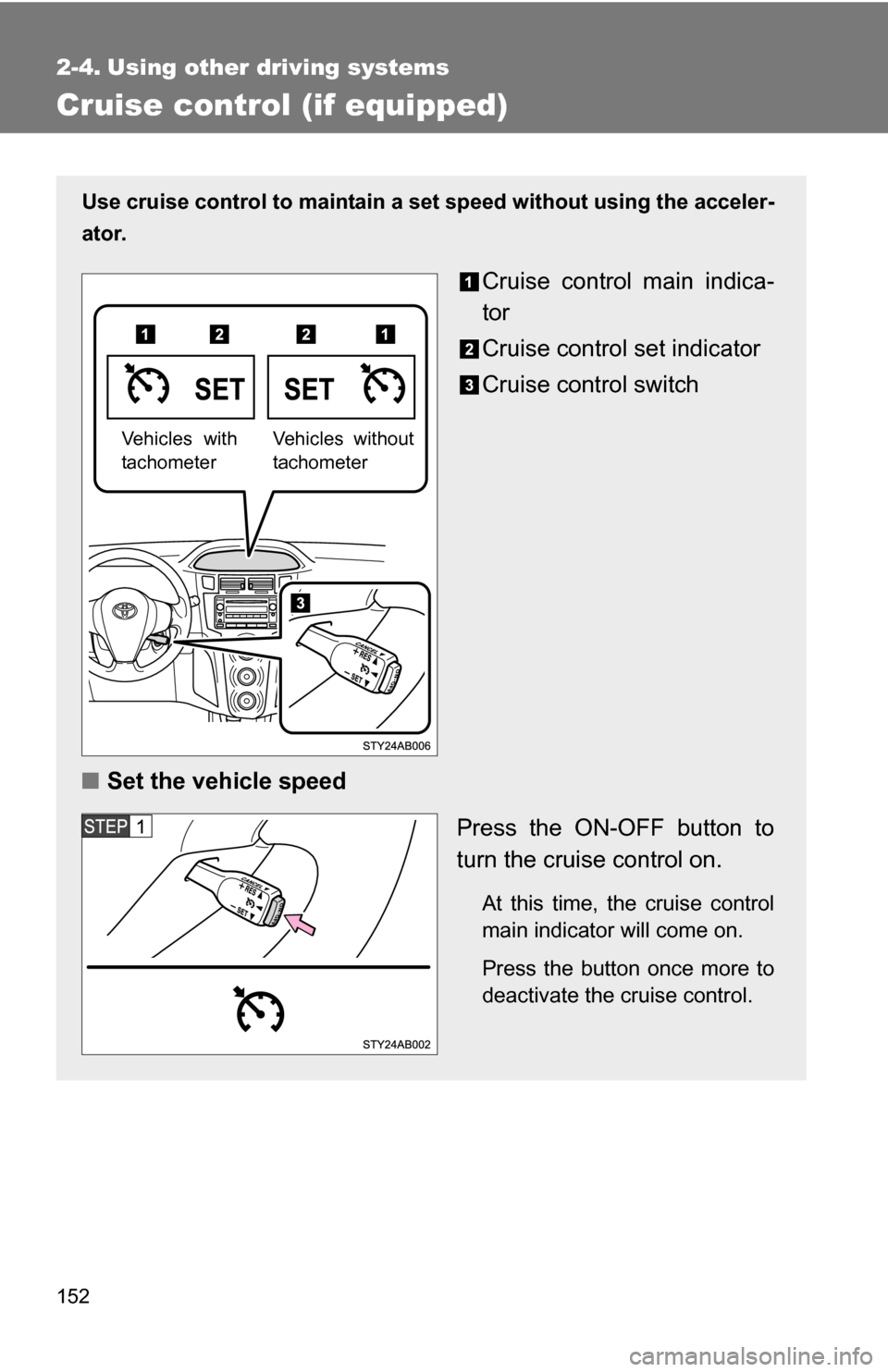
Use cruise control to maintain a set speed without using the acceler-
ator.
Cruise control main indica-
tor
Cruise control set indicator
Cruise control switch
■ Set the vehicle speed
Press the ON-OFF button to
turn the cruise control on.
At this time, the cruise control
main indicator will come on.
Press the button once more to
deactivate the cruise control.
Vehicles without
tachometerVehicles with
tachometer
Page 153 of 392
153
2-4. Using other
driving systems
2
When driving
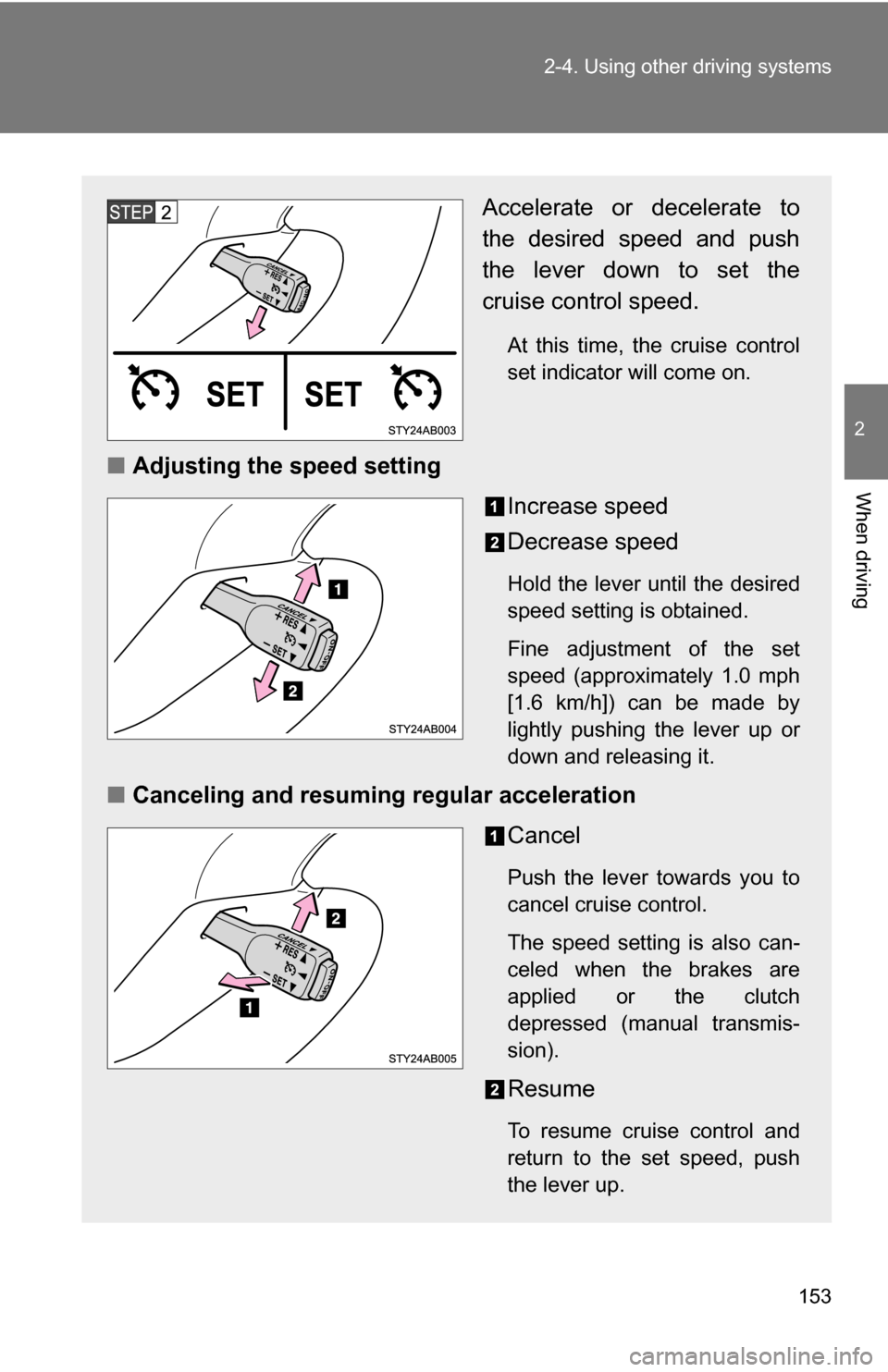
Accelerate or decelerate to
the desired speed and push
the lever down to set the
cruise control speed.
At this time, the cruise control
set indicator will come on.
■Adjusting the speed setting
Increase speed
Decrease speed
Hold the lever until the desired
speed setting is obtained.
Fine adjustment of the set
speed (approximately 1.0 mph
[1.6 km/h]) can be made by
lightly pushing the lever up or
down and releasing it.
■Canceling and resuming regular acceleration
Cancel
Push the lever towards you to
cancel cruise control.
The speed setting is also can-
celed when the brakes are
applied or the clutch
depressed (manual transmis-
sion).
Resume
To resume cruise control and
return to the set speed, push
the lever up.
Page 154 of 392
154 2-4. Using other driving systems
■Cruise control can be set when
●The shift lever is in D or 3 (vehicles with an automatic transmission).
● Vehicle speed is above approximately 25 mph (40 km/h).
■ Accelerating
The vehicle can be accelerated normally. After acceleration, the set speed
resumes.
■ Automatic cruise control cancellation
The set speed is automatically canceled in any of the following situations.
●Actual vehicle speed falls more than 10 mph (16 km/h) below the preset
vehicle speed.
At this time, the memorized set speed is not retained.
● Actual vehicle speed is below 25 mph (40 km/h).
■ If the cruise control main indicator flashes
Press the ON-OFF button to turn the cruise control off, and then reactivate
the system.
If the cruise control speed cannot be set or if the cruise control cancels
immediately after being activated, there may be a malfunction in the cruise
control system. Have the vehicle inspected by your Toyota dealer.
CAUTION
■To avoid operating the cruise control by mistake
Keep the ON-OFF button off when not in use.
■ Situations unsuitable for cruise control
Do not use cruise control in any of the following situations.
Doing so may result in control of the vehicle being lost and could cause seri-
ous or fatal accident.
●In heavy traffic
● On roads with sharp bends
● On winding roads
● On slippery roads, such as those covered with rain, ice or snow
● On steep hills
● When towing a trailer