2009 TOYOTA YARIS HATCHBACK change time
[x] Cancel search: change timePage 2 of 402
17
OVERVIEW
FEATURES/OPERATIONS
SAFETY AND EMERGENCY FEATURES
2009
Yaris Liftback
!Awordaboutsafevehicleoperations
This
Quick Reference Guide is a summary of basic vehicle
operations. It contains brief descriptions of fundamental
operations so you can locate and use the vehicle’s main
equipment quickly and easily.
The Quick Reference Guide is not intended as a substitute for the
Owner’s Manual located in your vehicle’s glove box. We strongly
encourage you to review the Owner’s Manualand supplementary
manuals so you will have a better understanding of your vehicle’s
capabilities and limitations.
Your dealership and the entire staff of Toyota Motor Sales, U.S.A.,
Inc. wish you many years of satisfied driving in your new Yaris.
This Quick Reference Guide is not a full description of Yaris
operations. Every Yaris owner should review the Owner’s
Manual that accompanies this vehicle.
Pay special attention to the boxed information highlighted in
color throughout the Owner’s Manual. Each box contains safe
operatinginstructionstohelpyouavoidinjuryorequipment
malfunction.
All information in this Quick Reference Guide is current at
the time of printing. Toyota reserves the right to make
changes at any time without notice.
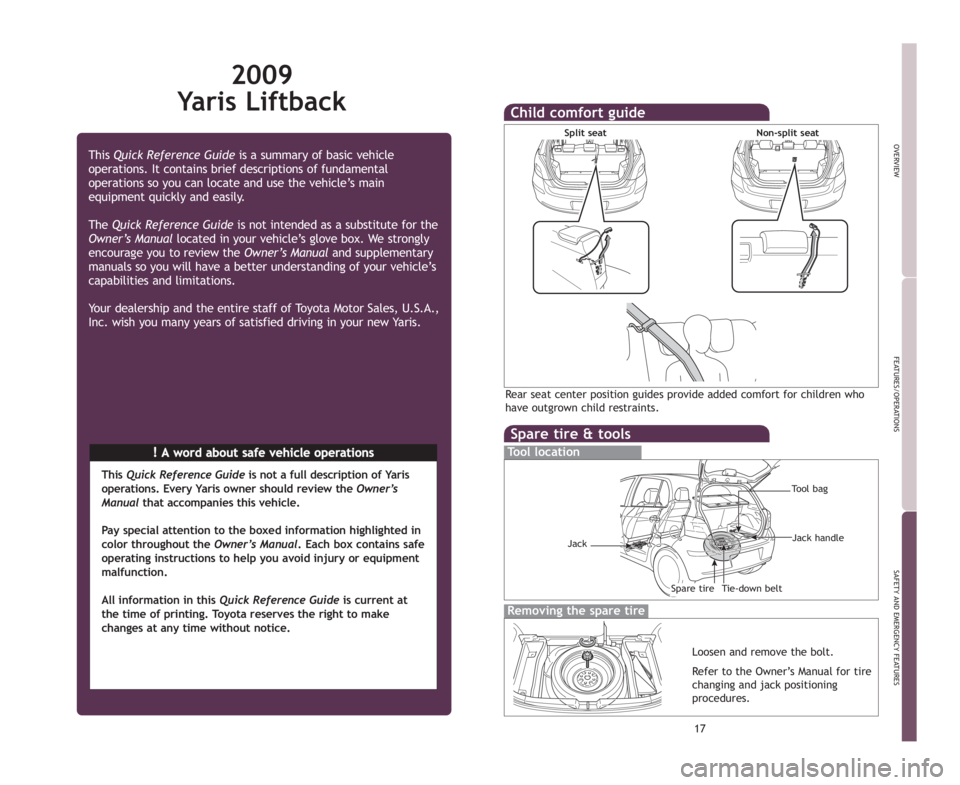
Spare tire & tools
Tool location
Removing the spare tire
Loosen and remove the bolt.
Refer to the Owner’s Manual for tire
changing and jack positioning
procedures.
Tool bag
Tie-down belt Jack handleSpare tire
Jack
Child comfort guide
Rear seat center position guides provide added comfort for children who
have outgrown child restraints.
Split seat
Non-split seat
412782M1.qxd:412782M1 8/18/08 1:55 PM Page 2
Page 13 of 402
11
OVERVIEW
FEATURES/OPERATIONS
SAFETY AND EMERGENCY FEATURES
p
p
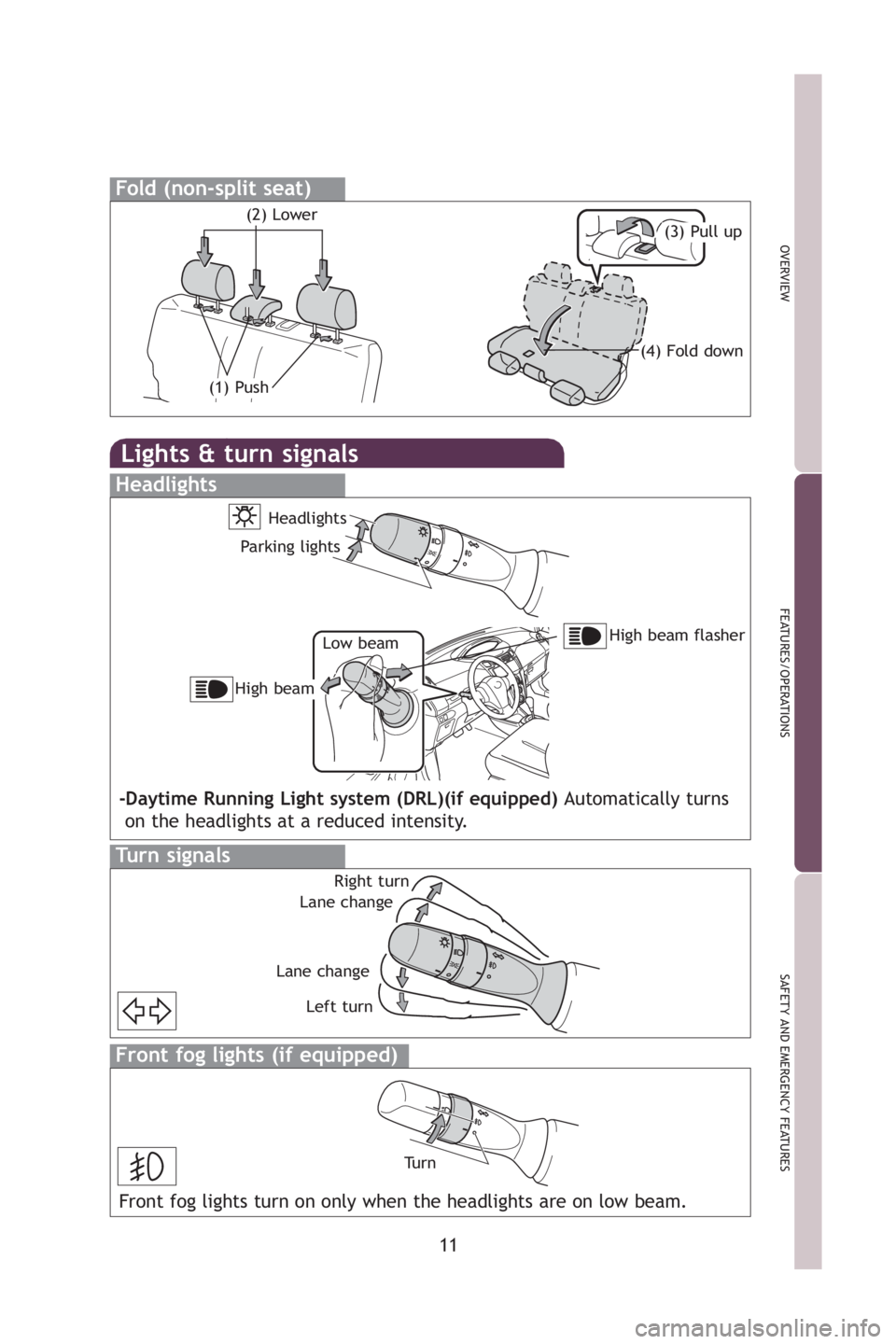
Lights & turn signals
Headlights
High beam flasher
Low beam
Headlights
Parking lights
High beam
-Daytime Running Light system (DRL)(if equipped) Automatically turns
on the headlights at a reduced intensity.
Turn signals
Right turn
Lane change
Lane change Left turn
Front fog lights (if equipped)
Tu r n
Front fog lights turn on only when the headlights are on low beam.
Fold (non-split seat)
(1) Push
(3) Pull up(2) Lower
(4) Fold down
412782M2.qxd:_412782M2 8/18/08 2:07 PM Page 11
Page 20 of 402

20
For your information
Main Owners Manual
Please note that this manual applies to all models explains and all equip-
ment, including options. Therefore, you may find some explanations for
equipment n
ot installed on your vehicle.
All specifications provided in this manual are current at the time of printing.
However
, because of the Toyota policy of continual product improvement, we
reserve the right to make changes at any time without notice.
Depending on specifications, the vehicle shown in the illustrations may differ
from your vehicle in terms of equ
ipment.
Accessories, spare parts and modification of your Toyota
A wide variety of non-genuine spare parts and accessories for Toyota
vehicles are currently available in the market. You should know that Toyota
does not warrant these products and is not responsible for their
performance, repair, or replacement, or for any damage they may cause to,
or adverse effect they may have on, your Toyota vehicle.
This vehicle should not be modified with non-genuine Toyota products.
Modification with non-genu
ine Toyota products could affect its performance,
safety or durability, and may even violate governmental regulations. In
addition, damage or performance problems resulting from the modification
may not be covered under warranty.
Installation of a mobile two-way radio system
As the installation of a mobile two-way radio system in your vehicle could
affect electronic systems such as the multiport fuel injection system/sequen-
tial multiport fuel injection system, anti-lock brake system, SRS airbag sys -
tem and seat belt pretensioner system, be sure to check with your Toyota
dealer for
precautionary measures or special instructions regarding installa -
tion.
Page 137 of 402

124 2-1. Driving procedures
NOTICE
nAvoiding damage to vehicle parts
lDo not turn the steering wheel fully in either direction and hold it there for a
long time.
Doing so may damage the power steering motor.
l When driving over bumps in the road, drive as slowly as possible to avoid
damaging the wheels, underside of the vehicle, etc.
n If you hear a squealing or scrapin g noise while driving (brake pad wear
limit indicators)
Have the brake pads checked and replaced by your Toyota dealer as soon
as possible.
The rotor damage can result if the pads are not replaced when needed.
It is dangerous to drive the vehicle when the wear limits of the brake pads
and/or that of the brake discs are exceeded.
n If you get a flat tire while driving
A flat or damaged tire may cause the following situations. Hold the steering
wheel firmly and gradually press the brake pedal to slow down the vehicle.
lIt may be difficult to control your vehicle.
l The vehicle will make abnormal sounds.
l The vehicle will behave abnormally.
Replace a flat tire with a new one. ( →P. 320)
n When encountering flooded roads
Do not drive on a road that has flooded after heavy rain etc. Doing so may
cause the following serious damage to the vehicle.
lEngine stalling
l Short in electrical components
l Engine damage caused by water immersion
In the event that you drive on a flooded road and the vehicle is flooded, be
sure to have your Toyota dealer check the following.
l Brake function
l Changes in quantity and quality of eng ine oil, transaxle fluid, etc.
l Lubricant condition for the bearings and suspension joints (where possi-
ble) and the function of all joints, bearings, etc.
Page 202 of 402

190 3-2. Using the audio system
nScanning all radio stations within range
Press .
All stations with reception will be played for 5 seconds each.
When the desired station is reached, press the button once
again.
XM® Satellite Radio* (if equipped)
n Re
ceiving XM® Satellite Radio
Press and select the XM
® band.
The display changes as follows each time is
pressed.
AM → SA
T1 → SAT2 → SAT3
Turn to select the desired channel in the all catego -
ries or press “
∧” or “∨ ” on to select the desired chan -
nel in the current category.
n Setting XM
® Satellite Radio channel presets
Select the desired channel. Press and hold the button (from
to ) that the channel is to be set to until you hear a beep.
n Changing the channel category
Press “
∧” or “ ∨” on the .
n Scanning
XM® Satellite Radio channels
l Scan
ning channels in the current category
Press .
When the desired channel is reached, press
again.
Page 203 of 402

191
3-2. Using the audio system
3
Interior features
l
Scanning preset channels
Press and hold until you hear a beep.
When the desired channel is reached, press
again.
n Displaying t
ext information
Press .
The display will show up to 10 characters.
The display changes as follows each time the button is pressed.
lCH NAME
l TITLE (SONG/PROGRAM TITLE)
l NAME (AR
TIST NAME/FEATURE)
l CH
NUMBER
*:Use of XM® Satellite Radio requires XM® tuner and service.
Contact your Toyota dealer.
n When the battery is disconnected
Stations presets are erased.
n Reception se
nsitivity
l Main
taining perfect radio reception at all times is difficult due to the con-
tinually changing position of the antenna, differences in signal strength
and surrounding object
s, such as trains, transmitters, etc.
l The radio antenna is mounted on the
rear roof. The antenna can be
removed from the base by turning it.
Page 205 of 402
193
3-2. Using the audio system
3
Interior features
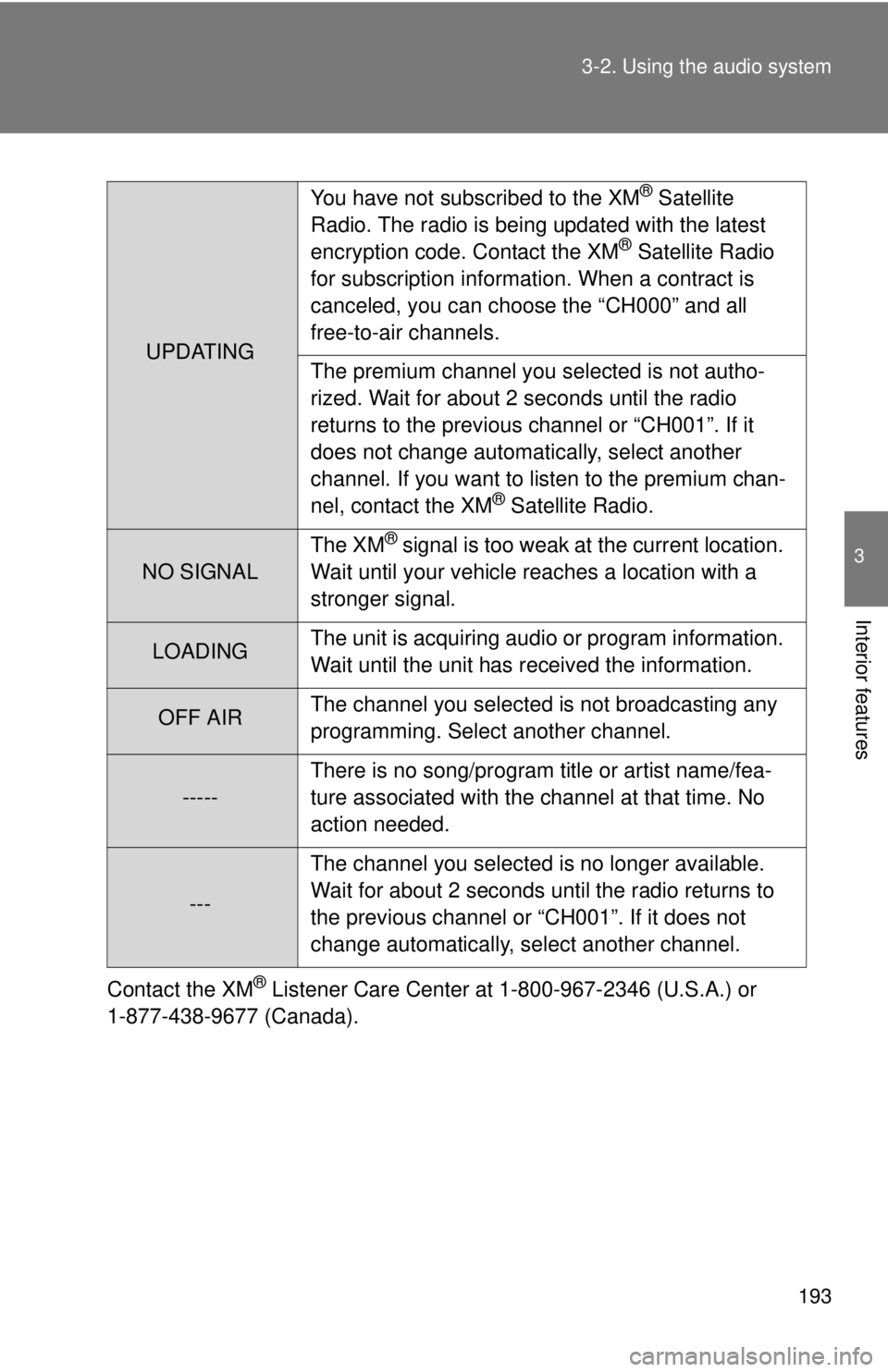
Contact the XM® Listener Care Center at 1-800-967-2346 (U.S.A.) or
1-877-438-9677 (Canada).
UPDATING You have not subscribed to the XM
® Satellite
Radio. The radio is being updated with the latest
encryption code. Contact the XM
® Satellite Radio
for subscription information. When a contract is
canceled, you can choose the “CH000” and all
free-to-air channels.
The premium channel you selected is not autho-
rized. Wait for about 2 seconds until the radio
returns to the previous channel or “CH001”. If it
does not change automatically, select another
channel. If you want to listen to the premium chan-
nel, contact the XM
® Satellite Radio.
NO SIGNAL The XM
® signal is too weak at the current location.
Wait until your vehicle reaches a location with a
stronger signal.
LOADING The unit is acquiring audio or program information.
Wait until the unit has received the information.
OFF AIRThe channel you selected is not broadcasting any
programming. Select another channel.
-----There is no song/program title or artist name/fea-
ture associated with the channel at that time. No
action needed.
---The channel you selected is no longer available.
Wait for about 2 seconds until the radio returns to
the previous channel or “CH001”. If it does not
change automatically, select another channel.
Page 209 of 402

197
3-2. Using the audio system
3
Interior features
n
All CDs (with externa l CD changer only)
Press and hold (RAND) until you hear a beep.
Tracks on all loaded CDs are played in a random order until the button is
pressed once more.
Switching the display
Press .
Each time the switch is pressed, the display changes in the order of Track
no./Elapsed time →CD title→Track name.
nDisplay
Up to 12 characters can be displayed at a time.
If there are 13 characters or more, pressing and holding
for 1 second
or more will display the remaining characters.
A maximum of 24 characters can be displayed.
If
is pressed for 1 second or more again or has not been pressed for
6 seconds or more, the display will return to the first 12 characters.
Depending on the contents recorded, the characters may not be displayed
prop
erly or may not be displayed at all.
n Cancelin
g random playback
Press
(RAND) again.
n Canceling repeat play
Press
(RPT) again.
n Error messages
“ERROR”: This indicates a trouble either in the CD or inside the player.
The CD may be dirty, damaged or inserted up-side down.