Page 214 of 402

202 3-2. Using the audio system
Random playback
nTo play files from a partic ular folder in random order
Press (RAND).
n T
o play all of the files on a disc in random order
Press and hold (RAND) until you hear a beep.
Switching the display
Press .
Each time the switch is pressed, the display changes in the order of
Folder no./File no./Elapsed time →Folder name→File name→Album title
(MP3 only) →Track title →Artist name.
nDisplay
Up to 12 characters can be displayed at a time.
If there are 13 characters or more, pressing and holding for 1 second
or more will display the remaining characters.
A maximum of 24 characters can be displayed.
If is pressed for 1 second or more again or has not been pressed for
6 seconds or more, the display will return to the first 12 characters.
Depending on the contents recorded, the characters may not be displayed
prop
erly or may not be displayed at all.
n Cancelin
g random playback
Press
(RAND) again.
n Canceling repeat play
Press (RPT) again.
n Error messages
“ERROR”: This indicates a trouble either in the CD or inside the player.
The CD may be dirty, damaged or inserted up-side down.
“NO MUSIC”:This indicates that the MP 3/WMA file
is not included in the CD.
Page 222 of 402
210
3-3. Using the interior lights
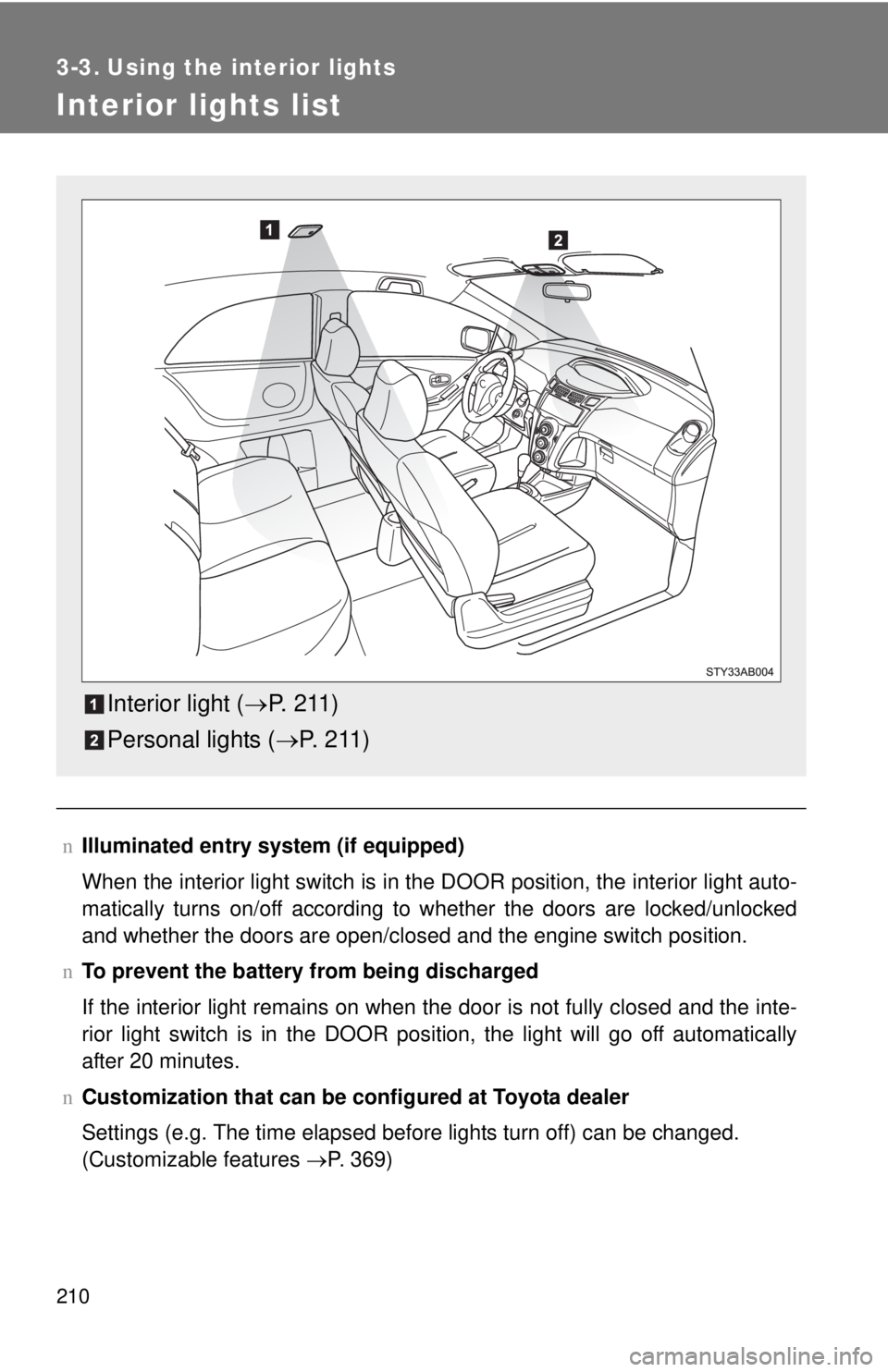
Interior lights list
nIlluminated entry system (if equipped)
When the interior light switch is in the DOOR position, the interior light auto -
matically turns on/off according to whether the doors are locked/unlocked
and whether the doors are
open/closed and the engine switch position.
n T
o prevent the battery from being discharged
If the interior light remains on when the door is not fully closed and the inte -
rior light switch is in the DOOR position, the light will go off automatically
af
ter 20 minutes.
n Customization that can be co nfigure
d at Toyota dealer
Settings (e.g. The time elapsed before lights turn off) can be changed.
(Customizable features →P. 369)
Interior light (→P. 2 11 )
Personal lights ( →P. 2 1 1 )
Page 378 of 402
369
6
Vehicle specifications
6-2. Customization
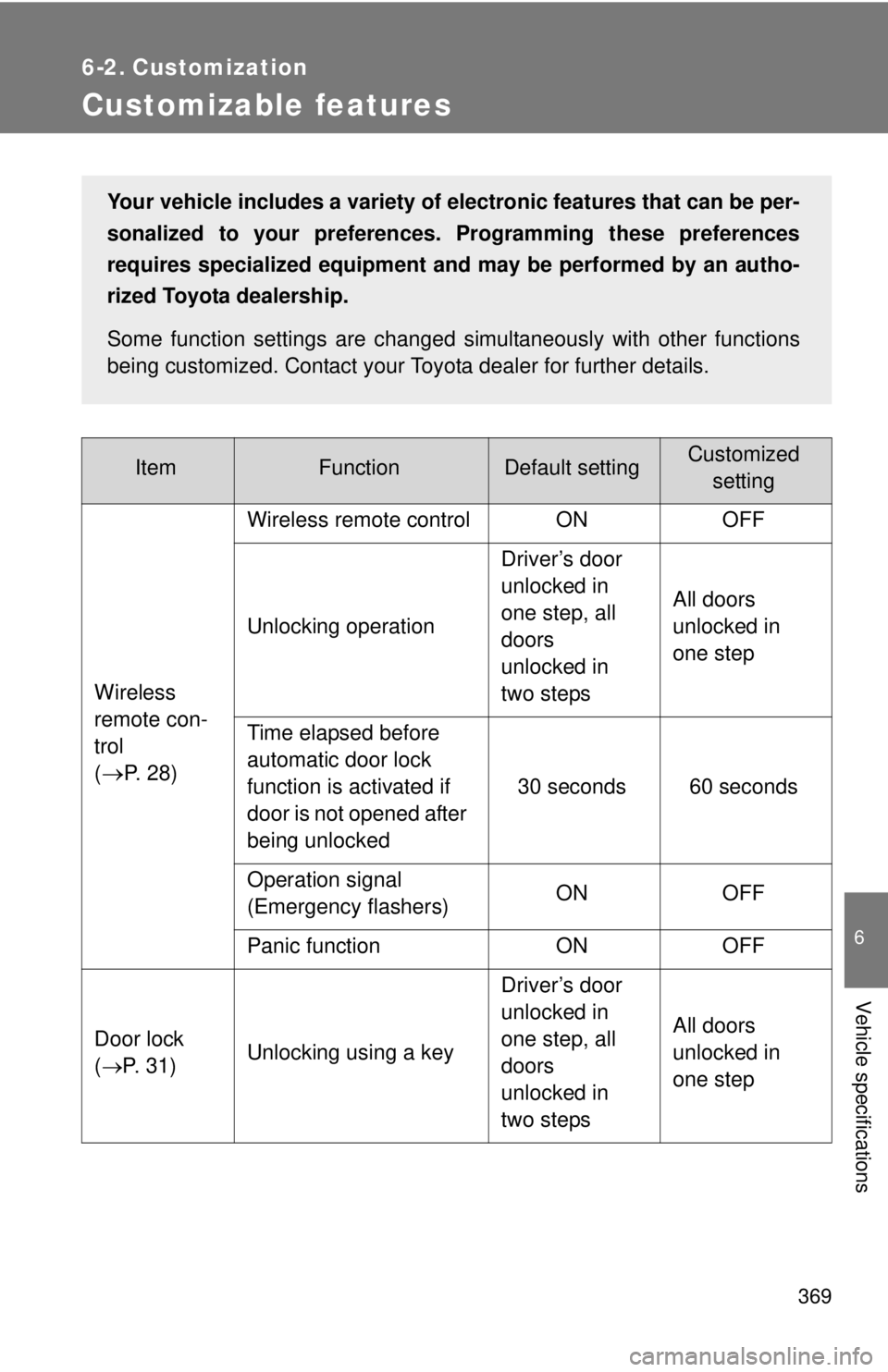
Customizable features
ItemFunctionDefault settingCustomizedsetting
Wireless
remote con-
trol
(
→P. 2 8 ) Wireless remote control ON OFF
Unlocking operation
Driver’s door
unlocked in
one step, all
doors
unlocked in
two stepsAll doors
unlocked in
one step
Time elapsed before
automatic door lock
function is activated if
door is not opened after
being unlocked 30 seconds 60 seconds
Operation signal
(Emergency flashers) ON OFF
Panic function ON OFF
Door lock
( →P. 31) Unlocking using a key Driver’s door
unlocked in
one step, all
doors
unlocked in
two stepsAll doors
unlocked in
one step
Your vehicle includes a variety of electronic features that can be per-
sonalized to your preferences. Programming these preferences
requires specialized
equipment and may be performed by an autho -
rized Toyota dealership.
Some function settings are changed simultaneously with other functions
being customized. Cont
act your Toyota dealer for further details.