Page 11 of 592
11
B
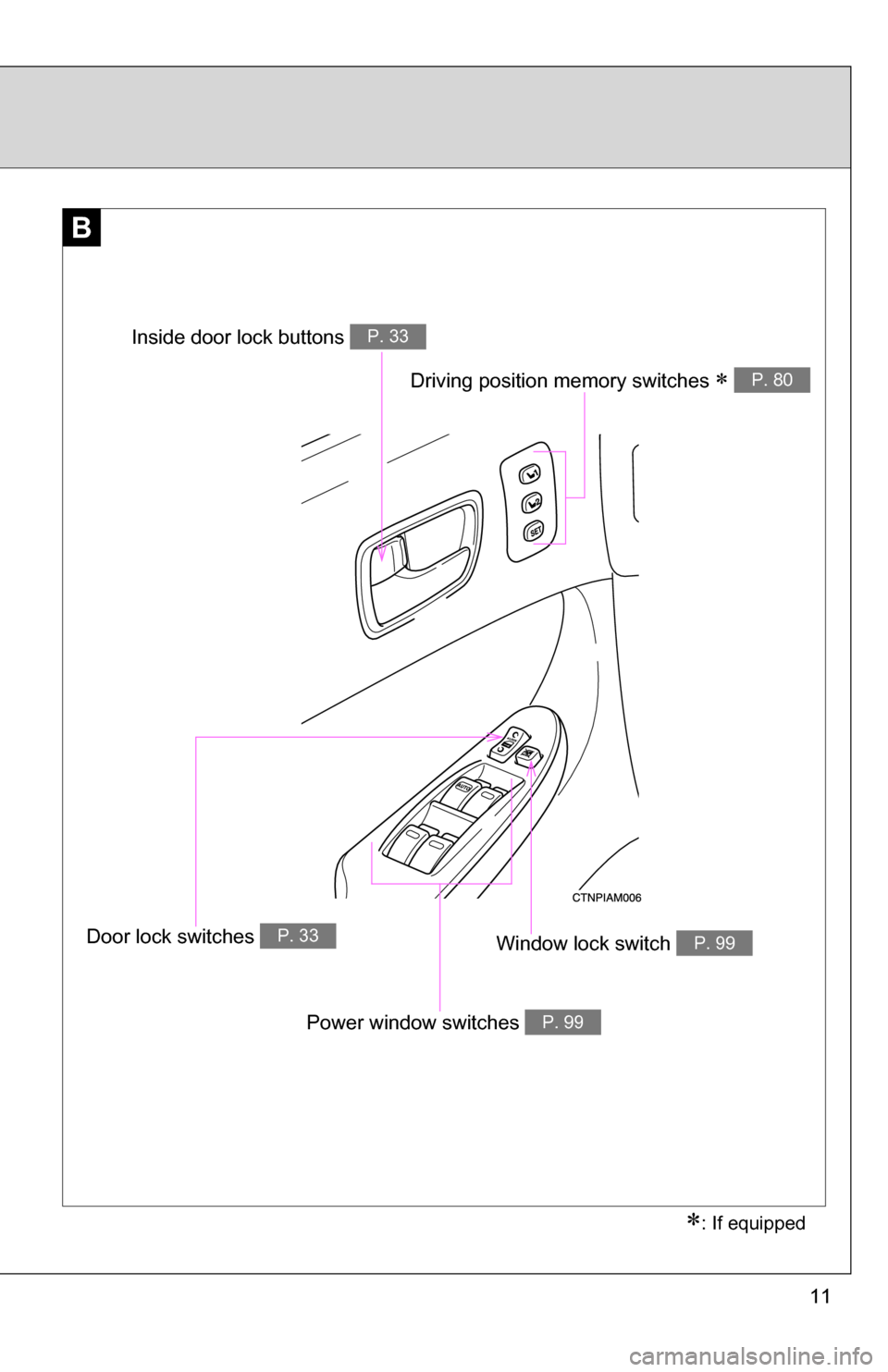
Window lock switch P. 99
Power window switches P. 99
Door lock switches P. 33
Inside door lock buttons P. 33
: If equipped
Driving position memory switches P. 80
Page 33 of 592
33
1
1-2. Opening, closing and locking the doors
Before driving
Front doors
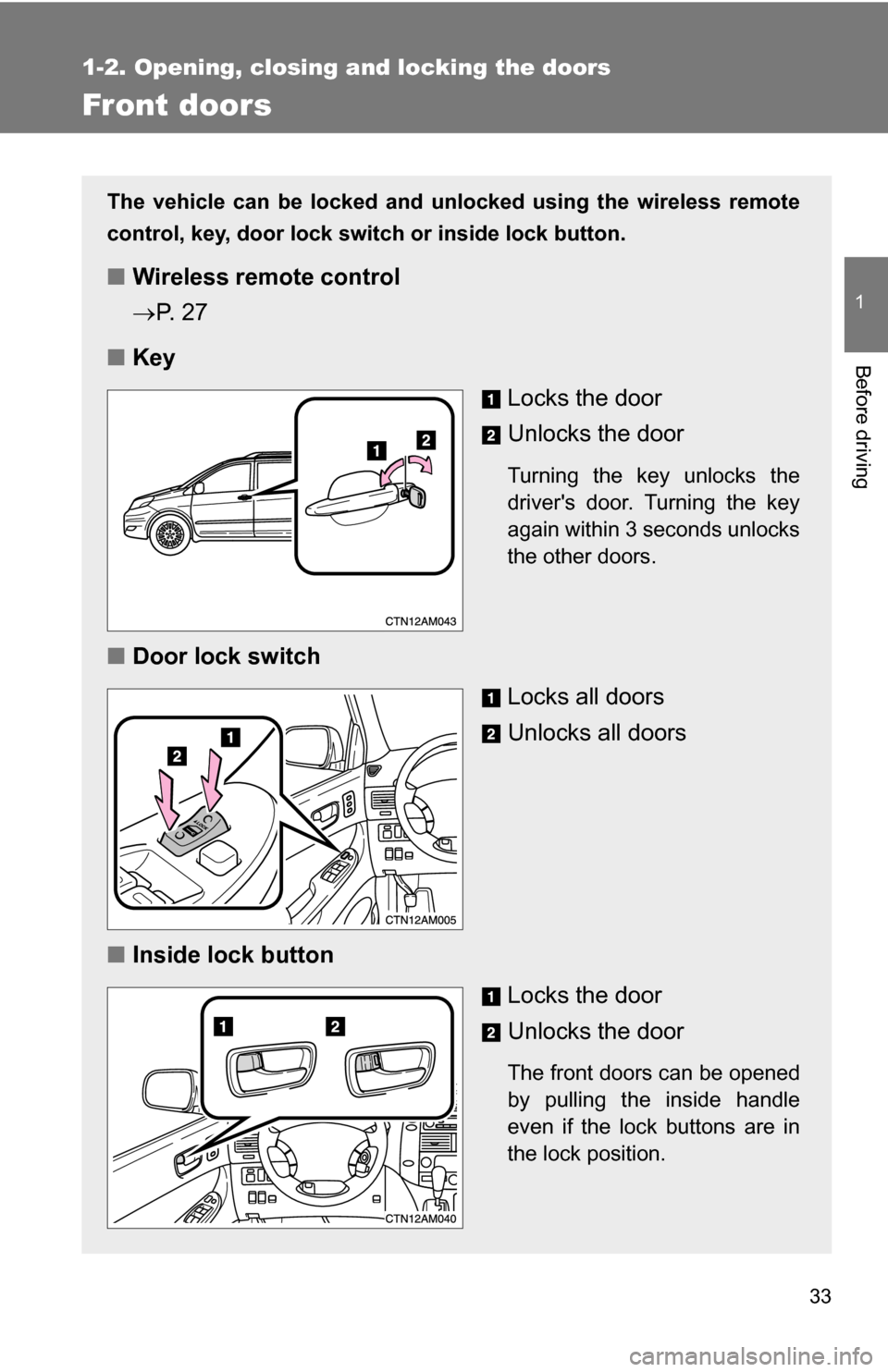
The vehicle can be locked and unlocked using the wireless remote
control, key, door lock switch or inside lock button.
■Wireless remote control
P. 2 7
■ Key
Locks the door
Unlocks the door
Turning the key unlocks the
driver's door. Turning the key
again within 3 seconds unlocks
the other doors.
■Door lock switch
Locks all doors
Unlocks all doors
■ Inside lock button
Locks the door
Unlocks the door
The front doors can be opened
by pulling the inside handle
even if the lock buttons are in
the lock position.
Page 139 of 592
139
1
1-7. Safety information
Before driving
Installing child restraints
Follow the child restraint system manufacturer's instructions. Firmly
secure child restraints to the r ear seats using the LATCH anchors or
a seat belt. Attach the top teth er strap when installing a child
restraint.
The lap/shoulder belt can be used if your child restraint system is
not compatible with the LATCH (Low er Anchors and Tethers for Chil-
dren) system.
■ Using the LATCH anchors
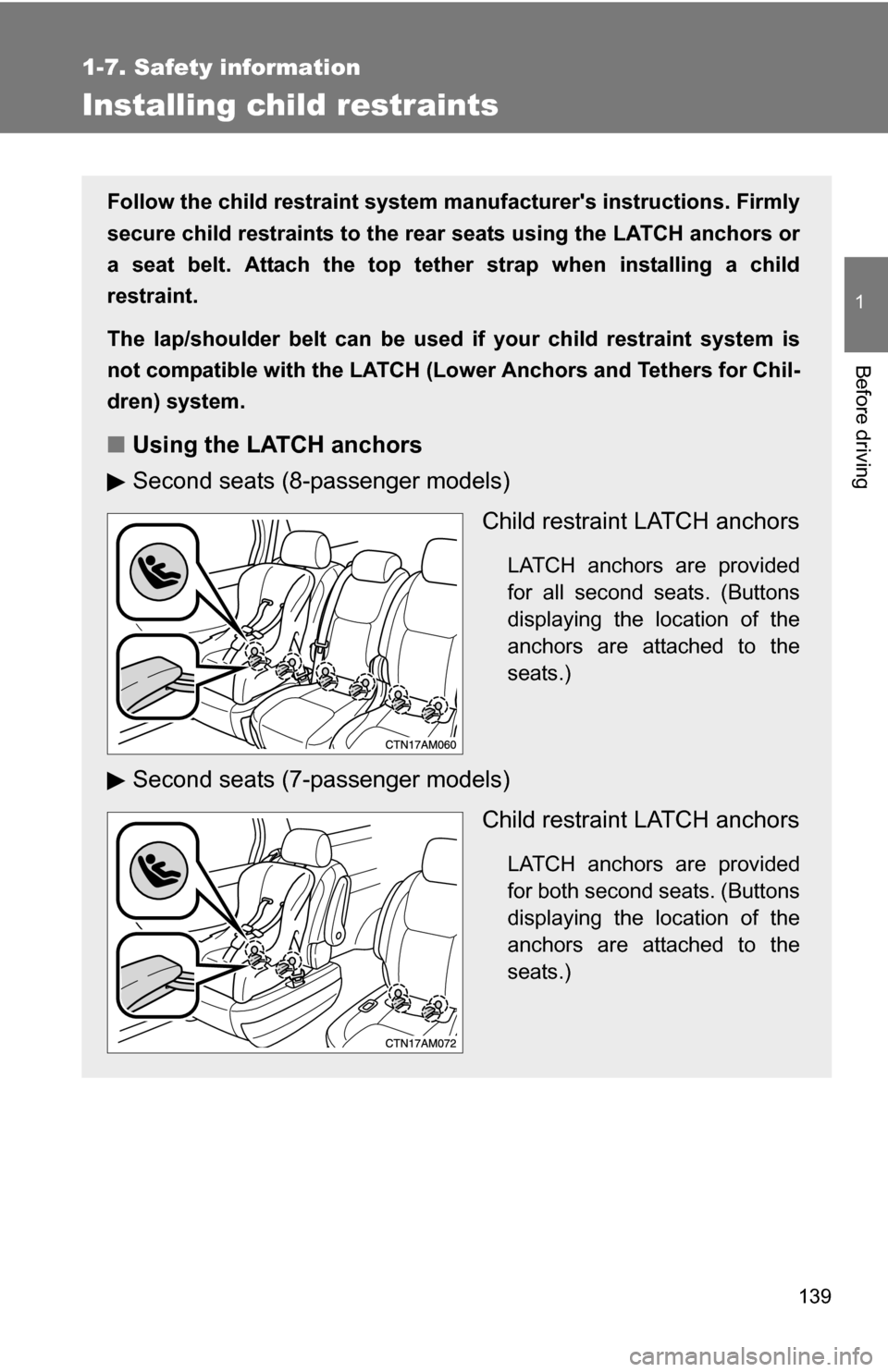
Second seats (8-passenger models)
Child restraint LATCH anchors
LATCH anchors are provided
for all second seats. (Buttons
displaying the location of the
anchors are attached to the
seats.)
Second seats (7-passenger models)Child restraint LATCH anchors
LATCH anchors are provided
for both second seats. (Buttons
displaying the location of the
anchors are attached to the
seats.)
Page 182 of 592
182 2-2. Instrument cluster and information display
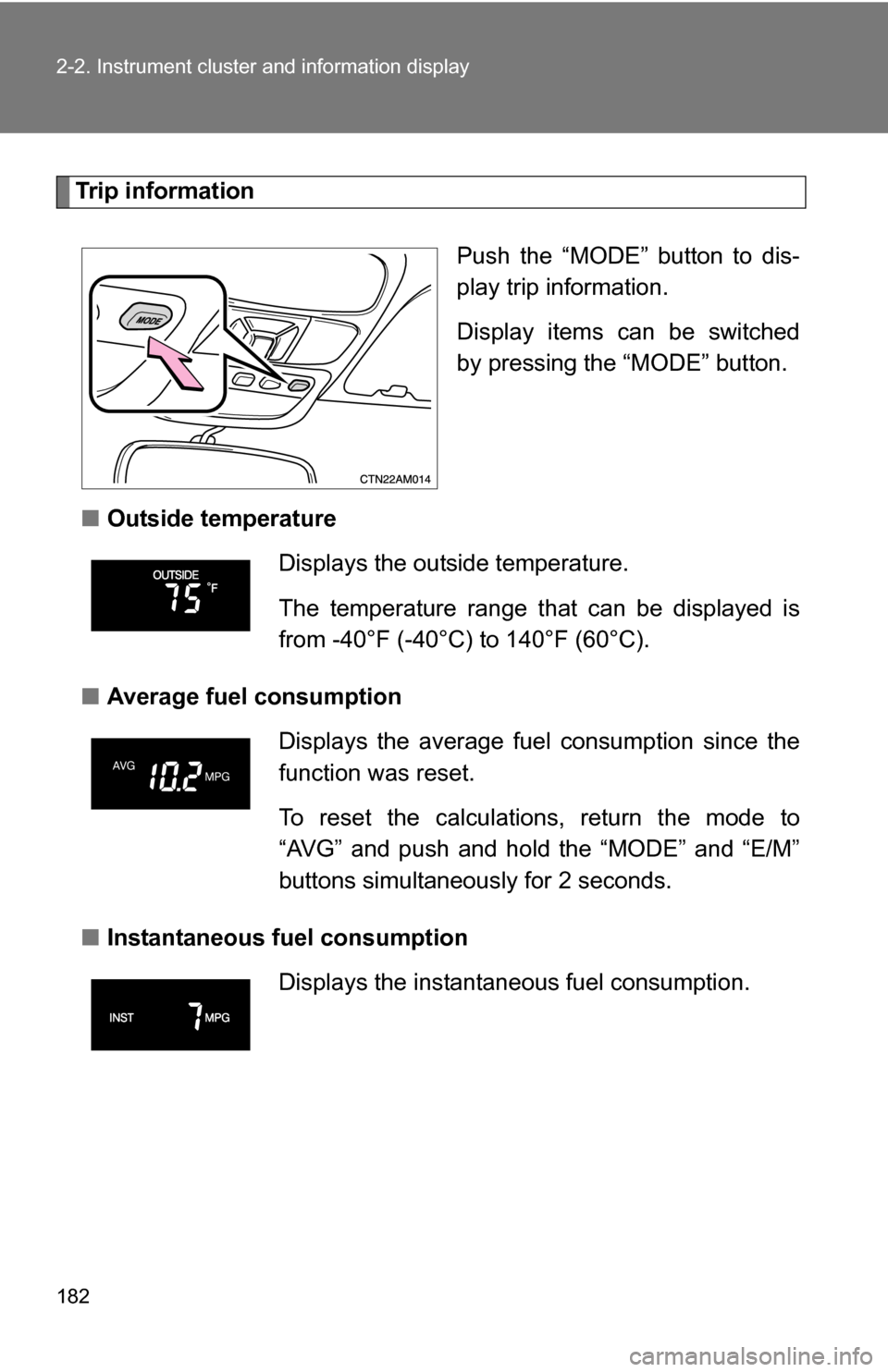
Trip informationPush the “MODE” button to dis-
play trip information.
Display items can be switched
by pressing the “MODE” button.
■ Outside temperature
■ Average fuel consumption
■ Instantaneous fuel consumption
Displays the outside temperature.
The temperature range that can be displayed is
from -40°F (-40°C) to 140°F (60°C).
Displays the average fuel consumption since the
function was reset.
To reset the calculations, return the mode to
“AVG” and push and hold the “MODE” and “E/M”
buttons simultaneously for 2 seconds.
Displays the instantane ous fuel consumption.
Page 265 of 592
265
3-2. Using the audio system
3
Interior features
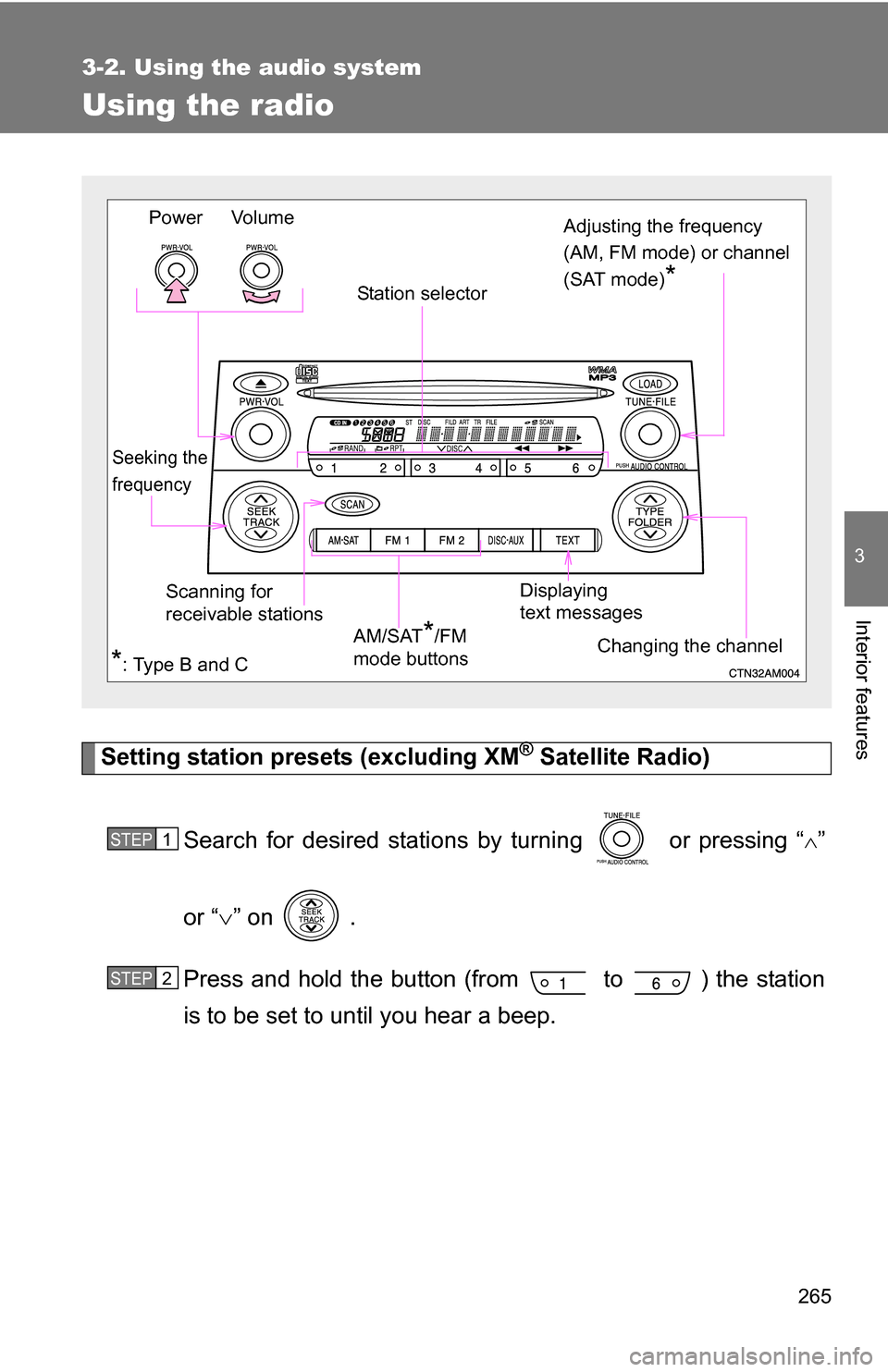
Using the radio
Setting station presets (excluding XM® Satellite Radio)
Search for desired stations by turning or pressing “
”
or “ ” on .
Press and hold the button (from to ) the station
is to be set to until you hear a beep.
Vo lu m e
Scanning for
receivable stations Station selector
Seeking the
frequency
Adjusting the frequency
(AM, FM mode) or channel
(SAT mode)
*
AM/SAT*/FM
mode buttons
Power
Displaying
text messages
Changing the channel
*: Type B and C
STEP1
STEP2
Page 405 of 592
405
3-7. Other interior features
3
Interior features
Garage door opener (if equipped)
The garage door opener (HomeLink Universal Transceiver) is manufac-
tured under license from HomeLink.
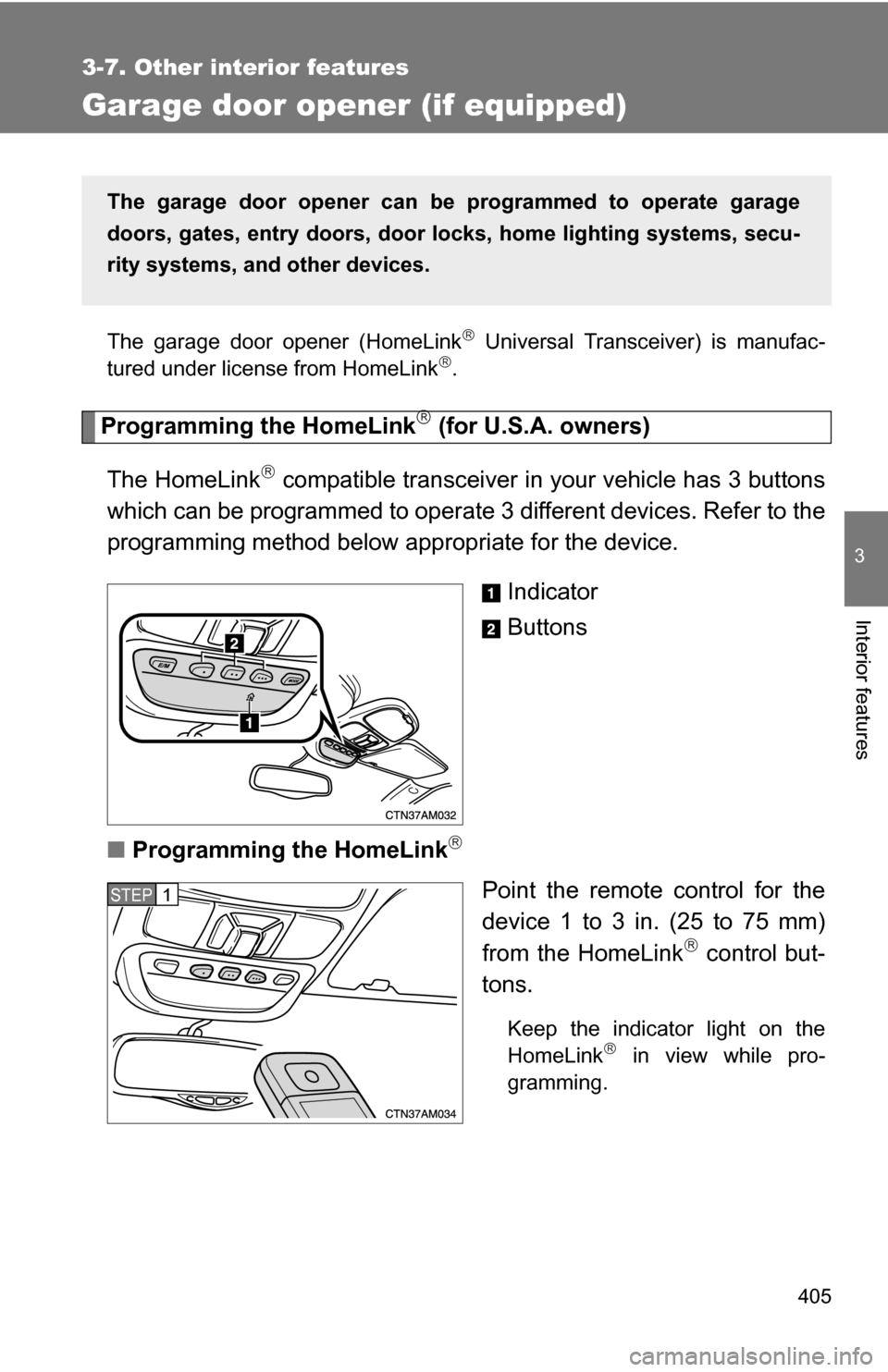
Programming the HomeLink (for U.S.A. owners)
The HomeLink
compatible transceiver in your vehicle has 3 buttons
which can be programmed to operate 3 different devices. Refer to the
programming method below appropriate for the device.
Indicator
Buttons
■ Programming the HomeLink
Point the remote control for the
device 1 to 3 in. (25 to 75 mm)
from the HomeLink
control but-
tons.
Keep the indicator light on the
HomeLink in view while pro-
gramming.
The garage door opener can be programmed to operate garage
doors, gates, entry do ors, door locks, home lighting systems, secu-
rity systems, and other devices.
STEP1
Page 406 of 592
406 3-7. Other interior features
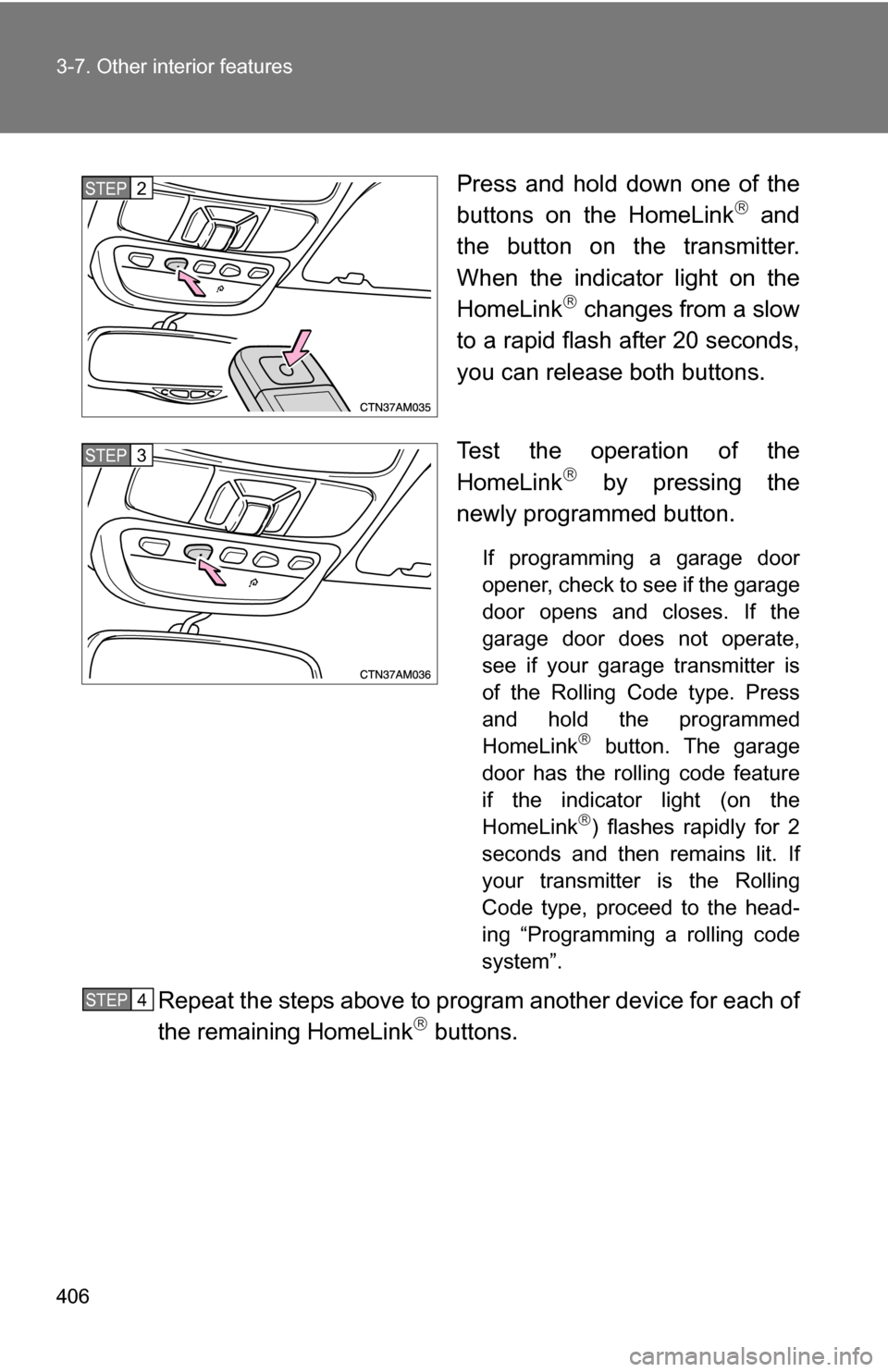
Press and hold down one of the
buttons on the HomeLink and
the button on the transmitter.
When the indicator light on the
HomeLink
changes from a slow
to a rapid flash after 20 seconds,
you can release both buttons.
Test the operation of the
HomeLink
by pressing the
newly programmed button.
If programming a garage door
opener, check to see if the garage
door opens and closes. If the
garage door does not operate,
see if your garage transmitter is
of the Rolling Code type. Press
and hold the programmed
HomeLink
button. The garage
door has the rolling code feature
if the indicator light (on the
HomeLink
) flashes rapidly for 2
seconds and then remains lit. If
your transmitter is the Rolling
Code type, proceed to the head-
ing “Programming a rolling code
system”.
Repeat the steps above to program another device for each of
the remaining HomeLink buttons.
STEP2
STEP3
STEP4
Page 407 of 592
407
3-7. Other interior features
3
Interior features
■
Programming a Rolling Code sys tem (for U.S.A. owners)
If your device is Rolling Code equipped, follow the steps under the
heading “Programming the HomeLink
” before proceeding with
the steps listed below.
Locate the training button on the ceiling mounted garage door
opener motor. The exact location and color of the button may
vary by brand of garage door opener.
Refer to the operation manual supplied with the garage door opener
for the location of the training button.
Press the training button.
Press and release the vehicle’s programmed HomeLink
but-
ton twice. The garage door may open.
If the garage door opens, the programming process is complete. If
the door does not open, press and release the button a third time.
This third press and release will complete the programming process
by opening the garage door.
The ceiling mounted garage door opener motor should now recog-
nize the HomeLink
transceiver and operate the garage door.
Repeat the steps above to prog ram another rolling code sys-
tem for any of the remaining HomeLink buttons.
■ Programming an entry gate (f or U.S.A. owners)/Programming
all devices in the Canadian market
Place your transmitter 1 to 3 in. (25 to 75 mm) away from the
surface of the HomeLink
.
Keep the indicator light on the HomeLink in view while program-
ming.
Press and hold the selected HomeLink button.
Repeatedly press and releas e (cycle) the device’s remote
control button for two seconds each until step 4 is complete.
When the indicator light on the HomeLink
compatible trans-
ceiver starts to flashing ra pidly, release the buttons.
STEP1
STEP2
STEP3
STEP4
STEP1
STEP2
STEP3
STEP4