Page 301 of 592
301
3-3. Using the rear audio system
3
Interior features
■
Headphones
With some headphones generally available in the market, it may be difficult
to catch signals properly. Toyota recommends the use of Toyota genuine
wireless headphones.
Please contact your Toyota dealer for further details.
■ Vo l u m e
●Adjust the volume when you connect the headphones to the jack. Loud
sounds may have a significant impact on the human body.
● Conversational speech on some DVDs is recorded at a low volume to
emphasize the impact of sound effects. If you adjust the volume assum-
ing that the conversations represent the maximum volume level that the
DVD will play, you may be startled by louder sound effects or when you
change to a different audio source. Be sure to adjust the volume with this
in mind.
CAUTION
■While driving
Do not use headphones.
Doing so may cause an accident, resulting in death or serious injury.
■ When the rear seat entert ainment system is not used
Keep the display closed.
In the event of an accident or sudden braking, the opened display may hit an
occupant's body, resulting in injury.
■ To prevent accidents and electric shock
Do not disassemble or modify the remote controller.
■ When the remote controller is not used
Stow the remote controller.
Injuries may result in the event of an accident or sudden braking.
■ Removed battery and other parts
Keep away from children.
These parts are small and if swallowed by a child they can cause choking.
Page 302 of 592
302 3-3. Using the rear audio system
NOTICE
■For normal operation after replacing the battery
Observe the following precautions to prevent accidents.
●Always work with dry hands.
Moisture may cause the battery to rust.
● Do not touch or move any other components inside the remote controller.
● Do not bend either of the battery terminals.
Page 327 of 592

327
3
Interior features
3-4. Using the hands-free phone system (for cellular phone)
Hands-free phone system (for cellular phone) features (if equipped)
■Conditions affecting operation
The hands-free phone system may not operate normally in the following situ-
ations:
●The cellular phone is turned off, or located outside the service area.
● The cellular phone has a low battery.
● The cellular phone is not connected to the system.
● The cellular phone is behind the seat or in the glove box, or metal mate-
rial covers or touches the phone.
■ When transferring ownership of the vehicle
Be sure to initialize the system to prevent personal data from being improp-
erly accessed.
■ Required profiles for the cellular phone
●HFP (Hands Free Profile) Ver. 1.0
● OPP (Object Push Profile) Ver. 1.1
If your cellular phone does not support HFP, you cannot enter the Bluetooth
®
phone, and take OPP service individually.
Owners of models equipped with a navigation system should refer to
the “Navigation System Owner's Manual”.
This system supports Bluetooth
®, which allows you to make or
receive calls without using cables to connect a cellular phone and
the system, and without oper ating the cellular phone.
TitlePage
Using the hands-free phone system
(for cellular phone) P. 331
Making a phone call P. 339
Setting a cellular phone P. 345
Security and system setup P. 350
Using the phone book P. 353
Page 363 of 592
363
3-5. Using the interior lights
3
Interior features
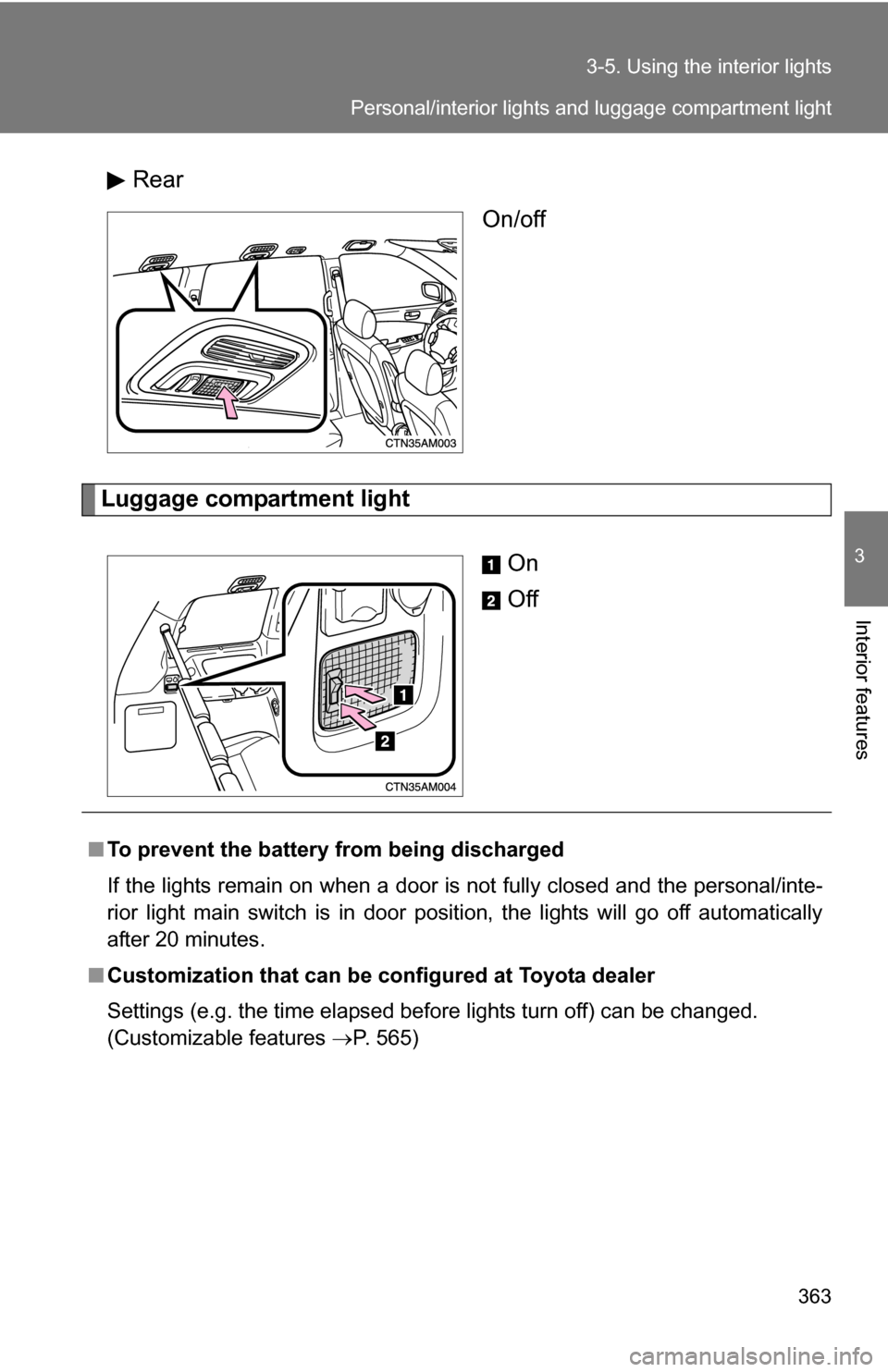
Rear
On/off
Luggage compartment light
On
Off
■To prevent the battery from being discharged
If the lights remain on when a door is not fully closed and the personal/inte-
rior light main switch is in door position, the lights will go off automatically
after 20 minutes.
■ Customization that can be co nfigured at Toyota dealer
Settings (e.g. the time elapsed before lights turn off) can be changed.
(Customizable features P. 565)
Personal/interior lights and luggage compartment light
Page 385 of 592
385
3-7. Other interior features
3
Interior features
Clock
■The clock is displayed when
The engine switch is in the “ACC” or “ON” position.
■ When disconnecting and reco nnecting battery terminals
The time display will automatically be set to 1:00.
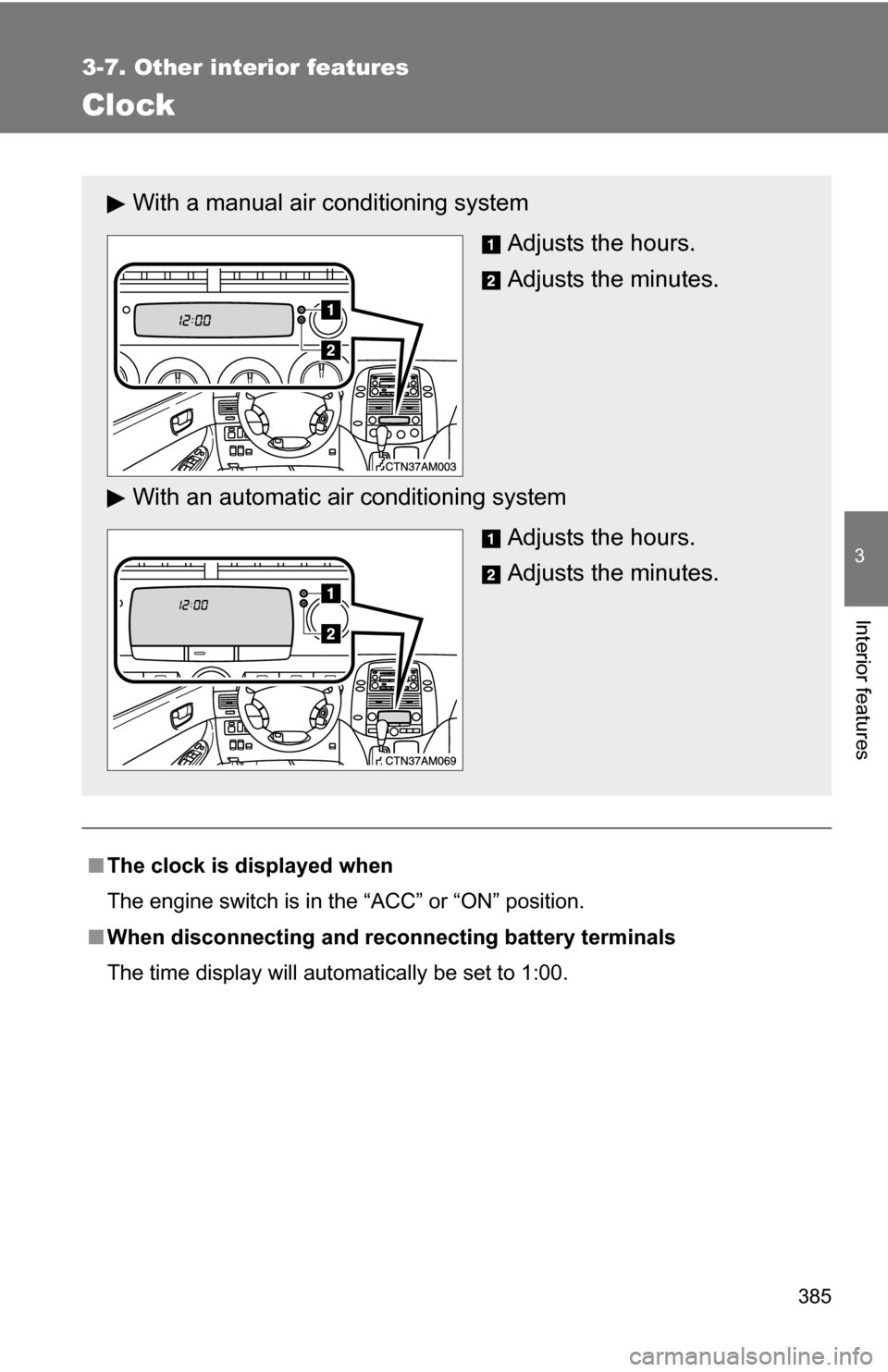
With a manual air conditioning system
Adjusts the hours.
Adjusts the minutes.
With an automatic ai r conditioning system
Adjusts the hours.
Adjusts the minutes.
Page 389 of 592
389
3-7. Other interior features
3
Interior features
■
The power outlet can be used when
12 V
The engine switch is in the “ACC” or “ON” position.
115 VAC
The engine switch is in the “ON” position.
NOTICE
■To avoid damaging the power outlet
Close the power outlet lid when the power outlet is not in use.
Foreign objects or liquids that enter the power outlet may cause a short cir-
cuit.
■ To prevent the fuse from being blown
12 V
Do not use accessories that require a combined total of more than 120 W
(10 A at 12 V).
115 VAC
Do not use 115 VAC appliances that require a combined total of more
than 100 W.
If a 115 VAC appliance that consumes more than 100 W is used, the pro-
tection circuit will cut the power supply.
■ To prevent the battery from being discharged
Do not use the power outlet longer than necessary when the engine is off.
■ Appliances that may not operate properly (115 VAC)
The following 115 VAC appliances may not operate properly even if their
power consumption is under 100 W.
●Appliances with high initial peak wattage
● Measuring devices that process precise data
● Other appliances that require an extremely stable power supply
Page 391 of 592
391
3-7. Other interior features
3
Interior features
NOTICE
■
To prevent seat heater damage
Do not put unevenly weighted objects on the seat and do not stick sharp
objects (needles, nails, etc.) into the seat.
■ To prevent battery discharge
Turn the switches off when the engine is not running.
Page 409 of 592
409
3-7. Other interior features
3
Interior features
■
Before programming
●Install a new battery in the transmitter.
● The battery side of the transmitter must be pointed away from the
HomeLink
.
■ Certification for the garage door opener
This device complies with Part 15 of the FCC Rules and with RSS-210 of the
IC Rules.
Operation is subject to the following two conditions: (1) This device may not
cause harmful interference, and (2) this device must accept any interference
received, including interference that may cause undesired operation.
WARNING: This transmitter has been tested and complies with FCC and IC
rules. Changes or modifications not expressly approved by the party respon-
sible for compliance could void the user's authority to operate the device.
■ For additional programming assi stance with your HomeLink
Univer-
sal Transceiver
Refer to HomeLink
on the internet at WWW.HOMELINK.COM.
CAUTION
■ When programming a garage door or other remote control device
The garage door may operate, so ensure people and objects are out of dan-
ger to prevent potential harm.
■ Conforming to federal safety standards
Do not use the HomeLink
Compatible Transceiver with any garage door
opener or device that lacks safety stop and reverse features as required by
federal safety standards.
This includes any garage door that cannot detect an obstruction object. A
door or device without these features increases the risk of death or serious
injury.