Page 417 of 612
417
3-7. Other interior features
3
Interior features
Floor mat
CAUTION
■When inserting the floor mat
Observe the following precautions.
Failure to do so may result in the floor mat slipping and interfering wi\
th the
movement of the pedals during driving, resulting in an accident.
●Make sure the floor mat is properly placed on the vehicle carpet and the
correct side faces upward.
● Do not place floor mats on top of existing mats.
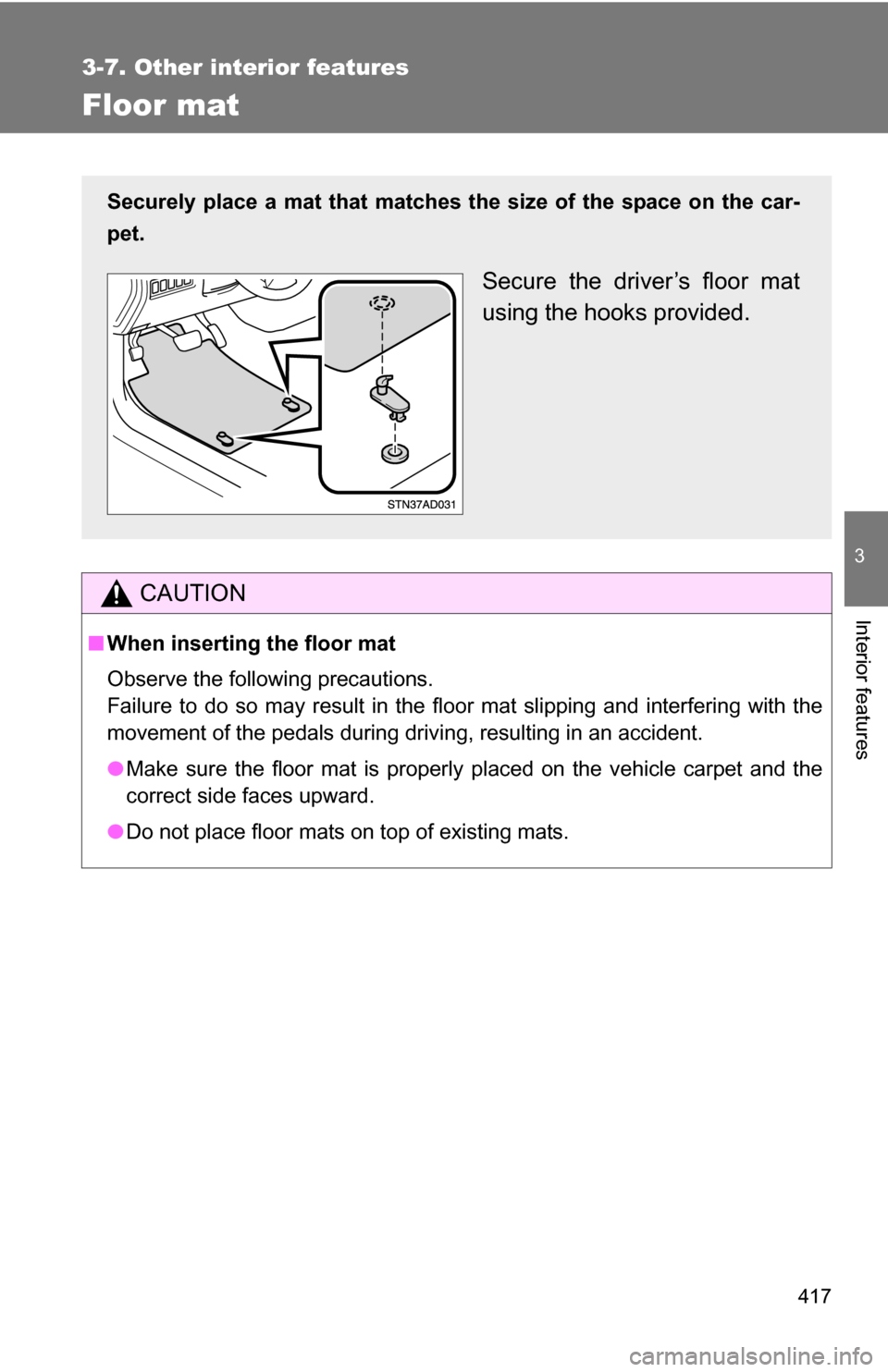
Securely place a mat that matches the size of the space on the car-
pet.
Secure the driver’s floor mat
using the hooks provided.
Page 418 of 612
418
3-7. Other interior features
Luggage compartment features
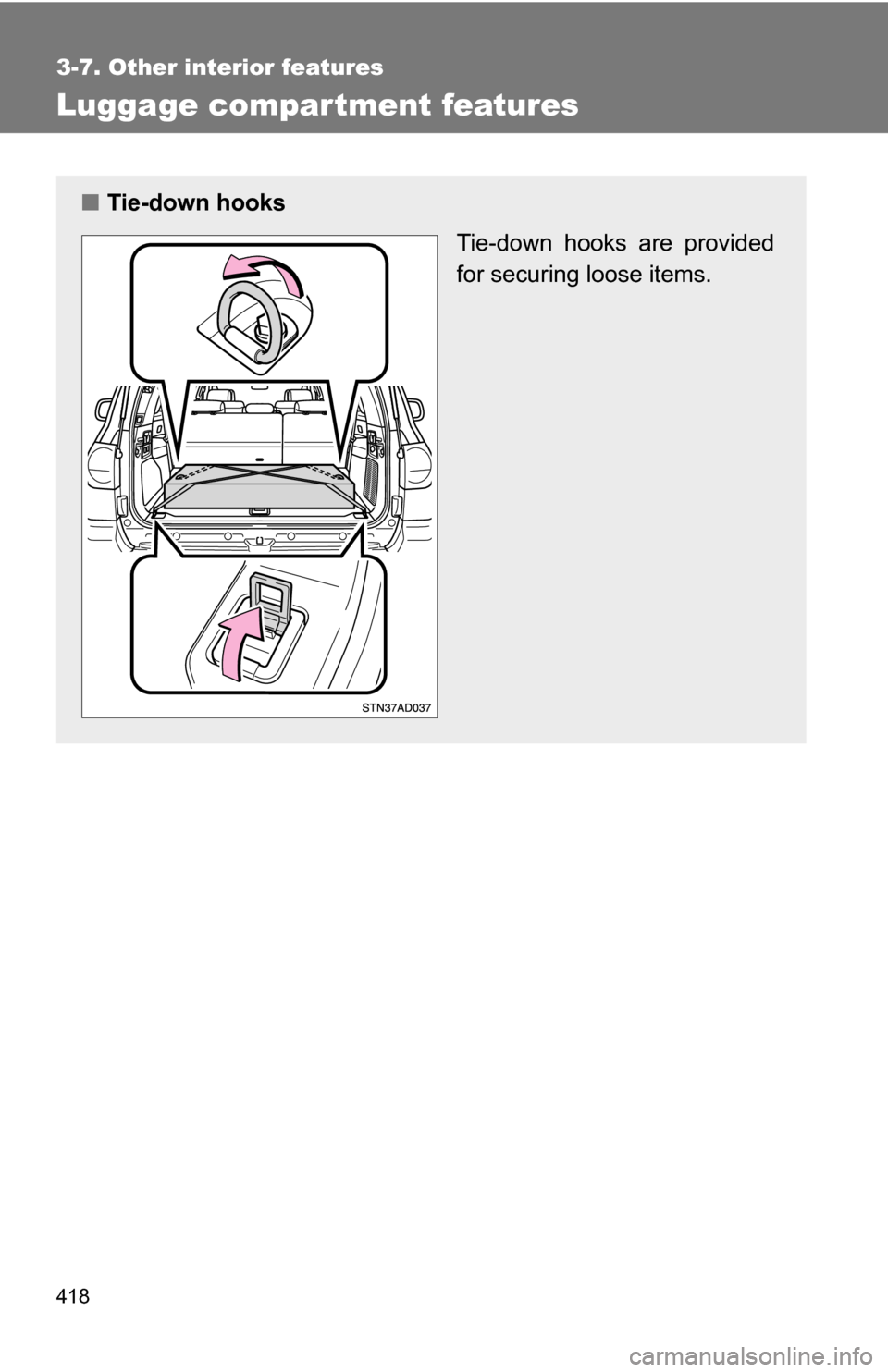
■Tie-down hooks
Tie-down hooks are provided
for securing loose items.
Page 423 of 612
423
3-7. Other interior features
3
Interior features
Garage door opener (if equipped)
The garage door opener (HomeLink® Universal Transceiver) is manufac-
tured under license from HomeLink®.
Programming the HomeLink® (for U.S.A. owners)
The HomeLink
® compatible transceiver in your vehicle has 3 buttons
which can be programmed to operate 3 different devices. Refer to the
programming method below appropriate for the device.
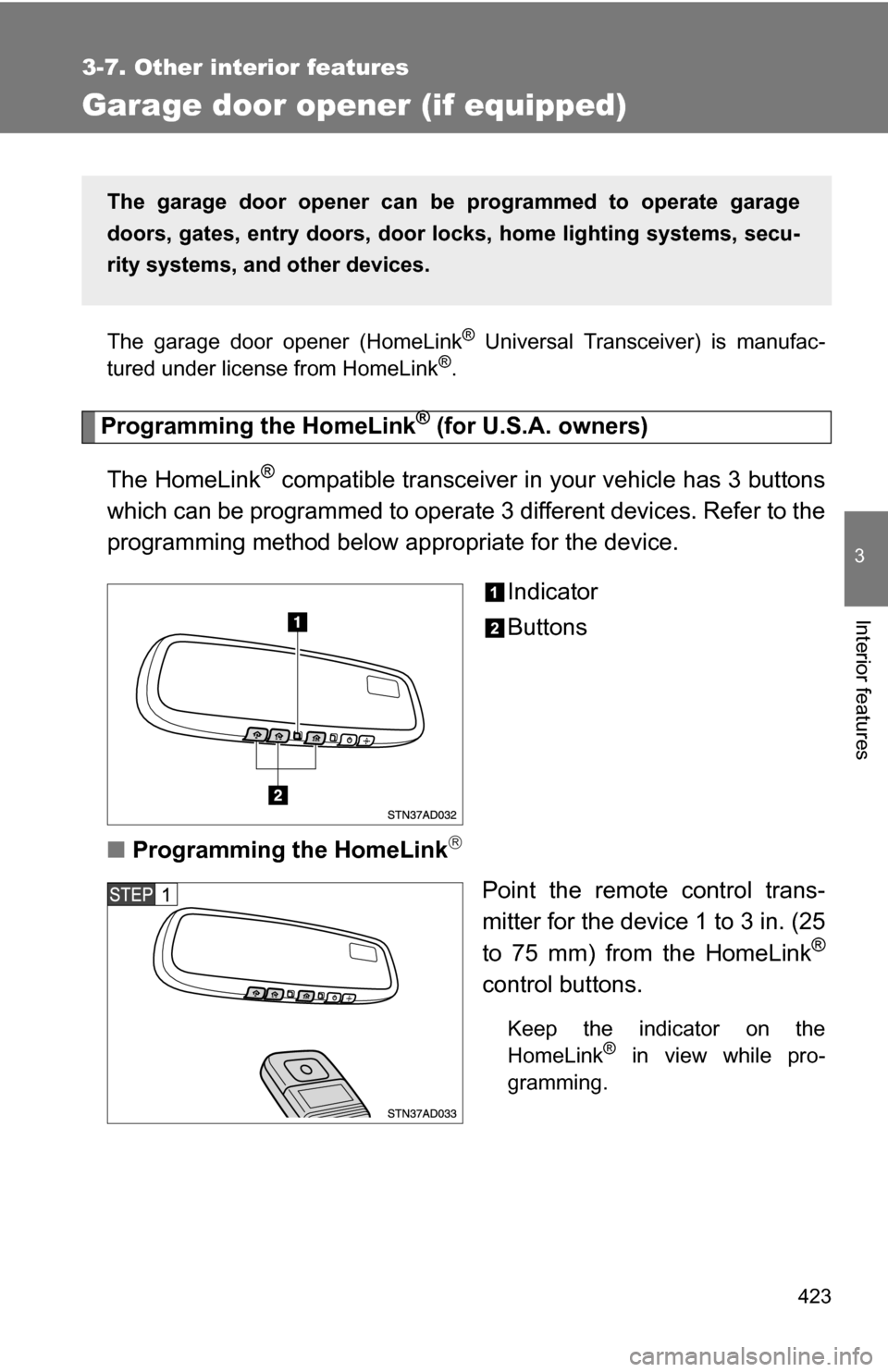
Indicator
Buttons
■ Programming the HomeLink
Point the remote control trans-
mitter for the device 1 to 3 in. (25
to 75 mm) from the HomeLink
®
control buttons.
Keep the indicator on the
HomeLink® in view while pro-
gramming.
The garage door opener can be programmed to operate garage
doors, gates, entry do ors, door locks, home lighting systems, secu-
rity systems, and other devices.
Page 426 of 612
426 3-7. Other interior features
Test the operation of the HomeLink® by pressing the newly
programmed button. Check to se e if the gate/device operates
correctly.
Repeat the steps above to program another device for each of
the remaining HomeLink
® buttons.
■ Programming other devices
To program other devices such as home security systems, home
door locks or lighting, contact your authorized Toyota dealer for
assistance.
■ Reprogramming a button
The individual HomeLink
® buttons cannot be erased but can be
reprogrammed. To reprogram a button, follow the programming
instructions.
Operating the HomeLink®
Press the appropriate HomeLink® button. The HomeLink® indicator
on the HomeLink® transceiver should turn on.
The HomeLink® continues to send a signal for a maximum of 20 seconds
if the button is held in.
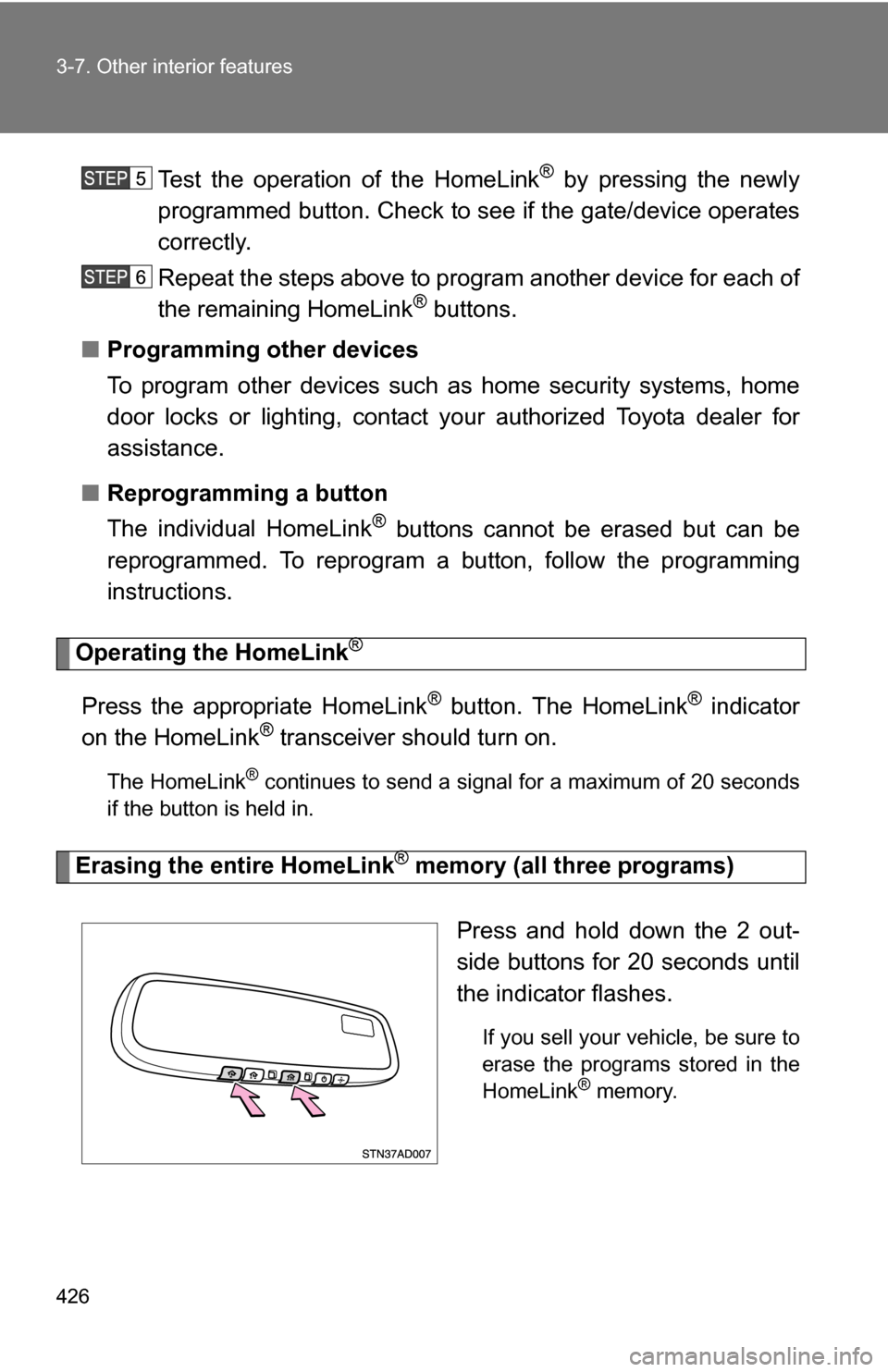
Erasing the entire HomeLink® memory (all three programs)
Press and hold down the 2 out-
side buttons for 20 seconds until
the indicator flashes.
If you sell your vehicle, be sure to
erase the programs stored in the
HomeLink
® memory.
Page 430 of 612

430 3-7. Other interior features
■Circling calibration
When “CAL” appears on the dis-
play, drive the vehicle at 5 mph
(8 km/h) or less in a circle until a
direction is displayed.
If there is not enough space to
drive in a circle, drive around the
block until the direction is dis-
played.
■Conditions unfavorable to correct operation
The compass may not show the correct direction in the following conditions:
●The vehicle is stopped immediately after turning.
● The vehicle is on an inclined surface.
● The vehicle is in a place where the earth’s magnetic field is subject to
interference by artificial magnetic fields (underground car park/parking
lot, under a steel tower, between buildings, roof car park/parking lot, near
an intersection, near a large vehicle, etc.).
● The vehicle has become magnetized.
(There is a magnet or metal object near the inside rear view mirror.)
● The battery has been disconnected.
● A door is open.
CAUTION
■While driving the vehicle
Do not adjust the display. Be sure to adjust the display only when the vehicle
is stopped.
■ When doing the circling calibration
Be sure to secure a wide space, and watch out for people and vehicles in the
neighborhood. Do not violate any local traffic rules while performing circling
calibration.
Page 442 of 612
442 4-2. Maintenance
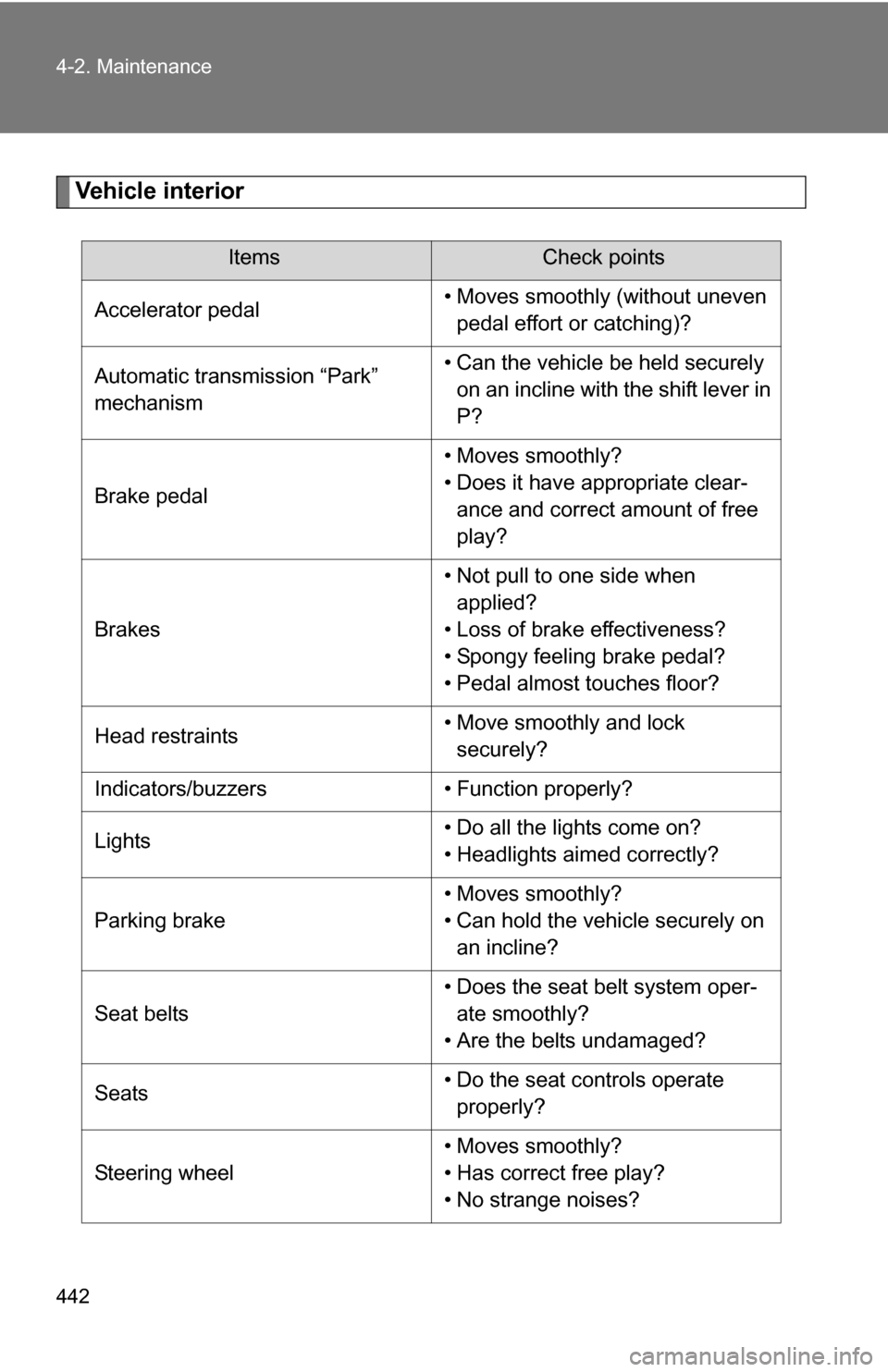
Vehicle interior
ItemsCheck points
Accelerator pedal • Moves smoothly (without uneven
pedal effort or catching)?
Automatic transmission “Park”
mechanism • Can the vehicle be held securely
on an incline with the shift lever in
P?
Brake pedal • Moves smoothly?
• Does it have appropriate clear-
ance and correct amount of free
play?
Brakes • Not pull to one side when
applied?
• Loss of brake effectiveness?
• Spongy feeling brake pedal?
• Pedal almost touches floor?
Head restraints • Move smoothly and lock
securely?
Indicators/buzzers • Function properly?
Lights • Do all the lights come on?
• Headlights aimed correctly?
Parking brake • Moves smoothly?
• Can hold the vehicle securely on
an incline?
Seat belts • Does the seat belt system oper-
ate smoothly?
• Are the belts undamaged?
Seats • Do the seat controls operate
properly?
Steering wheel • Moves smoothly?
• Has correct free play?
• No strange noises?
Page 488 of 612

488 4-3. Do-it-yourself maintenance
13 FOG15 A Front fog lights
14 STOP 15 AStop lights, high mounted stop-
light, vehicle stability control sys-
tem, anti-lock brake system, shift
lock system, multiport fuel injection
system/sequential multiport fuel
injection system, towing converter
15 TOW BRK 30 A Trailer brake controller
16 IMB 7.5 A Engine immobilizer system
17 AM2 7.5 A Starting system
18 TOWING 30 A Towing converter
19 ALT-S 5 A Charging system
20 TURN-HAZ 15 A Turn signal lights, emergency
flashers, towing converter
21 F/PMP 15 A No circuit
22 ETCS 10 AMultiport fuel injection system/
sequential multiport fuel injection
system, electric throttle control sys-
tem
23 MET-B 5 A Gauges and meters
24 AMP 30 AAudio system, rear view monitor,
navigation system, rear seat enter-
tainment system
25 RAD NO.1 15 A Audio system, rear view monitor,
navigation system, rear seat enter-
tainment system
26 ECU-B1 7.5 AMultiplex communication system,
Multiport fuel injection system/
sequential multiport fuel injection
system, auto anti-glare inside rear
view mirror, power outlets, power
front driver’s seat, power tilt and
power telescopic, power back door
FuseAmpereCircuit
Page 490 of 612

490 4-3. Do-it-yourself maintenance
*: Replace the fuse with one of the same ampere rating as the original.
42 PBD 30 A Power back door
43 RR HTR 40 A Air conditioning system
44 H-LP CLN 30 A Headlight cleaner
45 DEFOG 40 A Rear window defogger
46 SUB BATT 40 A Trailer towing
47 ABS1 50 A
Anti-lock brake system, vehicle sta-
bility control system
48 ABS2 40 A Anti-lock brake system, vehicle sta-
bility control system
49 ST 30 A Starting system
50 HTR 50 A Air conditioning system
51 LH-J/B 150 A AM1, TAIL, PANEL, ACC, CIG, LH-
IG, 4WD, ECU-IG NO.1, BK/UP LP,
SEAT-HTR, A/C IG, ECU-IG NO.2,
WSH, WIPER, OBD, A/C, TI&TE,
FR P/SEAT RH, MIR, DR/LCK, FR
P/SEAT LH, CARGO LP, PWR
OUTLET, POWER NO.1 fuses
52 ALT 180 A
*LH-J/B, HTR, SUB BATT, TOW
BRK, STOP, FOG, TOW TAIL,
DEICER fuses
140 A
*
53 A/PUMP NO.1 50 A Multiport fuel injection system/
sequential multiport fuel injection
system
54 A/PUMP NO.2 50 A Multiport fuel injection
system/sequential multiport fuel
injection system
55 MAIN 40 A HEAD LL, HEAD RL,
HEAD LH, HEAD RH fuses
FuseAmpereCircuit