Page 216 of 508
216 3-3. Using the audio system
PRIUS_U_(OM47614U)
■Using cellular phones
Interference may be heard through the audio system’s speakers if a cellular
phone is being used inside or close to the vehicle while the audio system is
operating.
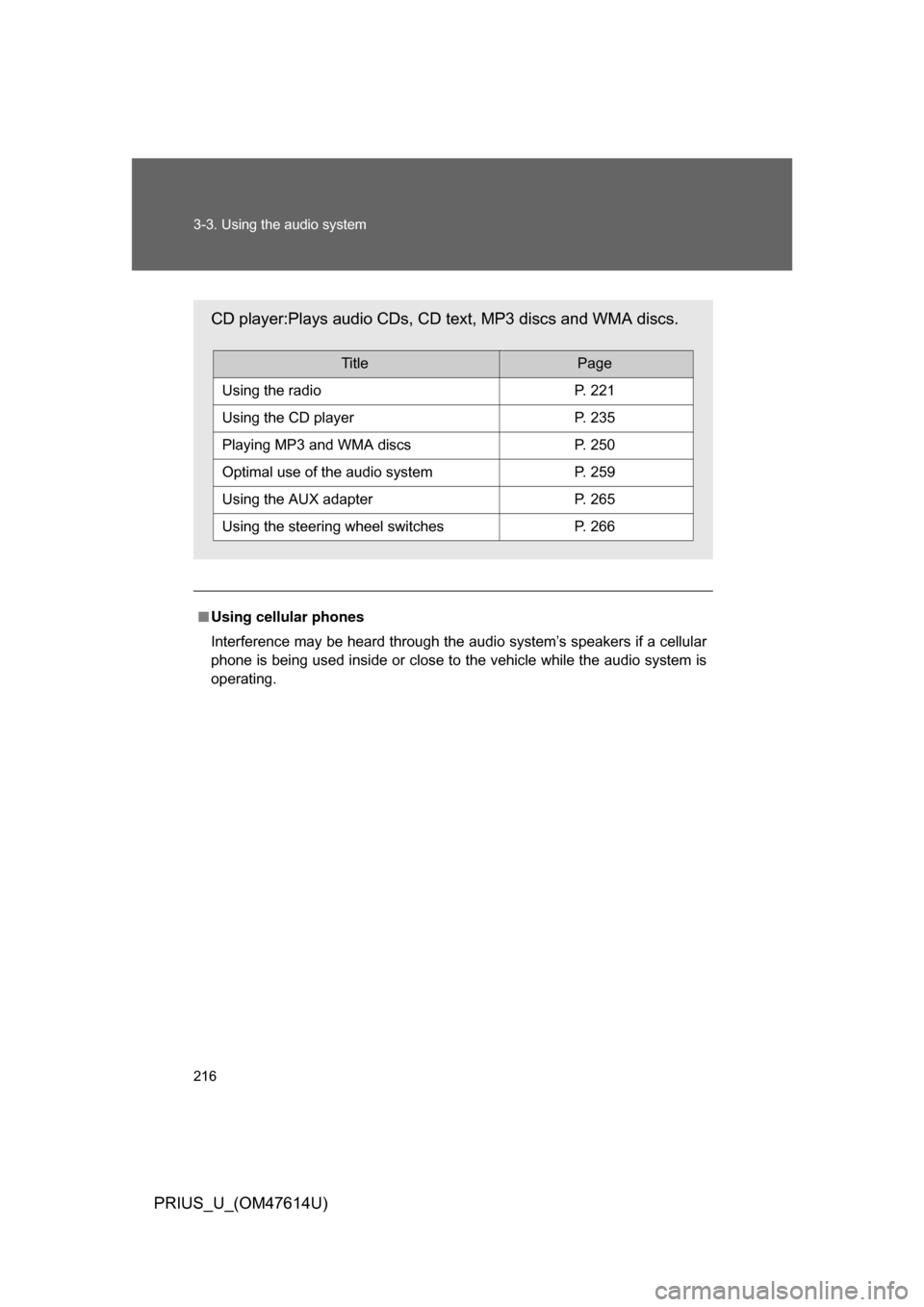
CD player:Plays audio CDs, CD text, MP3 discs and WMA discs.
TitlePage
Using the radioP. 221
Using the CD playerP. 235
Playing MP3 and WMA discsP. 250
Optimal use of the audio systemP. 259
Using the AUX adapterP. 265
Using the steering wheel switchesP. 266
Page 219 of 508
219
3-3. Using the audio system
3
Interior features
PRIUS_U_(OM47614U)
■
Using cellular phones
Interference may be heard through the audio system’s speakers if a cellular
phone is being used inside or close to the vehicle while the audio system is
operating.
CAUTION
■For vehicles sold in the U.S.A. and Canada
● Part 15 of the FCC Rules
FCC Warning:
Any unauthorized changes or modifications to this equipment will void the
user’s authority to operate this device.
● Laser products
• Do not take this unit apart or attempt to make any changes yourself.
This is an intricate unit that uses a laser pickup to retrieve information
from the surface of compact discs. The laser is carefully shielded so
that its rays remain inside the cabinet. Therefore, never try to disas-
semble the player or alter any of its parts since you may be exposed to
laser rays and dangerous voltages.
• This product utilizes a laser. Use of controls or adjustments or performance of procedures other
than those specified herein may result in hazardous radiation expo-
sure.
CD player:Plays audio CDs and CD text.
TitlePage
Using the radioP. 230
Using the CD playerP. 243
Optimal use of the audio systemP. 263
Using the steering wheel switchesP. 266
Page 266 of 508
266
3-3. Using the audio system
PRIUS_U_(OM47614U)
Using the steering switches
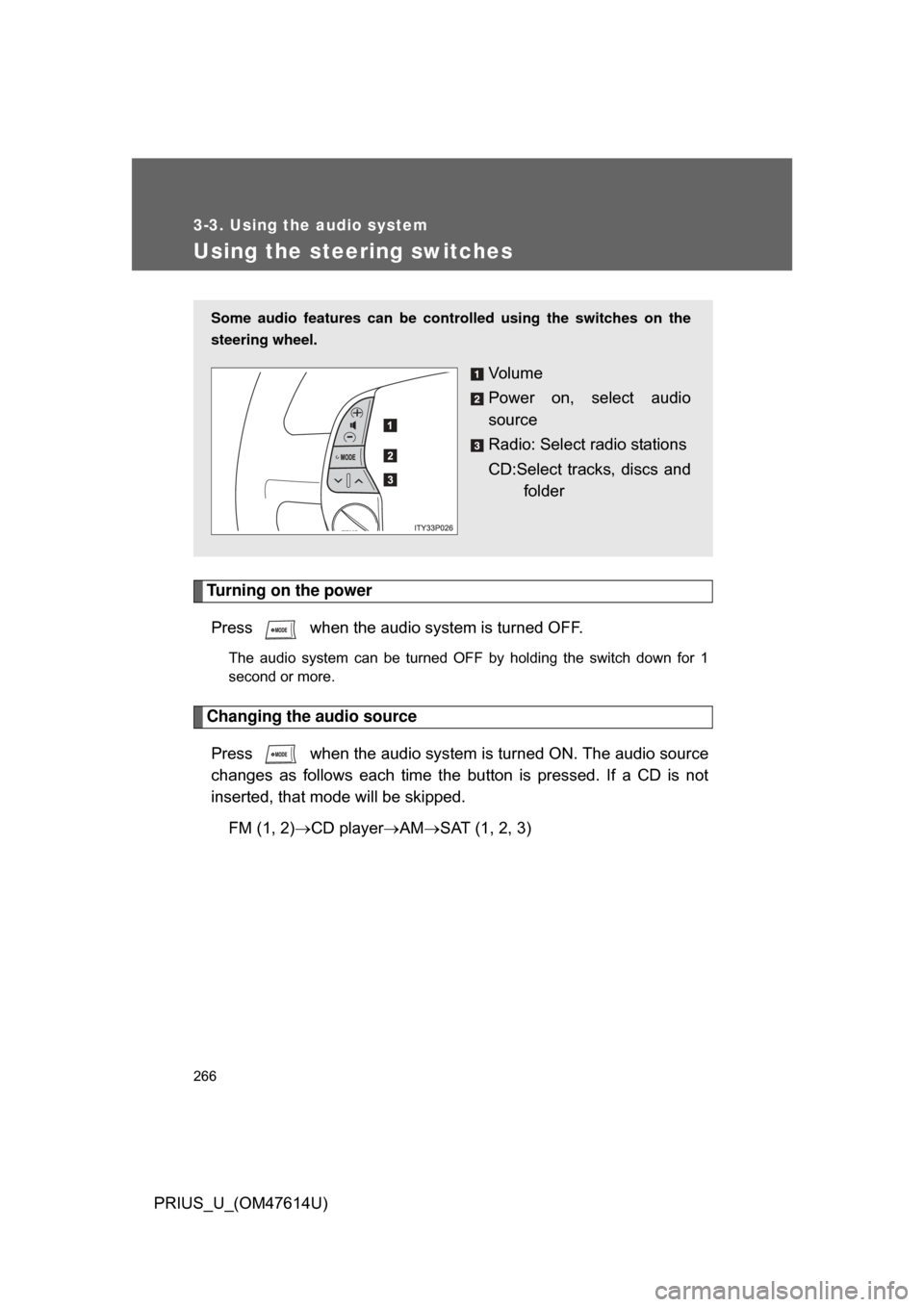
Turning on the powerPress when the audio system is turned OFF.
The audio system can be turned OFF by holding the switch down for 1
second or more.
Changing the audio sourcePress when the audio system is turned ON. The audio source
changes as follows each time the bu tton is pressed. If a CD is not
inserted, that mode will be skipped.
FM (1, 2) CD player AM SAT (1, 2, 3)
Some audio features can be controlled using the switches on the
steering wheel.
Vo l u m e
Power on, select audio
source
Radio: Select radio stations
CD:Select tracks, discs and
folder
Page 268 of 508
268 3-3. Using the audio system
PRIUS_U_(OM47614U)
■Canceling automatic selection of a radio station
Push the same switch.
CAUTION
■To reduce the risk of an accident
Exercise care when operating the audio switches on the steering wheel.
Page 277 of 508
277
3-4. Using the hands-free
system (for cellular phone)
3
Interior features
PRIUS_U_(OM47614U)
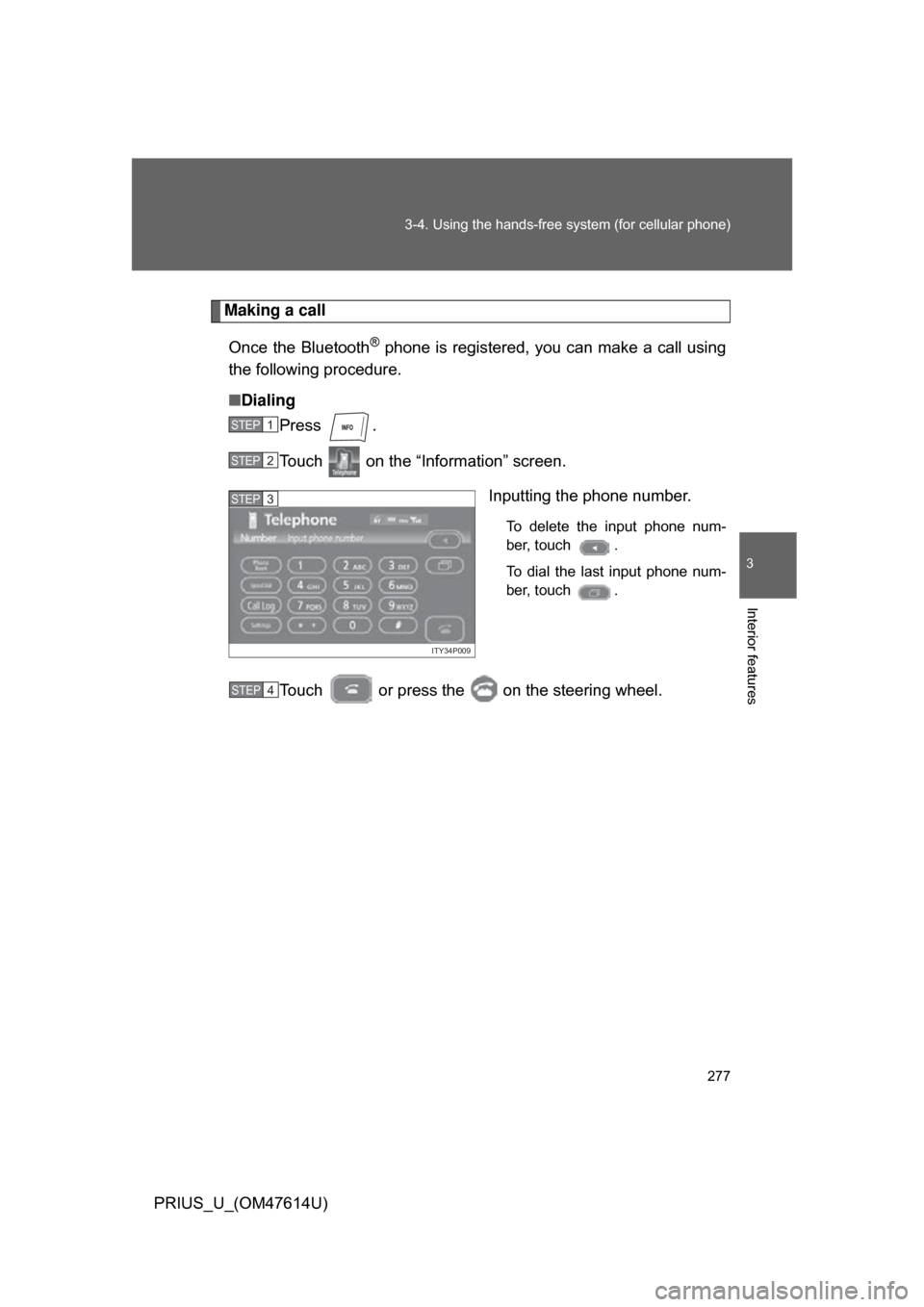
Making a call
Once the Bluetooth
® phone is registered, you can make a call using
the following procedure.
■ Dialing
Press .
Touch on the “Information” screen.
Inputting the phone number.
To delete the input phone num-
ber, touch .
To dial the last input phone num-
ber, touch .
Touch or press the on the steering wheel.
STEP1
STEP2
ITY34P009
STEP3
STEP4
Page 278 of 508
278 3-4. Using the hands-free system (for cellular phone)
PRIUS_U_(OM47614U)■
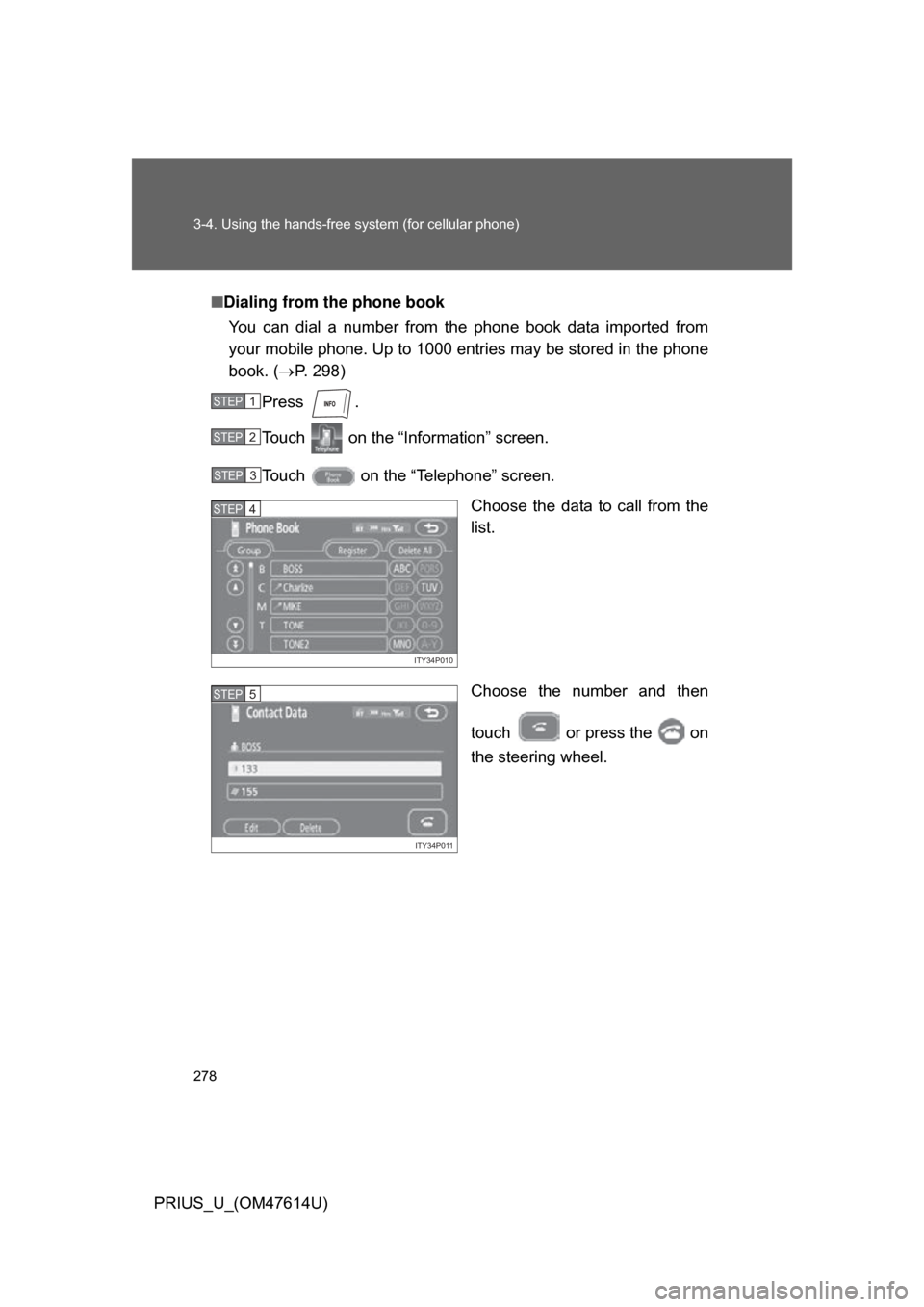
Dialing from the phone book
You can dial a number from the phone book data imported from
your mobile phone. Up to 1000 entries may be stored in the phone
book. ( P. 298)
Press .
Touch on the “Inf ormation” screen.
Touch on the “Telephone” screen. Choose the data to call from the
list.
Choose the number and then
touch or press the on
the steering wheel.
STEP1
STEP2
STEP3
ITY34P010
STEP4
ITY34P011
STEP5
Page 279 of 508
279
3-4. Using the hands-free
system (for cellular phone)
3
Interior features
PRIUS_U_(OM47614U)■
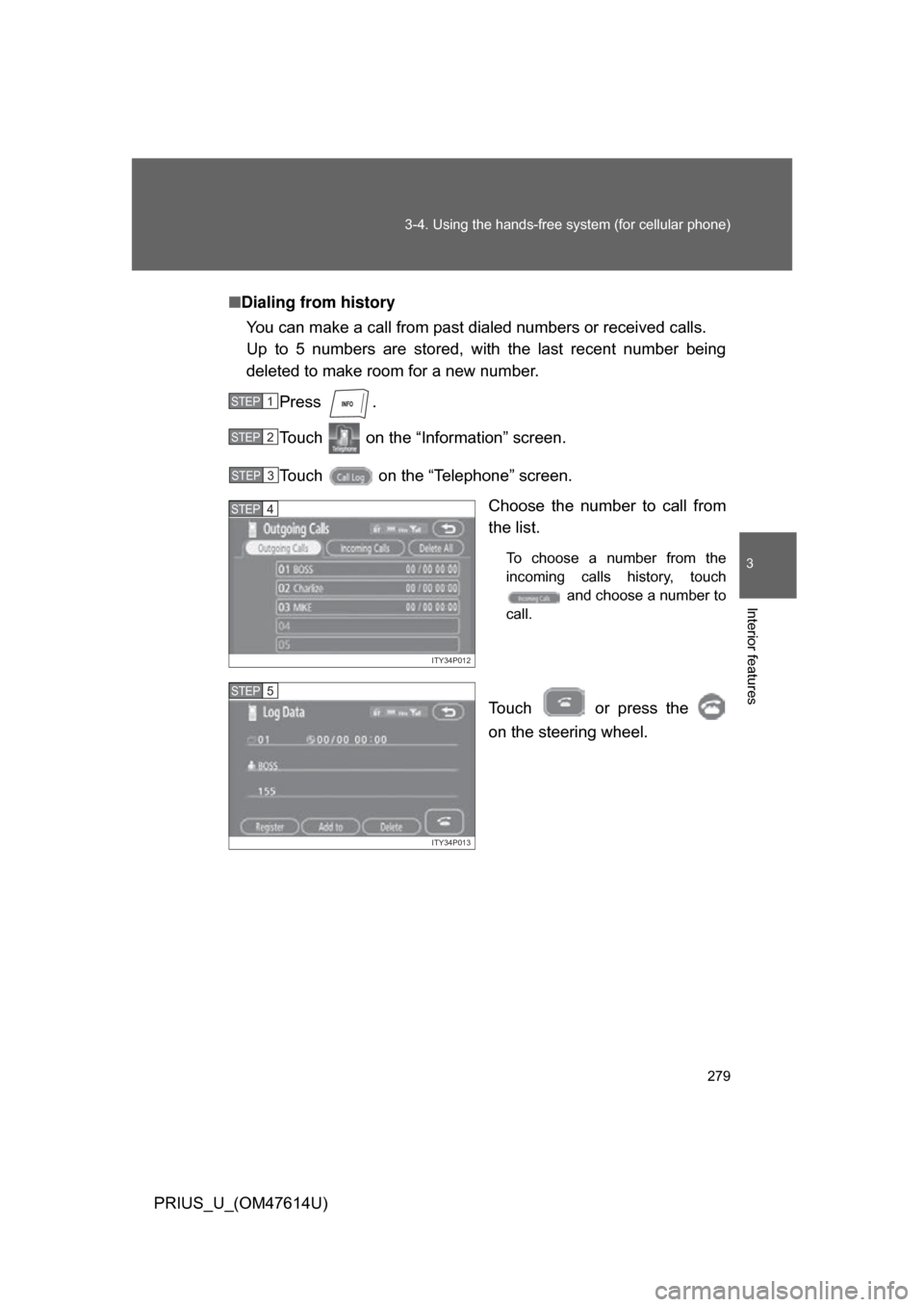
Dialing from history
You can make a call from past dialed numbers or received calls.
Up to 5 numbers are stored, with the last recent number being
deleted to make room for a new number.
Press .
Touch on the “Information” screen.
Touch on the “Telephone” screen. Choose the number to call from
the list.
To choose a number from the
incoming calls history, touch and choose a number to
call.
Touch or press the
on the steering wheel.
STEP1
STEP2
STEP3
ITY34P012
STEP4
ITY34P013
STEP5
Page 283 of 508
283
3-4. Using the hands-free
system (for cellular phone)
3
Interior features
PRIUS_U_(OM47614U)
■Made/Received call history list
● If you make a call to or receive a call from a number registered in the
phone book, the name is displayed in the call history.
● If you make multiple calls to the same number, only the last call made is
displayed in the made calls history.
● is displayed to the left of phone number for unanswered calls.
● Calls where the number is unavailable, such as public telephones, are
not stored in the call history.
■ When driving
● The functions “Dialing”, “Dialing from the phone book”, and “Dialing from
history” are unavailable.
● If you press the on the steering wheel, the “Speed Dial” screen is
displayed. At this time phone numbers will not be displayed. Choose
from the names displayed to make a call.
■ International calls
You may not be able to make international calls, depending on the mobile
phone in use.
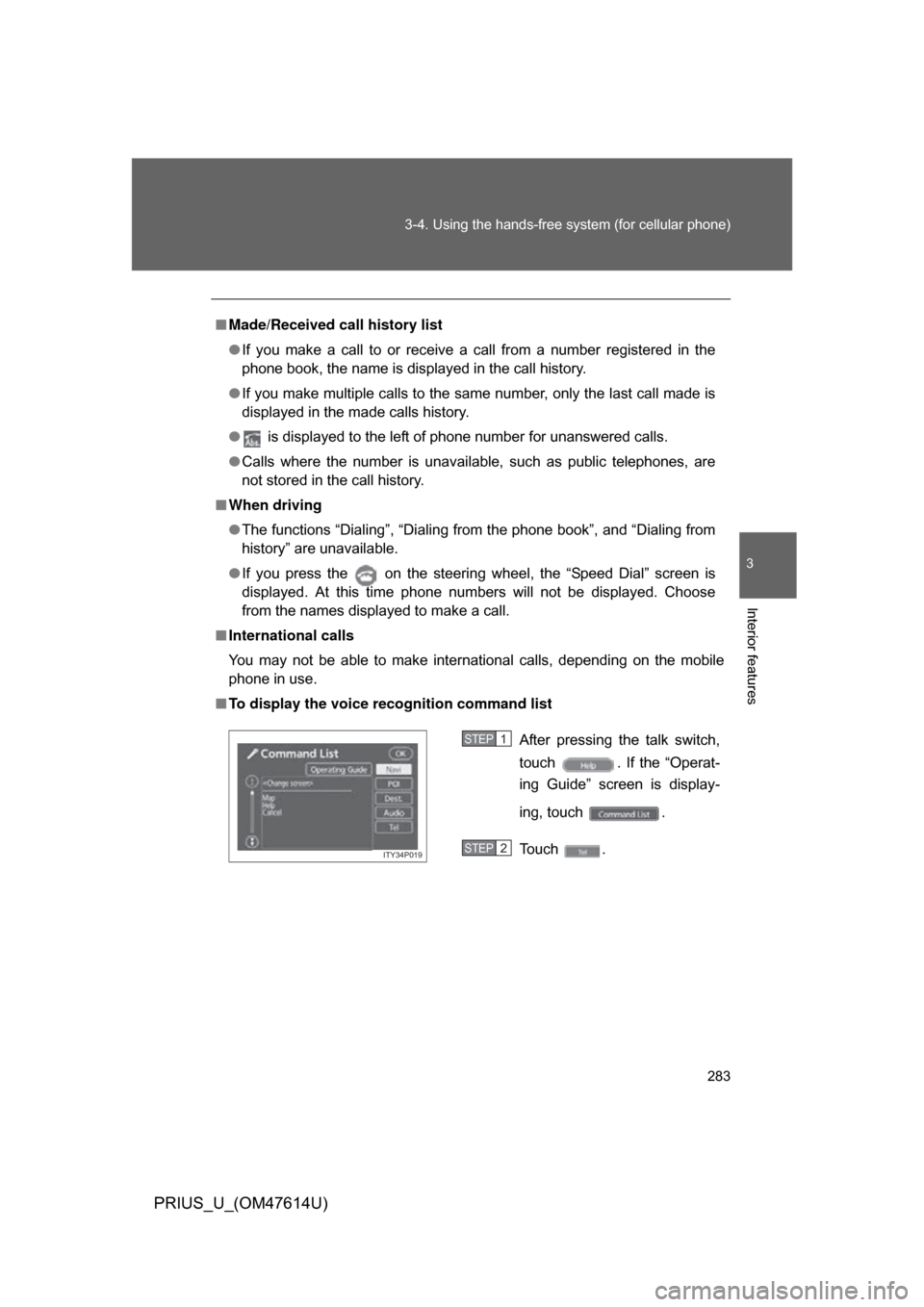
■ To display the voice recognition command list
After pressing the talk switch,
touch . If the “Operat-
ing Guide” screen is display-
ing, touch .
Touch .
ITY34P019
STEP1
STEP2