Page 209 of 608
209
2-3. Operating the lights and wipers
2
When driving
■
The windshield wipers and washer can be operated when
Vehicles without smart key system
The engine switch is in
the“ON” position.
Vehicles with smart key system
The “ENGINE START STOP” switch is in IGNITION ON mode.
■ If no windshield washer fluid sprays
Check that the washer nozzles are not blocked and if there is washer fluid in
the windshield washer fluid reservoir.
NOTICE
■When the windshield is dry
Do not use the wipers, as they may damage the windshield.
■ When there is no washer fluid spray from the nozzle
Damage to the washer fluid pump may be caused if the lever is pulled
toward you and held continually.
■ When a nozzle is blocked
Do not try to clear it with a pin or other object. The nozzle will be damaged.
Wash/wipe operation
Wipers operate automatically.
Page 210 of 608
210
2-3. Operating the lights and wipers
Rear window wiper and washer
■The rear window wiper and washer can be operated when
Vehicles without smart key system
The engine switch is in
the“ON” position.
Vehicles with smart key system
The “ENGINE START STOP” switch is in IGNITION ON mode.
NOTICE
■ When the rear window is dry
Do not use the wipers, as they may damage the rear window.
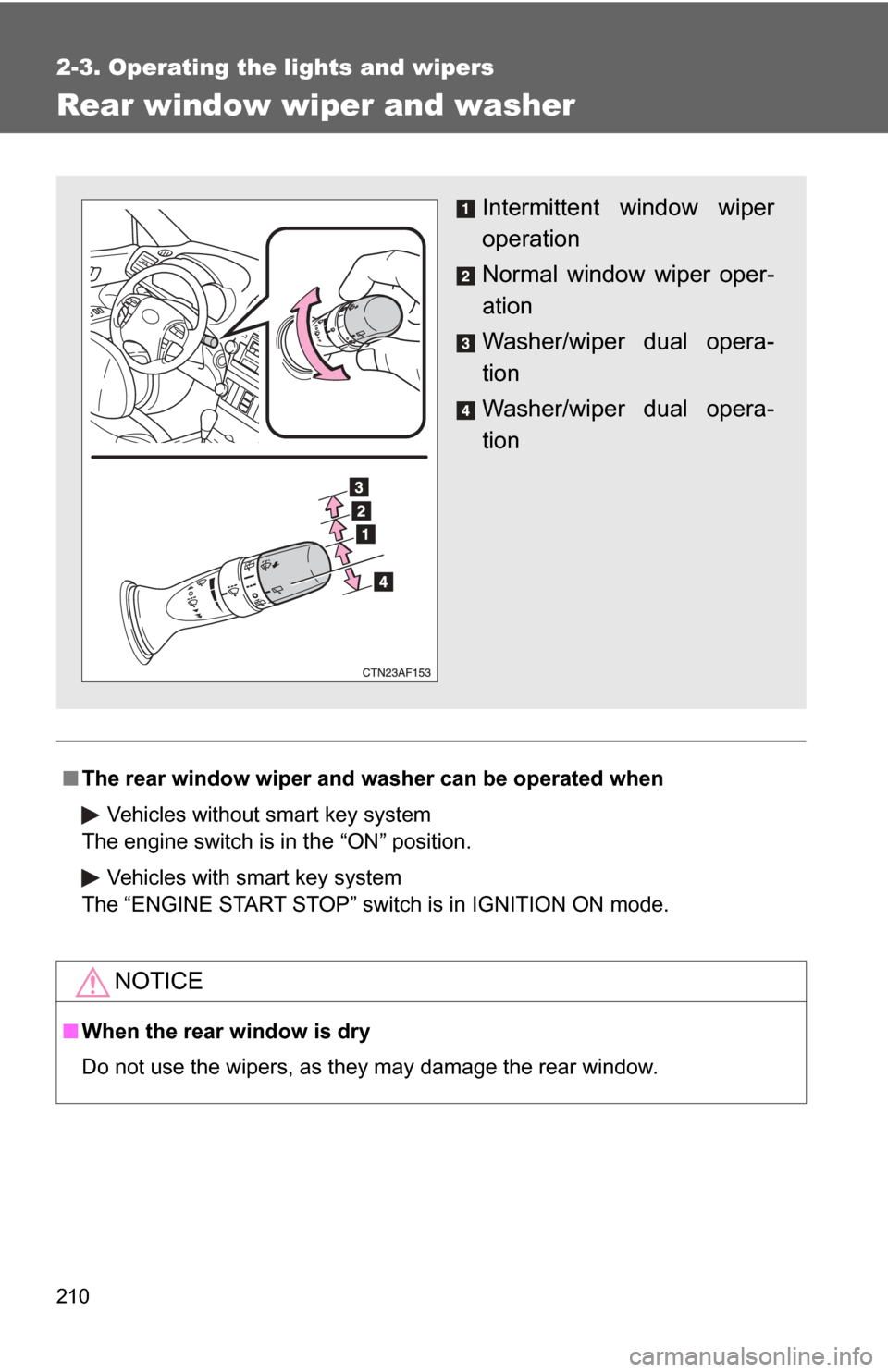
Intermittent window wiper
operation
Normal window wiper oper-
ation
Washer/wiper dual opera-
tion
Washer/wiper dual opera-
tion
Page 212 of 608
212 2-4. Using other driving systems
■Cruise control can be set when
●2.7 L 4-cylinder (1AR-FE) engine: The shift lever is in D, 4, 5 or 6 range
of S.
● 3.5 L V6 (2GR-FE) engine: The shift lever is in D, 4 or 5 range of S.
● Vehicle speed is above approximately 25 mph (40 km/h). Within the limits
of the engine’s capabilities, cruising speed can be maintained on up or
down grades.
■ Accelerating
The vehicle can be accelerated normally. After acceleration, the set speed
resumes.
■ Adjusting the speed setting
Increase speed
Decrease speed
Hold the lever until the desired
speed setting is obtained.
Fine adjustment of the set
speed can be made by lightly
pushing the lever up or down
and releasing it.
■Canceling and resuming regular acceleration
Cancel
Push the lever towards you to
cancel cruise control.
The speed setting is also can-
celed when the brakes are
applied.
Resume
To resume cruise control and
return to the set speed, push
the lever up.
Page 219 of 608
219
2-4. Using other
driving systems
2
When driving
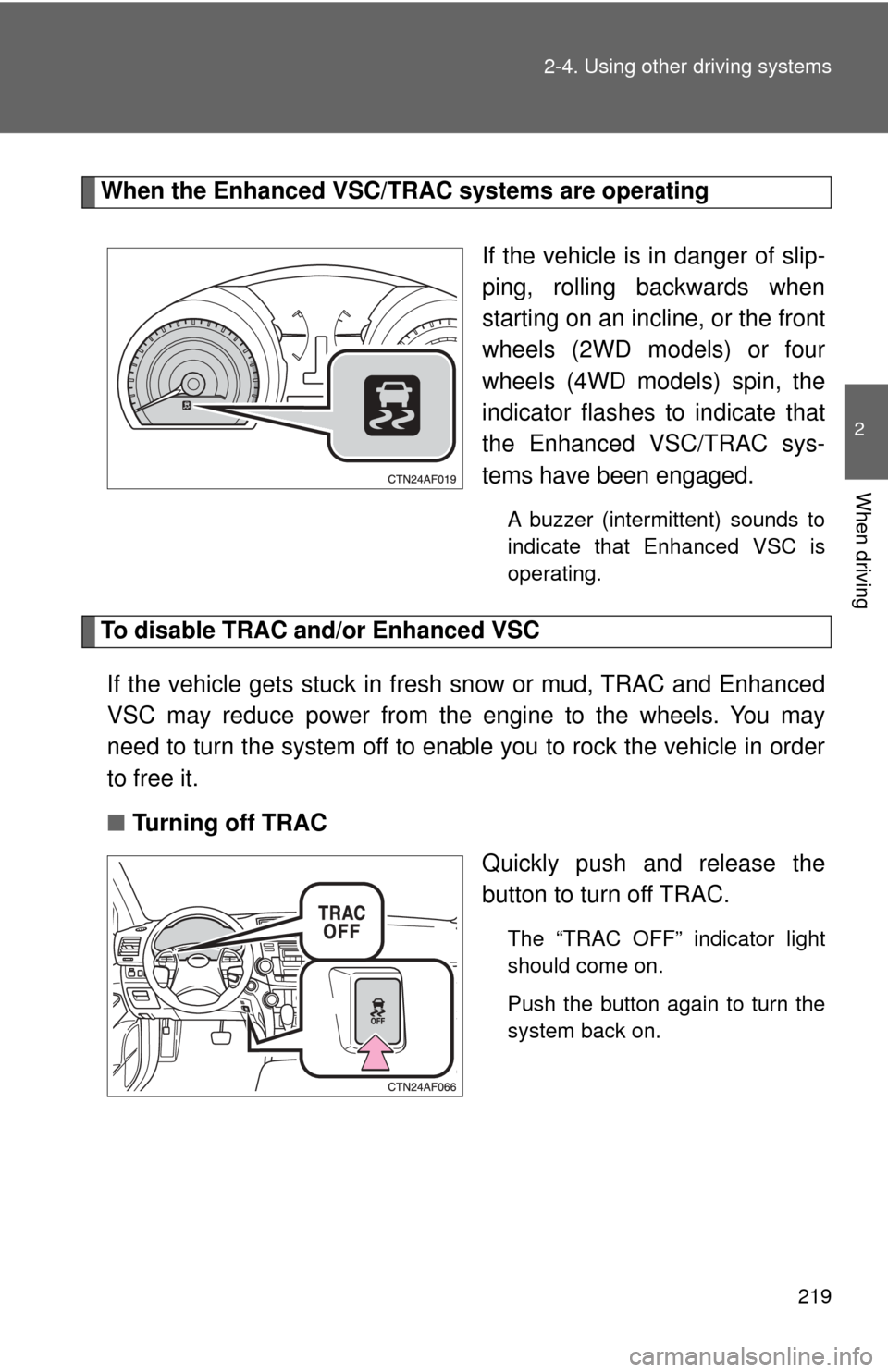
When the Enhanced VSC/TRAC systems are operating
If the vehicle is in danger of slip-
ping, rolling backwards when
starting on an incline, or the front
wheels (2WD models) or four
wheels (4WD models) spin, the
indicator flashes to indicate that
the Enhanced VSC/TRAC sys-
tems have been engaged.
A buzzer (intermittent) sounds to
indicate that Enhanced VSC is
operating.
To disable TRAC and/or Enhanced VSCIf the vehicle gets stuck in fres h snow or mud, TRAC and Enhanced
VSC may reduce power from the engine to the wheels. You may
need to turn the system off to enable you to rock the vehicle in order
to free it.
■ Turning off TRAC
Quickly push and release the
button to turn off TRAC.
The “TRAC OFF” indicator light
should come on.
Push the button again to turn the
system back on.
Page 220 of 608
220 2-4. Using other driving systems
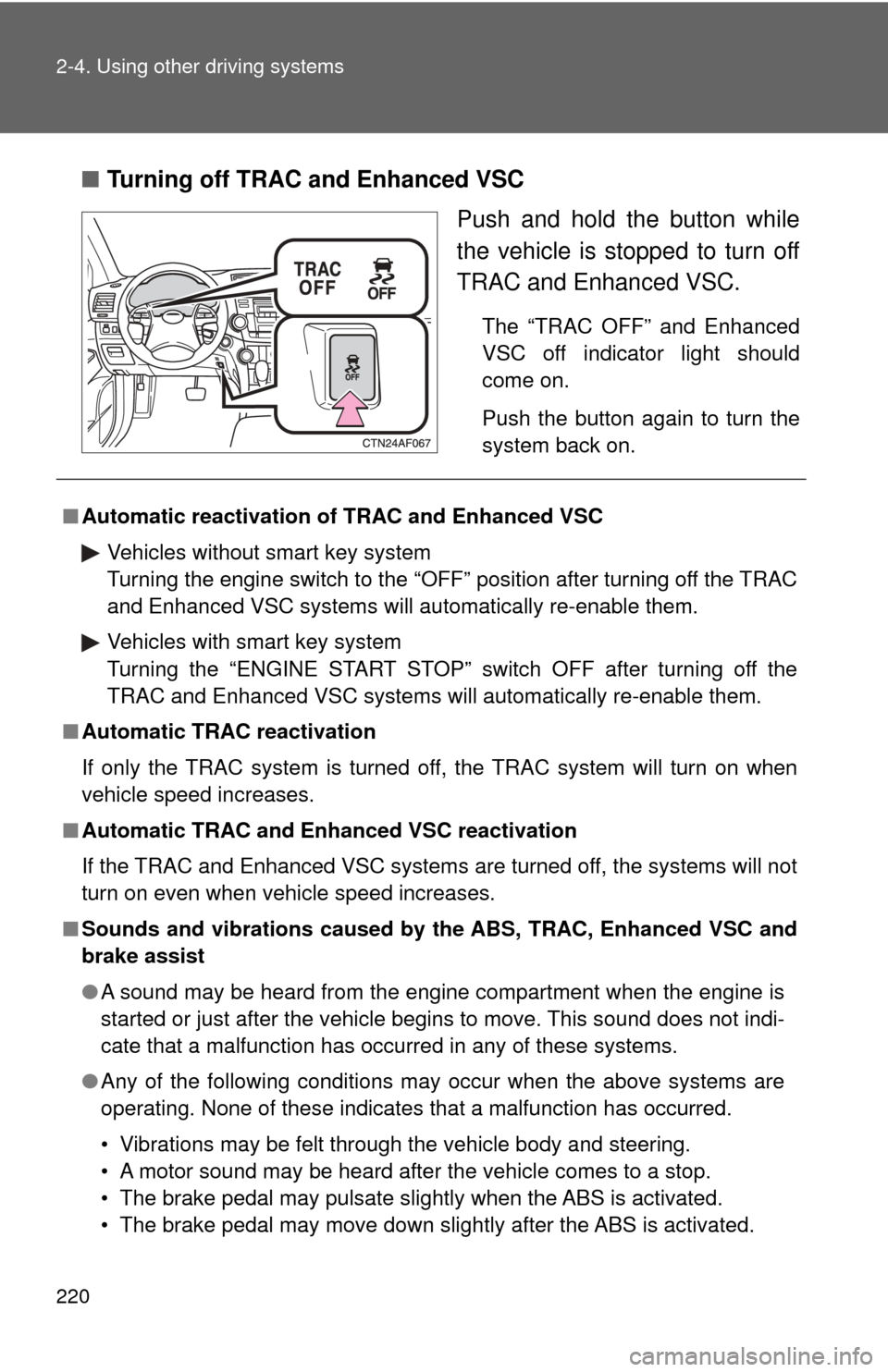
■Turning off TRAC and Enhanced VSC
Push and hold the button while
the vehicle is stopped to turn off
TRAC and Enhanced VSC.
The “TRAC OFF” and Enhanced
VSC off indicator light should
come on.
Push the button again to turn the
system back on.
■Automatic reactivation of TRAC and Enhanced VSC
Vehicles without smart key system
Turning the engine switch to the “OFF” position after turning off the TRAC
and Enhanced VSC systems will automatically re-enable them.
Vehicles with smart key system
Turning the “ENGINE START STOP” switch OFF after turning off the
TRAC and Enhanced VSC systems will automatically re-enable them.
■ Automatic TRAC reactivation
If only the TRAC system is turned off, the TRAC system will turn on when
vehicle speed increases.
■ Automatic TRAC and Enha nced VSC reactivation
If the TRAC and Enhanced VSC systems are turned off, the systems will not
turn on even when vehicle speed increases.
■ Sounds and vibrations caused by the ABS, TRAC, Enhanced VSC and
brake assist
● A sound may be heard from the engine compartment when the engine is
started or just after the vehicle begins to move. This sound does not indi-
cate that a malfunction has occurred in any of these systems.
● Any of the following conditions may occur when the above systems are
operating. None of these indicates that a malfunction has occurred.
• Vibrations may be felt through the vehicle body and steering.
• A motor sound may be heard after the vehicle comes to a stop.
• The brake pedal may pulsate slightly when the ABS is activated.
• The brake pedal may move down slightly after the ABS is activated.
Page 221 of 608

221
2-4. Using other
driving systems
2
When driving
■EPS operation sound
When the steering wheel operates, a motor sound (whirring sound) may be
heard.
This does not indicate a malfunction.
■ Reduced effectiveness of EPS
The effectiveness of EPS is reduced to prevent the system from overheating
when there is frequent steering input over an extended period of time. The
steering wheel may feel heavy as a result. Should this occur, refrain from
excessive steering input or stop the vehicle and turn the engine off. The sys-
tem should return to normal within 10 minutes.
■ If the slip indicator comes on...
It may indicate a malfunction in the Enhanced VSC and TRAC. Contact your
Toyota dealer.
CAUTION
■The ABS does not operate effectively when
●Tires with inadequate gripping ability are used (such as excessively worn
tires on a snow covered road).
● The vehicle hydroplanes while driving at high speed on wet or slick road.
■ Stopping distance when the ABS is operating on the wet or slick roads
The ABS is not designed to shorten the vehicle's stopping distance. Always
maintain a safe distance from the vehicle in front of you in the following situ-
ations.
●When driving on dirt, gravel or snow-covered roads
● When driving with tire chains
● When driving over bumps in the road
● When driving over roads with potholes or uneven roads
Page 226 of 608

226 2-4. Using other driving systems
■Conditions in which the downhill assi st control system does not oper-
ate
● In the following situations, the downhill assist control system indicator
flashes and the downhill assist control system does not operate or will
stop operating:
• The shift lever is not in 1 range of S mode or R.
• The vehicle speed is higher than 15 mph (25 km/h).
● If the accelerate or brake pedal is depressed, the downhill assist control
system will stop operating with the downhill assist control system indica-
tor stayed on.
■ If the “DAC” switch is turned off during operat ion of the downhill assist
control system
The downhill assist control system gradually ceases operation. The downhill
assist control system indicator will flash during the canceling operation, and
then go off when the system is fully off.
■ Downhill assist control system operation sound
●A sound may be heard from the engine compartment during operation of
the downhill assist control system. This sound does not indicate a mal-
function.
● If the accelerator or brake pedal is depressed during operation of the
downhill assist control system, a sound caused by the release of system
operation may be heard, or you may feel the brake pedal push-back. This
does not indicate a malfunction.
■ When the downhill assist contro l system operates continuously
The brake actuator may overheat. In that case, the downhill assist control
system will stop operating, a buzzer will sound and the downhill assist con-
trol system indicator will start flashing. Refrain from using the system until
the downhill assist control system indicator stays on. (There is no problem
with continuing driving normally.)
■ If the slip indicator comes on...
It may indicate a malfunction in the system. Contact your Toyota dealer.
Page 231 of 608

231
2-5. Driving information
2
When driving
CAUTION
■
Off-road driving precautions
Always observe the following precautions to minimize the risk of serious per-
sonal injury or damage to your vehicle:
●Drive carefully when off the road. Do not take unnecessary risks by driving
in dangerous places.
● Do not grip the steering wheel spok es when driving off-road. A bad bump
could jerk the wheel and injure your hands. Keep both hands and espe-
cially your thumbs on the outside of the rim.
● Always check your brakes for effectiveness immediately after driving in
sand, mud, water or snow.
● After driving through tall grass, mud, rock, sand, rivers, etc., check that
there is no grass, bush, paper, rags, stone, sand, etc. adhering or trapped
on the underbody. Clear off any such matter from the underbody. If the
vehicle is used with these materials trapped or adhering to the underbody,
a breakdown or fire could occur.
● When driving off-road or in rugged terrain, do not drive at excessive
speeds, jump, make sharp turns, strike objects, etc. This may cause loss
of control or vehicle rollover causing death or serious injury. You are also
risking expensive damage to your vehicle’s suspension and chassis.
NOTICE
■To prevent the water damage
Take all necessary safety measures to ensure that water damage to the
engine or other components does not occur.
●Water entering the engine air intake will cause severe engine damage.
● Water entering the automatic transmission will cause deterioration in shift
quality, locking up of your transmission accompanied by vibration, and ulti-
mately damage.
● Water can wash the grease from wheel bearings, causing rusting and pre-
mature failure, and may also enter the differentials, transmission and
transfer case, reducing the gear oil’s lubricating qualities.