Page 192 of 608

192 2-2. Instrument cluster
*: These lights turn on when the engine switch is turned to the “ON”
position (vehicles without smart key system) or the “ENGINE START
STOP” switch is turned to IGNITI ON ON mode (vehicles with smart
key system) to indicate that a system check is being performed.
They will turn off after the engine is started, or after a few seconds.
There may be a malfunction in a system if a light does not come on,
or if the lights do not turn off. Have the vehicle inspected by your
Toyota dealer for details.
■ Warning lights
Warning lights inform the driver of malfunctions in any of the
vehicle’s systems. ( →P. 510)
Shift position and shift range indica-
tors ( →P. 180)
SRS airbag on-off indi-
cator (→P. 140)
Enhanced VSC off indi-
cator
(→P. 220)Cruise control indicator
( →P. 211)
(if equipped)
Engine immobilizer/
alarm indicator
(→P. 115, 122)“TRAC OFF” indicator
( →P. 219)
(Canada)(U.S.A.)(Canada)(U.S.A.)(Canada)
(U.S.A.)(U.S.A.)
*
*
*
*1*1*1*1, 2*1*1*1*1
*1*1, 2*1*1*1, 2*1, 2
*4*5*3
Page 193 of 608

193
2-2. Instrument cluster
2
When driving
CAUTION
■
If a safety system warning light does not come on
Should a safety system light such as the ABS and SRS airbag warning light
not come on when you start the engine, this could mean that these systems
are not available to help protect you in an accident, which could result in
death or serious injury. Have the vehicle inspected by your Toyota dealer
immediately if this occurs.
*1: These lights turn on when the engine switch is turned to the “ON”
position (vehicles without smart key system) or the “ENGINE
START STOP” switch is turned to IGNITION ON mode (vehicles
with smart key system) to indicate that a system check is being per-
formed. They will turn off after the engine is started, or after a few
seconds. There may be a malfunction in a system if a light does not
come on, or if the lights do not turn off. Have the vehicle inspected
by your Toyota dealer for details.
*2: Vehicles without multi-information display
*3: Vehicles with multi-information display
*4: Vehicles without navigation system
*5: Vehicles with navigation system
Page 195 of 608
195
2-2. Instrument cluster
2
When driving
Trip information
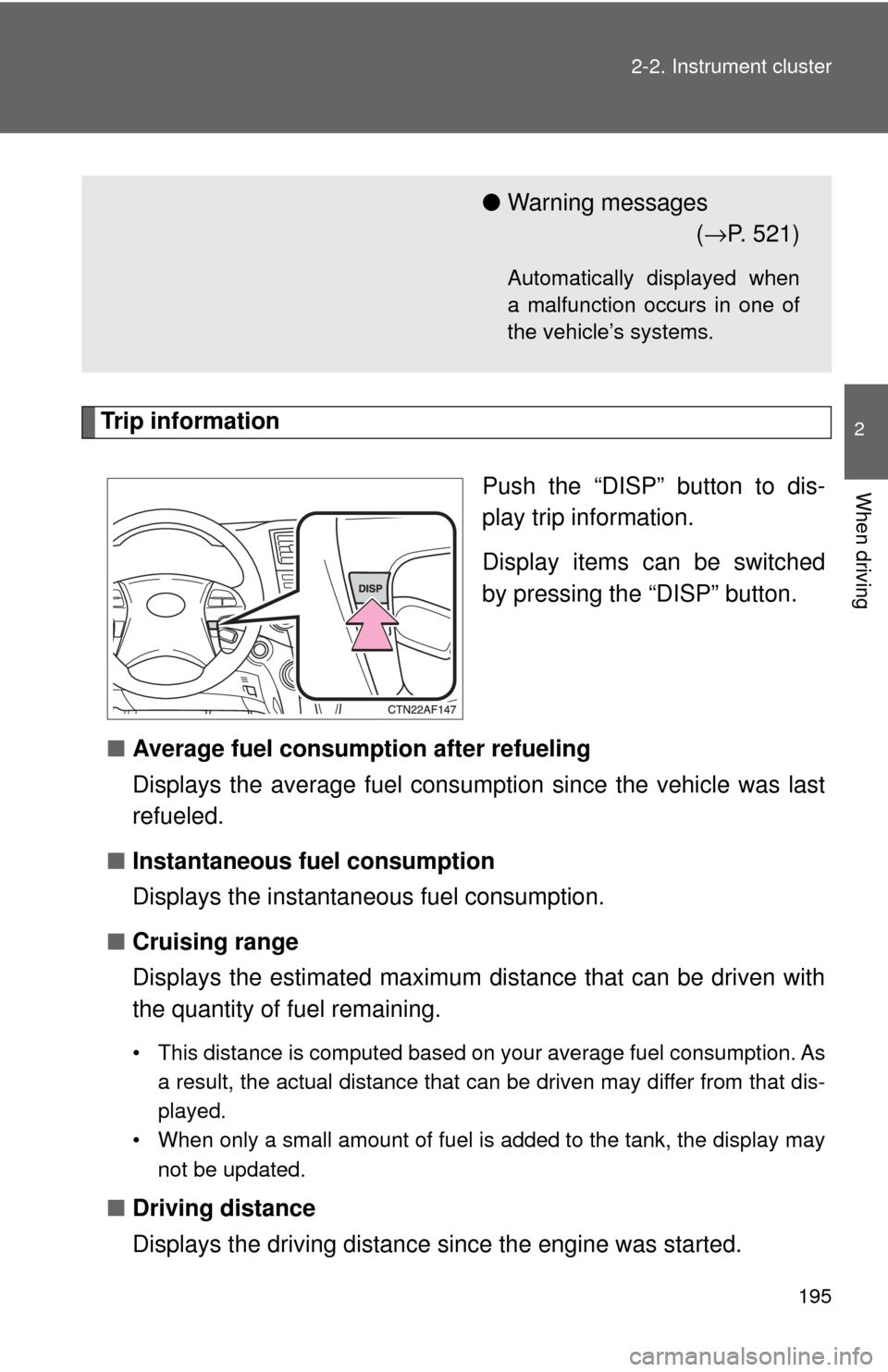
Push the “DISP” button to dis-
play trip information.
Display items can be switched
by pressing the “DISP” button.
■ Average fuel consumption after refueling
Displays the average fuel consum ption since the vehicle was last
refueled.
■ Instantaneous fuel consumption
Displays the instantan eous fuel consumption.
■ Cruising range
Displays the estimated maximum distance that can be driven with
the quantity of fuel remaining.
• This distance is computed based on your average fuel consumption. As
a result, the actual distance that can be driven may differ from that dis-
played.
• When only a small amount of fuel is added to the tank, the display may not be updated.
■Driving distance
Displays the driving distance since the engine was started.
●Warning messages
(→ P. 521)
Automatically displayed when
a malfunction occurs in one of
the vehicle’s systems.
Page 202 of 608

202 2-2. Instrument cluster
■Returning to the previous screen
Select “RETURN” on the menu screen. Press and hold the “DISP”
button until the display changes.
■System check display
Vehicles without smart key system
After the engine switch is turned to the “ON” position, “SYSTEM CHECK”
is displayed while system operation is checked. When the system check
is complete, the normal screen will return. When the system check is
complete, the normal screen will return.
Vehicles with smart key system
After the “ENGINE START STOP” sw itch is turned to IGNITION ON
mode, “SYSTEM CHECK” is displayed while system operation is
checked. When the system check is complete, the normal screen will
return. When the system check is complete, the normal screen will return.
■ Liquid crystal display
Small bright spots or dots may appear on the liquid crystal display. This is a
particular characteristic of liquid crystal displays and does not indicate a mal-
function. No action is required.
■ Outside temperature display
When stopped, or driving at low speeds (less than 12 mph [20 km/h]), the
correct outside temperature may not be displayed, or the display may take
longer than normal to change.
■ Customization that can be configured at Toyota dealer
Setting of language selection can be changed.
(Customizable features →P. 582)
NOTICE
■The multi-information display at low temperatures
Allow the interior of the vehicle to warm up before using the liquid crystal
information display. At extremely low temperatures, the information display
monitor may respond slowly, and display changes may be delayed.
Page 203 of 608
203
2
When driving
2-3. Operating the lights and wipers
Headlight switch
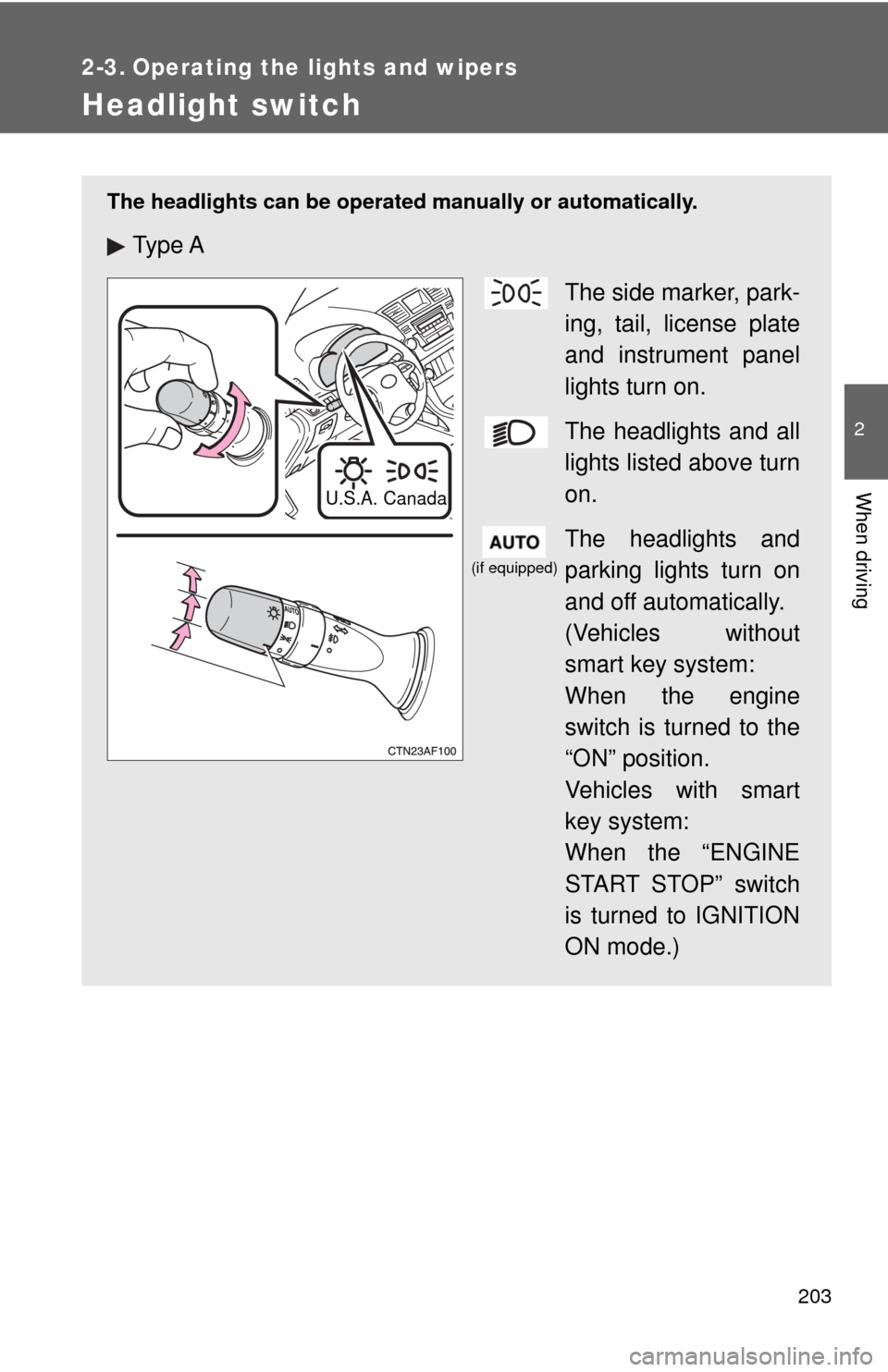
The headlights can be operated manually or automatically.
Ty p e A
The side marker, park-
ing, tail, license plate
and instrument panel
lights turn on.
The headlights and all
lights listed above turn
on.
The headlights and
parking lights turn on
and off automatically.
(Vehicles without
smart key system:
When the engine
switch is turned to the
“ON” position.
Vehicles with smart
key system:
When the “ENGINE
START STOP” switch
is turned to IGNITION
ON mode.)
U.S.A. Canada
(if equipped)
Page 204 of 608
204 2-3. Operating the lights and wipers
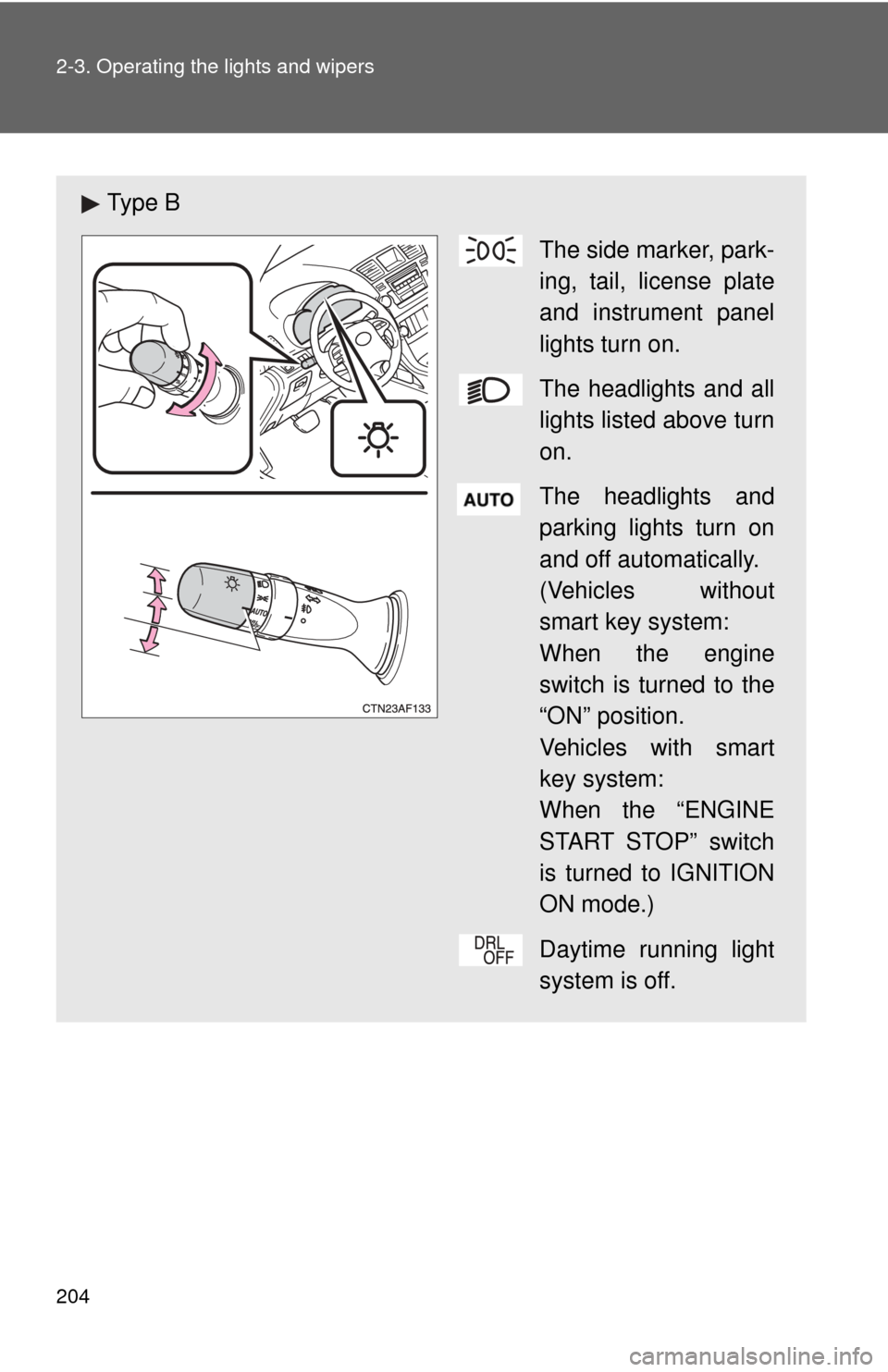
Ty p e BThe side marker, park-
ing, tail, license plate
and instrument panel
lights turn on.
The headlights and all
lights listed above turn
on.
The headlights and
parking lights turn on
and off automatically.
(Vehicles without
smart key system:
When the engine
switch is turned to the
“ON” position.
Vehicles with smart
key system:
When the “ENGINE
START STOP” switch
is turned to IGNITION
ON mode.)
Daytime running light
system is off.
Page 205 of 608

205
2-3. Operating the lights and wipers
2
When driving
Turning on the high beam headlights
With the headlights on, push
the lever forward to turn on the
high beams.
Pull the lever back to the center
position to turn the high beams
off.
Pull the lever toward you to
turn on the high beams.
Release the lever to turn them off.
You can flash the high beams
with the headlights on or off.
■Daytime running light system (if equipped)
To make your vehicle more visible to other drivers, the headlights turn on
automatically (at a reduced intensity) whenever the engine is started and the
parking brake is released. Daytime running lights are not designed for use at
night.
U.S.A.: Daytime running lights can be turned off by operating the switch.
■ Headlight control sensor (if equipped)
The sensor may not function properly if
an object is placed on the sensor, or any-
thing that blocks the sensor is affixed to
the windshield.
Doing so interferes with the sensor
detecting the level of ambient light and
may cause the automatic headlight sys-
tem to malfunction.
Page 206 of 608

206 2-3. Operating the lights and wipers
■Automatic light off system
Vehicles without smart key system
The headlights and tail lights turn off 30 seconds after drivers door is opened
and closed if the engine switch has been turned to the “ACC” or “LOCK”
position.
To turn the lights on again, turn the engine switch to the “ON” position, or
turn the headlight switch off and then back to or .
Vehicles with smart key system
The headlights and tail lights turn off 30 seconds after drivers door is opened
and closed if the “ENGINE START STOP” switch has been turned to
ACCESSORY mode or turned to OFF.
To turn the lights on again, turn the “ENGINE START STOP” switch to IGNI-
TION ON mode, or turn the headlight switch off and then back to or .
■ Customization that can be configured at Toyota dealer
Settings (e.g. daytime running light system) can be changed.
(Customizable features →P. 582)
NOTICE
■To prevent battery discharge
Do not leave the lights on longer than necessary when the engine is not run-
ning.