2009 SKODA OCTAVIA steering
[x] Cancel search: steeringPage 124 of 304

Starting-off and Driving
123
Using the system
Safety
Driving Tips
General Maintenance
Breakdown assistance
Technical Data
Ignition lockPetrol engines - ignition switched off, engine
off, the steering can be locked.
- ignition switched on - start engine Diesel engines - interruption of fuel supply, ignition sw
itched off, engine off, the steering can
be locked. - heating glow plugs on, ignition switched on•
You should not switch on any major elec
trical components during the heating
period otherwise the vehicle batter
y will be drained unnecessarily.
- start engine Applies to all models: Position
To lock the steering
, with the ignition key withdrawn, turn the steering wheel until
the steering locking pin is heard to engage.
You should always lock the steering as
a general rule if you leave your vehicle. This acts as a deterrent against possible theft of your vehicle
⇒
.
Position
Move the steering wheel back and forward a little if the ignition key cannot, or cannot easily be turned into
this position, in order to
release the steering lock.
Position
The engine is started in this position. At
the same time switched on low beam or
main beam or other electrical compon
ents with major po
wer consumption are
briefly switched off. The ignition key moves back into position when one releases the key. The ignition key must be turned back into
position each time before starting the
engine again. The starter repeat lock in th
e ignition lock prevents the starter being
engaged when the engine is running and thus getting damaged. Ignition key withdrawal lock (automatic gearbox) You can only withdraw the ignition key after switching off the ignition if the selector lever is in position
P.
WARNING
•
When driving, the ignition key must always be in the position (igni-
tion switched on) without the engine running. This position is indicated by the warning lights coming on. If this is not the case, it could result in unex- pected locking of the steering wheel - risk of accident!•
Only remove the ignition key from the ignition lock when the vehicle has
come to a standstill (by applying the handbrake or moving the selector lever into the position P). The steering lock
can engage immediately - risk of acci-
dent!•
Always withdraw the ignition key if
you are going to leave the vehicle,
even for a short time. This is particularly
important if children are left in the
vehicle. The children might otherwise star
t the engine or switch on electrical
equipment (e.g. power windows) - risk of accident or injury!
Fig. 146 Ignition lock posi- tions
A1A2A3A1A2A3
A1A2
A3
A2
A1
A2
se0.1.book Page 123 Frida
y, April 10, 2009 3:19 PM
Page 138 of 304

Automatic gearbox
137
Using the system
Safety
Driving Tips
General Maintenance
Breakdown assistance
Technical Data
Shifting up gears – One-touch forward of the selector lever (in the Tiptronic position)
⇒
page 136, fig. 155
.
Shifting down gears – One-touch back of the selector
lever (in the Tiptronic position) .
It is possible to switch over to manual both
when the car is stationary and also when
driving. When you accelerate, the gearbox shifts up
automatically into the higher gear just
before the maximum permissible engine speed is reached. If you select a lower gear, the automatic ge
arbox does not shift down until there is
no risk of the engine overrevving. If you operate the kickdown function, the ge
arbox shifts into a lower gear in line
with the vehicle speed and engine speed.Manual shifting on the multifunction steering wheel*Switching over to manual shifting – Push the selector lever to the right out of position
D. After switching
over, the current engaged gear
is indicated in the display.
Shifting up gears – Press the right rocker switch
⇒
fig. 157
for the multifunction
steering wheel.
Shifting down gears – Press the left rocker switch
⇒
fig. 157
for the multifunction
steering wheel.
Temporarily switching over to manual shifting – If the selector lever is in position
D or
S, press the left rocker switch
or the right rocker switch fo
r the multifunction steering wheel.
– If the rocker switches or are not pressed for some time, the
manual shifting switches off. You can also switch off the temporary switch over to manual shifting by pressing the right rocker switch for more than 1 second.
Emergency programme An emergency programme exists in th
e event of a fault in the system.
The gearbox operates in a corresponding emergency programme if there are func- tional faults in the gearbox electronics. This is indicated by all of the segments in the display lighting up or going out. A functional fault can ha
ve the following effect:
•
The gearbox only shifts into certain gears.
•
The reverse gear
R cannot be used.
•
The manual shift programme (Tiptronic) is switched off in the emergency mode.
If the gearbox has switched over to
emergency mode, drive to the nearest
specialist garage in order to
have the fault rectified.
A+
A-
Fig. 157 Multifunction steering wheel: Manual shifting of gears
++
-
+
-
+
+
se0.1.book Page 137 Frida
y, April 10, 2009 3:19 PM
Page 140 of 304
Communication
139
Using the system
Safety
Driving Tips
General Maintenance
Breakdown assistance
Technical Data
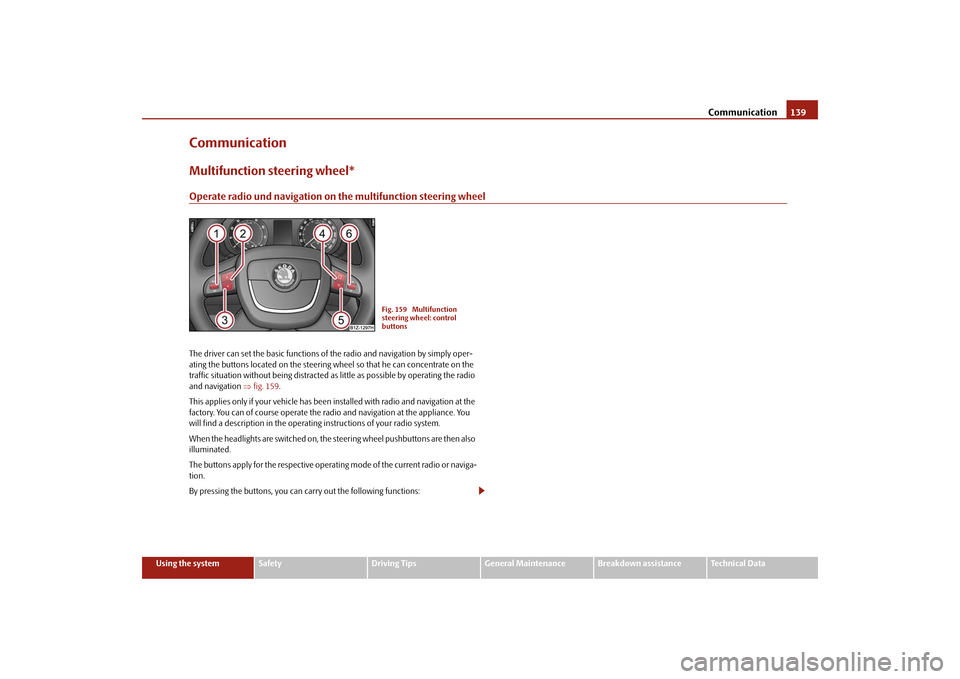
CommunicationMultifunction steering wheel*Operate radio und navigation on the multifunction steering wheelThe driver can set the basic functions of
the radio and navigation by simply oper-
ating the buttons located on the steering wheel so that he can concentrate on the traffic situation without being distracted as little as possible by operating the radio and navigation
⇒fig. 159
.
This applies only if your vehicle has been installed with radio and navigation at the factory. You can of course operate the radio and navigation at the appliance. You will find a description in the operating instructions of your radio system. When the headlights are switched on, the
steering wheel pushbuttons are then also
illuminated. The buttons apply for the respective operating mode of the current radio or naviga- tion. By pressing the buttons, you can
carry out the following functions:
Fig. 159 Multifunction steering wheel: control buttons
se0.1.book Page 139 Frida
y, April 10, 2009 3:19 PM
Page 143 of 304

Communication
142
Mobile phones and two-way radio systemsThe installation of a mobile phone and two-way radio system in a vehicle should only be carried out by an authorised Škoda Service Partner. Škoda Auto permits the operation of mobile phones and two-way radio systems with a professionally installed external aerial and a maximum transmission power of up to 10 watts. It is essential that you inform a specialist garage about the possibilites to assemble and operate mobile phones and two-way radio sets which have a power output of more than 10 W. They will inform you which technical possibilities exist for retrofit- ting mobile telephones and radio transmitters. Operation of mobile phones or two-way radio systems may interfere with func- tioning of the electronic systems of your vehicle. The reasons for this may be:•
no external aerial,
•
external aerial incorrectly installed,
•
transmission power gr
eater than 10 watts.
You should also be aware of
the fact that only an
external
aerial makes it possible
to achieve the optimal range of such equipment.
WARNING
•
If a mobile phone or a two-way radio system is operated in the vehicle
without using a special external aerial
or an external aerial which has been
incorrectly installed, this can increase the strength of the electromagnetic field in the interior of the vehicle.•
Please concentrate fully at all times on your driving!
•
You must not install two-way radio systems, mobile phones or mounts
on the covers of the airbags or within the immediate deployment range of airbags. This might result in injuries to the occupants in the event of an acci- dent.
Note
Please also refer to the operating instru
ctions of the mobile phones and two-way
radio systems.Universal telephone preinstallation GSM II*IntroductionThis enables you to make full use of the
advantages of a norm
al carphone (“hands-
free system - Hands Free” using a micropho
ne integrated in the vehicle, optimal
transmission of signals using an external aerial
14) etc.). The equipment includes
also the voice control. The telephone is connected by means of the Bluetooth
®
technology
⇒page 143, “Bluetooth®”. On vehicl
es fitted with a telephone
mount*, it is also possible to establis
h the connection via the interface of the
adapter
15) ⇒page 145, “Operating telephone calls with the aid of the adapter*.”.
A phone phonebook is part of the mobile
phone preinstallation with voice control.
In the phone phonebook there are 1500 free
memory locations available. This
phone phonebook is independent of the appliance used for the mobile phone. Furthermore the volume can be changed indi
vidually during the call at any time
with the button for setting the radio* or
on vehicles fitted with multifunction
steering wheel* with function buttons on the steering wheel. If the system answers with the voice response “
Telephone is not ready
”, please
check the operating state of
the telephone as follows:
•
Is the telephone switched on?
•
Is the PIN code entered?
Dialogue The period, in which the telephone system is ready to receive voice commands and carry out the voice commands, is called DIALOGUE. The system gives audible feed-back and guides you if necessary through
the relevant functions. You can start or
14)Valid for telephone used with adapter* in the telephone mount.15)Not valid for adapter “Bluetooth only”
⇒page 145.
se0.1.book Page 142 Frida
y, April 10, 2009 3:19 PM
Page 144 of 304

Communication
143
Using the system
Safety
Driving Tips
General Maintenance
Breakdown assistance
Technical Data
end the dialogue at any time by pres
sing the PTT button on the adapter*
⇒ page 145 or on the multifunction steering wheel*
⇒page 146.
The dialogue is always automatically ended after carrying out an operation, e.g. after erasing the name from the phonebook. When receiving an incoming call, the dialogue is immediately interrupted and you can accept the call by
pressing the button°
on the multifunction steering wheel*
⇒ page 146 or by pressing the button for
receiving a call directly on your tele-
phone. If a voice command is not detected, the system answers with “
Sorry?
” and a new
entry can be performed. After the 2nd error
the system repeats the aid. After the 3rd
error the answer “
Cancel
” is given and the dialogue is ended.
Optimum understanding of the voice
commands depends on the following
factors:•
Speak with a normal tone of voice wi
thout intonation and excessive voice
pauses.•
Avoid insufficient articulation.
•
Close the doors, windows and sliding roof, in order to reduce or stop disturbing
exterior noise.•
It is recommended to speak louder at hi
gher speeds, so that the tone of your
voice is louder than the increased surrounding noise.•
During the dialogue avoid additional noise in the vehicle, e.g. simultaneously
talking occupants.•
Do not speak, if the system makes an announcement.
•
The microphone for voice control is directed to the driver and front passenger.
Therefore the driver and the front passenger can operate the equipment.
WARNING
Pay attention primarily to the traffic situation! As the driver you are fully responsible for road safety. Use the telephone system only to such an extent, so that you are in full control of your vehicle at any time.
Caution
Taking the mobile phone out of the adapter during the call can lead to interruption of the connection. When taking out th
e mobile phone, the connection to the
factory-fitted antenna is interrupted, this reduces the quality of the transmitting and receiving signal. The charging of the
mobile phone battery is also interrupted.
Note
•
Please also refer to the additional instructions
⇒page 142, “Mobile phones
and two-way radio systems”.•
Should you have any questions, please
contact an authorised Škoda Service
Par tner.Bluetooth
®
The Bluetooth
® technology serves as ca
bleless connection of a
mobile phone to a hands-free system of your vehicle.In order to connect a mobile phone with Bluetooth
® to the hands-free
system, it is necessary to adapt the phone and the hands-free system to each other. Detailed information on this is provided in the operating instructions of your mobile phone.
The following steps must be carried
out for the connection: – Switch on the ignition.– Select Bluetooth
® on the mobile phone and select the menu with
which the mobile phone searches for suitable Bluetooth
® devices.
– If the hands-free system on the display of the mobile phone
announces
Skoda UHV
, enter the PIN°
1234
within 30 seconds and
wait, until the connection is established.
16)
16)Some mobile phones have a menu, in which th
e authorization for establishing a Bluetooth
®
connection is performed via the input of a code. If the input for the authorization is neces- sary, it must always be performed when
re-establishing the Bluetooth connection.
se0.1.book Page 143 Frida
y, April 10, 2009 3:19 PM
Page 147 of 304

Communication
146
Operation of the telephone on the multifunction steering wheel*
The driver can set the basic functions of
the telephone by simply operating the
buttons located on the steering wheel so that he can concentrate on the traffic situ- ation without being distracted as little
as possible by operating the telephone
⇒ fig. 163
.
This applies only if your vehicle has be
en equipped with the telephone preinstalla-
tion at the factory. If the side lights are switched on, the bu
ttons on the multifunc
tion steering wheel
are illuminated. Overview of the different functions in contrast to the multifunction steering wheel without mobile phone operation
⇒page 139.
Fig. 163 Multifunction steering wheel: Control buttons for the telephone
Button
Action
Operation
press briefly
Activation and deactivation of the voice control°
(Button PTT - Push to talk)
turn upwards
Increase volume
turn downwards
Decrease volume
press briefly
Accept call, terminate call, entry in the main
menu of the telephone, list of selected numbers
press button for a long
time
Reject call, entry in the main menu of
the telephone, list of selected numbers
press briefly
Reach one level higher in the menu (accordi
ng to the current position in the menu)
press button for a long
time
Return in the main menu of the information display
press briefly
Confirm menu selection
press button for a long
period of time
Confirming the selected menu point, the fo
llowing initial letters in the telephone book
turn upwards
The last chosen me
nu selection, name
turn downwards
The next menu selection, name
A1A1A1A2A2A3A3A4A4A4A4
se0.1.book Page 146 Frida
y, April 10, 2009 3:19 PM
Page 153 of 304

Communication
152
Universal telephone preinstallation GSM III*IntroductionThis enables you to make full use of the ad
vantages of a normal carphone (“hands-
free system” using a microphone integrated in the vehicle, optimal transmission of signals using an external aerial etc.). The
equipment includes also the voice control.
The telephone is connected using the
rSAP
profile -
Remote SIM access profile
(telecommunication
of the SIM data)
by means of Bluetooth
® technology, if your
telephone supports this profile. The equi
pment includes the following functions:
•
Display of the SMS text in the information display.
•
Free talking in the vehicle interior.
•
MUTE signal to the radio.
•
Voice control (with the set-up possibility for “short and long dialogue”,
depending on the user's knowledge of the operating structure).•
Convenience mode with the multifunction steering wheel and the display in the
information display.•
Handsfree-system.
The voice control of the telephone is acti
vated by pressing the button PTT on the
multifunction steering wheel
⇒page 154, fig. 164
.
A phone phonebook is part of the univers
al telephone preinstallation GSM III with
voice control. In the phone phonebook ther
e are 1000 free memory locations avail-
able. This phone phonebook is independen
t of the appliance us
ed for the mobile
phone. The volume can be changed at any time with the set button of the radio* or with the function keys on the mult
ifunction stee
ring wheel*.
Dialogue The period, in which the telephone system
is ready to receive voice commands and
carry out the voice commands, is called DIALOGUE. The system gives audible feed- back and guides you if nece
ssary through the relevant functions. You can start or
end the dialogue at any time
by pressing the PTT button.
The dialogue is always automatically ended after carrying out an operation, e.g. after erasing the name from the phonebook. The dialogue of the incoming call is i
mmediately interrupted
and you can accept
the call by pressing the button
.
If a voice command is not detected, the system answers with “
Sorry?
” and a new
entry can be performed. After the 2nd error the system repeats the aid. After the 3rd error the answer “
Cancel
” is given and the dialogue is ended.
Optimum understanding of the voice commands depends on the following factors:•
Speak with a normal tone of voice wi
thout intonation and excessive voice
pauses.•
Avoid insufficient articulation.
•
Close the doors, windows and sliding roof,
in order to reduce or stop disturbing
exterior noise.•
It is recommended to speak
louder at higher speeds, so
that the tone of your
voice is louder than the increased surrounding noise.•
During the dialogue avoid additional nois
e in the vehicle, e.g. simultaneously
talking occupants.•
Do not speak, if the system makes an announcement.
•
The microphone for voice control is in
serted in the moulded headliner and
directed to the driver and front passen
ger. Therefore the driver and the front
passenger can operate the equipment.
WARNING
Pay attention primarily to the traffic situation! As the driver you are fully responsible for road safety. Use the telephone system only to such an extent, so that you are in full control of your vehicle at any time.
Note
•
Should you have any questions, please contact an authorised Škoda Service
Par tner.
se0.1.book Page 152 Frida
y, April 10, 2009 3:19 PM
Page 154 of 304

Communication
153
Using the system
Safety
Driving Tips
General Maintenance
Breakdown assistance
Technical Data
•
Please also refer to the additional instructions
⇒page 142, “Mobile phones
and two-way radio systems”.Bluetooth
®
The equipment enables the wireless connection to the control unit of a telephone with Bluetooth
® function which supports the
rSAP
profile.
Process of connection – Switch on the ignition. – If you have not switched on Bluetooth
® on your telephone, switch it
on.
– For certain mobile phones it is necessary to switch on first the
rSAP
function.
– Press the button
on the multifunction steering wheel and select
device search
. The system searches mobile devices and shows these
in the information display*.
– Select your telephone in the information display by turning the hand-
wheel and select it by
pressing the handwheel.
– Within 30 seconds enter in your te
lephone the 16 digit PIN of your
control unit, which is indicated in the information display* and confirm it according to the instructions on the display of your tele- phone.
– If your SIM card is blocked by a PIN code, enter the PIN of the SIM card
of your telephone. The telephone
connects to the control unit (during
the first connection you can only se
lect in the information display*
and when the vehicle is stationary
, if the PIN should be stored).
– For the first storage of a new user
follow the instructions in the infor-
mation display.
– To download the telephone book and the indentification data of the
SIM card into the new control unit, confirm again the command
rSAP
in your mobile phone. The sy
stem reads the telephone book.
If you do not want to confirm the command
rSAP
during each connection of the
telephone to the control unit, then you mu
st carry out in the menu of the mobile
phone an authorization using the control unit. The telephone deregisters from the GSM network and only the control unit ensures the communication with the network. In th
e telephone only the interface for Blue-
tooth
® remains active. In this case, you can only
select to separate from the device,
switch off the Bluetooth
® connection or the number of the emergency call 112.
If the PIN was stored, an automatic select
ion and connection of the telephone take
place the next time the ignition is swit
ched. Check on your mobile phone if the
automatic connectio
n was established.
Connection terminated The connection of the handsfree-system is terminated by means of Bluetooth
®:
•
When removing the key from the igniti
on lock (during a telephone call, the
connection is disconnected).•
By switching off the Bluetooth
® in the mobile phone.
•
By selecting “separate telephone” in the menu of the mobile phone.
On vehicles which are fitted out with radio or navigation at the factory, it is possible to terminate the telephone call after remo
ving the key from th
e ignition lock by
pressing the icon on the touch-screen of the radio
17) or the navigation, see oper-
ating instructions for radio or for navigation.
WARNING
•
Pay attention primarily to the traffic situation! As the driver you are fully
responsible for road safety. Use the tele
phone system only to such an extent,
so that you are in full control of your vehicle at any time - risk of accident!•
In the event of air transport, the Bluetooth
® function of the handsfree-
system must be switched of
f by a specialist garage!
17)Does not apply for Radio Swing.
se0.1.book Page 153 Frida
y, April 10, 2009 3:19 PM