2009 SATURN AURA instrument cluster
[x] Cancel search: instrument clusterPage 139 of 408

I(On/Off):Press to turn the cruise control system on
and off.
RES+ (Resume):Press to resume a set speed and to
accelerate the speed.
SET−(Set):Press to set a speed and to decrease the
speed.
To set a speed do the following:
1. Press
Ito turn cruise control on. The indicator
light on the button comes on.
2. Get up to the desired speed.
3. Press the SET−and release it. The cruise symbol
displays in the instrument panel cluster to show the
system is engaged.
4. Take your foot off the accelerator pedal.
When the brakes are applied, the cruise control
shuts off.
If the vehicle is in cruise control and the Traction Control
System (TCS) begins to limit wheel spin, the cruise
control automatically disengages. SeeTraction Control
System (TCS) on page 4-8. When road conditions allow,
the cruise control can be used again.
Resuming a Set Speed
If the cruise control is set at a desired speed and then
the brakes are applied, the cruise control is disengaged.
But it does not need to be reset. The cruise symbol in the
instrument panel cluster also goes out indicating cruise is
no longer engaged. Once the vehicle speed is 25 mph
(40 km/h) or more, briey press the RES+.
The vehicle returns to the previously set speed and
stays there.
Increasing Speed While Using Cruise
Control
There are two ways to increase the vehicle speed while
using cruise control:
If the cruise control system is already engaged,
press and hold the RES+ button until the desired
speed is reached, then release it.
To increase the vehicle speed in small amounts,
briey press the RES+ and then release it. Each
time this is done, the vehicle goes about 1 mph
(1.6 km/h) faster.
3-11
ProCarManuals.com
Page 140 of 408

Reducing Speed While Using Cruise
Control
If the cruise control system is already engaged:
Press and hold the SET−until the desired lower
speed is reached, then release it.
To slow down in very small amounts, briey push
the SET−. Each time this is done, the vehicle
goes about 1 mph (1.6 km/h) slower.
Passing Another Vehicle While Using
Cruise Control
Use the accelerator pedal to increase the vehicle’s
speed. When you take your foot off the pedal, the
vehicle slows down to the previously set cruise
control speed.
Using Cruise Control on Hills
How well the cruise control works on hills depends upon
the vehicle’s speed, load, and the steepness of the hills.
When going up steep hills, you might have to step on the
accelerator pedal to maintain the vehicle’s speed. When
going downhill, you might have to brake or shift to a lower
gear to keep the vehicle at a lower speed. When the
brakes are applied this ends the cruise control.
Ending Cruise Control
There are two ways to disengage the cruise control:
Step lightly on the brake pedal; when cruise control
disengages, the cruise symbol in the instrument
panel cluster goes out.
Press theIbutton, to turn off the cruise control
system.
Erasing Speed Memory
The cruise control set speed memory is erased when
the cruise control or the ignition is turned off.
3-12
ProCarManuals.com
Page 143 of 408

Automatic Headlamp System
When it is dark enough outside, the automatic headlamp
system turns on the headlamps at the normal brightness
along with other lamps such as the taillamps, sidemarker,
parking lamps, and the instrument panel lights. The radio
lights will also be dim.
The vehicle has a light sensor on top of the instrument
panel that controls the automatic headlamp system.
Do not cover the sensor or the automatic headlamp
system will turn on when it is not needed.
There is a delay in the transition between the daytime
and nighttime operation of the DRL and the automatic
headlamp systems so that driving under bridges or
bright overhead street lights does not affect the system.
The DRL and automatic headlamp systems will only be
affected when the light sensor sees a change in lighting
lasting longer than this delay.
If vehicle is started in a dark garage, the automatic
headlamp system comes on immediately. Once the
vehicle leaves the garage, it takes about one minute for
the automatic headlamp system to change to DRL if it is
light outside. During that delay, the instrument panel
cluster may not be as bright as usual. Make sure the
instrument panel brightness control is in the full bright
position. SeeInstrument Panel Brightness on page 3-16.To idle the vehicle with the automatic headlamp system
off, turn the ignition on and set the exterior light switch to
the off/on position. For vehicles rst sold in Canada, the
transmission must stay in P (Park) for this function.
The regular headlamps should be used when needed.
Fog Lamps
For vehicles with fog lamps, the button for this feature is
located on the instrument panel, to the left of the
steering wheel.
The ignition must be on for the fog lamps to work.
#:Press to turn the fog lamps on or off. An indicator
light comes on when the fog lamps are on.
The parking lamps automatically turn on and off when
the fog lamps are turned on and off.
The fog lamps turn off while the high-beam headlamps
are turned on.
Some localities have laws that require the headlamps to
be on along with the fog lamps.
3-15
ProCarManuals.com
Page 156 of 408
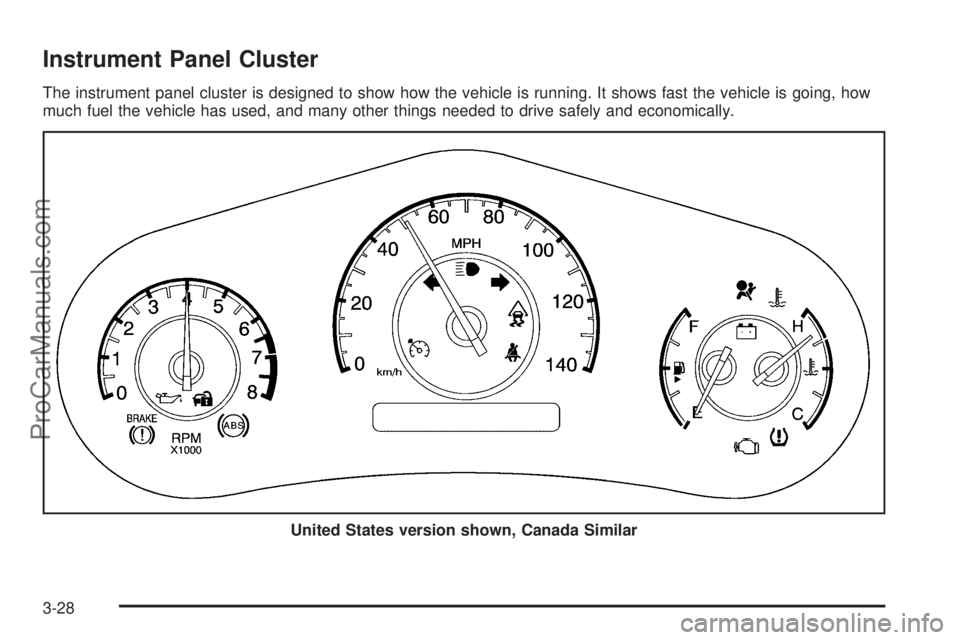
Instrument Panel Cluster
The instrument panel cluster is designed to show how the vehicle is running. It shows fast the vehicle is going, how
much fuel the vehicle has used, and many other things needed to drive safely and economically.
United States version shown, Canada Similar
3-28
ProCarManuals.com
Page 171 of 408

Driver Information Center (DIC)
Your vehicle has a Driver Information Center (DIC).
The DIC display gives you the status of many of your
vehicle’s systems. The DIC is also used to display driver
personalization menu modes and warning/status
messages. All messages will appear in the DIC display,
located at the bottom of the instrument panel cluster.
The DIC buttons are
located on the left side of
the steering wheel.
INFO (Information):Press this button to scroll through
the vehicle information mode displays.
r(Reset):Press this button to reset some vehicle
information mode displays, select a personalization menu
mode setting, or acknowledge a warning message.Press and hold the information and reset buttons at the
same time for one second, then release the buttons
to enter the personalization menu. SeeDIC Vehicle
Personalization on page 3-50for more information.
DIC Operation and Displays
The DIC comes on when the ignition is on. The DIC has
different modes which can be accessed by pressing the
DIC buttons. The button functions are detailed in the
following.
Information Modes
INFO (Information):Press this button to scroll through
the following vehicle information modes:
Outside Air Temperature
The outside air temperature will be displayed at the
same time as the Odometer and the Trip Odometer.
The temperature outside of the vehicle will be
displayed in either degrees Fahrenheit (°F) or degrees
Celsius (°C). The outside air temperature appears
on the left side of the DIC display and the odometer, or
trip odometer, appears on the right side of the display.
3-43
ProCarManuals.com
Page 174 of 408

AUTO (Automatic) LIGHTS ON
This message displays if the automatic headlamp
system is enabled with the headlamp switch. See
Automatic Headlamp System on page 3-15for more
information.
BRAKE FLUID
This message displays, while the ignition is on, when the
brake uid level is low. The brake system warning light on
the instrument panel cluster also comes on. SeeBrake
System Warning Light on page 3-33for more information.
Have the brake system serviced by your dealer/retailer as
soon as possible.
CHANGE OIL SOON
This message displays when the life of the engine oil
has expired and it should be changed.
When this message is acknowledged and cleared from
the display, the engine oil life system must still be reset
separately. SeeEngine Oil Life System on page 5-18,
Engine Oil on page 5-15, andScheduled Maintenance on
page 6-4for more information.
CHECK GAS CAP
This message displays if the fuel cap has not been fully
tightened. Recheck the fuel cap to make sure that it is on
properly. A few driving trips with the cap properly installed
should turn the message off.
CHECK TIRE PRESS (Pressure)
On vehicles with the Tire Pressure Monitor System
(TPMS), this message displays when the pressure in
one or more of the vehicle’s tires needs to be checked.
If a tire pressure message appears on the DIC, stop
as soon as you can. Have the tire pressures checked
and set to those shown on the Tire Loading Information
label. SeeTires on page 5-45,Loading the Vehicle on
page 4-21, andInflation - Tire Pressure on page 5-52.
The DIC also shows the tire pressure values. SeeDIC
Operation and Displays on page 3-43. If the tire pressure
is low, the low tire pressure warning light comes on.
SeeTire Pressure Light on page 3-36.
CRUISE ENGAGED
This message displays when the cruise control system
is active. SeeCruise Control on page 3-10for more
information.
DOOR AJAR
This message displays if one or more of the vehicle’s
doors are not closed properly. Make sure that the
door(s) are closed completely.
ENGINE DISABLED
This message displays if the starting of the engine is
disabled. Have your vehicle serviced by your dealer/
retailer immediately.
3-46
ProCarManuals.com
Page 175 of 408

ENG (Engine) PWR (Power) REDUCED
This message displays when the vehicle’s engine
power is reduced. Reduced engine power can affect the
vehicle’s ability to accelerate. If this message is on, but
there is no reduction in performance, proceed to your
destination. The performance may be reduced the next
time the vehicle is driven. The vehicle may be driven at a
reduced speed while this message is on, but acceleration
and speed may be reduced. Anytime this message stays
on, the vehicle should be taken to your dealer/retailer for
service as soon as possible.
ESC (Electronic Stability Control) ACTIVE
If your vehicle has Electronic Stability Control (ESC),
this message displays and the ESC/TCS light on the
instrument panel cluster ashes when ESC is assisting
you with directional control of the vehicle. You may feel or
hear the system working and see this message displayed
in the DIC. Slippery road conditions may exist when this
message is displayed, so adjust your driving accordingly.
This message may stay on for a few seconds after ESC
stops assisting you with directional control of the vehicle.
This is normal when the system is operating. See
Electronic Stability Control (ESC) on page 4-6and
Electronic Stability Control (ESC)/Traction Control
System (TCS) Indicator/Warning Light on page 3-34
for more information.
ESC (Electronic Stability Control) OFF
If your vehicle has Electronic Stability Control (ESC),
this message displays and the ESC/TCS light on the
instrument panel cluster comes on solid when ESC is
turned off. Adjust your driving accordingly. SeeElectronic
Stability Control (ESC) on page 4-6andElectronic
Stability Control (ESC)/Traction Control System (TCS)
Indicator/Warning Light on page 3-34for more
information.
ICE POSSIBLE
This message displays when the outside air temperature
is cold enough to create icy road conditions. Adjust your
driving accordingly.
KEY FOB BATT (Battery) LOW
This message displays if the Remote Keyless Entry
(RKE) transmitter battery is low. Replace the battery
in the transmitter. See “Battery Replacement” under
Remote Keyless Entry (RKE) System Operation on
page 2-5.
LOW FUEL
This message displays when your vehicle is low on fuel.
Rell the fuel tank as soon as possible. SeeFuel Gage
on page 3-42,Fuel on page 5-5, andFilling the Tank on
page 5-8for more information.
3-47
ProCarManuals.com
Page 176 of 408

LOW TRACTION
If your vehicle has the Traction Control System (TCS),
this message displays and the ESC/TCS light on the
instrument panel cluster ashes when the system is
actively limiting wheel spin. Slippery road conditions may
exist if this message is displayed, so adjust your driving
accordingly. This message stays on for a few seconds
after the system stops limiting wheel spin. SeeTraction
Control System (TCS) on page 4-8andElectronic
Stability Control (ESC)/Traction Control System (TCS)
Indicator/Warning Light on page 3-34for more
information.
LOW WASHER FLUID
This message displays when the vehicle’s windshield
washer uid is low. Fill the windshield washer uid
reservoir to the proper level as soon as possible.
SeeWindshield Washer Fluid on page 5-32.
POWER STEERING
On some vehicles, this message displays if a problem
has been detected with the electric power steering. Have
your vehicle serviced by your dealer/retailer immediately.
PUSH PARK PEDAL
This message displays if the parking brake is left
engaged. SeeParking Brake on page 2-29for more
information.
SERVICE AIR BAG
This message displays when there is a problem with the
airbag system. Have your vehicle serviced by your
dealer/retailer immediately.
SERVICE ESC (ELECTRONIC STABILITY
CONTROL)
If your vehicle has Electronic Stability Control (ESC),
this message displays and a chime sounds if there has
been a problem detected with ESC. The ESC/TCS
light also appears on the instrument panel cluster. This
light stays on solid as long as the detected problem
remains present. When this message displays, the
system is not working. Adjust your driving accordingly.
SeeElectronic Stability Control (ESC) on page 4-6
andElectronic Stability Control (ESC)/Traction Control
System (TCS) Indicator/Warning Light on page 3-34
for more information.
If this message turns on while you are driving, pull off the
road as soon as possible and stop carefully. Try resetting
the system by turning the ignition off and then back on.
If this message still stays on or turns back on again while
you are driving, your vehicle needs service. Have the
ESC inspected by your dealer/retailer as soon as
possible.
3-48
ProCarManuals.com