Page 11 of 343

Contents
9
Battery....................................................... 303
External Power Supply, Jump-Lead
Starting...................... ................................ 306
Changing the Remote Control Battery ........... 307
Replacing Bulbs .......... ................................ 308
Headlights ...................... ............................ 308
Side Turn Signal Ligh t ................................. 312
Licence Plate Lights .... ................................ 313
Side Marker Light ... .................................... 313
Changing Light-Emitting Diodes and
Long-Life Bulbs ........... ............................... 314
Headlight Adjustment .. ................................ 314
Towing ....................................................... 316
Fire Extinguisher ......... ................................ 321Tire Pressure and Technical Data ..... 322Vehicle Identification Data ............................ 323
Engine Data................................................ 324
Wheels, Tires.............. ................................ 325
Tire Pressure for Cold Tires (68 °F/20 °C) .... 326
Weights...................................................... 328
Filling Capacities ......... ................................ 329
Driving Performance ... ................................ 329
Dimensions .................... ............................ 330Index .............................................. 331
Page 162 of 343

160
Instrument Panel and Multi-Function Display
System not active
Temporary faultTemporary fault in the Tire Pressure Monitoring system.
Tire pressure is not monitored.Tire Pressure too low for speeds
greater xxx
Top speed for the preset co
mfort pressure exceeded.Tire change?
Update settings The tire settings on the multi-f
unction display must be updated
after changing a wheel.Fault Tire pressure check Fault in Tire Pressu re Monitoring system. Tire pressure is not
monitored. Have the fault corrected at a qualified specialist
workshop.*Driving light on Driving light/side light on.Parking light on Left/right parking light on.Example:
Check front left direction
indicator The reported light is faulty.
Check bulb.
Have the fault corrected at
a qualified specialist workshop.*
flashesDynamic cornering light defective Have the faul t corrected at a qualified specialist workshop.*
lights upAuto driving light control
defective Have the fault corrected at
a qualified specialist workshop.*Check static cornering light,
left/right The reported light is faulty.
Check bulb.
Have the fault corrected at
a qualified specialist workshop.*Headlight beam adjust. defective Adjust your speed and driving style. Have the fault corrected at
a qualified specialist workshop.*Rain/light sensor defective Switch on wipers/ light manually. Have the fault corrected at
a qualified specialist workshop.*
Light in
instrument
panel
Warning message on multi-function
display Meaning/Action required
Page 279 of 343
Minor Repairs
277
Minor Repairs
Exercise Extreme Caution when Working
on your Vehicle .......
................................... 278
Tires and Wheels..... ................................... 280
Wheel Bolts ................ .............................. 293
Flat Tire .................. ................................... 293
Electrical System .... ................................... 296
Battery ............................................ .......... 303
External Power Supply, Jump-Lead
Starting ........................................... .......... 306
Changing the Remote Co ntrol Battery .......... 307
Replacing Bulbs ...... ................................... 308
Headlights ....................................... .......... 308
Side Turn Signal Ligh t................................. 312
Licence Plate Lights ................................... 313
Side Marker Light .... ................................... 313
Changing Light-Emitting Diodes and
Long-Life Bulbs ......................................... 314
Headlight Adjustment .................................. 314
Towing ........................ .............................. 316
Fire Extinguisher .......................... .............. 321
Page 310 of 343
308
Minor Repairs
Changing the battery (CR 2032, 3V)
1. Remove the emergency key.
2. Lever off the cover on the back of the key
housing using a small screwdriver.
3. Change the battery (check polarity).
4. Re-fit cover and press together firmly.
5. Insert the emergency key.
Replacing Bulbs
Warning!
Risk of serious personal injury or death. The
headlights are under high voltage when
installed.
f Exercise extreme care when working close to
the headlights.
Risk of short circuit.
f Always switch off the relevant load when
changing bulbs.
Risk of damage. Bulbs of a high wattage can
damage the housing.
f Only use the bulbs specified in the bulb chart.
f Bulbs must be clean and free from grease.
f Never touch bulbs with your bare hands.
Use a cloth or soft paper when
replacing bulbs.
f Always carry spare bulbs with you.
In certain countries, it is mandatory to
carry spare bulbs.
Headlights
Caution!
Risk of damage to headlights due to abrasion
and excessive temperatures.
f Do not affix any coverings (e.g. “stone guards”
or films) on or around the headlights.
f Use soapy water only to clean light lenses and
plastic headlight lenses. In no case may
chemical cleaners or other volatile cleaning
fluids be used.
f To prevent scratches, do not rub with a dry or merely moist cloth, tissue or insect sponges.
Note
The headlights can mist up due to temperature
and humidity.
f To ensure optimum ventilation, do not cover
the gap between headlight and body.
Page 312 of 343
310
Minor Repairs
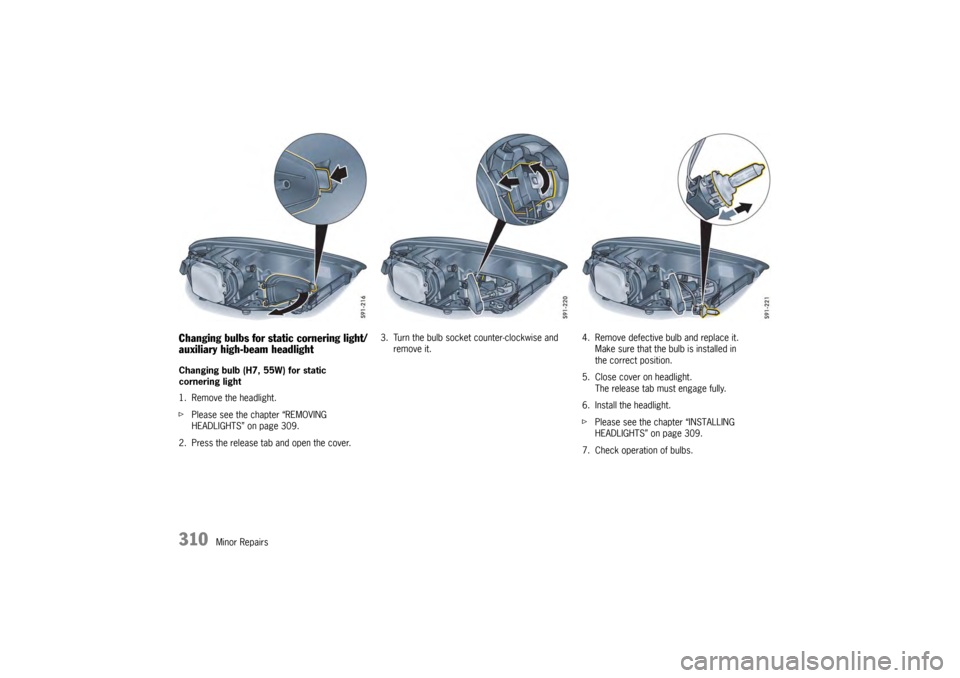
Changing bulbs for static cornering light/
auxiliary high-beam headlight Changing bulb (H7, 55W) for static
cornering light
1. Remove the headlight.
fPlease see the chapter “REMOVING
HEADLIGHTS” on page 309.
2. Press the release tab and open the cover. 3. Turn the bulb socket counter-clockwise and
remove it. 4. Remove defective bulb and replace it.
Make sure that the bulb is installed in
the correct position.
5. Close cover on headlight. The release tab must engage fully.
6. Install the headlight.
f Please see the chapter “INSTALLING
HEADLIGHTS” on page 309.
7. Check operation of bulbs.
Page 313 of 343
Minor Repairs
311
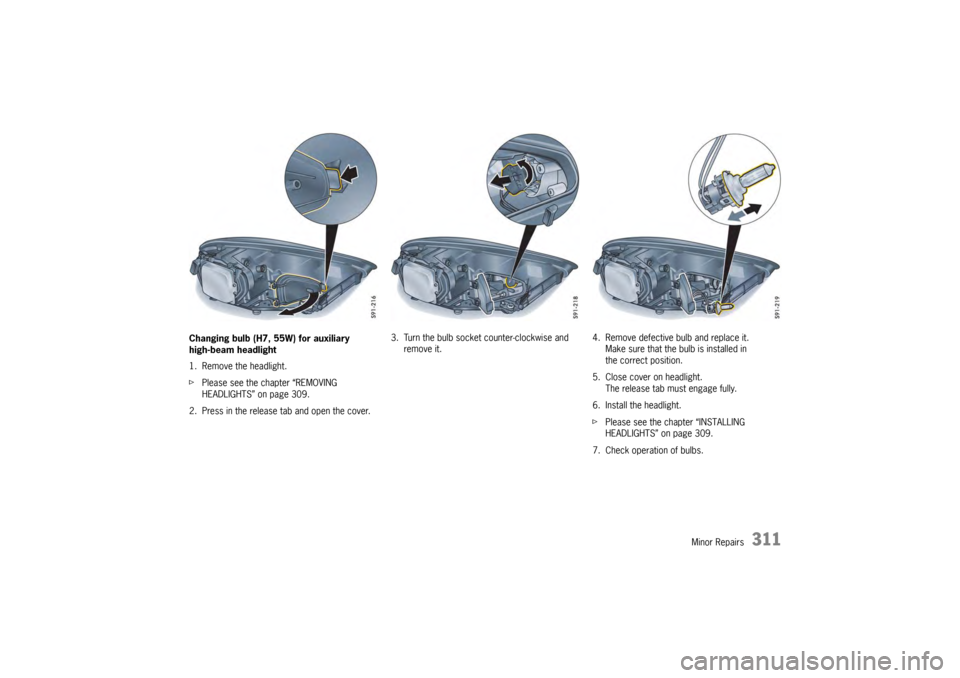
Changing bulb (H7, 55W) for auxiliary
high-beam headlight
1. Remove the headlight.
fPlease see the chapter “REMOVING
HEADLIGHTS” on page 309.
2. Press in the release tab and open the cover. 3. Turn the bulb socket counter-clockwise and
remove it. 4. Remove defective bulb and replace it.
Make sure that the bulb is installed in
the correct position.
5. Close cover on headlight. The release tab must engage fully.
6. Install the headlight.
f Please see the chapter “INSTALLING
HEADLIGHTS” on page 309.
7. Check operation of bulbs.
Page 314 of 343
312
Minor Repairs
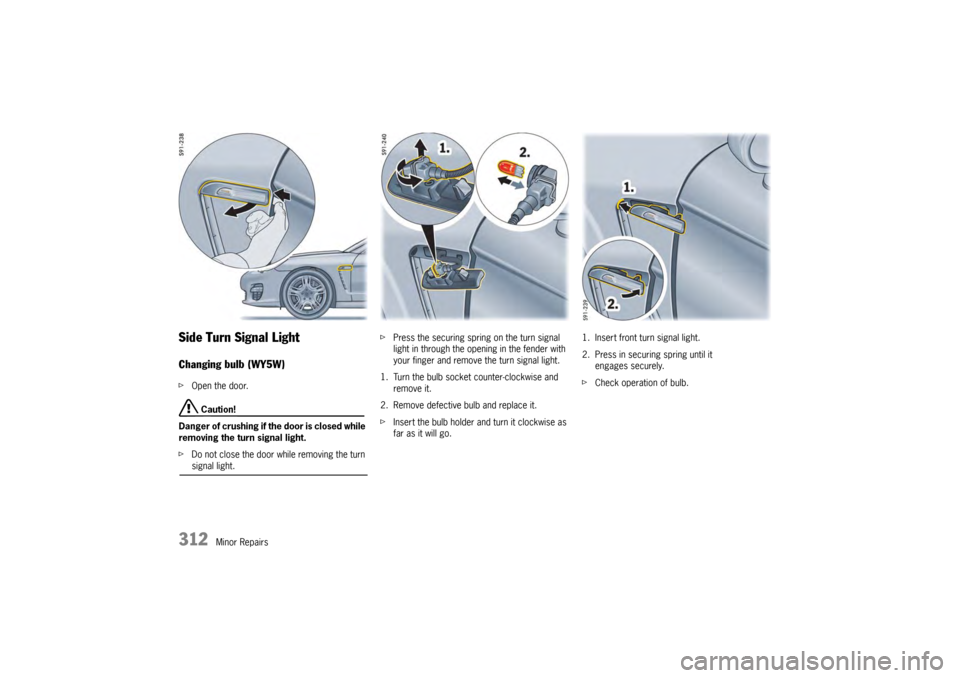
Side Turn Signal LightChanging bulb (WY5W)fOpen the door.
Caution!
Danger of crushing if th e door is closed while
removing the turn signal light.
f Do not close the door while removing the turn signal light. f
Press the securing spring on the turn signal
light in through the opening in the fender with
your finger and remove the turn signal light.
1. Turn the bulb socket counter-clockwise and remove it.
2. Remove defective bulb and replace it.
f Insert the bulb holder and turn it clockwise as
far as it will go. 1. Insert front turn signal light.
2. Press in securing spring until it
engages securely.
f Check operation of bulb.
Page 315 of 343
Minor Repairs
313
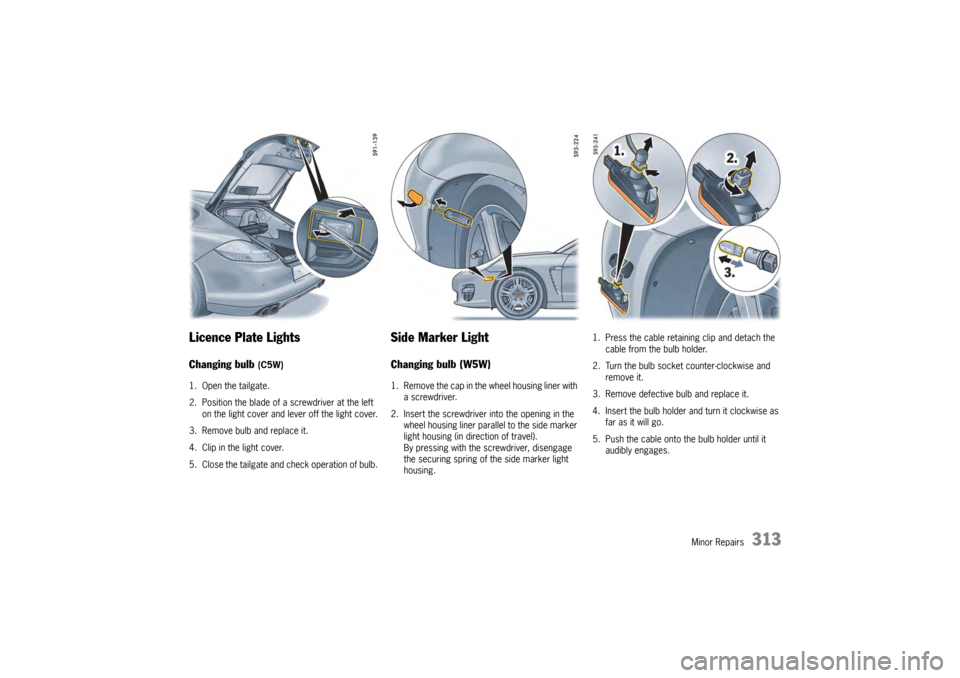
Licence Plate LightsChanging bulb
(C5W)
1. Open the tailgate.
2. Position the blade of a screwdriver at the left on the light cover and lever off the light cover.
3. Remove bulb and replace it.
4. Clip in the light cover.
5. Close the tailgate and check operation of bulb.
Side Marker LightChanging bulb (W5W)1. Remove the cap in the wheel housing liner with
a screwdriver.
2. Insert the screwdriver into the opening in the wheel housing liner parallel to the side marker
light housing (in direction of travel).
By pressing with the screwdriver, disengage
the securing spring of the side marker light
housing. 1. Press the cable retaining clip and detach the
cable from the bulb holder.
2. Turn the bulb socket counter-clockwise and remove it.
3. Remove defective bulb and replace it.
4. Insert the bulb holder and turn it clockwise as far as it will go.
5. Push the cable onto the bulb holder until it audibly engages.