2009 PORSCHE PANAMERA reset
[x] Cancel search: resetPage 164 of 343

162
Instrument Panel and Multi-Function Display
* We recommend that you have an authorized Porsche
d e a l e r t o d o t h i s w o r k , a s t h e y h a v e t h e t r a i n e d w o r k s h o p
personnel and the necessary parts and tools for this type
of work.
Fault
ParkAssist sound Acoustic warning and distance signals for ParkAssist are not
available.
Please remember this
when parking. Have the fault corrected at
a qualified specialist workshop.*Limit 1 or 2 exceeded Preset speed limit 1 or 2 has been exceeded.
Warning light on
the coolant
temperature
gauge flashesCheck Engine Have the fault corrected at a qualified specialist workshop.*Example:
Full maintenance in XXX miles (km) Service reminder
Bring the vehicle in for service no
later than after the distance/
time shown has elapsed. The maintence intervals can be found
in the “Maintenance” booklet.
Light in
instrument
panel
Warning message on multi-function
display Meaning/Action required
Page 167 of 343

Driving and Driving Safety
165
To remove the ignition key:
fStop the vehicle.
f Move PDK selector lever to position P.
f Switch ignition off.
f Remove the ignition key.Ignition lock position 1 – Ignition onfTurn ignition key to position 1.
All electrical equipment can be switched on. The
warning lights on the inst rument panel light up for
alamp check.
f Please see the chapter “INSTRUMENT PANEL
USA MODELS” on page 107.
If an electrical consumer is not switched on for
10 minutes after switching on the ignition, the
ignition must be switched off then on again.
Ignition lock position 2 – Start enginef Turn ignition key to ignition lock position 2.
The car key is reset automa tically from position 2
to position 1 when you start the engine.Ignition lock position 3 – Activate
steering column lock on vehicles with
Porsche Entry & Drivef Please see the chapter “Manually locking the
steering column on vehicles with Porsche
Entry & Drive” on page 165.Steering column lockVehicles without Porsche Entry & Drive
The steering column is locked automatically
when the ignition key is removed from the ignition
lock and unlocked automatically when the
ignition key is inserted into the ignition lock.
Vehicles with Porsche Entry & Drive
The steering column is locked automatically
when the driver’s door is opened when the ignition
is switched off. Manually locking the steering column on
vehicles with Porsche Entry & Drive
f
Once the ignition is switched off, turn the
control unit to ignition lock position 3 again
and hold it there for 2seconds.
The steering column is locked when you hear
a clicking noise.
The steering column can be unlocked
automatically by turning the control unit to
ignition lock position 1.
Emergency operation with Porsche
Entry & DriveInterference in radio tr ansmission between the
vehicle and ignition lock or a discharged ignition
lock battery can disable the Porsche Entry & Drive
comfort function.
If this happens, the control unit can be removed
from the ignition lock and the vehicle can be
started using the standard ignition key.
Removing the control unit from the
ignition lock
1. Turn the control unit to ignition lock position 3
and hold it there for about 10 seconds.
Once you hear the clicking sound, you can remove
the control unit in ignition lock position 0.
Page 169 of 343

Driving and Driving Safety
167
Starting and Stopping the EngineThe immobilizer can be deactivated and the
engine started only using an authorised
ignition key.
fPlease see the chapter “IMMOBILIZER” on
page 250.
Warning!
Risk of poisoning. Exhaust gas contains
colorless and odorless carbon monoxide
(CO), which is toxic even in low
concentrations. Carbon monoxide can cause
unconsciousness and even death if inhaled.
f Never start or let the engine run in an
enclosed, unventilated area. It is not
recommended to sit in your car for prolonged
periods with the engine on and the car not
moving.
An unattended vehicle with a running engine
is potentially hazardous. If warning lights
should come on to indicate improper
operation, they would go unnoticed.
f Never leave the engine idling unattended.
Danger of fire close to the hot exhaust
system.
f Do not park or drive your vehicle where
combustible materials, such as dry grass or
leaves, can come into contact with the hot
exhaust system. For information on the emission control system:
f
Please see the chapter “EMISSION CONTROL
SYSTEM” on page 262.
f If your car catches on fire for any reason, call
the fire department. Do not endanger your life
by attempting to put out the fire.
Starting the vehicle f Operate the footbrake.
f Move PDK selector lever to position P or N.
f Do not press the accelerator pedal.
The engine control unit will provide the correct
starting mixture.
f Turn the ignition key or control unit (Porsche
Entry & Drive) to ignition lock position 2.
The starting process is carried out and
completed automatically as soon as ignition
lock position 2 (start engine) is reached.
The ignition key or control unit is reset
automatically to ignition lock position 1
(ignition on).
f Do not operate the starter for more than
approx. 10 seconds. If necessary, repeat the
starting procedure after a pause of approx.
10 seconds. Turn the ignition key back to
ignition lock position 0 (initial position) first.
The first operation of the starter is ended
automatically when the engine starts.
If the engine does not start, subsequent
starter operations will not be ended
automatically.
Page 186 of 343

184
Driving and Driving Safety
Possible distance settings
Automatic braking to a stopIf the vehicle in front stops, adaptive cruise control
will slow your vehicle down
to a stop provided this
is possible within the control limits of the system.
The display lights up on the instrument panel.
The vehicle is actively held at a stop.
For information on the HOLD function:
f Please see the chapter “HOLD FUNCTION:
DRIVE-OFF ASSISTANT AND STANDSTILL
MANAGEMENT” on page 206.
Note
Depending on the traffic flow, e.g. slow moving
traffic, stopping is initiated by a slow crawling
phase which ends in vehicle standstill.
Caution!
Brake pedal feels different. When adaptive
cruise control is operating normally or when
the HOLD function is active, the brake pedal
may feel different and you may hear
hydraulic noises.
This behavior is no rmal for the system.
It is not a fault.
Driving off againThe vehicle can be driven off again after being
stopped and speed and distance control will be
resumed, depending on the operating state of the
adaptive cruise control system.
For information on the operating states of the
adaptive cruise control system:
fPlease see the chapter “OPERATING STATES
WHEN ADAPTIVE CRUISE CONTROL IS
SWITCHED ON” on page 182.
Adaptive cruise control active
1. Press the control stalk on the steering wheel up (position 4, RESUME ).
2. Briefly press the accelerator pedal. Your vehicle drives on automatically.
Note
Your vehicle will not drive off if the vehicle
detected in front is stationary.
Adaptive cruise control is ready
Automatic speed and distance control can only
be resumed when your vehicle is moving.
1. Drive off normally.
2. Press the control stalk on the steering wheel up (position 4, RESUME ).
or
Set or change the desired speed.
Suitable for speedy driving in lines of
traffic. The time headway is 1 second.
This corresponds to 36 yd. (33 meters)
at a speed of 75 mph (120 km/h).
Suitable for driving comfortably in lines
of traffic. The time headway is
1.3 seconds. This corresponds to
47 yd. (43 meters) at a speed of
75 mph (120 km/h).
Preset distance
Corresponds to the general
recommendation of the road traffic
safety regulation (“two seconds time
headway”). The time headway is
1.8 seconds. This corresponds to
66 yd. (60 meters) at a speed of
75 mph (120 km/h).
Suitable for driving on country roads.
The time headway is 2.3 seconds.
This corresponds to 63 yd. (58 meters)
at a speed of 56 mph (90 km/h).
Page 216 of 343
214
Driving and Driving Safety
Warning messages
The warning message “Sport mode error”
appears on the multi-f
unction display in the
instrument panel in the event of a fault.
For information on warning messages on the
multi-function display:
f Please see the chapter “OVERVIEW OF
WARNING MESSAGES” on page 152.
Note
After the ignition is switched off, Sport mode is
automatically reset to Normal mode.
f Please see the chapter “PORSCHE ACTIVE
SUSPENSION MANAGEMENT (PASM)” on
page 208.
f Please see the chapter “PORSCHE DYNAMIC
CHASSIS CONTROL (PDCC)” on page 211.
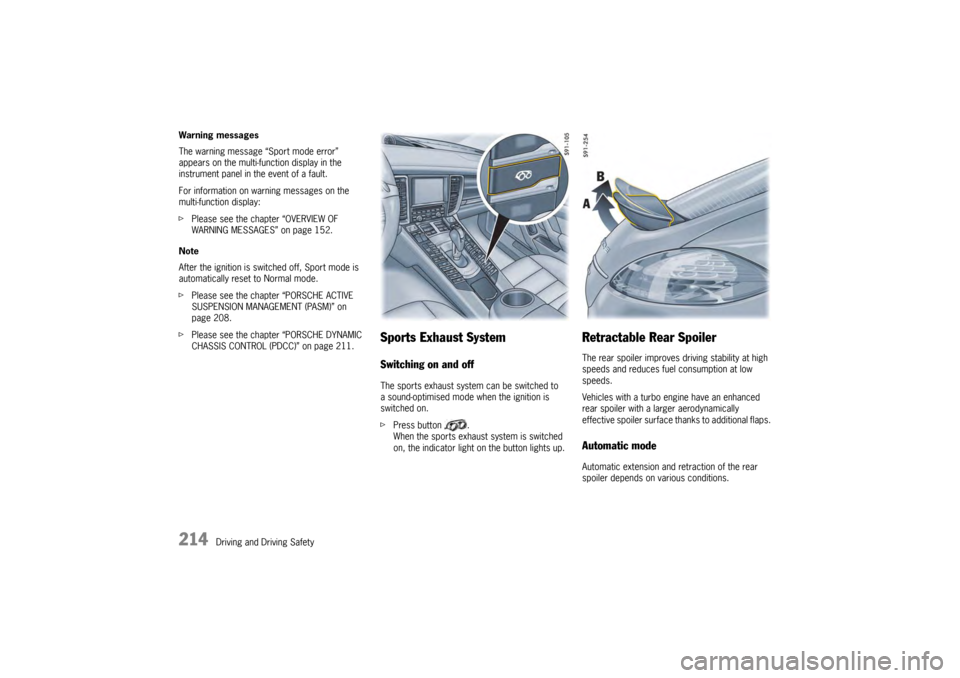
Sports Exhaust SystemSwitching on and offThe sports exhaust system can be switched to
a sound-optimised mode when the ignition is
switched on.
fPress button .
When the sports exhaust system is switched
on, the indicator light on the button lights up.
Retractable Rear SpoilerThe rear spoiler improves driving stability at high
speeds and reduces fuel consumption at low
speeds.
Vehicles with a turbo engine have an enhanced
rear spoiler with a larger aerodynamically
effective spoiler surface thanks to additional flaps.Automatic modeAutomatic extension and retraction of the rear
spoiler depends on various conditions.
Page 339 of 343

Index
337
Operating navigation system ............................... 123
Operating principle......... .................................... 115
Operating with multi-function steering wheel ......... 115
Operating with steering wh eel lever ..................... 116
Overview of warning me ssages ........................... 152
Retrieving vehicle inform ation ............................. 119
Selecting a radio statio n ..................................... 123
Sport Chrono................. .................................... 136
Tire pressure warnings ....................................... 133
Trip information ......... ........................................ 126
Using the telephone ....... .................................... 125
Multi-function steering wheel Changing button assign ment on multi-function
steering wheel ............... .................................... 151
Functional description .......................................... 63
MFS button.................... .................................... 116
With telephone function ........................................ 63
NNavigation system ............... ........................................ 191
Using via multi-function display ............................ 123OOctane rating ....... .......................................... ............. 268
Octane rating, petrol ........ ............................................ 265
Odometer Display ..................................................... ......... 112
Resetting ................................................. ......... 112
Off delay Switching on.................. ...................................... 95
Oil ................................................................. ............. 254
Change .............. ...................................... ......... 256
Change quantity ............. .................................... 329
Checking level ............... .................................... 121
Consumption ...... ...................................... ............. 6
Filler opening ............. ........................................ 255
General information ........ .................................... 254
Level gauge .................. .................................... 121
Oil pressure.......................................... ............. 152
Oil-level warning on the mult i-function display........ 255
Temperature gauge ....... .................................... 110
Topping up ......... ...................................... ......... 255On-board computer
Measuring oil level..............................................121
Menu overview ................. ..................................117
Multi-function display .... ......................................115
Operating principle ....... ......................................115
Overview of warning me ssages ...........................152
Tire Pressure Monitoring .....................................127
Opening and closing Closing tailgate automati cally ................................28
Engine compartment lid .... ....................................33
Locking vehicle door with car key
(remote control) ...................................... .............24
Locking vehicle door with Porsche Entry & Drive.....24
Luggage compartment floo r................................227
Opening and locking vehicle door from inside .........31
Opening tailgate automatica lly ...............................27
Slide/tilt roof ............... ........................................88
Unlocking vehicle door with car key
(remote control)
...................................... .............23
Unlocking vehicle door with
Porsche Entry & Drive .. ........................................23
Opening and closing the engine compartment lid..............33
Opening and closing the hood .........................................33
Operating in other countries .........................................264
Operating overview Air conditioning system, front ................................76
Operating the horn ............. ............................................61
Optical distortion, rear wi ndow ........................................84
Oxygen sensor ...................... ......................................263
PPaint
Care instructions .......... ......................................271
Polishing ............. ..............................................271
Preserving ........... ..............................................271
Removing spots and stai ns .................................271
Repairing damage ............ ..................................271
Panic button ........... .......................................... .............19
ParkAssist Sensors .............. ..............................................239
Parking Applying the parking brak e..................................171
Locking the vehicle....... ........................................24
PDK transmission .................................... ...........199 Parking aid
Sensors ............. ............................................... 239
Swivelling down mirror glass ................................ 60
Parking brake Automatic parking brake release upon
driving off ...... ................................................... 171
Operating .......... ............................................... 171
Releasing ........... ............................................... 171
Testing on brake test st and ................................ 253
Parking/pulling out Functional description, ParkAssist ....................... 239
Sensors for ParkAssist .......................... ............ 239
Particle filter, maintenance instructions ......................... 261
PASM (Porsche Active Suspension Management) Functional description . ....................................... 208
Overview................................ ........................... 201
Selecting chassis setup . .................................... 208
Warning message on the mult i-function display .... 208
Passenger air bag Automatic deactivation of the passenger air bag .... 50
Warning light in the cent er console ....................... 51
PASSENGER AIR BAG OFF Warning light in the cent er console ....................... 51
Passenger mirror Adjusting ....................... ..................................... 58
Adjusting as parking aid . ...................................... 60
Folding in ....................... ..................................... 59
Folding out..................... .....................................
59
PCCB (Porsche Ceramic Composite Brake) General information ........ ....................................... 3
PCM (Porsche Communicatio n Management) ................. 191
PDCC (Porsche Dyna mic Chassis Control)
Functional description . ....................................... 211
Overview................................ ........................... 201
Warning message on the mult i-function display .... 211
PDK selector lever Emergency unlocking...... ................................... 200
PDK transmission ................. ....................................... 193
Driving in winter.......... ....................................... 199
Faults ................ ............................................... 194
Kickdown ........... ............................................... 197
Reduced driving program ................................... 199
Rocker switches on the steering wheel.................. 61
Selector-lever positions ...................................... 195
Shifting gears on the st eering wheel ................... 196
Sport mode ....... ............................................... 195
Page 342 of 343

340
Index
Switching automatic anti-dazzle function on and off .......... 60
Switching child protection on/off Disabling rear control pane l and power windows .... 80
Switching MONO mode on/off Air-conditioning system ........................................ 74
Switching on air-recirculation mode Air-conditioning system ........................................ 74
Switching on parking light .. ............................................ 96TTachometer
Display................ ...................................... ........ 110
Tailgate Closing ..................................................... .......... 26
Closing automatically .. ......................................... 28
Opening .............. ...................................... .......... 25
Opening automatically ..... ..................................... 27
Tailpipes Stainless steel, care inst ructions......................... 274
Tank Ventilation system........... ................................... 269
Technical data Driving performance ....... ................................... 329
Engine ................ ...................................... ........ 324
Tire pressure (psi/bar) ....................................... 326
Tires, wheels ... .................................................. 325
Weights .............. ...................................... ........ 328
Technical modification s to the vehicle, information ......... 253
Telephone.................................... ............................... 190
Using via multi-function display ............................ 125
Test stands Brake test ...................... ................................... 253
Performance test ............ ................................... 253
Theft protection ................... ......................................... 18
Tie-down rings................... .......................................... 228
Tie-down rings, fastening points in luggage
compartment ............................... ............................... 227
Tire Care ................... ...................................... ........ 284
Life ..................... ...................................... ........ 283
Traction .................................................... ........ 281
Wear......................................................... ........ 283
Tire pressure ........ ...................................................... 326
Air pressure (psi/bar) .. ....................................... 326
Data (psi/bar) ............. .......................................
326Filling information ..........
..................................... 129
Selecting comfort pressu re ................................ 131
Speed warning .................. ................................. 131
System learning ............ ..................................... 134
Tire pressure plate ........ ..................................... 323
Tire type information ..... ..................................... 130
Warnings .............. ............................................. 133
Tire Pressure Monitoring (T PM) ..................................... 127
Tire pressure plate ......... ............................................. 323
Tire sealant ......... ........................................................ 279
Tire sealant/sealing set For defective ti res ................. ............................. 293
Tires Breaking in new tires ..... ......................................... 6
Changing .............. ............................................. 292
Damage ................................... ......................... 284
Fixing a flat tire ......... ......................................... 293
General information ....... ..................................... 280
Inscription on radial tire ...................................... 288
Replacing .......... ................................................ 285
Rim offset ......... ................................................ 325
Sealant ................ ............................................. 293
Setting type and size ..... ..................................... 132
Sidewall ............... ............................................. 288
Size ..................... ............................................. 325
Snow chains (general info rmation) ....................... 288
Storage................ ............................................. 286
Tire pressure plate ........ ..................................... 323
Tire pressure, data (psi/b ar) ............................... 326
Valves .................. ............................................. 285
Winter tires (general info rmation)
......................... 287
Tool kit ............... ........................................................ 279
Tools ...................... .................................................... 279
Torque, Technical data........ ......................................... 324
Towing Screwing in towing lug... ..................................... 319
Towing lug in tool kit . ......................................... 279
Tow-starting ............ .................................................... 321
Tracks .................... .................................................... 330
Transmission Porsche Doppelkupplung (P DK) ........................... 193
Transmission and cha ssis control systems
Overview (PTM, PSM, PASM , PDCC) .................... 201
Transport (on car trai ns, ferries, etc.)
Securing the vehicle ...... ..................................... 320
Switching off inclination sensor ............. .............. 247Trip counter
Display ............... .............................................. 112
Resetting ............ .............................................. 112
Trip information ................ .......................................... 126
Turn signal, changing side tu rn signal light .................... 312
Turn signal, stalk .............. ............................................ 96
UUltrasound sensor, ParkAssi st ..................................... 239
Undercoating, care instruct ions.................................... 273
Universal audio interface, inst allation position ................ 192
Unlocking Opening vehicle door from inside .......................... 31
Unlocking and opening tail gate ............................. 25
Unlocking vehicle door fr om inside........................ 32
Unlocking vehicle door with car key (remote control) ..
23
Unlocking vehicle door wi th Porsche Entry & Drive
(keyless) ......... .................................................... 23
Upshift prompt....... .......................................... ........... 112
USB interface, installation position................................ 192
Using engine residual heat .................................... ......... 71
Air-conditioning system ........................................ 71VVanity mirror...... .............................................. ............. 64
Vehicle Battery ............... .............................................. 191
Keys .................. ................................................ 19
Storage .............. .............................................. 304
Vehicle data........... .......................................... ........... 323
Vehicle door Locking from inside ..... ........................................ 31
Locking with car key (rem ote control) ................... 24
Locking with Porsche Entry & Drive (keyless) ......... 24
Malfunctions when opening and closing ................. 35
Switching child lock for re ar doors on/off.............. 32
Unlocking with car key (remote control)................. 23
Unlocking with Porsche Entr y & Drive (keyless) ...... 23
Vehicle information Retrieving on multi-functi on display ..................... 119
Vehicle key (remote control) Changing battery ............. .................................. 307
Page 343 of 343

Index
341
Vehicle settingsAdapting multi-function display ............................ 139
Adjusting on multi-function display ....................... 138
Adjusting volume of warning and information
tones ....................................................... ......... 150
Air-conditioning settings ..................................... 146
Changing button assign ment on multi-function
steering wheel ............... .................................... 151
Changing the language ... .................................... 150
Light and vision settings ..................................... 142
Locking settings ............ .................................... 145
Resetting to factory sett ings ............................... 139
Selecting settings menu ..................................... 138
Setting date and time . ........................................ 147
Setting units .................. .................................... 149
Storing on person buttons .................. .................. 40
Storing on the key ......... ...................................... 40
Vents Adjusting ....................... ...................................... 82
Opening/closing ............ ...................................... 82
Viscosity, engine oil ...... ...................................... ......... 256
Voice control ........ .......................................... ............. 192WWarning messages on multi-function display
Overview ............ ...................................... ......... 152
Warning triangle (storage location) ............ .................... 279
Washer fluid Antifreeze................................................. ......... 260
Filling capacity ............... .................................... 329
Topping up ......... ...................................... ......... 259
Washing the vehicle, instructions .............. .................... 270
Weights Definitions ..................... .................................... 236
Weights, Technical data ... ............................................ 328
Welcome Home function Switching on.................. ...................................... 95
Wheel alignment ... .......................................... ............. 285
Wheel change ..................... ........................................ 287
Wheels Adjusting ....................... .................................... 285
Changing............ ...................................... ......... 292
Fixing a flat tire .......... ........................................ 293
General information ........ .................................... 280
Inscription on alloy whee ls .................................. 289 Inscription on radial ti
re ......................................288
Overview ............. ..............................................325
Replacing tires (general in formation) ....................285
Rim offset........ ..................................................325
Security wheel bolt (wrenc h socket) .....................293
Size .................... ..............................................325
Snow chains (general info rmation) .......................288
Storage ............... ..............................................286
Tire pressure plate ....... ......................................323
Tire pressure, data (psi /bar) ...............................326
Tire sealant ................. ......................................293
Tracks................. ..............................................330
Wheel balancing ............... ..................................285
Wheel bolts (care instruct ions)
.............................293
Winter tires (general information) .......... ...............287
Windows Adjusting after connecting battery .........................88
Care instructions .......... ......................................272
Opening/closing with rocker switch ...... .................86
Windshield washer system Adding washer fluid ...... ......................................259
Antifreeze ........ ..................................................259
Filling capacity ............. ......................................329
Windshield wiper/washer stal k ......................................102
Rain sensor adjustment ......................................103
Rear window wiping .......... ..................................104
Switching on intermittent operation of rear
window wiper ................... ..................................104
Switching on rain sensor .....................................102
Windshield wiping plus wa sher system .................102
Windshield, fast wiping ..... ..................................102
Windshield, slow wiping ......................................102
Wiping windshield once (one -touch operation) .......102
Windshield wipers Brief overview .................. ..................................101
Care instructions .......... ......................................273
Rain sensor adjustment ......................................103
Rear window wiping .......... ..................................104
Stalk ................... ..............................................102
Switching on intermittent operation of rear
window wiper ................... ..................................104
Switching on rain sensor .....................................102
Windshield wiping plus wa sher system .................102
Windshield, fast wiping ..... ..................................102
Windshield, slow wiping ......................................102
Wiping windshield once (one -touch operation) .......102 Winter driving....
.............................................. ............ 304
Winter tires General information ........ ................................... 287
Storage ............. ............................................... 286
Wiper blades
Care instructions ............ ................................... 273
Wrench socket for security wheel bolt Storage
................................. ........................... 279
Using................. ............................................... 293XXenon headlights
Changing bulb for auxiliar y high-beam headlight ... 311
Installing headlights ........ ................................... 309
Removing headlights....... ................................... 309