2009 PORSCHE PANAMERA tow
[x] Cancel search: towPage 156 of 343
154
Instrument Panel and Multi-Function Display
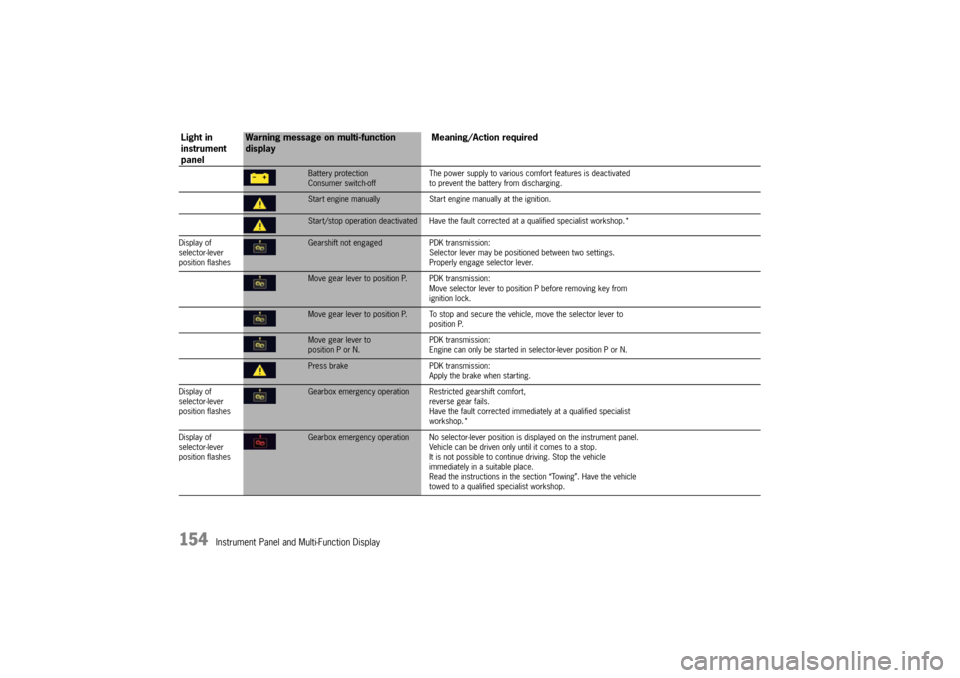
Battery protection
Consumer switch-offThe power supply to various comf
ort features is deactivated
to prevent the battery from discharging.Start engine manually Start engine manually at the ignition.Start/stop operation deactivated Have the faul t corrected at a qualified specialist workshop.*
Display of
selector-lever
position flashesGearshift not engaged PDK transmission:
Selector lever may be positi oned between two settings.
Properly engage selector lever.Move gear lever to position P. PDK transmission:
Move selector lever to position P before removing key from
ignition lock.Move gear lever to position P. To stop and se cure the vehicle, move the selector lever to
position P.Move gear lever to
position P or N. PDK transmission:
Engine can only be started in selector-lever position P or N.Press brake
PDK transmission:
Apply the brake when starting.
Display of
selector-lever
position flashesGearbox emergency operation R estricted gearshift comfort,
reverse gear fails.
Have the fault corrected immediately at a qualified specialist
workshop.*
Display of
selector-lever
position flashesGearbox emergency operation No selector-lever po sition is displayed on the instrument panel.
Vehicle can be driven only until it comes to a stop.
It is not possible to contin ue driving. Stop the vehicle
immediately in a suitable place.
Read the instructions in the se ction “Towing”. Have the vehicle
towed to a qualified specialist workshop.
Light in
instrument
panel
Warning message on multi-function
display Meaning/Action required
Page 166 of 343
164
Driving and Driving Safety
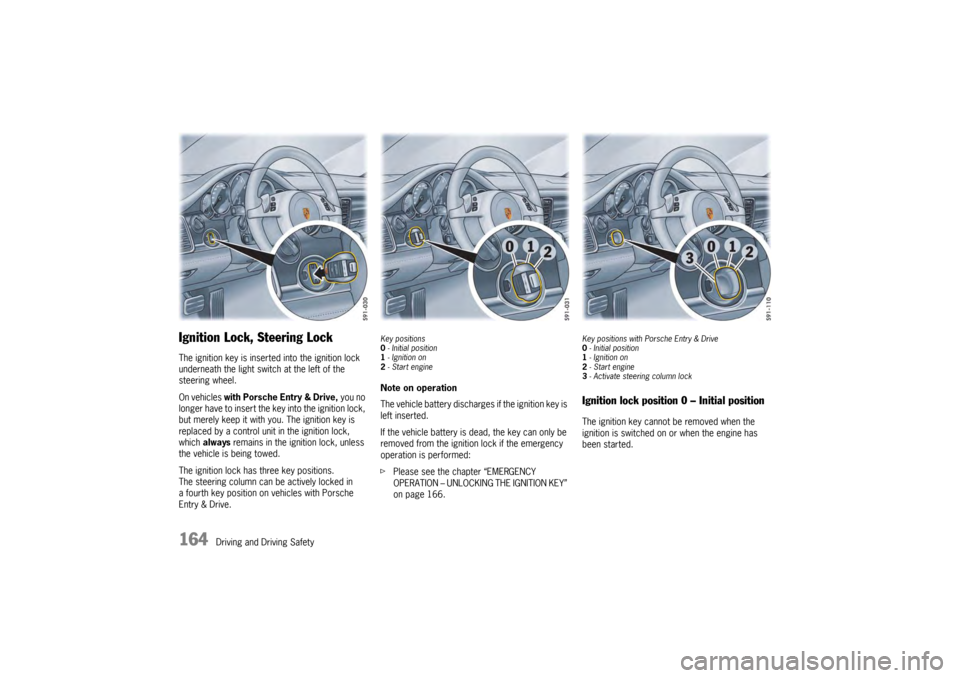
Ignition Lock, Steering LockThe ignition key is inserted into the ignition lock
underneath the light swit ch at the left of the
steering wheel.
On vehicles with Porsche Entry & Drive, you no
longer have to insert the key into the ignition lock,
but merely keep it with yo u. The ignition key is
replaced by a control unit in the ignition lock,
which always remains in the ignition lock, unless
the vehicle is being towed.
The ignition lock has three key positions.
The steering column can be actively locked in
a fourth key position on vehicles with Porsche
Entry & Drive.
Key positions
0 - Initial position
1 - Ignition on
2 -Start engineNote on operation
The vehicle battery discharges if the ignition key is
left inserted.
If the vehicle battery is dead, the key can only be
removed from the ignition lock if the emergency
operation is performed:
f Please see the chapter “EMERGENCY
OPERATION – UNLOCKING THE IGNITION KEY”
on page 166.
Key positions with Porsche Entry & Drive
0-Initial position
1 - Ignition on
2 -Start engine
3 -Activate steeri ng column lockIgnition lock position 0 – Initial positionThe ignition key cannot be removed when the
ignition is switched on or when the engine has
been started.
Page 174 of 343

172
Driving and Driving Safety
If the electric parking brake could not be applied
fully when the vehicle is stopped, the brake
warning light on the instrument panel starts to
flash.
For information on warning messages on the
multi-function display:
f
Please see the chapter “OVERVIEW OF
WARNING MESSAGES” on page 152.
BrakesfMake it a habit to chec k the operation of your
brakes before driving.
Keep in mind that the braking distance increases
very rapidly as the speed increases. At 60 mph
(100 km/h), for example, it is not twice but four
times longer than 30 mph (50 km/h). Tire traction
is also less effective when the roads are wet or
slippery.
f Therefore, always maintain a safe distance
from the car in front of you.Vehicles without Porsche Ceramic
Composite Brake (PCCB)Even though the brake discs consist of alloyed
grey cast iron, they will unavoidably start to
corrode if your car is parked for an extended
period. The brakes will tend to “rub” as a result.
The nature, extent and effects of corrosion
depend on the amount of time the vehicle was
parked, whether road salt or grit was spread and
whether grease-dissolving agents were used in
car washes.
If the braking comfort is noticeably impaired, we
recommend having the brake system checked by
experts at an authorized Porsche dealer.
Brake system functionYour Porsche is equipped with a power assisted
hydraulic dual circuit brake system with disc
brakes at the front and rear.
Both circuits function independently. One brake
circuit operates the front left and rear right wheel
and the other operates the front right and rear left
wheel.
If one brake circuit has failed, the other will still
operate. However, you will notice an increased
pedal travel when you apply the brakes. Failure of
one brake circuit will cause the stopping distance
to increase.
Warning!
Risk of an accident, resulting in serious
personal injury or death.
In the unlikely event of hydraulic failure of
one brake circuit:
f Push the brake pedal down firmly and hold it in
that position. A mechanical linkage activates
the second circuit, and you will be able to bring
the vehicle to a stop.
f After bringing your vehicle to a complete stop,
avoid driving the vehicle and instead have it
towed to the nearest authorized Porsche dealer for repair.
Brake warning light USA
Brake warning light Canada
Page 177 of 343

Driving and Driving Safety
175
Warning!
f Do not obstruct the pedal travel with floor mats
or other objects.
The brake booster is ready for operation only
while the engine is running.
If the engine is switched off or there is a defect in
the brake booster, much greater force has to be
applied to the pedal when braking.
f Vehicles with defective brakes must not
be towed and must be transported on a flat
bed.
For information on towing and tow-starting:
f Please see the chapter “TOWING” on
page 316.
In heavy rain, while driving through water or after
leaving a car wash, the braking action may be
delayed and increased pressure may be required.
f For this reason, keep further back from the
vehicle in front and “dry” the brakes by
applying them at interval s. Make sure that the
traffic behind you is not affected. After a long drive over salted or gritted roads,
a coating may form on the brake discs and pads
that significantly reduces
friction and therefore
also braking effect.
f Even though the brake discs consist of alloyed
grey cast iron, they will unavoidably start to
corrode if your vehicle is parked for an
extended period. The brakes will tend to “rub”
as a result.
The nature, extent and effects of corrosion
depend on the amount of time the vehicle was
parked, whether road salt or grit was spread
and whether grease-dissolving agents were
used in car washes (not on vehicles with
Porsche Ceramic Composite Brake).
To prevent corrosion of the brake discs,
“brake them dry” before parking the vehicle
(not on vehicles with Porsche Ceramic
Composite Brake).
If braking comfort is no ticeably impaired, we
recommend that you have the brake system
checked by an authorized Porsche dealer. f
To relieve the brake system on downhill
stretches, change down to a lower gear in
good time (engine braking).
If engine braking is insufficient on steep
stretches, operate the footbrake at intervals.
Avoid continuous braking as it overheats the
brakes and reduces the braking effect.
For information on brake fluid and checking the
brake fluid level:
f Please see the chapter “BRAKE FLUID” on
page 258.
Page 179 of 343

Driving and Driving Safety
177
Accelerating (e.g. to overtake)Variant 1
fIncrease the speed as usual with the
accelerator pedal.
When you ease off the accelerator, the
previously stored value is set again.
Variant 2
f Push the control stalk on the steering wheel
forward (position 1).
The desired speed is increased in steps of
1mph (1km/h).
or
Press the control stalk on the steering wheel
forward and keep it pressed (position 1).
The desired speed is increased in steps of
5 mph (10 km/h).
The new desired speed is displayed on the
multi-function display in the instrument panel.
Deceleratingf Briefly pull the control stalk on the steering
wheel towards the steering wheel (position 2).
The desired speed is decreased in steps of
1 mph (1 km/h).
or
Pull the control stalk on the steering wheel
towards the steering whee l and keep it pulled
(position 2).
The desired speed is decreased in steps of
5 mph (10 km/h).
The new desired speed is displayed on the
multi-function display in the instrument panel.
Vehicles with PDK
Downshifts are carried out to help maintain the
pre-selected speed (especially when driving
downhill).
Interrupting cruise control
operation–OFFThe speed driven before the interruption remains
stored in the memory and can be reactivated by
pressing the control stalk.
f Please see the chapter “RESUMING THE
STORED SPEED – RESUME” on page 178.
f Press the control stalk down (position 3).
or
Press the brake or clutch pedal or move
the PDK selector lever to position N.
For more information on driving with Porsche
Doppelkupplung:
f Please see the chapter “PORSCHE
DOPPELKUPPLUNG (PDK)” on page 193.
Cruise control operation is interrupted
automatically:
– If the set vehicle speed is exceeded by more than approx. 16 mph (25 km/h) for longer
than 20 seconds.
– If the actual vehicle speed falls below the set vehicle speed by approx. 37 mph (60 km/h)
for longer than 60 seconds (e.g. gradients).
– If Porsche Stability Management (PSM) intervenes for longer than 0.5 seconds.
Page 185 of 343
Driving and Driving Safety
183
Increasing the desired speed
fPush the control stalk on the steering wheel
forward (position 1).
The desired speed is increased in steps of
1mph (1km/h).
or
Press the control stalk on the steering wheel
forward and keep it pressed (position 1).
The desired speed is increased in steps of
5 mph (10 km/h).
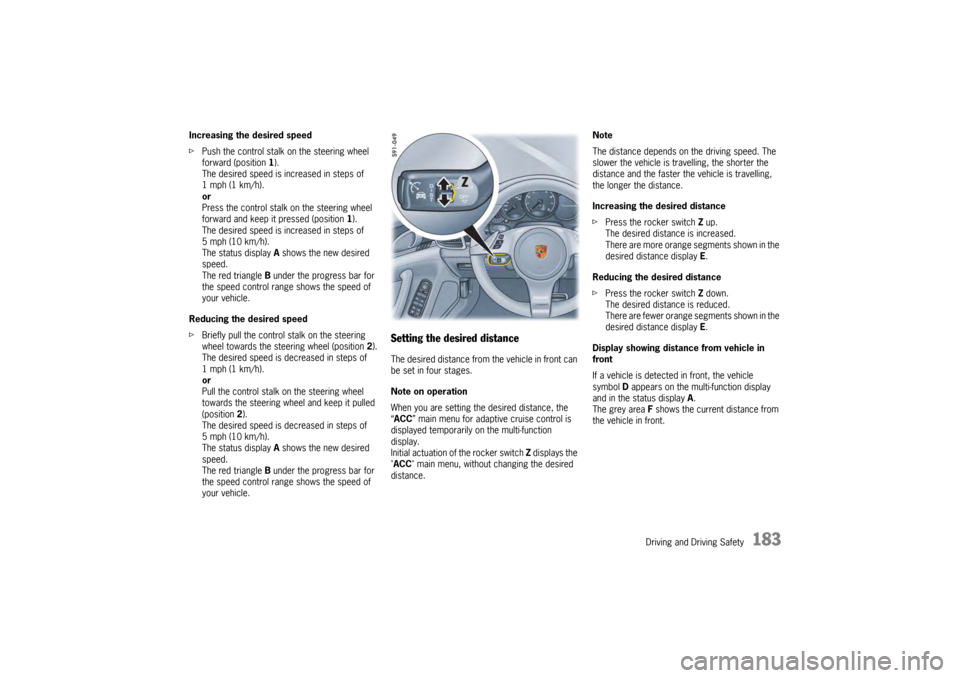
The status display A shows the new desired
speed.
The red triangle B under the progress bar for
the speed control range shows the speed of
your vehicle.
Reducing the desired speed
f Briefly pull the control stalk on the steering
wheel towards the steering wheel (position 2).
The desired speed is decreased in steps of
1mph (1km/h).
or
Pull the control stalk on the steering wheel
towards the steering wheel and keep it pulled
(position 2).
The desired speed is decreased in steps of
5 mph (10 km/h).
The status display A shows the new desired
speed.
The red triangle B under the progress bar for
the speed control range shows the speed of
your vehicle.
Setting the desired distanceThe desired distance from the vehicle in front can
be set in four stages.
Note on operation
When you are setting the desired distance, the
“ ACC ” main menu for adaptive cruise control is
displayed temporarily on the multi-function
display.
Initial actuation of the rocker switch Z displays the
"ACC " main menu, without changing the desired
distance. Note
The distance depends on the driving speed. The
slower the vehicle is travelling, the shorter the
distance and the faster the vehicle is travelling,
the longer the distance.
Increasing the desired distance
f
Press the rocker switch Z up.
The desired distance is increased.
There are more orange segments shown in the
desired distance display E.
Reducing the desired distance
f Press the rocker switch Z down.
The desired distance is reduced.
There are fewer orange segments shown in the
desired distance display E.
Display showing distance from vehicle in
front
If a vehicle is detected in front, the vehicle
symbol D appears on the multi-function display
and in the status display A.
The grey area F shows the current distance from
the vehicle in front.
Page 197 of 343

Driving and Driving Safety
195
Selector-Lever PositionsP – Parking lockfEngage parking lock only when the vehicle is
stationary.
If selector-lever position P is flashing in the
instrument panel, the parking lock is not
engaged. The vehicle can roll away.
Shift again from selector-lever position R to P.
f Activate the electric parking brake and then
engage the parking lock.
If selector-lever position P is flashing in the
instrument panel, the parking lock is not
engaged. The vehicle can roll away.
Shift again from selector-lever position R to P.
The ignition key can be removed only in selector-
lever position P.R – Reverse gearf Select only if the vehicl e is stationary and the
brake is applied.N – Neutral (idling)Selector-lever position N must be selected for
towing or in car washes, for example.
f Only select the desired position for driving off
(D , M or R) when the engine is idling and the
brake pedal is pressed.
D – Automatic selection modeSelect position D for “normal” driving. The gears
are shifted automatically according to the
accelerator position and speed.
Depending on the way the vehicle is driven
(economical, comfortable or sporty driving style)
and on the resistance (e.g. uphill), the gear-
changing points are shifted towards higher or
lower engine-speed ranges.
The accelerator position, driving speed, engine
speed, longitudinal and lateral acceleration and
the road profile all have an influence on the gear-
changing characteristic.
Unwanted upshifts, e.g. when entering
bends, are prevented by swiftly releasing the
accelerator pedal.
Depending on lateral acceleration, upshifts on
bends are not made until the engine-speed limit
is reached.
When you brake, and depending on the amount of
deceleration, the PDK transmission changes down
earlier.
For subsequent cornering, the right gear is
engaged when pressure is applied to the brakes
before the bend. The bend is taken in the right
gear, and when you accelerate out of the bend you
do not have to change down.
With a sporty driving style, downshifts are already
initiated when the brake pedal is touched lightly.
This further enhances a dynamic driving style. The PDK transmission temporarily changes to the
sportiest gear-changing map, i.e. to the highest
possible gear-changing points, if the accelerator
pedal is pressed quickly. The transmission
accordingly shifts down
immediately by one or
two gears (temporary change-down).
The transmission no longer selects 7th gear
at high driving speeds.
“Sport” and “Sport Plus” Mode “Sport” mode activated:
The PDK transmission switches to a sporty gear-
changing map and shortens the shifting times.
A sporty driving style is recognized more quickly
and the gear-changing speeds are adapted to
driving performance.
Deceleration downshifts are initiated earlier.
Downshifts occur for small decelerations,
even at higher revs.
“Sport Plus” mode activated:
In “Sport Plus” mode, the PDK transmission
changes to a shift program designed for driving
on race circuits. 7th gear is not selected.
The gear-changing performance is enhanced
significantly again compared with “Sport” mode.
f Please see the chapter ““SPORT” AND “SPORT
PLUS” MODE” on page 212.
Page 200 of 343

198
Driving and Driving Safety
Upshift prompt for fuel-economy-optimised
driving
The consumption-oriente
d upshift indicator A in
the tachometer at the ri ght beside the digital
speed display helps you to develop a fuel-saving
driving style.
The upshift indicator lights up - prompting you to
shift up to the next-higher gear - depending on the
selected gear, engine speed and accelerator
pedal position.
The upshift indicator is only active when “Sport” or
“Sport Plus” mode is switched off.
f Change to the next-higher gear when the
upshift indicator lights up. Shifting down –
f
Pull the PDK selector lever or shift button on
the steering wheel back.
You can shift up or down by the corresponding
number of gears by quickly pressing or pulling the
shift buttons or selector lever several times in
succession.
The transmission can be shifted up or down by
several gears in succession by continuously
operating the selector lever or shift buttons.
You can shift up or down at any time depending
on driving speed and engine speed.
Gear changes that would exceed the upper or
lower engine-speed limit are not executed by the
control unit.
There is no automatic upshift at the upper engine-
speed limit in selector-lever position M. Upshift
suppression can be cancelled by kickdown
operation. If, for example, the engine-speed limit
is reached during overtaking and an automatic
upshift does not occur, the transmission shifts up
in this case as a result of kickdown operation.
f Select an appropriately low gear on upward
and downward slopes.
This will ensure optimum use of engine power
and engine braking. To shift up automatically
at the upper engine-
speed limit:
f Press the accelerator pedal beyond the full-
throttle point (kickdown).
Failure of the selector lever display on the
instrument panel
The warning “Gearbox emergency operation”
appears in red on the multi-function display.
Effect:
– No selector-lever position is displayed on the instrument panel.
Vehicle can be driven only until it comes to
astop.
Action required:
f It is not possible to continue driving. Stop the
vehicle immediately in a suitable place. Have
the vehicle towed to a qualified specialist
workshop.
f Please see the chapter “TOWING” on
page 316.