2009 PONTIAC G6 maintenance reset
[x] Cancel search: maintenance resetPage 176 of 410

MPG (L/100 KM) AVG (Average):Press the
information button until MPG (L/100 KM) AVG displays.
This mode shows how many miles per gallon (mpg)
or liters per 100 kilometers (L/100 km) your vehicle is
getting based on current and past driving conditions.
To reset the average fuel economy, press and hold the
enter button while MPG (L/100 KM) AVG is displayed.
Average fuel economy is then be calculated starting
from that point. If the average fuel economy is not reset,
it is continually updated each time you drive.
MPG (L/100 KM) INST (Instantaneous):Press the
information button until MPG (L/100 KM) INST displays.
This mode shows the current fuel economy at a
particular moment and changes frequently as driving
conditions change. This mode shows the instantaneous
fuel economy in miles per gallon (mpg) or liters per
100 kilometers (L/100 km). Unlike average fuel
economy, this screen cannot be reset.
AV (Average) SPEED:Press the information button
until AV SPEED displays. This mode shows the vehicle’s
average speed in miles per hour (mph) or kilometers
per hour (km/h).
To reset the average vehicle speed, press and hold the
enter button while AV SPEED is displayed.OIL LIFE:Press the information button until OIL LIFE
displays. The engine oil life system shows an estimate of
the oil’s remaining useful life. It shows 100% when
the system is reset after an oil change. It alerts you to
change the oil on a schedule consistent with your driving
conditions.
In addition to the engine oil life system monitoring the oil
life, additional maintenance is recommended in the
Maintenance Schedule in this manual. SeeScheduled
Maintenance on page 6-4andEngine Oil on page 5-21.
Always reset the engine oil life system after an oil
change. See “How to Reset the Engine Oil Life System”
underEngine Oil Life System on page 5-24.
Tire Pressure:On vehicles with the Tire Pressure
Monitor System (TPMS), the pressure for each tire can
be viewed in the DIC. The tire pressure is shown in
either pounds per square inch (psi) or kilopascals (kPa).
Press the information button until LF ## PSI (kPa) ## RF
displays for the front tires. Press the information
button again until LR ## PSI (kPa) ## RR displays for
the rear tires.
If a low tire pressure condition is detected by the system
while driving, a message advising you to check the tire
pressure appears in the display. SeeInflation - Tire
Pressure on page 5-67andDIC Warnings and Messages
on page 3-46for more information.
3-44
Page 178 of 410

DIC Warnings and Messages
These messages appear if there is a problem detected
in one of your vehicle’s systems.
A message clears when the vehicle’s condition is no
longer present. To acknowledge a message and clear it
from the display, press and hold any of the DIC buttons.
If the condition is still present, the warning message
comes back on the next time the vehicle is turned
off and back on. With most messages, a warning chime
sounds when the message displays. Your vehicle
may have other warning messages.
AUTO (Automatic) LIGHTS OFF
This message displays if the automatic headlamp
system is disabled with the headlamp switch.
AUTO (Automatic) LIGHTS ON
This message displays if the automatic headlamp
system is enabled with the headlamp switch.
BRAKE FLUID
This message displays, while the ignition is on, when
the brake uid level is low. The brake system warning
light on the instrument panel cluster also comes on.
SeeBrake System Warning Light on page 3-34for more
information. Have the brake system serviced by your
dealer/retailer as soon as possible.
CHANGE OIL SOON
This message displays when the life of the engine oil
has expired and it should be changed.
When this message is acknowledged and cleared from
the display, the engine oil life system must still be
reset separately. SeeEngine Oil Life System on
page 5-24,Engine Oil on page 5-21, andScheduled
Maintenance on page 6-4for more information.
CHECK CARGO TOP
If your vehicle has a retractable hardtop, this message
displays if the cargo cover is not in place when operating
the retractable hardtop. Open the trunk and make sure
the cargo cover is secure and no objects are in contact
with the cover. SeeTrunk on page 2-12,Lowering the
Retractable Hardtop on page 2-44, andRaising the
Retractable Hardtop on page 2-47for more information.
CHECK GAS CAP
This message displays if the fuel cap has not been fully
tightened. Recheck the fuel cap to make sure that it
is on properly. A few driving trips with the cap properly
installed should turn the message off.
3-46
Page 315 of 410
After the tires have been rotated, adjust the front
and rear ination pressures as shown on the Tire
and Loading Information label. SeeInflation - Tire
Pressure on page 5-67andLoading the Vehicle on
page 4-20.
Reset the Tire Pressure Monitor System. SeeTire
Pressure Monitor Operation on page 5-71.
Make certain that all wheel nuts are properly
tightened. See “Wheel Nut Torque” under
Capacities and Specifications on page 5-118.
{CAUTION:
Rust or dirt on a wheel, or on the parts to
which it is fastened, can make wheel nuts
become loose after time. The wheel could
come off and cause an accident. When you
change a wheel, remove any rust or dirt from
places where the wheel attaches to the
vehicle. In an emergency, you can use a
cloth or a paper towel to do this; but be sure
to use a scraper or wire brush later, if
needed, to get all the rust or dirt off. See
Changing a Flat Tire on page 5-86.
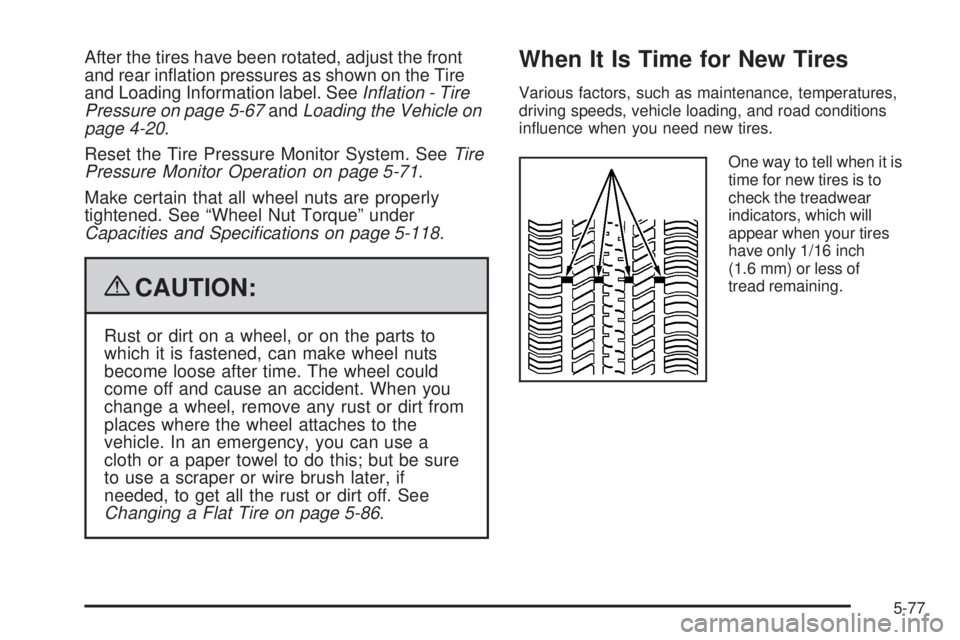
When It Is Time for New Tires
Various factors, such as maintenance, temperatures,
driving speeds, vehicle loading, and road conditions
inuence when you need new tires.
One way to tell when it is
time for new tires is to
check the treadwear
indicators, which will
appear when your tires
have only 1/16 inch
(1.6 mm) or less of
tread remaining.
5-77
Page 362 of 410

The proper replacement parts, uids, and lubricants to
use are listed inRecommended Fluids and Lubricants
on page 6-13andMaintenance Replacement Parts
on page 6-14. When the vehicle is serviced, make sure
these are used. All parts should be replaced and all
necessary repairs done before you or anyone else
drives the vehicle. We recommend the use of genuine
parts from your dealer/retailer.
Scheduled Maintenance
When the CHANGE OIL SOON message displays in the
Driver Information Center (DIC), service is required for
the vehicle. Have the vehicle serviced as soon as
possible within the next 600 miles (1 000 km). It is
possible that, if driving under the best conditions, the
engine oil life system may not indicate that vehicle
service is necessary for over a year. However, the engine
oil and lter must be changed at least once a year and at
this time the system must be reset. Your dealer/retailer
has trained service technicians who will perform this work
using genuine parts and reset the system.If the engine oil life system is ever reset accidentally,
service the vehicle within 3,000 miles (5 000 km)
since the last service. Remember to reset the oil life
system whenever the oil is changed. SeeEngine Oil Life
System on page 5-24for information on the Engine
Oil Life System and resetting the system.
When the CHANGE OIL SOON message appears,
certain services, checks, and inspections are required.
Required services are described in the following for
“MaintenanceI” and “MaintenanceII.” Generally, it is
recommended that the rst service be MaintenanceI, the
second service be MaintenanceII, and then alternate
MaintenanceIand MaintenanceIIthereafter. However,
in some cases, MaintenanceIImay be required more
often.
MaintenanceI— Use MaintenanceIif the message
displays within 10 months since the vehicle was
purchased or MaintenanceIIwas performed.
MaintenanceII— Use MaintenanceIIif the previous
service performed was MaintenanceI. Always use
MaintenanceIIwhenever the message displays
10 months or more since the last service or if the
message has not come on at all for one year.
6-4
Page 363 of 410

Scheduled Maintenance
Service MaintenanceIMaintenanceII
Change engine oil and lter. SeeEngine Oil on page 5-21. Reset oil life system.
SeeEngine Oil Life System on page 5-24.An Emission Control Service.••
Visually check for any leaks or damage.See footnote (j).••
Inspect engine air cleaner lter. If necessary, replace lter. SeeEngine Air
Cleaner/Filter (3.5 L V6 Engine) on page 5-26orEngine Air Cleaner/Filter
(All Other Engines) on page 5-27.See footnote (k).•
Rotate tires and check ination pressures and wear. SeeTire Inspection and
Rotation on page 5-76and “Tire Wear Inspection” inAt Least Once a Month
on page 6-10.••
Inspect brake system.See footnote (a).••
Check engine coolant and windshield washer uid levels and add uid as
needed.••
Perform any needed additional services. See “Additional Required Services” in
this section.••
Inspect suspension and steering components.See footnote (b).•
Inspect engine cooling system.See footnote (c).•
Inspect wiper blades.See footnote (d).•
Inspect restraint system components.See footnote (e).•
Lubricate body components.See footnote (f).•
3.6L and 3.9L Engines Only: Check automatic transmission uid level and add
uid as needed.•
Inspect throttle system.See footnote (g).•
6-5