2009 OPEL ZAFIRA alarm
[x] Cancel search: alarmPage 18 of 228

18
In brief
Starting engine with Start/Stop
button The electronic key must be in the
vehicle interior. Operate clutch and
brake,
automatic transmission in P or
N , do not accelerate, for diesel
engine, press the button briefly to
start preheating, move the steering
wheel slightly to release the steering
wheel lock, wait until control
indicator ! goes out and then press
button for 1 second and release when
the engine is running.
Open&Start system 3 29. Parking
■
Always apply hand brake withoutpressing release button. Apply as
firmly as possible on a downhill
slope or uphill slope. Operate foot
brake at same time to reduce
operating force.
■ Switch off the engine and ignition. Turn the ignition key to 0 and
remove or, with the vehicle
stationary, press the Start/Stop
button and open the driver's door.
Turn the steering wheel until the
steering wheel lock is felt to
engage.
For vehicles with automatic
transmission, the key can only be
removed when the selector lever is
in the P position. If P is not engaged
or the hand brake is not applied, "P"
flashes for a few seconds in the
transmission display.
■ If the vehicle is on a level surface or uphill slope, engage first gear or set
the selector lever to P before
switching off the ignition. On an
uphill slope, turn the front wheels
away from the kerb. If the vehicle is on a downhill slope,
engage reverse gear or set the
selector
lever to P before switching
off the ignition. Turn the front
wheels towards the kerb.
■ Lock the vehicle with button p on
the remote control or with the
sensor in a front door handle.
To activate the anti-theft locking
system and the anti-theft alarm
system, press button p twice or
touch the sensor in a front door
handle twice.
■ Do not park the vehicle on an easy flammable surface. The high
temperature of the exhaust system
could ignite the surface.
■ On vehicles with manual transmission automated, control
indicator R flashes for a few
seconds after the ignition is
switched off if the hand brake has
not been applied 3 100.
■ Close windows.
■ The engine cooling fans may run after the engine has been switched
off 3 155.
Page 23 of 228

In brief
23
Active head restraints on
front seats In the event of a rear-end impact, the
active head restraints tilt forwards
slightly. The head is more effectively
supported by the head restraint and
the risk of whiplash injury is reduced.
Active head restraints can be
recognised by the word
ACTIVE.
Head restraints 3 44. Trip computer
Functions:
■ Range
■ Instantaneous consumption
■ Distance
■ Average speed
■ Absolute consumption
■ Average consumption
■ Stop watch
■ Tyre pressure
Trip computer 3 102, 3 104. Check control
The check control software monitors
■ Fluid levels
■ Tyre pressure
■ Radio remote control battery
■ Anti-theft alarm system
■ Important exterior lighting bulbs, including cables and fuses.
Display messages 3 100.
Page 28 of 228

28
Keys, doors and windows
Radio remote control Used to operate:
■ Central locking system,
■ Anti-theft locking system,
■ Anti-theft alarm system,
■ Power windows.
The radio remote control has a range
of approx. 5 metres. This range can
be affected by outside influences.
The hazard warning flashers confirm
operation.
Handle with care, protect it from
moisture and high temperatures and
avoid unnecessary operation. Fault
If the central locking system cannot
be operated with the radio remote
control,
it may be due to the following:
■ Range exceeded,
■ Battery voltage too low,
■ Frequent, repeated operation of the remote control while not in range,
which will require re-
synchronisation,
■ Overloading the central locking by operating at frequent intervals, the
power supply is interrupted for
a short time,
■ Interference from higher-power radio waves from other sources.
Opening the vehicle 3 32.
Radio remote control battery
replacement
Replace the battery as soon as the
range reduces.
Batteries do not belong in household
waste. They must be disposed of at
an appropriate recycling collection
point. Key with foldaway key section
Extend the key and open the unit.
Replace the battery (battery type CR
20 32), paying attention to the
installation position. Close the unit
and synchronise.
Key with fixed key section
Have the battery replaced by
a workshop.
Page 29 of 228

Keys, doors and windows
29
Radio remote control
synchronisation
After replacing the battery, unlock the
door with the key in the lock. The radio
remote control will be synchronised
when you switch on the ignition.
Memorised settings
When locking the vehicle the last
settings are automatically saved
specifically for the used key:
■ Electronic climate control,
■ Info-Display,
■ Infotainment system,
■ Instrument panel illumination.
The saved settings are automatically
remembered when that key is used
for unlocking. Open&Start system
Makes operation of the following
possible without the use of the
mechanical key
■
Central locking system,
■ Anti-theft locking system,
■ Anti-theft alarm system,
■ Power windows,
■ Ignition and starter.
The electronic key simply needs to be
on the driver's person. Press the Start/Stop button. The
ignition
is switched on. The electronic
immobiliser and steering wheel lock
are deactivated.
To start the engine depress the brake
and clutch pedals then press and hold
the Start/Stop button.
With automatic transmission, only
start with the vehicle in P or N.
The engine and the ignition are
switched off by pressing the Start/
Stop button again. The vehicle must
be stationary. The immobiliser is
activated at the same time.
Page 31 of 228
Keys, doors and windows
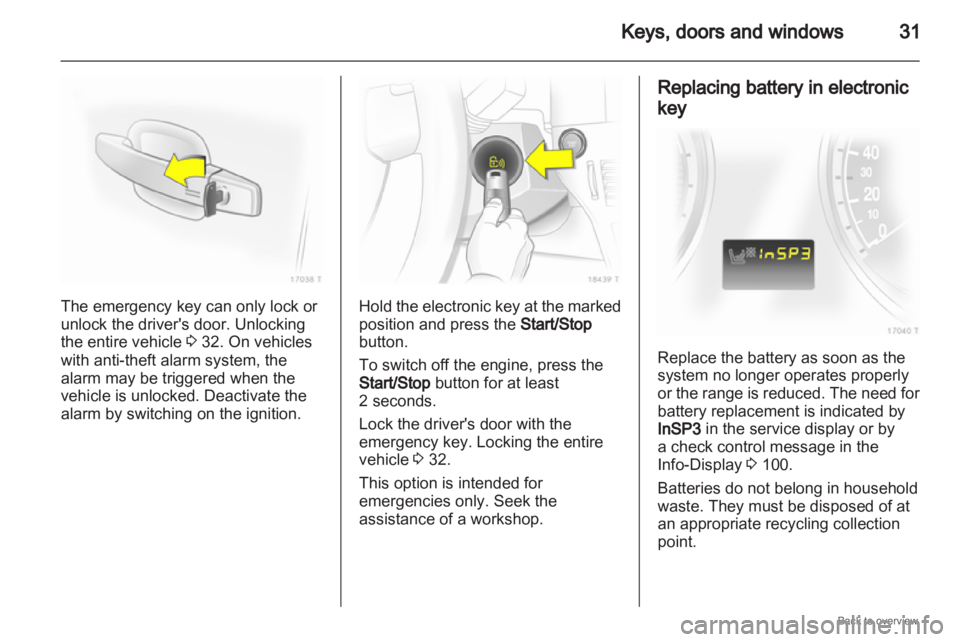
31The emergency key can only lock or
unlock the driver's door. Unlocking
the entire vehicle
3 32. On vehicles
with anti-theft alarm system, the
alarm may be triggered when the
vehicle is unlocked. Deactivate the
alarm by switching on the ignition. Hold the electronic key at the marked
position and press the
Start/Stop
button.
To switch off the engine, press the
Start/Stop button for at least
2 seconds.
Lock the driver's door with the
emergency key. Locking the entire
vehicle 3 32.
This option is intended for
emergencies only. Seek the
assistance of a workshop. Replacing battery in electronic
key
Replace the battery as soon as the
system no longer operates properly
or
the range is reduced. The need for
battery replacement is indicated by
InSP3 in the service display or by
a check control message in the
Info-Display 3 100.
Batteries do not belong in household
waste. They must be disposed of at
an appropriate recycling collection
point.
Page 36 of 228

36
Keys, doors and windows
Vehicle security
Anti-theft locking system 9
Warning Do not use the system if there are
people in the vehicle! The doors
cannot be unlocked from the
inside.
The system deadlocks all the doors.
All doors must be closed or the
system cannot be activated.
If
the ignition was on, the driver's door
must be opened and closed once so
that the vehicle can be secured.
Unlocking the vehicle disables the
mechanical anti-theft locking system.
This is not possible with the central
locking button. Activating with the remote
control
Press p twice within 15 seconds. Activating with the Open&Start
system
Touch the sensor field in the front
door handle twice within 15 seconds.
The electronic key must be outside
the vehicle, within a range of
approximately one metre.
Anti-theft alarm system
The anti-theft alarm system
incorporates and is operated in
conjunction with the anti-theft locking
system.
Page 37 of 228
Keys, doors and windows
37
It monitors: ■ Doors, load compartment, bonnet,
■ Passenger compartment,
■ Vehicle tilt, e.g. if it is raised,
■ Ignition.
Unlocking the vehicle deactivates
both systems simultaneously.
Note
Changes to the vehicle interior, such
as the use of seat covers, could
impair the function of passenger
compartment monitoring. Activation without monitoring of
passenger compartment and
vehicle tilt
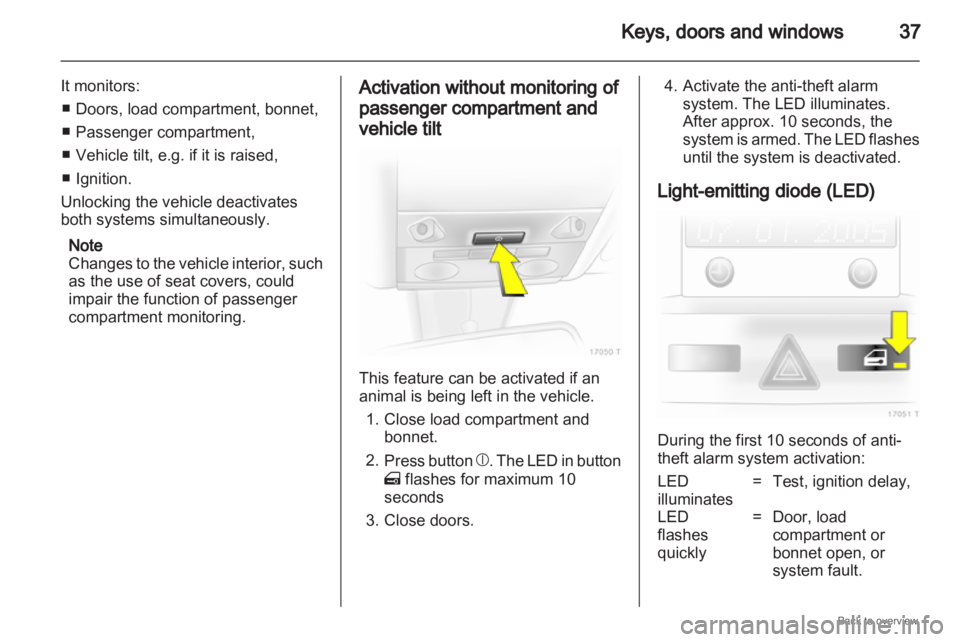
This feature can be activated if an
animal is being left in the vehicle.
1.
Close load compartment andbonnet.
2. Press button b. The LED in button
m flashes for maximum 10
seconds
3. Close doors. 4. Activate the anti-theft alarm
system. The LED illuminates.
After approx. 10 seconds, the
system
is armed. The LED flashes
until the system is deactivated.
Light-emitting diode (LED) During the first 10 seconds of anti-
theft alarm system activation:
LED
illuminates
= Test, ignition delay,
LED
flashes
quickly = Door, load
compartment or
bonnet open, or
system fault.
Page 38 of 228

38
Keys, doors and windows
After the first 10 seconds of anti-theft
alarm system activation:
LED flashes
slowly = System active,
LED comes
on for approx.
1 second = Switch off function.
Seek the assistance of a workshop in
the event of faults.
Alarm
When triggered, the alarm gives off
an
acoustic signal (horn) and a visual
signal (hazard warning flashers). The
number and duration of which are
stipulated by legislation.
The alarm can be silenced by
pressing a button of the radio remote
control or by switching on the ignition.
The anti-theft alarm system is
deactivated at the same time. Immobiliser
The system checks whether the
vehicle
is allowed to start with the key
being used. If the transponder in the
key is recognised, the vehicle can be
started.
The electronic immobiliser activates
itself automatically after the key has
been removed from the ignition
switch or when the engine is switched
off by pressing the Start/Stop button.
If the control indicator A flashes
when the ignition is on, there is a fault
in the system; the engine cannot be
started. Switch off the ignition and
then repeat the start attempt.
If the control indicator continues
flashing, attempt to start the engine
using the spare key and seek the
assistance of a workshop.
If control indicator illuminates after
the engine has started, there is a fault
in the engine electronics or
transmission electronics 3 88,
3 135, 3 139, or there is water in the
diesel fuel filter 3 101. Note
The immobiliser does not lock the
doors. You should always lock the
vehicle
after leaving it and switch on
the anti-theft alarm system 3 32,
3 36.