Page 27 of 228
Keys, doors and windows
27
Keys, doors and
windows
Keys, locks ................................... 27
Doors ........................................... 35
Vehicle security
............................ 36
Exterior mirrors ............................ 39
Interior mirrors ............................. 40
Windows ...................................... 41
Roof ............................................. 43 Keys, locks
Keys
Replacement keys
The key number is specified in the
Car Pass or on a detachable tag.
The key number must be quoted
when
ordering replacement keys as it
is a component of the immobiliser
system.
When electronic keys of the
Open&Start system are being
replaced, all keys requiring
programming must be handed over to
the dealer.
Locks 3 189, Open&Start system,
electronic keys 3 29. Key with foldaway key section
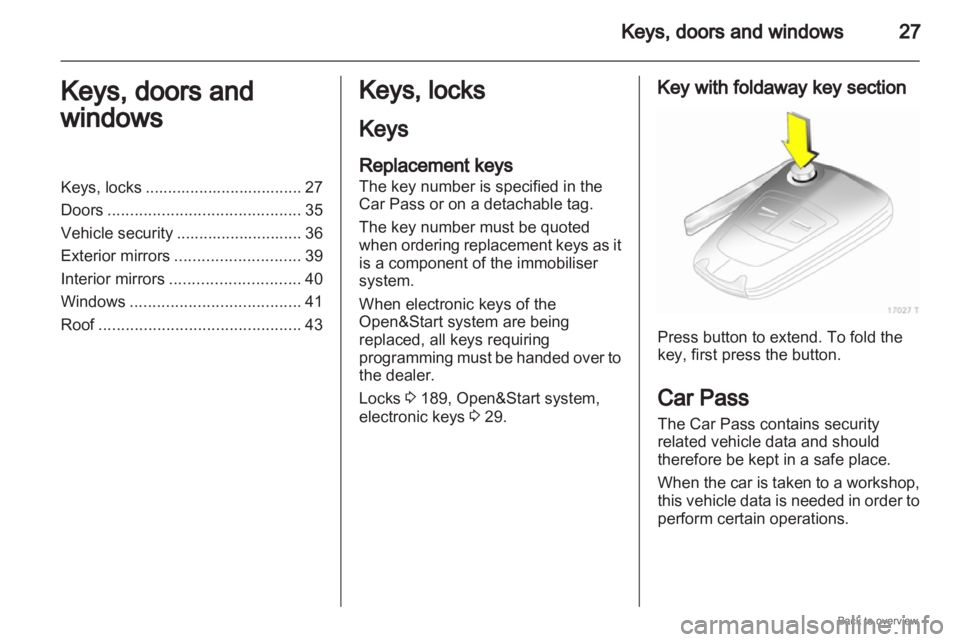
Press button to extend. To fold the
key, first press the button.
Car Pass
The Car Pass contains security
related vehicle data and should
therefore be kept in a safe place.
When
the car is taken to a workshop,
this vehicle data is needed in order to
perform certain operations.
Page 36 of 228
36
Keys, doors and windows
Vehicle security
Anti-theft locking system 9
Warning Do not use the system if there are
people in the vehicle! The doors
cannot be unlocked from the
inside.
The system deadlocks all the doors.
All doors must be closed or the
system cannot be activated.
If
the ignition was on, the driver's door
must be opened and closed once so
that the vehicle can be secured.
Unlocking the vehicle disables the
mechanical anti-theft locking system.
This is not possible with the central
locking button. Activating with the remote
control
Press p twice within 15 seconds. Activating with the Open&Start
system
Touch the sensor field in the front
door handle twice within 15 seconds.
The electronic key must be outside
the vehicle, within a range of
approximately one metre.
Anti-theft alarm system
The anti-theft alarm system
incorporates and is operated in
conjunction with the anti-theft locking
system.
Page 63 of 228
Seats, restraints
63
Child restraint installation locations
Permissible options for fitting a child safety seat
Weight and age class 1) On front passenger
seat On outboard
seats in the
second row On centre seat
in the second
row On the seats
in the third
row
Group 0: up to 10 kg or approx. 10 months
Group 0+: up to 13 kg or approx. 2 years
B
1
, + U, + U X
Group I: 9 to 18 kg or approx. 8 months to 4 years
B
2
, + U, +, ++ U UF
Group II: 15 to 25 kg or approx. 3 to 7 years
Group III: 22 to 36 kg or approx. 6 to 12 years
X U U UF
B
1
= Limited, only with seat occupancy recognition and Opel child restraint system with transponders.
If the child restraint system is being secured using a three-point seat belt, move seat height adjustment to uppermost
position. Move front passenger seat as far back as possible and move front passenger seat belt anchorage point to
lowest position.
B 2
= Limited, only with seat occupancy recognition and Opel child restraint system with transponders.
If
the child restraint system is being secured using a three-point seat belt, move seat height adjustment to uppermost
position. Move front passenger seat as far back as possible so that vehicle safety belt runs from anchorage point
towards the front.
U = Universal suitability in conjunction with three-point seat belt.
UF = Can be used universally for child restraint systems facing the front in combination with a three-point seat belt.
+ = Vehicle seat available with ISOFIX attachments. When attaching using ISOFIX, only the ISOFIX child restraint systems permitted for the vehicle may be used.
1) We recommend the use of each system until the child reaches the upper weight limit.
Page 70 of 228
70
Storage
Installation
Insert the left side of the load
compartment cover in the recess, pull
the release lever up and hold, insert
the right side of the load compartment
cover and engage.
Stowing behind the third row of
seats Insert load compartment cover in
aperture, pull release lever at right
side upwards, insert right load
compartment cover and engage. Rear floor storage cover
Use
the rear floor storage cover when
the third seat row is stowed.
Load rails and hooks Install the hooks in the desired
position
in the rails: insert the hook in
the upper groove on the rail and press
in the lower groove.
When the rails are being used (with
the exception of the partition net in
front of the tailgate), the third seat row
must be stowed 3 51 and the seat belts unhooked from the vehicle floor.
Secure released seat belt hooks to
belt holder magnets
3 55.
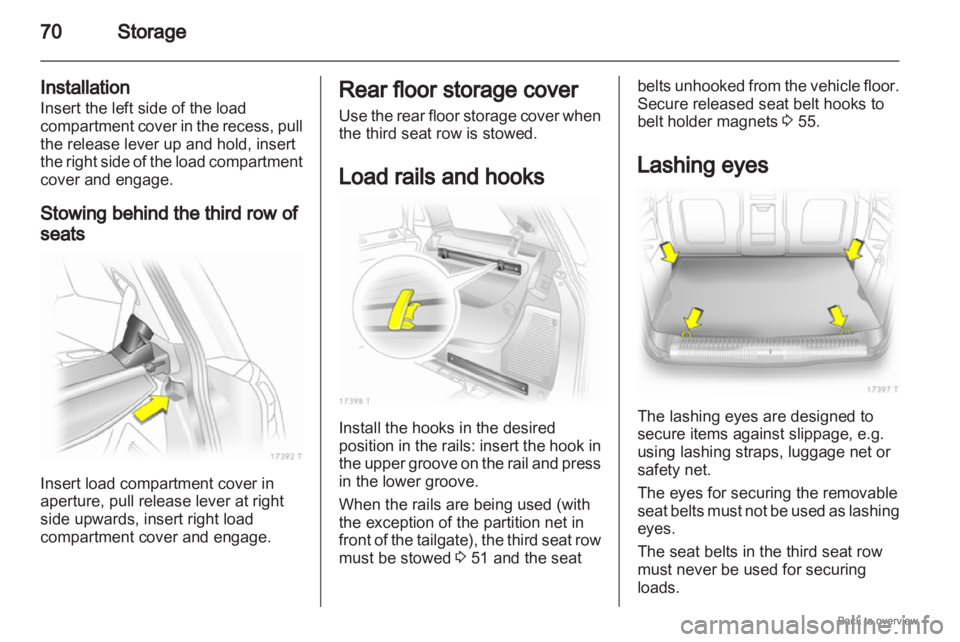
Lashing eyes The lashing eyes are designed to
secure items against slippage, e.g.
using lashing straps, luggage net or
safety net.
The eyes for securing the removable
seat
belts must not be used as lashing
eyes.
The seat belts in the third seat row
must never be used for securing
loads.
Page 71 of 228
Storage
71
Cargo management
system
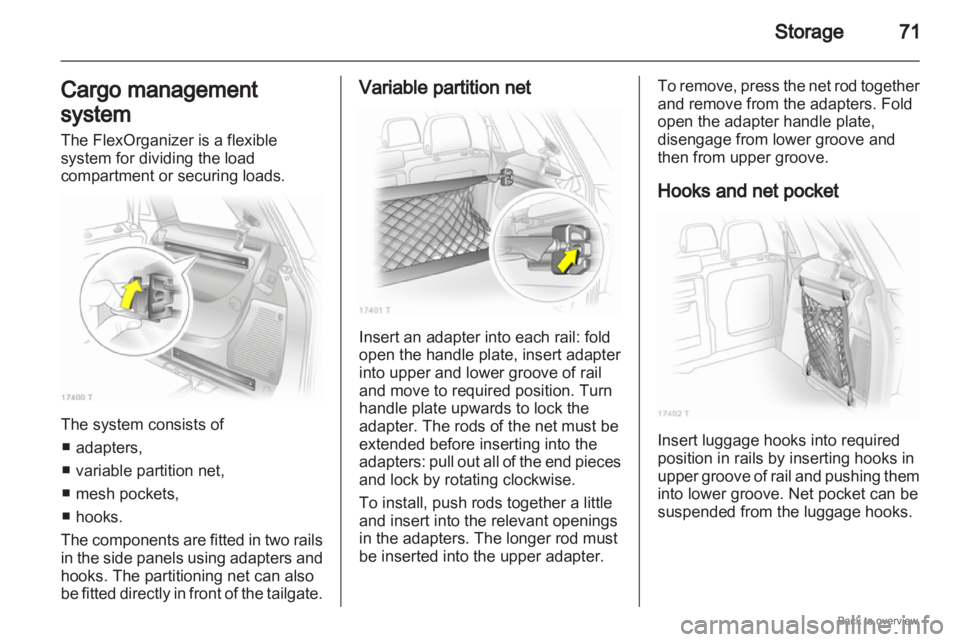
The FlexOrganizer is a flexible
system for dividing the load
compartment or securing loads. The system consists of
■ adapters,
■ variable partition net,
■ mesh pockets,
■ hooks.
The components are fitted in two rails
in the side panels using adapters and
hooks. The partitioning net can also
be fitted directly in front of the tailgate. Variable partition net
Insert an adapter into each rail: fold
open the handle plate, insert adapter
into upper and lower groove of rail
and move to required position. Turn
handle plate upwards to lock the
adapter. The rods of the net must be
extended before inserting into the
adapters:
pull out all of the end pieces
and lock by rotating clockwise.
To install, push rods together a little
and insert into the relevant openings
in the adapters. The longer rod must
be inserted into the upper adapter. To remove, press the net rod together
and remove from the adapters. Fold
open the adapter handle plate,
disengage from lower groove and
then from upper groove.
Hooks and net pocket
Insert luggage hooks into required
position in rails by inserting hooks in
upper
groove of rail and pushing them
into lower groove. Net pocket can be
suspended from the luggage hooks.
Page 75 of 228
Storage
75
Fasten the roof rack at the fastening
points.
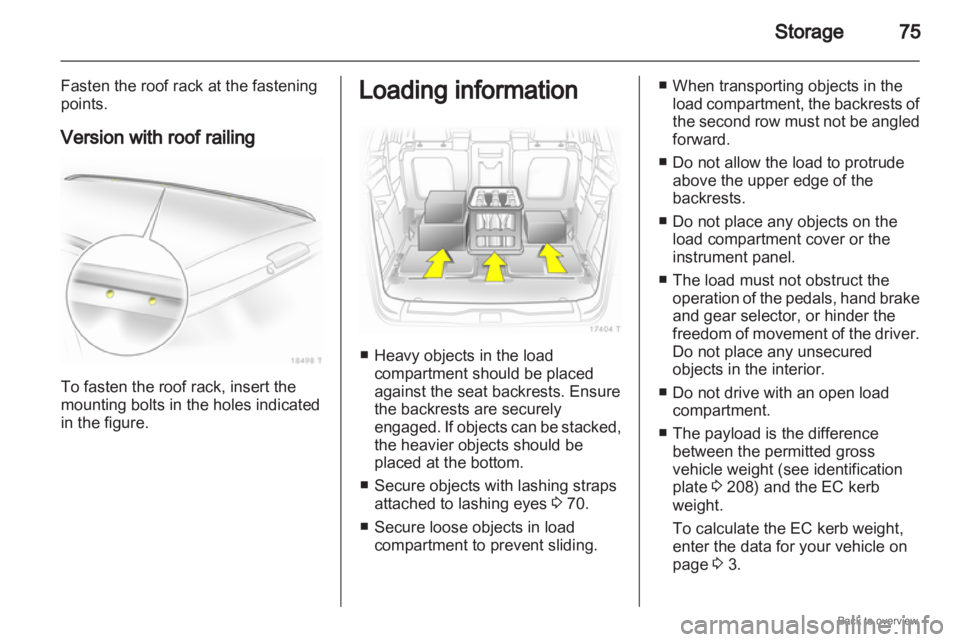
Version with roof railing To fasten the roof rack, insert the
mounting bolts in the holes indicated
in the figure. Loading information
■ Heavy objects in the load
compartment should be placed
against the seat backrests. Ensure
the backrests are securely
engaged.
If objects can be stacked,
the heavier objects should be
placed at the bottom.
■ Secure objects with lashing straps attached to lashing eyes 3 70.
■ Secure loose objects in load compartment to prevent sliding. ■ When transporting objects in the
load
compartment, the backrests of
the second row must not be angled
forward.
■ Do not allow the load to protrude above the upper edge of the
backrests.
■ Do not place any objects on the load compartment cover or the
instrument panel.
■ The load must not obstruct the operation of the pedals, hand brake
and gear selector, or hinder the
freedom of movement of the driver.
Do not place any unsecured
objects in the interior.
■ Do not drive with an open load compartment.
■ The payload is the difference between the permitted gross
vehicle weight (see identification
plate 3 208) and the EC kerb
weight.
To calculate the EC kerb weight,
enter the data for your vehicle on
page 3 3.
Page 76 of 228
76
Storage
The EC kerb weight includes
weights for the driver (68 kg),
luggage (7 kg) and all fluids (tank
90% full).
Optional equipment and
accessories increase the kerb
weight.
■
Driving with a roof load increases the sensitivity of the vehicle to
cross-winds and has a detrimental
effect on vehicle handling due to
the vehicle’s higher centre of
gravity. Distribute the load evenly
and secure it properly with retaining
straps. Adjust the tyre pressure and
vehicle speed according to the load
conditions. Check and retighten the
straps frequently.
The permissible roof load is 75 kg
and 100 kg for vehicles with roof
railing. The roof load is the
combined weight of the roof rack
and the load.
Page 133 of 228
Driving and operating
133
Do not accelerate while engaging
a gear. Never depress the accelerator
pedal and brake pedal at the same
time.
When a gear is engaged, the vehicle
slowly begins to creep when the
brake is released.
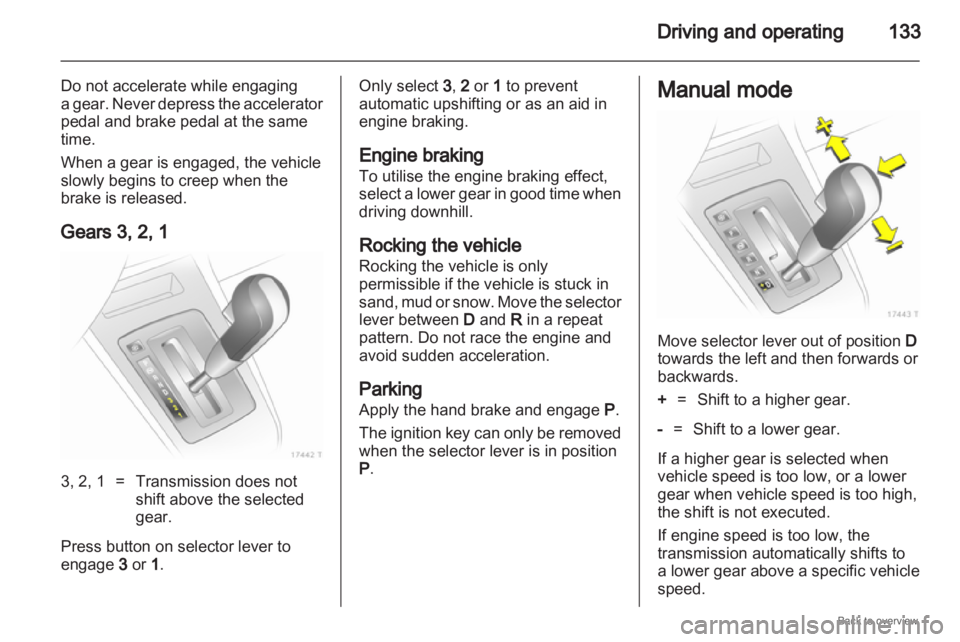
Gears 3, 2, 1 3, 2, 1 = Transmission does not
shift above the selected
gear.
Press button on selector lever to
engage 3 or 1 . Only select 3
, 2 or 1 to prevent
automatic upshifting or as an aid in
engine braking.
Engine braking
To utilise the engine braking effect,
select
a lower gear in good time when
driving downhill.
Rocking the vehicle
Rocking the vehicle is only
permissible if the vehicle is stuck in
sand, mud or snow. Move the selector
lever between D and R in a repeat
pattern. Do not race the engine and
avoid sudden acceleration.
Parking
Apply the hand brake and engage P.
The ignition key can only be removed
when the selector lever is in position
P. Manual mode
Move selector lever out of position
D
towards the left and then forwards or
backwards.
+ = Shift to a higher gear.
- = Shift to a lower gear.
If a higher gear is selected when
vehicle speed is too low, or a lower
gear when vehicle speed is too high,
the shift is not executed.
If engine speed is too low, the
transmission automatically shifts to
a lower gear above a specific vehicle
speed.