Page 33 of 228
Keys, doors and windows
33
Open&Start system Pull a door handle or press the button
under the tailgate moulding.
The electronic key must be outside
the vehicle, within a range of
approximately one metre.
Locking
Close doors, load compartment and
fuel
filler flap. If the driver's door is not
closed properly, the central locking
system will not work. Radio remote control
Press button p.
Open&Start system Touch the sensor field in the door
handle of one of the front doors.
The electronic key must be outside
the vehicle, within a range of
approximately one metre. The other
electronic key must not be inside the
vehicle.
2 seconds must pass before the
vehicle can be unlocked. Within this
time, it is possible to check that the
vehicle is locked.
Note
The Open&Start system does not
lock the vehicle automatically.
Central locking button
Page 34 of 228
34
Keys, doors and windows
Press the m button: the doors are
locked or unlocked.
The LED in the button m illuminates
for
around 2 minutes after locking with
the remote control.
If the doors are locked from the inside
whilst driving, the LED remains lit.
If the key is in the ignition, locking is
only possible if all doors are closed.
Fault in remote control or
Open&Start system
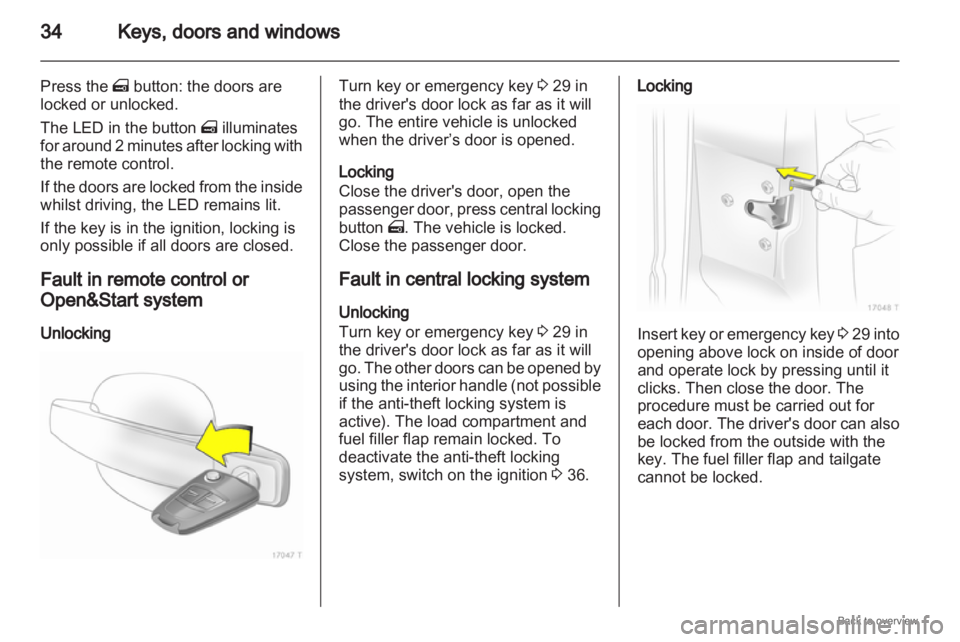
Unlocking Turn key or emergency key
3 29 in
the driver's door lock as far as it will
go. The entire vehicle is unlocked
when the driver’s door is opened.
Locking
Close the driver's door, open the
passenger
door, press central locking
button m. The vehicle is locked.
Close the passenger door.
Fault in central locking system
Unlocking
Turn key or emergency key 3 29 in
the driver's door lock as far as it will
go. The other doors can be opened by
using the interior handle (not possible
if the anti-theft locking system is
active). The load compartment and
fuel filler flap remain locked. To
deactivate the anti-theft locking
system, switch on the ignition 3 36. Locking
Insert key or emergency key
3 29
into
opening above lock on inside of door
and operate lock by pressing until it
clicks. Then close the door. The
procedure must be carried out for
each door. The driver's door can also
be locked from the outside with the
key. The fuel filler flap and tailgate
cannot be locked.
Page 36 of 228
36
Keys, doors and windows
Vehicle security
Anti-theft locking system 9
Warning Do not use the system if there are
people in the vehicle! The doors
cannot be unlocked from the
inside.
The system deadlocks all the doors.
All doors must be closed or the
system cannot be activated.
If
the ignition was on, the driver's door
must be opened and closed once so
that the vehicle can be secured.
Unlocking the vehicle disables the
mechanical anti-theft locking system.
This is not possible with the central
locking button. Activating with the remote
control
Press p twice within 15 seconds. Activating with the Open&Start
system
Touch the sensor field in the front
door handle twice within 15 seconds.
The electronic key must be outside
the vehicle, within a range of
approximately one metre.
Anti-theft alarm system
The anti-theft alarm system
incorporates and is operated in
conjunction with the anti-theft locking
system.
Page 38 of 228

38
Keys, doors and windows
After the first 10 seconds of anti-theft
alarm system activation:
LED flashes
slowly = System active,
LED comes
on for approx.
1 second = Switch off function.
Seek the assistance of a workshop in
the event of faults.
Alarm
When triggered, the alarm gives off
an
acoustic signal (horn) and a visual
signal (hazard warning flashers). The
number and duration of which are
stipulated by legislation.
The alarm can be silenced by
pressing a button of the radio remote
control or by switching on the ignition.
The anti-theft alarm system is
deactivated at the same time. Immobiliser
The system checks whether the
vehicle
is allowed to start with the key
being used. If the transponder in the
key is recognised, the vehicle can be
started.
The electronic immobiliser activates
itself automatically after the key has
been removed from the ignition
switch or when the engine is switched
off by pressing the Start/Stop button.
If the control indicator A flashes
when the ignition is on, there is a fault
in the system; the engine cannot be
started. Switch off the ignition and
then repeat the start attempt.
If the control indicator continues
flashing, attempt to start the engine
using the spare key and seek the
assistance of a workshop.
If control indicator illuminates after
the engine has started, there is a fault
in the engine electronics or
transmission electronics 3 88,
3 135, 3 139, or there is water in the
diesel fuel filter 3 101. Note
The immobiliser does not lock the
doors. You should always lock the
vehicle
after leaving it and switch on
the anti-theft alarm system 3 32,
3 36.
Page 42 of 228
42
Keys, doors and windows
Operating windows from outside
Depending on the equipment level,
the windows can be operated
remotely from outside the vehicle.
Radio remote control Press q or p until all windows have
opened or closed. Open&Start system
To close, touch the sensor field in the
door handle until all windows are
completely closed.
The electronic key must be outside
the vehicle, within a range of
approximately one metre.
Overload
If the windows are repeatedly
operated
at short intervals, the power
supply is briefly cut off. Fault
If the windows cannot be opened or
closed automatically, activate the
window electronics as follows:
1.
Close doors.
2. Switch on ignition.
3. Close the window completely and operate the button for a further
5 seconds.
4. Open the window completely and operate the button for a further
1 second.
5. Repeat for each window.
Heated rear window
Page 92 of 228

92
Instruments and controls
When operating with natural gas, the
system automatically switches over to
petrol operation 3 84.
Open&Start system
0 illuminates or flashes yellow.
Flashes
The electronic key is no more within
the reception range of the vehicle
interior. The engine cannot be
started. Hold the Start/Stop button
depressed a bit longer to switch off
the ignition.
or
Failure of the electronic key.
Operation is yet only possible via
emergency operation.
Illuminated
Fault in system. Try to operate with
the spare key, the remote control or
through emergency operation. Hold
the Start/Stop button depressed a bit
longer to switch off the ignition. Seek
the assistance of a workshop.
or The steering wheel lock is still
engaged. Move the steering wheel
slightly and press the
Start/Stop
button.
Open&Start System 3 29.
Apply footbrake
j illuminates yellow.
The
engine with manual transmission
automated can only be started if the
foot brake is depressed. If the foot
brake is not depressed, the control
indicator illuminates 3 137.
Exterior light
8 illuminates green.
Illuminated when the exterior lights
are on 3 108.
High beam
C illuminates blue.
Illuminated when high beam is on and
during headlamp flash 3 109. Adaptive forward lighting
B
illuminates or flashes yellow.
Illuminated
Fault in system.
If the swivelling device for curve
lighting fails, the corresponding
dipped
beam lamp is deactivated and
the fog lamp is switched on.
Seek the assistance of a workshop.
Flashes
System switched to symmetrical
dipped beam.
Control indicator B flashes for
approximately 4 seconds after the
ignition is switched on as a reminder
that the system has been switched
3 109.
Adaptive Forward Lighting (AFL)
3 110.
Fog light
> illuminates green.
Illuminated when the fog lamps are on
3 111.
Page 100 of 228

100
Instruments and controls
Always day design: black or coloured
text on light background.
Always night design: white or
coloured text on dark background.
Selection is indicated by a o in front
of the menu item.
Ignition logic
See infotainment system manual. Vehicle messages
Messages are given via the
instrument panel display or as
warning and signal buzzers. Check
control messages appear on the
Info-Display. Some appear in an
abbreviated form. Confirm warning
messages 3 93, 3 96.
Warning chimes
When starting the engine or
whilst driving
■
If the electronic key is not presentor is not recognised.
■ If seat belt is not fastened.
■ If a door or the tailgate is not fully closed when starting off.
■ If a certain speed is exceeded with the hand brake applied.
■ If the speed programmed at the factory is exceeded.
■ If the vehicle has automated manual transmission and the
driver's door is opened when the engine is running, a gear is
engaged and the foot brake is not
depressed.
When the vehicle is parked and
the driver's door is opened ■
When the key is in the ignition switch.
■ With exterior lights on.
■ With Open&Start system and automatic transmission, if the
selector lever is not in P.
■ For automated manual transmission, if the hand brake is
not applied and no gear is engaged
when the engine is switched off.
Battery voltage
Low battery voltage in remote control
or electronic key. On vehicles without
check control, the message InSP3
appears in the instrument panel
display. Replace the battery 3 28,
3 29.
Page 194 of 228
194
Service and maintenance
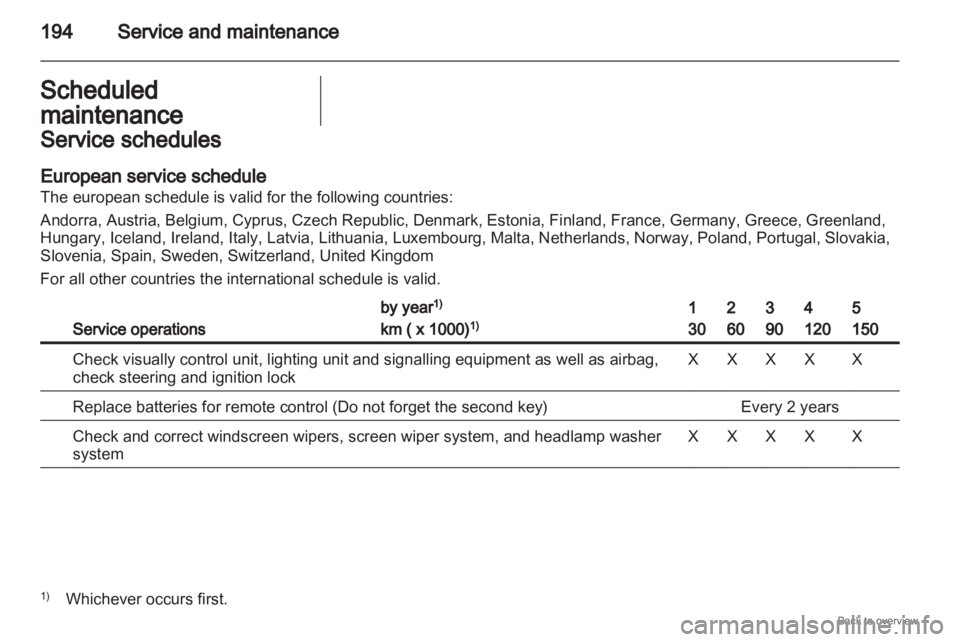
Scheduled
maintenance Service schedules
European service schedule
The european schedule is valid for the following countries:
Andorra, Austria, Belgium, Cyprus, Czech Republic, Denmark, Estonia, Finland, France, Germany, Greece, Greenland,
Hungary, Iceland, Ireland, Italy, Latvia, Lithuania, Luxembourg, Malta, Netherlands, Norway, Poland, Portugal, Slovakia,
Slovenia, Spain, Sweden, Switzerland, United Kingdom
For all other countries the international schedule is valid.
Service operations by year
1)
km ( x 1000) 1) 1
30 2
60 3
90 4
120 5
150
Check visually control unit, lighting unit and signalling equipment as well as airbag,
check steering and ignition lock X X X X X
Replace batteries for remote control (Do not forget the second key) Every 2 years
Check and correct windscreen wipers, screen wiper system, and headlamp washer
system X X X X X
1)
Whichever occurs first.