Page 74 of 234

Instruments, controls74
aAnti-theft alarm system activation
without monitoring of passenger
compartment and vehicle tilt 3
see page 28.
IEngine oil pressure
Illuminates in red when ignition is switched
on. Extinguishes after engine is started.
Can illuminate intermit tently when idling
with hot engine; must extinguish when
engine speed is increased.
If
it illuminates during driving;
engine oil pressure may be dangerously
low, interrupting engine lubrication and
resulting in damage to the engine and/or
locking of the driving wheels:
z Move out of the flow of traffic as quickly
as possible without impeding other
vehicles,
z Depress clutch,
z Move gearshift lever to neutral
(automatic transmission to N),
z Switch off ignition. Check engine oil level before consulting
a workshop. If the oil level is low, top up
using the specified engine oil - see pages
192, 213, 217.
If the oil level is normal, have a workshop
check the vehicle’s lubricating system.
pAlternator
Illuminates in red when ignition is switched
on. Extinguishes after engine is started.
If
it illuminates during driving:
stop vehicle and switch off engine. The
battery is not being charged and the
engine cooling may be interrupted. The
brake servo unit may cease to be effective.
Interrupt your journey immediately.
Remove key and check drive belt condition
and tensioning before consulting a
workshop.
ZExhaust emissions
Illuminates in yellow when ignition is
switched on. Extinguishes after engine is
started. Can illuminate briefly when
driving; this is normal and does not
indicate a system fault.
If it illuminates when the engine is running
;
fault in emission control system.
The permitted emission limits may be
exceeded. Fuel economy and vehicle
driveability may be impaired.
The control indicator also illuminates if
there is a fault in the diesel particle filter 3.
Consult a workshop as soon as possible.
If it flashes when the engine is running
;
for a fault that can lead to destruction of
the catalytic converter, see page 134.
Consult a workshop as soon as possible.
0Winter program 3
Illuminates in yellow when Winter program
for the automatic transmission is enabled -
see page 117.
9 Warning
When the engine is off, considerably
greater force will be required for braking
and steering.
Do not remove key until vehicle has come
to a standstill, otherwise the steering
column lock could engage unexpectedly.
Page 76 of 234

Instruments, controls76
Fuel gauge
Indicates fuel level when the ignition is on.
After adding fuel and restarting engine,
fuel gauge pointer slowly moves to show
new fuel level.
When fuel gauge indica tes that fuel supply
is low, control indicator
Y illuminates:
fill up fuel tank as soon as possible -
see page 132.
Never let the fuel tank become empty.
Diesel engines: if the tank has been run dry,
bleed the fuel system as described on
page 171.
Because of the amount of fuel remaining in
the tank, the amount of fuel required to fill
the tank may be less than the specified
tank capacity. Transmission display 3
Display of the selected gear or mode with
automatic transmission
3.
Information display
Board information display
Display of time, outside temperature and
date/Infotainment system (when it is on).
An F in the display in dicates a fault.
Have the cause of the fault remedied by a
workshop.
P Park position.
R Reverse gear.
N Neutral.
D Automatic mode.
1 to 5 Selected gear in manual
mode.
11:25}21.5°C
Range
RDS [TP]
257km
Page 79 of 234

Instruments, controls79
To select using the left adjuster wheel on
the steering wheel:
If check control 3 issues a warning
message, the display is blocked from other
functions. Acknowledge the message by
pressing the OK button or the left adjuster
wheel. If there are several warning
messages, acknowledge them one at a
time. Board information display,
system settings
Press the
Settings button on the
Infotainment system. Menu item Audio or
System will appear.
Press the left arrow button to reach menu
item System and select. The first function
of the System menu is marked.
Some of the functions appear on the
display in an abbreviated form. The functions are displayed in the following
order:
z
Time synchronisation
z Time, setting hours
z Time, setting minutes
z Date, setting day
z Date, setting month
z Date, setting year
z Ignition logic
z Language selection
z Setting units of measure
Turn up Previous menu item.
Turn down Next menu item.
Press Select marked item,
confirm command.
11:25}21.5°C
System
Page 80 of 234
Instruments, controls80
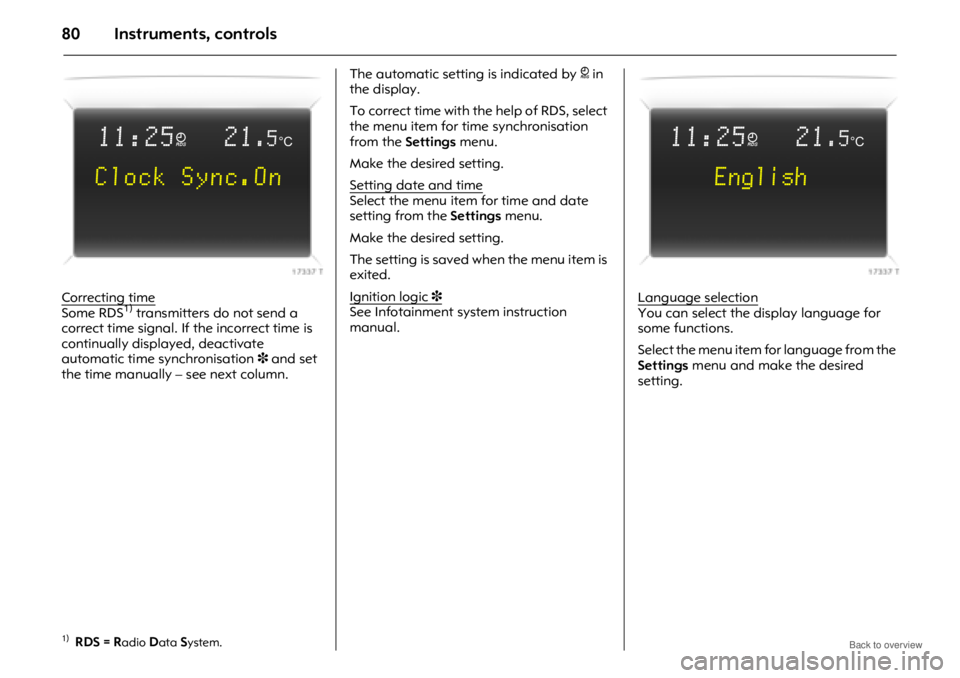
Correcting timeSome RDS1) transmitters do not send a
correct time signal. If the incorrect time is
continually displayed, deactivate
automatic time synchronisation 3 and set
the time manually – see next column. The automatic setting is indicated by
} in
the display.
To correct time with the help of RDS, select
the menu item for time synchronisation
from the Settings menu.
Make the desired setting.
Setting date and time
Select the menu item for time and date
setting from the Settings menu.
Make the desired setting.
The setting is saved when the menu item is
exited.
Ignition logic
3See Infotainment system instruction
manual. Language selectionYou can select the display language for
some functions.
Select the menu item for language from the
Settings
menu and make the desired
setting.
1)RDS = Radio Data System.
11:25}21.5°C
Clock Sync.On
11:25}21.5°C
English
Page 82 of 234

Instruments, controls82
Average consumptionDisplay of average consumption.
The measurement can be restarted at any
time – see "Resetting trip computer
information".
Effective consumption
Displays amount of fuel consumed.
The measurement can be restarted at any
time – see "Resetting trip computer
information".
Average speed
Display of average speed.
The measurement can be restarted at any
time - see "Resetting trip computer
information".
Stoppages in the journey with the ignition
off are not included in the calculations.
Distance travelled
Displays number of kilometres (miles)
driven. The measurement can be restarted
at any time – see "Resetting trip computer
information".Range
Range is calculated fr
om current fuel tank
content and instantaneous consumption.
The display shows average values.
The vehicle updates the range
automatically after a brief delay when the
vehicle has been refuelled.
If the fuel in the tank will allow less than
50 km (30 miles) of travel, the warning
"Range" appears on the display.
If the fuel in the tank will allow less than
30 km (20 miles) of travel, the warning
"Refuel!" 3 appears on the display. Resetting trip computer information
The following trip computer information
can be reset (restart measurements):
z
Average consumption
z Effective consumption
z Average speed
z Distance travelled
Select the desired trip computer
information.
Reset by pressing the left adjuster wheel on
the steering wheel or the OK button on the
Infotainment system.
11:25}21.5°C
Range
257km
Page 87 of 234

Instruments, controls87
Setting units of measureYou can select which units of measure are
to be used.
Select menu item Units from the Settings
menu.
The available units are displayed.
Select the desired unit.
Selections are indicated by a o in front of
the menu item. Adjusting contrast 3 (graphicalinformationdisplay)Select menu item
Contrast from the
Settings menu.
The menu for Contrast is displayed.
Confirm the required setting. Setting display mode
3The display can be adjust
ed to suit the light
conditions: black or coloured text on a light
background or white or coloured text on a
dark background.
Select menu item Day / Night from the
Settings menu.
The options are displayed.
Automatic; adapted based on vehicle
lighting.
Always day design; black or coloured text
on light background.
Always night design; white or coloured
text on dark background.
Selections are indicated by a o in front
of the menu item.
Ignition logic
3See Infotainment system instruction
manual.
7
77 7 Settings 19,5° 19:36
Time, Date
Language
~Europe-SI
Units
|Japan
Contrast
|Great Britain
Day / Night
|USA
6
66 6 Ign. logic
7
77 7 Contrast 19,5° 19:36
12
Page 89 of 234

Instruments, controls89
Distance travelledDisplays number of kilometres (miles)
driven. The measurement can be restarted
at any time - see "Resetting trip computer
information".
Average speed
Display of average speed.
The measurement can be restarted at any
time - see "Resetting trip computer
information".
Stoppages in the journey with the ignition
off are not included in the calculations.
Effective consumption
Displays amount of fuel consumed.
The measurement can be restarted at any
time - see "Resetting trip computer
information".
Average consumption
Display of average consumption.
The measurement can be restarted at any
time - see "Resetting trip computer
information". Resetting trip computer information
The following trip computer information
can be reset (restart measurements):
z
Distance travelled
z Average speed
z Effective consumption
z Average consumption
Select BC 1 or BC 2 from the trip computer
menu. The information of the two trip computers
can be reset separately, making it possible
to evaluate data from different time
periods.
Select the desired trip computer
information.
The value for the selected function will be
reset and recalculated.
ÜBoard Computer 19,5° 19:36
BC 1 All values
BC 2
257.0kmTimerØ40km/hTyres
31.0Ltr.
Ø 7.0Ltr./100km
1
11 1
8
88
8
Ü Reset BC 1 19,5° 19:36
All values
257.0km
Ø40km/h
31.0Ltr.
Ø 7.0Ltr./100km
Page 91 of 234

Instruments, controls91
The desired stop watch display can be
selected from the Optionsmenu3:
Driving Time excl. Stops
The time the vehicle is in motion is
recorded. Stationary ti me is not included.
Driving Time incl. Stops
The time the vehicle is in motion is
recorded. The time the vehicle is stationary
with the key in the ignition switch is
included.
Travel Time
Measurement of the time from manual
activation via Start to manual deactivation
via Reset .
Display of current tyre pressure 3
Select menu item Tyres from the Board
Computer menu.
The current pressure of each tyre is
displayed.
Further information – see page 144.
Check control 3
In vehicles with tyre pressure monitoring
system 3, if tyre pressure is too low, the
display indicates which tyre to check, e.g.:
Tyre pressure
check rear
right tyre
(value in bar)
Check tyre pressure at next opportunity
using suitable gauge.
Tyre pressure monitoring system 3 –
see page 144.
Tyre pressure – see page 224.
In vehicles with tyre pressure monitoring
system 3, if there is a major loss of pressure
in a tyre, the display indicates the tyre at
fault, e.g.:
Attention!
Rear left tyre
pressure loss
(value in bar)
Stop immediately and check tyre.
Tyre pressure monitoring system 3 –
see page 144.
Tyre pressure – see page 224.
Ü Board Computer
BC 1
BC 2
Timer
Tyres