2009 NISSAN MURANO brake
[x] Cancel search: brakePage 88 of 443
Black plate (86,1)
Model "Z51-D" EDITED: 2007/ 10/ 2
SIC3577
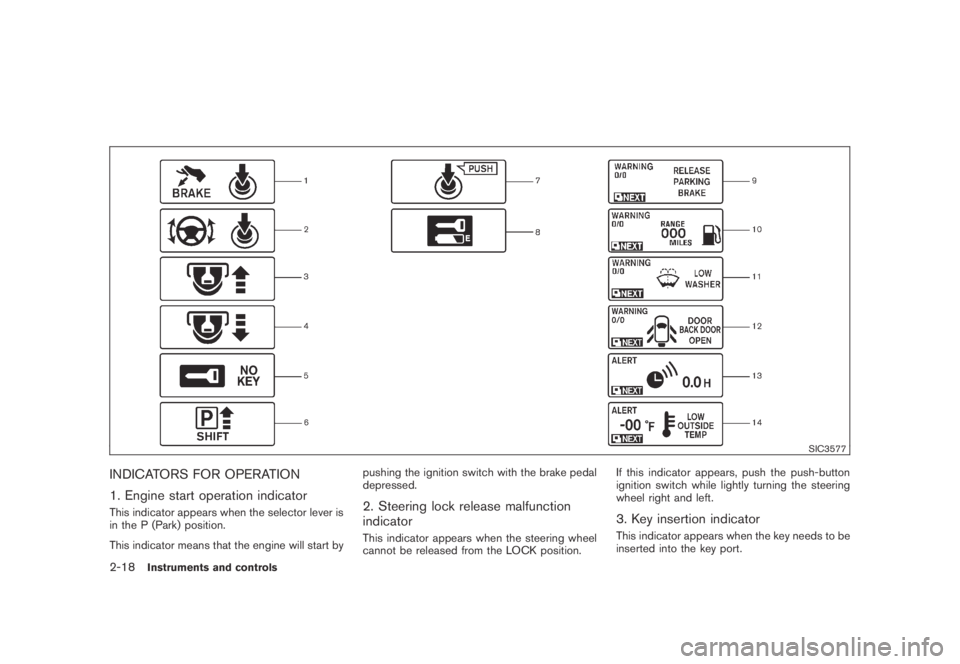
INDICATORS FOR OPERATION
1. Engine start operation indicator
This indicator appears when the selector lever is
in the P (Park) position.
This indicator means that the engine will start bypushing the ignition switch with the brake pedal
depressed.2. Steering lock release malfunction
indicator
This indicator appears when the steering wheel
cannot be released from the LOCK position.If this indicator appears, push the push-button
ignition switch while lightly turning the steering
wheel right and left.
3. Key insertion indicator
This indicator appears when the key needs to be
inserted into the key port.
2-18Instruments and controls
Page 89 of 443

Black plate (87,1)
Model "Z51-D" EDITED: 2007/ 10/ 2
If this indicator appears, insert the key into the
key port in the correct direction. (See “PUSH-
BUTTON IGNITION SWITCH” in the “5. Start-
ing and driving” section.)
4. Key removal indicator
This indicator appears when the driver’s door is
opened with the ignition switch in the OFF or
LOCK position and the key placed in the key
port. A key reminder chime also sounds.
If this indicator appears, remove the key from the
key port and take it with you when leaving the
vehicle.
5. NO KEY warning
This warning appears in either of the following
conditions.
No key inside the vehicle:
With Intelligent Key system:
The warning appears when the door is closed
with the key left outside the vehicle and the
ignition switch in the ACC or ON position. Make
sure that the key is inside the vehicle.
Without Intelligent Key system:
The warning appears when the key is removed
from the key port and the ignition switch is in the
ACC or ON position. Make sure that the key is
inserted into the key port.Unregistered key:
The warning appears when the ignition switch is
pushed from the LOCK position and the key
cannot be recognized by the system. You cannot
start the engine with an unregistered key. Use
the registered key.
See “INTELLIGENT KEY SYSTEM” in the “3.
Pre-driving checks and adjustments” section for
more details.
6. SHIFT “P” warning
This warning appears when the ignition switch is
pushed to stop the engine with the selector lever
in any position except the P (Park) position.
If this warning appears, move the selector lever
to the P (Park) position or push the ignition
switch to the ON position.
An inside warning chime will also sound. (See
“INTELLIGENT KEY SYSTEM” in the “3. Pre-
driving checks and adjustments” section.)
7. “PUSH” warning
This warning appears when the selector lever is
moved to the P (Park) position with the ignition
switch in the ACC position after the SHIFT “P”
warning appears.
To push the ignition switch to the OFF position,
perform the following procedure:SHIFT “P” warning?(Move the selector
lever to “P”)?PUSH warning?(Push
the ignition switch?ignition switch position
is turned to ON)?PUSH warning?
(Push the ignition switch?ignition switch
position is turned to OFF)
8. Key battery discharge indicator
This indicator appears when the key battery is
running out of power.
If this indicator appears, replace the battery with
a new one. (See “BATTERY REPLACEMENT” in
the “8. Maintenance and do-it-yourself” section.)
9. Parking brake release warning
This warning appears when the vehicle speed is
above 4 MPH (7 km/h) and the parking brake is
applied.
10. Low fuel warning
This warning appears when the fuel level in the
tank is getting low. Refuel as soon as it is
convenient, preferably before the fuel gauge
reaches the empty (E) position.
There is a small reserve of fuel remaining
in the tank when the fuel gauge reaches
the empty (E) position.
Instruments and controls2-19
Page 95 of 443
Black plate (93,1)
Model "Z51-D" EDITED: 2007/ 10/ 2
SIC3679
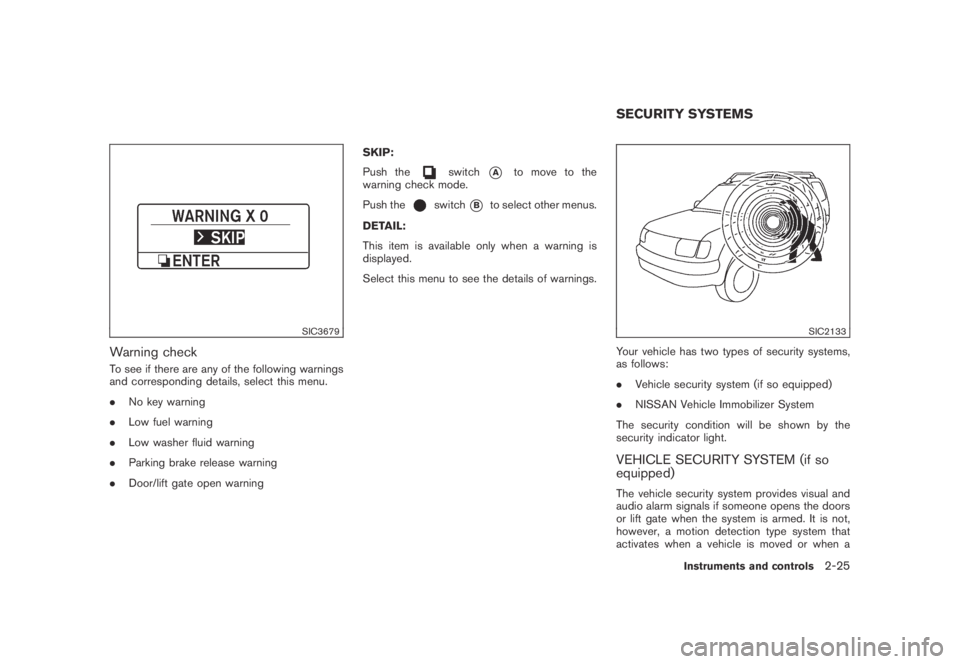
Warning check
To see if there are any of the following warnings
and corresponding details, select this menu.
.No key warning
.Low fuel warning
.Low washer fluid warning
.Parking brake release warning
.Door/lift gate open warningSKIP:
Push the
switch*Ato move to the
warning check mode.
Push the
switch*Bto select other menus.
DETAIL:
This item is available only when a warning is
displayed.
Select this menu to see the details of warnings.
SIC2133
Your vehicle has two types of security systems,
as follows:
.Vehicle security system (if so equipped)
.NISSAN Vehicle Immobilizer System
The security condition will be shown by the
security indicator light.
VEHICLE SECURITY SYSTEM (if so
equipped)
The vehicle security system provides visual and
audio alarm signals if someone opens the doors
or lift gate when the system is armed. It is not,
however, a motion detection type system that
activates when a vehicle is moved or when a
SECURITY SYSTEMS
Instruments and controls2-25
Page 105 of 443

Black plate (103,1)
Model "Z51-D" EDITED: 2007/ 10/ 2
WARNING
Xenon headlights are extremely bright
compared to conventional headlights. If
the xenon headlights hit the rearview
mirror of the vehicle ahead or the
windshield of oncoming vehicle, the
driver of these vehicles may have
difficulty driving because of the bright-
ness. Use the headlight aiming control
switch to lower the light axis. See
“XENON HEADLIGHTS” earlier in this
section for additional information.
Daytime running light system (Canada
only)
The daytime running lights automatically illumi-
nate when the engine is started with the parking
brake released. The daytime running lights
operate with the headlight switch in the OFF
position or in the
position. Turn the
headlight switch to theposition for full
illumination when driving at night.
If the parking brake is applied before the engine
is started, the daytime running lights do not
illuminate. The daytime running lights illuminate
once the parking brake is released. The daytime
running lights will remain on until the ignition
switch is pushed to the OFF position.
WARNING
When the daytime running light system
is active, tail lights on your vehicle are
not on. It is necessary at dusk to turn on
your headlights. Failure to do so could
cause an accident injuring yourself and
others.
SIC3585
Instrument brightness control
The instrument brightness control operates
when the ignition switch is in the ON position.
Pushing the control switch
*Aonce will change
the brightness to the night mode.
Pushing the control switch
*Bonce will change
the brightness to the day mode.
To adjust the brightness of instrument panel
lights, push the control switches. Pushing the
upper switch
*Awill brighten the lights. When
the brightness reaches the maximum level, a
beep will sound. The lower switch
*Bdims the
lights. Repeatedly pushing the lower switch will
turn the lights off and a beep will sound.
Instruments and controls2-35
Page 166 of 443
Black plate (164,1)
Model "Z51-D" EDITED: 2007/ 10/ 2
WARNING
.Do not disassemble or modify this
system. If you do, it may result in
accidents, fire, or electric shock.
.Do not use this system if you notice
any abnormality, such as a frozen
screen or lack of sound. Continued
use of the system may result in
accident, fire or electric shock.
.In case you notice any foreign
object in the system hardware, spill
liquid on it, or notice smoke or smell
coming from it, stop using the
system immediately and contact
your nearest NISSAN dealer. Ignor-
ing such conditions may lead to
accidents, fire, or electric shock.
.Park the vehicle in a safe location
and apply the parking brake to view
the images on the front center dis-
play screen using devices connected
to the auxiliary input jacks.
Do not attempt to operate the system in
extreme temperature conditions [below
−48F(−208C) and above 1588F(708C)].
Operating this system under these condi-
tions may result in system malfunctions.
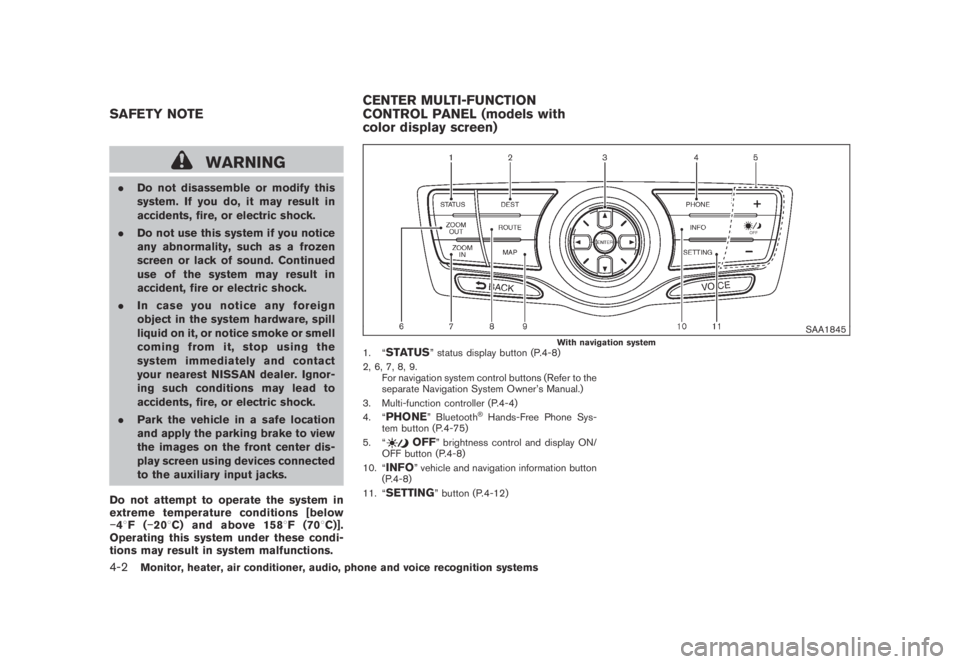
SAA1845With navigation system1. “STATUS” status display button (P.4-8)
2, 6, 7, 8, 9.
For navigation system control buttons (Refer to the
separate Navigation System Owner’s Manual.)
3. Multi-function controller (P.4-4)
4. “
PHONE” Bluetooth®Hands-Free Phone Sys-
tem button (P.4-75)
5. “
OFF” brightness control and display ON/
OFF button (P.4-8)
10. “
INFO” vehicle and navigation information button
(P.4-8)
11. “
SETTING” button (P.4-12)
SAFETY NOTECENTER MULTI-FUNCTION
CONTROL PANEL (models with
color display screen)
4-2Monitor, heater, air conditioner, audio, phone and voice recognition systems
Page 186 of 443
Black plate (184,1)
Model "Z51-D" EDITED: 2007/ 10/ 2
SAA1898
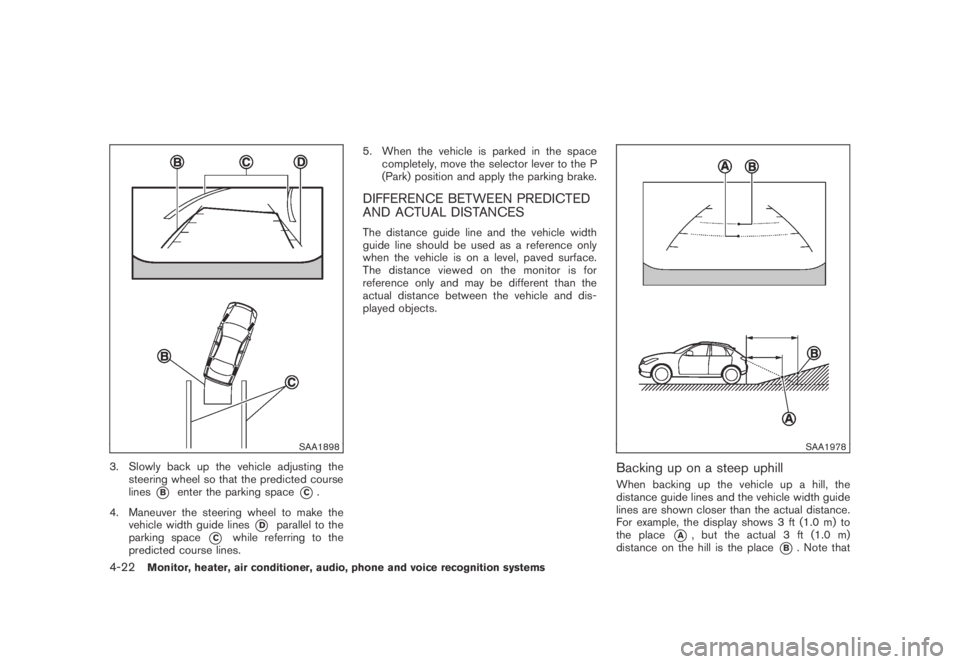
3. Slowly back up the vehicle adjusting the
steering wheel so that the predicted course
lines
*Benter the parking space*C.
4. Maneuver the steering wheel to make the
vehicle width guide lines
*Dparallel to the
parking space
*Cwhile referring to the
predicted course lines.5. When the vehicle is parked in the space
completely, move the selector lever to the P
(Park) position and apply the parking brake.
DIFFERENCE BETWEEN PREDICTED
AND ACTUAL DISTANCES
The distance guide line and the vehicle width
guide line should be used as a reference only
when the vehicle is on a level, paved surface.
The distance viewed on the monitor is for
reference only and may be different than the
actual distance between the vehicle and dis-
played objects.
SAA1978
Backing up on a steep uphill
When backing up the vehicle up a hill, the
distance guide lines and the vehicle width guide
lines are shown closer than the actual distance.
For example, the display shows 3 ft (1.0 m) to
the place
*A, but the actual 3 ft (1.0 m)
distance on the hill is the place
*B. Note that
4-22Monitor, heater, air conditioner, audio, phone and voice recognition systems
Page 188 of 443
Black plate (186,1)
Model "Z51-D" EDITED: 2007/ 10/ 2
SAA1923
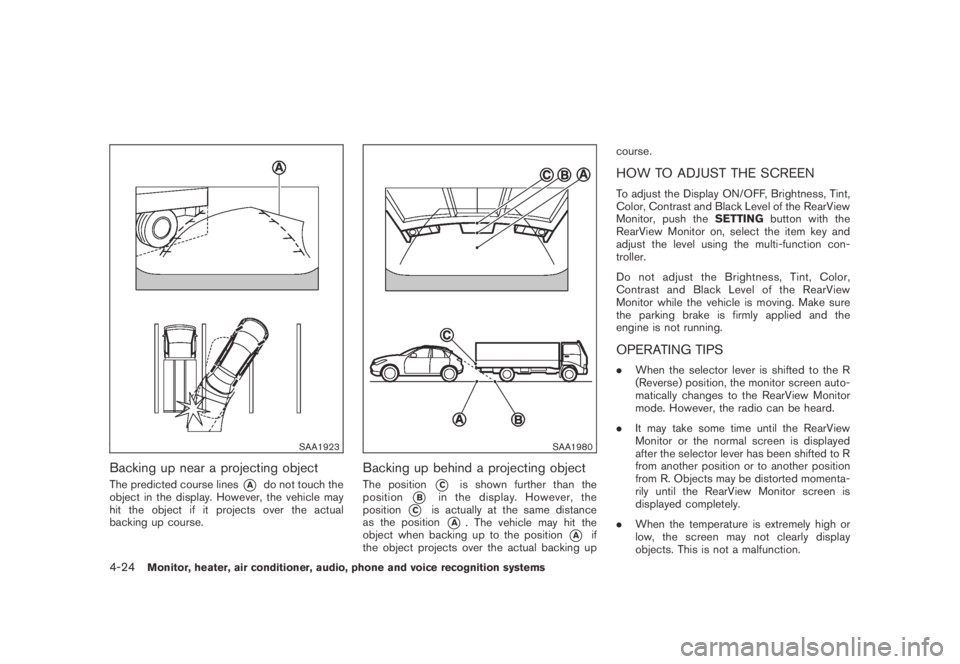
Backing up near a projecting object
The predicted course lines*Ado not touch the
object in the display. However, the vehicle may
hit the object if it projects over the actual
backing up course.
SAA1980
Backing up behind a projecting object
The position*Cis shown further than the
position
*Bin the display. However, the
position
*Cis actually at the same distance
as the position
*A. The vehicle may hit the
object when backing up to the position
*Aif
the object projects over the actual backing upcourse.
HOW TO ADJUST THE SCREEN
To adjust the Display ON/OFF, Brightness, Tint,
Color, Contrast and Black Level of the RearView
Monitor, push theSETTINGbutton with the
RearView Monitor on, select the item key and
adjust the level using the multi-function con-
troller.
Do not adjust the Brightness, Tint, Color,
Contrast and Black Level of the RearView
Monitor while the vehicle is moving. Make sure
the parking brake is firmly applied and the
engine is not running.
OPERATING TIPS
.When the selector lever is shifted to the R
(Reverse) position, the monitor screen auto-
matically changes to the RearView Monitor
mode. However, the radio can be heard.
.It may take some time until the RearView
Monitor or the normal screen is displayed
after the selector lever has been shifted to R
from another position or to another position
from R. Objects may be distorted momenta-
rily until the RearView Monitor screen is
displayed completely.
.When the temperature is extremely high or
low, the screen may not clearly display
objects. This is not a malfunction.
4-24Monitor, heater, air conditioner, audio, phone and voice recognition systems
Page 227 of 443
Black plate (225,1)
Model "Z51-D" EDITED: 2007/ 10/ 2
of contact with skin, wash immedi-
ately with soap and water.
.Use a damp, soft cloth when clean-
ing the Mobile Entertainment Sys-
tem components. Do not use
solvents or cleaning solutions.
.Do not attempt to use the system in extreme
temperature conditions [below−48F
(−208C) or above 1588F (708C)].
.To avoid discharging the vehicle battery, do
not operate the system more than 15
minutes without starting the engine.
Movies will not be shown on the front display
while the vehicle is in any drive position to
reduce driver distraction. Audio is available
when a movie is played. To view movies in the
front display, stop the vehicle in a safe location,
move the selector lever to the P (Park) position
and apply the parking brake.
LHA0484
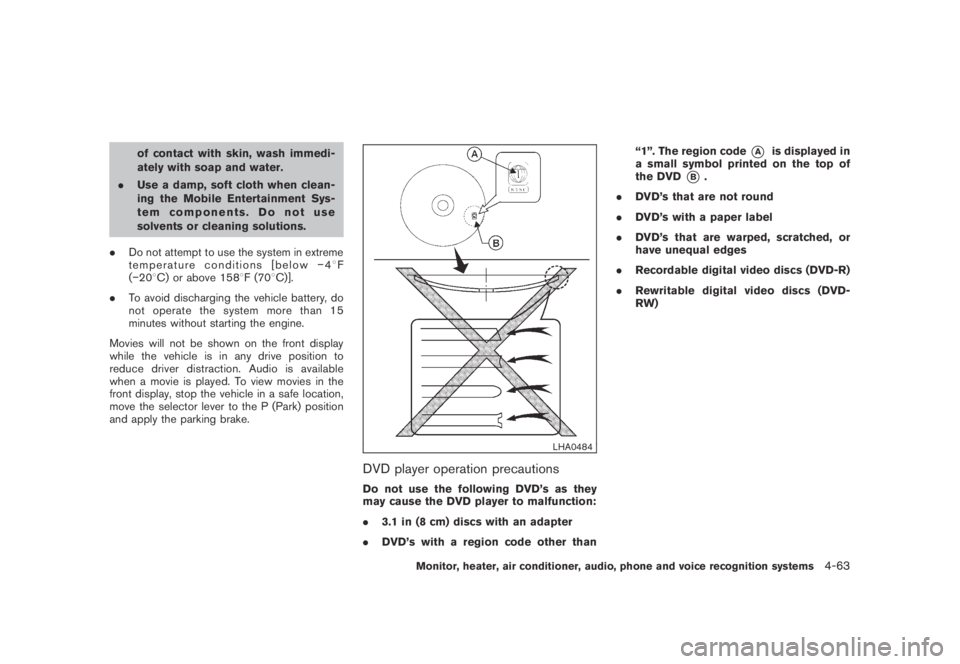
DVD player operation precautions
Do not use the following DVD’s as they
may cause the DVD player to malfunction:
.3.1 in (8 cm) discs with an adapter
.DVD’s with a region code other than“1”. The region code
*Ais displayed in
a small symbol printed on the top of
the DVD
*B.
.DVD’s that are not round
.DVD’s with a paper label
.DVD’s that are warped, scratched, or
have unequal edges
.Recordable digital video discs (DVD-R)
.Rewritable digital video discs (DVD-
RW)
Monitor, heater, air conditioner, audio, phone and voice recognition systems4-63