Page 535 of 4331
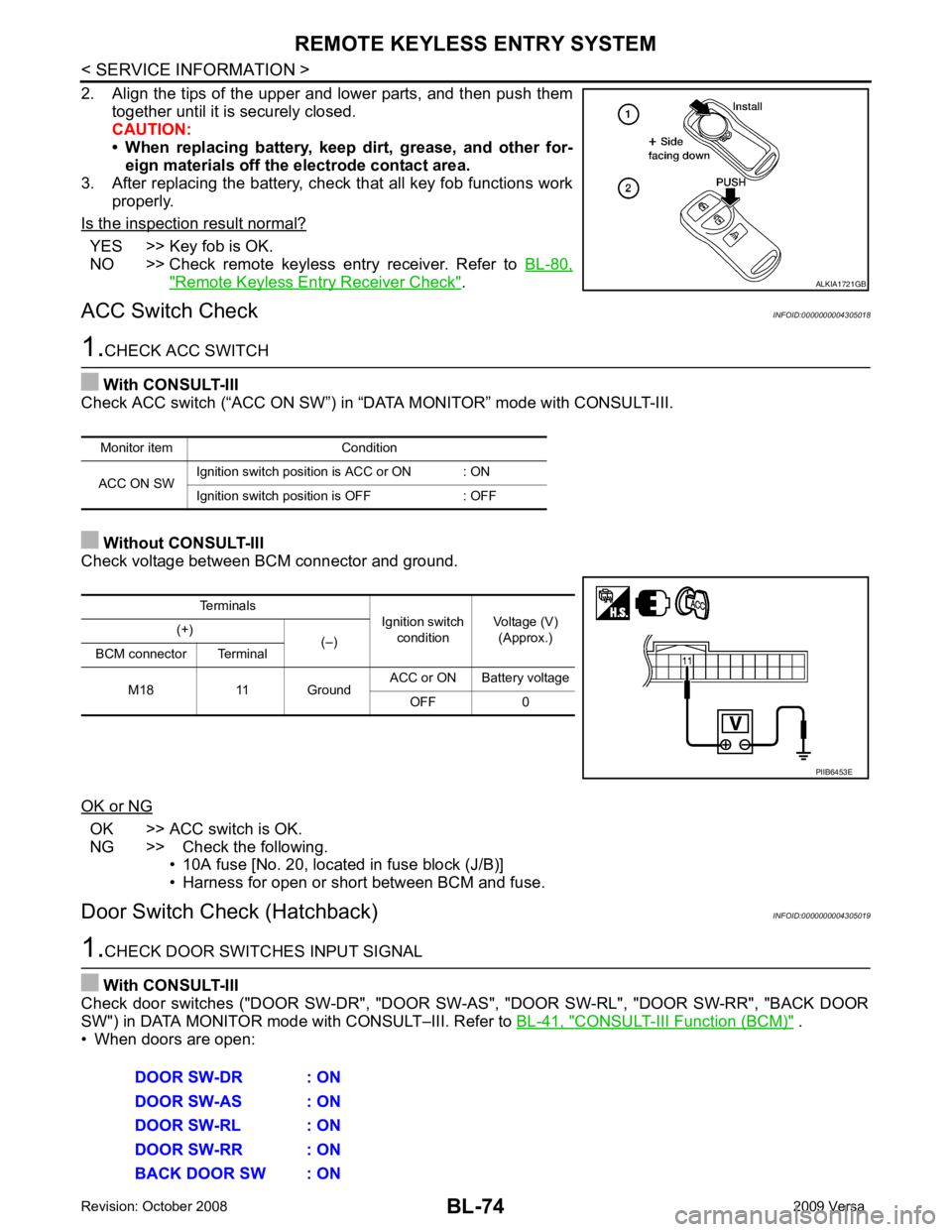
YES >> Key fob is OK.
NO >> Check remote keyless entry receiver. Refer to BL-80," Remote Keyless Entry Receiver Check " .
ACC Switch Check INFOID:0000000004305018OK >> ACC switch is OK.
NG >> Check the following. • 10A fuse [No. 20, located in fuse block (J/B)]
• Harness for open or short between BCM and fuse.
Door Switch Check (Hatchback) INFOID:0000000004305019CONSULT-III Function (BCM) " .
• When doors are open: Terminals
Ignition switch
condition Voltage (V)
(Approx.)
(+)
(–)
BCM connector Terminal
M18 11 Ground ACC or ON Battery voltage
OFF 0
Page 536 of 4331
REMOTE KEYLESS ENTRY SYSTEM
BL-75
< SERVICE INFORMATION >
C
D E
F
G H
J
K L
M A
B BL
N
O P
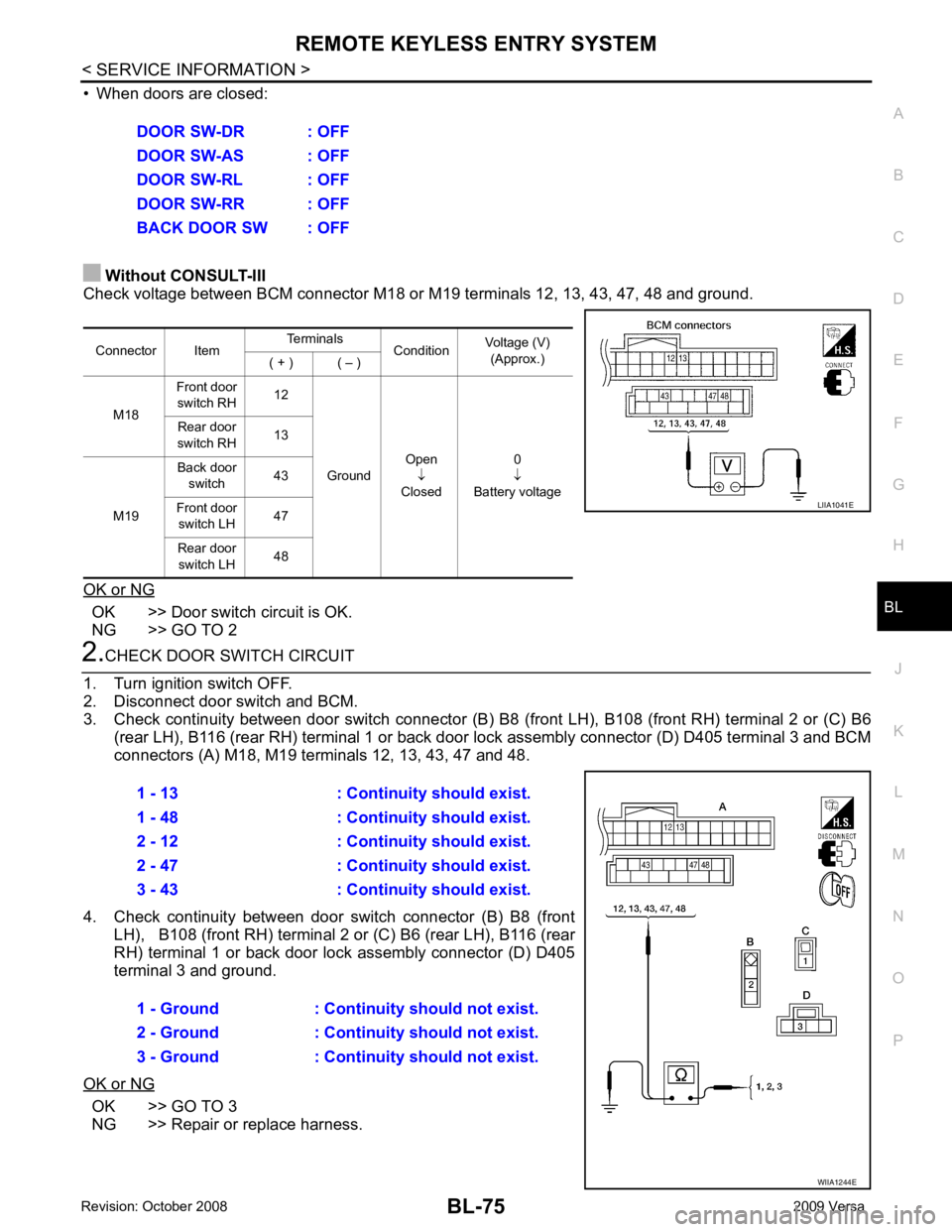
• When doors are closed:
Without CONSULT-III
Check voltage between BCM connector M18 or M19 terminals 12, 13, 43, 47, 48 and ground.
OK or NG OK >> Door switch circuit is OK.
NG >> GO TO 2 2.
CHECK DOOR SWITCH CIRCUIT
1. Turn ignition switch OFF.
2. Disconnect door switch and BCM.
3. Check continuity between door switch connector (B) B8 (front LH), B108 (front RH) terminal 2 or (C) B6
(rear LH), B116 (rear RH) terminal 1 or back door lock assembly connector (D) D405 terminal 3 and BCM
connectors (A) M18, M19 te rminals 12, 13, 43, 47 and 48.
4. Check continuity between door switch connector (B) B8 (front LH), B108 (front RH) terminal 2 or (C) B6 (rear LH), B116 (rear
RH) terminal 1 or back door lo ck assembly connector (D) D405
terminal 3 and ground.
OK or NG OK >> GO TO 3
NG >> Repair or replace harness. DOOR SW-DR : OFF
DOOR SW-AS : OFF
DOOR SW-RL : OFF
DOOR SW-RR : OFF
BACK DOOR SW : OFF
Connector Item Terminals
ConditionVoltage (V)
(Approx.)
( + ) ( – )
M18 Front door
switch RH 12
Ground Open
↓
Closed 0
↓
Battery voltage
Rear door
switch RH 13
M19 Back door
switch 43
Front door switch LH 47
Rear door switch LH 48 LIIA1041E
1 - 13 : Continuity should exist.
1 - 48 : Continuity should exist.
2 - 12 : Continuity should exist.
2 - 47 : Continuity should exist.
3 - 43 : Continuity should exist.
1 - Ground : Continuity should not exist.
2 - Ground : Continuity should not exist.
3 - Ground : Continuity should not exist. WIIA1244E
Page 537 of 4331
BL-76< SERVICE INFORMATION >
REMOTE KEYLESS ENTRY SYSTEM3.
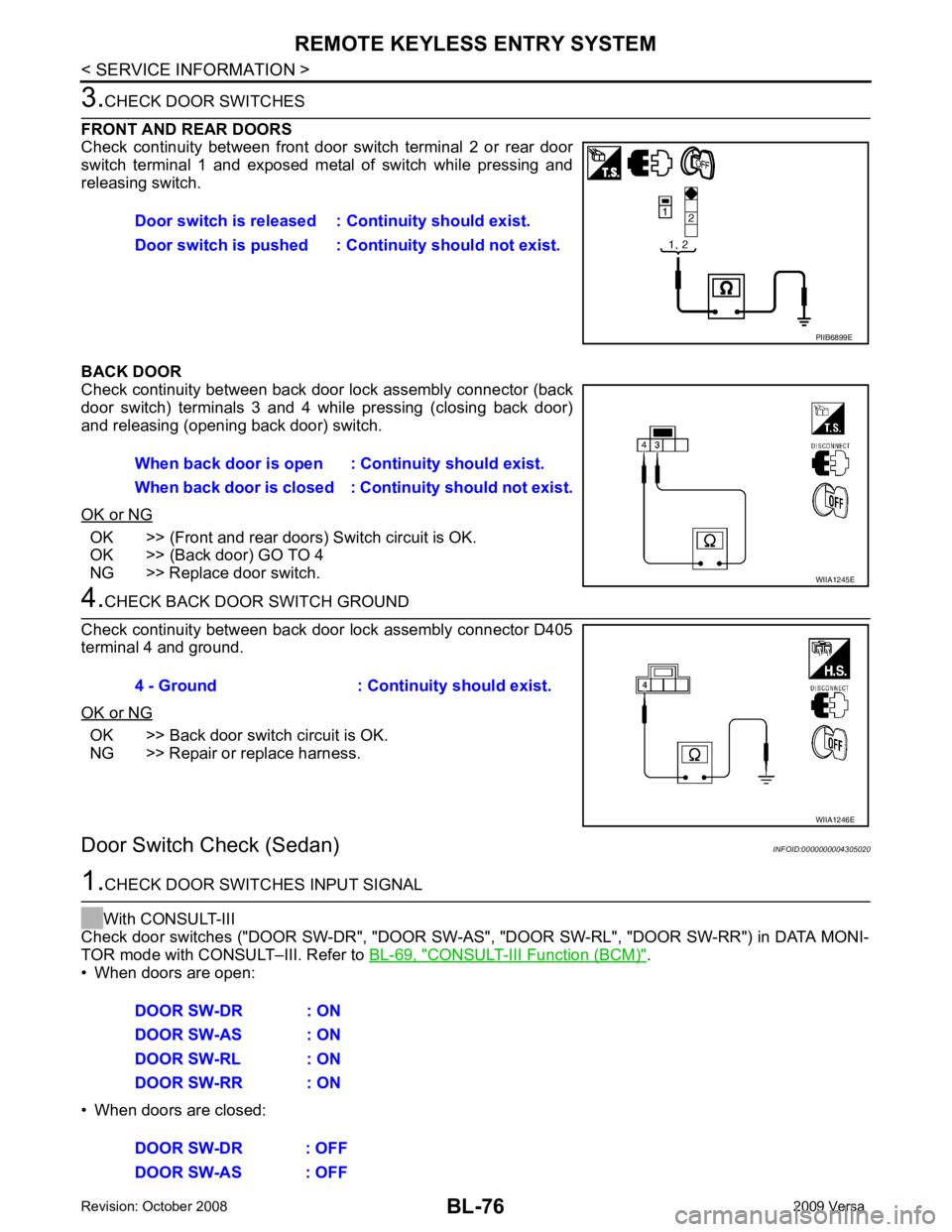
CHECK DOOR SWITCHES
FRONT AND REAR DOORS
Check continuity between front door switch terminal 2 or rear door
switch terminal 1 and exposed metal of switch while pressing and
releasing switch.
BACK DOOR
Check continuity between back door lock assembly connector (back
door switch) terminals 3 and 4 while pressing (closing back door)
and releasing (opening back door) switch.
OK or NG OK >> (Front and rear doors) Switch circuit is OK.
OK >> (Back door) GO TO 4
NG >> Replace door switch. 4.
CHECK BACK DOOR SWITCH GROUND
Check continuity between back door lock assembly connector D405
terminal 4 and ground.
OK or NG OK >> Back door switch circuit is OK.
NG >> Repair or replace harness.
Door Switch Check (Sedan) INFOID:00000000043050201.
CHECK DOOR SWITCHES INPUT SIGNAL
With CONSULT-III
Check door switches ("DOOR SW-DR", "DOOR SW-AS" , "DOOR SW-RL", "DOOR SW-RR") in DATA MONI-
TOR mode with CONSULT–III. Refer to BL-69, " CONSULT-III Function (BCM) " .
• When doors are open:
• When doors are closed: Door switch is released :
Continuity should exist.
Door switch is pushed : Co ntinuity should not exist. PIIB6899E
When back door is open :
Continuity should exist.
When back door is closed : Co ntinuity should not exist. WIIA1245E
4 - Ground : Continuity should exist.
WIIA1246E
DOOR SW-DR : ON
DOOR SW-AS : ON
DOOR SW-RL : ON
DOOR SW-RR : ON
DOOR SW-DR : OFF
DOOR SW-AS : OFF
Page 538 of 4331
REMOTE KEYLESS ENTRY SYSTEM
BL-77
< SERVICE INFORMATION >
C
D E
F
G H
J
K L
M A
B BL
N
O P
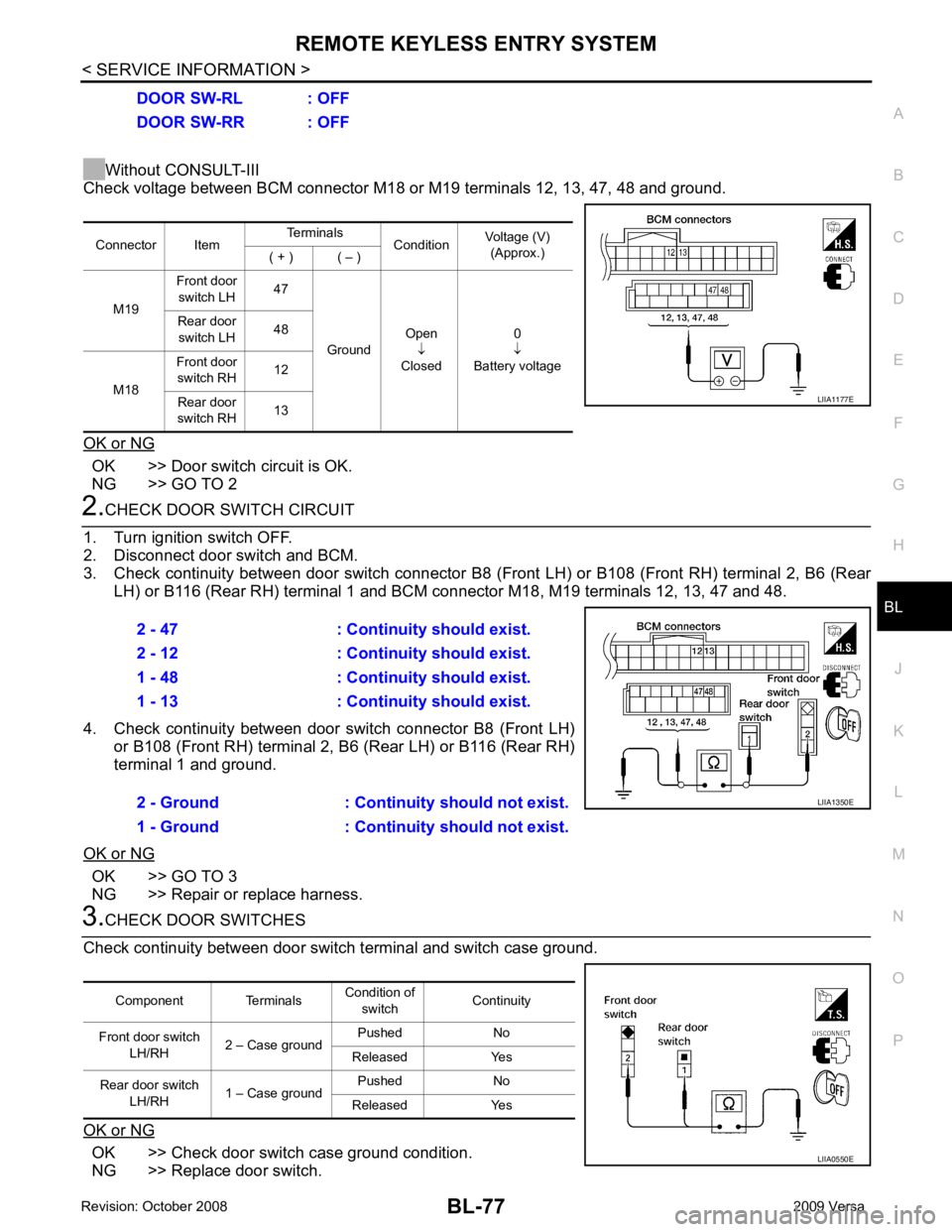
Without CONSULT-III
Check voltage between BCM connector M18 or M19 terminals 12, 13, 47, 48 and ground.
OK or NG OK >> Door switch circuit is OK.
NG >> GO TO 2 2.
CHECK DOOR SWITCH CIRCUIT
1. Turn ignition switch OFF.
2. Disconnect door switch and BCM.
3. Check continuity between door switch connector B8 (F ront LH) or B108 (Front RH) terminal 2, B6 (Rear
LH) or B116 (Rear RH) terminal 1 and BCM connector M18, M19 terminals 12, 13, 47 and 48.
4. Check continuity between door switch connector B8 (Front LH) or B108 (Front RH) terminal 2, B6 (Rear LH) or B116 (Rear RH)
terminal 1 and ground.
OK or NG OK >> GO TO 3
NG >> Repair or replace harness. 3.
CHECK DOOR SWITCHES
Check continuity between door switch terminal and switch case ground.
OK or NG OK >> Check door switch case ground condition.
NG >> Replace door switch. DOOR SW-RL : OFF
DOOR SW-RR : OFF
Connector Item Terminals
ConditionVoltage (V)
(Approx.)
( + ) ( – )
M19 Front door
switch LH 47
Ground Open
↓
Closed 0
↓
Battery voltage
Rear door
switch LH 48
M18 Front door
switch RH 12
Rear door
switch RH 13 LIIA1177E
2 - 47 : Continuity should exist.
2 - 12 : Continuity should exist.
1 - 48 : Continuity should exist.
1 - 13 : Continuity should exist.
2 - Ground : Continuity should not exist.
1 - Ground : Continuity should not exist. LIIA1350E
Component Terminals
Condition of
switch Continuity
Front door switch LH/RH 2 – Case ground Pushed No
Released Yes
Rear door switch LH/RH 1 – Case ground Pushed No
Released Yes LIIA0550E
Page 539 of 4331
BL-78< SERVICE INFORMATION >
REMOTE KEYLESS ENTRY SYSTEM
Key Switch (I nsert) Check INFOID:00000000043050211.
CHECK KEY SWITCH INPUT SIGNAL
With CONSULT-III
Check key switch "KEY ON SW" in DATA MONITOR mode with CONSULT–III. Refer to BL-41, " CONSULT-III
Function (BCM) " .
• When key is inserted into ignition key cylinder:
• When key is removed from ignition key cylinder:
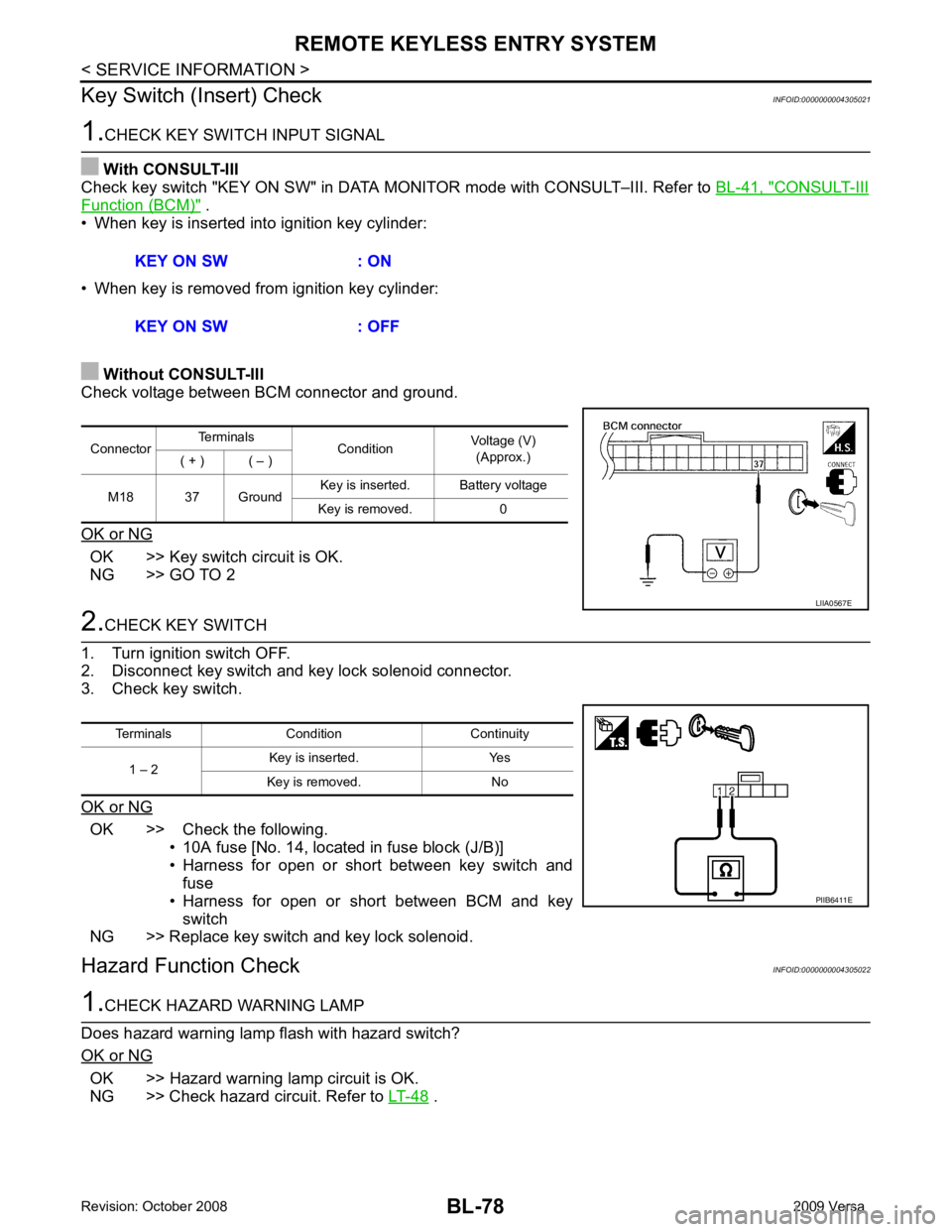
Without CONSULT-III
Check voltage between BCM connector and ground.
OK or NG OK >> Key switch circuit is OK.
NG >> GO TO 2 2.
CHECK KEY SWITCH
1. Turn ignition switch OFF.
2. Disconnect key switch and key lock solenoid connector.
3. Check key switch.
OK or NG OK >> Check the following.
• 10A fuse [No. 14, located in fuse block (J/B)]
• Harness for open or short between key switch and fuse
• Harness for open or short between BCM and key switch
NG >> Replace key switch and key lock solenoid.
Hazard Function Check INFOID:00000000043050221.
CHECK HAZARD WARNING LAMP
Does hazard warning lamp flash with hazard switch?
OK or NG OK >> Hazard warning lamp circuit is OK.
NG >> Check hazard circuit. Refer to LT-48 .
KEY ON SW : ON
KEY ON SW : OFF Connector
Terminals
ConditionVoltage (V)
(Approx.)
( + ) ( – )
M18 37 Ground Key is inserted. Battery voltage
Key is removed. 0 LIIA0567E
Terminals Condition Continuity
1 – 2 Key is inserted. Yes
Key is removed. No PIIB6411E
Page 541 of 4331
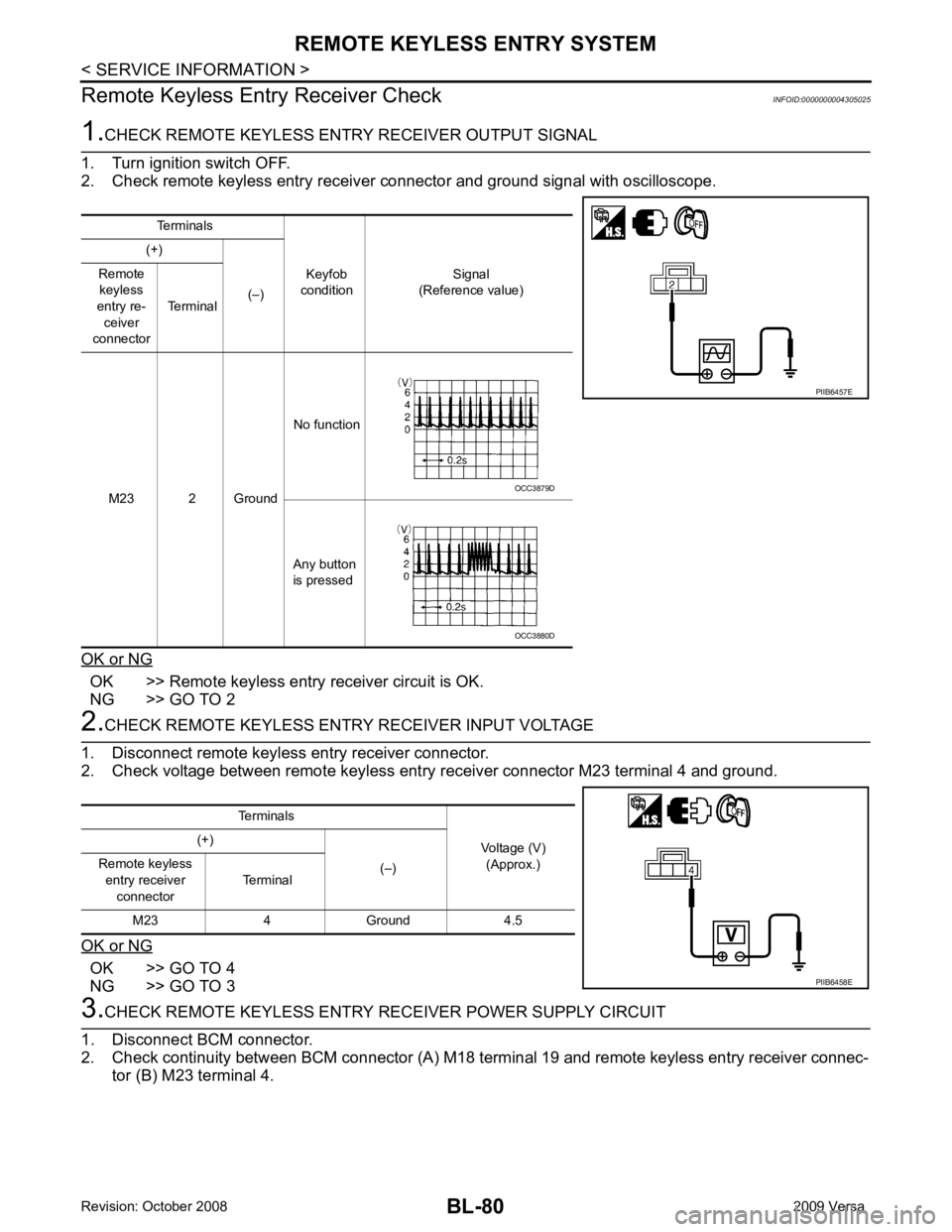
OK >> Remote keyless entry receiver circuit is OK.
NG >> GO TO 2 OK >> GO TO 4
NG >> GO TO 3 OCC3880D
Terminals Voltage (V)(Approx.)
(+)
(–)
Remote keyless
entry receiver connector Terminal
M23 4 Ground 4.5
Page 543 of 4331
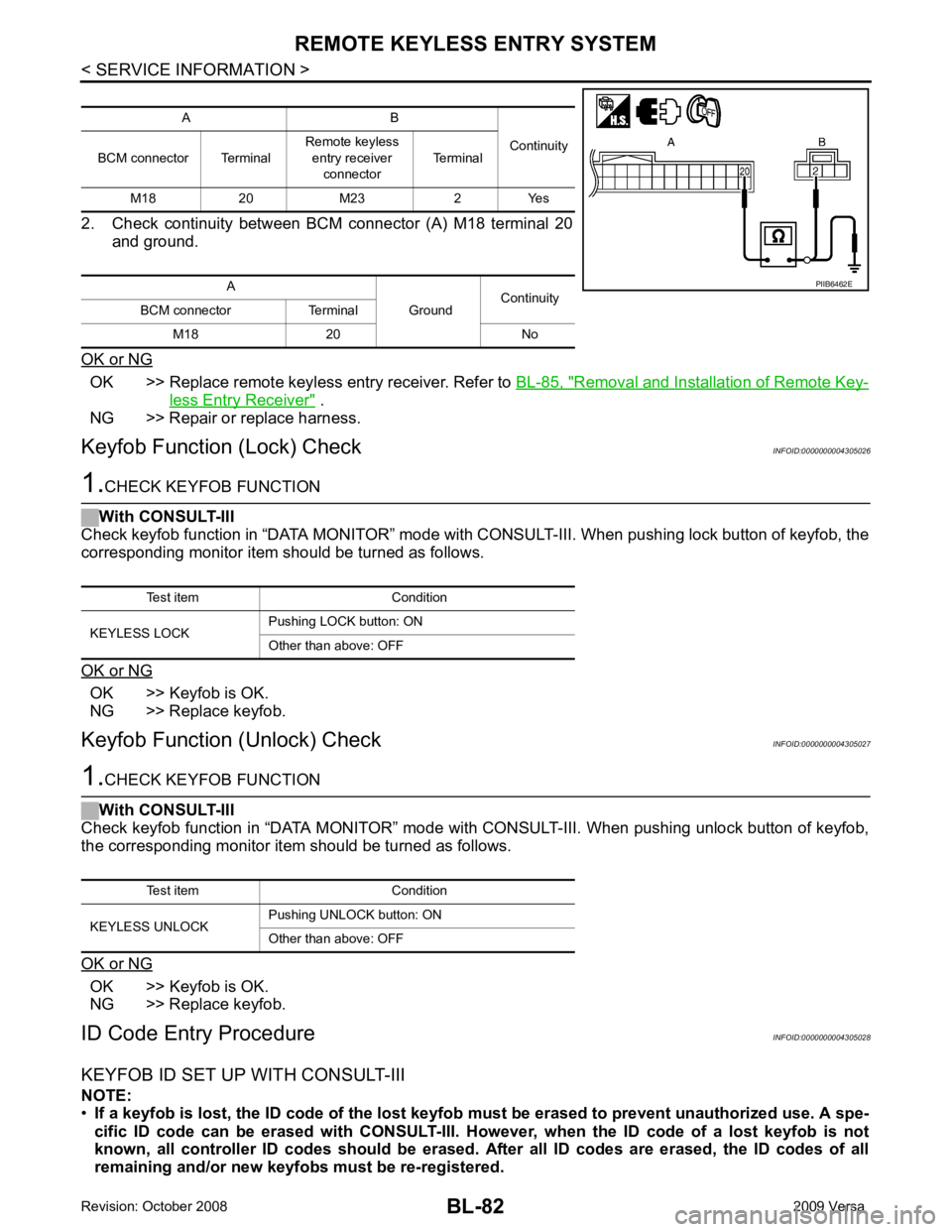
OK >> Replace remote keyless entry receiver. Refer to
BL-85, " Removal and Installation of Remote Key-
less Entry Receiver " .
NG >> Repair or replace harness.
Keyfob Function (Lock) Check INFOID:0000000004305026OK >> Keyfob is OK.
NG >> Replace keyfob.
Keyfob Function (Unlock) Check INFOID:0000000004305027OK >> Keyfob is OK.
NG >> Replace keyfob.
ID Code Entry Procedure INFOID:0000000004305028
KEYFOB ID SET UP WITH CONSULT-III
NOTE:
• If a keyfob is lost, the ID code of the lost keyfob must be erased to prevent unauthorized use. A spe-
cific ID code can be erased with CONSULT-III. Ho wever, when the ID code of a lost keyfob is not
known, all controller ID codes should be erased. After all ID codes are erased, the ID codes of all
remaining and/or new keyfobs must be re-registered. A B
Continuity
BCM connector Terminal Remote keyless
entry receiver
connector Terminal
M18 20 M23 2 Yes
A GroundContinuity
BCM connector Terminal
M18 20 No Test item Condition
KEYLESS UNLOCK Pushing UNLOCK button: ON
Other than above: OFF
Page 546 of 4331
BL
N
O P
• When registering an additional keyfob, the existing ID codes
in memory may or may not be erased. If five ID
codes are stored in memory, when an additional code is registered, only the oldest code is erased. If less
than five ID codes are stored in memory, when an additional ID code is registered, the new ID code is added
and no ID codes are erased.
• If you need to activate more than two additional new keyfobs, repeat the procedure “Additional ID code
entry” for each new keyfob.
• Entry of maximum five ID codes is allowed. When mo re than five ID codes are entered, the oldest ID code
will be erased.
• Even if same ID code that is already in the memory is input, the same ID code can be entered. The code is
counted as an additional code.
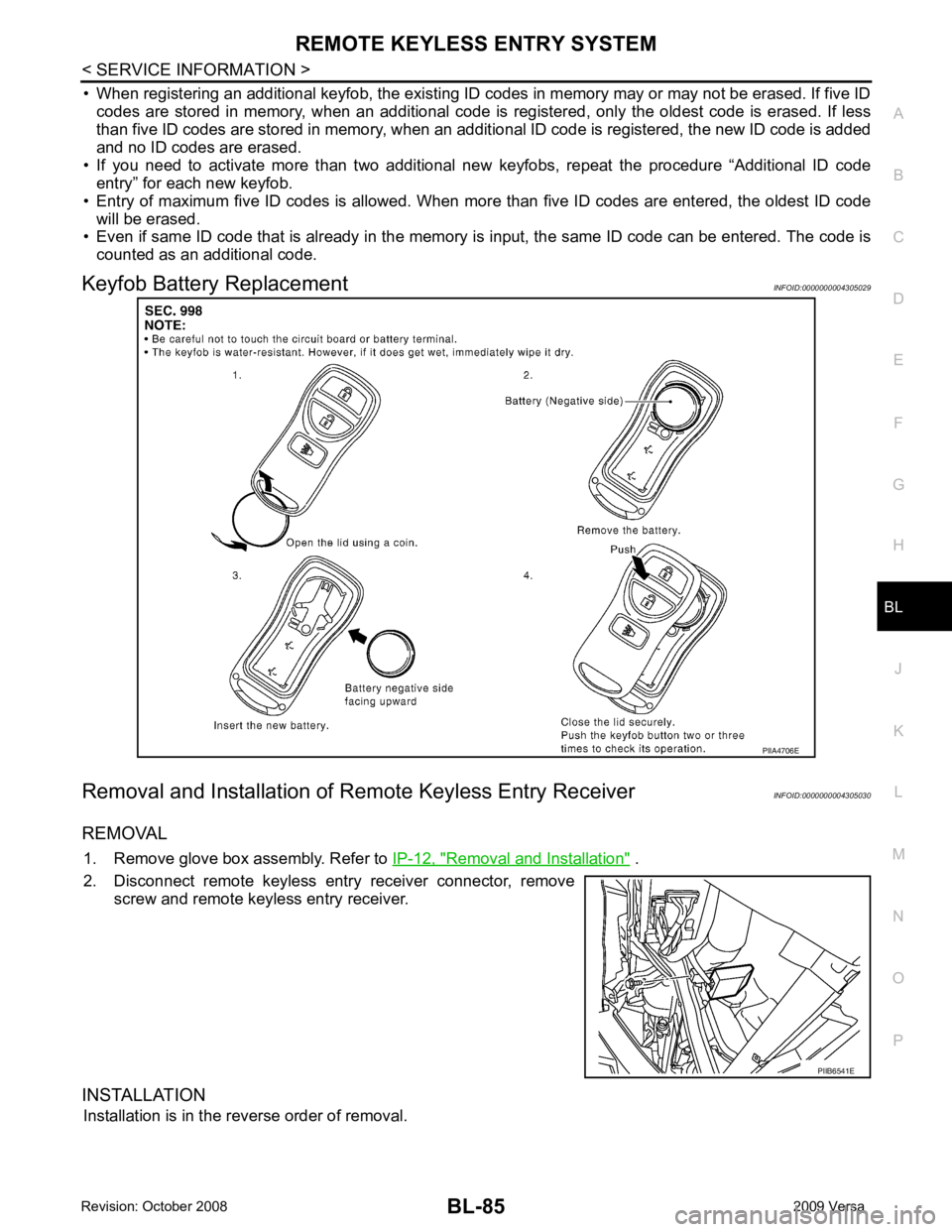
Keyfob Battery Replacement INFOID:0000000004305029
Removal and Installation of Re mote Keyless Entry Receiver INFOID:0000000004305030
REMOVAL 1. Remove glove box assembly. Refer to IP-12, " Removal and Installation " .
2. Disconnect remote keyless entry receiver connector, remove screw and remote keyless entry receiver.
INSTALLATION Installation is in the reverse order of removal. PIIB6541E