2009 NISSAN LATIO center console
[x] Cancel search: center consolePage 1293 of 4331
![NISSAN LATIO 2009 Service Repair Manual KEY INTERLOCK CABLE
CVT-349
< SERVICE INFORMATION >
[RE0F08B] D
E
F
G H
I
J
K L
M A
B CVT
N
O P
6. Temporarily install the adjust holder (A) to the key interlock rod
(B).
7. Install the casi](/manual-img/5/57359/w960_57359-1292.png "NISSAN LATIO 2009 Service Repair Manual KEY INTERLOCK CABLE
CVT-349
< SERVICE INFORMATION >
[RE0F08B] D
E
F
G H
I
J
K L
M A
B CVT
N
O P
6. Temporarily install the adjust holder (A) to the key interlock rod
(B).
7. Install the casi")
KEY INTERLOCK CABLE
CVT-349
< SERVICE INFORMATION >
[RE0F08B] D
E
F
G H
I
J
K L
M A
B CVT
N
O P
6. Temporarily install the adjust holder (A) to the key interlock rod
(B).
7. Install the casing cap (C) to the cable bracket (D) on the control device assembly.
CAUTION:
• Do not bend or twist key interlock cable excessively when
installing.
• After installing key interlo ck cable to cable bracket (D) on
control device assembly, make sure casing caps (C) is
firmly secured in cable bracket (D) on control device
assembly.
• If casing cap (C) is loose [less than 39.2 N (4.0 kg, 8.8 lb)
removing force], replace key interlock cable.
8. Slide the slider (A) toward the key interlock rod (D) while press- ing the pull lock (B) down to securely connect the adjust holder
(C) with the key interlock rod (D).
CAUTION:
• Do not press tabs when holding slider (A).
• Do not apply any side to side force to key interlock rod (D)
when sliding slider (A).
9. Secure the key interlock cable (1) with the clip (A).
10. Install steering column cover (upper and lower) and instrument lower finisher. Refer to IP-11 .
11. Install the center console assembly. Refer to IP-11 .
12. Install the selector lever knob. Refer to CVT-344, " Selector
Lever Knob Removal and Installation " .
13. Check shift lock system. Refer to CVT-335, " Description " . SCIA6188E
SCIA6978E
SCIA6973E
Page 2936 of 4331
EI
N
O P
FLOOR TRIM
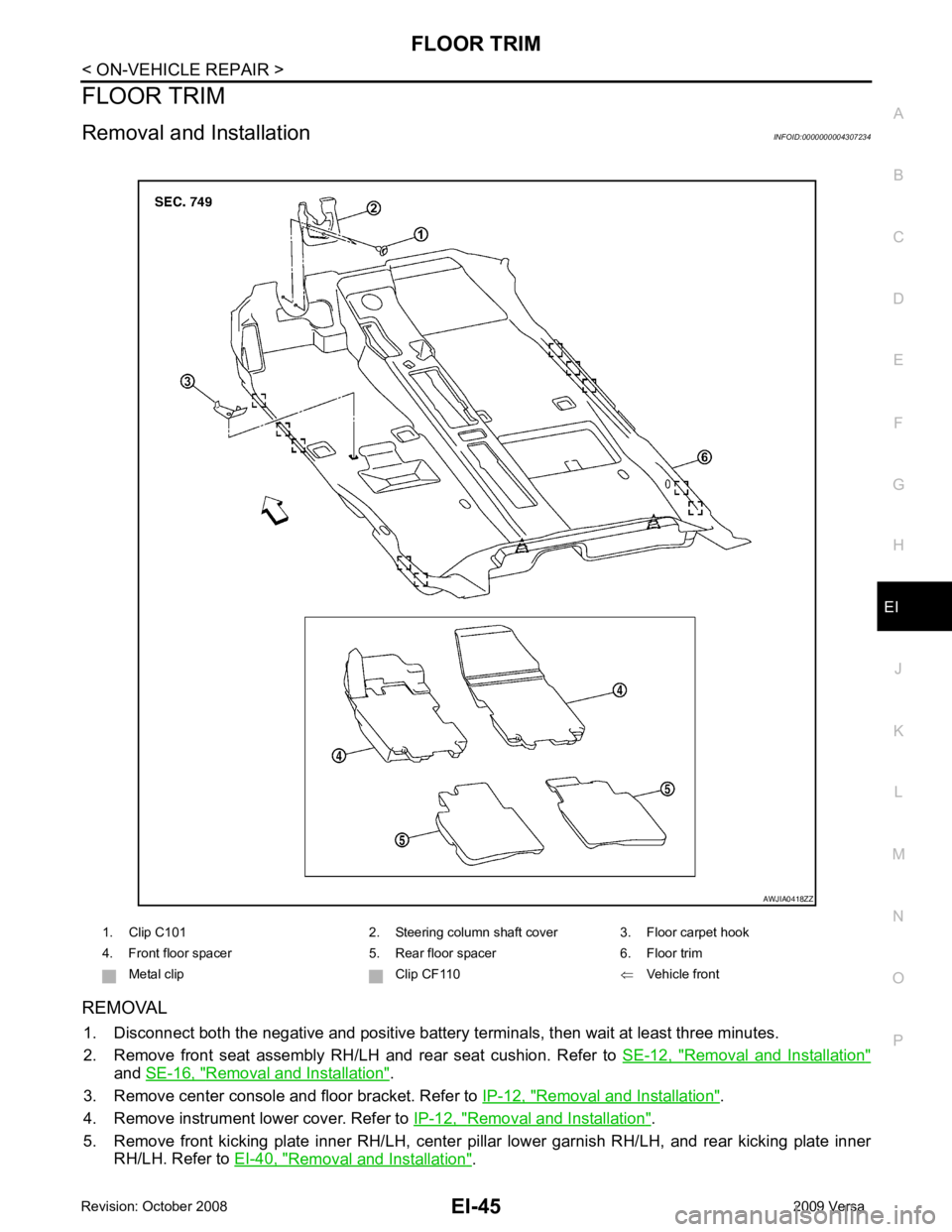
Removal and Installation INFOID:0000000004307234
REMOVAL 1. Disconnect both the negative and positive battery te rminals, then wait at least three minutes.
2. Remove front seat assembly RH/LH and rear seat cushion. Refer to SE-12, " Removal and Installation "
and
SE-16, " Removal and Installation " .
3. Remove center console and floor bracket. Refer to IP-12, " Removal and Installation " .
4. Remove instrument lower cover. Refer to IP-12, " Removal and Installation " .
5. Remove front kicking plate inner RH/LH, center pillar lower garnish RH/LH, and rear kicking plate inner
RH/LH. Refer to EI-40, " Removal and Installation " .
1. Clip C101 2. Steering column shaft cover 3. Floor carpet hook
4. Front floor spacer 5. Rear floor spacer 6. Floor trim Metal clip Clip CF110 ⇐Vehicle front
Page 2940 of 4331
EI
N
O P
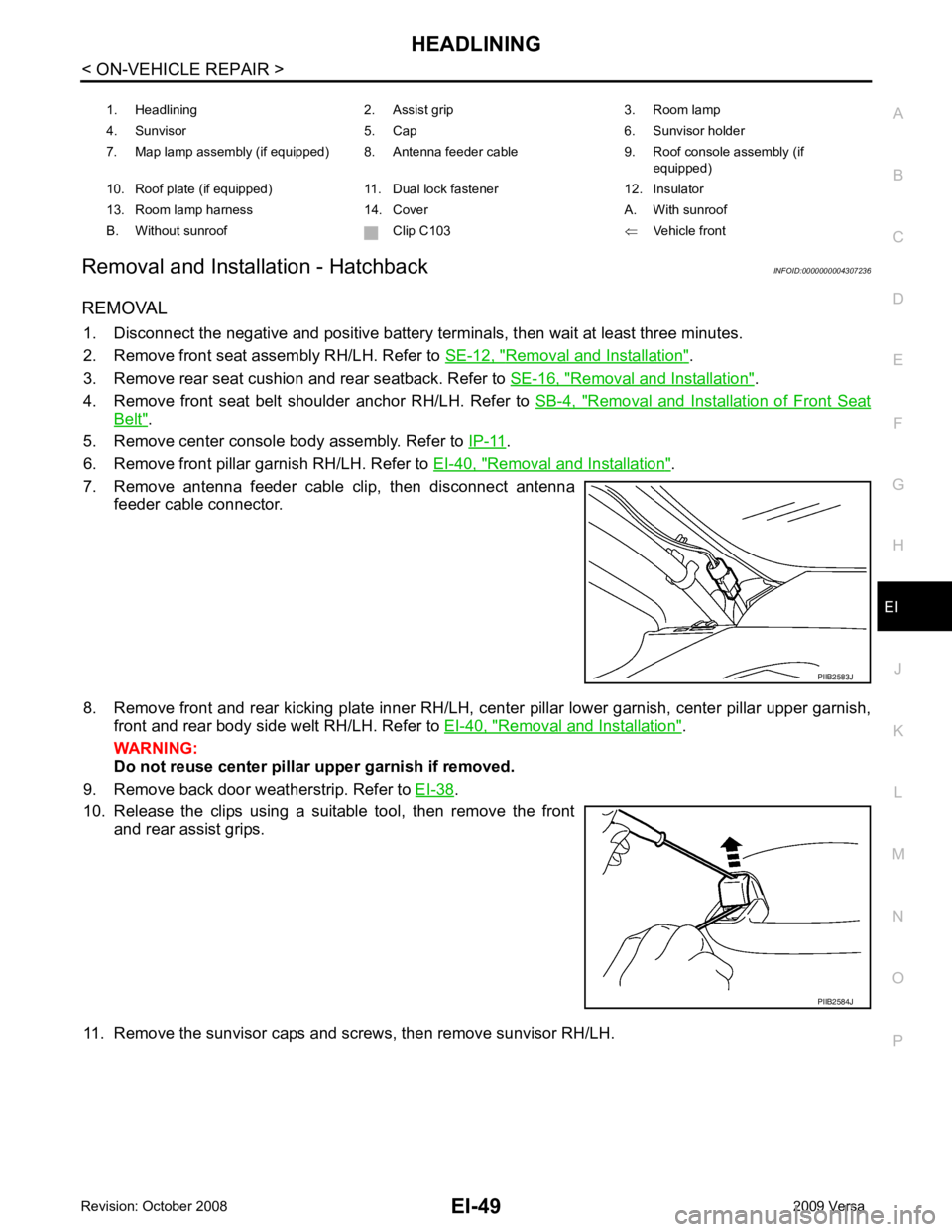
Removal and Installation - Hatchback
INFOID:0000000004307236
REMOVAL 1. Disconnect the negative and positive battery term inals, then wait at least three minutes.
2. Remove front seat assembly RH/LH. Refer to SE-12, " Removal and Installation " .
3. Remove rear seat cushion and rear seatback. Refer to SE-16, " Removal and Installation " .
4. Remove front seat belt shoulder anchor RH/LH. Refer to SB-4, " Removal and Installation of Front Seat
Belt " .
5. Remove center console body assembly. Refer to IP-11 .
6. Remove front pillar garnish RH/LH. Refer to EI-40, " Removal and Installation " .
7. Remove antenna feeder cable clip, then disconnect antenna feeder cable connector.
8. Remove front and rear kicking plate inner RH/LH, cent er pillar lower garnish, center pillar upper garnish,
front and rear body side welt RH/LH. Refer to EI-40, " Removal and Installation " .
WARNING:
Do not reuse center pillar upper garnish if removed.
9. Remove back door weatherstrip. Refer to EI-38 .
10. Release the clips using a suitable tool, then remove the front and rear assist grips.
11. Remove the sunvisor caps and screws, then remove sunvisor RH/LH. 1. Headlining 2. Assist grip 3. Room lamp
4. Sunvisor 5. Cap 6. Sunvisor holder
7. Map lamp assembly (if equipped) 8. Antenna feeder cable 9. Roof console assembly (if equipped)
10. Roof plate (if equipped) 11. Dual lock fastener 12. Insulator
13. Room lamp harness 14. Cover A. With sunroof
B. Without sunroof Clip C103 ⇐Vehicle front PIIB2584J
Page 2942 of 4331
HEADLINING
EI-51
< ON-VEHICLE REPAIR >
C
D E
F
G H
J
K L
M A
B EI
N
O P
Avoid headlining damage when
installing by inserting rear clips first during assembly.
Removal and Installation - Sedan INFOID:0000000004307237
REMOVAL 1. Disconnect the negative and positive battery term inals, then wait at least three minutes.
2. Remove front seat assembly RH/LH. Refer to SE-12, " Removal and Installation " .
3. Remove rear seat cushion and rear seatback. Refer to SE-16, " Removal and Installation " .
4. Remove front seat belt shoulder anchor RH/LH. Refer to SB-4, " Removal and Installation of Front Seat
Belt " .
5. Remove center console body assembly. Refer to IP-11 .
6. Remove front pillar garnish RH/LH. Refer to EI-40, " Removal and Installation " .
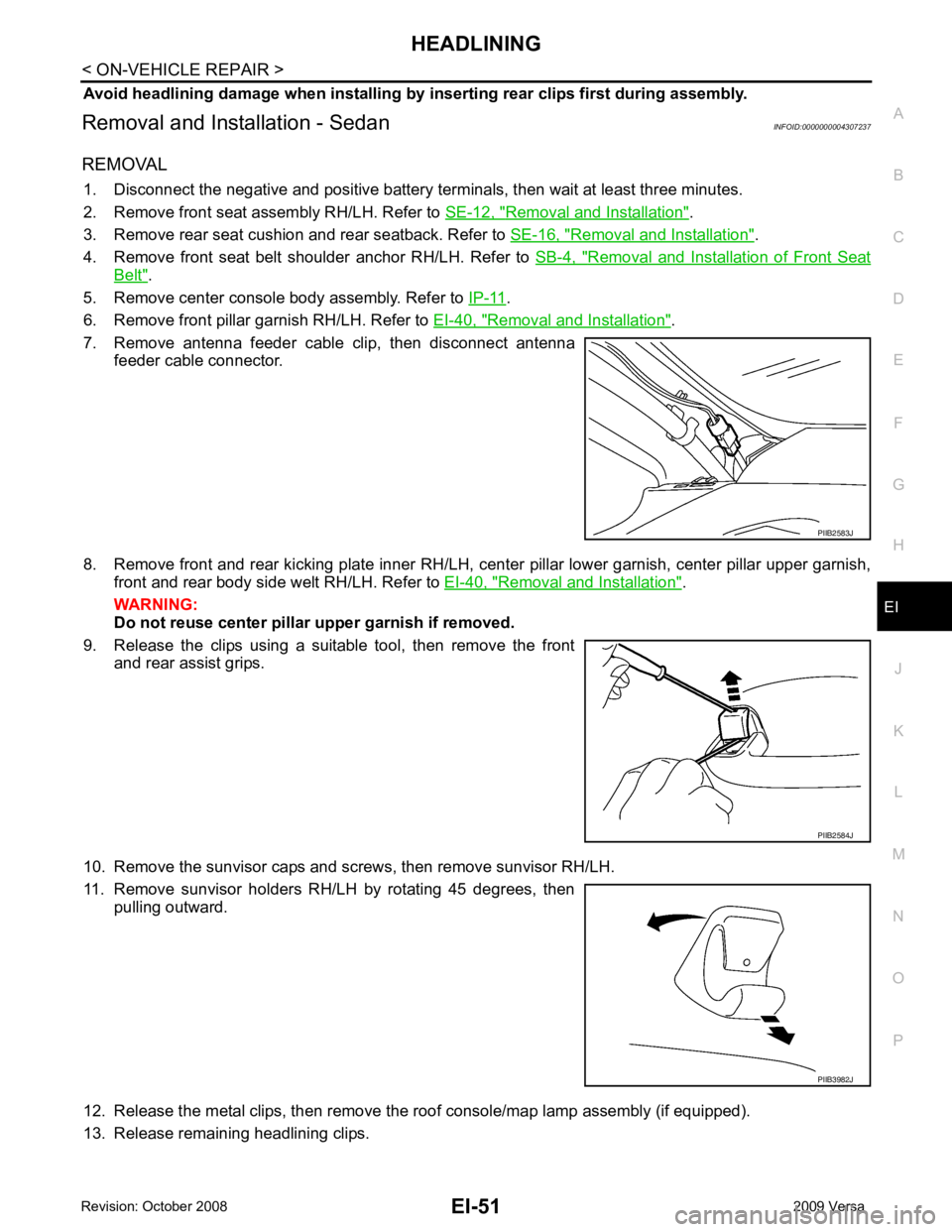
7. Remove antenna feeder cable clip, then disconnect antenna feeder cable connector.
8. Remove front and rear kicking plate inner RH/LH, cent er pillar lower garnish, center pillar upper garnish,
front and rear body side welt RH/LH. Refer to EI-40, " Removal and Installation " .
WARNING:
Do not reuse center pillar upper garnish if removed.
9. Release the clips using a suitable tool, then remove the front and rear assist grips.
10. Remove the sunvisor caps and screws, then remove sunvisor RH/LH.
11. Remove sunvisor holders RH/LH by rotating 45 degrees, then pulling outward.
12. Release the metal clips, then remove the roof console/map lamp assembly (if equipped).
13. Release remaining headlining clips. PIIB2583J
PIIB2584J
PIIB3982J
Page 2943 of 4331
EI-52< ON-VEHICLE REPAIR >
HEADLINING
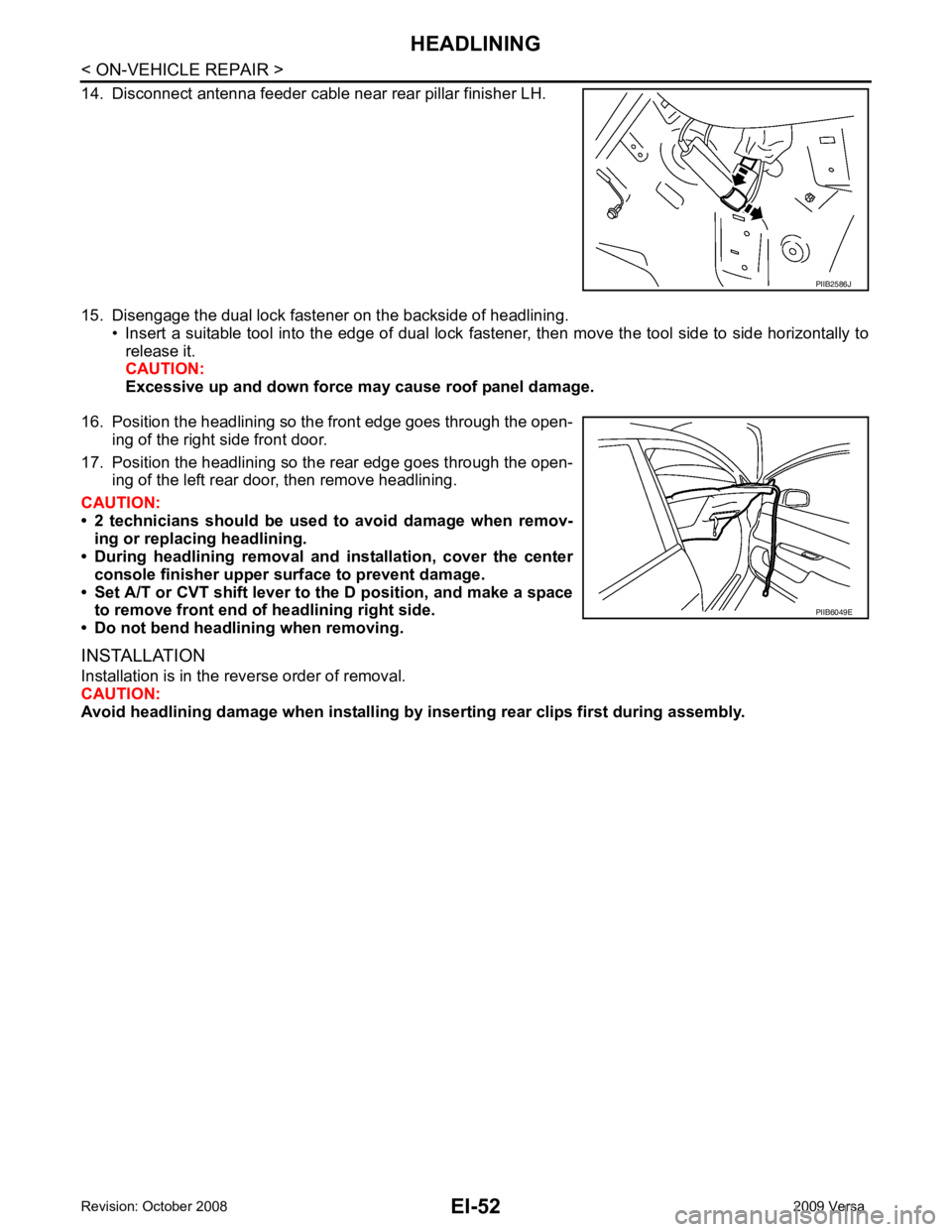
14. Disconnect antenna feeder cable near rear pillar finisher LH.
15. Disengage the dual lock fastener on the backside of headlining. • Insert a suitable tool into the edge of dual lock fastener, then move the tool side to side horizontally to
release it.
CAUTION:
Excessive up and down force may cause roof panel damage.
16. Position the headlining so the front edge goes through the open- ing of the right side front door.
17. Position the headlining so the rear edge goes through the open- ing of the left rear door, then remove headlining.
CAUTION:
• 2 technicians should be used to avoid damage when remov-
ing or replacing headlining.
• During headlining removal and installation, cover the center
console finisher upper surface to prevent damage.
• Set A/T or CVT shift lever to the D position, and make a space to remove front end of headlining right side.
• Do not bend headlining when removing.
INSTALLATION
Installation is in the reverse order of removal.
CAUTION:
Avoid headlining damage when installing by inserting rear clips first during assembly. PIIB2586J
PIIB6049E
Page 3377 of 4331
IP
N
O P
The following materials, not found in the kit, can also be used to repair squeaks and rattles.
UHMW (TEFLON) TAPE
Insulates where slight movement is present. Ideal for instrument panel applications.
SILICONE GREASE
Used in place of UHMW tape that will be visible or not fit.
Note: Will only last a few months.
SILICONE SPRAY
Use when grease cannot be applied.
DUCT TAPE
Use to eliminate movement.
CONFIRM THE REPAIR Confirm that the cause of a noise is repaired by test driving the vehicle. Operate the vehicle under the same
conditions as when the noise originally occurred. Refer to the notes on the Diagnostic Worksheet.
Generic Squeak and Rattle Troubleshooting INFOID:0000000004307245
Refer to Table of Contents for specific component removal and installation information.
INSTRUMENT PANEL Most incidents are caused by contact and movement between:
1. The cluster lid A and instrument panel
2. Acrylic lens and combination meter housing
3. Instrument panel to front pillar garnish
4. Instrument panel to windshield
5. Instrument panel mounting pins
6. Wiring harnesses behind the combination meter
7. A/C defroster duct and duct joint
These incidents can usually be located by tapping or moving the components to duplicate the noise or by
pressing on the components while driving to stop the noi se. Most of these incidents can be repaired by apply-
ing felt cloth tape or silicone spray (in hard to reach areas). Urethane pads can be used to insulate wiring har-
ness.
CAUTION:
Do not use silicone spray to isolate a squeak or ra ttle. If you saturate the area with silicone, you will
not be able to recheck the repair.
CENTER CONSOLE Components to pay attention to include:
1. Shifter assembly cover to finisher
2. A/C control unit and cluster lid C
3. Wiring harnesses behind audio and A/C control unit
The instrument panel repair and isolation pr ocedures also apply to the center console.
DOORS Pay attention to the:
1. Finisher and inner panel making a slapping noise
2. Inside handle escutcheon to door finisher
3. Wiring harnesses tapping
4. Door striker out of alignment causing a popping noise on starts and stops
Tapping or moving the components or pressing on them wh ile driving to duplicate the conditions can isolate
many of these incidents. You can usually insulate the ar eas with felt cloth tape or insulator foam blocks from
the NISSAN Squeak and Rattle Kit (J-43980) to repair the noise.
TRUNK Trunk noises are often caused by a loose jack or loose items put into the trunk by the owner.
In addition look for:
1. Trunk lid bumpers out of adjustment
2. Trunk lid striker out of adjustment
Page 3382 of 4331
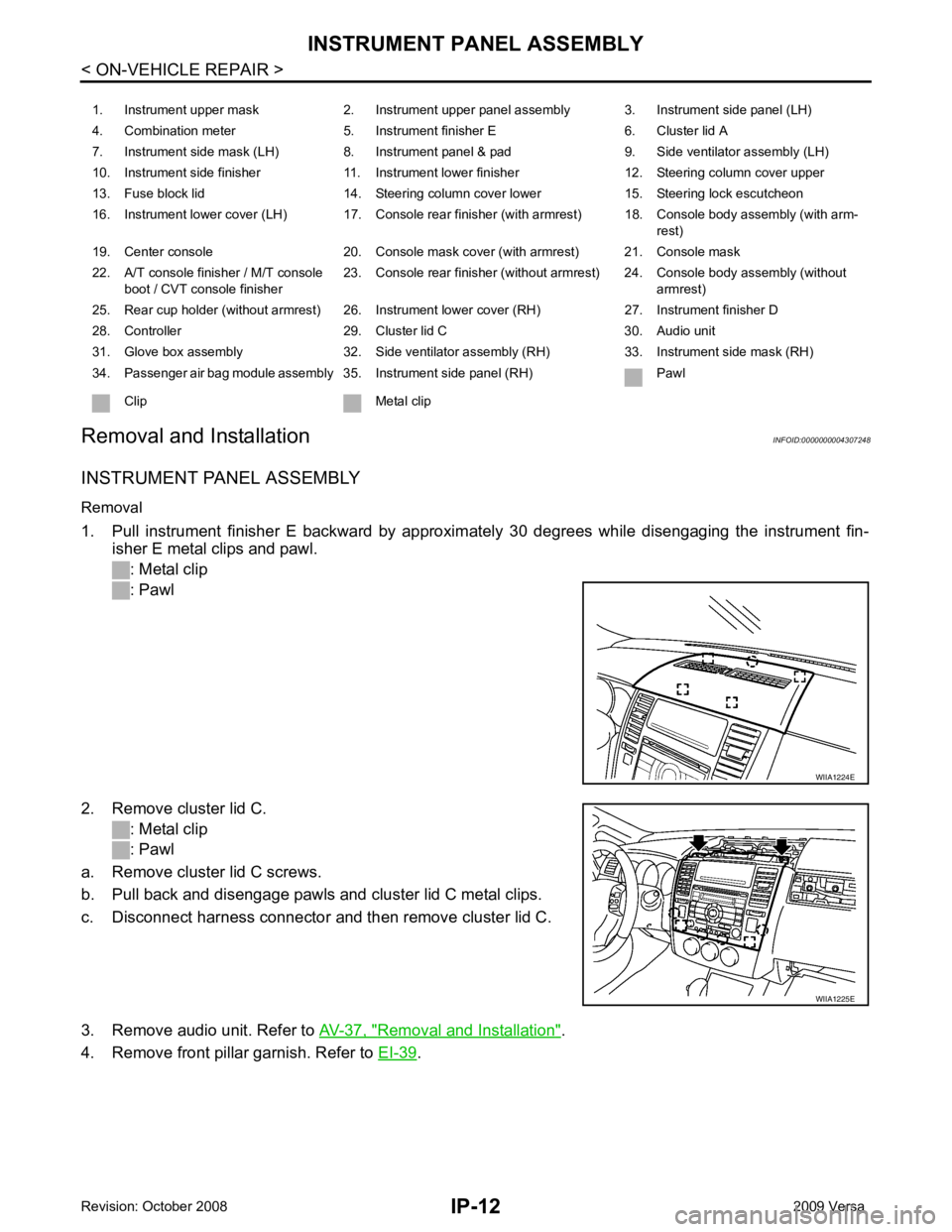
Removal and Installation " .
4. Remove front pillar garnish. Refer to EI-39 .
1. Instrument upper mask 2. Instrument upper panel assembly 3. Instrument side panel (LH)
4. Combination meter 5. Instrument finisher E 6. Cluster lid A
7. Instrument side mask (LH) 8. Instrument panel & pad 9. Side ventilator assembly (LH)
10. Instrument side finisher 11. Instrument lower finisher 12. Steering column cover upper
13. Fuse block lid 14. Steering column cover lower 15. Steering lock escutcheon
16. Instrument lower cover (LH) 17. Console rear finisher (with armrest) 18. Console body assembly (with arm- rest)
19. Center console 20. Console mask cover (with armrest) 21. Console mask
22. A/T console finisher / M/T console boot / CVT console finisher 23. Console rear finisher (without armrest) 24. Console body assembly (without
armrest)
25. Rear cup holder (without armrest) 26. Instrument lower cover (RH) 27. Instrument finisher D
28. Controller 29. Cluster lid C 30. Audio unit
31. Glove box assembly 32. Side ventilator assembly (RH) 33. Instrument side mask (RH)
34. Passenger air bag module assembly 35. Instrument side panel (RH) Pawl
Clip Metal clip WIIA1225E
Page 3391 of 4331
IP
N
O P
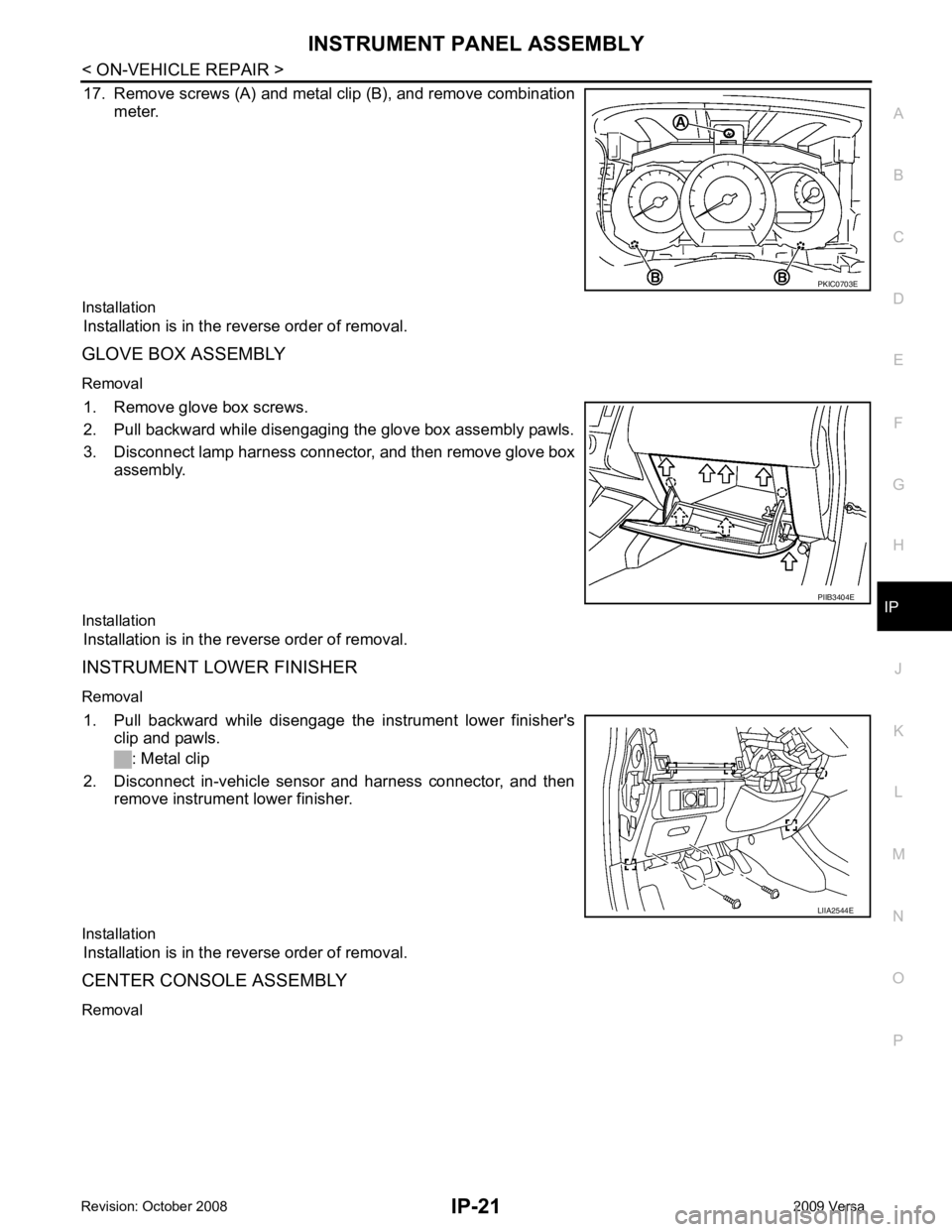
17. Remove screws (A) and metal clip (B), and remove combination
meter.
Installation Installation is in the reverse order of removal.
GLOVE BOX ASSEMBLY
Removal 1. Remove glove box screws.
2. Pull backward while disengaging the glove box assembly pawls.
3. Disconnect lamp harness connector, and then remove glove box assembly.
Installation Installation is in the reverse order of removal.
INSTRUMENT LOWER FINISHER
Removal 1. Pull backward while disengage the instrument lower finisher's clip and pawls.
: Metal clip
2. Disconnect in-vehicle sensor and harness connector, and then remove instrument lower finisher.
Installation Installation is in the reverse order of removal.
CENTER CONSOLE ASSEMBLY
Removal PIIB3404E