Page 170 of 313
CAUTION
�Keep the antenna as far away as
possible from the electronic control
modules.
�Keep the antenna wire more than 8 in
(20 cm) away from the electronic con-
trol system harnesses. Do not route
the antenna wire next to any harness.
�Adjust the antenna standing-wave
ratio as recommended by the manu-
facturer.
�Connect the ground wire from the CB
radio chassis to the body.
�For details, consult a NISSAN dealer.
WARNING
�Use a phone after stopping your ve-
hicle in a safe location. If you have to
use a phone while driving, exercise
extreme caution at all times so full
attention may be given to vehicle
operation.
�If you find yourself unable to devote
full attention to vehicle operation
while talking on the phone, pull off
the road to a safe location and stop
your vehicle before doing so.
CAUTION
To avoid draining the vehicle battery,
use a phone after starting the engine.
CAR PHONE OR CB RADIOBLUETOOTH
HANDS-FREE
PHONE SYSTEM WITH NISSAN
VOICE RECOGNITION (if so
equipped)
Display screen, heater, air conditioner and audio systems
4-31
Page 172 of 313
wireless connection, the battery
power of the cellular phone may discharge
quicker than usual.
If the Bluetooth
Hands-Free Phone System
seems to be malfunctioning, see “Troubleshoot-
ing guide” later in this section. You can also visit
www.nissanusa.com/bluetooth for troubleshoot-
ing help.
Some cellular phones or other devices may
cause interference or a buzzing noise to come
from the audio system speakers. Storing the
device in a different location may reduce or
eliminate the noise.
Refer to the cellular phone Owner’s Manual
regarding the telephone charges, cellular phone
antenna and body, etc.
This device complies with Part 15 of the
FCC Rules. Operation is subject to the
following two conditions: (1) this device
may not cause harmful interference, and
(2) this device must accept any interference
received, including interference that may
cause undesired operation.
FCC Radiation Exposure Statement:
This equipment complies with FCC radiation
exposure limits set forth for an uncontrolled
environment. This equipment should be installed
and operated with minimum distance 8 in (20cm) between the radiator and your body. This
Transmitter must not be co-located or operating
in conjunction with any other antenna or trans-
mitter.
USING THE SYSTEMThe NISSAN Voice Recognition system allows
hands-free operation of the Bluetooth
Hands-
Free Phone System.
If the vehicle is in motion, some commands may
not be available so full attention may be given to
vehicle operation.
InitializationWhen the ignition switch is turned to the ON
position, NISSAN Voice Recognition is initial-
ized, which takes a few seconds. When com-
pleted, the amber light on the overhead console
illuminates and the system is ready to accept
voice commands. If the
button is pushed
before the initialization completes, the system
will announce “Hands-free phone system not
ready” and will not react to voice commands.
Operating tipsTo get the best performance out of the NISSAN
Voice Recognition system, observe the follow-
ing:
�Keep the interior of the vehicle as quiet aspossible. Close the windows to eliminate
surrounding noises (traffic noises, vibration
sounds, etc.), which may prevent the system
from recognizing voice commands correctly.
�
Wait until the tone sounds before speaking a
command. Otherwise, the command will not be
received properly.
�Start speaking a command within 5 seconds
after the tone sounds.
�Speak in a natural voice without pausing
between words.Giving voice commandsTo operate NISSAN Voice Recognition, push
and release the
button located on the
steering wheel. The light on the overhead con-
sole flashes to signal you have entered a voice
recognition (VR) session. After the tone sounds,
speak a command.
The command given is picked up by the micro-
phone, and voice feedback is given when the
command is accepted.
�If you need to hear the available commands
for the current menu again, say “Help” and
the system will repeat them.
�If a command is not recognized, the system
announces, “Command not recognized.
Display screen, heater, air conditioner and audio systems
4-33
Page 174 of 313

Hands-
Free Phone System are located on the steering
wheel.
TALK/PHONE SEND
Push the
button to initiate a VR session
or answer an incoming call.
You can also use the
button to skip
through system feedback and to enter com-
mands during a call. See “List of voice com-
mands” and “During a call” later in this sec-
tion for more information.
MODE/PHONE END
Push the
button to cancel a VR session
or end a call.
GETTING STARTEDThe following procedures will help you get
started using the Bluetooth
Hands-Free Phone
System with NISSAN Voice Recognition. For
additional command options, refer to “List of
voice commands” later in this section.
Choosing a languageYou can interact with the Bluetooth
Hands-
Free Phone System using English, Spanish or
French.
To change the language, perform the following.
1. Press and hold the
button for more
than 5 seconds.
2. The system announces: “Press the PHONE
SEND (
) button for the hands-free
phone system to enter the speaker adapta-
tion mode or press the PHONE END
(
) button to select a different lan-
guage.”
3. Press the
button.
For information on speaker adaptation, see“Speaker adaptation (SA) mode” later in this
section.
4. The system announces the current language
and gives you the option to change the
language to Spanish (in Spanish) or French
(in French). Use the following chart to select
the language.
NOTE:
You must press the
button or the
button within 5 seconds to change
the language.
(TALK/PHONE
SEND)
to selectPress
(MODE/PHONE
END)
to select
English Spanish French
Spanish English French
French English Spanish
5. If you decide not to change the language, do
not press either button. After 5 seconds, the
VR session will end, and the language will not
be changed.
SAA1700
Display screen, heater, air conditioner and audio systems
4-35
Page 188 of 313
CAUTION
�Do not use leaded gasoline. Deposits
from leaded gasoline will seriously
reduce the three-way catalyst’s abil-
ity to help reduce exhaust pollutants.
�Keep your engine tuned up. Malfunc-
tions in the ignition, fuel injection, or
electrical systems can cause overrich
fuel flow into the three-way catalyst,
causing it to overheat. Do not keep
driving if the engine misfires, or if
noticeable loss of performance or
other unusual operating conditions
are detected. Have the vehicle in-
spected promptly by a NISSAN
dealer.�Avoid driving with an extremely low
fuel level. Running out of fuel could
cause the engine to misfire, damag-
ing the three-way catalyst.
�Do not race the engine while warm-
ing it up.
�Do not push or tow your vehicle to
start the engine.
TIRE PRESSURE MONITORING
SYSTEM (TPMS)Each tire, including the spare (if provided),
should be checked monthly when cold and
inflated to the inflation pressure recommended
by the vehicle manufacturer on the vehicle plac-
ard or tire inflation pressure label. (If your vehicle
has tires of a different size than the size indicated
on the vehicle placard or tire inflation pressure
label, you should determine the proper tire infla-
tion pressure for those tires.)
As an added safety feature, your vehicle has
been equipped with a Tire Pressure Monitoring
System (TPMS) that illuminates a low tire pres-
sure telltale when one or more of your tires is
significantly under-inflated. Accordingly, when
the low tire pressure telltale illuminates, you
should stop and check your tires as soon as
Starting and driving
5-3
Page 192 of 313
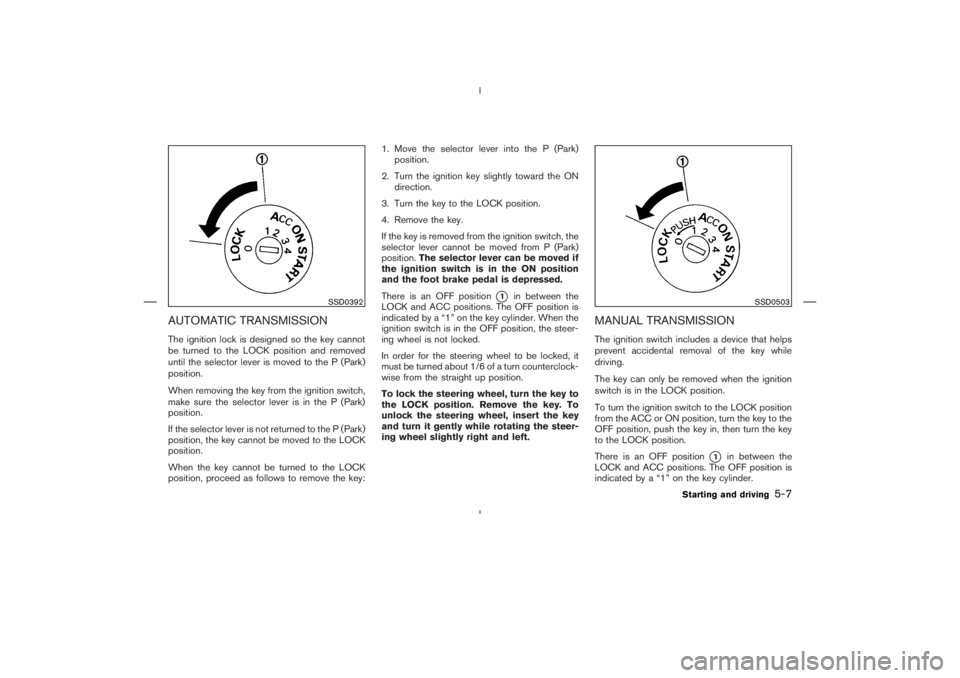
SSD0392
SSD0503
Starting and driving
5-7
Page 195 of 313
CAUTION
When stopping the vehicle on an uphill
grade, do not hold the vehicle by de-
pressing the accelerator pedal. The foot
brake should be used for this purpose.
DRIVING THE VEHICLE5-10
Starting and driving
Page 196 of 313
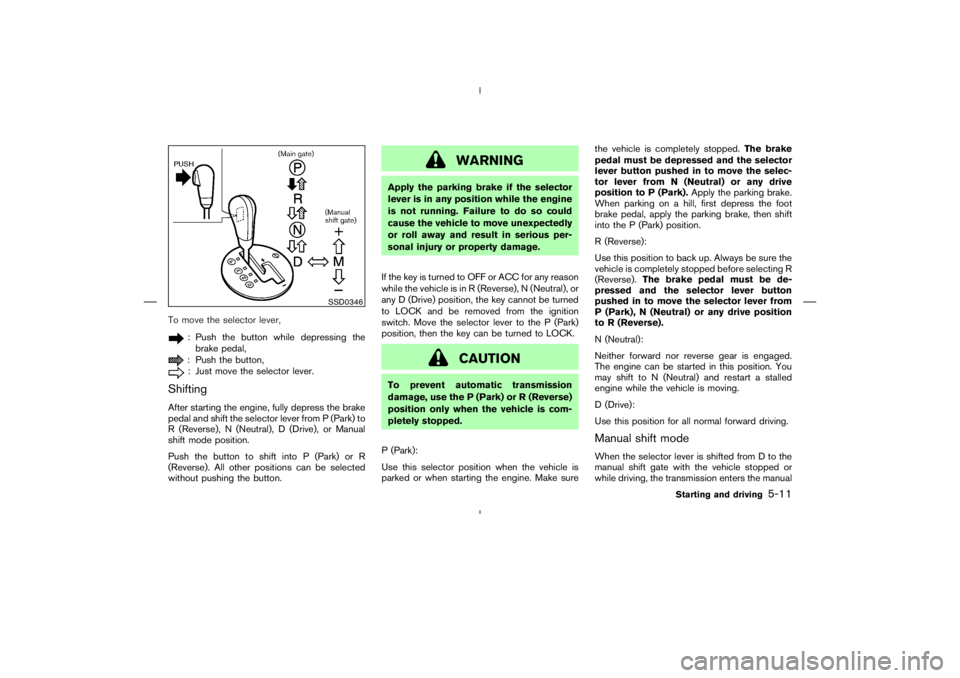
: Push the button while depressing the
brake pedal,: Push the button,: Just move the selector lever.
ShiftingAfter starting the engine, fully depress the brake
pedal and shift the selector lever from P (Park) to
R (Reverse), N (Neutral), D (Drive), or Manual
shift mode position.
Push the button to shift into P (Park) or R
(Reverse). All other positions can be selected
without pushing the button.
SSD0346
Starting and driving
5-11
Page 198 of 313
CAUTION
�Do not rest your foot on the clutch
pedal while driving. This may damage
the clutch.
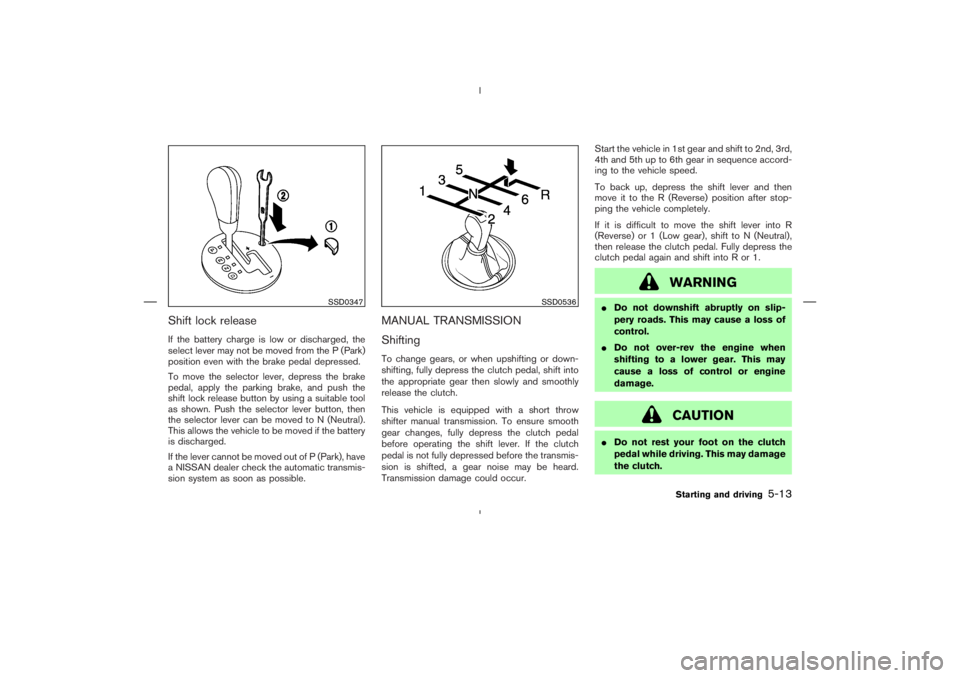
SSD0536
Starting and driving
5-13