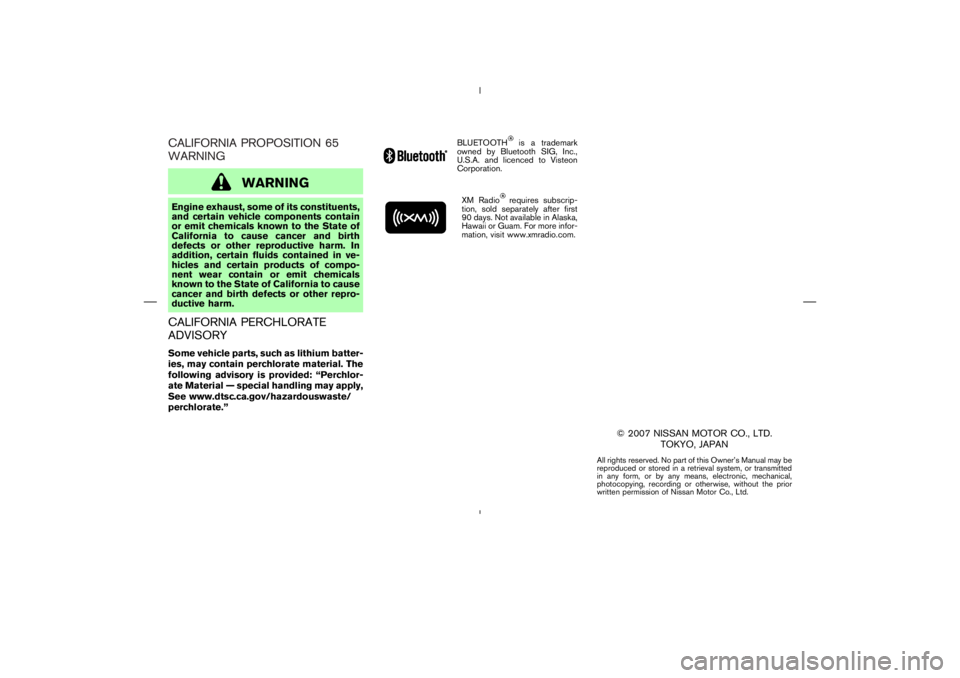
Page 3 of 313
is a trademark
owned by Bluetooth SIG, Inc.,
U.S.A. and licenced to Visteon
Corporation.
XM Radio
requires subscrip-
tion, sold separately after first
90 days. Not available in Alaska,
Hawaii or Guam. For more infor-
mation, visit www.xmradio.com.
© 2007 NISSAN MOTOR CO., LTD.
TOKYO, JAPAN
All rights reserved. No part of this Owner’s Manual may be
reproduced or stored in a retrieval system, or transmitted
in any form, or by any means, electronic, mechanical,
photocopying, recording or otherwise, without the prior
written permission of Nissan Motor Co., Ltd.
Page 106 of 313
Universal Transceiver provides a
convenient way to consolidate the functions of
up to three individual hand-held transmitters into
one built-in device.
HomeLink
Universal Transceiver:
�Will operate most Radio Frequency (RF)
devices such as garage doors, gates, home
and office lighting, entry door locks and se-
curity systems.
�Is powered by your vehicle’s battery. No
separate batteries are required. If the vehi-
cle’s battery is discharged or is discon-
nected, HomeLink
will retain all program-
ming.
Once the HomeLinkUniversal Transceiver
is programmed, retain the original trans-
mitter for future programming procedures
(for example, new vehicle purchases).
Upon sale of the vehicle, the programmed
HomeLink
Universal Transceiver buttons
should be erased for security purposes.
For additional information, refer to “Pro-
gramming HomeLink
” later in this sec-
tion.
WARNING
�Do not use the HomeLink
Universal
Transceiver with any garage door
opener that lacks safety stop and
reverse features as required by fed-
eral safety standards. (These stan-
dards became effective for opener
models manufactured after April 1,
1982). A garage door opener which
cannot detect an object in the path of
a closing garage door and then auto-
matically stop and reverse, does not
meet current federal safety stan-
dards. Using a garage door opener
without these features increases the
risk of serious injury or death.
�During the programming procedure,
your garage door or security gate will
open or close (if the transmitter is
within range). Make sure that people
and objects are clear of the garage
door, gate, etc. that you are
programming.�Your vehicle’s engine should be
turned off while programming the
HomeLink
Universal Transceiver.
PROGRAMMING HomeLinkTo program your HomeLink
Transceiver to op-
erate a garage door, gate, or entry door opener,
home or office lighting, you need to be at the
same location as the device. Note: Garage door
openers (manufactured after 1996) have “rolling
code protection”. To program a garage door
opener equipped with “rolling code protection”;
you will need to use a ladder to get up to the
garage door opener motor to be able to access
the training button.
HomeLink
UNIVERSAL
TRANSCEIVER (if so equipped)
Instruments and controls
2-43
Page 140 of 313
” button.................................... 4-8
Ventilators ............................................................................... 4-8
Center ventilators ............................................................ 4-8
Side ventilators ................................................................ 4-8
Heater and air conditioner (Automatic) .......................... 4-9
Automatic operation .................................................... 4-10
Manual operation .......................................................... 4-10
Operating tips ............................................................... 4-11
Servicing air conditioner .................................................. 4-12
Audio system ....................................................................... 4-12
Radio ............................................................................... 4-12
FM radio reception ...................................................... 4-13AM radio reception ...................................................... 4-13
Satellite (SAT) radio reception (if so equipped) ... 4-13
Audio operation precautions ..................................... 4-14
FM-AM radio with compact disc (CD) player ...... 4-19
FM-AM-SAT radio with compact disc (CD)
changer ........................................................................... 4-23
CD care and cleaning ................................................. 4-29
Steering wheel switch for audio control (if so
equipped)......................................................................... 4-29
Antenna ........................................................................... 4-30
Car phone or CB radio .................................................... 4-31
Bluetooth
Hands-Free Phone System with
NISSAN voice recognition (if so equipped) ............... 4-31
Using the system ........................................................... 4-33
Control buttons .............................................................. 4-35
Getting started ............................................................... 4-35
List of voice commands ............................................... 4-37
Speaker adaptation (SA) mode ................................. 4-42
Troubleshooting guide.................................................. 4-45
Page 159 of 313
,
) or SEEK (
,
) button
to adjust Bass and Treble to the desired level.
Use the TUNE or SEEK button also to adjust
Fader or Balance modes. Fader adjusts the
sound level between the front and rear speakers
and Balance adjusts the sound between the
right and left speakers.
After 10 seconds, the radio or CD display
reappears. Once the sound quality is set to the
desired level, push the AUDIO button repeatedly
until the radio or CD display appears.
or
for manual
tuning. To move quickly through the channels,
push and hold either side of the TUNE button
down for more than 0.5 second.
or
to tune
from high to low or low to high frequencies and
stops at the next broadcasting station.
Page 162 of 313
satellite
radio provider. After receiving the activation
signal, an available channel list will be auto-
matically updated in the radio. Turn the ignition
switch from the LOCK to ACC position to
update the channel list.
Satellite radio is not available in Alaska and
Hawaii.
Audio main operationFor all operation precautions, see “Audio opera-
tion precautions” earlier in this section.
Head unit:
The auto loudness circuit enhances the low
SAA1299
Display screen, heater, air conditioner and audio systems
4-23
Page 163 of 313

,
) or SEEK (
,
) button
to adjust Bass and Treble to the desired level.
Use the TUNE or SEEK button also to adjust
Fader or Balance modes. Fader adjusts the
sound level between the front and rear speakers
and Balance adjusts the sound between the
right and left speakers.
To change the AUDIOP (Audio Pilot) mode to
OFF or ON, push the TUNE or SEEK button.
Once you have adjusted the sound quality to the
desired level, push the AUDIO button repeatedly
until the radio or CD display reappears. Other-
wise, the radio or CD display will automatically
reappear after about 10 seconds.
satellite radio
service subscription is active.
When RADIO band select button is pushed
while the ignition switch is in the ACC or ON, the
radio will come on at the station last played.
The last station/channel played will also come on
when the ON⋅OFF/VOL control knob is pushed
to ON.
If a compact disc is playing when the RADIO
band select button is turned to ON, the compact
disc will automatically be turned off and the last
radio station/channel played will come on.
The FM stereo indicator ST will glow during FM
stereo reception. When the stereo broadcast
signal is weak, the radio will automatically
4-24
Display screen, heater, air conditioner and audio systems
Page 164 of 313
or
for manual
tuning. To move quickly through the channels,
push and hold either side of the TUNE button
down for more than 0.5 second.
or
to tune
from high to low or low to high frequencies and
stops at the next broadcasting station.
(For satellite radio)
Push the SEEK button
or
to seek
channels of the next or previous category.
Page 165 of 313
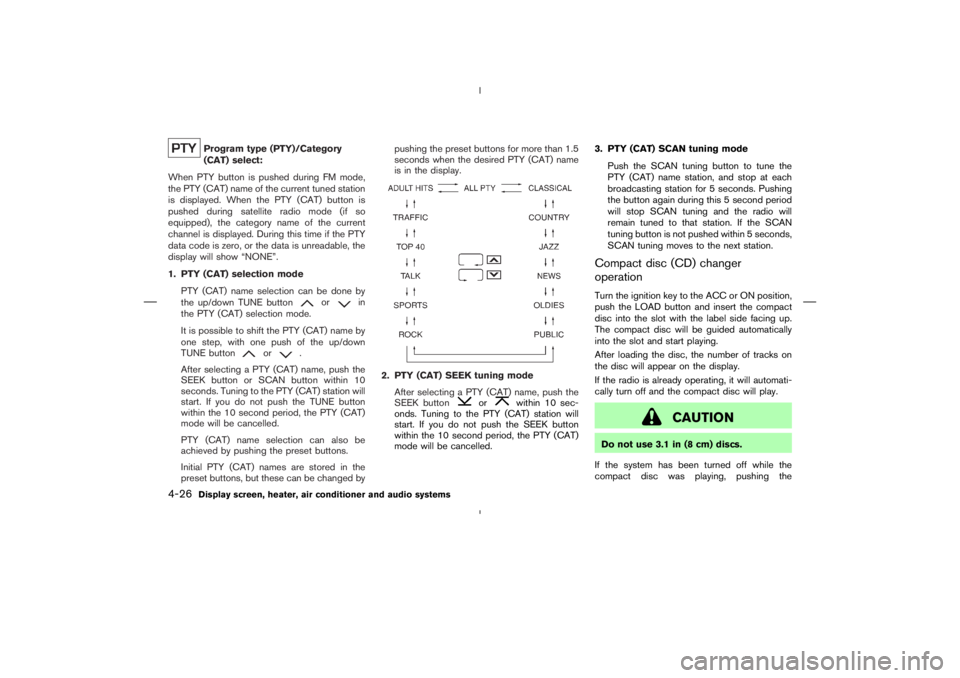
or
in
the PTY (CAT) selection mode.
It is possible to shift the PTY (CAT) name by
one step, with one push of the up/down
TUNE button
or
.
After selecting a PTY (CAT) name, push the
SEEK button or SCAN button within 10
seconds. Tuning to the PTY (CAT) station will
start. If you do not push the TUNE button
within the 10 second period, the PTY (CAT)
mode will be cancelled.
PTY (CAT) name selection can also be
achieved by pushing the preset buttons.
Initial PTY (CAT) names are stored in the
preset buttons, but these can be changed bypushing the preset buttons for more than 1.5
seconds when the desired PTY (CAT) name
is in the display.
or
within 10 sec-
onds. Tuning to the PTY (CAT) station will
start. If you do not push the SEEK button
within the 10 second period, the PTY (CAT)
mode will be cancelled.3. PTY (CAT) SCAN tuning mode
Push the SCAN tuning button to tune the
PTY (CAT) name station, and stop at each
broadcasting station for 5 seconds. Pushing
the button again during this 5 second period
will stop SCAN tuning and the radio will
remain tuned to that station. If the SCAN
tuning button is not pushed within 5 seconds,
SCAN tuning moves to the next station.
Compact disc (CD) changer
operationTurn the ignition key to the ACC or ON position,
push the LOAD button and insert the compact
disc into the slot with the label side facing up.
The compact disc will be guided automatically
into the slot and start playing.
After loading the disc, the number of tracks on
the disc will appear on the display.
If the radio is already operating, it will automati-
cally turn off and the compact disc will play.