2009 MITSUBISHI ASX light
[x] Cancel search: lightPage 117 of 368
4. Lightly press the multi-information meter
switch to select the time until the display.
5. Press and hold the multi-information meter switch for about 2 seconds or more, the set-
ting is changed to the selected time.
NOTE l If the battery is disconnected, the unit setting
is erased from memory and is automatically
set to OFF.
l The drive time is reset when the ignition
switch is turned off or the operation mode is
put in OFF.
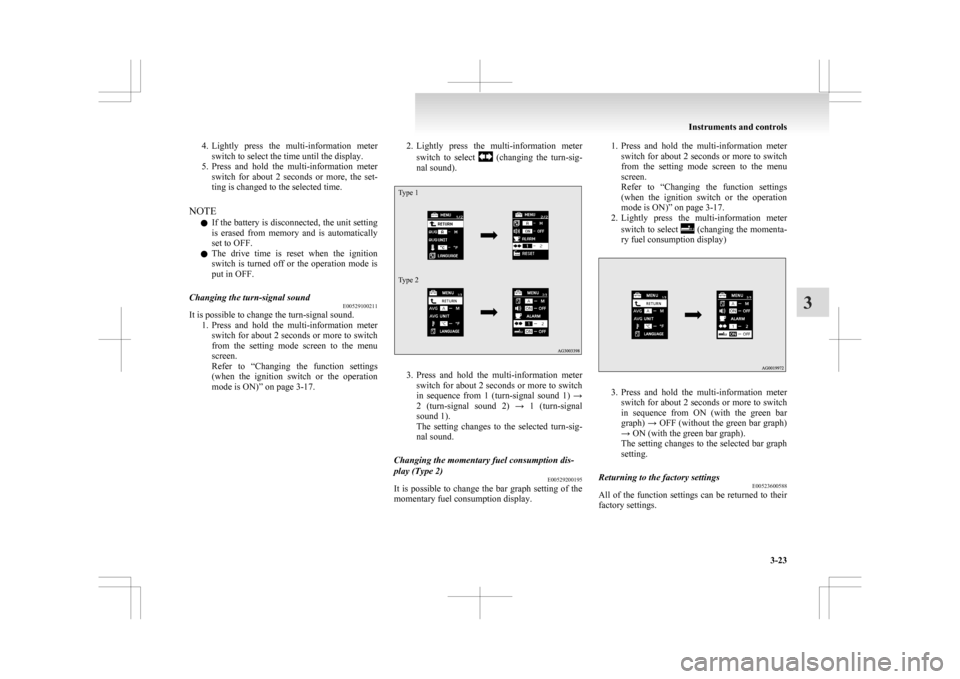
Changing the turn-signal sound E00529100211
It is possible to change the turn-signal sound.
1. Press
and hold the multi-information meter
switch for about 2 seconds or more to switch
from the setting mode screen to the menu
screen.
Refer to “Changing the function settings
(when the ignition switch or the operation
mode is ON)” on page 3-17. 2. Lightly
press the multi-information meter
switch to select (changing the turn-sig-
nal sound).
Type 1
Type 2 3. Press
and hold the multi-information meter
switch for about 2 seconds or more to switch
in sequence from 1 (turn-signal sound 1) →
2 (turn-signal sound 2) → 1 (turn-signal
sound 1).
The setting changes to the selected turn-sig-
nal sound.
Changing the momentary fuel consumption dis-
play (Type 2) E00529200195
It is possible to change the bar graph setting of the
momentary fuel consumption display. 1. Press
and hold the multi-information meter
switch for about 2 seconds or more to switch
from the setting mode screen to the menu
screen.
Refer to “Changing the function settings
(when the ignition switch or the operation
mode is ON)” on page 3-17.
2. Lightly press the multi-information meter
switch to select (changing the momenta-
ry fuel consumption display) 3. Press
and hold the multi-information meter
switch for about 2 seconds or more to switch
in sequence from ON (with the green bar
graph) → OFF (without the green bar graph)
→ ON (with the green bar graph).
The setting changes to the selected bar graph
setting.
Returning to the factory settings E00523600588
All of the function settings can be returned to their
factory settings. Instruments and controls
3-23 3
Page 118 of 368
1. Press and hold the multi-information meter
switch for about 2 seconds or more to switch
from the setting mode screen to the menu
screen.
Refer to “Changing the function settings
(when the ignition switch or the operation
mode is ON)” on page 3-17.
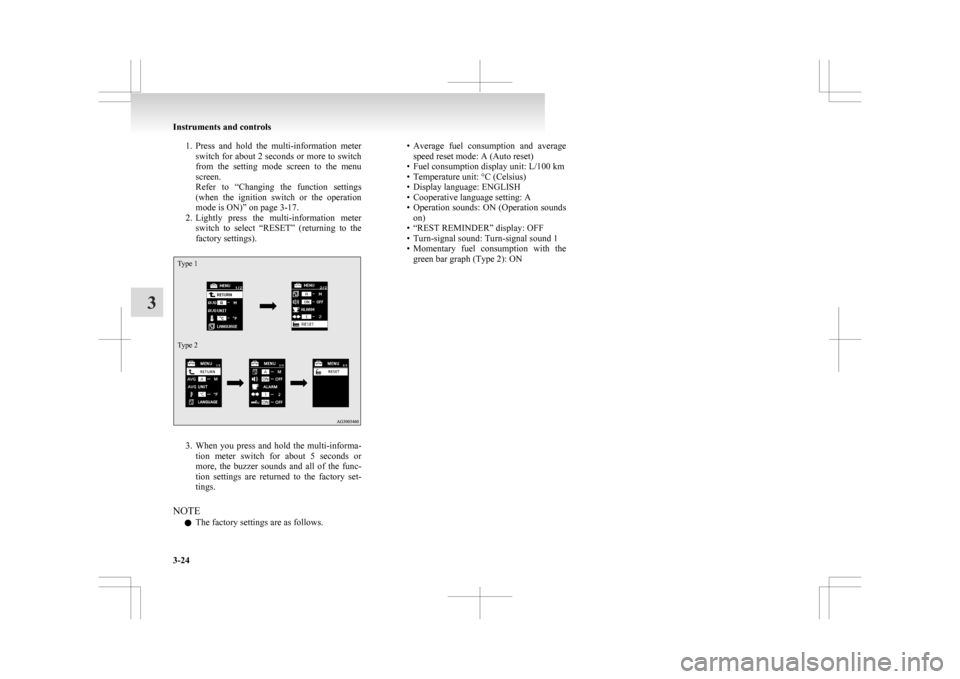
2. Lightly press the multi-information meter switch to select “RESET” (returning to the
factory settings).
Type 1
Type 2 3. When
you press and hold the multi-informa-
tion meter switch for about 5 seconds or
more, the buzzer sounds and all of the func-
tion settings are returned to the factory set-
tings.
NOTE l The factory settings are as follows. • Average
fuel consumption and average
speed reset mode: A (Auto reset)
• Fuel consumption display unit: L/100 km
• Temperature unit: °C (Celsius)
• Display language: ENGLISH
• Cooperative language setting: A
• Operation sounds: ON (Operation sounds on)
• “REST REMINDER” display: OFF
• Turn-signal sound: Turn-signal sound 1
• Momentary fuel consumption with the green bar graph (Type 2): ON Instruments and controls
3-24
3
Page 138 of 368

Oil pressure warning display
E00524900214
Type 1 Type 2
If the engine oil pressure drops while the engine is
running,
the warning display is displayed on the in-
formation screen in the multi-information display. CAUTION
l
If
the vehicle is driven while the engine
oil is low, or the oil level is normal but the
warning is displayed, the engine may
burn out and be damaged.
l If the warning is displayed while the en-
gine is running, immediately park your ve-
hicle in a safe place and check the engine
oil level.
l If the warning is displayed while the en-
gine oil level is normal, have it inspected. Engine oil level warning display*
E00526700072
Type 1 Type 2
When the ignition switch or the operation mode is
in ON, if it is suspected that the engine oil level has
increased
excessively, the warning display is dis-
played on the information screen in the multi-infor-
mation display. CAUTION
l
If
this warning is displayed while driving,
stop the vehicle in a safe place, turn off
the engine, and check the engine oil level.
Refer to “Engine oil” on page 8-04.
NOTE l Immediately
have your vehicle checked by a
MITSUBISHI MOTORS Authorized Service
Point. Combination headlamps and
dipper switch E00506002002
Headlamps
NOTE l When
entering a country in which vehicles
are driven on the opposite side of the road to
the country in which your vehicles is sup-
plied, necessary measures have to be taken to
avoid dazzling oncoming traffic. However,
headlamps on this vehicle do not need any ad-
justment.
l Do not leave the lights on for a long time
while the engine is stationary (not running).
A rundown battery could result.
l When it rains, or when the vehicle has been
washed, the inside of the lens sometimes be-
comes foggy, but this does not indicate a func-
tional problem.
When the lamp is switched on, the heat will
remove the fog. However, if water gathers in-
side the lamp, we recommend you to have it
checked. Instruments and controls
3-44
3
Page 139 of 368

Type 1
Rotate the switch to turn on the lamps.
OFF
All lamps off {Daytime Running Lamps
(if so equipped)} Position, tail, licence plate and instrument
panel lamps on
Headlamps and other lamps go on
Type 2
Rotate the switch to turn on the lamps. OFF
All lamps off {Daytime Run-
ning Lamps (if so equipped)}
AUTO With the ignition switch or the
operation mode is in ON, head-
lamps, position, tail, licence
plate, and instrument panel
lamps turn on and off automati-
cally in accordance with outside
light level. {Daytime Running
Lamps (if so equipped) will be
turned on while the tail lamps
are
off.} All lamps turn off auto-
matically when the ignition
switch is turned to “OFF” posi-
tion or the operation mode is
put in OFF. Position, tail, licence plate and
instrument panel lamps on
Headlamps and other lamps go
on
NOTE
l On vehicles with the rain sensor, the sensitiv-
ity
of the automatic on/off control can be ad-
justed. For further information, please con-
tact your MITSUBISHI MOTORS Author-
ized Service Point.
On vehicles equipped with MITSUBISHI
Multi-Communication System (MMCS),
screen operations can be used to make the ad-
justment.
Refer to the separate owner’s manual for de-
tails. l
When
the headlamps are turned off by the au-
tomatic on/off control with the ignition
switch in the “ON” position, the front fog
lamps (if so equipped) and rear fog lamps al-
so go off. When the headlamps are subse-
quently turned back on by the automatic on/
off control, the front fog lamps also come on
but the rear fog lamp stays off. If you wish to
turn the rear fog lamp back on, operate the
switch again.
l Do not place anything on the automatic light
sensor (A), and do not clean with a glass clean-
er. l
If
the lamps do not turn on or off with the
switch in the “AUTO” position, manually op-
erate the switch and we recommend you to
have your vehicle checked.
Lamps (headlamps, fog lamp, etc.) au-
to-cutout function l If the following operation is performed while
the lamp switch is in the “ ”
position, the
lamps will automatically go out when the driv-
er’s door is opened. Instruments and controls
3-45 3
Page 141 of 368

Dipper (High/Low beam change)
E00506200329
When
the lamp switch is in the “ ”
position, the
beam changes from high to low (or low to high)
each time the lever is pulled fully (1). While the high-
beam is on, the high-beam indication lamp in the in-
strument cluster will also illuminate. Headlamp flasher
E00506300199
The high-beams flash when the lever is pulled slight-
ly (2), and will go off when it is released.
When
the high-beam is on, the high-beam indica-
tion lamp in the instrument cluster will illuminate.
NOTE
l The high-beams can also flash when the
lamp switch is OFF.
l If you turn the lamps off with the headlamps
set to high-beam, the headlamps are automat-
ically returned to their low-beam setting
when the lamp switch is next turned to the
“ ” position. Welcome light*
E00528900254
This
function turns on the position and tail lamps
for about 30 seconds after the UNLOCK switch
(A) on the remote control transmitter is pressed
when the combination headlamps and dipper
switch is in the “OFF” or “AUTO” position (for ve-
hicles equipped with the automatic lamp control).
On vehicles equipped with automatic lamp control,
the welcome light function will operate only when
it is dark outside the vehicle. NOTE
l While
the welcome light function is operat-
ing, perform one of the following operations
to cancel the function. • Push the LOCK switch (B) on the remotecontrol transmitter. • Turn the combination headlamps and dip-
per switch to the “ ” or “ ” position.
• Turn
the ignition switch to the “ON” po-
sition or put the operation mode in ON.
l It is possible to modify functions as follows:
• The headlamps can be set to come on inthe low beam setting instead of the posi-
tion and tail lamps.
• The welcome light function can be deacti- vated.
For further information, please contact
your MITSUBISHI MOTORS Author-
ized Service Point.
On vehicles equipped with MITSUBISHI
Multi-Communication System (MMCS),
screen operations can be used to make
the adjustment. Refer to the separate own-
er’s manual for details.
Coming home light E00529000236
This function turns on the headlamps in the low
beam
setting for about 30 seconds after the ignition
switch is turned to the “OFF” position or the opera-
tion mode is put in OFF. Instruments and controls
3-47 3
Page 142 of 368

1. Turn the combination headlamps and dipper
switch to the “OFF” or “AUTO” position
(for vehicles equipped with the automatic
lamp control).
2. Turn the ignition switch to the “LOCK” posi- tion or put the operation mode in OFF. Also,
if a key was used to start the engine, remove
the key from the ignition switch.
3. Within 60 seconds of turning the ignition switch to the “OFF” position or putting the
operation mode in OFF, pull the turn signal
lever towards you. 4. The
headlamps will come on in the low
beam setting for about 30 seconds. After the
headlamps go off, the headlamps can be
turned on again in the low beam setting for
about 30 seconds by pulling the turn signal
lever towards you within 60 seconds of turn-
ing the ignition switch to the “OFF” position
or putting the operation mode in OFF.
To turn on the headlamps again after 60 sec-
onds of turning the ignition switch to the
“OFF” position or putting the operation
mode in OFF, repeat the process from step 1. NOTE
l While
the coming home light function is op-
erating, perform one of the following opera-
tions to cancel the function. • Pull the lever towards you.
• Turn the combination headlamps and dip-
per switch to the “ ” or “ ” position.
• Turn
the ignition switch to the “ON” po-
sition or put the operation mode in ON.
l It is possible to modify functions as follows:
• The time that the headlamps remain oncan be changed.
• The coming home light function can be deactivated.
For further information, please contact your
MITSUBISHI MOTORS Authorized Service
Point.
On vehicles equipped with MITSUBISHI
Multi-Communication System (MMCS),
screen operations can be used to make the ad-
justment. Refer to the separate owner’s man-
ual for details. Headlamp levelling
E00517400031
Headlamp levelling switch (except for
vehicles with discharge headlamps) E00517500465
The angle of the headlamp beam varies depending
on the load carried by the vehicle.
The
headlamp levelling switch can be used to ad-
just the headlamp illumination distance (when the
lower beam is illuminated) so that the headlamps’
glare does not distract other drivers.
Set the switch according to the following table. CAUTION
l
Always
perform adjustments before driv-
ing.
Do not attempt to adjust while driving, as
it could cause an accident. Instruments and controls
3-48
3
Page 143 of 368

Vehi-
cle
condi- tion Switch
posi-tion “0” “0” “1” “2” “3” ●:1 person
:Full luggage loading
Switch position 0- Driver only/Driver + 1 front passenger
Switch position 1- 5 passengers (including driv- er)
Switch position 2- 5 passengers (including driv- er) + Full luggage loading
Switch position 3- Driver + Full luggage loading
Automatic headlamp levelling (vehi-
cles with discharge headlamps) E00517600453
This mechanism automatically adjusts the direction
of
the headlamps (beam position) depending on
changes in the condition of the vehicle, such as the
number of occupants or luggage weight. When the
headlamps are illuminated with the ignition switch
or the operation mode in ON, the beam position of
the headlamps is automatically adjusted when the
vehicle is stopped. Headlamp automatic levelling system warning dis-
play
Type 1 Type 2
If there is a fault in the automatic headlamp level-
ling
system, the warning display is displayed on
the information screen in the multi-information dis-
play. CAUTION
l
If
a warning is displayed, the system may
be malfunctioning, so we recommend you
to have your vehicle inspected. Turn-signal lever
E00506501231 1- Turn-signals
When
making a normal turn, use position
(1). The lever will return automatically when
cornering is completed.
2- Lane-change signals When moving the lever to (2) slightly to
change a lane, the turn-signal lamps and indi-
cation lamp in the instrument cluster will on-
ly flash while the lever is operated.
Also, when you move the lever to (2) slight-
ly then release it, the turn-signal lamps and in-
dication lamp in the instrument cluster will
flash 3 times.
NOTE l If the lamp flashes unusually quickly, the
bulb in a turn-signal lamp may have burned
out. We recommend you to have the vehicle
inspected.
l It is possible to activate the following func-
tions. Instruments and controls
3-49 3
Page 147 of 368

If the blades are frozen to the windscreen or rear
window,
do not operate the wipers until the ice has
melted and the blades are freed, otherwise the wip-
er motor may be damaged. MIST- Misting function
The wipers will operate once.
OFF- Off
AUTO- Auto-wiper control Rain sensor
The
wipers will automatically operate de-
pending on the degree of wetness on the
windscreen.
LO- Slow
HI- Fast
Rain sensor
Can
only be used when the ignition switch or the
operation mode is in ON.
If the lever is put in the “AUTO” position, the rain
sensor (A) will detect the extent of rain (or snow,
other moisture, dust, etc.) and the wipers will oper-
ate automatically.
Keep the lever in the “OFF” position if the wind-
screen is dirty and the weather is dry. Wiper operation under these conditions can scratch
the windscreen and damage the wipers.
CAUTION
l
With
the ignition switch or the operation
mode in ON and lever in the “AUTO” po-
sition, the wipers may automatically oper-
ate in the situations described below.
If your hands get trapped, you could suf-
fer injuries or the wipers could malfunc-
tion. Be sure to turn the ignition switch to
the “OFF” position or put the operation
mode in OFF, or move lever to the
“OFF” position to deactivate the rain sen-
sor. • When cleaning the outside surface ofthe windscreen, if you touch on top of
the rain sensor.
• When cleaning the outside surface of the windscreen, if you wipe with a
cloth on top of the rain sensor.
• When using an automatic car wash.
• A physical shock is applied to the wind- screen. CAUTION
• A
physical shock is applied to the rain
sensor.
NOTE l To
protect the rubber parts of the wipers, this
operation of the wipers does not take place
when the vehicle is stationary and the ambi-
ent temperature is about 0 °C or lower.
l Do not cover the sensor by affixing a sticker
or label to the windscreen. Also, do not put
any water-repellent coating on the wind-
screen. The rain sensor would not be able to
detect the extent of rain, and the wipers
might stop working normally.
l In the following cases, the rain sensor may
be malfunctioning.
For further information, we recommend you
to consult a MITSUBISHI MOTORS Author-
ized Service Point.
• When the wipers operate at a constant in-terval despite changes in the extent of rain.
• When the wipers do not operate even though it is raining.
l The wipers may automatically operate when
things such as insects or foreign objects are
affixed to the windscreen on top of the rain
sensor or when the windscreen is frozen. Ob-
jects affixed to the windscreen will stop the
wipers when the wipers cannot remove them.
To make the wipers operate again, place the
lever in the “LO” or “HI” position.
Also, the wipers may operate automatically
due to strong direct sunlight or electromag-
netic wave. To stop the wipers, place the lev-
er in the “OFF” position. Instruments and controls
3-53 3