2009 MINI COOPER CONVERTIBLE fuel fill door release
[x] Cancel search: fuel fill door releasePage 21 of 172

REFERENCEAT A GLANCE CONTROLS DRIVING TIPS MOBILITY
19
Personal Profile settings
For more information on specific settings, refer
to the specified pages.
>Response of the central locking system
when the car is being unlocked19
>Automatic locking of the vehicle23
>Triple turn signal activation47
>Settings for the displays on the onboard
monitor, in the speedometer and in the
tachometer.
>12h/24h mode of the clock, refer to For-
mats and units of measure56
>Date format, refer to Formats and units
of measure56
>Units of measure for fuel consumption,
distance covered/remaining distances
and temperature, refer to Formats and
units of measure56
>Light settings:
>Pathway lighting73
>Daytime running lamps74
>Automatic climate control
*: AUTO program,
activating/deactivating cooling function and
automatic recirculated-air control, setting
temperature, air flow rate and
distribution80
>Entertainment:
>Audio volume, refer to separate Owner's
Manual
>Speed-dependent volume, refer to sepa-
rate Owner's Manual
Central locking system
The concept
The central locking system is ready for operation
whenever the driver's door is closed.
The system simultaneously engages and
releases the locks on the following:
>Doors
>Tailgate
>Fuel filler door
Operating from outside
>Via the remote control
>Via the door lock
*
>In cars with convenient access*, via the door
handles on the driver's and passenger's
sides.
The anti-theft system is also operated at the
same time. It prevents the doors from being
unlocked using the lock buttons or door han-
dles. The remote control can also be used to
switch on/off the welcome lamps and interior
lamps. The alarm system
* is also activated or
deactivated, page24.
Operating from inside
Button for central locking system, page22.
In the event of a sufficiently severe accident, the
central locking system unlocks automatically. In
addition, the hazard warning flashers and inte-
rior lamps come on.
Opening and closing:
from outside
Persons or animals in a parked vehicle
could lock the doors from the inside. Take
the key with you when you leave the vehicle so
that the vehicle can be opened from the out-
side.<
Using the remote control
Unlocking
Press button .
The welcome lamps and interior lamps come on.
Unlocking mode
You can also set which parts of the car are
unlocked. The setting is stored for the remote
control in use.
Page 22 of 172

Opening and closing
20
1.Switch on the ignition, refer to page43.
2.Briefly press the button in the turn indicator
lever repeatedly until "SET/INFO" is displayed.
3.Press and hold the button until the display
changes.
4.Briefly press the button repeatedly until the
symbol and "SET" are displayed.
5.Press and hold the button until the display
changes.
6.Briefly press the button repeatedly until the
display shows the illustrated symbol, arrow.
7.Press and hold the button until the display
changes.
8.Briefly press the button to select:
>
Press the button once to unlock
only the driver's door and the fuel filler
door. Press the button twice to unlock the entire
vehicle.
>
Press the button once to unlock
the entire vehicle.
9.Press and hold the button until the display
changes. The setting is stored for the remote
control currently in use.
Convenient opening
Hold the button down.
The power windows are opened and the glass
sunroof* is raised. In the MINI Convertible, the
windows and the sliding sunroof are opened.
In order to open the convertible top of your MINI
Convertible: release button and push again until
the convertible top is completely open. The side
window remains open.
Convenient closing is not possible by
means of the remote control.<
Locking
Press the button.
Do not lock the vehicle from the outside if
there is any person inside, because the
vehicle cannot be unlocked from inside without
special knowledge.<
Setting confirmation signals
To have the vehicle confirm when it has been
locked or unlocked.
1.Switch on the ignition, refer to page43.
2.Briefly press the button in the turn indicator
lever repeatedly until "SET/INFO" is dis-
played.
Page 102 of 172
Refueling
100
Refueling
Switch off the engine before refueling,
otherwise fuel cannot be added to the
tank and a message will be displayed.<
Take all precautionary measures and
observe all applicable regulations when
handling fuel. Do not carry any spare fuel con-
tainers in your vehicle. They can develop a leak
and cause an explosion or cause a fire in the
event of an accident.<
Fuel filler door
Opening
1.Open fuel filler door.
2.Turn the gas cap counterclockwise.
3.Place the gas cap in the bracket attached to
the fuel filler door.
Closing
Fit the cap and turn it clockwise until you clearly
hear a click.
Do not pinch the band attached to the
cap, otherwise the cap cannot be closed
properly and fuel vapors can escape. A message
will be displayed if the gas cap is loose or miss-
ing.<
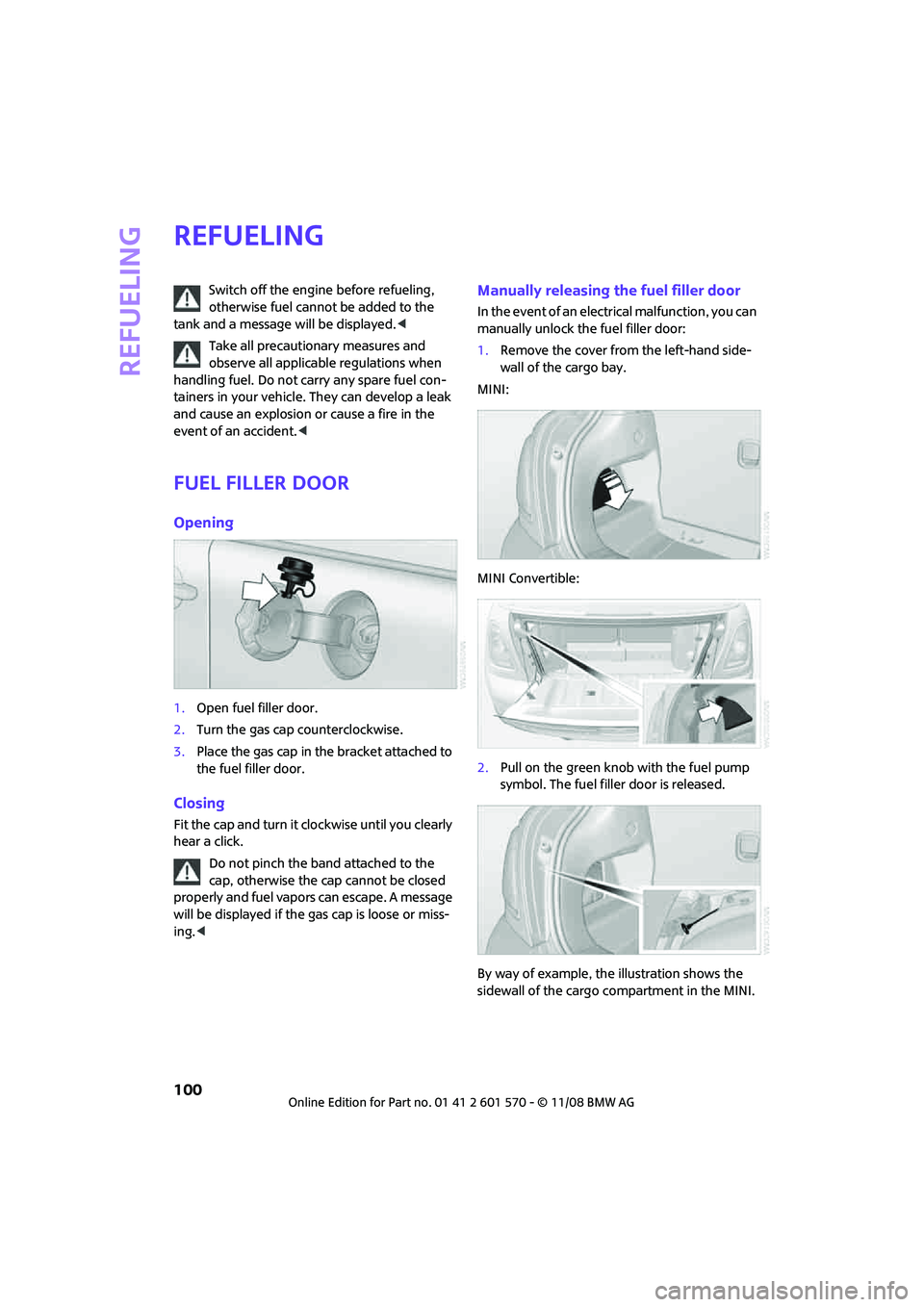
Manually releasing the fuel filler door
In the event of an electrical malfunction, you can
manually unlock the fuel filler door:
1.Remove the cover from the left-hand side-
wall of the cargo bay.
MINI:
MINI Convertible:
2.Pull on the green knob with the fuel pump
symbol. The fuel filler door is released.
By way of example, the illustration shows the
sidewall of the cargo compartment in the MINI.
Page 165 of 172

REFERENCEAT A GLANCE CONTROLS DRIVING TIPS MOBILITY
163
License plate lamp, bulb
replacement127
Light switch73
Light-alloy wheels, care121
Light-emitting diodes
LEDs124
Lighter87
– socket87
Lighting
– lamps and bulbs123
– of the instruments76
– of vehicle, refer to Lamps73
Limit149
Load94
Load securing equipment,
refer to Securing cargo95
Lock buttons of doors, refer to
Locking22
Locking
– adjusting confirmation
signal20
– from inside22
– from outside20
– without remote control, refer
to Convenient access26
Locking and unlocking doors
– confirmation signals20
– from inside22
– from outside19
Low beams73
– automatic73
– replacing bulb124
Lower back support, refer to
Lumbar support35
Luggage compartment
– emergency operation, refer
to Manual release24
– Increasing the capacity93
– opening from the inside24
Luggage compartment lid
– emergency operation, refer
to Manual release24
Luggage compartment lid,
refer to Tailgate23
Luggage compartment, refer
to Cargo bay23
Luggage rack, refer to Roof-
mounted luggage rack95
Lumbar support35M
M+S tires, refer to Winter
tires112
Maintenance, refer to Service
Booklet
Maintenance system117
Malfunction
– convertible top32
– trunk lid24
Malfunction warnings, refer to
Check Control60
Manual air distribution80
Manual mode
– automatic transmission with
Steptronic46
Manual operation
– door lock22
– fuel filler door100
– power convertible top32
– transmission lock, automatic
transmission47
– trunk lid24
Manual transmission45
Manual washing120
Master key, refer to Integrated
key/remote control18
Maximum cooling81
Maximum speed
– with winter tires112
Medical assistance, refer to
First aid pouch134
Microfilter
– for air conditioner80
– for automatic climate
control82
– MINI Maintenance
System117
Microfilter/activated-charcoal
filter
– MINI Maintenance
System117
Microphone for telephone14
MINI Internet page4
MINI Maintenance System117
Mirror dimming feature38Mirrors38
– exterior mirrors38
– heating38
– interior rearview mirror38
Mobile phone
– installation location, refer to
Center armrest85
– refer to separate Owner's
Manual
Mobile phone, installation
location, refer to Center
armrest85
Mobile phone, refer to the
separate Owner's Manual
Mobility System128
Modifications, technical, refer
to For your own safety4
Monitoring system for tire
pressures, refer to Flat Tire
Monitor65
Multifunction switch
– refer to Turn signals/
headlamp flasher47
– refer to Wiper system48
Multifunctional steering
wheel, refer to Buttons on
the steering wheel11
N
Neck support, refer to Head
restraints36
Nets, refer to Storage
compartments86
New tires111
Number of cylinders, refer to
Engine data152
Nylon rope, refer to Tow
rope136
O
OBD socket, refer to Socket for
Onboard Diagnosis117
Octane ratings, refer to Fuel
specifications101
Odometer52
Oil consumption114
Oil level114