2009 MERCEDES-BENZ GL SUV spare wheel
[x] Cancel search: spare wheelPage 11 of 309

DVD audio
Operating (on-board computer) .....101
DVD video
Operating (on-board computer) .....102 E
EASY-ENTRY/EXIT feature Activating/deactivating (on-
board computer) ............................ 108
EASY-ENTRY feature ............................ 72
Activating/deactivating (on-
board computer) ............................ 108
EASY-EXIT feature ............................... 72
Crash-responsive ............................. 72
Easy-Pack fix kit ................................ 159
EBV (electronic brake force distri-
bution) .................................................. 52
Display message ............................ 220
Electronic brake force distribution
See EBV ........................................... 52
Electronic Stability Program
see ESP ®
......................................... 51
Electronic Traction System
see 4ETS .......................................... 53
Emergency key element
Lost ............................................... 247
Emergency locking
Vehicle .......................................... .251
Emergency release
Fuel filler fla p................................. 251
Spare wheel bracket ......................251
Emergency running mode
Automatic transmission .................244
Emergency unlocking
Vehicle .......................................... .250
Engine
Running irregularl y......................... 243
Starting problems ..................242, 243
Starting with KEYLESS GO ...............89
Starting with the key ........................ 88
Switching off .................................... 91
Engine diagnostics warning
lamp .................................................... 237
Engine electronics .............................284
Malfunction ................................... .242
Engine number .................................. 287Engine oil
.......................................... 289
Capacities ...................................... 177
Checking the oil level (dipstick) .....177
Checking the oil level (on-board
computer) ...................................... 176
Consumption ................................ 176
Display mes-
sage .............................. 176, 228, 229
Filler neck ...................................... 177
Topping up ..................................... 177
ESP ®
(Electronic Stability Pro-
gram) .................................................... 51
Activating/deactivating ...................52
Display mes-
sages ............................................. 215
Trailer stabilisatio n.......................... 51
Warning lamp ..................51, 235, 236
Exterior lighting
Delayed switch-off (on-board
computer) ...................................... 105
Exterior mirrors
Adjusting ......................................... 72
Anti-dazzle mode (automatic) ..........73
Folding in/out (automatically). ........73
Folding in/out (electrically). ............73
Folding in when locking (on-board
computer) ...................................... 109
Malfunction ................................... .246
Parking position ............................... 74
Resetting ......................................... 73
Storing settings ............................... 74
Exterior view
Overview .......................................... 22 F
Fault message see Display message .....................211
Fire extinguisher ............................... 208
First-aid kit ......................................... 208
Flat tyre Equipment ..................................... 262
Preparing the vehicle .....................262
TIREFIT kit ...................................... 263
Floormat ............................................ .168
Foglamps Display message ............................ 227
Fording ....................................... 188, 1928
Index X164_AKB; 2; 3, en-GB
wobuchh,
Version: 2.11.8.1 2009-03-31T14:14:58+02:00 - Seite 8Dateiname: 6515431202_buchblock.pdf; erzeugt am 01. Apr 2009 00:16:29; WK
Page 14 of 309

Luggage cover
................................... 157
Luggage net Front-passenger footwell ...............154
Front seats (behind) ....................... 154
Lumbar support
4-way ............................................... 66
Luxury head restraint .........................66 M
Main-beam headlamps Display message ............................ 227
Maintenance
Battery ........................................... 272
Making calls
On-board computer .......................111
Memory card ...................................... 101
Operating (on-board computer) .....101
see separate operating instructions
Memory function ................................. 74
Menu Overview of the menus ....................99
Menu (on-board computer) ................. 99
Additional functions .......................109
Audio ............................................. 100
Distronic ........................................ 124
DVD ............................................... 102
Navi ............................................... 102
Off-road ......................................... 102
Resetting to factory settings ..........103
Settings ......................................... 103
Standard displa y.............................. 99
Telephone ...................................... 111
Trip computer ................................ 110
TV .................................................. 101
Message
see Display message .....................211
see Indicator and warning lamp .....235
Minispare emergency spare wheel
Technical data ............................... 297
Mirrors
Sun visor ........................................ 162
see Exterior mirrors or Rear-view mirror
Mobile phone ..................................... 164
Display message .................... 216, 232
Installation ..................................... 285
Operation (on-board computer) .....111 Mobile telephone
see Mobile phone .......................... 164
Modifying the programming
Key .................................................. 59
MP3 .................................................... 101
Operating (on-board computer) .....101
see separate operating instructions
Multicontour seat ................................ 67
Multi-function display .........................98
Setting the display when the igni-
tion is switched off (on-board
computer) ...................................... 107
Multi-function steering wheel ............97
Overview .......................................... 28 N
Navigation .......................................... 102
On-board computer .......................102
see separate operating instructions
NECK-PRO head restraints .................40
Resetting after being triggered ......252
NECK-PRO luxury head restraints ...... 40
Resetting after being triggered ......252
Notes on running in a new vehicle ..172 O
Odometer see Trip meter ............................... 110
Off-road
4MATIC .......................................... 112
Differential locks ............................ 116
DSR ............................................... 113
LOW RANGE off-road gear .............114
Off-road 4ETS .................................. 53
Off-road ABS .................................... 50
Off-road 4ETS ...................................... .53
Off-road ABS ........................................ 50
Off-road driving Checklist ........................................ 189
Information .................................... 189
Off-road ESP ®
....................................... 52
Off-road terrain Off-road ESP .................................... 52
Oil
Consumption ................................. 176
Topping up ..................................... 177 Index
11 X164_AKB; 2; 3, en-GB
wobuchh,
Version: 2.11.8.1
2009-03-31T14:14:58+02:00 - Seite 11Dateiname: 6515431202_buchblock.pdf; erzeugt am 01. Apr 2009 00:16:30; WK
Page 17 of 309
Socket
................................................ 163
Cockpit .......................................... 163
Luggage compartment ...................164
Rear compartment .........................163
Spare wheel
Fitting ............................................ 268
Storage location ............................ 209
Technical data ............................... 297
Spare wheel bracket ...........................60
Emergency release ........................251
Speed limiter
Speedtronic ................................... 126
Speedometer
Additional speedometer (on-
board computer) ............................ 100
Segments ......................................... 97
Setting the unit (on-board com-
puter) ............................................. 103
Speedtronic ....................................... 126
Display message ............................ 218
Permanent ..................................... 128
Variabl e......................................... 126
SRS (Supplemental Restraint Sys-
tem) ...................................................... 35
Display message ............................ 221
Warning lamp ........................... 35, 236
Standard display (on-board com-
puter) .................................................... 99
Station see Radio ....................................... 100
Status line (on-board computer) ........98
Selecting the display ..................... .104
Steering
Display message ............................ 225
Steering wheel
Adjusting ................................... 70, 71
Buttons (on-board computer) ...........97
Storing settings ............................... 74
Steering wheel boss
Cleaning ......................................... 204
Steering wheel heating .......................71
Malfunction indicator lamp ............233
Stowage compartments ...................152
Armrest (under) ............................. 153
Centre console .............................. 152
Centre console (rear) .....................153Cup holder
..................................... 153
Glove compartment .......................152
Submenu (on-board computer)
Convenience .................................. 108
Heating .......................................... 107
Instrument cluster .........................103
Lighting .......................................... 105
Time/Date ..................................... 104
Vehicle .......................................... .106
Summer opening
see Convenience opening
Sun visor ............................................ 161
Supplemental Restraint System See SRS ........................................... 35
Surround lighting
Switching on/off (on-board com-
puter) ............................................. 105
Switching off the alarm
ATA .................................................. 54 T
Tailgate Display message ............................ 219
Limiting the opening angle ...............63
Tail lamps
Display message ............................ 228
Tail pipes
Cleaning ......................................... 203
Tank
see Fuel tank
Tank capacity .................................... 287
Technical data GL 350 BlueTEC ............................. 293
GL 350 CDI 4MATIC BlueEFFI-
CIENCY .......................................... 293
GL 450 4MATIC ............................. 292
GL 450 CDI 4MATIC ......................294
GL 500 4MATIC ............................. 292
Trailer loads ................................... 298
Tyres ...................................... 296, 297
Wheels ................................... 296, 297
Telescopic lever ................................ 193
Telescopic rod (Easy-Pack fix kit) ....160
Temperature Outside temperature ........................ 97
Thermatic
Malfunction indicator lamp ............234 14
Index X164_AKB; 2; 3, en-GB
wobuchh,
Version: 2.11.8.1 2009-03-31T14:14:58+02:00 - Seite 14Dateiname: 6515431202_buchblock.pdf; erzeugt am 01. Apr 2009 00:16:30; WK
Page 25 of 309
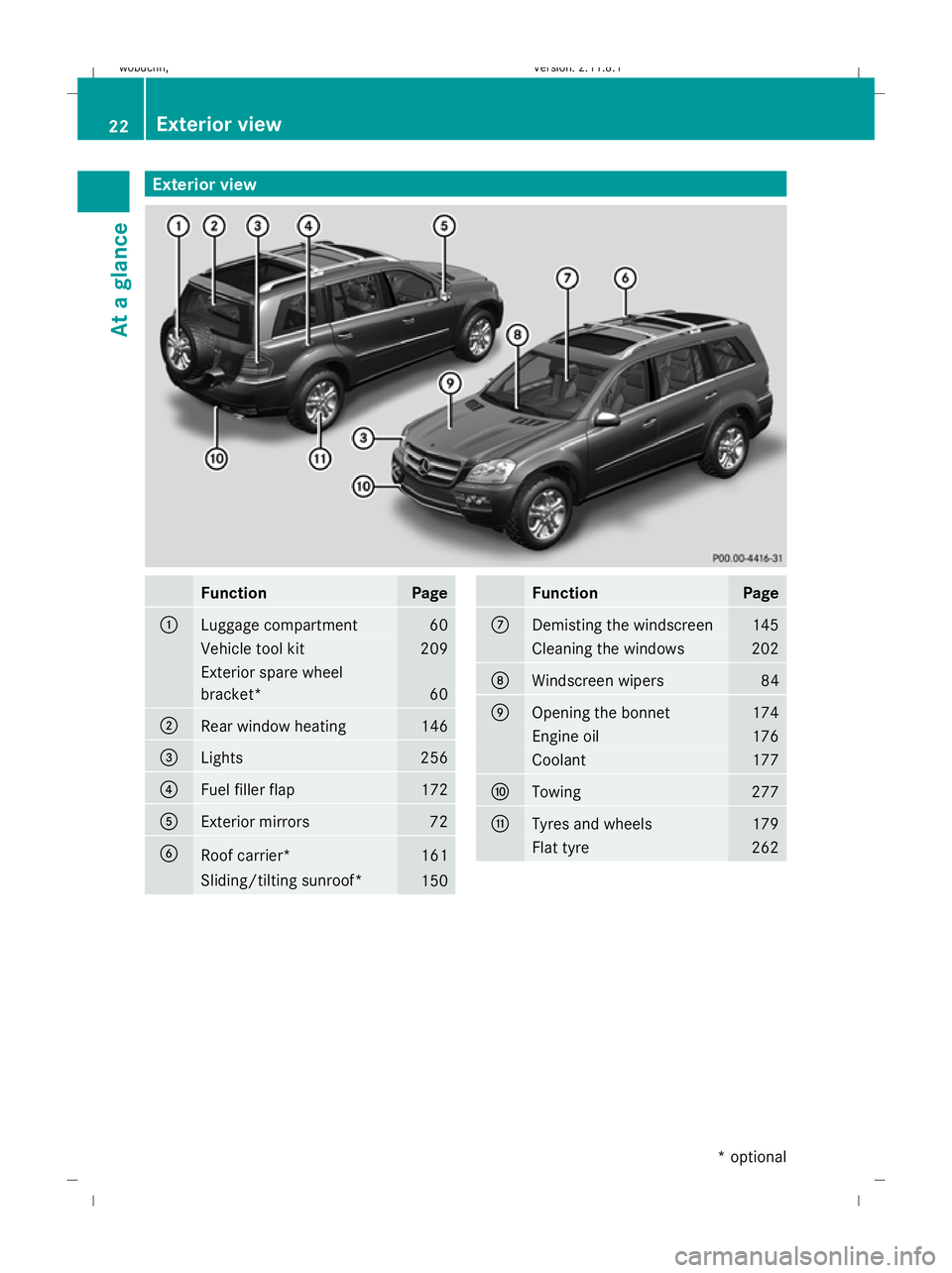
Exterior view
Function Page
:
Luggage compartment 60
Vehicle tool kit 209
Exterior spare wheel
bracket*
60
;
Rear window heating 146
=
Lights 256
?
Fuel filler flap 172
A
Exterior mirrors 72
B
Roof carrier* 161
Sliding/tilting sunroof*
150 Function Page
C
Demisting the windscreen 145
Cleaning the windows 202
D
Windscreen wipers 84
E
Opening the bonnet 174
Engine oil 176
Coolant 177
F
Towing 277
G
Tyres and wheels 179
Flat tyre 26222
Exterior viewAt a glance
* optional
X164_AKB; 2; 3, en-GB
wobuchh,
Version: 2.11.8.1 2009-03-31T14:14:58+02:00 - Seite 22
Dateiname: 6515431202_buchblock.pdf; erzeugt am 01. Apr 2009 00:16:32; WK
Page 63 of 309

X
To unlock: press button :.
X To lock: press button ;.
Automatic locking The vehicle will lock automatically once you
have pulled away.
You can switch the automatic locking func-
tion on and off using the on-board computer
(Y page 107).
i The vehicle is locked automatically when
the ignition is switched on and the wheels
begin to turn. There is a risk of being locked
out when the vehicle is being pushed or
tested on a dynamometer. Tailgate
Points to remember
G
Risk of poisoning
Exhaust fumes could enter the vehicle interior
if the engine is running and the tailgate is
open. This could poison you. Therefore, you
should make sure that the tailgate is always
closed when the engine is running.
! The tailgate swings up and to the rear
when opened. Therefore, make sure that
there is sufficient clearance above and
behind the tailgate.
Do not leave the key in the luggage compart-
ment. Otherwise, you could lock yourself out.
On vehicles with a spare wheel bracket*, you
can only open the tailgate after first opening
the spare wheel bracket* completely.
i You will find details of the tailgate opening
dimensions in the Technical data section
(Y page 295). The tailgate can be:
R
opened and closed manually
(Y page 61)
R opened and closed* automatically from
outside (Y page 62)
R opened and closed* automatically from
inside (Y page 62) Spare wheel bracket*
G
Risk of accident
While the spare wheel bracket is folded to the
side, the tail lamps may be blocked from view.
Other road users may then fail to see you and
crash into your vehicle. Additionally, secure
your vehicle using a warning lamp or a warn-
ing triangle.
Do not drive with the spare wheel bracket fol-
ded out.
Make sure that the spare wheel bracket is
closed correctly.
Otherwise, the freely moving spare wheel
bracket could injure people or cause an acci-
dent.
! Do not wash vehicles equipped with a
spare wheel bracket in an automatic car
wash.
Opening the spare wheel bracket 60
TailgateControls
* optional
X164_AKB; 2; 3, en-GB
wobuchh
,V ersion: 2.11.8.1
2009-03-31T14:14:58+02:00 - Seite 60
Dateiname: 6515431202_buchblock.pdf; erzeugt am 01. Apr 2009 00:16:52; WK
Page 64 of 309
X
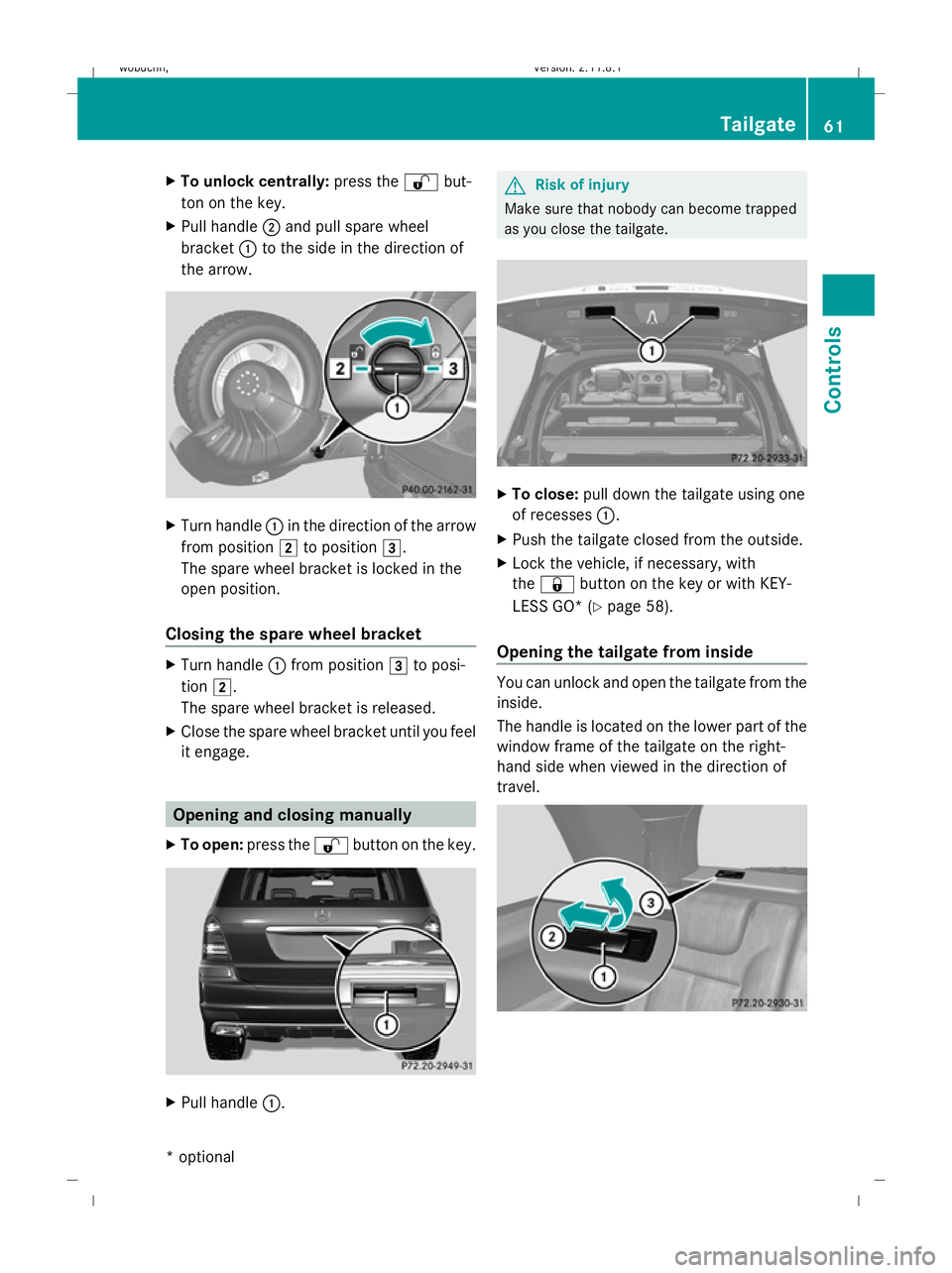
To unlock centrally: press the%but-
ton on the key.
X Pull handle ;and pull spare wheel
bracket :to the side in the direction of
the arrow. X
Turn handle :in the direction of the arrow
from position 2to position 3.
The spare wheel bracket is locked in the
open position.
Closing the spare wheel bracket X
Turn handle :from position 3to posi-
tion 2.
The spare wheel bracket is released.
X Close the spare wheel bracket until you feel
it engage. Opening and closing manually
X To open: press the %button on the key. X
Pull handle :. G
Risk of injury
Make sure that nobody can become trapped
as you close the tailgate. X
To close: pull down the tailgate using one
of recesses :.
X Push the tailgate closed from the outside.
X Lock the vehicle, if necessary, with
the & button on the key or with KEY-
LESS GO* ( Ypage 58).
Opening the tailgate from inside You can unlock and open the tailgate from the
inside.
The handle is located on the lower part of the
window frame of the tailgate on the right-
hand side when viewed in the direction of
travel. Tailgate
61Controls
* optional
X164_AKB; 2; 3, en-GB
wobuchh
,V ersion: 2.11.8.1
2009-03-31T14:14:58+02:00 - Seite 61 Z
Dateiname: 6515431202_buchblock.pdf; erzeugt am 01. Apr 2009 00:16:53; WK
Page 65 of 309
X
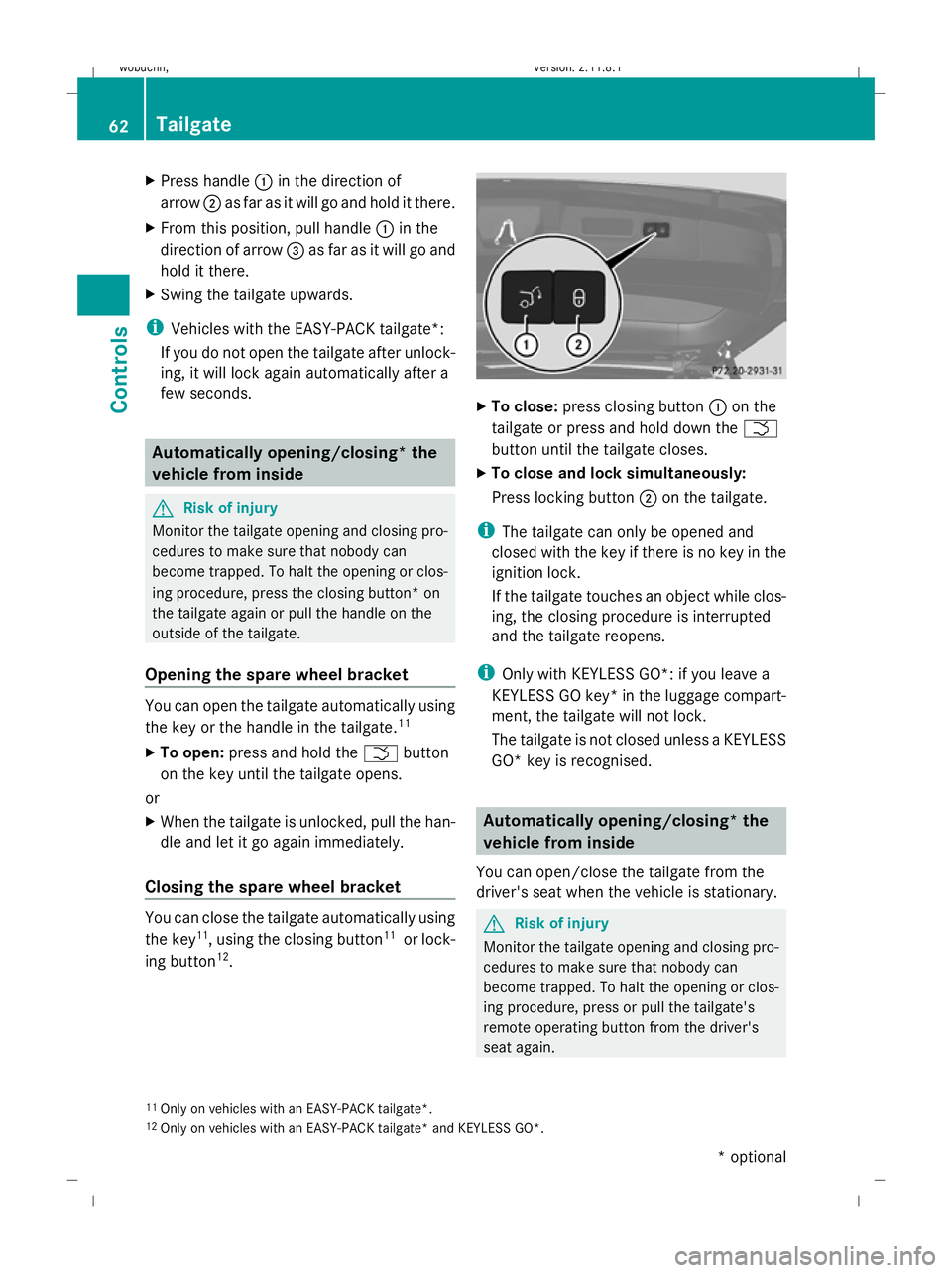
Press handle :in the direction of
arrow ;as far as it will go and hold it there.
X From this position, pull handle :in the
direction of arrow =as far as it will go and
hold it there.
X Swing the tailgate upwards.
i Vehicles with the EASY-PACK tailgate*:
If you do not open the tailgate after unlock-
ing, it will lock again automatically after a
few seconds. Automatically opening/closing* the
vehicle from inside G
Risk of injury
Monitor the tailgate opening and closing pro-
cedures to make sure that nobody can
become trapped. To halt the opening or clos-
ing procedure, press the closing button* on
the tailgate again or pull the handle on the
outside of the tailgate.
Opening the spare wheel bracket You can open the tailgate automatically using
the key or the handle in the tailgate. 11
X To open: press and hold the Fbutton
on the key until the tailgate opens.
or
X When the tailgate is unlocked, pull the han-
dle and let it go again immediately.
Closing the spare wheel bracket You can close the tailgate automatically using
the key 11
, using the closing button 11
or lock-
ing button 12
. X
To close: press closing button :on the
tailgate or press and hold down the F
button until the tailgate closes.
X To close and lock simultaneously:
Press locking button ;on the tailgate.
i The tailgate can only be opened and
closed with the key if there is no key in the
ignition lock.
If the tailgate touches an object while clos-
ing, the closing procedure is interrupted
and the tailgate reopens.
i Only with KEYLESS GO*: if you leave a
KEYLESS GO key* in the luggage compart-
ment, the tailgate will not lock.
The tailgate is not closed unless a KEYLESS
GO* key is recognised. Automatically opening/closing* the
vehicle from inside
You can open/close the tailgate from the
driver's seat when the vehicle is stationary. G
Risk of injury
Monitor the tailgate opening and closing pro-
cedures to make sure that nobody can
become trapped. To halt the opening or clos-
ing procedure, press or pull the tailgate's
remote operating button from the driver's
seat again.
11 Only on vehicles with an EASY-PACK tailgate*.
12 Only on vehicles with an EASY-PACK tailgate* and KEYLESS GO*. 62
TailgateControls
* optional
X164_AKB; 2; 3, en-GB
wobuchh,
Version: 2.11.8.1 2009-03-31T14:14:58+02:00 - Seite 62
Dateiname: 6515431202_buchblock.pdf; erzeugt am 01. Apr 2009 00:16:54; WK
Page 171 of 309
X
Start the engine.
X Use W orX on the multi-function
steering wheel to select the Vehiclesub-
menu.
X Keep pressing &or* until the Com‐
pass calibration message appears.
The selection marker highlights switched
off . X
Use W orX to select Start.
In the multi-function display, you will see
the Compass calibration active
Please drive a full circle message.
X Drive the vehicle a full circle at approx-
imately 5 – 10 km/h.
When calibration is completed, you will see
the following message in the multi-function
display: Compass calibration Comple‐
ted successfully
If you do not see the Compass calibration
Completed successfully message in the
multi-function display, drive another full cir-
cle. If calibration is not successful within
three minutes of it starting, the Compass
calibration message will appear in the
multi-function display again. This means that
compass calibration is impossible because of
external interference. Repeat calibration at
another location. Floormat* on the driver's side
G
Risk of accident
Make sure that there is sufficient clearance
around the pedals when floormats are used,
and that the floormats are properly secured.
The floormats must be correctly secured at all
times using retainers and press-studs. Before you drive off, check the floormats and
secure if necessary. A floormat which is not
properly secured can slip and, thereby, inter-
fere with the movement of the pedals.
Do not place floormats on top of one another.
X
Slide seat backwards.
X To fit: place the floormat in position.
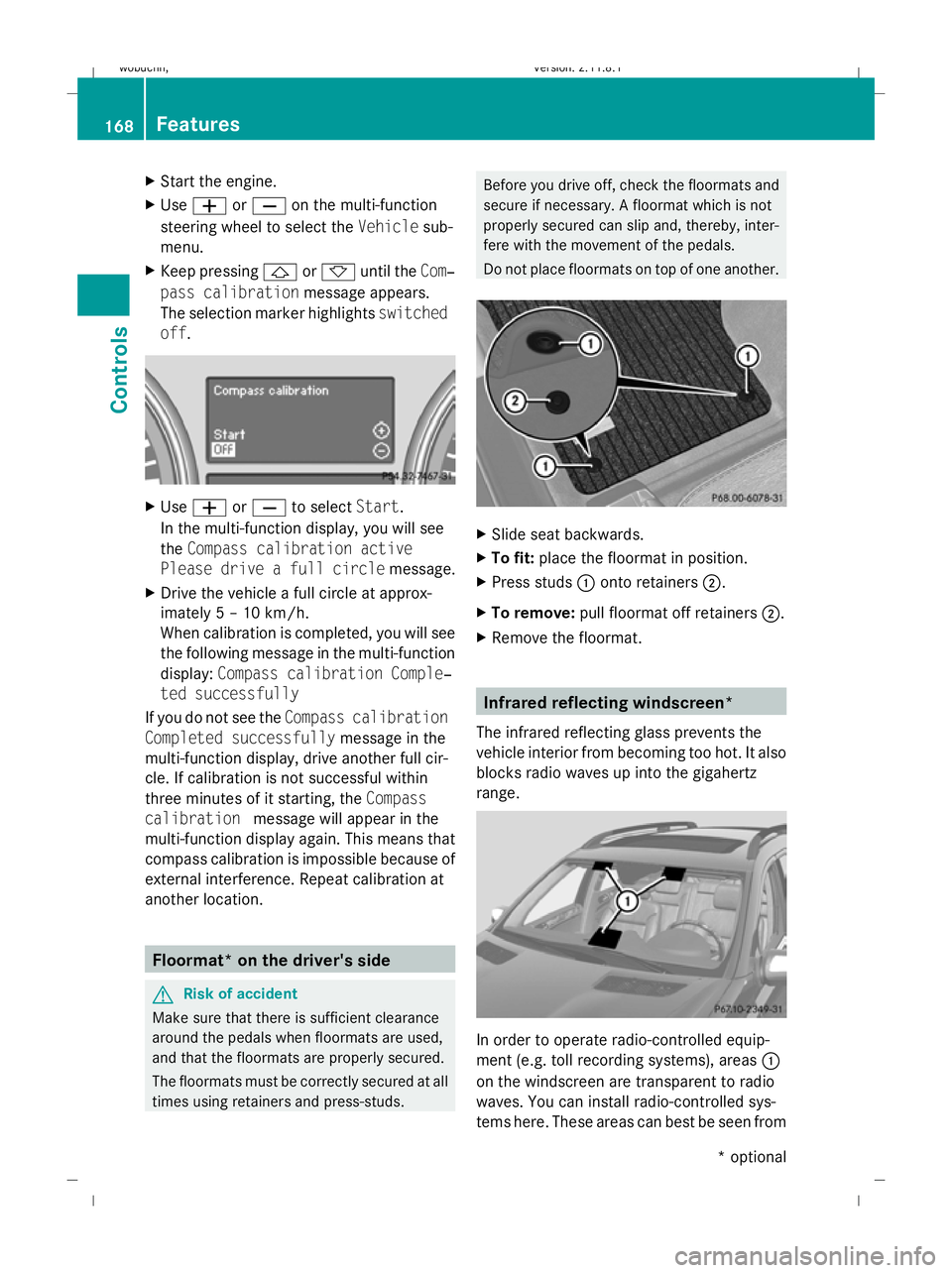
X Press studs :onto retainers ;.
X To remove: pull floormat off retainers ;.
X Remove the floormat. Infrared reflecting windscreen*
The infrared reflecting glass prevents the
vehicle interior from becoming too hot. It also
blocks radio waves up into the gigahertz
range. In order to operate radio-controlled equip-
ment (e.g. toll recording systems), areas :
on the windscreen are transparent to radio
waves. You can install radio-controlled sys-
tems here. These areas can best be seen from 168
FeaturesControls
* optional
X164_AKB; 2; 3, en-GB
wobuchh,
Version: 2.11.8.1 2009-03-31T14:14:58+02:00 - Seite 168
Dateiname: 6515431202_buchblock.pdf; erzeugt am 01. Apr 2009 00:17:44; WK