2009 MERCEDES-BENZ E-CLASS SALOON reset
[x] Cancel search: resetPage 140 of 373
X
Press the =or; button on the steer-
ing wheel to select the Settingsmenu.
X Press the :or9 button to select the
Convenience submenu.
X Press the abutton to confirm.
X Press the :or9 button to select the
Fold in mirrors when locking: func-
tion.
You will see the selected setting: onor
off.
X Press the abutton to save the setting.
Restoring the factory settings For safety reasons, not all functions are reset:
the Limit Speed (winter tyres): func-
tion in permanent Speedtronic can only be set
in the Vehicle submenu. If you want to reset
the Daytime driving lamps: in theLight
submenu, you must turn the key in the igni-
tion lock to position 1.
X Press the =or; button on the steer-
ing wheel to select the Settingsmenu.
X Press the :or9 button to select the
Factory setting submenu.
X Press the abutton to confirm.
The Reset all settings? message
appears.
X Press the :or9 button to select
Yes orNo.
X Press the abutton to confirm the selec-
tion.
If you have selected Yes, the multi-function
display shows a confirmation message. Driving systems
Overview of driving systems
The vehicle's driving systems are described
on the following pages:
R cruise control, Distronic Plus* and Speed-
tronic, which are used to control the speed
of the vehicle
R HOLD function, which makes pulling away
easier, particularly on steep uphill gradi-
ents
R RACE START (E 63 AMG), which makes pull-
ing away on race tracks easier
R AIRMATIC* (except E 63 AMG), which is
used to adjust the vehicle's suspension
system
R AMG RIDE CONTROL sports suspension
(E 63 AMG), which is used to adjust the
vehicle's suspension system
R 4MATIC* (permanent four-wheel drive), for
optimum traction
R PARKTRONIC* and Parking Guidance*,
which assist you in finding a parking space,
as well as when manoeuvring and parking
R reversing camera*, which assists you when
parking and manoeuvring
R ATTENTION ASSIST, which helps you
detect tiredness or increasing lapses in
concentration
R Speed Limit Assist*, which shows you
speed limits that are detected in the multi-
function display
R Night View Assist Plus*, which assists you
when driving in the dark
R lane package*, which assists you with Blind
Spot Assist when changing lanes and warns
you against leaving your lane unintention-
ally with Lane Keeping Assist
The ABS, BAS, BAS PLUS*, adaptive brake
lights, ESP ®
, EBV and ADAPTIVE BRAKE driv-
ing safety systems and the PRE-SAFE ® Driving systems
137Controls
* optional
212_AKB; 2; 4, en-GB
mkalafa,
Version: 2.11.8.1 2009-05-05T14:17:16+02:00 - Seite 137 Z
Dateiname: 6515346702_buchblock.pdf; erzeugt am 07. May 2009 14:16:16; WK
Page 143 of 373
Adjustment in 10 km/h increments
X
Briefly press the cruise control lever
beyond the pressure point, up :for a
higher speed or down ?for a lower speed.
The last speed stored is increased or
reduced.
Deactivating cruise control There are several ways to deactivate cruise
control:
X
Briefly press the cruise control lever for-
wards B.
or
X Brake.
or
X Briefly press the cruise control lever in the
direction of arrow A.
Variable Speedtronic is selected. LIM indi-
cator lamp ;in the cruise control lever
lights up.
Cruise control is automatically deactivated if:
R you depress the parking brake.
R you drive at less than 30 km/h
R ESP ®
intervenes or you deactivate ESP ®
R you change into neutral in a vehicle with
manual transmission while driving or if the
clutch is depressed for longer than 6 sec-
onds
R on vehicles with manual transmission, you
shift to a higher gear and as a result the
engine speed is too low
R you move the selector lever to Non vehi-
cles with automatic transmission* while
driving
If cruise control is deactivated, you will hear
a warning tone. You see the Cruise con‐
trol off message in the multi-function dis-
play for approximately five seconds.
i The last speed stored is cleared when you
switch off the engine. Distronic Plus*
i Distronic Plus is not available in all coun-
tries.
Distronic Plus regulates the speed and auto-
matically maintains the distance to the vehi-
cle in front. It brakes automatically in order
to avoid exceeding the set speed. On long and
steep downhill gradients, especially if the
vehicle is laden or towing a trailer, you must
select shift range 1,2or 3in good time. By
doing so, you will make use of the braking
effect of the engine, which relieves the load
on the brake system and prevents the brakes
from overheating and wearing too quickly. G
Risk of accident
Do not change down for additional engine
braking on a slippery road surface. This could
cause the drive wheels to lose their grip and
the vehicle could skid. G
Risk of accident
Distronic Plus is only an aid designed to assist
driving. The driver is fully responsible for the
vehicle's distance from other vehicles, the
vehicle's speed and for braking in good time.
Distronic Plus does not react to:
R pedestrians
R stationary obstacles on the road, e.g. stop-
ped or parked vehicles
R oncoming and crossing traffic
Distronic Plus may not detect narrow vehicles
driving in front, e.g. motorcycles, or vehicles
driving on a different line. Therefore, always
pay attention to traffic conditions even when
Distronic Plus is activated. Otherwise, you
may fail to recognise dangers in time, cause
an accident and injure yourself and others.
If a slower-moving vehicle is detected in front,
Distronic Plus causes your vehicle to brake
and maintain a preset distance to the vehicle
in front. 140
Driving systemsCont
rols
* optional
212_AKB; 2; 4, en-GB
mkalafa
,V ersion: 2.11.8.1
2009-05-05T14:17:16+02:00 - Seite 140
Dateiname: 6515346702_buchblock.pdf; erzeugt am 07. May 2009 14:16:17; WK
Page 146 of 373
Pulling away
X
If the vehicle in front pulls away: remove
your foot from the brake pedal.
X Briefly pull the cruise control lever towards
you ?.
or
X Accelerate briefly.
Your vehicle pulls away and adapts its
speed to that of the vehicle in front.
Driving
If there is no vehicle in front, Distronic Plus
operates in the same way as cruise control.
If a slower-moving vehicle is detected in front,
Distronic Plus causes your vehicle to brake
and maintain a preset distance to the vehicle
in front.
If Distronic Plus detects a faster-moving vehi-
cle in front, it increases the driving speed, but
only up to the stored speed. G
Risk of accident
If you depress the brake, Distronic Plus is
deactivated unless your vehicle is stationary.
Distronic Plus then no longer brakes your
vehicle. The driver is fully responsible for the
vehicle's distance from other vehicles, its
speed and for braking in good time.
Stopping G
Risk of accident
The Distronic Plus braking effect is cancelled
and the vehicle can start moving if:
R Distronic Plus is deactivated using the
cruise control lever
R you accelerate
R the system or the power supply is disrup-
ted, e.g. due to battery failure
R the electrical system in the engine com-
partment or the fuses have been tampered
with
R the battery is disconnected G
Risk of accident
Never get out of the vehicle when Distronic
Plus is activated.
Distronic Plus must never be operated or
deactivated by a passenger or from outside
the vehicle.
Distronic Plus does not replace the parking
brake and must not be used for parking.
If you wish to leave the vehicle or park it,
deactivate Distronic Plus and secure the vehi-
cle against rolling away.
If Distronic Plus detects that the vehicle in
front is stopping, it brakes your vehicle until
it is stationary.
Once your vehicle is stationary, it remains
stationary and you do not need to depress the
brake.
i Depending on the specified minimum dis-
tance, your vehicle will come to a standstill
at a sufficient distance behind the vehicle
in front. The specified minimum distance is
set using the thumbwheel on the cruise-
control lever.
Vehicles with automatic transmission
with selector lever
When Distronic Plus is activated and the vehi-
cle is at a standstill, a warning message
appears in the multi-function display if:
R the driver's door is opened and you release
the seat belt.
R the engine is switched off, unless it is auto-
matically switched off by the ECO Start/
Stop function.
R the bonnet is opened.
Select Park (P)
X Move the selector lever to Pto prevent the
vehicle from rolling away.
Distronic Plus is deactivated. The warning
message in the multi-function display dis-
appears. Driving systems
143Controls
212_AKB; 2; 4, en-GB
mkalafa, Version: 2.11.8.1 2009-05-05T14:17:16+02:00 - Seite 143 Z
Dateiname: 6515346702_buchblock.pdf; erzeugt am 07. May 2009 14:16:18; WK
Page 167 of 373
Warning and display messages in the
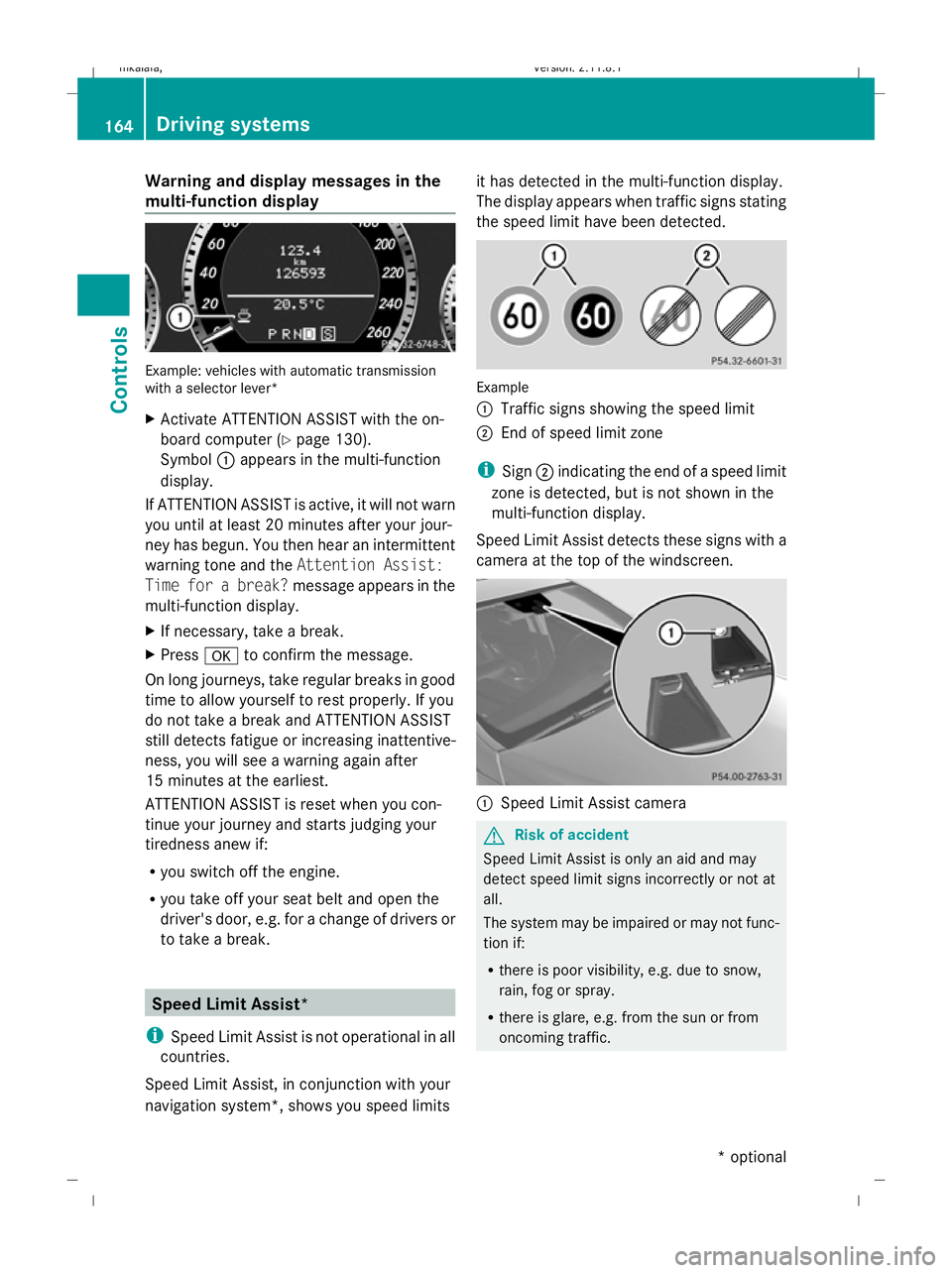
multi-function display Example: vehicles with automatic transmission
with a selector lever*
X Activate ATTENTION ASSIST with the on-
board computer (Y page 130).
Symbol :appears in the multi-function
display.
If ATTENTION ASSIST is active, it will not warn
you until at least 20 minutes after your jour-
ney has begun. You then hear an intermittent
warning tone and the Attention Assist:
Time for a break? message appears in the
multi-function display.
X If necessary, take a break.
X Press ato confirm the message.
On long journeys, take regular breaks in good
time to allow yourself to rest properly. If you
do not take a break and ATTENTION ASSIST
still detects fatigue or increasing inattentive-
ness, you will see a warning again after
15 minutes at the earliest.
ATTENTION ASSIST is reset when you con-
tinue your journey and starts judging your
tiredness anew if:
R you switch off the engine.
R you take off your seat belt and open the
driver's door, e.g. for a change of drivers or
to take a break. Speed Limit Assist*
i Speed Limit Assist is not operational in all
countries.
Speed Limit Assist, in conjunction with your
navigation system*, shows you speed limits it has detected in the multi-function display.
The display appears when traffic signs stating
the speed limit have been detected.
Example
:
Traffic signs showing the speed limit
; End of speed limit zone
i Sign ;indicating the end of a speed limit
zone is detected, but is not shown in the
multi-function display.
Speed Limit Assist detects these signs with a
camera at the top of the windscreen. :
Speed Limit Assist camera G
Risk of accident
Speed Limit Assist is only an aid and may
detect speed limit signs incorrectly or not at
all.
The system may be impaired or may not func-
tion if:
R there is poor visibility, e.g. due to snow,
rain, fog or spray.
R there is glare, e.g. from the sun or from
oncoming traffic. 164
Driving systemsControls
* optional
212_AKB; 2; 4, en-GB
mkalafa,
Version: 2.11.8.1 2009-05-05T14:17:16+02:00 - Seite 164
Dateiname: 6515346702_buchblock.pdf; erzeugt am 07. May 2009 14:16:25; WK
Page 188 of 373

Sliding/tilting sunroof*
Overhead control panel
:
To open
; To close/lower
= To raise
X Turn the key to position 1or 2in the ignition
lock.
X Pull or push the switch in the corresponding
direction.
i If you press the switch beyond the point
of resistance, an automatic opening/clos-
ing process is started in the corresponding
direction. You can stop automatic opera-
tion by pressing again.
The sun protection cover automatically opens
along with the sliding/tilting sunroof. Once
you have closed the sliding/tilting sunroof,
you can close the cover by hand.
Closing with increased force and with-
out the anti-entrapment feature G
Risk of injury
You could be severely or even fatally injured
when closing the sliding/tilting sunroof with
increased force or without the anti-entrap-
ment feature. Make sure that nobody can
become trapped when closing the sliding/tilt-
ing sunroof.
If the sliding/tilting sunroof locks up during
closing:
X Immediately after it locks up, pull the
switch again to the pressure point in the direction of arrow
;until the sliding/tilt-
ing sunroof is closed.
The sliding/tilting sunroof is closed with
more force.
If the sliding/tilting sunroof locks up during
closing again:
X Immediately after it locks up, pull the
switch again to the pressure point in the
direction of arrow ;until the sliding/tilt-
ing sunroof is closed.
The sliding/tilting sunroof is closed without
the anti-entrapment feature.
Rain closing feature* If the key is in position
0in the ignition lock,
or if it is removed, the sliding/tilting sunroof
closes automatically:
R if it starts to rain
R at extreme outside temperatures
R after six hours
R if there is a malfunction in the power supply
The rear of the sliding/tilting sunroof is then
raised in order to ventilate the interior of the
vehicle.
i The sliding/tilting sunroof is opened
slightly again if it is obstructed while being
closed by the rain closing feature. The rain
closing feature is then deactivated.
The sliding/tilting sunroof does not close if:
R it is raised at the rear
R it is blocked
R no rain is falling on the area of the wind-
screen being monitored by the rain sensor
(e.g. because the vehicle is under a bridge
or in a carport)
Resetting Reset the sliding/tilting sunroof if it does not
open smoothly. Sliding sunroof
185Controls
* optional
212_AKB; 2; 4, en-GB
mkalafa,
Version: 2.11.8.1 2009-05-05T14:17:16+02:00 - Seite 185 Z
Dateiname: 6515346702_buchblock.pdf; erzeugt am 07. May 2009 14:16:33; WK
Page 190 of 373

feature, it opens again slightly. The rain
closing feature is then deactivated.
The panorama sliding sunroof does not close
if:
R it is raised at the rear.
R it is blocked.
R no rain is falling on the area of the wind-
screen being monitored by the rain sensor
(e.g. because the vehicle is under a bridge
or in a carport). Roller sunblinds for the panorama
sliding sunroof*
The roller sunblinds provide protection from
the sun. The two roller sunblinds can only be
opened and closed together when the pano-
rama sliding sunroof is closed. G
Risk of injury
Make sure that nobody can become trapped
as you open or close the roller sunblinds. Overhead control panel
: To open
; To close
= To open
X Turn the key to position 1or 2in the ignition
lock.
X Pull or push the switch in the corresponding
direction. i
If you press the switch beyond the point
of resistance, an automatic opening/clos-
ing process is started in the corresponding
direction. You can stop automatic opera-
tion by pressing again.
Resetting the panorama sliding sunroof
and the roller sunblinds Reset the panorama sliding sunroof and the
roller sunblinds if the panorama sliding sun-
roof or the roller sunblinds do not close
smoothly.
X Turn the key to position 1or 2in the ignition
lock.
X Pull the switch repeatedly to the point of
resistance in the direction of arrow ;until
the panorama sliding sunroof is fully
closed.
X Keep the switch pulled for an additional
second.
X Pull the switch repeatedly to the point of
resistance in the direction of arrow ;until
the roller sunblinds are fully closed.
X Keep the switch pulled for an additional
second.
X Check that the panorama sliding sunroof
and the roller sunblinds can be fully opened
again.
X If this is not the case, consult a qualified
specialist workshop. Loading and stowing
Loading guidelines
G
Risk of injury
Secure and position the load as described in
the loading guidelines.
Otherwise, vehicle occupants could
be injured by the load being thrown around in
the event of sharp braking, a sudden change
in direction or an accident.
You will find further information in the "Secur-
ing a load" section. Loading and stowing
187Controls
* optional
212_AKB; 2; 4, en-GB
mkalafa,
Version: 2.11.8.1 2009-05-05T14:17:16+02:00 - Seite 187 Z
Dateiname: 6515346702_buchblock.pdf; erzeugt am 07. May 2009 14:16:33; WK
Page 250 of 373
Where will I find...?
...........................248
Display messages ............................. 251
Troubleshooting ................................ 278
Locking/unlocking in an emer-
gency ................................................. 299
Resetting the active bonnet
(pedestrian protection) after trig-
gering ................................................. 302
Resetting triggered NECK-PRO
head restraints .................................. 303
Replacing batteries (key and
remote control) ................................. 303
Changing bulbs ................................. 304
Replacing the wiper blades ..............308
Flat tyre ............................................. 309
Battery ............................................... 319
Jump-starting .................................... 323
Towing and tow-starting ..................324
Fuses .................................................. 327 247Practical advice
212_AKB; 2; 4, en-GB
mkalafa,
Version: 2.11.8.1 2009-05-05T14:17:16+02:00 - Seite 247
Dateiname: 6515346702_buchblock.pdf; erzeugt am 07. May 2009 14:17:04; WK
Page 266 of 373
Symbol messages
G
Risk of accident and injury
The operating safety of the vehicle can be compromised if maintenance work is carried out
incorrectly. This could cause you to lose control of the vehicle and cause an accident. The safety
systems may also not be able to protect you or others as they are designed to do.
Always have maintenance work carried out at a qualified specialist workshop. The qualified spe-
cialist workshop must have the necessary specialist knowledge and tools to carry out the work
required. Mercedes-Benz recommends that you use a Mercedes-Benz Service Centre for this
purpose. In particular, work relevant to safety or on safety-related systems must be carried out
at a qualified specialist workshop. Display messages
Possible causes/consequences and
X
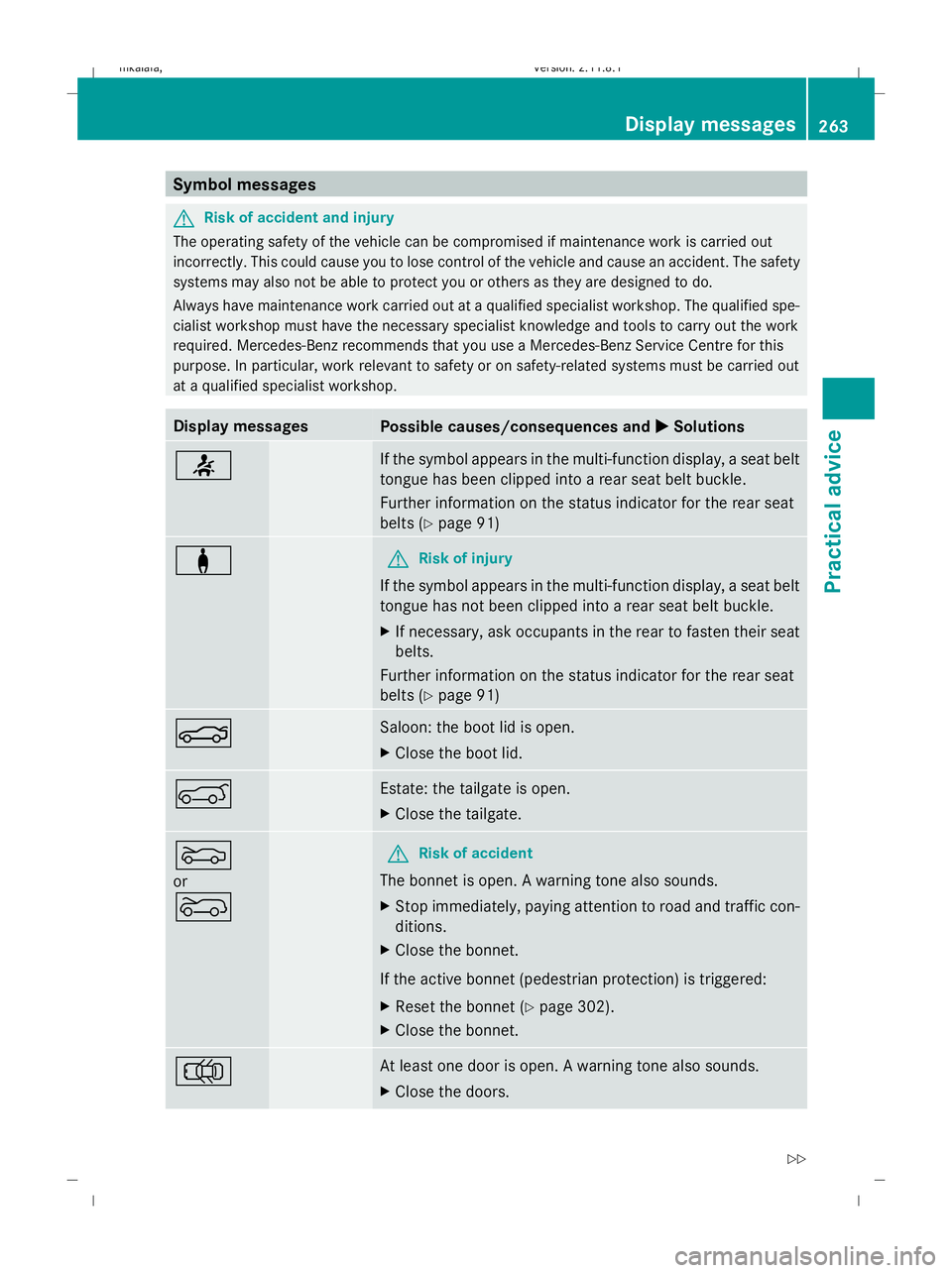
X Solutions 7 If the symbol appears in the multi-function display, a seat belt
tongue has been clipped into a rear seat belt buckle.
Further information on the status indicator for the rear seat
belts (Y
page 91) a G
Risk of injury
If the symbol appears in the multi-function display, a seat belt
tongue has not been clipped into a rear seat belt buckle.
X If necessary, ask occupants in the rear to fasten their seat
belts.
Further information on the status indicator for the rear seat
belts (Y page 91) N Saloon: the boot lid is open.
X
Close the boot lid. A Estate: the tailgate is open.
X
Close the tailgate. M
or
? G
Risk of accident
The bonnet is open. A warning tone also sounds.
X Stop immediately, paying attention to road and traffic con-
ditions.
X Close the bonnet.
If the active bonnet (pedestrian protection) is triggered:
X Reset the bonnet (Y page 302).
X Close the bonnet. ; At least one door is open. A warning tone also sounds.
X
Close the doors. Display messages
263Practical advice
212_AKB; 2; 4, en-GB
mkalafa, Version: 2.11.8.1 2009-05-05T14:17:16+02:00 - Seite 263 Z
Dateiname: 6515346702_buchblock.pdf; erzeugt am 07. May 2009 14:17:09; WK