2009 MERCEDES-BENZ E-CLASS SALOON park assist
[x] Cancel search: park assistPage 143 of 373
Adjustment in 10 km/h increments
X
Briefly press the cruise control lever
beyond the pressure point, up :for a
higher speed or down ?for a lower speed.
The last speed stored is increased or
reduced.
Deactivating cruise control There are several ways to deactivate cruise
control:
X
Briefly press the cruise control lever for-
wards B.
or
X Brake.
or
X Briefly press the cruise control lever in the
direction of arrow A.
Variable Speedtronic is selected. LIM indi-
cator lamp ;in the cruise control lever
lights up.
Cruise control is automatically deactivated if:
R you depress the parking brake.
R you drive at less than 30 km/h
R ESP ®
intervenes or you deactivate ESP ®
R you change into neutral in a vehicle with
manual transmission while driving or if the
clutch is depressed for longer than 6 sec-
onds
R on vehicles with manual transmission, you
shift to a higher gear and as a result the
engine speed is too low
R you move the selector lever to Non vehi-
cles with automatic transmission* while
driving
If cruise control is deactivated, you will hear
a warning tone. You see the Cruise con‐
trol off message in the multi-function dis-
play for approximately five seconds.
i The last speed stored is cleared when you
switch off the engine. Distronic Plus*
i Distronic Plus is not available in all coun-
tries.
Distronic Plus regulates the speed and auto-
matically maintains the distance to the vehi-
cle in front. It brakes automatically in order
to avoid exceeding the set speed. On long and
steep downhill gradients, especially if the
vehicle is laden or towing a trailer, you must
select shift range 1,2or 3in good time. By
doing so, you will make use of the braking
effect of the engine, which relieves the load
on the brake system and prevents the brakes
from overheating and wearing too quickly. G
Risk of accident
Do not change down for additional engine
braking on a slippery road surface. This could
cause the drive wheels to lose their grip and
the vehicle could skid. G
Risk of accident
Distronic Plus is only an aid designed to assist
driving. The driver is fully responsible for the
vehicle's distance from other vehicles, the
vehicle's speed and for braking in good time.
Distronic Plus does not react to:
R pedestrians
R stationary obstacles on the road, e.g. stop-
ped or parked vehicles
R oncoming and crossing traffic
Distronic Plus may not detect narrow vehicles
driving in front, e.g. motorcycles, or vehicles
driving on a different line. Therefore, always
pay attention to traffic conditions even when
Distronic Plus is activated. Otherwise, you
may fail to recognise dangers in time, cause
an accident and injure yourself and others.
If a slower-moving vehicle is detected in front,
Distronic Plus causes your vehicle to brake
and maintain a preset distance to the vehicle
in front. 140
Driving systemsCont
rols
* optional
212_AKB; 2; 4, en-GB
mkalafa
,V ersion: 2.11.8.1
2009-05-05T14:17:16+02:00 - Seite 140
Dateiname: 6515346702_buchblock.pdf; erzeugt am 07. May 2009 14:16:17; WK
Page 154 of 373
X
Press the :or9 button to set per-
manent Speedtronic in increments of ten
(240 km/h to 160 km/h). Permanent
Speedtronic is deactivated with the Off
setting.
X Press ato save the entry. HOLD function
The HOLD function can assist the driver in the
following situations:
R when pulling away, especially on steep
slopes
R when manoeuvring on steep slopes
R when waiting in traffic
The vehicle is kept stationary without the
driver having to depress the brake pedal.
The braking effect is cancelled and the HOLD
function deactivated when you depress the
accelerator pedal to pull away.
Activation conditions You can activate the HOLD function if:
R
the vehicle is stationary.
R the engine is running or was automatically
switched off by the ECO Start/Stop func-
tion.
R the driver's door is closed or your seat belt
is fastened.
R the parking brake is not applied.
R the bonnet is closed.
R on vehicles with automatic transmission*,
D, Ror Nis selected.
R Distronic Plus* is deactivated
Activating the HOLD function X
Make sure that the activation conditions
are met.
X Depress the brake. Vehicles with automatic transmission* with a
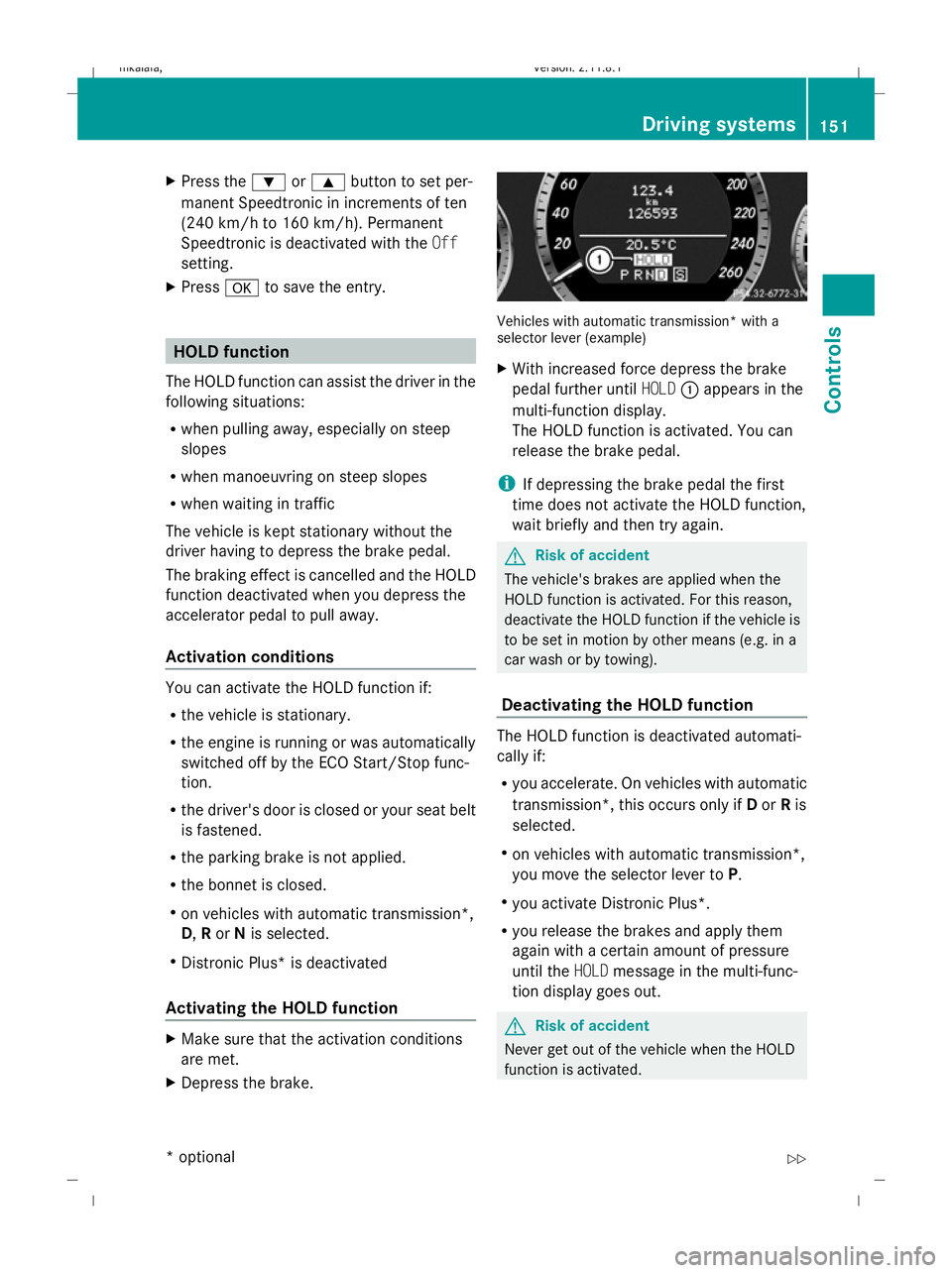
selector lever (example)
X
With increased force depress the brake
pedal further until HOLD:appears in the
multi-function display.
The HOLD function is activated. You can
release the brake pedal.
i If depressing the brake pedal the first
time does not activate the HOLD function,
wait briefly and then try again. G
Risk of accident
The vehicle's brakes are applied when the
HOLD function is activated. For this reason,
deactivate the HOLD function if the vehicle is
to be set in motion by other means (e.g. in a
car wash or by towing).
Deactivating the HOLD function The HOLD function is deactivated automati-
cally if:
R
you accelerate. On vehicles with automatic
transmission*, this occurs only if Dor Ris
selected.
R on vehicles with automatic transmission*,
you move the selector lever to P.
R you activate Distronic Plus*.
R you release the brakes and apply them
again with a certain amount of pressure
until the HOLDmessage in the multi-func-
tion display goes out. G
Risk of accident
Never get out of the vehicle when the HOLD
function is activated. Driving systems
151Controls
* optional
212_AKB; 2; 4, en-GB
mkalafa,
Version: 2.11.8.1 2009-05-05T14:17:16+02:00 - Seite 151 Z
Dateiname: 6515346702_buchblock.pdf; erzeugt am 07. May 2009 14:16:21; WK
Page 166 of 373
R
the boot lid/tail gate is open
R in heavy rain, snow or fog
R at night or in very dark places
R if the camera is exposed to very bright light
R if the area is lit by fluorescent light (the dis-
play may flicker)
R if there is a sudden change in temperature,
e.g. when driving into a heated garage in
winter
R if the camera lens is dirty or obstructed
R if the rear of your vehicle is damaged. In this
event have the camera position and setting
checked at a qualified specialist workshop.
Mercedes-Benz recommends that you use
a Mercedes-Benz Service Centre for this
purpose.
Do not use the reversing camera in these
types of situation. You could, otherwise,
injure others or damage objects and your
vehicle while you are parking.
Activating the reversing camera X
Make sure that the key is in position 2in
the ignition lock.
X Make sure that the "Reversing camera"
function is selected in COMAND APS (see
the separate operating instructions for
COMAND APS).
X Engage reverse gear.
The area behind the vehicle is shown in the
COMAND APS display.
You can select not to show the area behind
the vehicle in the COMAND APS display (see
the separate operating instructions for
COMAND APS). ATTENTION ASSIST
ATTENTION ASSIST helps you on long, monot-
onous journeys such as on motorways and
trunk roads. It is active at speeds between 80
and 180 km/h. If ATTENTION ASSIST detects tiredness or increasing lapses in concentra-
tion on the part of the driver, it suggests a
break. G
Risk of accident
ATTENTION ASSIST is only an aid and may
detect your tiredness or lapses in concentra-
tion too late or not at all. It is not a substitute
for a well rested and attentive driver.
Fatigue may cause you to recognise hazard-
ous situations too late, misjudge a situation
or react slower. For this reason, make sure
you feel rested before you begin driving and
during your journey. Always take breaks in
good time and regularly, especially during
long journeys. Otherwise, you may fail to rec-
ognise dangers in time, cause an accident and
injure yourself and others.
ATTENTION ASSIST assesses your level of
fatigue or increasing inattentiveness taking
into consideration the following criteria:
R personal driving style, e.g. steering charac-
teristics
R driving conditions, e. g. time, driving time
ATTENTION ASSIST's functionality is restric-
ted and warnings are delayed or do not
appear at all:
R if the road condition is poor, e.g. large
bumps or potholes
R there is a strong side wind
R you have adopted a very sporty driving style
with high cornering speeds or driving with
a high rate of acceleration
R if you are predominantly driving slower
than 80 km/h or faster than 180 km/h
R if you are currently operating or making a
call using COMAND APS*
R in active driving situations, for example, if
you are changing lanes or changing the
vehicle speed Driving systems
163Controls
* optional
212_AKB; 2; 4, en-GB
mkalafa
,V ersion: 2.11.8.1
2009-05-05T14:17:16+02:00 - Seite 163 Z
Dateiname: 6515346702_buchblock.pdf; erzeugt am 07. May 2009 14:16:24; WK
Page 170 of 373

i
The infrared headlamps only switch on
when the vehicle is driving at speeds of at
least 10 km/h. This means that you do not
have the full visual range while stationary
and cannot check whether Night View
Assist Plus is working.
Pedestrian recognition The Night View Assist Plus recognises pedes-
trians using typical characteristics, i. e. a sil-
houette in the shape of a person.
Pedestrian recognition is activated, if:
R Night View Assist Plus is activated
R you are driving faster than about 10 km/h
R the surroundings are dark, e. g. when driv-
ing outside built-up areas without street
lighting
If pedestrian recognition is active, sym-
bol ?appears. If a pedestrian is now recog-
nised, they are framed =and thereby high-
lighted. If the pedestrian recognition system
has brought a pedestrian to your attention,
look through the windscreen to evaluate the
situation. The actual distance to objects and
pedestrians cannot be gauged accurately by
looking at a screen.
It may be the case that objects are highlighted
as well as pedestrians. G
Risk of accident
Pedestrian recognition may be impaired or
inoperative, if:
R pedestrians are partially or completely
obscured by objects, e. g. by parked vehi-
cles
R the silhouette in the Night View Assist Plus
display is incomplete or interrupted, e. g. by
powerful light reflections
R pedestrians do not contrast with the sur-
roundings
R pedestrians are not in an upright position,
e. g. sitting, squatting or lying i
Animals are not recognised by pedestrian
recognition.
Misted up or dirty windscreen If the windscreen in front of the camera is
misted up or dirty on the inside or outside, the
Night View Assist Plus display is affected.
X To demist: check the automatic air-condi-
tioning settings (Y page 179) and fold
down the camera cover (Y page 245).
X To demist the inside of the wind-
screen: fold down the camera cover and
clean the windscreen (Y page 242). Lane package*
The lane package consists of Blind Spot
Assist and Lane Keeping Assist.
Blind Spot Assist Blind Spot Assist uses a radar sensor system
to monitor the area on both sides of your
vehicle. It supports you when you change
lanes at speeds above 30 km/h. In each case,
a warning lamp appears in the exterior mirror
as soon as a vehicle is detected in the area
monitored. When you switch on the corre-
sponding turn signal prior to changing lanes,
you receive an optical and acoustic collision
warning. For this purpose, Blind Spot Assist
uses sensors in the rear bumper.
G
Risk of accident
Blind Spot Assist is only an aid and may not
detect all vehicles. Blind Spot Assist does not
relieve you of the responsibility of paying
attention.
Always pay attention to traffic conditions and
your surroundings. Otherwise, you may fail to
recognise dangers in time, cause an accident
and injure yourself and others.
The radar sensor system is automatically
deactivated near radio telescope facilities
(Y page 362). Driving systems
167Controls
* optional
212_AKB; 2; 4, en-GB
mkalafa,
Version: 2.11.8.1 2009-05-05T14:17:16+02:00 - Seite 167 Z
Dateiname: 6515346702_buchblock.pdf; erzeugt am 07. May 2009 14:16:26; WK
Page 238 of 373

X
Grasp release wheel ;with your hand
such that the thumb is in the thumb rest
and turn it anti-clockwise.
The ball coupling disengages and folds out
from under the rear bumper. Indicator
lamp :flashes. X
Pull the ball coupling in the direction of the
arrow until it engages in a vertical position.
Indicator lamp :goes out.
The multi-function display shows the
Trailer hitch Check lock mech. mes-
sage until the ball coupling is engaged.
X Remove the protective cap from the ball
coupling and store it in a safe place.
X Make sure that the ball of the ball coupling
is clean and that, depending on the trailer
specification, it is greased or dry (without
grease) when used.
The power socket is integrated in the ball
coupling. Notes on towing a trailer
G
Risk of accident
When reversing the vehicle towards the
trailer, make sure there is nobody between
the trailer and the vehicle.
Couple and uncouple the trailer carefully. If
you do not couple the trailer to the towing
vehicle correctly, the trailer could become
detached. Make sure that the following values are not
exceeded:
R
the permissible trailer drawbar noseweight
R the permissible trailer load
R the permissible rear axle load of the towing
vehicle
R the maximum permissible gross vehicle
weight of both the towing vehicle and the
trailer
You will find the applicable permissible val-
ues, which must not be exceeded, in the vehi-
cle documents.
You will find the values approved by the man-
ufacturer on the vehicle identification plates
and those for the towing vehicle in the "Tech-
nical data" section.
i When towing a trailer, set the tyre pres-
sure on the rear axle of the towing vehicle
for a maximum load; see the tyre pressure
table in the fuel filler flap.
You will find installation dimensions and loads
in the "Technical data" section
(Y page 356).
The maximum drawbar load of the trailer
drawbar on the ball coupling is 84 kg. How-
ever, the actual noseweight must not exceed
the value given on the trailer coupling or
trailer identification plates. The lowest weight
applies.
! Use a noseweight as close as possible to
the maximum permissible noseweight. Do
not use a noseweight of less than 50 kg,
otherwise the trailer may come loose.
Bear in mind that the payload and the rear
axle load are reduced by the actual nose-
weight.
Please note that when towing a trailer, PARK-
TRONIC* ( Ypage 159), parking guid-
ance* (Y page 162) and Blind Spot
Assist* (Y page 261) are only available with
limitations, or not at all. Trailer towing
235Operation
* optional
212_AKB; 2; 4, en-GB
mkalafa
,V ersion: 2.11.8.1
2009-05-05T14:17:16+02:00 - Seite 235 Z
Dateiname: 6515346702_buchblock.pdf; erzeugt am 07. May 2009 14:16:59; WK
Page 256 of 373
Display messages
Possible causes/consequences and
X
X Solutions 120 km/h Maximum
speed
exceeded
The maximum speed has been exceeded
40
.
X Drive more slowly. Adaptive
Main-beam
Assist inopera‐
tive
Adaptive Highbeam Assist* is faulty.
X
Visit a qualified specialist workshop. Active
bonnet malfunc‐
tion See
Owner's
Manual The active bonnet function (pedestrian protection) is not
active due to a malfunction.
X
Visit a qualified specialist workshop. Auxiliary
battery malfunc‐
tion The auxiliary battery for the automatic transmission is no lon-
ger being charged.
X
Visit a qualified specialist workshop. P Select
Park (P)
Vehicles with automatic transmission* with a selector lever:
You have switched off the engine with the start/stop but-
ton* and opened the driver's door.
You attempted to lock the vehicle.
A warning tone also sounds.
X
Move the selector lever to P.P Select
Park (P)
Vehicles with automatic transmission* with a selector lever:
With the HOLD function or Distronic Plus
*activated, you
have:
R opened the driver's door and released the seat belt or
R switched off the engine or
R opened the bonnet
A tone may also sound at regular intervals. The tone becomes
louder if you attempt to lock the vehicle.
You cannot start the engine.
X Move the selector lever to P.
You can restart the engine. Only
select Park (P)
when vehi‐
cle is
stationary
Vehicles with a DIRECT SELECT lever*: the vehicle is still in
motion.
X
Stop the vehicle.
X Shift the automatic transmission* to P.40
Only for certain countries. Display messages
253Practical advice
* optional
212_AKB; 2; 4, en-GB
mkalafa
,V ersion: 2.11.8.1
2009-05-05T14:17:16+02:00 - Seite 253 Z
Dateiname: 6515346702_buchblock.pdf; erzeugt am 07. May 2009 14:17:08; WK
Page 269 of 373
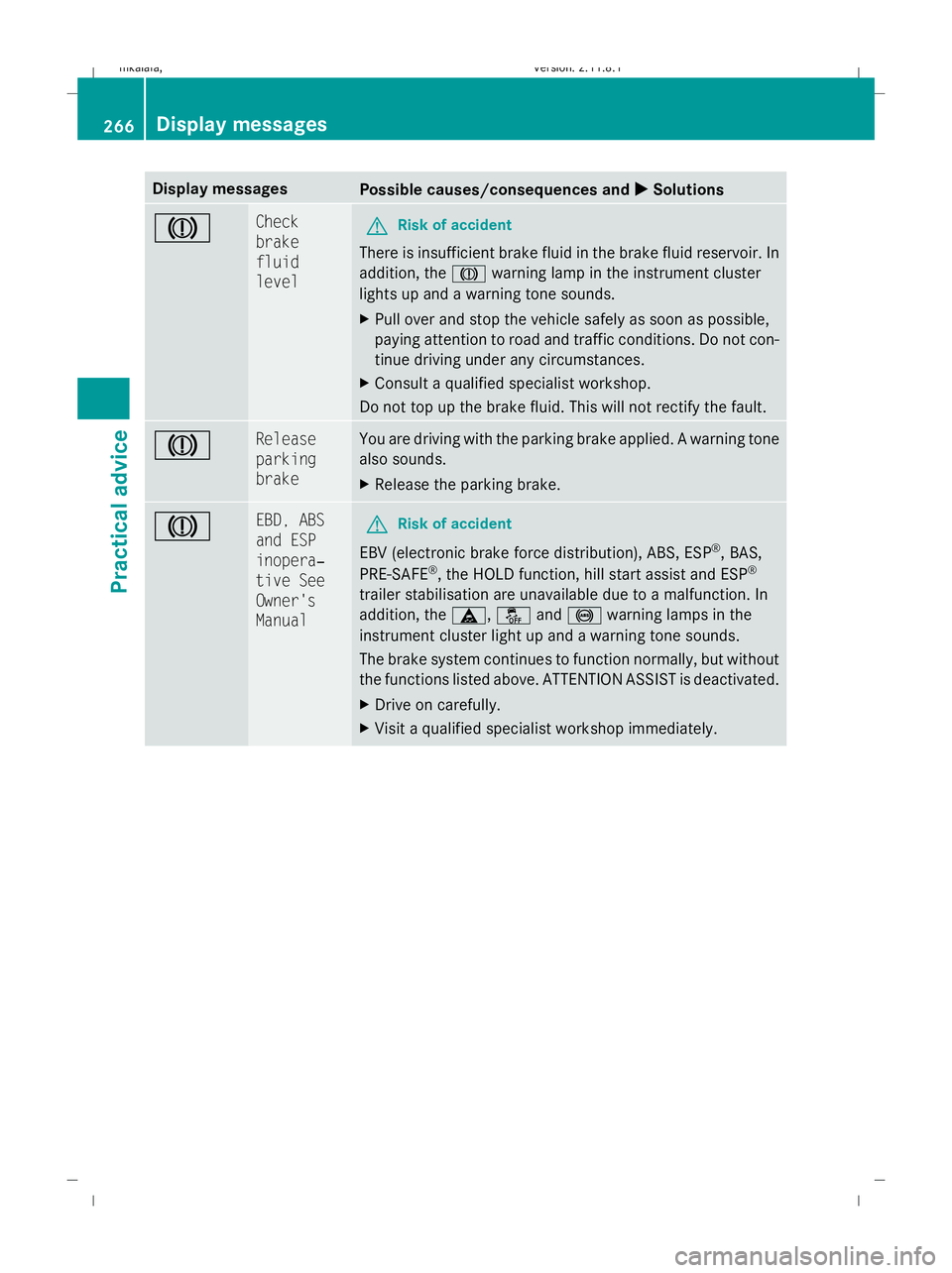
Display messages
Possible causes/consequences and
X
X Solutions J Check
brake
fluid
level
G
Risk of accident
There is insufficient brake fluid in the brake fluid reservoir. In
addition, the Jwarning lamp in the instrument cluster
lights up and a warning tone sounds.
X Pull over and stop the vehicle safely as soon as possible,
paying attention to road and traffic conditions. Do not con-
tinue driving under any circumstances.
X Consult a qualified specialist workshop.
Do not top up the brake fluid. This will not rectify the fault. J Release
parking
brake You are driving with the parking brake applied. A warning tone
also sounds.
X
Release the parking brake. J EBD, ABS
and ESP
inopera‐
tive See
Owner's
Manual
G
Risk of accident
EBV (electronic brake force distribution), ABS, ESP ®
, BAS,
PRE-SAFE ®
, the HOLD function, hill start assist and ESP ®
trailer stabilisation are unavailable due to a malfunction. In
addition, the ä,åand! warning lamps in the
instrument cluster light up and a warning tone sounds.
The brake system continues to function normally, but without
the functions listed above. ATTENTION ASSIST is deactivated.
X Drive on carefully.
X Visit a qualified specialist workshop immediately. 266
Display
messagesPractical advice
212_AKB; 2; 4, en-GB
mkalafa,V ersion: 2.11.8.1
2009-05-05T14:17:16+02:00 - Seite 266
Dateiname: 6515346702_buchblock.pdf; erzeugt am 07. May 2009 14:17:09; WK
Page 297 of 373

Problem
Possible causes/consequences and
X XSolutions Only the red segments
in the PARKTRONIC
warning display are lit.
PARKTRONIC is deacti-
vated after approx-
imately 20 seconds. The problem may be caused by an external source of radio or
ultrasound waves.
X
See if PARKTRONIC functions in a different location. Night View Assist Plus*
Problem
Possible causes/consequences and
X XSolutions The picture quality of
Night View Assist Plus
has deteriorated. The windscreen wipers are smearing the windscreen.
X
Replace the wiper blades (Y page 308). The windscreen is smeared after cleaning the vehicle in a car wash.
X
Clean the windscreen (Y page 242). Windscreen chip damage in the camera's field of vision.
X
Replace the windscreen. The windscreen is misted up on the inside.
X
Demist the windscreen (Y page 179). The windscreen is iced up.
X
De-ice the windscreen (Y page 179). There is dirt on the inside of the windscreen.
X
Clean the inside of the windscreen (Y page 242).Headlamps
Problem
Possible causes/consequences and
X XSolutions The headlamps are mis-
ted up on the inside. Air humidity is very high.
X
Drive with the headlamps switched on.
The headlamps are demisted after a short distance. The headlamp housing is not sealed and moisture has been able
to enter.
X
Have the headlamps checked at a qualified specialist workshop. 294
TroubleshootingPractical advice
* optional
212_AKB; 2; 4, en-GB
mkalafa,
Version: 2.11.8.1 2009-05-05T14:17:16+02:00 - Seite 294
Dateiname: 6515346702_buchblock.pdf; erzeugt am 07. May 2009 14:17:13; WK