2009 MERCEDES-BENZ E-CLASS COUPE stop start
[x] Cancel search: stop startPage 118 of 313
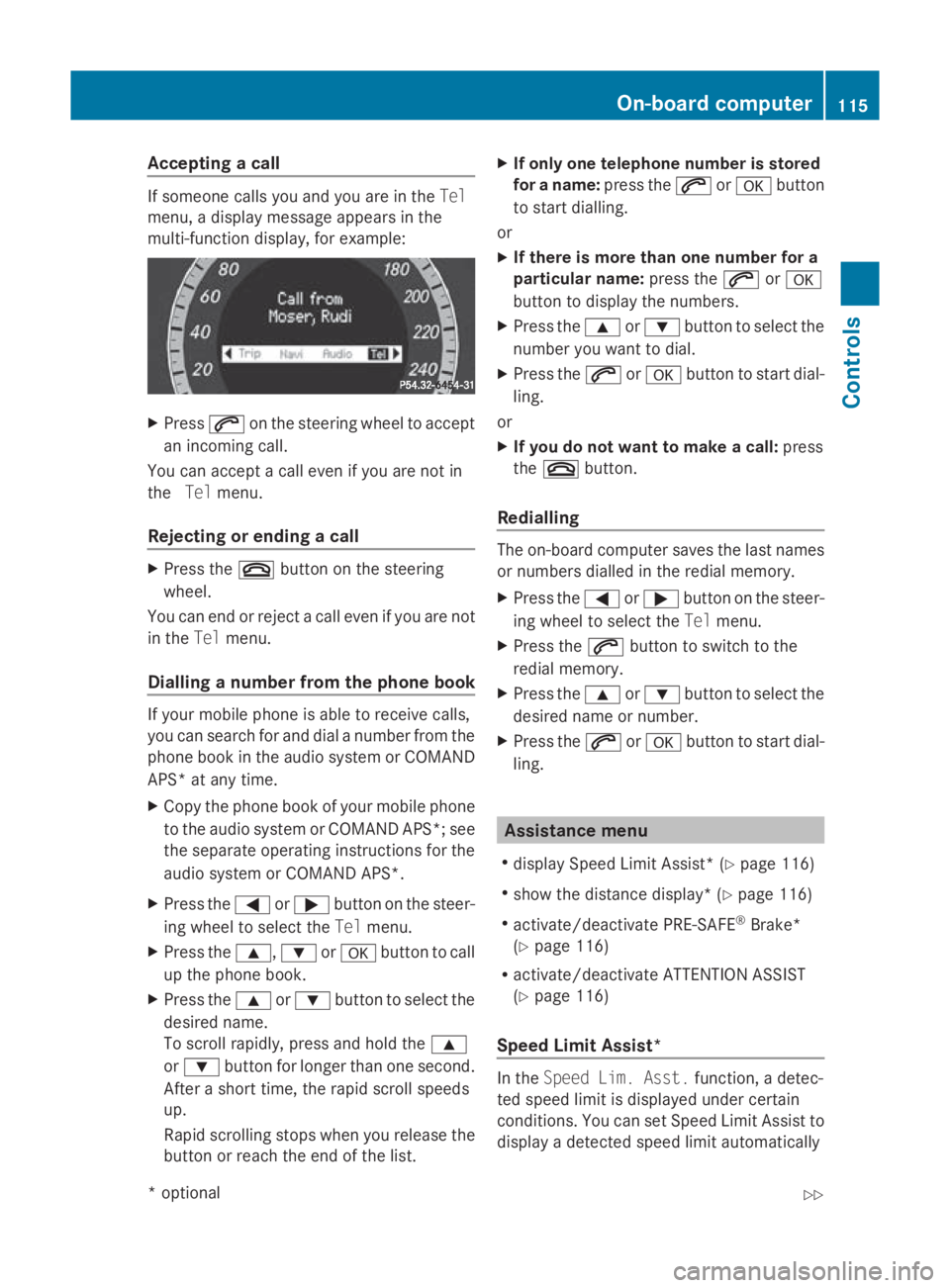
Accepting
acall If someon
ecallsy ou and you are in the Tel
menu, adisplay message appear sinthe
multi-function display, for example: X
Press 006Aon thesteering whee ltoa ccept
an incoming call.
You can accept acall eve nifyou are no tin
the Telmenu.
Rejecting or ending acall X
Press the 007Fbuttonont hesteering
wheel.
You can en dorrejectacall eve nifyou are not
in the Telmenu.
Dialling anumber from th ephone book If your mobile phone is able to receiv
ecalls,
you can search for and dial anumber from the
phone book in th eaudio system or COMAND
APS* at any time.
X Copy th ephone book of your mobile phone
to th eaudio system or COMAND APS* ;see
th es eparat eoperating instruction sfor the
audio system or COMAND APS*.
X Press the 0040or003E buttononthesteer-
ing whee ltos elect the Telmenu.
X Press the 003C,003Dor0064 buttontocall
up th ephone book.
X Press the 003Cor003D buttontoselect the
desired name.
To scrol lrapidly, press and hold the 003C
or 003D buttonfor longer than on esecond.
Afte ras hort time, th erapi dscrolls peeds
up.
Rapid scrollin gstops when you release the
butto norr eachthe endoft helist. X
If only one telephone number is stored
for aname: press the 006Aor0064 button
to start dialling.
or
X If there is mor ethano ne number for a
particular name: press the006Aor0064
butto ntod isplay th enumbers.
X Press the 003Cor003D buttontoselect the
number you want to dial.
X Press the 006Aor0064 buttontostart dial-
ling.
or
X If you do not want to make acall: press
the 007F button.
Redialling The on-board computer saves th
elast names
or number sdialle dint heredial memory.
X Press the 0040or003E buttononthesteer-
ing whee ltos elect the Telmenu.
X Press the 006Abuttontos witch to the
redial memory.
X Press the 003Cor003D buttontoselect the
desired nam eornumber.
X Press the 006Aor0064 buttontostart dial-
ling. Assistance menu
R display Speed Limit Assist* (Y page 116)
R sho wthe distanc edisplay* ( Ypage 116)
R activate/deactivat ePRE-SAFE ®
Brake*
(Y page 116)
R activate/deactivat eATTEN TION ASSIST
(Y page 116)
Speed Limit Assist* In the
Speed Lim .Asst. function ,adetec-
te ds pee dlimi tisd isplayed under certain
conditions. You can set Speed Limit Assis tto
display adetecte dspee dlimi tautomatically On-boar
dcomputer
115Controls
*optio nal
207_AKB; 2; 3, en-GB
mkalafa
,V ersion: 2.11.8.1
2009-07-23T10:23:49+02:00
-Seite 115 Z
Page 131 of 313
Pulling away
X
If the vehicle in front pulls away: remove
your foot from the brake pedal.
X Briefly pull the cruise control lever towards
you 0088.
or
X Accelerate briefly.
Your vehicle pulls away and adapts its
speed to that of the vehicle in front.
Driving
If there is no vehicle in front,D istronic Plus
operates in the same way as cruise control.
If as lower-moving vehicle is detected in front,
Distronic Plus causes your vehicle to brake
and maintain apreset distance to the vehicle
in front.
If Distronic Plus detectsaf aster-moving vehi-
cle in front,iti ncreases the driving speed, but
only up to the stored speed. G
Risk of accident
If you depress the brake, DISTRONIC PLUS is
deactivated unless your vehicle is stationary.
DISTRONIC PLUS then no longer brakes your
vehicle. The driver is fully responsible for the
vehicle's distance from other vehicles, its
speed and for braking in good time.
Stopping G
Risk of accident
The DISTRONIC PLUS braking effect is can-
celled and the vehicle can start moving if:
R DISTRONIC PLUS is deactivated using the
cruise control lever.
R you accelerate.
R the system or the power supply is disrup-
ted, e.g. due to battery failure.
R the electrical system in the engine com-
partment or the fuses are tampered with.
R the battery is disconnected. G
Risk of accident
Never get out of the vehicle when DISTRONIC
PLUS is activated.
DISTRONIC PLUS must never be operated or
deactivated by apassenger or from outside
the vehicle.
DISTRONIC PLUS does not replace the park-
ing brake and must not be used for parking.
If you wish to leave the vehicle or park it,
deactivate DISTRONIC PLUS and secure the
vehicle against rolling away.
If Distronic Plus detectst hat the vehicle in
front is stopping, it brakes your vehicle until
it is stationary.
Once your vehicle is stationary, it remains
stationary and you do not need to depress the
brake.
i Depending on the specified minimum dis-
tance, your vehicle will come to astandstill
at as ufficient distance behind the vehicle
in front.T he specified minimum distance is
set using the thumbwheel on the cruise-
control lever.
When Distronic Plus is activated and the vehi-
cle is at astandstill, awarning message
appears in the multi-function display if:
R the driver's door is opened and you release
the seat belt.
R the engine is switched off.
R the bonnet is opened.
Select Park (P)
X Move the selector lever to Pto prevent the
vehicle from rolling away.
Distronic Plus is deactivated. The warning
message in the multi-function display dis-
appears.
Ah orn will also sound at regular intervals if
Distronic Plus is activated and you:
R switch off the engine, open the driver's
door and remove your seat belt.
R open the bonnet. 128
Driving systemsControls
207_AKB; 2; 3, en-GB
mkalafa,
Version: 2.11.8.1 2009-07-23T10:23:49+02:00-Seite 128
Page 162 of 313
i
If you press the switch beyond the point
of resistance, an automatic opening/clos-
ing process is started in the corresponding
direction. You can stop automatic opera-
tion by pressing again.
Closing with increased force and with-
out the anti-entrapment feature G
Risk of injury
You could be severel yoreven fatall yinjured
when closing the panorama sliding sunroof
with increased closing force or if the anti-
entrapment feature is deactivated. Make sure
that nobody can become trapped when clos-
ing the panorama sliding sunroof.
If the panorama sliding sunroof blocks during
closing:
X Immediately after the panorama sliding
sunroof blocks, pullt he switch again to the
point of resistance in the direction of
arrow 0047until the panorama sliding sun-
roof is closed.
The panorama sliding sunroof is closed
with more force.
If the panorama sliding sunroof blocks during
closing again:
X Immediately after the panorama sliding
sunroof blocks, pullt he switch again to the
point of resistance in the direction of
arrow 0047until the panorama sliding sun-
roof is closed.
The panorama sliding sunroof is closed
withou tthe anti-entrapment feature.
Rain closing feature* When the key is in position
0in the ignition
lock or is removed, the panorama sliding sun-
roof closes automatically:
R if it starts to rain
R at extreme outsid etemperatures
R after six hours
R if there is amalfunction in the powers upplyThe panorama sliding sunroof remains raised
at the rear in order to allow ventilation of the
vehicle interior.
i
If the panorama sliding sunroof is obstruc-
ted when being closed by the rain closing
feature, it opens again slightly. The rain
closing feature is then deactivated.
The panorama sliding sunroof does not close
if:
R it is raisedatt he rear.
R it is blocked.
R no rain is falling on the area of the wind-
screen being monitored by the rain sensor
(e.g. because the vehicle is under abridge
or in acarport). Rollers
unblind for the panorama slid-
ing sunroof*
The rollers unblind provide sprotection from
the sun. The rollers unblind can only be
opened and closed when the panorama slid-
ing sunroof is closed. G
Risk of injury
Make sure that nobody can become trapped
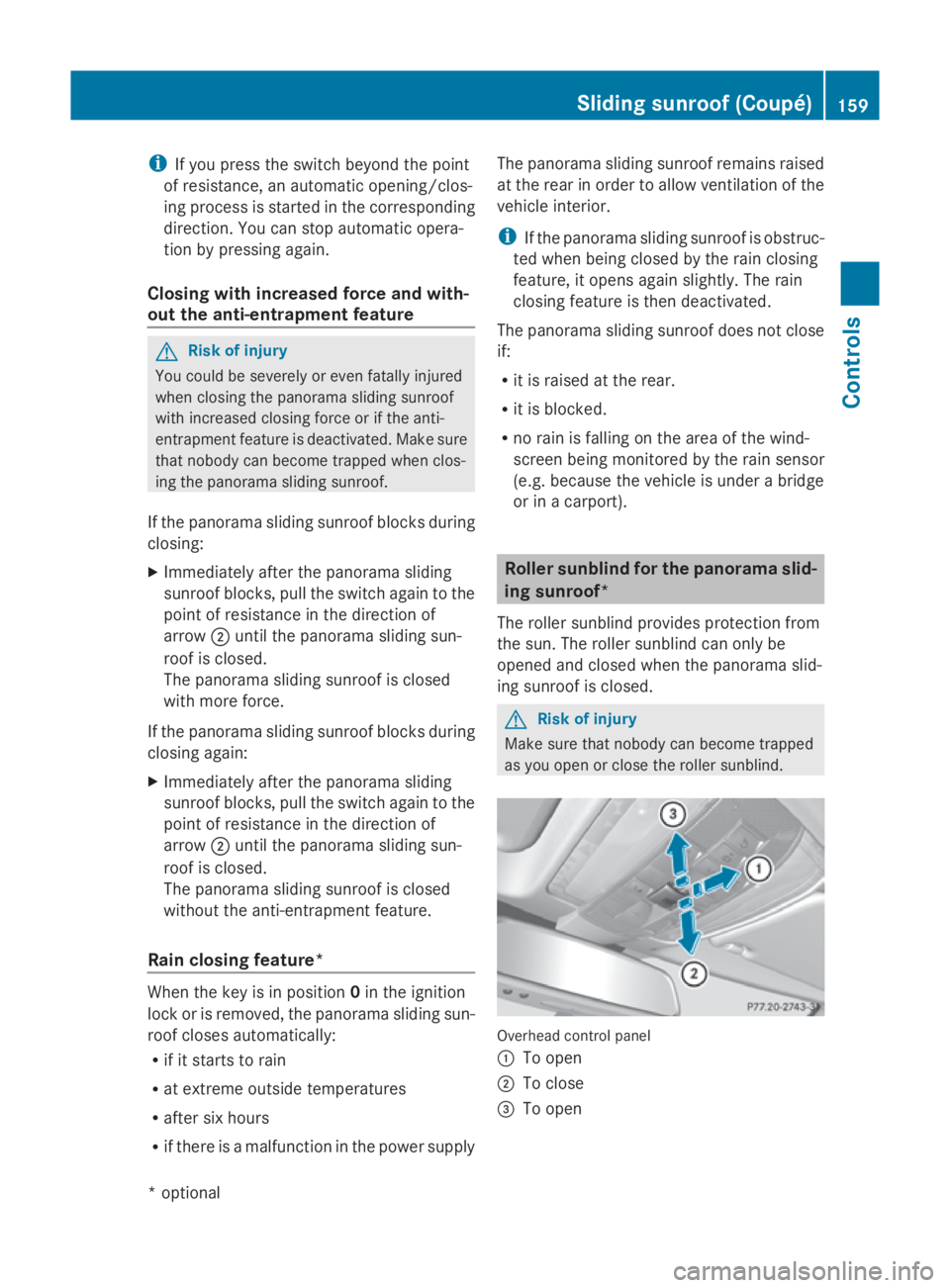
as you open or close the rollers unblind. Overhea
dcontrol panel
0046 To open
0047 To close
008A To open Sliding sunroof (Coupé)
159Controls
*optional
207_AKB; 2; 3, en-GB
mkalafa
,V ersion: 2.11.8.1
2009-07-23T10:23:49+02:00
-Seite 159 Z
Page 163 of 313
X
Turn the key to position 1or 2in the ignition
lock.
X Pull or push the switch in the corresponding
direction.
i If you press the switch beyond the point
of resistance, an automatic opening/clos-
ing process is started in the corresponding
direction .You can stop automatic opera-
tion by pressing again.
Resetting the panorama sliding sunroof
and the roller sunblind Reset the panorama sliding sunroof and the
roller sunblind if the panorama sliding sunroof
or the roller sunblind does not close
smoothly.
X Turn the key to position 1or 2in the ignition
lock.
X Pull the switch repeatedly to the point of
resistanc einthe direction of arrow 0047until
the panorama sliding sunroof is fully
closed.
X Keep the switch pulled for an additional
second.
X Pull the switch repeatedly to the point of
resistanc einthe direction of arrow 0047until
the roller sunblind is fully closed.
X Keep the switch pulled for an additional
second.
X Check that the panorama sliding sunroof
and the roller sunblind can be fully opened
again.
X If this is not the case, consult aqualified
specialist workshop. Soft top (Cabriolet)
Opening and closing the soft top
You can open or close the soft top either
when the vehicle is stationary or when driving
up to aspeed of 40 m/h.
If there is astron ghead wind, it may not be
possible to close the soft top fully. In this case, reduce speed or stop in order to close
the soft top fully.
For safety reasons, Mercedes-Benz recom-
mends that you only open or close the soft
top when the vehicle is stationary. G
Risk of accident and injury
Only drive with the soft top fully open or
closed.
If the soft top does not open or close fully, the
soft-top hydraulics are depressurised and the
soft top is lowered:
R after about seven minutes if the ignition is
switched on
R immediately if the ignition is switched off
Aw arning tones ounds shortly beforehand.
The Top being opened message appears in
the multifunction display.
Lock the soft top again before driving on. Oth-
erwise, the unlocked soft top could open dur-
ing the journey and cause you to lose control
of your vehicle. You or other persons could be
injured as aresult.
! Never sit on the soft-top compartment
cover and do not store any heavy objects
on it. You will otherwise damage the soft
top and soft-top compartment cover of the
vehicle.
! The soft top swings upwards when it is
opened or closed. In order to avoid dam-
aging the soft top or other parts of the vehi-
cle when opening or closing the soft top,
observe the following:
R there must be sufficient clearance above
the vehicle.
R the boot separator must be closed and
must not be pushed upwards by the load.
R there must not be any object sonthe
soft-top compartment cover. 160
Soft top (Cabriolet)Controls
207_AKB; 2; 3, en-GB
mkalafa,
Version: 2.11.8.1 2009-07-23T10:23:49+02:00-Seite 160
Page 168 of 313
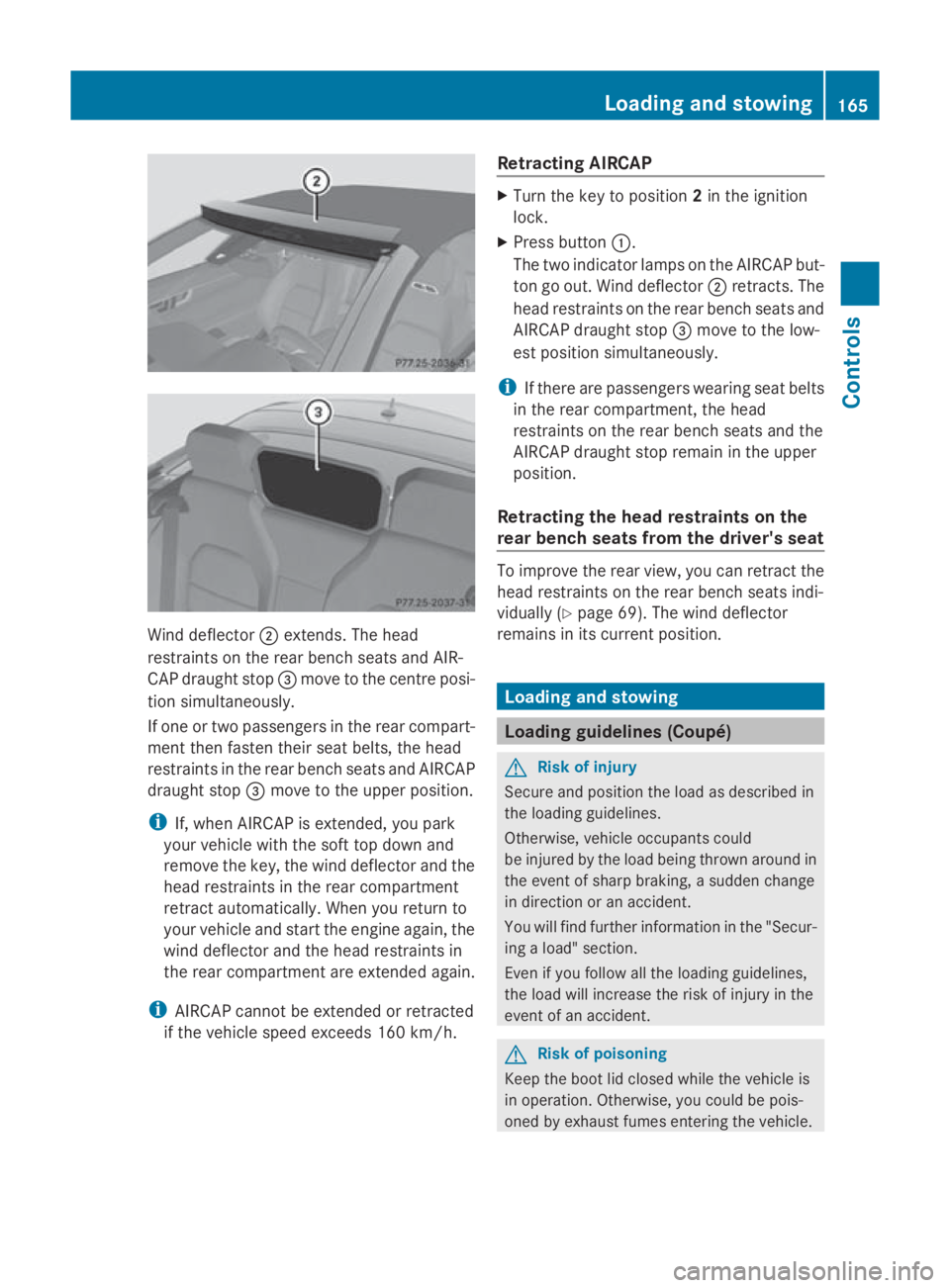
Wind deflector
0047extends. The head
restraints on the rear bench seats and AIR-
CAP draught stop 008Amove to the centre posi-
tion simultaneously.
If one or two passengers in the rear compart-
ment then fasten their seat belts, the head
restraints in the rear bench seats and AIRCAP
draught stop 008Amove to the upper position.
i If, when AIRCAP is extended, you park
your vehicle with the soft top down and
remove the key, the wind deflector and the
head restraints in the rear compartment
retract automatically. When you return to
your vehicle and start the engine again, the
wind deflector and the head restraints in
the rear compartment are extended again.
i AIRCAP cannot be extended or retracted
if the vehicle speed exceeds 160 km/h. Retracting AIRCAP X
Turn the key to position 2in the ignition
lock.
X Press button 0046.
The two indicato rlamps on the AIRCAP but-
ton go out. Wind deflector 0047retracts. The
head restraints on the rear bench seats and
AIRCAP draught stop 008Amove to the low-
est position simultaneously.
i If there are passengers wearing seat belts
in the rear compartment ,the head
restraints on the rear bench seats and the
AIRCAP draught stop remain in the upper
position.
Retracting the head restraints on the
rear bench seats from the driver's seat To improve the rear view, you can retract the
head restraints on the rear bench seats indi-
vidually (Y
page 69). The wind deflector
remains in its curren tposition. Loading and stowing
Loading guidelines (Coupé)
G
Risk of injury
Secure and position the load as described in
the loading guidelines.
Otherwise, vehicle occupant scould
be injured by the load being thrown around in
the event of sharp braking, asudden change
in direction or an accident.
You will find further information in the "Secur-
ing aload" section.
Even if you follow all the loading guidelines,
the load will increase the risk of injury in the
event of an accident. G
Risk of poisoning
Keep the boot lid closed while the vehicle is
in operation .Otherwise, you could be pois-
oned by exhaust fumes entering the vehicle. Loading and stowing
165Controls
207_AKB; 2; 3, en-GB
mkalafa, Version: 2.11.8.1 2009-07-23T10:23:49+02:00-Seite 165 Z
Page 185 of 313

X
Lower the bonnet and let it fall from a
heightofa pproximately 20 cm.
X Check that the bonnet has engage dprop-
erly.
i If the bonnet can be raiseds lightly, it is
not properl yengaged. Open it again and
close it with alittle more force. Engine oil
Depending on driving style, the vehicle con-
sumes up to 0.8 loil per 1,000 km. The oil
consumption may be highert han this when
the vehicle is new or if you frequently drive at
high engine speeds.
Checking the engine oil level Before checking the engine oil level the fol-
lowing conditions for the vehicle shouldbe
met:
R
the vehicle shouldbep arked on level
ground.
R the engine shouldbes witched off for at
least five minutes if the engine is at normal
operating temperature.
R the engine shouldbes witched off for at
least 30 minutes if the engine is not at
operating temperature (i.e. if you only start
the engine briefly).
Depending on the engine, the oil dipstick may
be installed at adifferent location. E3
50 (example) X
Pullo il dipstick 0046out of the oil dipstick
tube.
X Wipe off oil dipstick 0046.
X Insert oil dipstick 0046into the oil dipstick
tube to the stop, and take it out again.
The oil level is correct if the level is between
the minimum mark 008Aand maximum
mark 0047.
X Top up the oil if necessary.
Topping up the engine oil H
Environmental note
When topping up the oil, take care not to spill
any. Oil must not be allowed to escape into
the soil or waterways. You would otherwis ebe
damaging the environment. Cap (example)
X Turn cap 0046anti-clockwise and remove.
X Top up with the amount of oil required
(Y page 288).
i The difference in quantity betwee nthe
minimum mark and maximu mmark is
approximately 2litres.
i On vehicle switha4-cylinder petrol
engine and vehicle swith an 8-cylinder pet-
rol engine, the difference betwee nthe MIN
mark and the MAX mark is approximately
1.5 litres.
! Do not add too much oil. If too much oil
is added and the oil level is above the max- 182
Engine compartmentOperation
207_AKB; 2; 3, en-GB
mkalafa
,V ersion: 2.11.8.1
2009-07-23T10:23:49+02:00
-Seite 182
Page 193 of 313
Once you have fitted the winter tyres:
X
Check the tyre pressures (Y page 186).
X Restart the tyre pressure loss warning sys-
tem (Y page 187). G
Risk of accident
If you fit the spare wheel* when driving with
winter tyres, bear in mind that driving stability
will be impaired owing to unstable cornering
characteristics caused by the different tyres.
You should therefore adapty our driving style
and drive carefully.
Have the spare wheel* replaced at the near-
est qualified specialist workshop which has
the necessary specialist knowledge and tools
to carry out the work required. Mercedes-
Benz recommends that you use aMercedes-
Benz Service Centre for this purpose. In par-
ticular, work relevant to safety or on safety-
related systems must be carried out at aquali-
fied specialist workshop. Snow chains
For safety reasons, Mercedes-Benz recom-
mends that you only use snow chains which
have been speciallya pproved for your vehicle
by Mercedes-Benz,ora re ofacorresponding
standard of quality.
If you intend to fit snow chains, pleaseb ear
the following points in mind:
R you may not attach snow chains to all
wheel-tyre combinations; see the "Tyres
and wheels" section in the "Technical data"
chapter.
R snow chains must not be fitted to emer-
gency spare wheels, e.g. a"Minispare"
emergency spare wheel.
R Fit snow chains only in pairs and only to the
rear wheels. Comply with the manufactur-
er's installation instructions.
Do not exceed the maximum permissible
speed of 50 km/h.
i You may wish to deactivate ESP ®
when
pulling awayw ith snow chains fitted (Y
page 54). This way,y ou can allowthe
wheels to spin in acontrolled manner, ach-
ieving an increased driving force (cutting
action). Winter driving
G
Risk of accident
Do not shift down for additional engine brak-
ing on aslippery road surface. This could
cause the drive wheels to lose their grip and
the vehicle could skid.
You should drive particularly carefully on slip-
pery road surfaces. Avoid sudden accelera-
tion, steering and braking manoeuvres.
If the vehicle threatens to skid or cannot be
stopped when moving at low speed:
X Vehicles with manual transmission: engage
neutral.
X Vehicles with automatic transmission*:
shift the selector lever to N.
X Try to bring the vehicle under control by
using corrective steering. Driving tips
Rolling with the engines
witchedoff G
Risk of accident
Never switch the engine off while the vehicle
is in motion.
There is no power assistance for the steering
and the service brake when the engine is not
running.
You will require considerably more effort to
steer and brake and you could therefore lose
control of the vehicle and cause an accident. 190
Driving tipsOperation
*o
ptional
207_AKB;2;3,e
n-GB
mkalafa, Version: 2.11.8.1 2009-07-23T10:23:49+02:00-Seite 190
Page 194 of 313
Brakes
G
Ris
kofa ccident
Do not change down for additional engine
braking on aslipper yroads urface. Thi scould
cause the drive wheels to lose thei rgripa nd
the vehicl ecould skid. G
Ris
kofa ccident
Make sure tha tothe rroa du sers are not
endangere dbyyourb raking.
Downhil lgradients On long and stee
pdownhil lstretches ,espe-
ciall yift he vehicl eisladen or towing atrailer,
yo um usts hift to alower gearing oodtime or,
on vehicles with automatic transmission*,
select shift range 1,2or 3.
i Thisalsoa pplies if youhavea ctivated
cruis econtrol, SPEEDTRONIC or DIS-
TRONIC PLUS*.
Thi sw illu se the braking effect of the engine,
so less braking will be required to maintain
the speed .Thisr elieves the load on the brake
system and prevents the brakes from over-
heating and wearing too quickly. If yo uneed
additional braking ,depress the brake pedal
repeatedly rather tha ncontinuously.
Heavy and light loads If the brakes have been subjected to
aheavy
load ,don ot stop the vehicl eimmediately, but
drive on for ashort while. Thi sallow sthe air-
flo wtoc oolthe brakes more quickly. G
Ris
kofa ccident
Never depress the brake peda lcontinuously
whil ethe vehicl eisinmotion, e.g .neve rcause
the brakes to ru bbyapplyingconstant slight
peda lpressure. Thi scauses the brake system
to overheat, increases the braking distance
and can lead to the brakes failing completely.
If the brakes have been used onl ymoderately,
yo us houl doccasionall ytest thei reffective-
ness .Todot his, brake more firmly from a highe
rspeed .Thisi mprove sthe gri pofthe
brakes.
Wet roads If driving in heavy rain for
aprolonged period
of time withou tbraking ,ther em aybe a
delaye dreactio nfrom the brakes when brak-
ing for the first time .Thism ayalso occu rafter
the vehicl ehasbeen washed.
Yo uh avetod epress the brake peda lmore
firmly .Maintain agreate rdistance from the
vehicl einfront.
After driving on awetroa dorh aving the vehi-
cle washed, brake firmly whil epayin gatten-
tio ntot he traffic conditions. Thi swaythe
brake discs will become warm, drying more
quickly, which will protect them against cor-
rosion.
Limite dbraking performanc eonsalt
treate droads G
Ris
kofa ccident
The laye rofsaltont he brake discs and the
brake pads/lining smaycause adelay in the
braking effect, resulting in asignificantly lon-
ger braking distance, which could lead to an
accident.
To avoid thi sdanger ,you should:
R occasionall ybrake carefully, withou tput-
ting othe rroa du sers at risk, when yo uare
driving on salte droads. Thi shelps to
remove any salt tha tmayhave started to
buil dupont he brake discs and the brake
pads/linings.
R maintain agreate rdistance to the vehicle
ahea dand drive with particula rcare.
R carefull yapply the brakes at the end of a
trip and immediatel yaftercommencing a
new trip ,sothats altr esidue sare removed
from the brake discs. Driving tips
191Operation
*optional
207_AKB; 2; 3, en-GB
mkalafa,
Version: 2.11.8.1 2009-07-23T10:23:49+02:00-Seite 191 Z