2009 MERCEDES-BENZ E-CLASS COUPE engine
[x] Cancel search: enginePage 57 of 313

R
dirt on the sensor sorthe sensor sare cov-
ered
R snow or heavy rain
R interferencebyo ther radar sources
R strong radar reflections, for example in
multi-storey car parks
BASP LUS does not react to people or ani-
mals, oncoming vehicles and crossing traffic.
BASP LUS may not detec tnarro wvehicles
such as motorcycles and vehicles driving on
ad ifferen tline.
Following acollision or crash-related damage
to the fron tend of the vehicle, have the con-
figuration and operation of the radar sensors
checked at aMercedes-Benz Service Centre.
If BASP LUS is not available due to amalfunc-
tion in the radar sensor system, the braking
system remains available with full brake
boostin geffec tand BAS. Adaptive brake lamps
i Adaptiv ebrake lamps are only available in
certain countries.
If you brake sharply from aspeed of more
than 50 km/ horifb raking is assisted by BAS
or BAS PLUS* ,the brake lamp sflashr apidly.
In this way, traffic travelling behind you is
warned in an even more noticeable manner.
If you brake sharply from aspee dofm ore
than 70 km/h to astandstill, the hazard warn-
ing lamp sare activated automatically.Ift he
brakes are applieda gain, the brake lamps
light up continuously.T he hazard warning
lamp sswitch off automatically if you travel
faster than 10 km/h .You can alsos witch off
the hazard warning lamp susing the hazard
warning switch button (Y page84). ESP
®
(Electronic Stability Program)
ESP ®
monitors driving stability and traction,
i.e. power transmission between tyres and
the road surface.
If ESP ®
detects that the vehicl eisdeviating
from the direction desired by the driver, one
or more wheels are braked to stabilise the
vehicle. If necessary ,the engine outpu tisalso
modified to keep the vehicl eonthe desired
course withi nphysical limits. ESP ®
assists
the drive rwhen pulling away on wet or slip-
pery roads. ESP ®
can alsos tabilise the vehi-
cle during braking.
When ESP ®
intervenes, the 00C6warning
lamp flashes in the instrument cluster. G
Risk of accident
If the 00C6 warning lamp in the instrument
cluster flashes, proceed as follows:
R do not deactivate ESP ®
under any circum-
stances.
R only depress the accelerator peda lasfar as
necessary when pulling away.
R adapt yourd riving style to suitt he prevail-
ing road and weather conditions.
Otherwise, the vehicl ecoulds kid.
ESP ®
cannot reduce the risk of an accident if
you drive too fast. ESP ®
cannot overrid ethe
lawsofp hysics.
! If the vehicl eistobetowed with the front
or rear axle raised, the ignitio nmust be
switched off (key in position 0or 1in the
ignitio nlock). Application of the brakes by
ESP ®
coul dotherwise destroy the brake
system on the front or rear axle.
i Only use wheels with the recommended
tyre sizes. Only then willE SP®
function
properly. 54
Driving safety systemsSafety
*o
ptional
207_AKB; 2; 3, en-GB
mkalafa,
Version: 2.11.8.1 2009-07-23T10:23:49+02:00-Seite 54
Page 58 of 313
ESP
®
trailer stabilisation If your trailer begin
stolurch, you can only
stabilise th evehicle/trailer combinatio nby
depressing th ebrak efirmly.
In this situation, ESP ®
assists you and can
detect when th etrailer begin stolurch.
ESP ®
slows th evehicle down by braking and
limiting th eengineo utput until th evehicle/
trailer combinatio nhas stabilised.
Traile rstabilisation is active above speeds of
about 65 km/h. G
Ris
kofa ccident
If road and weather condition sare poor,
trailer stabilisation will no tbeable to prevent
th et railer from swervin gand will thus be
unabl etoreducethe risk of an accident. Trail-
ers with ahigh centr eofgravity can tip over
before ESP ®
can detect this.
Traile rstabilisation does no twork if ESP ®
is
deactivate dordisable dbecause of amal-
function.
ETS (Electronic Traction Support) Tractio
ncontrol is part of ESP ®
.
Tractio ncontrol brakes th edrivew heels indi-
vidually if they spin .This enables you to pull
away and accelerate on slippery surfaces ,for
example, if th eroad surface is slippery on one
side.
Tractio ncontrol remains active when you
deactivate ESP ®
. G
Ris
kofa ccident
Tractio ncontrol canno treduc ethe risk of an
acciden tifyou driv etoo fast .Tractio ncontrol
canno toverride th elaws of physics.
Activating/deactivatin gESP® ESP
®
is activated automatically when the
engin eisrunning. It may be best to deactivate ESP
®
in th efol-
lowin gsituations:
R when usin gsnowc hains
R in deep snow
R on san dorgravel G
Ris
kofa ccident
Activate ESP ®
as soon as th esituations
describe dabov enol onger apply. ESP ®
will
otherwise no tbeable to stabilise th evehicle
if th evehicle start stoskidoraw heel starts
to spin.
If you deactivate ESP ®
:
R ESP ®
no longer improve sdriving stability.
R engin etorque is no tlimited and th edrive
wheels are able to spin .The spinning
wheels produce acuttin geffect for better
traction.
R traction control is still activated.
R ESP ®
still provide ssupport when you
brake.
i If ESP ®
is deactivate dand on eorm ore
wheels start to spin ,the 00C6 warning lamp
in th einstrumen tcluste rflashes. In such
situations ,ESP ®
will no tstabilise th evehi-
cle. X
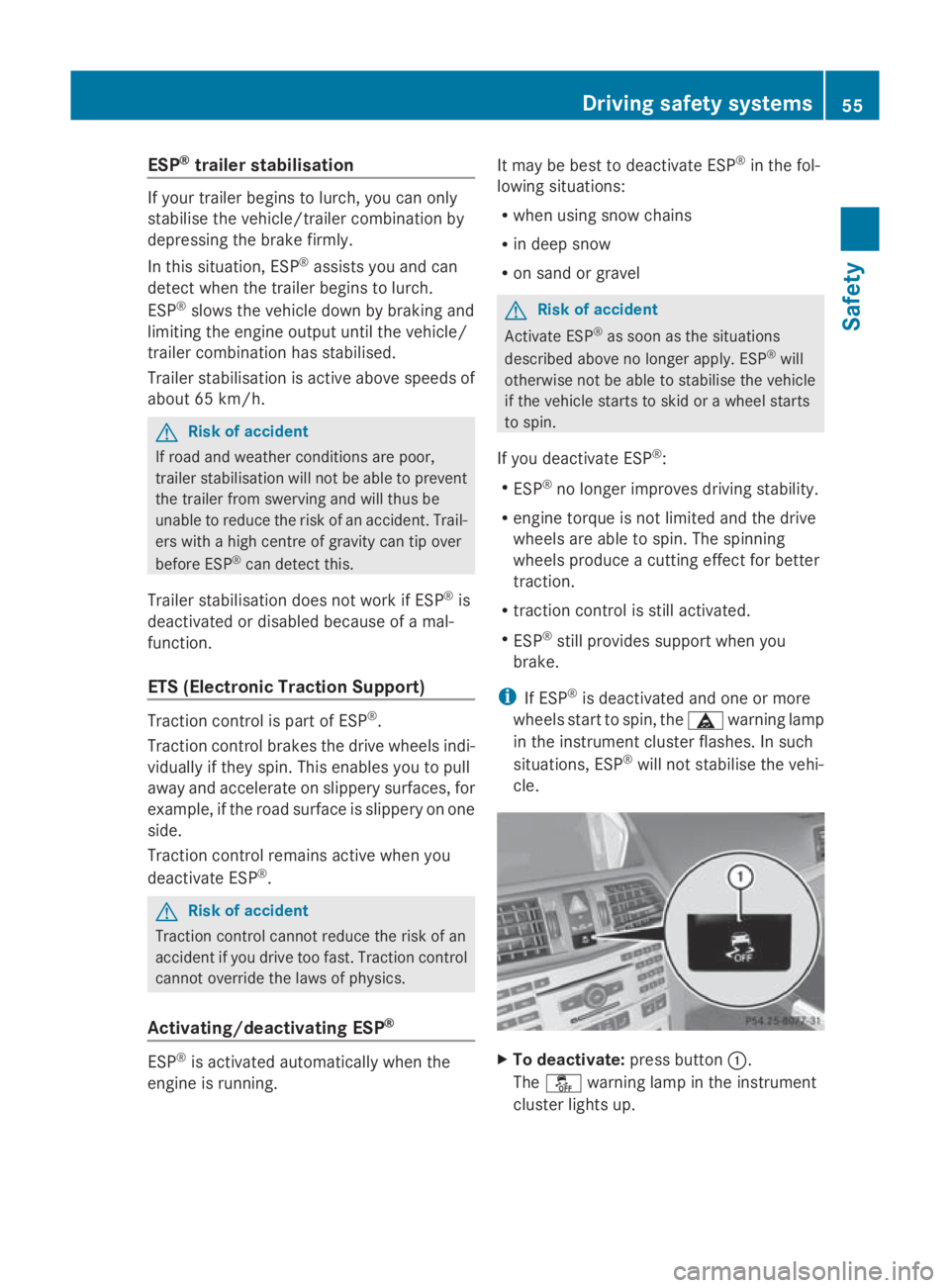
To deactivate: pressbutton 0046.
The 00C7 warning lamp in th einstrument
cluste rlight sup. Driving safety systems
55Safety
207_AKB;2;3,en-GB
mkalafa, Version:2.11.8.1
2009-07-23T10:23:49+02:00
-Seite 55 Z
Page 59 of 313
G
Risk of accident
If the 00C7 warning lamp in the instrument
cluster lights up whe nthe engine is running,
ESP ®
is deactivated or is unavailabl edueto a
malfunction. The ris kthat your vehicle may
star ttos kid then increase sincertain situa-
tions.
Alway sadapt your driving styl etothe prevail-
ing roa dand weathe rconditions.
X To activate: press button 0046.
The 00C7 warning lamp in the instrument
cluster goe sout. EBV (electroni
cbrake forc edistribu-
tion)
EBV monitors and control sthe brake pres-
sure on the rea rwheel stoi mprove driving
stability whe nbraking. G
Risk of accident
If EBV is malfunctioning ,the brake system is
stil lavailable with ful lbrake boosting effect.
However, the rea rwheel scan stil llock, e.g.
under ful lbraking. Thi scould cause yo uto
los econtrol of your vehicle and cause an acci-
dent. You shoul dtherefore adap tyou rd riving
styl etot he different handling characteristics. ADAPTIVE BRAKE
ADAPTIVE BRAKE enhances braking safety
and offers increased braking comfort. In addi-
tion to the braking function, ADAPTIVE BRAKE
also ha sthe HOLD function (Y page 135) and
hil lstar tassist( Ypage 100). For further
information, see Driving tips (Y page 191).PRE-SAFE
®
Brake (vehicle swithD IS-
TRONIC PLUS)*
PRE-SAFE ®
Brake can hel pyou to minimise
the ris kofafrontalcollision with avehicle ahea
dorr educe the effects of such acolli-
sion.
Thi sfunction will issue awarning at speeds of
around 30 km/h or more if:
R for aperiod of several seconds, the dis-
tance to the vehicle in front is too short for
the speed at which yo uare travelling. The
00BA distance warning lamp in the instru-
ment cluster lights up.
R yo ua re approaching the vehicle in front too
rapidly .Anintermittent warning tone
sounds and the 00BAdistance warning
lamp lights up in the instrument cluster.
Due to the nature of the system, particularly
complicated driving conditions may cause the
system to display an unnecessary warning. G
Risk of accident
Pa yp articula rattention to the traffi ccondi-
tions if the 00BAdistance warning lamp in the
instrument cluster lights up or an intermittent
warning tone sounds. If necessary, brake or
manoeuvre to avoid an obstacle.
If the driver and passengers have fastened
thei rseatb elts, PRE-SAFE ®
Brake can also
can also perform the following at speeds of
above approximately 30 km/h:
R brake the vehicle automaticall yfrom a
speed of up to approximately 200 km/h
R trigger preventative passenger protection
measures (PRE-SAFE ®
) G
Risk of accident
PRE-SAFE ®
Brake is only an ai dtoassist you
whe ndriving .You are responsibl efor main-
taining asafed istance from othe rvehicles,
the vehicle's speed and for braking in good
time .Alway spayattention to the traffi ccon-
ditions .Otherwise, yo umay recognise dan-
gers too late, cause an accident and injure
yoursel fand others.
With the hel pofthe radar senso rsystem,
PRE-SAFE ®
Brake can detect obstacles that
are in front of your vehicle for an extended 56
Drivin
gsafety systemsSafety
*optional
207_AKB
;2;3,en-GB
mkalafa ,V ersion: 2.11.8.1
2009-07-23T10:23:49+02:00
-Seite 56
Page 61 of 313

The braking action of PRE-SAFE
®
Brake is
ended automatically if:
R you manoeuvre to avoid the obstacle.
R you drive slower than approximately
15 km/h.
R there is no longer an obstacle detected in
frontofy our vehicle.
R there is no longer any danger of acollision.
Following acollision or crash-related damage
to the fronte nd of the vehicle, have the con-
figuration and operation of the radar sensors
checked. Choose aqualified specialist work-
shop for this which has the necessary spe-
cialist knowledge and tools for the work
required. Mercedes-Benz recommends that
you use aMercedes-Benz Servic eCentre for
this purpose. Anti-theft systems
Immobiliser
The immobiliser prevent syour vehicle from
being started without the correc tkey.
Activating the immobiliser X
With the key: remove the key from the
ignition lock.
X With KEYLESS GO*: press the start/stop
button on the dashboard.
The engine switches off.
Deactivating the immobiliser X
With the key: turn the key to position 2in
the ignition lock.
X With KEYLESS GO*: press the start/stop
button on the dashboard twice without
depressing the brake.
i The immobiliser is alway sdeactivated
when you start the engine. ATA* (anti-theft alarms
ystem)
Av isual and audibl ealarm is triggered when
the alarm system is primed and you open:
R ad oor
R ad oor or the boot lid with the emergency
key element
R the boot lid
R the bonnet
The alarm is not switched off even if you close
ad oor again. X
To prime: lock the vehicle using the key.
Vehicles with KEYLESS GO* can also be
locked by touchin gthe door handle on the
outside.
Indicator lamp 0046flashes. The alarm sys-
tem is primed after approximately 15 sec-
onds.
X To deactivate: unlock the vehicle using the
key. On vehicles with KEYLESS GO* ,you
can also unlock the vehicle by opening the
door/boot lid.
Deactivating the alarm X
With the key: insert the key into the igni-
tion lock.
The alarm is deactivated.
or
X Press the 0036or0037 button on the key.
The alarm is deactivated. 58
Anti-theft systemsSafety
*o
ptional
207_AKB; 2; 3, en-GB
mkalafa,
Version: 2.11.8.1 2009-07-23T10:23:49+02:00-Seite 58
Page 67 of 313
X
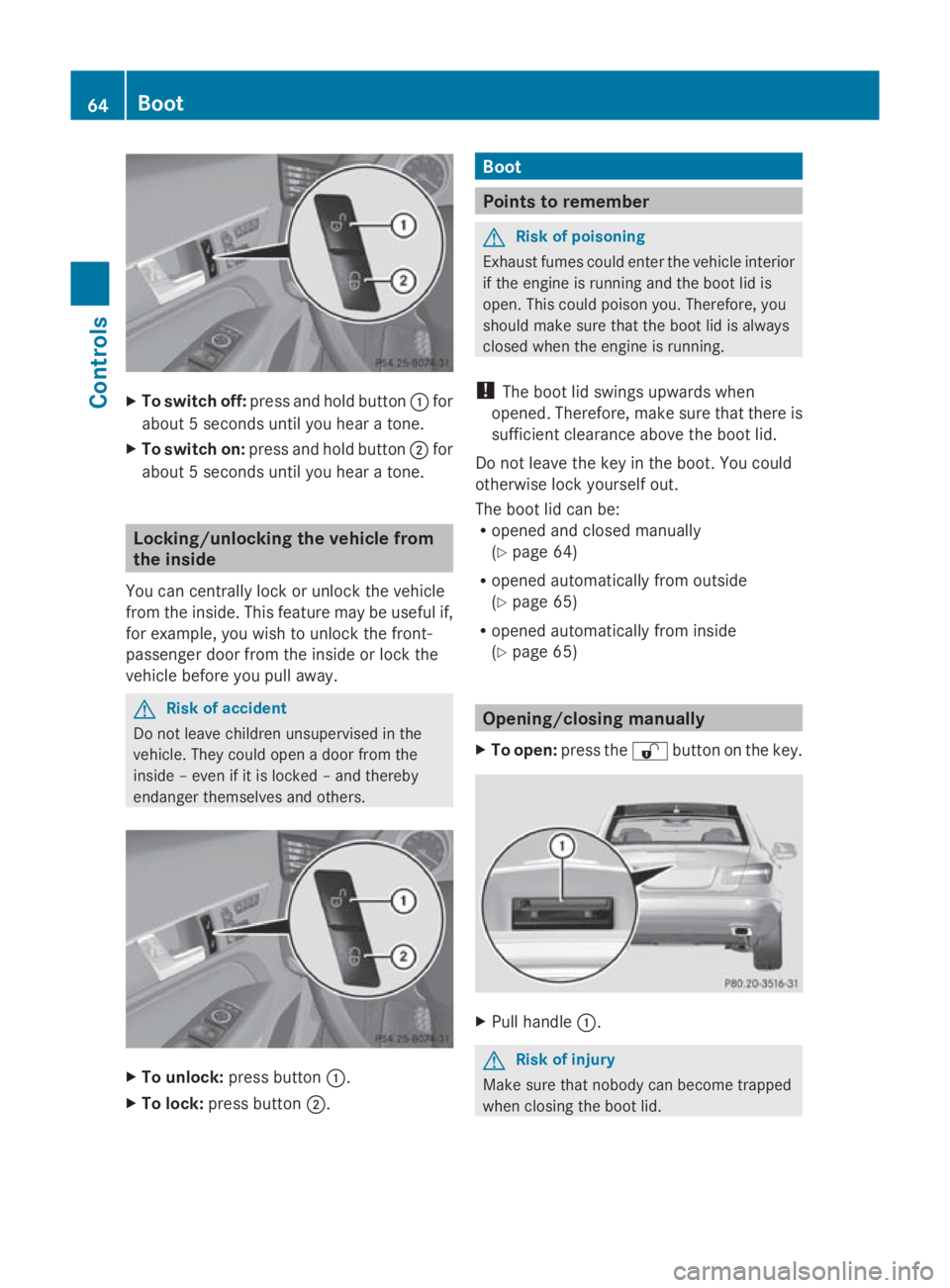
To switc hoff:press and hol dbutton 0046for
abou t5second suntilyou hea rat one.
X To switc hon:press and hol dbutton 0047for
abou t5second suntilyou hea rat one. Locking/unlockin
gthe vehicle from
the inside
Yo uc an centrall yloc koru nlock the vehicle
from the inside. Thi sfeatur emaybe usefu lif,
for example, yo uwishtou nlock the front-
passenge rdoorfrom the insid eorlockt he
vehicl ebefore yo upulla way. G
Ris
kofa ccident
Do not leav echildren unsupervised in the
vehicle. The ycould open adoorfrom the
insid e–e venifiti sloc ked –and thereby
endanger themselves and others. X
To unlock: press button 0046.
X To lock: press button 0047. Boot
Points to remember
G
Ris
kofp oisoning
Exhaus tfum es could ente rthe vehicl einterior
if the engine is running and the boot li dis
open. Thi scould poison you. Therefore ,you
shoul dmakes uret hatthe boot li disalways
closed when the engine is running.
! The boot li dswing su pwar ds when
opened. Therefore ,makes uret hatther eis
sufficient clearance above the boot lid.
Do not leav ethe key in the boot. Yo ucould
otherwise lock yoursel fout.
The boot li dcan be:
R opene dand closed manually
(Y page 64)
R opene dautomaticall yfrom outside
(Y page 65)
R opene dautomaticall yfrom inside
(Y page 65) Opening/closing manually
X To open: press the 0036button on the key. X
Pull handle 0046. G
Ris
kofi njury
Make sure tha tnobod ycan become trapped
when closing the boot lid. 64
BootControls
207_AKB; 2; 3, en-GB
mkalafa,
Version: 2.11.8.1 2009-07-23T10:23:49+02:00-Seite 64
Page 69 of 313
004B
Ignition (power supply for all consumers)
and drive position
004C To start the engine
i Even if the key is not for the vehicle in
question, it wills till turn in the ignition lock.
The ignition is not switched on. The engine
cannot be started. KEYLESS-GO*
Pressing the Start/Stop button repeatedly
corresponds to the different key positions in
the ignition lock. This requires that you do not
depres sthe brake pedal.
If you depres sthe brake pedala nd press the
Start/Stop button, the engine starts immedi-
ately. X
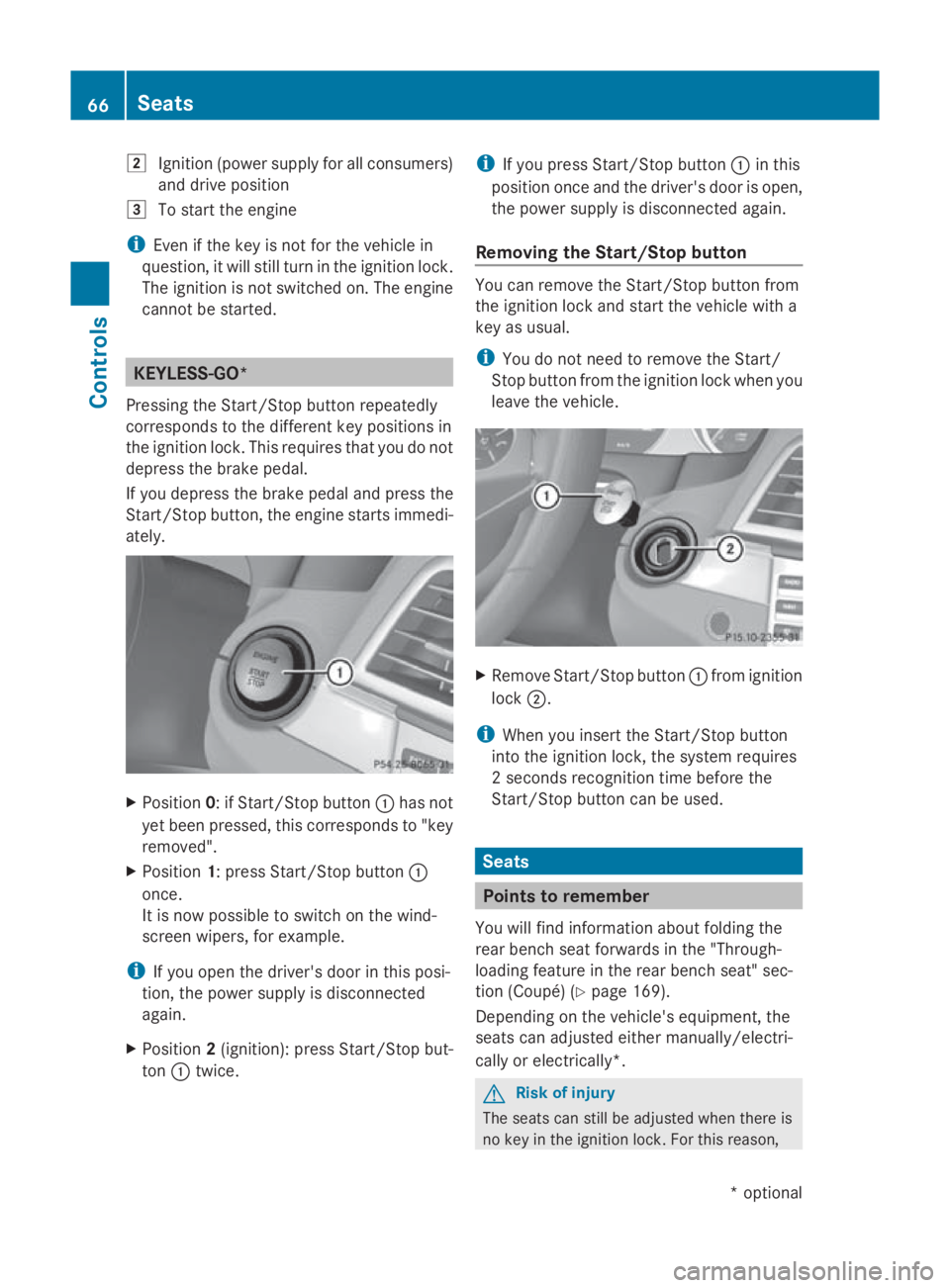
Position 0:ifStart/Stop button 0046has not
yet been pressed ,this corresponds to "key
removed".
X Position 1:press Start/Stop button 0046
once.
It is now possible to switch on the wind-
screen wipers, for example.
i If you open the driver's door in this posi-
tion, the powers upply is disconnected
again.
X Position 2(ignition): press Start/Stop but-
ton 0046twice. i
If you press Start/Stop button 0046in this
positio nonce and the driver's door is open,
the powers upply is disconnected again.
Removing the Start/Stop button You can remove the Start/Stop button from
the ignition lock and start the vehicle with a
key as usual.
i
You do not need to remove the Start/
Stop button from the ignition lock when you
leave the vehicle. X
Remove Start/Stop button 0046from ignition
lock 0047.
i When you insert the Start/Stop button
into the ignition lock, the system requires
2s econds recognition time before the
Start/Stop button can be used. Seats
Points to remember
You willf ind information aboutf olding the
rear bench seat forward sinthe "Through-
loading feature in the rear bench seat" sec-
tion (Coupé) (Y page 169).
Depending on the vehicle's equipment, the
seats can adjusted either manually/electri-
cally or electrically*. G
Risk of injury
The seats can still be adjusted when there is
no key in the ignition lock. For this reason, 66
SeatsControls
*o
ptional
207_AKB; 2; 3, en-GB
mkalafa
,V ersion: 2.11.8.1
2009-07-23T10:23:49+02:00
-Seite 66
Page 82 of 313

Seat-belt adjustment
The belt adjustment function adjusts the driv-
er's and front-passenger seat belt to the
upper body of the occupants. The belt strap
is tightened slightly when:
R you engage the belt tongue in the buckle
and then turn the key to position 2in the
ignition lock.
R the key is in position 2in the ignition lock
and you then engage the belt tongue in the
buckle once the seat-belt extender has
retracted.
The seat-belt adjustment will apply acertain
tightening force if any slack is detected
between the occupant and the belt sash. The
belt should not be held during the adjust-
ment.Y ou can switch the belt adjustment on
and off in the on-board computer
(Y page 121).
Unfastening the belt X
Press release button 0088and guide belt
tongue 0047back towards seat-belt
extender 0046. Belt warning for driver and front
passenger
The 0082 seat belt warning lamp in the instru-
ment cluster reminds you that all occupants
should fasten their seat belts. It is either lit
continuously or flashes. Additionally, there
may be awarning tone.
The 0082 seat belt warning lamp goes out and
the warning tone ceases as soon as the driver
and front passenger have fastened their seat
belts.
For certain countries only: regardless of
whether the driver or the front passenger
already have their seat belt fastened, the
0082 seat belt warning lamp lights up for six
seconds after the engine has been started. It
then goes out if both the driver and the front
passenger have fastened their seat belt. i
Further information about the 0082seat
belt warning lamp (Y page 236). Rear seat belt status indicator
The rear-compartment seat belt status indi-
cator tells you if the rear passengers have
their seat belts fastened. It indicates the rear
seat on which the belt is fastened.
The rear-compartment seat belt status indi-
cator appears in the multi-function display for
around 30 seconds if
R you set off and have reached aspeed of
approximately 10 km/h.
R the rear passengers fasten or unfasten
their seat belts while the vehicle is in
motion.
R someone gets in or out of the vehicle and
the vehicle drives away again. Example: the passenger in the right rear seat has
their seat belt fastened
You can also cancel the messages immedi-
ately (Y
page 208).
i The status indicator for the rear-compart-
ment seat belts is only available for certain
countries. Seat belts
79Controls
207_AKB; 2; 3, en-GB
mkalafa, Version: 2.11.8.1 2009-07-23T10:23:49+02:00-Seite 79 Z
Page 84 of 313

tries
,ope ratio noft he headlamps varies due
to lega lrequirements and self-impose dobli-
gations. In these countries ,the daytime driv-
ing lights ar eautomaticall yswitched on when
the engine is started.
Th ee xterior lighting (excep tthe side lamp/
parking lamp) switches off automaticall yif
you:
R remove the key fro mthe ignition lock
R open the driver's door when the ignition is
switched off (ke yinposition 0in the igni-
tio nlock)
! Switch off the side lamps and parking
lamp when yo uleave the vehicle. This pre-
vents the battery fro mdischarging.
Informatio nabout drivin gabroad Converting to symmetrica
ldipped beam
when drivin gabroad: switch the headlamps
to symmetrical dipped beam in countries in
which traffi cdrives on the opposite side of the roa
dtot he country where the vehicl eisreg-
istered. This prevents oncoming traffi cfrom
being dazzled.
Have the headlamps converte dataqualified
specialis tworkshop ,e.g.aM ercedes-Benz
Service Centre, as close to the borde raspos-
sibl ebefor ed riving in these countries .Sym-
metrica llight sdon ot illuminate as large an
area of the edge of the carriageway.
Converting to asymmetrica ldipped beam
afte rreturning: have the headlamps conver-
ted back to asymmetrica ldippe dbeamata
qualifie dspecialis tworkshop ,e.g.a
Mercedes-Benz Service Centre, as soon as
possibl eafter crossing the borde rwhen
returning.
Vehicle swithI ntelligent Light System*: if
the headlamps ar econverte dtosymmetrical
dipped beam ,not al llight functions ar eavail-
able ."Mo torway mode" and the "extended
range foglamps "aredeactivated
(Y page 119). Operation
Light switch
004A
006F
Left-hand parking lamp 004B
0070
Right-hand parking lamp 004C
0027
Lights off/daytime driving
lights Operation
004D
0066
Automatic headlamp mode/
daytime driving lights 004E
006C
Sidelam ps,licence plate and
instrument lighting 004F
0064
Dipped-bea mheadlam ps/
main-bea mheadlam ps18 18
Youm usts witch on the dipped-beam headlamps befor eyou can switch on the main-bea mheadlam ps. Lights
81Controls
*optional
207_AKB; 2; 3, en-GB
mkalafa
,V ersion: 2.11.8.1
2009-07-23T10:23:49+02:00
-Seite 81 Z