2009 MERCEDES-BENZ CL COUPE heating
[x] Cancel search: heatingPage 230 of 421

X
Press the abutton.
X To activate/deactivate: pressa
again. Driving systems
Overview of driving systems
The vehicle's driving systems are described
on the following pages:
R cruise control, Distronic*, Distronic Plus*
and Speedtronic, which are used to control
the speed of the vehicle
R HOLD, which makes pulling away easier,
particularly on steep uphill gradients
R AIRMATIC* and Active Body Control (ABC),
which is used to adjust the vehicle’s sus-
pension system
R 4MATIC* (permanent four-wheel drive), for
optimum traction
R PARKTRONIC and Park Assist*, which
assist you when parking
R reversing camera*, which assists you when
parking
R Night View Assist*, which assists you when
driving in the dark
R Parking Guidance*, which assists you when
looking for a parking space and assists you
when parking
R Blind Spot Assist*, which assists you when
changing lanes
The ABS, BAS, BAS PLUS*, adaptive brake
lights, ESP ®
, EBV, ADAPTIVE BRAKE, distance
warning function* and PRE-SAFE ®
Brake*
driving systems are described in the "Driving
safety systems" section (Y page 48).Cruise control
Cruise control maintains a constant road
speed for you. It brakes automatically in order
to avoid exceeding the set speed. On long and steep downhill gradients, especially if the
vehicle is laden, you must select shift range
1,
2or 3in good time. By doing so, you will
make use of the braking effect of the engine,
which relieves the load on the brake system
and prevents the brakes from overheating
and wearing too quickly. G
Risk of accident
Do not change down for additional engine
braking on a slippery road surface. This could
cause the drive wheels to lose their grip and
the vehicle could skid.
Use cruise control only if road and traffic con-
ditions make it appropriate to maintain a
steady speed for a prolonged period. You can
store any road speed above 30 km/h. G
Risk of accident
Cruise control cannot take account of road
and traffic conditions.
Always pay attention to traffic conditions
even when cruise control is activated.
Cruise control is only an aid designed to assist
driving. You are responsible for the vehicle's
speed and for braking in good time. G
Risk of accident
Do not use cruise control:
R in road and traffic conditions which do not
allow you to maintain a constant speed (e.g.
heavy traffic or winding roads). You could
otherwise cause an accident.
R on slippery roads. Braking or accelerating
could cause the drive wheels to lose trac-
tion and the vehicle could then skid.
R when there is poor visibility, e.g. due to fog,
heavy rain or snow
Cruise control lever You can operate cruise control and variable
Speedtronic with the cruise control lever. Driving systems
227Controls
* optional
216_AKB; 2; 3, en-GB
bjanott,
Version: 2.11.7.7 2009-02-27T14:54:17+01:00 - Seite 227 Z
Dateiname: 6515230602_buchblock.pdf; erzeugt am 04. Mar 2009 11:15:54; WK
Page 232 of 421
X
Briefly pull the cruise control lever towards
you =.
X Remove your foot from the accelerator
pedal.
The first time cruise control is activated, it
stores the current speed or regulates the
speed of the vehicle to the previously
stored speed.
Setting a speed X
Press the cruise control lever to the pres-
sure point, up :for a higher speed or
down ?for a lower speed.
X Keep the cruise control lever pressed until
the desired speed is reached.
X Release the cruise control lever.
The new speed is stored.
i Cruise control is not deactivated if you
depress the accelerator pedal. For exam-
ple, if you accelerate briefly to overtake,
cruise control adjusts the vehicle's speed
to the last speed stored after you have fin-
ished overtaking.
Making fine adjustments in 1 km/h
increments X
Briefly press the cruise control lever to the
pressure point, up :for a higher speed or
down ?for a lower speed.
The last speed stored is increased or
reduced.
Making adjustments in 10 km/h incre-
ments X
Briefly press the cruise control lever
beyond the pressure point, up :for a
higher speed or down ?for a lower speed.
The last speed stored is increased or
reduced. Deactivating cruise control There are several ways to deactivate cruise
control:
X
Briefly press the cruise control lever for-
wards B.
or
X Brake.
or
X Briefly press the cruise control lever in the
direction of arrow A.
Variable Speedtronic is selected. LIM indi-
cator lamp ;in the cruise control lever
lights up.
Cruise control is automatically deactivated if:
R you engage the electric parking brake
R you drive at less than 30 km/h
R ESP ®
intervenes or you deactivate ESP ®
R you shift the automatic transmission to N
while driving
If cruise control is deactivated, you will hear
a warning tone. You will see the Cruise
control off message in the multi-function
display for approximately five seconds.
i The last speed stored is cleared when you
switch off the engine. Distronic*
i Distronic is only available for certain
countries.
Distronic regulates the speed and automati-
cally maintains the distance to the vehicle in
front. It brakes automatically in order to avoid
exceeding the set speed. On long and steep
downhill gradients, especially if the vehicle is
laden, you must select shift range 1,2or 3in
good time. By doing so, you will make use of
the braking effect of the engine, which
relieves the load on the brake system and
prevents the brakes from overheating and
wearing too quickly. Driving systems
229Controls
* optional
216_AKB; 2; 3, en-GB
bjanott,
Version: 2.11.7.7 2009-02-27T14:54:17+01:00 - Seite 229 Z
Dateiname: 6515230602_buchblock.pdf; erzeugt am 04. Mar 2009 11:15:55; WK
Page 238 of 421
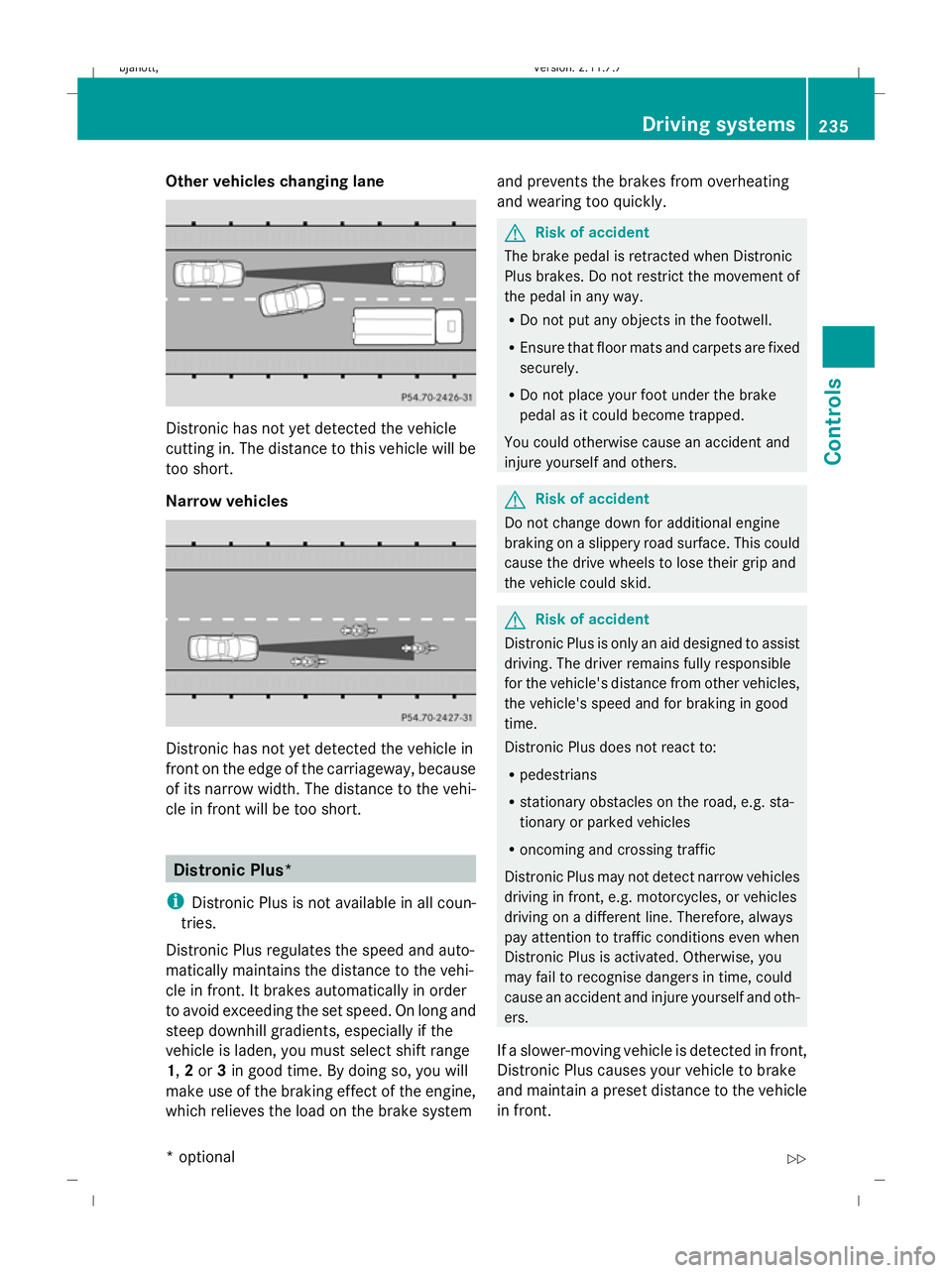
Other vehicles changing lane
Distronic has not yet detected the vehicle
cutting in. The distance to this vehicle will be
too short.
Narrow vehicles
Distronic has not yet detected the vehicle in
front on the edge of the carriageway, because
of its narrow width. The distance to the vehi-
cle in front will be too short. Distronic Plus*
i Distronic Plus is not available in all coun-
tries.
Distronic Plus regulates the speed and auto-
matically maintains the distance to the vehi-
cle in front. It brakes automatically in order
to avoid exceeding the set speed. On long and
steep downhill gradients, especially if the
vehicle is laden, you must select shift range
1, 2or 3in good time. By doing so, you will
make use of the braking effect of the engine,
which relieves the load on the brake system and prevents the brakes from overheating
and wearing too quickly. G
Risk of accident
The brake pedal is retracted when Distronic
Plus brakes. Do not restrict the movement of
the pedal in any way.
R Do not put any objects in the footwell.
R Ensure that floor mats and carpets are fixed
securely.
R Do not place your foot under the brake
pedal as it could become trapped.
You could otherwise cause an accident and
injure yourself and others. G
Risk of accident
Do not change down for additional engine
braking on a slippery road surface. This could
cause the drive wheels to lose their grip and
the vehicle could skid. G
Risk of accident
Distronic Plus is only an aid designed to assist
driving. The driver remains fully responsible
for the vehicle's distance from other vehicles,
the vehicle's speed and for braking in good
time.
Distronic Plus does not react to:
R pedestrians
R stationary obstacles on the road, e.g. sta-
tionary or parked vehicles
R oncoming and crossing traffic
Distronic Plus may not detect narrow vehicles
driving in front, e.g. motorcycles, or vehicles
driving on a different line. Therefore, always
pay attention to traffic conditions even when
Distronic Plus is activated. Otherwise, you
may fail to recognise dangers in time, could
cause an accident and injure yourself and oth-
ers.
If a slower-moving vehicle is detected in front,
Distronic Plus causes your vehicle to brake
and maintain a preset distance to the vehicle
in front. Driving systems
235Controls
* optional
216_AKB; 2; 3, en-GB
bjanott
,V ersion: 2.11.7.7
2009-02-27T14:54:17+01:00 - Seite 235 Z
Dateiname: 6515230602_buchblock.pdf; erzeugt am 04. Mar 2009 11:15:58; WK
Page 245 of 421
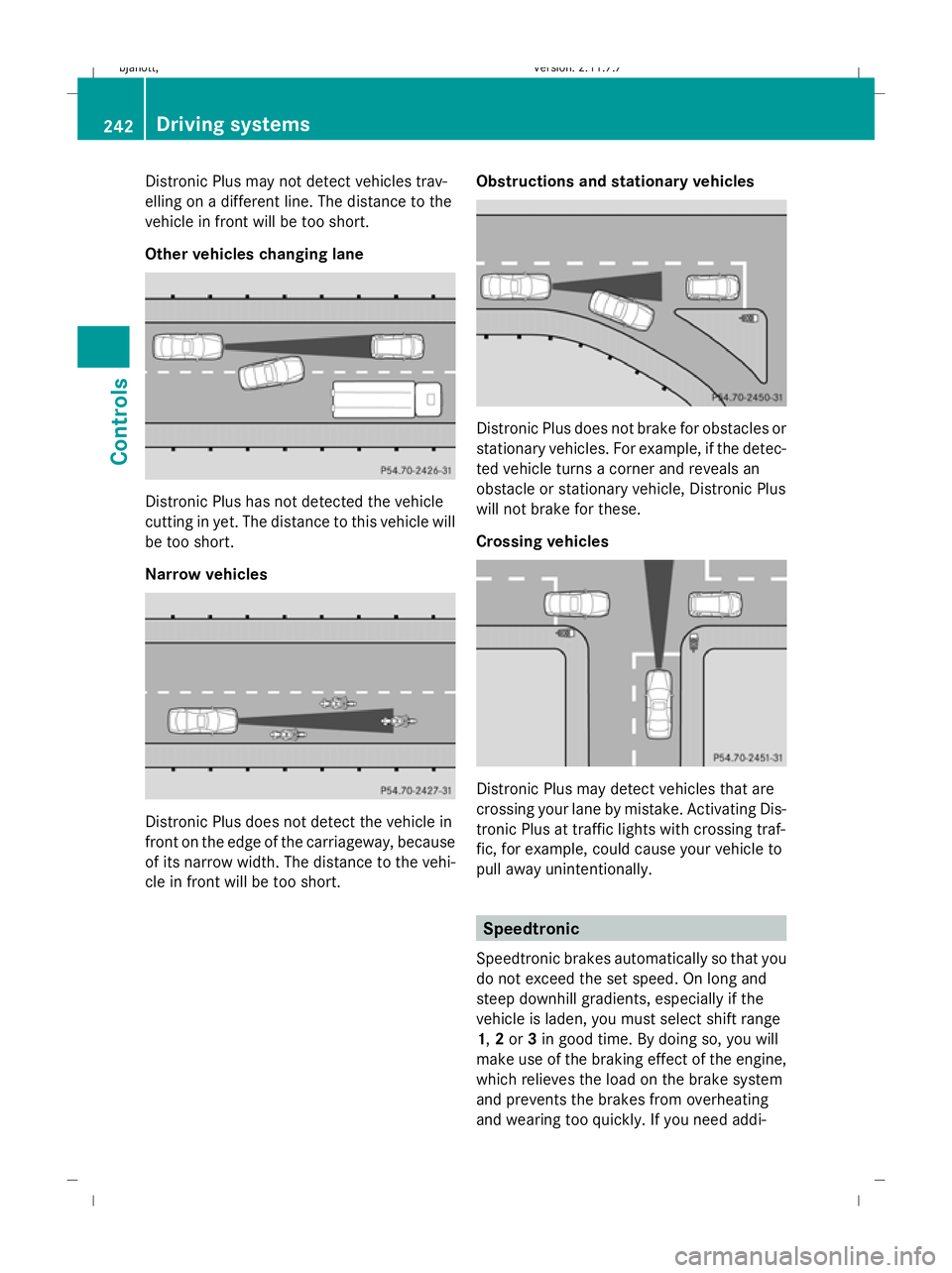
Distronic Plus may not detect vehicles trav-
elling on a different line. The distance to the
vehicle in front will be too short.
Other vehicles changing lane Distronic Plus has not detected the vehicle
cutting in yet. The distance to this vehicle will
be too short.
Narrow vehicles Distronic Plus does not detect the vehicle in
front on the edge of the carriageway, because
of its narrow width. The distance to the vehi-
cle in front will be too short. Obstructions and stationary vehicles Distronic Plus does not brake for obstacles or
stationary vehicles. For example, if the detec-
ted vehicle turns a corner and reveals an
obstacle or stationary vehicle, Distronic Plus
will not brake for these.
Crossing vehicles Distronic Plus may detect vehicles that are
crossing your lane by mistake. Activating Dis-
tronic Plus at traffic lights with crossing traf-
fic, for example, could cause your vehicle to
pull away unintentionally.
Speedtronic
Speedtronic brakes automatically so that you
do not exceed the set speed. On long and
steep downhill gradients, especially if the
vehicle is laden, you must select shift range
1, 2or 3in good time. By doing so, you will
make use of the braking effect of the engine,
which relieves the load on the brake system
and prevents the brakes from overheating
and wearing too quickly. If you need addi- 242
Driving systemsControls
216_AKB; 2; 3, en-GB
bjanott,
Version: 2.11.7.7 2009-02-27T14:54:17+01:00 - Seite 242
Dateiname: 6515230602_buchblock.pdf; erzeugt am 04. Mar 2009 11:16:00; WK
Page 266 of 421

i
The integrated filter can filter out most
particles of dust and completely filters out
pollen. A clogged filter reduces the amount
of air supplied to the vehicle interior. For
this reason, you should always observe the
interval for replacing the filter, which is
specified in the Service Booklet. As it
depends on environmental conditions, e.g.
heavy air pollution, the interval may be
shorter than stated in the Service Booklet. G
Risk of accident
Observe the settings recommended on the
following pages. Otherwise, the windows
could mist up. This may obstruct your view of
the traffic situation and, as a result, you may
cause an accident. Overview of air-conditioning system functions
Automatic air conditioning Function
:
Controls the air conditioning auto-
matically, left
;
Sets the temperature, left
=
Sets the airflow, left
?
Demists the windscreen
A
Activates/deactivates air-recircu-
lation mode
B
Switches the air conditioning on/
off
32 Switches the residual heat function
on/off
32 Function
C
Activates/deactivates auxiliary
heating*
D
Switches the rear window heating
on/off
E
Sets the airflow, right
F
Sets the temperature, right
G
Controls the air conditioning auto-
matically, right
32
On vehicles without auxiliary heating*, these functions have separate rocker switches. Air conditioning
263Controls
* optional
216_AKB; 2; 3, en-GB
bjanott,
Version: 2.11.7.7 2009-02-27T14:54:17+01:00 - Seite 263 Z
Dateiname: 6515230602_buchblock.pdf; erzeugt am 04. Mar 2009 11:16:09; WK
Page 269 of 421

Setting the side air vents
X
To open/close: turn control=up or
down.
i Demister vent :is never completely
shut, even if side air vent ;is shut.
Setting the stowage compartment air
vent The stowage compartment can be ventilated
when the automatic air-conditioning system
is activated, for instance to cool its contents.
The level of airflow depends on the airflow and
air distribution settings. The temperature of
the air is approximately the same as that of
the air flowing from the centre air vents.
! Close the stowage compartment air vent
when heating mode is activated and acti-
vate the "cooling with air dehumidification"
function if the outside temperature is high.
Otherwise, temperature-sensitive items
stored in the stowage compartment could
be damaged. X
To switch the ventilation on/off: push
rocker switch down ;or up :.
Setting the glove compartment air vent The glove compartment can be ventilated
when the automatic air-conditioning system
is activated, for instance to cool its contents.
The level of airflow depends on the airflow and
air distribution settings.
! At high outside temperatures, open the
air vent and activate the "cooling with air
dehumidification" function. Otherwise,
temperature-sensitive items stored in the
glove compartment could be damaged. X
To open: turn control :anti-clockwise
from position 3to position 2.
X To close: turn control :clockwise from
position 2to position 3.
Setting the rear-compartment air vents :
Rear-compartment air vent, left
; Rear-compartment air vent, right 266
Air conditioningControls
216_AKB; 2; 3, en-GB
bjanott
,V ersion: 2.11.7.7
2009-02-27T14:54:17+01:00 - Seite 266
Dateiname: 6515230602_buchblock.pdf; erzeugt am 04. Mar 2009 11:16:12; WK
Page 270 of 421

=
Control for right-hand rear-compartment
air vent
? Control for left-hand rear-compartment
air vent
X To open/close: turn controls=or? to
the right or left.
i Close the rear-compartment air vents
when heating mode is activated, as no
warm air flows through the rear-compart-
ment air vents in the basic heating setting. Setting the air distribution
The air distribution can be set individually for
the driver's and front-passenger sides.
¯ directs the airflow through the demis-
ter vents
P directs the airflow through the centre
and side air vents
O directs the airflow through the footwell
air vents
S directs the airflow through the centre
and side air vents, as well as the foot-
well air vents
a directs the airflow through the footwell
and demister vents
_ directs the airflow through the demis-
ter, centre and side air vents, as well
as the footwell air vents
b directs the airflow through the centre
and side air vents, as well as the demis-
ter vents
W adjusts the air distribution automati-
cally
The air distribution can be set using COMAND
(Y page 169). Setting the airflow
You can select different airflow settings for
the driver's and front-passenger sides. X
Turn the key to position 2in the ignition
lock.
X To increase/reduce: press theK
rocker switch up or down.
You can also use COMAND to set the airflow
(Y page 169). Demisting the windscreen
i You should only select the "demisting"
function until the windscreen is clear again.
X Turn the key to position 2in the ignition
lock.
X To activate: press the¬rocker switch
up or down.
The indicator lamp in the ¬rocker
switch comes on.
The system automatically switches to the
following functions:
R cooling with air dehumidification on
R high airflow 33
R high temperature 33
R air distribution to the windscreen and
front side windows
R air-recirculation mode off
X To deactivate: press the¬rocker
switch up or down.
The indicator lamp in the ¬rocker
switch goes out. The previously selected
settings come into effect again. The cooling
with air dehumidification function remains
on. Air-recirculation mode remains deacti-
vated.
or
X Press the wrocker switch up or down.
or
X Press the Krocker switch up or down.
33 Depending on the outside temperature. Air conditioning
267Controls
216_AKB; 2; 3, en-GB
bjanott, Version: 2.11.7.7 2009-02-27T14:54:17+01:00 - Seite 267 Z
Dateiname: 6515230602_buchblock.pdf; erzeugt am 04. Mar 2009 11:16:12; WK
Page 271 of 421

Demisting the windows
Windows misted up on the inside X
Activate the "cooling function with air dehu-
midification" function.
X Activate automatic mode.
X If the windows continue to mist up, activate
the demisting function.
i You should only select this setting until
the windscreen is clear again.
Windows misted up on the outside X
Activate the windscreen wipers.
X Activate the automatic air conditioning.
i You should only select this setting until
the windscreen is clear again. Switching the rear window heating
on/off G
Risk of accident
Clear all windows of ice or snow before setting
off. Otherwise, impaired visibility could
endanger you and others.
i The rear window heating has a high cur-
rent draw. You should therefore switch it
off as soon as the window is clear, as it only
switches off automatically after several
minutes.
i If the battery voltage is too low, the rear
window heating may switch off.
X Turn the key to position 2in the ignition
lock.
X Press the ¤rocker switch up or down.
The indicator lamp in the ¤rocker
switch lights up or goes out. Activating/deactivating air-recircula-
tion mode
You can deactivate the flow of fresh air if
unpleasant odours are entering the vehicle
from outside. The air already inside the vehi-
cle will then be recirculated. G
Risk of accident
Only switch over to air-recirculation mode
briefly at low outside temperatures. Other-
wise, the windows could mist up, thus impair-
ing visibility and endangering yourself and
others. This may prevent you from observing
the traffic conditions, thereby causing an
accident.
X Turn the key to position 2in the ignition
lock.
X To activate: press thegrocker switch
up or down.
The indicator lamp in the grocker
switch comes on.
i Air-recirculation mode is activated auto-
matically at high outside temperatures. The
indicator lamp in the grocker switch is
not lit when automatic air-recirculation
mode is activated.
Outside air is added after about 30
minutes.
X To deactivate: press thegrocker
switch up or down.
The indicator lamp in the grocker
switch goes out. 268
Air conditioningCont
rols
216_AKB; 2; 3, en-GB
bjanott, Version: 2.11.7.7 2009-02-27T14:54:17+01:00 - Seite 268
Dateiname: 6515230602_buchblock.pdf; erzeugt am 04. Mar 2009 11:16:12; WK