2009 MERCEDES-BENZ CL COUPE boot
[x] Cancel search: bootPage 69 of 421

Operation
Menu overview Each of the main functions,
Navi*,Audio,Telephone*, VideoandVehicle, has a basic menu
consisting of menu items or functions.
Example: the Videomain function includes these menu items: TV*,DVD video ,Aux*a nd the
Video off function. Navi* Audio
Telephone* Video Vehicle
Mode Radio Telephone on
TV* Multicontour
seat*/lumbar
support setting Map orientation Disc Telephone off video DVD Rear window
blind*
Special destina-
tion symbols on
the map Memory card
AUX* EASY-ENTRY/
EXIT feature
Text information
on the map MUSIC REGIS-
TER* Video off Exterior lighting
delayed switch-
off time Topographical
map Media Inter-
face* Interior lighting
delayed switch-
off time Town view USB Ambient light-
ing*
Motorway infor-
mation
AUX* Autom. mirror
folding Automatic read-
ing aloud of traf-
fic reports Audio off Locator lighting
Volume limiter Autom. locking
Map version Interior motion
sensor*
Tow-away pro-
tection*
Boot lid opening
limiter66
IntroductionCOMAND
* optional
216_AKB; 2; 3, en-GB
bjanott,
Version: 2.11.7.7 2009-02-27T14:54:17+01:00 - Seite 66
Dateiname: 6515230602_buchblock.pdf; erzeugt am 04. Mar 2009 11:14:55; WK
Page 167 of 421
X
Select Vehicle QSystem QReset.
A prompt appears asking whether you
really wish to reset.
X Select YesorNo.
If you select Yes, a prompt will appear again
asking whether you really wish to reset.
X Select YesorNo.
If you select Yes, COMAND will be reset
and restarted. Vehicle
Introduction to the vehicle menu
i Information about the components and
operating principles of COMAND can be
found on (Y page 58).
In this menu, you can set the following vehicle
functions:
R Multicontour seat settings*
R Rear window blind*
R EASY-ENTRY/EXIT feature
R Exterior lighting delayed switch-off time
R Interior lighting delayed switch-off time
R Ambient lighting*
R Automatic folding mirror
R Locator lighting
R Automatic locking feature
R Interior motion sensor*
R Tow-away protection*
R Boot lid opening limiter
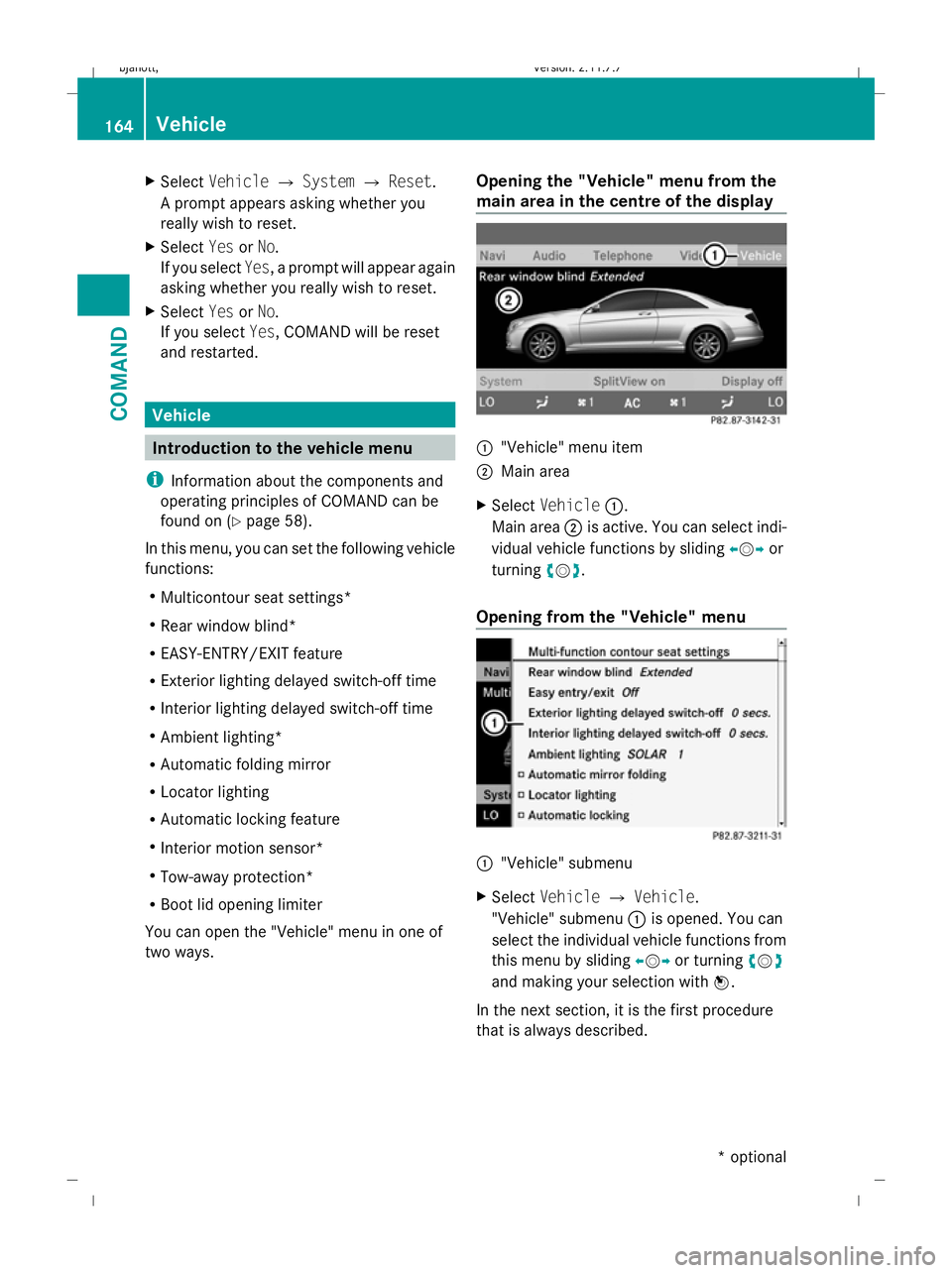
You can open the "Vehicle" menu in one of
two ways. Opening the "Vehicle" menu from the
main area in the centre of the display :
"Vehicle" menu item
; Main area
X Select Vehicle :.
Main area ;is active. You can select indi-
vidual vehicle functions by sliding XVYor
turning cVd.
Opening from the "Vehicle" menu :
"Vehicle" submenu
X Select Vehicle QVehicle.
"Vehicle" submenu :is opened. You can
select the individual vehicle functions from
this menu by sliding XVYor turning cVd
and making your selection with W.
In the next section, it is the first procedure
that is always described. 164
VehicleCOMAND
* optional
216_AKB; 2; 3, en-GB
bjanott,
Version: 2.11.7.7 2009-02-27T14:54:17+01:00 - Seite 164
Dateiname: 6515230602_buchblock.pdf; erzeugt am 04. Mar 2009 11:15:27; WK
Page 171 of 421

X
Select Vehicle.
The main area is active.
X To select the Interior motion sensor
function: slideXVY or turn cVd.
X To prime/deactivate the interior
motion sensor: pressW. Priming/deactivating tow-away pro-
tection
i You can assign this function to the pro-
grammable button (Y page 163).X
Select Vehicle.
The main area is active.
X To select the Tow-away protection
function: slideXVY or turn cVd.
X To prime/deactivate tow-away protec-
tion: press W. Activating/deactivating the boot lid
opening limiter
X
Select Vehicle.
The main area is active.
X To select the Boot lid opening lim‐
iter function: slideXVY or turn cVd.
X To activate/deactivate the boot lid
opening limiter: pressW. Automatic air conditioning
Introduction to the automatic air con-
ditioning
You can operate the automatic air-condition-
ing system using COMAND or the buttons on
the upper section of the centre console
(Y page 263).
Several special automatic air conditioning
functions can only be adjusted using
COMAND.
You can access the menu for the automatic
air-conditioning system via the air-condition-
ing function bar.
To do so, make certain that the key is in posi-
tion 2in the ignition lock. 168
Automatic air conditioningCOMAND
216_AKB; 2; 3, en-GB
bjanott,
Version: 2.11.7.7 2009-02-27T14:54:17+01:00 - Seite 168
Dateiname: 6515230602_buchblock.pdf; erzeugt am 04. Mar 2009 11:15:30; WK
Page 180 of 421
Opening and closing
.........................178
Boot .................................................... 180
Key positions .................................... 182
Seats .................................................. 183
Steering wheel .................................. 187
Mirrors ............................................... 189
Memory function .............................. 190
Seat belts ........................................... 191
Lights ................................................. 194
Windscreen wipers ...........................199
Side windows .................................... 200
Driving and parking ..........................202
Automatic transmission ...................206
Instrument cluster ............................212
On-board computer ..........................213
Driving systems ................................ 227
Air conditioning ................................. 262
Sliding sunroof .................................. 274
Loading and stowing ........................275
Features ............................................. 280 177Controls
216_AKB; 2; 3, en-GB
bjanott,
Version: 2.11.7.7 2009-02-27T14:54:17+01:00 - Seite 177
Dateiname: 6515230602_buchblock.pdf; erzeugt am 04. Mar 2009 11:15:35; WK
Page 181 of 421

Opening and closing
Key
The key centrally locks/unlocks:
R the doors
R the boot lid
R the fuel filler flap G
Risk of accident
If children are left unsupervised in the vehicle,
they could:
R open a door from the inside at any time,
even if it has been locked
R start the vehicle using a key which has been
left in the vehicle
R release the parking brake
They could thereby endanger themselves and
others. Never leave children unsupervised in
the vehicle. Always take the key with you
when leaving the vehicle, even if you are only
leaving it for a short time. :
Battery check lamp
; & To lock the vehicle
= F To unlock the boot lid
? % To unlock the vehicle
When unlocking, the turn signals flash once.
When locking, they flash three times.
When it is dark, the surround lighting also
comes on if it is activated in COMAND.
If you do not open either a door or the boot
lid after you have unlocked the vehicle, it will automatically relock after approximately 40
seconds.
KEYLESS GO* You can start, lock or unlock the vehicle using
KEYLESS GO. To do this, you only need carry
the key with you. When you touch the surface
of the sensors on the vehicle's door handles,
KEYLESS GO establishes a radio connection
between the vehicle and the key.
The distance to the vehicle's door handle
from which you wish to lock or unlock the
vehicle must not be greater than 1 m.
When starting the engine and whilst driving,
KEYLESS GO also checks whether a valid key
is in the vehicle by periodically establishing
radio contact. X
To unlock the vehicle: pull the door han-
dle.
X To lock the vehicle: touch sensor sur-
face :.
If you pull on the handle of the boot lid, only
the boot of the vehicle is unlocked.
i If the vehicle has been parked for a long
time, the sensor surfaces are deactivated
automatically.
Pull on the door handle to unlock the door
and switch on the ignition once to reacti-
vate the sensors. 178
Opening and closingControls
* optional
216_AKB; 2; 3, en-GB
bjanott,
Version: 2.11.7.7 2009-02-27T14:54:17+01:00 - Seite 178
Dateiname: 6515230602_buchblock.pdf; erzeugt am 04. Mar 2009 11:15:36; WK
Page 183 of 421

X
To unlock: press button :.
X To lock: press button ;.
Automatic locking The vehicle will lock automatically once you
have pulled away.
You can switch the automatic locking func-
tion on and off using COMAND (Y page 167).
i The vehicle is locked automatically when
the ignition is switched on and the wheels
begin to turn. There is a risk of being locked
out when the vehicle is being pushed or
tested on a dynamometer. Power closing feature
The power closing mechanism pulls the doors
and boot lid into their locks automatically
even if they are only partly closed. G
Risk of injury
Make sure that nobody can become trapped
as you close the doors and boot lid.
If there is a danger of being trapped, pull the
door handle on the inside or outside or press
on the boot lock.
Do not activate the power closing function by
tampering with the lock mechanism. You
could otherwise injure yourself. G
Risk of accident
Make sure that the doors and boot lid are
always fully closed. Otherwise, a door or the boot lid could open during the journey and
endanger yourself or others.
Power closing (doors) X
Push the door into the first detent position
of the lock.
The power closing mechanism will pull the
door closed completely.
Power closing (boot lid) X
Lightly push closed the boot lid.
The power closing mechanism will pull the
boot lid closed completely. Boot
Points to remember
G
Risk of poisoning
Exhaust fumes could enter the vehicle interior
if the engine is running and the boot lid is
open. This could poison you. Therefore, you
should make sure that the boot lid is always
closed when the engine is running.
! The boot lid swings upwards when
opened. Therefore, make sure that there is
sufficient clearance above the boot lid.
Do not leave the key in the boot. You could
otherwise lock yourself out.
The boot lid can be:
R opened manually (Y page 180)
R opened and closed automatically from out-
side (Y page 181)
R opened and closed automatically from
inside (Y page 182) Opening and closing manually
X To open: press the %button on the key. 180
BootControls
216_AKB; 2; 3, en-GB
bjanott,
Version: 2.11.7.7 2009-02-27T14:54:17+01:00 - Seite 180
Dateiname: 6515230602_buchblock.pdf; erzeugt am 04. Mar 2009 11:15:36; WK
Page 184 of 421

X
Pull handle :.
Locking the boot separately You can lock the boot separately.
24
If you then
unlock the vehicle centrally, the boot remains
locked and cannot be opened.
X Close the boot lid.
X Remove the emergency key element from
the key (Y page 365). X
Insert the emergency key element fully into
the tailgate lock.
X Turn the emergency key element clockwise
from position 1to position 2.
X Remove the emergency key element. Automatically opening/closing the
vehicle from outside
Opening the spare wheel bracket You can open the boot lid with the key.
G
Risk of injury
Monitor the boot lid opening and closing pro-
cedures to make sure that nobody can
become trapped. To halt the opening or clos-
ing procedure, press the closing button* in
the boot lid again or pull the handle on the
outside of the boot lid.
X Press and hold the Fbutton on the key
until the boot lid opens.
Closing the spare wheel bracket You can close the boot lid automatically by
using either the closing button or the locking
button
25
. X
To close: press closing button :in the
boot lid.
X To close and lock simultaneously:
Press locking button ;in the boot lid.
i If you leave a KEYLESS GO key* in the
boot, the boot lid will not lock.
24 Not available in all countries.
25 Only on vehicles with KEYLESS GO. Boot
181Controls
* optional
216_AKB; 2; 3, en-GB
bjanott,
Version: 2.11.7.7
2009-02-27T14:54:17+01:00 - Seite 181 Z
Dateiname: 6515230602_buchblock.pdf; erzeugt am 04. Mar 2009 11:15:37; WK
Page 185 of 421

Automatically opening/closing* the
vehicle from inside
You can open/close the boot lid from the
driver's seat when the vehicle is stationary. G
Risk of injury
Monitor the boot lid closing procedure to
make sure that nobody can become trapped.
Release the boot lid remote operating button
to stop the closing procedure. X
To open: press remote operating button for
boot lid :until the boot lid opens.
X To close: press remote operating switch
for boot lid :until the boot lid is closed. Key positions
Key
g
To remove the key
1 Power supply for some consumers, such
as the windscreen wipers 2
Ignition (power supply for all consumers)
and drive position
3 To start the engine
i Even if the key is not for the vehicle in
question, it will still turn in the ignition lock.
The ignition is not switched on. The engine
cannot be started. KEYLESS GO*
If you press the Start/Stop button repeatedly
without depressing the brake pedal, its func-
tion corresponds to the different key posi-
tions in the ignition lock.
If you depress the brake pedal and press the
Start/Stop button, the engine starts immedi-
ately. X
Position 0: if Start/Stop button :has not
yet been pressed, this corresponds to "key
removed".
X Position 1: press Start/Stop button :
once.
It is now possible to switch on the wind-
screen wipers, for example.
i If you open the driver's door in this posi-
tion, the power supply is disconnected
again.
X Position 2(ignition): press Start/Stop but-
ton :twice. 182
Key positionsCont
rols
* option al
216_AKB; 2; 3, en-GB
bjanott
,V ersion: 2.11.7.7
2009-02-27T14:54:17+01:00 - Seite 182
Dateiname: 6515230602_buchblock.pdf; erzeugt am 04. Mar 2009 11:15:38; WK