Page 1 of 292
Introduction 4
Instrument Cluster 10
Warning lights and chimes 10
Gauges 14
Entertainment Systems 16
AM/FM stereo with CDX6/MP3 16
Auxiliary input jack (Line in) 23
USB port 25
Satellite radio information 27
Navigation system 30
SYNC 30
Climate Controls 31
Automatic temperature control 31
Rear window defroster 36
Lights 37
Headlamps 37
Turn signal control 41
Bulb replacement 42
Driver Controls 52
Windshield wiper/washer control 52
Steering wheel adjustment 53
Power windows 56
Mirrors 58
Speed control 60
Moon roof 65
Message center 70
Locks and Security 80
Keys 80
Locks 82
Anti-theft system 96
Table of Contents
1
2009 MKZ(378)
Owners Guide
USA(fus)
Page 8 of 292
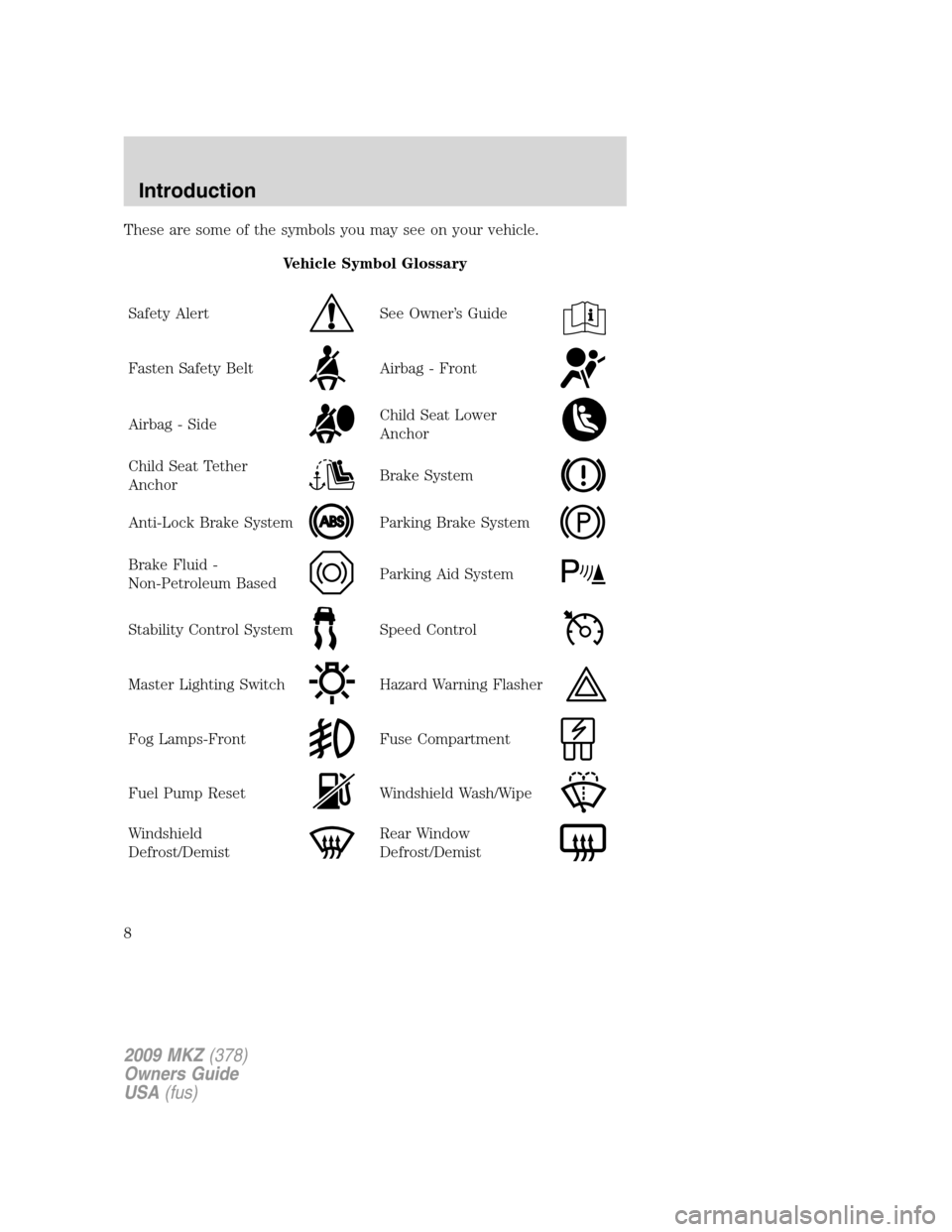
These are some of the symbols you may see on your vehicle.
Vehicle Symbol Glossary
Safety Alert
See Owner’s Guide
Fasten Safety BeltAirbag - Front
Airbag - SideChild Seat Lower
Anchor
Child Seat Tether
AnchorBrake System
Anti-Lock Brake SystemParking Brake System
Brake Fluid -
Non-Petroleum BasedParking Aid System
Stability Control SystemSpeed Control
Master Lighting SwitchHazard Warning Flasher
Fog Lamps-FrontFuse Compartment
Fuel Pump ResetWindshield Wash/Wipe
Windshield
Defrost/DemistRear Window
Defrost/Demist
2009 MKZ(378)
Owners Guide
USA(fus)
Introduction
8
Page 9 of 292
Vehicle Symbol Glossary
Power Windows
Front/Rear
Power Window Lockout
Child Safety Door
Lock/UnlockInterior Luggage
Compartment Release
Panic AlarmEngine Oil
Engine CoolantEngine Coolant
Temperature
Do Not Open When HotBattery
Avoid Smoking, Flames,
or SparksBattery Acid
Explosive GasFan Warning
Power Steering FluidMaintain Correct Fluid
LevelMAX
MIN
Service Engine SoonEngine Air Filter
Passenger Compartment
Air FilterJack
Check Fuel CapLow Tire Pressure
Warning
2009 MKZ(378)
Owners Guide
USA(fus)
Introduction
9
Page 11 of 292

WARNING:Under engine misfire conditions, excessive exhaust
temperatures could damage the catalytic converter, the fuel
system, interior floor coverings or other vehicle components, possibly
causing a fire.
Check fuel cap:Illuminates when
the fuel cap may not be properly
installed. Continued driving with
this light on may cause the Service
engine soon warning light to come
on, refer toFuel filler capin the
Maintenance and Specificationchapter.
Brake system warning light:To
confirm the brake system warning
light is functional, it will
momentarily illuminate when the
ignition is turned to the on position
when the engine is not running, or in a position between on and start, or
by applying the parking brake when the ignition is turned to the on
position. If the brake system warning light does not illuminate at this
time, seek service immediately from your authorized dealer. Illumination
after releasing the parking brake indicates low brake fluid level or a
brake system malfunction and the brake system should be inspected
immediately by your authorized dealer.
WARNING:Driving a vehicle with the brake system warning
light on is dangerous. A significant decrease in braking
performance may occur. It will take you longer to stop the vehicle.
Have the vehicle checked by your authorized dealer. Driving extended
distances with the parking brake engaged can cause brake failure and
the risk of personal injury.
Anti-lock brake system:If the
ABS light stays illuminated or
continues to flash, a malfunction has
been detected, have the system
serviced immediately by your
authorized dealer. Normal braking is still functional unless the brake
warning light also is illuminated.
P!
BRAKE
ABS
2009 MKZ(378)
Owners Guide
USA(fus)
Instrument Cluster
11
Page 13 of 292

Speed control:Illuminates when
the speed control is engaged. Turns
off when the speed control system
is disengaged.
O/D off:Illuminates when the
overdrive function of the
transmission has been turned off;
refer to theDrivingchapter. If the
light does not illuminate, have the transmission serviced soon, or damage
may occur.
Anti-theft system:Flashes when
the SecuriLock™ Passive Anti-theft
System has been activated.
Throttle Control/Transmission:
Illuminates when a powertrain or a
AWD fault has been detected.
Contact your authorized dealer as
soon as possible.
Door ajar (if equipped):
Illuminates when the ignition is in
the RUN position and any door or
decklid is open.
Turn signal:Illuminates when the
left or right turn signal or the
hazard lights are turned on. If the
indicators flash faster, check for a burned out bulb.
High beams:Illuminates when the
high beam headlamps are turned on.
Key-in-ignition warning chime:Sounds when the key is left in the
ignition in the off or accessory position and the driver’s door is opened.
Headlamps on warning chime:Sounds when the headlamps or parking
lamps are on, the ignition is off (the key is not in the ignition) and the
driver’s door is opened.
Parking brake on:Sounds when the parking brake is left on and the
vehicle is driven. If the warning stays on after the park brake is off,
contact your authorized dealer as soon as possible.
O/D
OFF
2009 MKZ(378)
Owners Guide
USA(fus)
Instrument Cluster
13
Page 18 of 292

: If your vehicle is equipped with SYNC, press to access SYNC
PHONE features. Refer to yourSYNC supplement.for further
information. If your vehicle is not equipped with SYNC, the display will
read NO PHONE.
4.MENU:Press repeatedly to scroll
through the following modes:
Setting the clock:Your vehicle is equipped with an in-dash clock. Refer
toClockin theDriver ControlsChapter for instructions on how to set
the time.
SATELLITE RADIO MENU (if equipped):Press MENU when satellite
radio mode is active to access. Press OK to enter into the satellite radio
menu. Press
/to cycle through the following options:
•CATEGORY:Press OK to enter category mode. Press
/to
scroll through the list of available SIRIUS channel Categories (Pop,
Rock, News, etc.) Press OK when the desired category appears in the
display. After a category is selected, press SEEK to search for that
specific category of channels only (i.e. ROCK). You may also select
CATEGORY ALL to seek all available SIRIUS categories and channels.
Press OK to close and return to the main menu.
•SAVE SONG:Press OK to save the currently playing song’s title in
the system’s memory. (If you try to save something other than a song,
CANT SAVE will appear in the display.) When the chosen song is
playing on any satellite radio channel, the system will alert you with
an audible prompt. Press OK while SONG ALERT is in the display and
the system will take you to the channel playing the desired song. You
can save up to 20 song titles. If you attempt to save more than 20
titles, the display will read REPLACE SONG? Press OK to access the
saved titles and press
/to cycle through the saved titles. When
the song title appears in the display that you would like to replace,
press OK. SONG REPLACED will appear in the display.
•DELETE SONG:Press OK to delete a song from the system’s
memory. Press
/to cycle through the saved songs. When the
song appears in the display that you would like to delete, press OK.
The song will appear in the display for confirmation. Press OK again
and the display will read SONG DELETED. If you do not want to
delete the currently listed song, press
/to select either
RETURN or CANCEL.
Note:If there are no songs presently saved, the display will read NO
SONGS.
2009 MKZ(378)
Owners Guide
USA(fus)
Entertainment Systems
18
Page 29 of 292

Radio Display Condition Action Required
INVALID CHNL Channel no longer
available.This previously available
channel is no longer
available. Tune to another
channel. If the channel
was one of your presets,
you may choose another
channel for that preset
button.
UNSUBSCRIBED Subscription not
available for this
channel.Contact SIRIUS at
1–888–539–7474 to
subscribe to the channel,
or tune to another
channel.
NO TEXT Artist information
not available.Artist information not
available at this time on
this channel. The system is
working properly.
NO TEXT Song title
information not
available.Song title information not
available at this time on
this channel. The system is
working properly.
NO TEXT Category
information not
available.Category information not
available at this time on
this channel. The system is
working properly.
NO SIGNAL Loss of signal from
the SIRIUS satellite
or SIRIUS tower to
the vehicle antenna.You are in a location that
is blocking the SIRIUS
signal (i.e., tunnel, under
an overpass, dense foliage,
etc). The system is
working properly. When
you move into an open
area, the signal should
return.
2009 MKZ(378)
Owners Guide
USA(fus)
Entertainment Systems
29
Page 37 of 292

HEADLAMP CONTROL
Turns the lamps off.
Turns on the parking lamps,
instrument panel lamps, license
plate lamps and tail lamps.
Turns the low beam headlamps
on.
Autolamp control
The autolamp system provides light
sensitive automatic on-off control of
the exterior lights normally
controlled by the headlamp control.
•To turn autolamps on, rotate the
control counterclockwise to
.
•To turn autolamps off, rotate the
control clockwise to off.
The autolamp system also keeps the
lights on for a predetermined
amount of time after the ignition switch is turned to off. You can change
the amount of time the lamps stay on by using the programming
procedure that follows:
Note:If the vehicle is equipped with autolamps, it will have the
headlamps on with windshield wipers feature.If the windshield
wipers are turned on (for a fixed period of time), the exterior lamps will
turn on with the headlamp control in the Autolamp position.
Autolamps - Programmable exit delay
Programmable exit delay allows the length of the autolamp exit delay to
be changed.
To program the auto lamp exit time delay:
1. Start with the ignition in the off position and the headlamp control in
the autolamp position.
2. Turn the headlamp switch to off.
2009 MKZ(378)
Owners Guide
USA(fus)
Lights
37