Page 299 of 622

298
3-3. Using the audio system
GS_G_U (OM30B43U)
April 27, 2009 10:48 am
●It may not be possible to play discs recorded on a personal computer depend-
ing on the application settings and the environment. Record with the correct
format. (For details, contact the appropriate application manufacturers of the
applications.)
●CD-R/CD-RW discs may be damaged by direct exposure to sunlight, high
temperatures or other storage conditions . The unit may be unable to play dam-
aged discs.
●If you insert a CD-RW disc into the MP3/WMA player, playback will begin
more slowly than with a conventional CD or CD-R disc.
●Recordings on CD-R/CD-RW cannot be played using the DDCD (Double
Density CD) system.
CAUTION
■DVD video precaution
Conversational speech on some DVDs is recorded at a low volume to emphasize
the impact of sound effects. If you adjust the volume assuming that the conversa-
tions represent the maximum volume level that the DVD will play, you may be star-
tled by louder sound effects or when you change to a different audio source.
Loud sounds may have a significant impact on the human body or pose a driving
hazard. Keep this in mind when you adjust the volume.
GS_U_G.book Page 298 Monday, April 27, 2009 10:50 AM
Page 300 of 622
299
3-3. Using the audio system
3
Interior features
GS_G_U (OM30B43U)
April 27, 2009 10:48 am
NOTICE
■Discs and adapters that cannot be used
Do not use the following types of discs, 3 in. (8 cm) disc adapters or Dual Disc.
Doing so may damage the player and render the disc insert/eject function unus-
able.
●Discs that have a diameter that is not 4.7 in.
(12 cm).
●Low-quality and deformed discs.
●Discs with a transparent or translucent
recording area.
●Discs that have tape, stickers or CD-R
labels attached to them, or that have the
label peeled off.
GS_U_G.book Page 299 Monday, April 27, 2009 10:50 AM
Page 301 of 622
300
3-3. Using the audio system
GS_G_U (OM30B43U)
April 27, 2009 10:48 am
NOTICE
■Player precautions
Failure to follow the precautions below may result in damage to the discs or the
player itself.
●Do not insert anything other than discs into the disc slot.
●Do not apply oil to the player.
●Store discs away from direct sunlight.
●Never try to disassemble any part of the player.
●Do not insert more than one disc at a time.
GS_U_G.book Page 300 Monday, April 27, 2009 10:50 AM
Page 302 of 622
301
3-3. Using the audio system
3
Interior features
GS_G_U (OM30B43U)
April 27, 2009 10:48 am
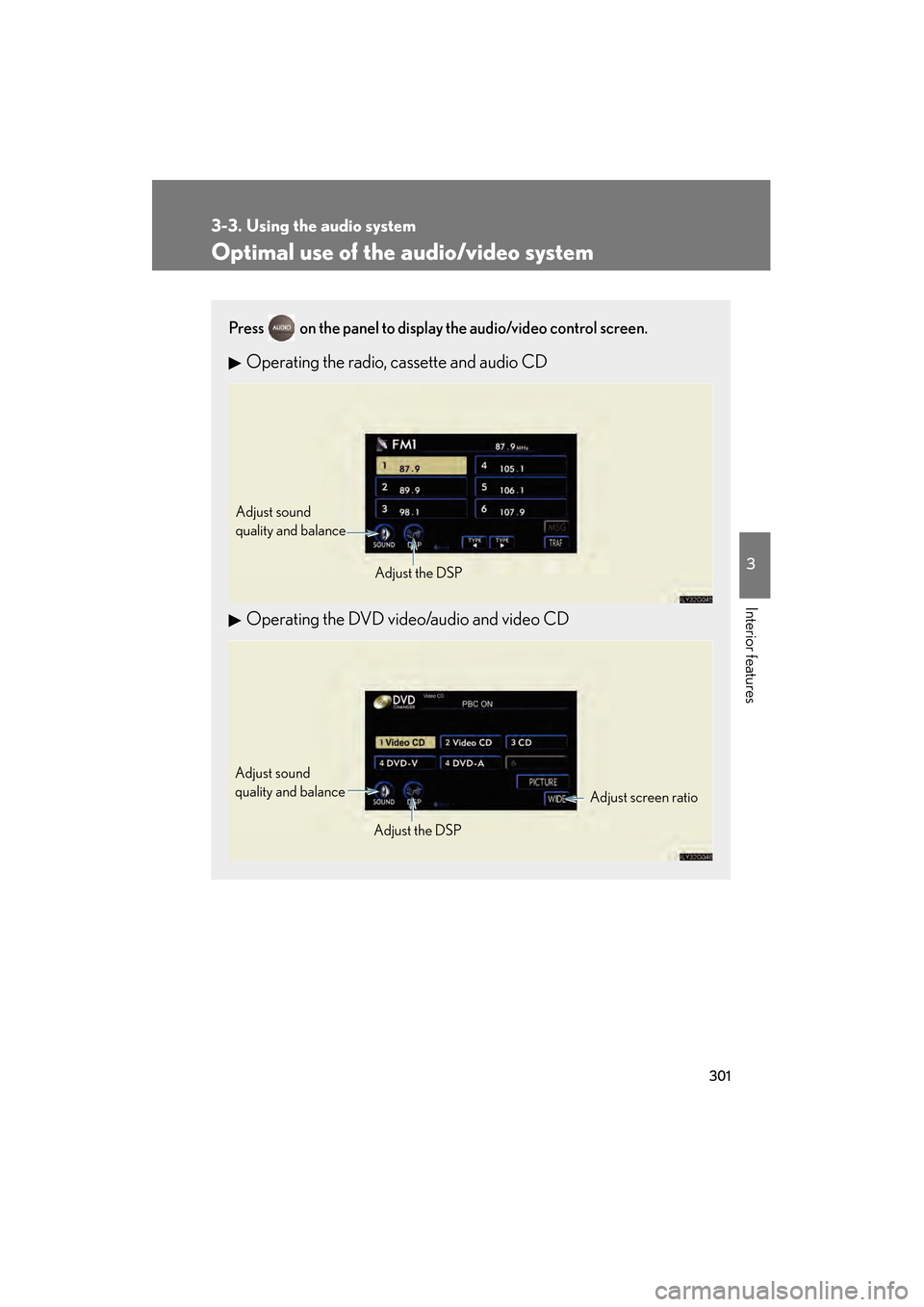
Optimal use of the audio/video system
Press on the panel to display the audio/video control screen.
Operating the radio, cassette and audio CD
Operating the DVD video/audio and video CD
Adjust sound
quality and balanceAdjust the DSP
Adjust screen ratio
Adjust sound
quality and balance
Adjust the DSP
GS_U_G.book Page 301 Monday, April 27, 2009 10:50 AM
Page 303 of 622
302
3-3. Using the audio system
GS_G_U (OM30B43U)
April 27, 2009 10:48 am
Adjusting sound quality and balanceTouch on the screen. Adjust the settings, referring to the
following table.
Once you have finished, touch.
*: The sound quality level is adjusted individually in each radio, cassette tape, CD or DVD mode.
STEP1
STEP2
Sound quality
modeDisplayLevelTo u c h
High-pitched tones*-5 to 5
or Mid-pitched
tones*-5 to 5
Low-pitched tones*-5 to 5
Front/rear
volume balanceF7 to R7 or
Left/right volume
balanceL7 to R7 or
GS_U_G.book Page 302 Monday, April 27, 2009 10:50 AM
Page 304 of 622
303
3-3. Using the audio system
3
Interior features
GS_G_U (OM30B43U)
April 27, 2009 10:48 am
Setting DSPThe following features can be set as desired by touching on the
screen.
With CD player
With DVD player
■ Turning Automatic Sound Levelizer (ASL) ON or OFF
Touch or .
ASL automatically adjusts the volu me and tone quality according to
the noise level as you drive your vehicle.
GS_U_G.book Page 303 Monday, April 27, 2009 10:50 AM
Page 305 of 622
304
3-3. Using the audio system
GS_G_U (OM30B43U)
April 27, 2009 10:48 am
■Changing the listening position (with CD player)
The speaker balance can be change d to produce the best sound for
each listening position.
To u c h .
The listening position changes as follows each time the switch is
touched.
■ Turning the surround ON or OFF (with DVD player)
Touch or .
DisplayListening position
Position best suited to the driver’s seat
Position best suited to the driver’s and front passen-
ger’s seat
Position best suited to the rear seats
Position best suited to all seats
GS_U_G.book Page 304 Monday, April 27, 2009 10:50 AM
Page 306 of 622
305
3-3. Using the audio system
3
Interior features
GS_G_U (OM30B43U)
April 27, 2009 10:48 am
Setting the screen ratio mode (with DVD player)Touch on the screen. Touch one of , or to
match the screen ratio printed on
the DVD.
STEP1
STEP2
Screen ratio modeDetails
NORMALSuitable for 4:3 screen ratio
WIDE1Expand the Normal screen
horizontally to fill the display.
WIDE2Suitable for 16:9 screen ratio
GS_U_G.book Page 305 Monday, April 27, 2009 10:50 AM