2009 KIA SOUL display
[x] Cancel search: displayPage 100 of 328
Features of your vehicle
28
4
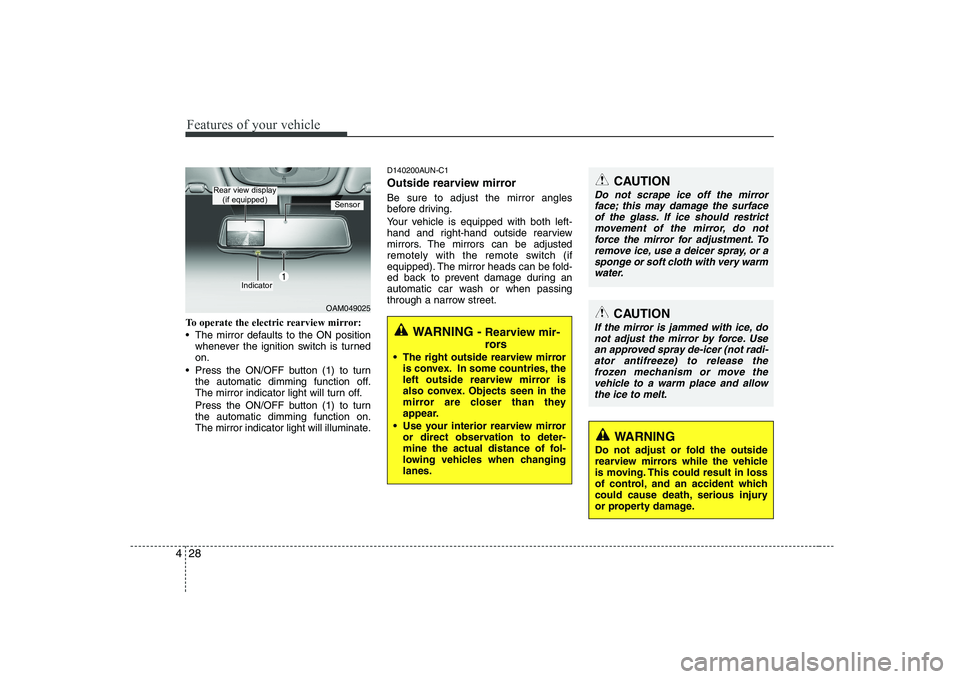
To operate the electric rearview mirror:
The mirror defaults to the ON position
whenever the ignition switch is turned on.
Press the ON/OFF button (1) to turn the automatic dimming function off.
The mirror indicator light will turn off.
Press the ON/OFF button (1) to turn the automatic dimming function on.
The mirror indicator light will illuminate. D140200AUN-C1
Outside rearview mirror Be sure to adjust the mirror angles
before driving.
Your vehicle is equipped with both left-
hand and right-hand outside rearview
mirrors. The mirrors can be adjusted
remotely with the remote switch (if
equipped). The mirror heads can be fold-
ed back to prevent damage during an
automatic car wash or when passing
through a narrow street.WARNING -
Rearview mir-
rors
The right outside rearview mirror is convex. In some countries, the
left outside rearview mirror is
also convex. Objects seen in the
mirror are closer than they
appear.
Use your interior rearview mirror or direct observation to deter-
mine the actual distance of fol-
lowing vehicles when changinglanes.
CAUTION
Do not scrape ice off the mirror
face; this may damage the surfaceof the glass. If ice should restrict movement of the mirror, do not
force the mirror for adjustment. To remove ice, use a deicer spray, or asponge or soft cloth with very warm water.
OAM049025
Indicator
Sensor
Rear view display (if equipped)
CAUTION
If the mirror is jammed with ice, do
not adjust the mirror by force. Use an approved spray de-icer (not radi-ator antifreeze) to release the frozen mechanism or move the
vehicle to a warm place and allow the ice to melt.
WARNING
Do not adjust or fold the outside
rearview mirrors while the vehicle
is moving. This could result in loss
of control, and an accident which
could cause death, serious injury
or property damage.
Page 107 of 328
435
Features of your vehicle
D150205AUN-C1
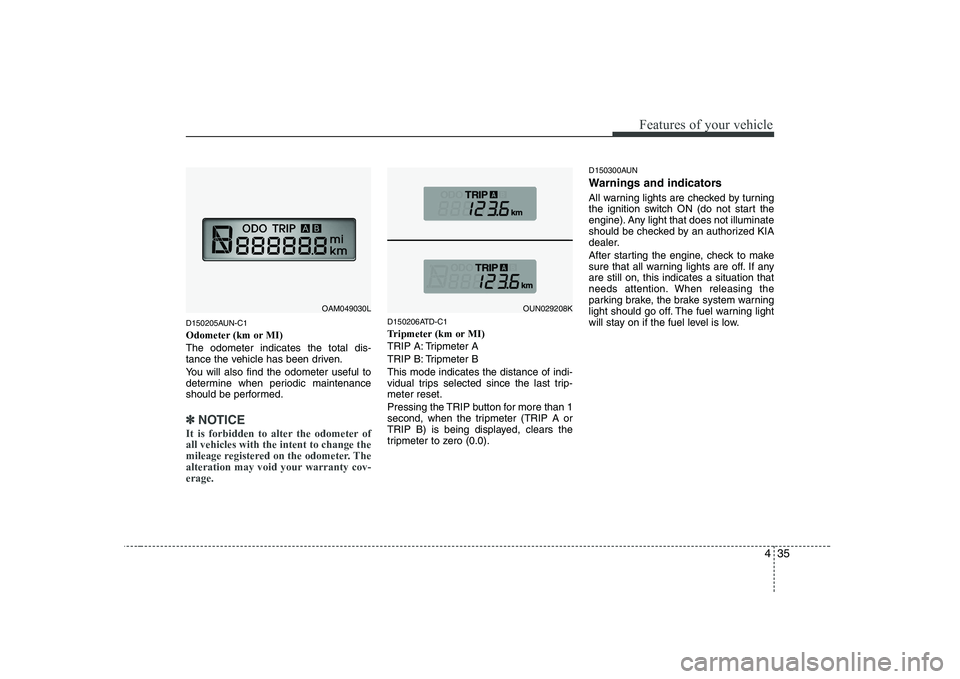
Odometer (km or MI)The odometer indicates the total dis-
tance the vehicle has been driven.
You will also find the odometer useful to
determine when periodic maintenance
should be performed.
✽✽NOTICE
It is forbidden to alter the odometer of all vehicles with the intent to change the
mileage registered on the odometer. The
alteration may void your warranty cov-erage.
D150206ATD-C1
Tripmeter (km or MI)
TRIP A: Tripmeter A
TRIP B: Tripmeter BThis mode indicates the distance of indi-
vidual trips selected since the last trip-meter reset.
Pressing the TRIP button for more than 1
second, when the tripmeter (TRIP A or
TRIP B) is being displayed, clears the
tripmeter to zero (0.0). D150300AUN
Warnings and indicators
All warning lights are checked by turning
the ignition switch ON (do not start the
engine). Any light that does not illuminate
should be checked by an authorized KIA
dealer.
After starting the engine, check to make
sure that all warning lights are off. If anyare still on, this indicates a situation that
needs attention. When releasing the
parking brake, the brake system warning
light should go off. The fuel warning light
will stay on if the fuel level is low.
OAM049030LOUN029208K
Page 112 of 328
Features of your vehicle
40
4
D150312AUN-U1
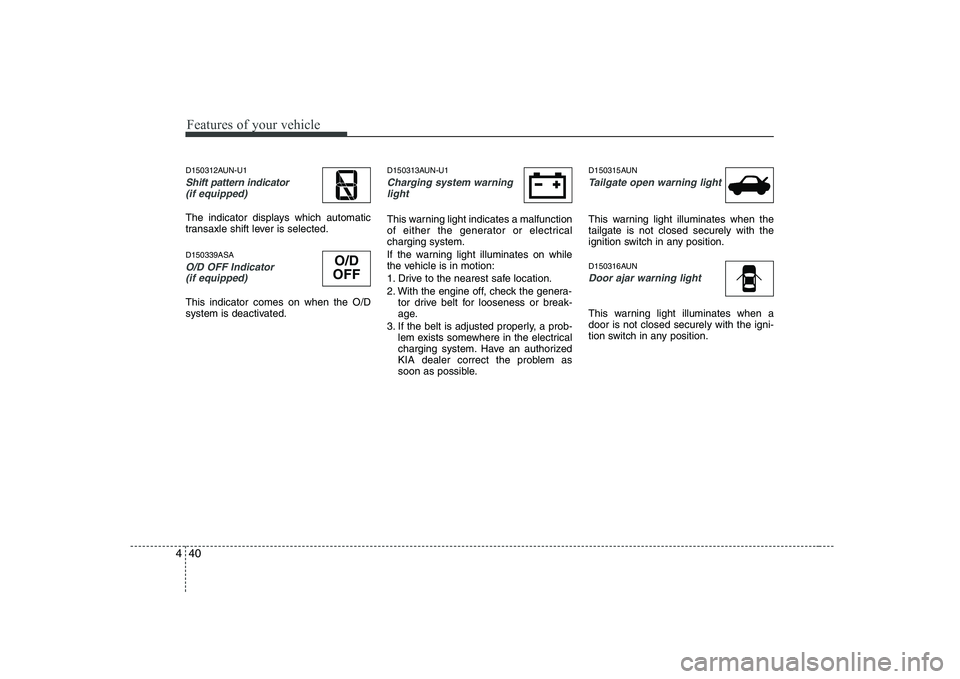
Shift pattern indicator
(if equipped)
The indicator displays which automatic
transaxle shift lever is selected. D150339ASA
O/D OFF Indicator (if equipped)
This indicator comes on when the O/D
system is deactivated. D150313AUN-U1
Charging system warning
light
This warning light indicates a malfunction
of either the generator or electricalcharging system.
If the warning light illuminates on while
the vehicle is in motion:
1. Drive to the nearest safe location.
2. With the engine off, check the genera- tor drive belt for looseness or break-
age.
3. If the belt is adjusted properly, a prob- lem exists somewhere in the electrical
charging system. Have an authorized
KIA dealer correct the problem as
soon as possible. D150315AUN
Tailgate open warning light
This warning light illuminates when the tailgate is not closed securely with the
ignition switch in any position.
D150316AUN
Door ajar warning light
This warning light illuminates when a door is not closed securely with the igni-
tion switch in any position.
O/D
OFF
Page 120 of 328
Features of your vehicle
48
4
D330000AHM-EE
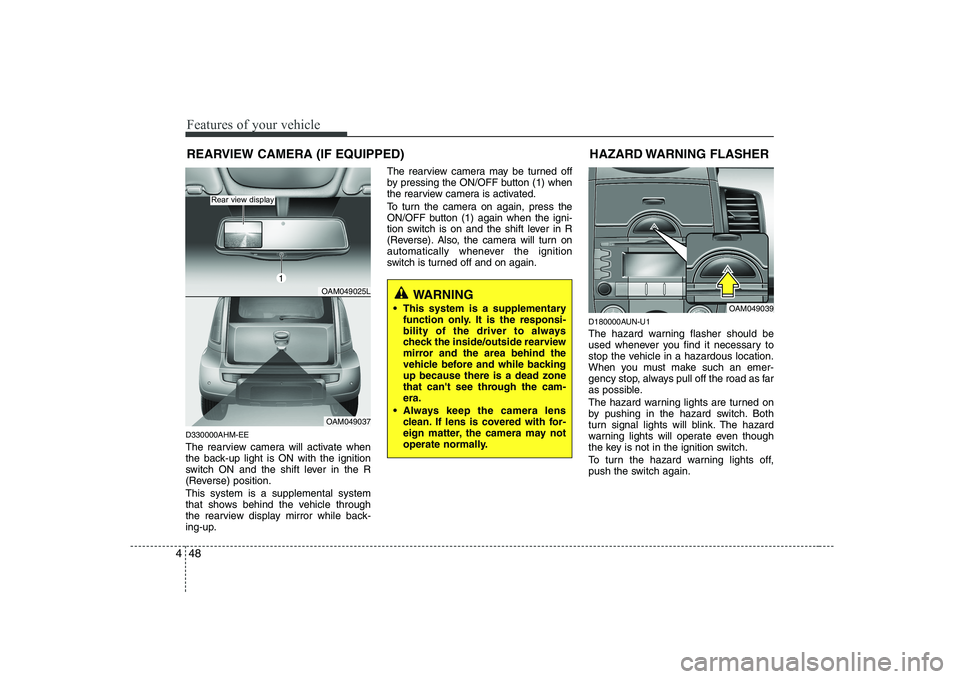
The rearview camera will activate when
the back-up light is ON with the ignition
switch ON and the shift lever in the R
(Reverse) position. This system is a supplemental system
that shows behind the vehicle through
the rearview display mirror while back-
ing-up. The rearview camera may be turned off
by pressing the ON/OFF button (1) when
the rearview camera is activated.
To turn the camera on again, press the
ON/OFF button (1) again when the igni-
tion switch is on and the shift lever in R
(Reverse). Also, the camera will turn on
automatically whenever the ignition
switch is turned off and on again.
D180000AUN-U1
The hazard warning flasher should be
used whenever you find it necessary to
stop the vehicle in a hazardous location.
When you must make such an emer-
gency stop, always pull off the road as far
as possible.
The hazard warning lights are turned on
by pushing in the hazard switch. Both
turn signal lights will blink. The hazard
warning lights will operate even though
the key is not in the ignition switch.
To turn the hazard warning lights off,
push the switch again.HAZARD WARNING FLASHER
OAM049039
WARNING
This system is a supplementary function only. It is the responsi-
bility of the driver to always
check the inside/outside rearview
mirror and the area behind the
vehicle before and while backingup because there is a dead zone
that can't see through the cam-era.
Always keep the camera lens clean. If lens is covered with for-
eign matter, the camera may not
operate normally.
REARVIEW CAMERA (IF EQUIPPED)
OAM049025L
OAM049037
Rear view display
1
Page 156 of 328
![KIA SOUL 2009 Owners Manual Features of your vehicle
84
4
5. Automatic Channel Selection
Button
] button is pressed, it reduces the band frequency by 50kHz
to automatically select a channel. Stops
at the previous frequency if](/manual-img/2/40388/w960_40388-155.png "KIA SOUL 2009 Owners Manual Features of your vehicle
84
4
5. Automatic Channel Selection
Button
] button is pressed, it reduces the band frequency by 50kHz
to automatically select a channel. Stops
at the previous frequency if")
Features of your vehicle
84
4
5. Automatic Channel Selection
Button
] button is pressed, it reduces the band frequency by 50kHz
to automatically select a channel. Stops
at the previous frequency if no channel
is found.
] button is pressed, it increases the band frequency by50kHz to automatically select a chan-
nel. Stops at the previous frequency if
no channel is found.
6. AST(AUTO STORE) Button When AST is pressed, frequency is stored
on the preset memory [1]~[6] and auto-
matically plays the channel stored on the
Preset [1]. If no channels have been stored
because there was no channel received,
will return to the previous channel.
7. SETUP Button & Clock Control Button
Press this button to turn to the RDS
option and the other adjustment mode.
If no action is taken for 5 seconds after
pressing the button, it will return to the
play mode. (After entering SETUP mode,
move between items using the left, right
and PUSH functions of the [TUNE] knob.) ■
PA710 MODEL
The setup changes in the order of TIME ↔
RDS ↔ SCROLL ↔ P.BASS ↔ TEMP ↔
SDVC... ■ PA715 MODEL
The setup changes in the order of TIME ↔ RDS ↔ SCROLL ↔ RETURN ↔TEMP
↔ SDVC...
If the vehicle has a center speaker and
woofer, then the AUDIO is PA715.
If the vehicle does not, then the AUDIO is
PA710.
Press the [SETUP] button for longer than 0.8 second to adjust the hour/min setting
on the clock. Adjust the hour and press the [ENTER]
button to set. Use the same method to
adjust the minute and press the [ENTER]
button to complete and exit from clock
adjustment mode.
The clock setting can be changed to dis-
play in 12 hour or 24 hour settings.
RDS OPTION (NEWS, AF, REGION,
TIME, TA VOL) can be selected.
This function is used to display charac-
ters longer than the LCD text display and
can be turned ON/OFF through the vol-
ume controller.
This function displays the previous MODE screen. This function is used to change the tem-
perature display setting.
This function automatically adjusts the
volume level according to the speed of
the vehicle and can be turned ON/OFF
through the volume controller.
Based on psychoacoustic technology, this
technology overcomes BASS limitations
which may occur due to the limited num-
ber and size of speakers to offer dynamic
BASS sound quality. It is possible to adjust
in 3 levels of LOW/MID/HIGH. OFF
➟
LOW ➟MID ➟HIGH
Modes: CD/FM/AUX/IPOD/USB (exclud-
ing MW, LW Mode)
Page 157 of 328
485
Features of your vehicle
8. TUNE Knob & Sound QualityControl Knob
Rotate the knob clockwise by one notch
to increase frequency by 50kHz from cur-
rent frequency.
Rotate the knob counterclockwise by one
notch to decrease frequency by 50kHz
from current frequency.
MIDDLE, TREBLE, FADER and BAL-
ANCE TUNE mode. The mode selected
is shown on the display. After selecting
each mode, rotate the Audio control
knob clockwise or counterclockwise.
(Sound Quality Control will operate in
FM, MW, LW, CD, AUX, USB and iPod
modes.)
To increase the BASS, rotate the knob
clockwise, while to decrease the BASS,
rotate the knob counterclockwise.
To increase the MIDDLE, rotate the knob
clockwise, while to decrease the MID-
DLE, rotate the knob counterclockwise. Control
To increase the TREBLE, rotate the knob
clockwise, while to decrease the TRE-
BLE, rotate the knob counterclockwise.
Turn the control knob clockwise to empha-
size rear speaker sound(front speaker
sound will be attenuated). When the con-
trol knob is turned counterclockwise, front
speaker sound will be emphasized(rear
speaker sound will be attenuated).
Rotate the knob clockwise to emphasize
right speaker sound(left speaker sound
will be attenuated). When the control
knob is turned counter clockwise, left
speaker sound will be emphasized(right
speaker sound will be attenuated).
9. PTY(FOLDER) Button
Press [PTY ] button when searching
PTY in RDS Broadcasting Program
Type selection.
Press [PTY ] button when searching PTY in RDS Broadcasting Program
Type selection. 10. Preset Button
Push [1]~[6] buttons less than 0.8 second
to play the channel saved in each button.
Push Preset button for 0.8 second or
longer to save current channel to the
respective button with a beep.
Page 158 of 328
Features of your vehicle
86
4
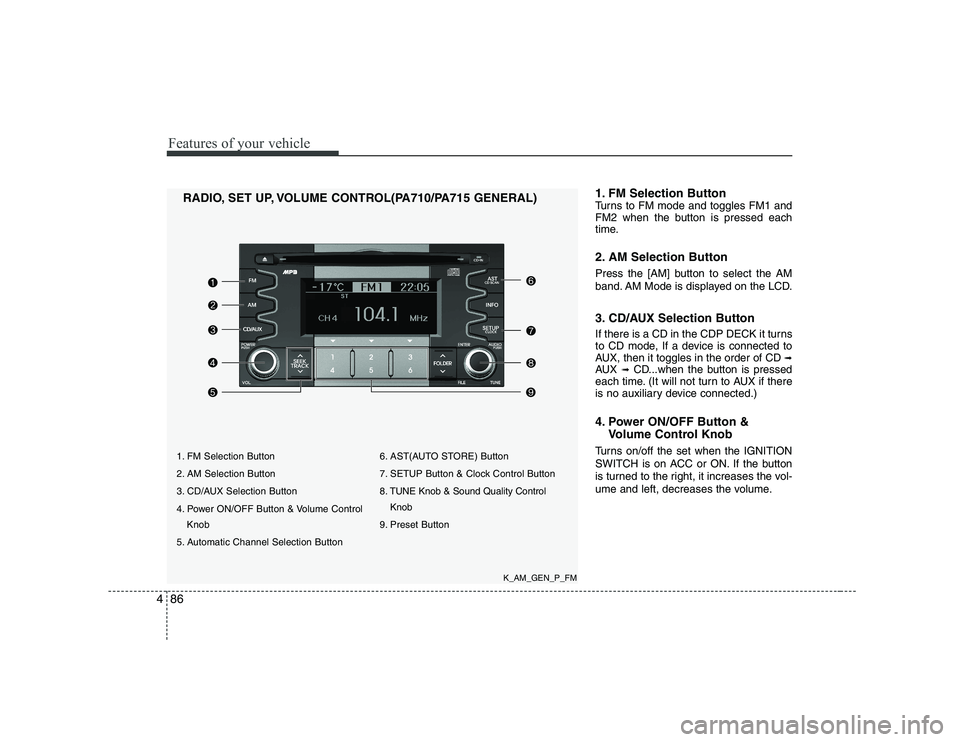
1. FM Selection Button
2. AM Selection Button
3. CD/AUX Selection Button
4. Power ON/OFF Button & Volume Control
Knob
5. Automatic Channel Selection Button 6. AST(AUTO STORE) Button
7. SETUP Button & Clock Control Button
8. TUNE Knob & Sound Quality Control
Knob
9. Preset Button
RADIO, SET UP, VOLUME CONTROL(PA710/PA715 GENERAL)
1. FM Selection Button
Turns to FM mode and toggles FM1 and
FM2 when the button is pressed each
time.
2. AM Selection Button
Press the [AM] button to select the AM
band. AM Mode is displayed on the LCD.
3. CD/AUX Selection Button
If there is a CD in the CDP DECK it turns
to CD mode, If a device is connected to
AUX, then it toggles in the order of CD
➟
AUX ➟CD...when the button is pressed
each time. (It will not turn to AUX if there
is no auxiliary device connected.)
4. Power ON/OFF Button &
Volume Control Knob
Turns on/off the set when the IGNITION
SWITCH is on ACC or ON. If the button
is turned to the right, it increases the vol-
ume and left, decreases the volume.
K_AM_GEN_P_FM
Page 159 of 328
![KIA SOUL 2009 Owners Manual 487
Features of your vehicle
5. Automatic Channel SelectionButton
] button is pressed, it reduces the band frequency by 200kHz to automatically select a chan-
nel. Stops at the previous frequency if](/manual-img/2/40388/w960_40388-158.png "KIA SOUL 2009 Owners Manual 487
Features of your vehicle
5. Automatic Channel SelectionButton
] button is pressed, it reduces the band frequency by 200kHz to automatically select a chan-
nel. Stops at the previous frequency if")
487
Features of your vehicle
5. Automatic Channel SelectionButton
] button is pressed, it reduces the band frequency by 200kHz to automatically select a chan-
nel. Stops at the previous frequency if
no channel is found.
] button is pressed, it increases the band frequency by200kHz to automatically select a chan-
nel. Stops at the previous frequency if no
channel is found.
6. AST(AUTO STORE) Button When AST is pressed, frequency is stored
on the preset memory [1]~[6] and auto-
matically plays the channel stored on the
Preset [1]. If no channels have been stored
because there was no channel received,
will return to the previous channel.
7. SETUP Button & Clock Control Button
Press this button to turn to the SETUP
adjustment mode. If no action is taken for
5 seconds after pressing the button, it will
return to the play mode. (After entering
SETUP mode, move between items
using the left, right and PUSH functions
of the [TUNE] knob.) ■
PA710 MODEL
The setup changes in the order of CLOCK
↔ SCROLL ↔ P.BASS ↔ RETURN ↔
TEMP ↔ SDVC...
■ PA715 MODEL
The setup changes in the order of CLOCK
↔ SCROLL ↔ TEMP ↔ SDVC...
Press the [SETUP] button. Use the vol-
ume controller to adjust the clock in the
following order: CLOCK ➟ENTER ➟
hour or minute. Adjust the hour and press the [ENTER]
button to set. Use the same method to
adjust the minute and press the [ENTER]
button to complete and exit from clock
adjustment mode.
Pressing the [SETUP] button while in
POWER OFF screen will allow the user to
make immediate adjustments to the clock.
This function is used to display charac-
ters longer than the LCD text display and
can be turned ON/OFF through the vol-
ume controller.
This function displays the previous MODE screen. This function is used to change the tem-
perature display setting.
This function automatically adjusts the
volume level according to the speed of
the vehicle and can be turned ON/OFF
through the volume controller.
Based on psychoacoustic technology, this
technology overcomes BASS limitations
which may occur due to the limited num-
ber and size of speakers to offer dynamic
BASS sound quality. It is possible to adjust
in 3 levels of LOW/MID/HIGH. OFF
➟
LOW ➟MID ➟HIGH
Modes: CD/FM/AUX/IPOD/USB (exclud- ing AM Mode)