2009 KIA Borrego light
[x] Cancel search: lightPage 242 of 425
![KIA Borrego 2009 1.G Owners Manual 4165
Features of your vehicle
CDC/rear DVDP modeStarting CDC / DVDP mode by use ofRear panel 1. Press the [MODE] button on the REAR
panel to display the MODE selection
screen.
2. If the joystick locat](/manual-img/2/2906/w960_2906-241.png "KIA Borrego 2009 1.G Owners Manual 4165
Features of your vehicle
CDC/rear DVDP modeStarting CDC / DVDP mode by use ofRear panel 1. Press the [MODE] button on the REAR
panel to display the MODE selection
screen.
2. If the joystick locat")
4165
Features of your vehicle
CDC/rear DVDP modeStarting CDC / DVDP mode by use ofRear panel 1. Press the [MODE] button on the REAR
panel to display the MODE selection
screen.
2. If the joystick located at the far right- side of the REAR panel is moved in
any direction, the cursor will highlight
the button of the most recently operat-
ed mode. (EX: The most recent RADIO
FM mode)
3. While in mode selection screen, use the 4-direction keys on the REAR panel
to move the cursor to CDC/DVDP mode
and press the joystick key.
4. If the CDC mode is selected, the DISC selection screen displaying the No. 1 ~
6 DISC will display. If the DVDP mode
is selected, the DISC already inserted
in the DVD PLAYER will begin playing. 5. When in CDC mode, use the 4-direction
joystick to move to the select area of the
desired DISC and press ENTER to
begin playing.
Starting CDC/DVDP mode by use ofRear remote control 1. When operating a different mode,
pressing the [DISC] key on the Rear
Remote Control will display the most
recently operated mode between CDC
mode and DVDP mode. In addition,
pressing the DISC key will change the
mode in CDC
➟DVDP
➟CDC order.
2. When in CDC mode, use the 4-direc- tion joystick on the REAR panel to
move the cursor to the desired track of
the Disc and press the select button on
the remote control to begin playing.
✽ ✽ NOTICEIf there are no discs already inserted in
the CD Changer or the DVD player,
pressing the [DISC] key on the remote
control will not begin mode operation.
Page 262 of 425

4185
Features of your vehicle
REAR Keyboard Connector Pin Layout
SG
CAO_H NC
Auto Light ALT
ILL+
ACC B+
NC
CANO_L NC
GND NC
ILL- NC
NC
1
2
3
4
5
6
7
8
9
10
11
12
13
14
15
16NO Signal
Model Power Voltage Dimensions(WxHxD) Weight
Rear Monitor 14.4V(10~15V possible) Negative ground 360 x 230 x 40 mm 2.19 kg
Rear Kyeboard 14.4V(10~15V possible) Negative ground 169 x 64 x 93.2 mm 365 g
DVD Player 14.4V(10~15V possible) Negative ground 178 x 54 x 181.2 mm 1.39 kg
Product Specification
Page 265 of 425

53
Driving your vehicle
E020100AUNBefore entering vehicle• Be sure that all windows, outside mir-ror(s), and outside lights are clean.
Check the condition of the tires.
Check under the vehicle for any sign of leaks.
Be sure there are no obstacles behind you if you intend to back up.E020200AUNNecessary inspectionsFluid levels, such as engine oil, engine
coolant, brake fluid, and washer fluid
should be checked on a regular basis,
with the exact interval depending on the
fluid. Further details are provided in sec-
tion 7, “Maintenance”.E020300BUNBefore starting Close and lock all doors.
Position the seat so that all controls areeasily reached.
Adjust the inside and outside rearview mirrors. Be sure that all lights work.
Check all gauges.
Check the operation of warning lights
when the ignition switch is turned to
the ON position.
Release the parking brake and make sure the brake warning light goes out.
For safe operation, be sure you are famil-
iar with your vehicle and its equipment.BEFORE DRIVING
WARNING
All passengers must be properly
belted whenever the vehicle is mov-
ing. Refer to “Seat belts” in section
3 for more information on their
proper use.
WARNING
Always check the surrounding
areas near your vehicle for people,
especially children, before putting a
car into D (Drive) or R (Reverse).
WARNING
- Driving under
the influence of alcohol or
drugs
Drinking and driving is dangerous.
Drunk driving is the number one
contributor to the highway death
toll each year. Even a small amount
of alcohol will affect your reflexes,
perceptions and judgment. Driving
while under the influence of drugs
is as dangerous or more dangerous
than driving drunk.
You are much more likely to have a
serious accident if you drink or
take drugs and drive.
If you are drinking or taking drugs,
don’t drive. Do not ride with a driv-
er who has been drinking or taking
drugs. Choose a designated driver
or call a cab.
WARNING
When you intend to park or stop the
vehicle with the engine on, be care-
ful not to depress the accelerator
pedal for a long period of time. It
may overheat the engine or exhaust
system and cause fire.
Page 266 of 425

Driving your vehicle45E030100AHMIlluminated ignition switchWhenever a front door is opened, the
ignition switch will illuminate for your con-
venience, provided the ignition switch is
not in the ON position. The light will go off
immediately when the ignition switch is
turned on. It will also go off after about 30
seconds when the door is closed.
Ignition switch positionE030201AUNLOCKThe steering wheel locks to protect
against theft. The ignition key can be
removed only in the LOCK position.
When turning the ignition switch to the
LOCK position, push the key inward at
the ACC position and turn the key toward
the LOCK position.
E030202AHMACC (Accessory)The steering wheel is unlocked and elec-
trical accessories are operative.✽ ✽NOTICEIf difficulty is experienced turning the
ignition switch to the ACC position, turn
the key while turning the steering wheel
right and left to release the tension.E030203AUNONThe warning lights can be checked
before the engine is started. This is the
normal running position after the engine
is started.Do not leave the ignition switch ON if the
engine is not running to prevent batterydischarge.
OHM058001N
OUN036002
KEY POSITIONS
Page 268 of 425

Driving your vehicle65Illuminated ENGINE START/STOP
buttonE030100AHMWhenever the front door is opened, the
ENGINE START/STOP button will illumi-
nate for your convenience. The light will
go off after about 30 seconds when the
door is closed. It will also go off immedi-
ately when the theft-alarm system is
armed.
ENGINE START/STOP button
positionE030701AHMOFFTo turn off the engine (START/RUN posi-
tion) or vehicle power (ON position),
press the ENGINE START/STOP button
with the shift lever in the P (Park) posi-
tion. When you press the ENGINE
START/STOP button without the shift
lever in the P (Park) position, the
ENGINE START/STOP button will not
turn to the OFF position but to the ACC
position.
Also, the steering wheel locks when the
ENGINE START/STOP button is in the
OFF position to protect you against theft.
It locks when the door is opened or when
you pull out the smart key from the smart
key holder.
If the steering wheel is not locked prop-
erly when you open the driver's door, the
warning chime will sound. Try locking the
steering wheel again. If the problem is
not solved, have it checked by an author-
ized KIA dealer.In addition, if the ENGINE START/STOP
button is in the OFF position after the dri-
ver's door is opened, the steering wheel
will not lock and the warning chime will
sound. In such a situation, close the door.
Then the steering wheel will lock and the
warning chime will stop.
✽ ✽
NOTICEIf the steering wheel doesn't unlock
properly, the ENGINE START/STOP
button will not work. Press the ENGINE
START/STOP button while turning the
steering wheel right and left to release
the tension.
ENGINE START/STOP BUTTON (IF EQUIPPED)
OHM058001
CAUTION
You are able to turn off the engine
(START/RUN) or vehicle power (ON), only when the vehicle is not inmotion. In an emergency situation while the vehicle is in motion, you areable to turn the engine off and to theACC position by pressing the ENGINE START/STOP button for more than 3seconds or 3 times successively. Ifthe vehicle is still moving, you can restart the engine without depressingthe brake pedal by pressing theENGINE START/STOP button with the shift lever in the N (Neutral) position.
Not illuminated
Page 269 of 425
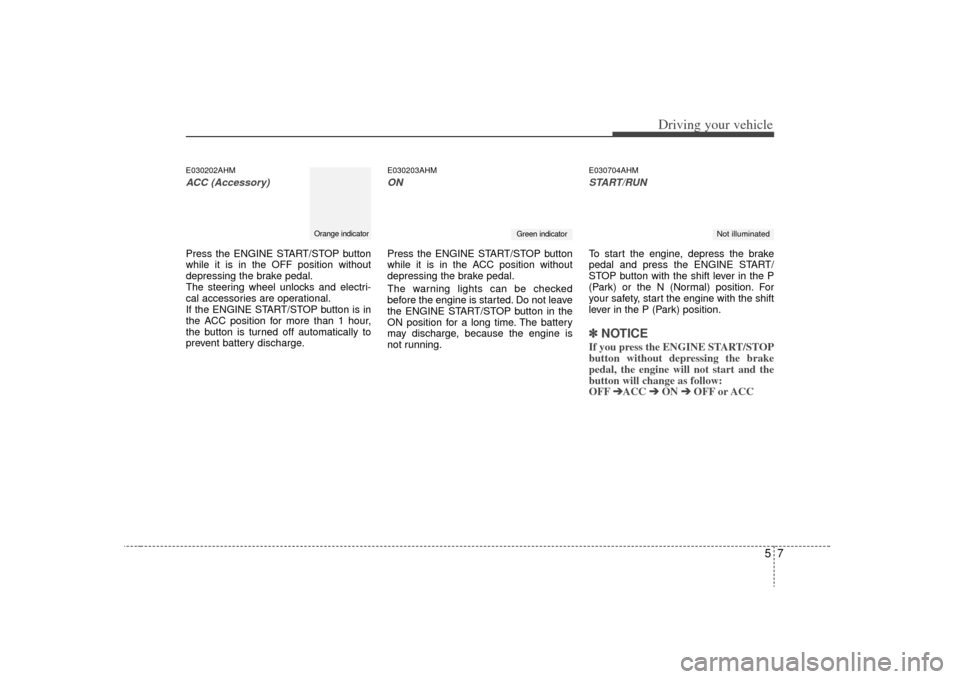
57
Driving your vehicle
E030202AHMACC (Accessory)Press the ENGINE START/STOP button
while it is in the OFF position without
depressing the brake pedal.
The steering wheel unlocks and electri-
cal accessories are operational.
If the ENGINE START/STOP button is in
the ACC position for more than 1 hour,
the button is turned off automatically to
prevent battery discharge.
E030203AHMONPress the ENGINE START/STOP button
while it is in the ACC position without
depressing the brake pedal.
The warning lights can be checked
before the engine is started. Do not leave
the ENGINE START/STOP button in the
ON position for a long time. The battery
may discharge, because the engine is
not running.
E030704AHMSTART/RUNTo start the engine, depress the brake
pedal and press the ENGINE START/
STOP button with the shift lever in the P
(Park) or the N (Normal) position. For
your safety, start the engine with the shift
lever in the P (Park) position.✽ ✽
NOTICEIf you press the ENGINE START/STOP
button without depressing the brake
pedal, the engine will not start and the
button will change as follow:
OFF ➔ ➔
ACC ➔
➔
ON ➔
➔
OFF or ACC
Orange indicator
Green indicator
Not illuminated
Page 276 of 425

Driving your vehicle14
5R (Reverse)
Use this position to drive the vehicle
backward. N (Neutral)
The wheels and transmission are not
engaged. The vehicle will roll freely even
on the slightest incline unless the parking
brake or service brakes are applied.
D (Drive)
This is the normal forward driving posi-
tion. The transmission will automatically
shift through a 5 (or 6)-gear sequence,
providing the best fuel economy and
power.
For extra power when passing another
vehicle or climbing grades, depress the
accelerator fully, at which time the trans-
mission will automatically downshift to
the next lower gear.
✽ ✽
NOTICEAlways come to a complete stop before
shifting into D (Driving).
Sports mode
Whether the vehicle is stopped or in
motion, sports mode is selected by push-
ing the shift lever from the D (Drive) posi-
tion into the manual gate. To return to the
D (Drive) range operation, push the shift
lever back into the main gate.
In sports mode, moving the shift lever
backwards and forwards will allow you to
make gearshifts rapidly. In contrast to a
manual transmission, the sports mode
allows gearshifts with the accelerator
pedal depressed.
Up (+) : Push the lever forward once to
shift up one gear.
Down (-) : Pull the lever backwards once to shift down one gear.
CAUTION
The transmission may be damagedif you shift into P (Park) while thevehicle is in motion.
CAUTION
Always come to a complete stopbefore shifting into or out of R (Reverse); you may damage thetransmission if you shift into R(Reverse) while the vehicle is in motion, except when “Rocking thevehicle” explained in this section.
OHM058005L
+ (UP)
- (DOWN)
Sports
mode
Page 281 of 425

519
Driving your vehicle
Transfer mode Shift knob Indicator lightDescription
This mode is used when driving on normal roads and highway.
This mode is used when driving on slippery roads such as
snowy and rainy roads at normal speed.
Maximum speed: 80 km/h (50 mph)
This mode is used when increased traction is required, such as
climbing or descending hills, driving off-roads, and towing a
vehicle.
Maximum speed: 40 km/h (25 mph)
4 4 W
W D
D
H
H I
I
4WD HI
4WD
LOW 4
4
W
W D
D
L
L O
O W
W
2H
(Rear-wheel drive)
4H
(High-speed
4-wheel drive)
4L
(Low-speed
4-wheel drive) (not illuminated)
✽
✽
NOTICE4WD transfer has a time delay for a few seconds until the actual shift is made after turning the transfer shift knob.
When the 4WD transfer mode is shifted, it may cause mechanical noise. It is not a mechanical f\
ailure but a normal condition.E170800AHM-EUPart-Time 4WD (if equipped)
CAUTION
When you stop the vehicle to transfer the shift knob, wait until the corresponding indicator light turns on or off to
depart. If the vehicle moves before the transfer is completed, the vehicle may be damaged.
(illuminated)
(illuminated)