Page 102 of 321
Knowing your vehicle90
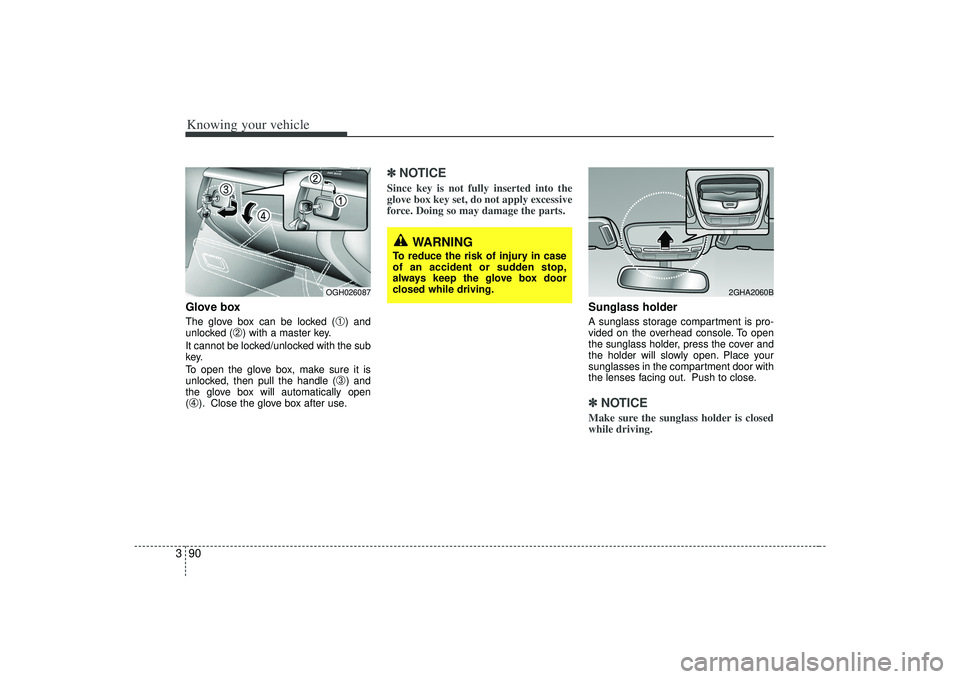
3Glove boxThe glove box can be locked (
➀) and
unlocked (
➁) with a master key.
It cannot be locked/unlocked with the sub
key.
To open the glove box, make sure it is
unlocked, then pull the handle (
➂) and
the glove box will automatically open
(
➃). Close the glove box after use.
✽ ✽ NOTICESince key is not fully inserted into the
glove box key set, do not apply excessive
force. Doing so may damage the parts.
Sunglass holder A sunglass storage compartment is pro-
vided on the overhead console. To open
the sunglass holder, press the cover and
the holder will slowly open. Place your
sunglasses in the compartment door with
the lenses facing out. Push to close.✽ ✽NOTICEMake sure the sunglass holder is closed
while driving.
WARNING
To reduce the risk of injury in case
of an accident or sudden stop,
always keep the glove box door
closed while driving.
2GHA2060B
OGH026087
Page 107 of 321
395
Knowing your vehicle
ClockAnalog (if equipped)Whenever the battery terminals, A/V
CLOCK fuse, or Power Connect are dis-
connected, you must reset the time.
When the ignition switch is in the ACC or
ON position, the clock buttons operate as
follows:➀
: time increases one minute each timethe button is pressed. It increases
continuously if pressed longer than 3
seconds.
Digital (if equipped)Whenever the battery terminals, A/V
CLOCK fuse, or Power Connect are dis-
connected, you must reset the time.
For details, see end of chapter 3.
OGH026077N
➀
OGH029078
Page 109 of 321
397
Knowing your vehicle
Sunshade The sunshade will be opened with the
glass panel automatically when the glass
panel is slid. After closing the glass panel
the sunshade will only close manually.
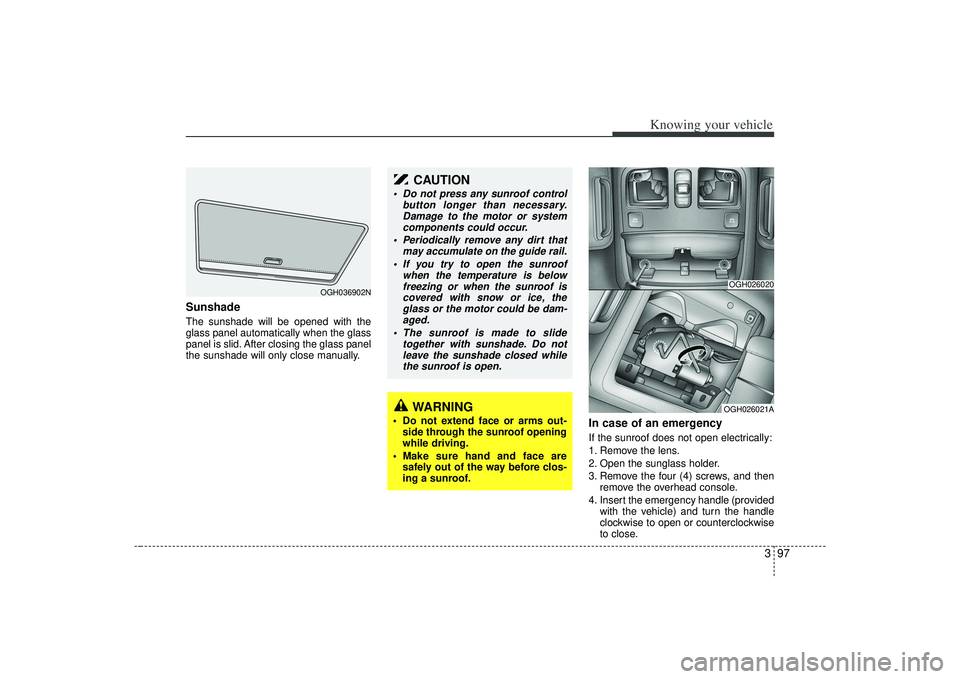
In case of an emergency If the sunroof does not open electrically:
1. Remove the lens.
2. Open the sunglass holder.
3. Remove the four (4) screws, and thenremove the overhead console.
4. Insert the emergency handle (provided with the vehicle) and turn the handle
clockwise to open or counterclockwise
to close.
OGH036902N
WARNING
Do not extend face or arms out-side through the sunroof opening
while driving.
Make sure hand and face are safely out of the way before clos-
ing a sunroof.
CAUTION
Do not press any sunroof control button longer than necessary.Damage to the motor or systemcomponents could occur.
Periodically remove any dirt that may accumulate on the guide rail.
If you try to open the sunroof when the temperature is belowfreezing or when the sunroof iscovered with snow or ice, the glass or the motor could be dam-aged.
The sunroof is made to slide together with sunshade. Do notleave the sunshade closed whilethe sunroof is open.
OGH026020OGH026021A
Page 113 of 321
3101
Knowing your vehicle
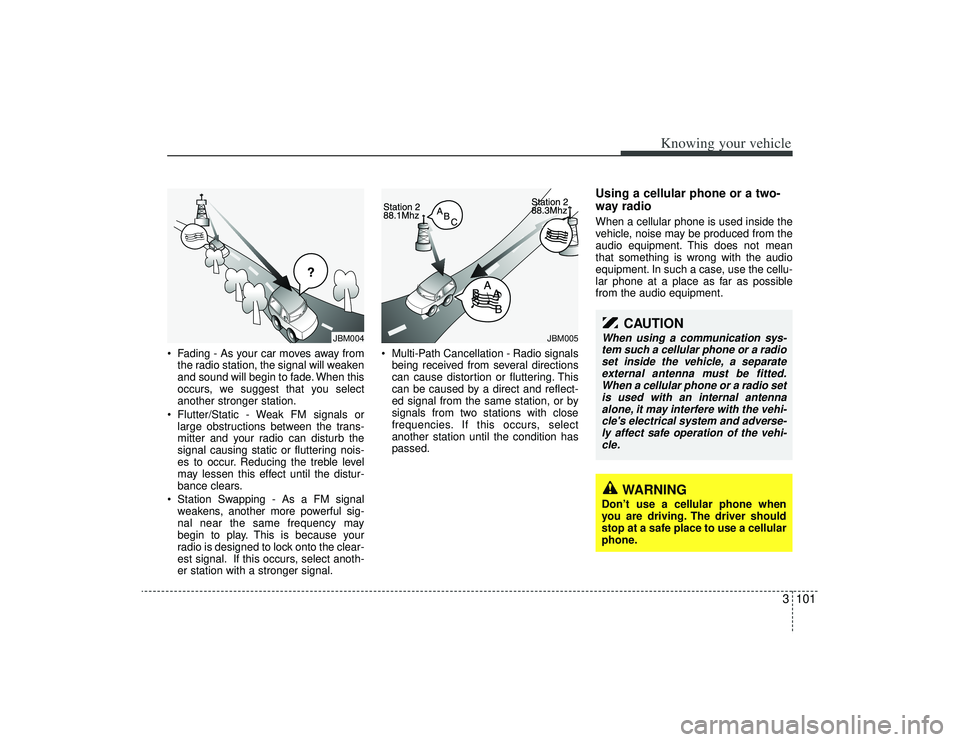
• Fading - As your car moves away fromthe radio station, the signal will weaken
and sound will begin to fade. When this
occurs, we suggest that you select
another stronger station.
Flutter/Static - Weak FM signals or large obstructions between the trans-
mitter and your radio can disturb the
signal causing static or fluttering nois-
es to occur. Reducing the treble level
may lessen this effect until the distur-
bance clears.
Station Swapping - As a FM signal weakens, another more powerful sig-
nal near the same frequency may
begin to play. This is because your
radio is designed to lock onto the clear-
est signal. If this occurs, select anoth-
er station with a stronger signal. Multi-Path Cancellation - Radio signals
being received from several directions
can cause distortion or fluttering. This
can be caused by a direct and reflect-
ed signal from the same station, or by
signals from two stations with close
frequencies. If this occurs, select
another station until the condition has
passed.
Using a cellular phone or a two-
way radio When a cellular phone is used inside the
vehicle, noise may be produced from the
audio equipment. This does not mean
that something is wrong with the audio
equipment. In such a case, use the cellu-
lar phone at a place as far as possible
from the audio equipment.
¢¢¢
JBM004
JBM005
CAUTION
When using a communication sys-tem such a cellular phone or a radioset inside the vehicle, a separate external antenna must be fitted.When a cellular phone or a radio setis used with an internal antenna alone, it may interfere with the vehi-cle's electrical system and adverse- ly affect safe operation of the vehi-cle.
WARNING
Don’t use a cellular phone when
you are driving. The driver should
stop at a safe place to use a cellular
phone.
Page 117 of 321

3105
Knowing your vehicle
1. FM/AM Selection ButtonTurns to FM or AM mode and toggles
FM1
➟FM2
➟AM
➟...➟FM1
➟... when the
button is pressed each time.
2. Automatic Channel Selection Button When the [TRACK ] is pressed, it
will automatically tune to the previous
lower station.
When the [SEEK ] is pressed, it will automatically tune to the next higher
station.3. SCAN Selection ButtonWhen the button is pressed, it automati-
cally only [SCAN] up. The sound hearing
for 5 seconds per all searched station
preset.4. MUTE Selection ButtonPush button to stop sound and [MUTE] is
displayed.
5. Pre-set Selection Button Push [1]~[6] buttons less than 0.8 sec-onds to play the channel saved in each
button.
Push pre-set button for 0.8 seconds or longer to save current channel to the
respective button with a beep.6. SET UP Button The SET UP Mode is displayed if the[SET UP] Button is pressed. While in
SET UP Mode, use the [TUNE/ENTER]
Button to set the SOUND(BASS, MID-
DLE, TREBLE, FADER, BALANCE),
SAT(CHANNEL/TITLE, CATEGORY/
CHANNEL), CLOCK(12, 24), TEMP
(°C, °F) and SCROLL(ON, OFF).
To exit from SET UP Mode, press "RETURN" or wait 10 seconds.
Method of adjusting the SET UP is the same for CDP, AUX, USB, and iPod
Mode.
■Setting the SET UP Mode Press the [TUNE/ENTER] Button to
select and make adjustments to the
desired mode within SET UP Mode.
While in SOUND Mode, press the[TUNE/ENTER] Button to change in
the order of BASS
➟MIDDLE
➟TREBLE
➟FADER
➟BALANCE
➟SET UP Mode.
Turn the [TUNE/ENTER] Button in
clockwise or counterclockwise direc-
tion to make adjustments for each SUB
Mode.
While in SAT Mode, press the [TUNE/ ENTER] Button to display the "CHAN-
NEL/TITLE, CATEGORY/CHANNEL".
Rotate the [TUNE/ENTER] Button to
select the SUB Mode and press the
[TUNE/ENTER] Button to set.
While in CLOCK Mode, press the [TUNE/ENTER] Button to display the
"ON, OFF".
Rotate the [TUNE/ENTER] Button to
select the SUB Mode and press the
[TUNE/ENTER] Button to set.
(CLOCK Mode CDC Only)
Page 118 of 321
![KIA AMANTI 2009 Owners Manual Knowing your vehicle106
3 While in TEMP Mode, press the [TUNE
/ENTER] Button to display the "°C, °F".
Rotate the [TUNE/ENTER] Button to
select the SUB Mode and press the
[TUNE/ENTER] Button to set.](/manual-img/2/57931/w960_57931-117.png "KIA AMANTI 2009 Owners Manual Knowing your vehicle106
3 While in TEMP Mode, press the [TUNE
/ENTER] Button to display the \"°C, °F\".
Rotate the [TUNE/ENTER] Button to
select the SUB Mode and press the
[TUNE/ENTER] Button to set.")
Knowing your vehicle106
3 While in TEMP Mode, press the [TUNE
/ENTER] Button to display the "°C, °F".
Rotate the [TUNE/ENTER] Button to
select the SUB Mode and press the
[TUNE/ENTER] Button to set.
(TEMP Mode CDC Only)
While in SCROLL Mode, press the [TUNE/ENTER] Button to display the
"ON, OFF".
Rotate the [TUNE/ENTER] Button to
select the SUB Mode and press the
[TUNE/ENTER] Button to set.7. TUNE/ENTER Button Turn this button clockwise by one notchto increase frequency by 200KHz(AM:
10KHz) from current frequency.
Turn this button counterclockwise by one notch to decrease frequency by
200KHz(AM:10KHz)from current fre-
quency.
Press this button while holding SET UP button to activate/inactivate the
item to select SET UP item using left
and right function of the Tune button.
8. Power ON/OFF & Volume Control ButtonTurns on/off the set when the IGNITION
SWITCH is on ACC or ON. If the button
is turned to the right, it increases the vol-
ume and left, decreases the volume.
channel is found.
Page 122 of 321
Knowing your vehicle110
310. CD Selection Button If there is a cd in the CDP DECK it
turns to CD mode when the button is
pressed each time.
If no Disc, it displays "NO DISC" and returns to th previous mode.11. File(Track) Search/ENTER Button Turn this button clockwise to display
Track NO(File name) after current
song.
Turn this button counterclockwise to display Track NO(File Name) before
current song.
To select to the displayed song, press the button.12. CD Eject Button Press this button to eject the CD duringCD playback.
If no CD is in the deck, "NO DISC" will be displayed and returns to the previ-
ous mode.❈ ALL EJECT(CDC ONLY)
Press this button for more than 0.8 sec-
onds to eject all discs inside the decks in
respective order.
13. CD LOAD Button(CDC Only) Press this button for less than 0.8 sec- onds to load CD into deck.
Press this button for more than 0.8 seconds to load CDs into all available
deck(from 1~6).
The last CD will play. 10 seconds idle status will disable loading process.14. DISC UP/DOWN Button(CDC Only)Disc is moved up or down from currently
playing disc.
Page 126 of 321
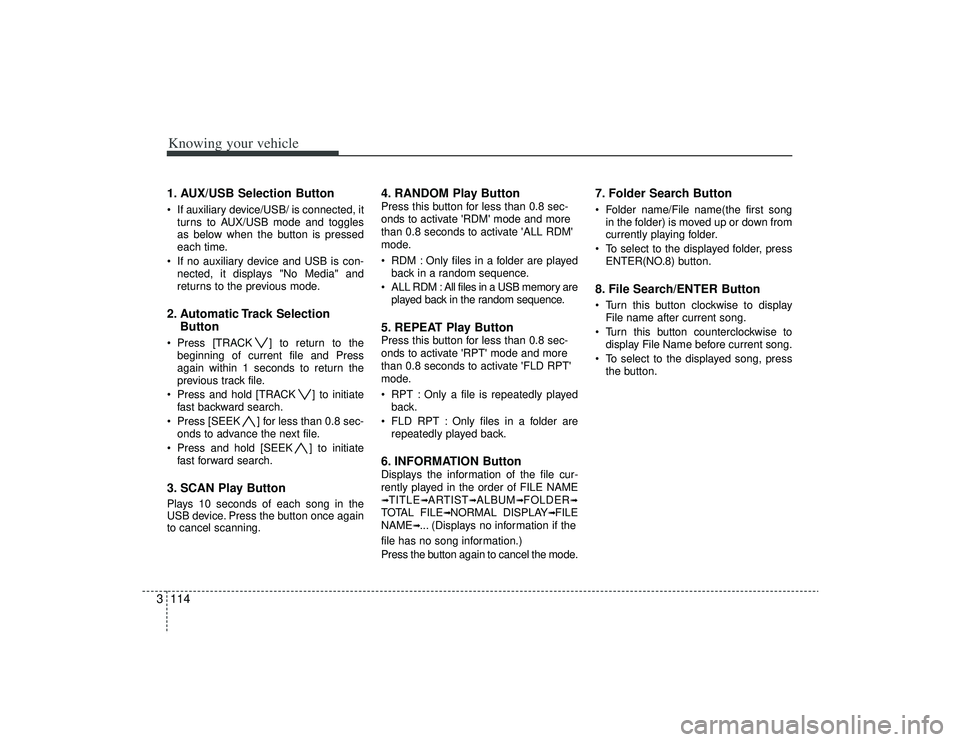
Knowing your vehicle114
31. AUX/USB Selection Button If auxiliary device/USB/ is connected, it
turns to AUX/USB mode and toggles
as below when the button is pressed
each time.
If no auxiliary device and USB is con- nected, it displays "No Media" and
returns to the previous mode.2. Automatic Track Selection Button Press [TRACK ] to return to the
beginning of current file and Press
again within 1 seconds to return the
previous track file.
Press and hold [TRACK ] to initiate fast backward search.
Press [SEEK ] for less than 0.8 sec- onds to advance the next file.
Press and hold [SEEK ] to initiate fast forward search.3. SCAN Play ButtonPlays 10 seconds of each song in the
USB device. Press the button once again
to cancel scanning.
4. RANDOM Play ButtonPress this button for less than 0.8 sec-
onds to activate 'RDM' mode and more
than 0.8 seconds to activate 'ALL RDM'
mode.
RDM : Only files in a folder are playedback in a random sequence.
ALL RDM : All files in a USB memory are played back in the random sequence.5. REPEAT Play ButtonPress this button for less than 0.8 sec-
onds to activate 'RPT' mode and more
than 0.8 seconds to activate 'FLD RPT'
mode.
RPT : Only a file is repeatedly playedback.
FLD RPT : Only files in a folder are repeatedly played back.6. INFORMATION ButtonDisplays the information of the file cur-
rently played in the order of FILE NAME➟TITLE
➟ARTIST
➟ALBUM
➟FOLDER
➟
TOTAL FILE
➟NORMAL DISPLAY
➟FILE
NAME
➟... (Displays no information if the
file has no song information.)
Press the button again to cancel the mode.
7. Folder Search Button Folder name/File name(the first song in the folder) is moved up or down from
currently playing folder.
To select to the displayed folder, press ENTER(NO.8) button.8. File Search/ENTER Button Turn this button clockwise to displayFile name after current song.
Turn this button counterclockwise to display File Name before current song.
To select to the displayed song, press the button.