Page 20 of 506
VEHICLE SECURITY ALARM — IF EQUIPPED
The Vehicle Security Alarm monitors the vehicle doors,
liftgate, and liftgate flip-up window for unauthorized
entry and ignition for unauthorized operation.
If something triggers the alarm, the Vehicle Security
Alarm will sound the horn intermittently, flash the head-
lights and taillights, and flash the Vehicle Security Light
in the instrument cluster.
NOTE:The Panic and Security alarms are quite differ-
ent. Please take a moment to activate the Panic and the
Security modes to hear the differences in the horn. In case
one should go off in the future, you will need to know
which mode has been activated in order to deactivate it.
Rearming of the System
If something triggers the Vehicle Security Alarm, and no
action is taken to disarm it, the Vehicle Security Alarm will turn off the horn after three minutes, turn off all of
the visual signals after 15 minutes, and then the Vehicle
Security Alarm will rearm itself.
To Arm the System
1. Remove the key from the ignition switch and exit the
vehicle.
2. Lock the doors and liftgate by pressing the power door
LOCK switch or the LOCK button on the Remote Keyless
Entry (RKE) transmitter.
NOTE:
The Vehicle Security Alarm will not arm if you
lock the doors with the manual door lock plungers or the
driver’s door lock cylinder.
3. Close all doors. The Vehicle Security Light in the
instrument cluster will flash rapidly for about 16 seconds
to signal that the Vehicle Security Alarm is arming.
During this period, opening any door or the liftgate will
18 THINGS TO KNOW BEFORE STARTING YOUR VEHICLE
Page 64 of 506

will cause the system to turn the airbag on. In this case,
the OCS has classified the occupant of the seat as an
adult. An adult occupant needs to sit in a normal position
(with their feet on or near the floor) in order to be
properly classified. Reclining the seat back too far may
change how an occupant is classified by the OCS.
Drivers and adult passengers should verify that the
“PAD Indicator Light” is not illuminated when an adult
is riding in the front passenger seat. If an adult occu-
pant’s weight is transferred to another part of the vehicle
(like the door or instrument panel), the weight sensors in
the seat may not properly classify the occupant. Objects
lodged under the seat or between the seat and the center
console can prevent the occupant’s weight from being
measured properly and may result in the occupant being
improperly classified. Ensure that the front passenger
seatback does not touch anything placed on the back seatbecause this can also affect occupant classification. Also,
if you fold down the rear seat check to be sure it doesn’t
touch the front passenger seat.
If the front passenger seat is damaged in any way, it
should only be serviced by an authorized dealer. If the
seat is removed (or even if the seat attachment bolts are
loosened or tightened in any way), take the vehicle to an
authorized dealer.
If there is a fault present in the OCS, the “Airbag Warning
Light” (a red light located in the center of the instrument
cluster directly in front of the driver) will be turned on.
This indicates that you should take the vehicle to an
authorized dealer. The “Airbag Warning Light” is turned
on whenever there is a fault that can affect the operation
of the airbag system. If there is a fault present in the OCS,
both the “PAD Indicator Light” and the “Airbag Warning
Light” are illuminated to show that the passenger airbag
is turned off until the fault is cleared. If an object is
62 THINGS TO KNOW BEFORE STARTING YOUR VEHICLE
Page 112 of 506
send the corresponding phone number associated with
the phonebook entry, as tones over the phone.
NOTE:
•You may not hear all of the tones due to cellular phone
network configurations. This is normal.
•Some paging and voice mail systems have system time
out settings that are too short and may not allow the
use of this feature.
Barge In - Overriding Prompts
The “Voice Recognition” button can be used when you
wish to skip part of a prompt and issue your voice
recognition command immediately. For example, if a
prompt is asking�Would you like to pair a phone, clear
a...,� you could press the VOICE RECOGNITION button
and say, �Pair a Phone� to select that option without
having to listen to the rest of the voice prompt.
Turning Confirmation Prompts ON/OFF
Turning confirmation prompts off will stop the system
from confirming your choices (e.g., the uconnect� phone
will not repeat a phone number before you dial it).
•Press the PHONE button to begin.
•After the �Ready�prompt and the following beep, say
�Setup Confirmations.� The uconnect�phone will play
the current confirmation prompt status and you will
be given the choice to change it.
Phone and Network Status Indicators
If available on the radio and/or on a premium display
such as the instrument panel cluster, and supported by
your cellular phone, the uconnect� phone will provide
notification to inform you of your phone and network
status when you are attempting to make a phone call
using uconnect� phone. The status is given for roaming,
network signal strength, phone battery strength, etc.
110 UNDERSTANDING THE FEATURES OF YOUR VEHICLE
Page 161 of 506

System Usage Precautions
NOTE:
•Ensure that the rear bumper is free of dirt and debris
to keep the Rear Park Assist System operating prop-
erly.
•Jackhammers, large trucks, and other vibrations could
affect the performance of the Rear Park Assist System.
•When you turn off the Rear Park Assist System, the
instrument cluster will display “PARK ASSIST DIS-
ABLED.” Furthermore, once you turn off the Rear
Park Assist System, it remains off until you turn it on
again, even if you cycle the ignition key.
•When you move the shift lever to the REVERSE
position and the Rear Park Assist System is turned off,
a single chime will sound once per ignition cycle and
the instrument cluster will display “PARK ASSIST
DISABLED.”
•The Rear Park Assist System, when on, will MUTE the
radio when it is sounding a tone.
•If a Rear Park Assist System malfunction occurs, a
single chime will sound once per ignition cycle. In
addition, the Electronic Vehicle Information Center
(EVIC) will display “SERVICE PARK ASSIST SYS-
TEM” and the LED in the Rear Park Assist switch will
illuminate. If this occurs, see your authorized dealer
for service.
CAUTION!
•The Rear Park Assist System is only a parking aid
and it is unable to recognize every obstacle, in-
cluding small obstacles. Parking curbs might be
temporarily detected or not detected at all. Ob-
stacles located above or below the sensors will not
be detected when they are in close proximity.(Continued)
UNDERSTANDING THE FEATURES OF YOUR VEHICLE 159
3
Page 199 of 506
UNDERSTANDING YOUR INSTRUMENT PANEL
CONTENTS
�Instrument Panel Features ............... 200
� Instrument Cluster .................... 201
� Instrument Cluster Descriptions ........... 202
� Electronic Vehicle Information Center (EVIC) —
If Equipped .......................... 215
▫ Electronic Vehicle Information Center (EVIC)
Displays ........................... 217
▫ Oil Change Required .................. 218
▫ Trip Functions ...................... 219
▫ Compass Display .................... 221 ▫
Personal Settings (Customer-Programmable
Features) .......................... 223
� Sales Code REQ — AM/FM Stereo Radio And
6–Disc CD/DVD Changer (MP3/WMA AUX
Jack) ............................... 227
▫ Operating Instructions - Radio Mode ...... 227
▫ Operation Instructions - (Disc Mode For CD
And MP3/WMA Audio Play, DVD-Video) . . . 235
▫ Notes On Playing MP3/WMA Files ....... 238
▫ List Button
(Disc Mode For MP3/WMA Play) ......... 2404
Page 202 of 506
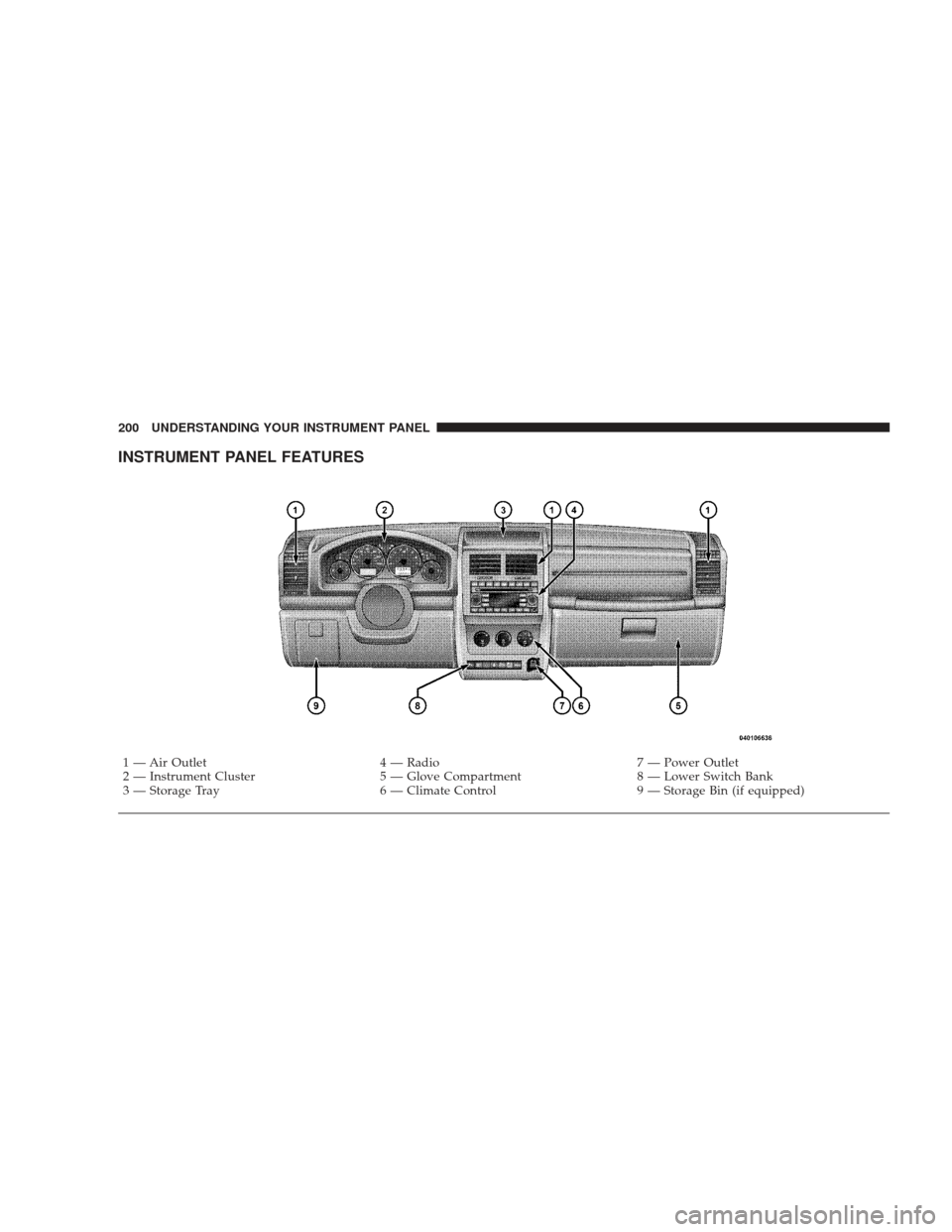
INSTRUMENT PANEL FEATURES
1 — Air Outlet4 — Radio7 — Power Outlet
2 — Instrument Cluster 5 — Glove Compartment8 — Lower Switch Bank
3 — Storage Tray 6 — Climate Control9 — Storage Bin (if equipped)
200 UNDERSTANDING YOUR INSTRUMENT PANEL
Page 203 of 506
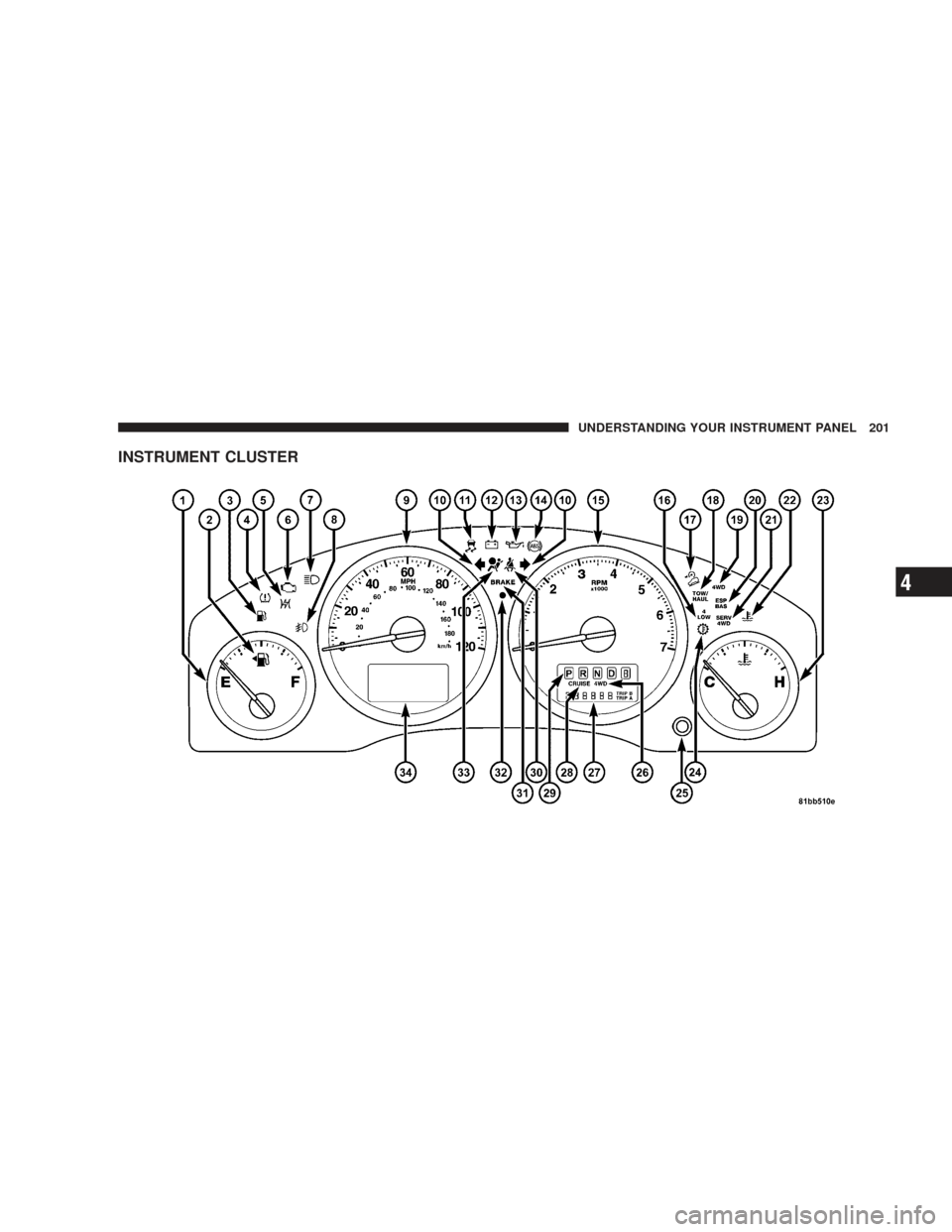
INSTRUMENT CLUSTER
UNDERSTANDING YOUR INSTRUMENT PANEL 201
4
Page 204 of 506
INSTRUMENT CLUSTER DESCRIPTIONS
1. Fuel Gauge
The fuel gauge shows level of fuel in tank when ignition
switch is in the ON position.
2. Fuel Door ReminderThis symbol indicates the side of the vehicle
where the fuel cap is located.
3. Low Fuel Light This indicator lights when the fuel level drops to
approximately one-eighth tank.
4. Tire Pressure Monitoring Telltale Light Each tire, including the spare (if provided),
should be checked monthly, when cold and
inflated to the inflation pressure recommended
by the vehicle manufacturer on the vehicle
placard or tire inflation pressure label. (If your vehicle has tires of a different size than the size indicated on the
vehicle placard or tire inflation pressure label, you should
determine the proper tire inflation pressure for those
tires.)
As an added safety feature, your vehicle has been
equipped with a Tire Pressure Monitoring System
(TPMS) that illuminates a low tire pressure telltale when
one or more of your tires is significantly under-inflated.
Accordingly, when the low tire pressure telltale illumi-
nates, you should stop and check your tires as soon as
possible, and inflate them to the proper pressure. Driving
on a significantly under-inflated tire causes the tire to
overheat and can lead to tire failure. Under-inflation also
reduces fuel efficiency and tire tread life, and may affect
the vehicle’s handling and stopping ability.
Please note that the TPMS is not a substitute for proper
tire maintenance, and it is the driver ’s responsibility to
202 UNDERSTANDING YOUR INSTRUMENT PANEL