Page 220 of 506
•Left/Right Rear Door Ajar (one or more, with a single
chime if speed is above 1 mph(1.6 km/h))
•Door(s) Ajar (with a single chime if vehicle is in
motion)
•Liftgate Ajar (with a single chime)
•Left Front Low Pressure (with a single chime). Refer to
“Tire Pressure Monitoring System” in Section 5 of this
manual.
•Left Rear Low Pressure (with a single chime). Refer to
“Tire Pressure Monitoring System” in Section 5 of this
manual.
•Right Front Low Pressure (with a single chime). Refer
to “Tire Pressure Monitoring System” in Section 5 of
this manual.
•Right Rear Low Pressure (with a single chime). Refer
to “Tire Pressure Monitoring System” in Section 5 of
this manual.
•Check TPM System (with a single chime). Refer to
“Tire Pressure Monitoring System” in Section 5 of this
manual.
•Check Gascap (refer to “Adding Fuel” in Section 5 of
this manual for more details)
•Service Park Assist System (with a single chime)
•Oil Change Required (with a single chime)
Oil Change Required
Your vehicle is equipped with an engine oil change
indicator system. The “Oil Change Required” message
will flash in the EVIC display for approximately 10 sec-
onds after a single chime has sounded to indicate the next
scheduled oil change interval. The engine oil change
indicator system is duty cycle based, which means the
engine oil change interval may fluctuate dependent upon
your personal driving style.
218 UNDERSTANDING YOUR INSTRUMENT PANEL
Page 221 of 506
Unless reset, this message will continue to display each
time you turn the ignition switch to the ON position. To
turn off the message temporarily, press and release the
MENU button. To reset the oil change indicator system
(after performing the scheduled maintenance) perform
the following procedure:
1. Turn the ignition switch to the ON position.Do not
start the engine.
2. Fully depress the accelerator pedal slowly three times
within 10 seconds.
3. Turn the ignition switch to the LOCK position.
NOTE: If the indicator message illuminates when you
start the vehicle, the oil change indicator system did not
reset. If necessary, repeat this procedure.Trip Functions
Press and release the MENU button until one of the
following Trip Functions displays in the EVIC:
•Average Fuel Economy
•Distance To Empty
•Elapsed Time
•Display Units of Measure in
Press the SCROLL button to cycle through all the Trip
Computer functions.
The Trip Functions mode displays the following informa-
tion:
•Average Fuel Economy
Shows the average fuel economy since the last reset. When
the fuel economy is reset, the display will read “RESET” or
show dashes for two seconds. Then, the history informa-
tion will be erased, and the averaging will continue from
the last fuel average reading before the reset.
UNDERSTANDING YOUR INSTRUMENT PANEL 219
4
Page 223 of 506
Compass Display
The compass readings indicate the direction
the vehicle is facing. Press and release the
COMPASS button to display one of eight com-
pass readings and the outside temperature.
Automatic Compass Calibration
This compass is self-calibrating, which eliminates the
need to set the compass manually. When the vehicle is
new, the compass may appear erratic and the EVIC will
display “CAL” until the compass is calibrated. You may
also calibrate the compass by completing one or more
360–degree turns (in an area free from large metal or
metallic objects) until the “CAL” message displayed in
the EVIC turns off. The compass will now function
normally.
NOTE:
A good calibration requires a level surface and an
environment free from large metallic objects such as build-
ings, bridges, underground cables, railroad tracks, etc.
Manual Compass Calibration
If the compass appears erratic and the “CAL” indicator
does not appear in the EVIC display, you must put the
compass into the Calibration Mode manually as follows:
1. Start the engine. Leave the shift lever in PARK in order
to enter the EVIC Programming Menus.
2. Press the MENU button until the Personal Settings
(Customer-Programmable Features) menu displays in the
EVIC.
3. Press the SCROLL button until “Calibrate Compass”
displays in the EVIC.
4. Press and release the FUNCTION SELECT button to
start the calibration. The “CAL” indicator will display in
the EVIC.
UNDERSTANDING YOUR INSTRUMENT PANEL 221
4
Page 244 of 506
Operating Instructions — Voice Recognition
System (VR) (If Equipped)
For the radio, refer to “Voice Recognition System (VR)” in
Section 3.
For uconnect�“Voice Recognition System (VR),” refer to
“uconnect� phone” in Section 3.
Operating Instructions - uconnect �phone (If
Equipped)
Refer to “uconnect� phone” in Section 3.
Operating Instructions - uconnect �studios
(Satellite Radio) (If Equipped)
Refer to “uconnect� studios (Satellite Radio)” in this
section.
Operating Instructions - Video Entertainment
System (VES)™ (If Equipped)
Refer to separate “Video Entertainment System (VES)™
Guide.” Dolby�
Manufactured under license from Dolby�
Laboratories.
�Dolby�� and the double-D symbol are trademarks of
Dolby� Laboratories.
Macrovision
This product incorporates copyright protection technol-
ogy that is protected by U.S. patents and other intellec-
tual property rights. Use of this copyright protection
technology must be authorized by Macrovision, and is
intended for home and other limited viewing uses only,
unless otherwise authorized by Macrovision. Reverse
engineering or disassembly is prohibited.
DTS™
�DTS™� and�DTS™ 2.0� are trademarks of Digital The-
ater Systems, Inc.
242 UNDERSTANDING YOUR INSTRUMENT PANEL
Page 279 of 506
•The A/C can be deselected manually without disturb-
ing the mode control selection.
Air Conditioning Control
Use this button to engage the Air Conditioning. A
light will illuminate when the Air Conditioning
System is engaged
NOTE: The air conditioning compressor will not engage
until the engine has been running for about 10 seconds.
•MAX A/C
For maximum cooling use the A/C and recirculation
buttons at the same time.
•Economy Mode
If economy mode is desired, press the A/C button to turn
off the indicator light and the A/C compressor. Then,
move the temperature control to the desired temperature.
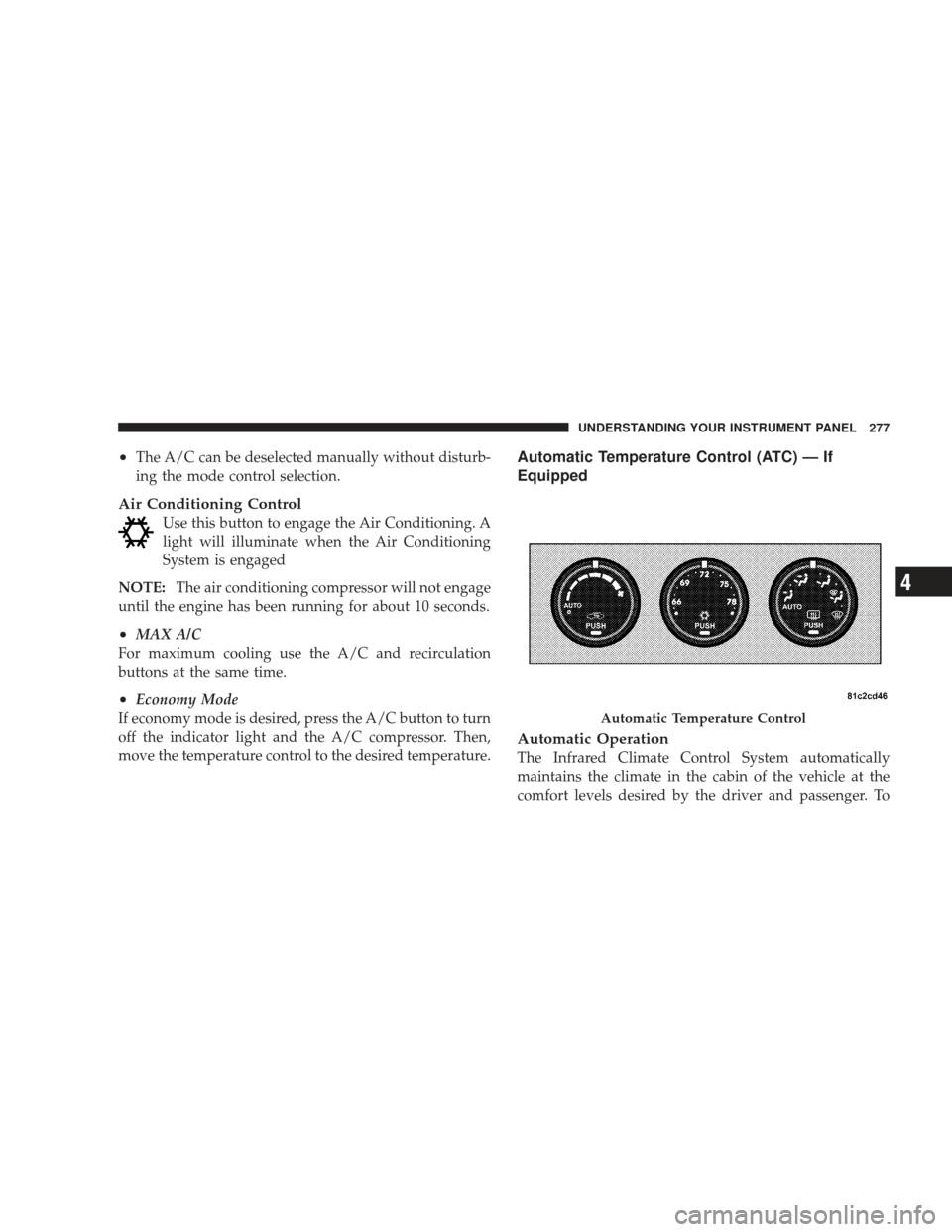
Automatic Temperature Control (ATC) — If
Equipped
Automatic Operation
The Infrared Climate Control System automatically
maintains the climate in the cabin of the vehicle at the
comfort levels desired by the driver and passenger. To
Automatic Temperature Control
UNDERSTANDING YOUR INSTRUMENT PANEL 277
4
Page 280 of 506

accomplish this, the system gathers information from the
cabin infrared sensor mounted between the sun-visors
and from various sensors located throughout the vehicle.
The controls on the climate control provide the system
with operator input. Other sensors take account of ve-
hicle speed, A/C pressure, outside temperature, and
engine cooling temperature. Using all of these inputs, the
system automatically adjusts airflow temperature, air-
flow distribution, airflow volume, and the amount of
outside air recirculation. This maintains a comfortable
temperature even under changing conditions.
Operation of the system is quite simple.
1. Turn the Mode Control knob (on the right) and the
Blower Control knob (on the left) to AUTO.
NOTE:The AUTO position performs best for front seat
occupants only. 2. Dial in the temperature you would
like the system to maintain by rotating
the Temperature Control knob.
Once the comfort level is selected, the system will main-
tain that level automatically using the heating system.
Should the desired comfort level require air conditioning,
the system will automatically make the adjustment.
You will experience the greatest efficiency by simply
allowing the system to function automatically. Selecting
the “O” (Off) position on the blower control stops the
system completely and closes the outside air intake.
72°F (22°C) is the recommended setting for maximum
comfort for the average person; however, this may vary.
278 UNDERSTANDING YOUR INSTRUMENT PANEL
Page 285 of 506
•Most of the time, when in Automatic Operation, you
can temporarily put the system into Recirculation
mode by pressing the RECIRCULATION button.
However, under certain conditions, while in Auto-
matic Mode, the system is blowing air out the defrost
vents. When these conditions are present, and the
RECIRCULATION button is pressed, the indicator will
flash and then turn off. This tells you that you are
unable to go into recirculation mode at this time. If you
would like the system to go into Recirculation mode,
you must first move the Mode Knob to Panel, Panel/
Floor and then press the RECIRCULATION button.
This feature reduces the possibility of window
fogging.
Operating Tips
NOTE:Refer to the chart at the end of this section for
suggested control settings for various weather condi-
tions.
Summer Operation
The engine cooling system in air-conditioned vehicles
must be protected with a high-quality antifreeze coolant
to provide proper corrosion protection and to protect
against engine overheating. A 50% solution of ethylene
glycol antifreeze coolant in water is recommended. Refer
to “Maintenance Procedures” in Section 7 of this manual
for proper coolant selection.
Winter Operation
Use of the air Recirculation mode during winter months
is not recommended because it may cause window
fogging.
Vacation Storage
Anytime you store your vehicle, or keep it out of service
(i.e., vacation) for two weeks or more, run the air
conditioning system at idle for about five minutes in the
fresh air and high blower settings. This will ensure
adequate system lubrication to minimize the possibility
of compressor damage when the system is started again.
UNDERSTANDING YOUR INSTRUMENT PANEL 283
4
Page 289 of 506
STARTING AND OPERATING
CONTENTS
�Starting Procedures .................... 291
▫ Normal Starting ..................... 291
▫ Extreme Cold Weather (Below –20°F Or
–29°C) ............................ 291
▫ If Engine Fails To Start ................ 292
▫ After Starting ....................... 293
� Engine Block Heater — If Equipped ........ 293
� Automatic Transmission ................. 294
▫ Brake/Transmission Shift
Interlock System ..................... 295 ▫
Brake/Transmission Interlock Manual
Override .......................... 295
▫ 4–Speed Automatic Transmission ......... 296
� Four-Wheel Drive Operation ............. 302
▫ MP1522 Command-Trac� Transfer Case — If
Equipped .......................... 302
▫ MP3022 Selec-Trac II� Transfer Case — If
Equipped .......................... 308
� On-Road Driving Tips .................. 313
5